

If your auditor asks for the fixed asset register and the only laptop list is IT's spreadsheet, this is for you. It is not for a company that expenses its laptops and phones, so the register holds only vehicles, fit-out and plant.
Why does the register question land on IT?
Because finance's register might say the company owns 162 laptops while IT's spreadsheet says 140, and the auditor wants to know which is true. Finance can prove what was bought. Only IT can say who holds each one, and which were retired, swapped or lost.
If your financial year ends on 31 December, the question arrives in January. A finance manager on AccountingWEB described what it costs after an audit flags the register: "I have spent 3 days on a forensic exercise and it now fully reconciles." That was in the UK in 2017, but the three days look the same in Dubai.
In the UAE the register also feeds the tax return. AdvisoryHub, writing on UAE corporate tax, says it "generally follows the depreciation in your financial statements", and that "the Corporate Tax Law sets no separate tax depreciation rates." So a laptop that IT retired last year but finance still depreciates is a wrong figure in the accounts and on the return. The Federal Tax Authority lists "a record of assets (including details of any purchases or disposals of assets)" among the records to keep, for at least seven years following the end of the tax period they relate to.
One list or two? How we decide
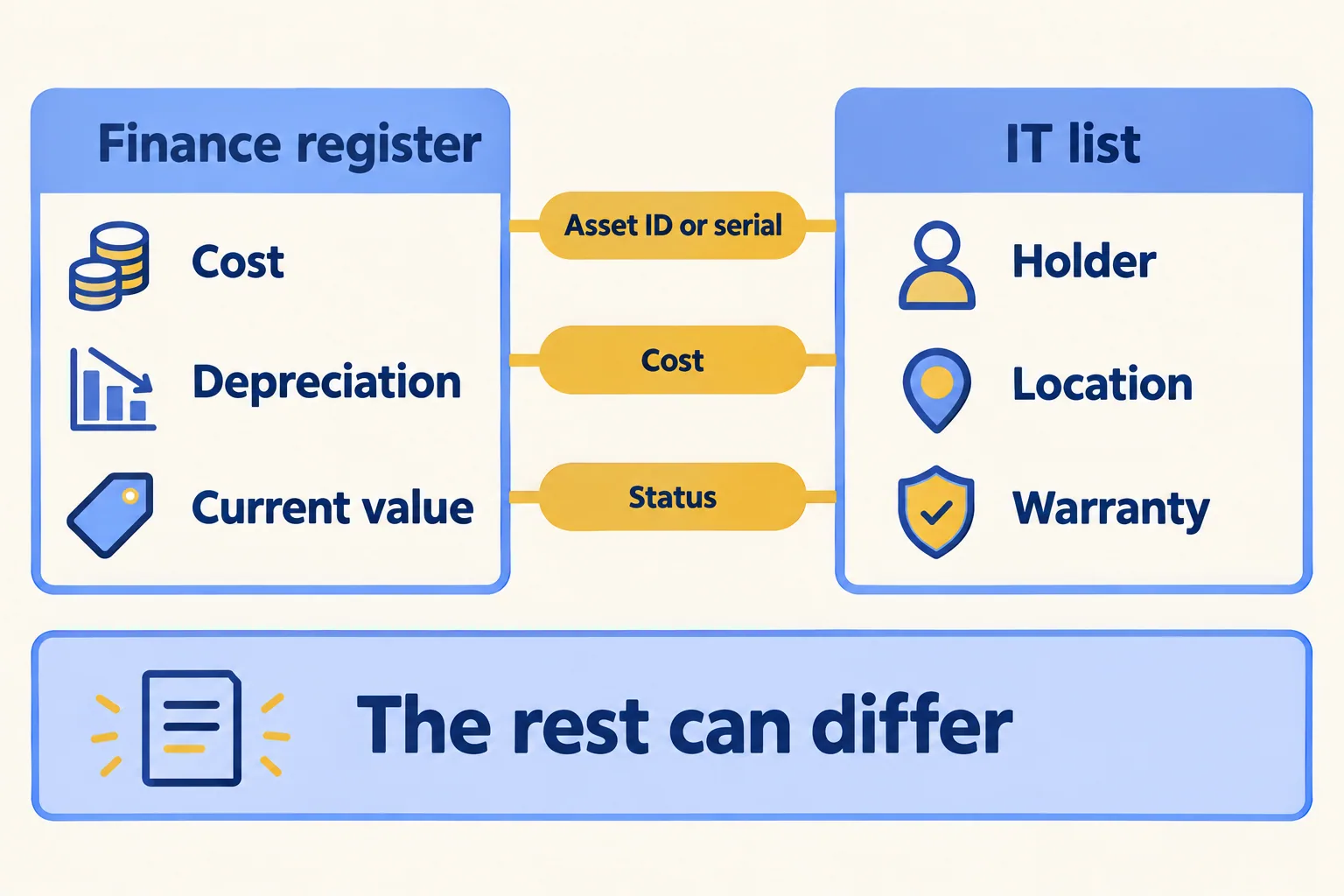
They are two lists, and they answer different questions. Finance's register says what the company owns, what it cost and what it is worth today. IT's list says who holds each device, where it is and when its warranty ends. The question is where they must agree.
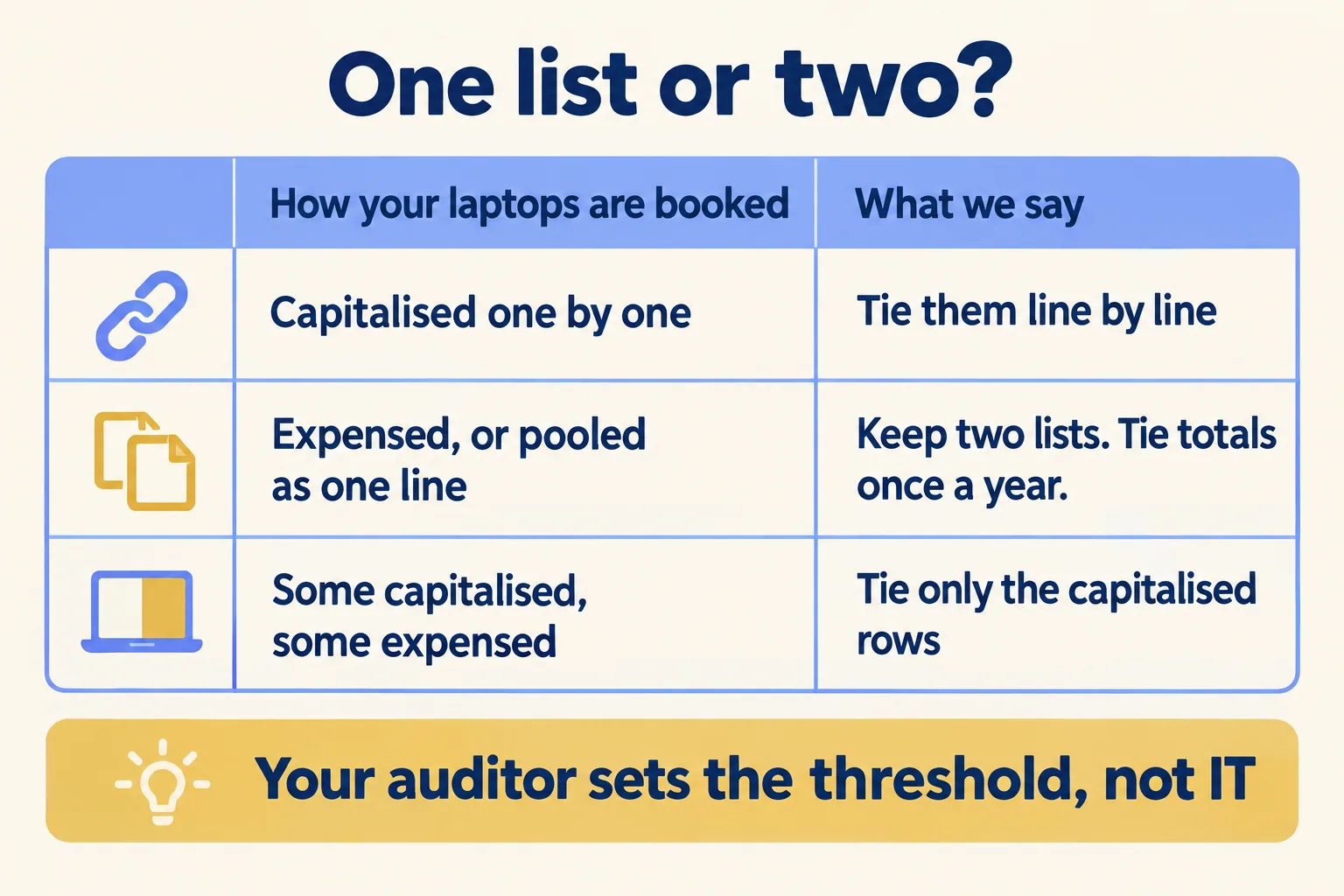
- Laptops and phones capitalised one by one. Tie them line by line. Every laptop on the register must be in IT's list with the same serial, and every laptop IT retires must leave the register.
- Laptops expensed, or pooled as "IT equipment 2025". Keep two lists. The register carries the pool; IT's list carries the devices. Tie the totals once a year, not the rows.
- A mix: expensive kit capitalised, the rest expensed. Tie only the capitalised rows. Mark them in IT's list so everyone knows which ones the auditor will ask about.
Your capitalisation threshold decides which case you are in. Your auditor or accountant sets it, not IT.
Which three fields must match?
Three, and only three. The rest can differ.
- Asset ID or serial number. The key that joins the two rows. If finance tags by invoice line and IT by serial, write the serial into finance's row once.
- Cost. The purchase cost on finance's row and on IT's record must be the same number, in the same currency.
- Status. In use, unassigned, in repair, missing, or disposed. This is the field that drifts.
Cost differs for dull reasons: one invoice line covers the laptop, the dock and an extended warranty, or one list holds the price with VAT and the other without. Use the cost as finance capitalised it, and copy that figure into IT's record.
The holder, the location and the warranty belong to IT. Depreciation and current value belong to finance. Nobody needs to copy those across.
The mismatches are well known. AssetCues, a fixed asset software vendor, lists them in a guide from 1 November 2026. Here is how we read their rows:
The last row comes from FixedAsset Pro, another register vendor: "The same laptop entered twice, once by IT and once by finance, is a common pattern."
The ten-laptop test
Run this before you change anything. It takes an afternoon for one person from finance and one from IT.
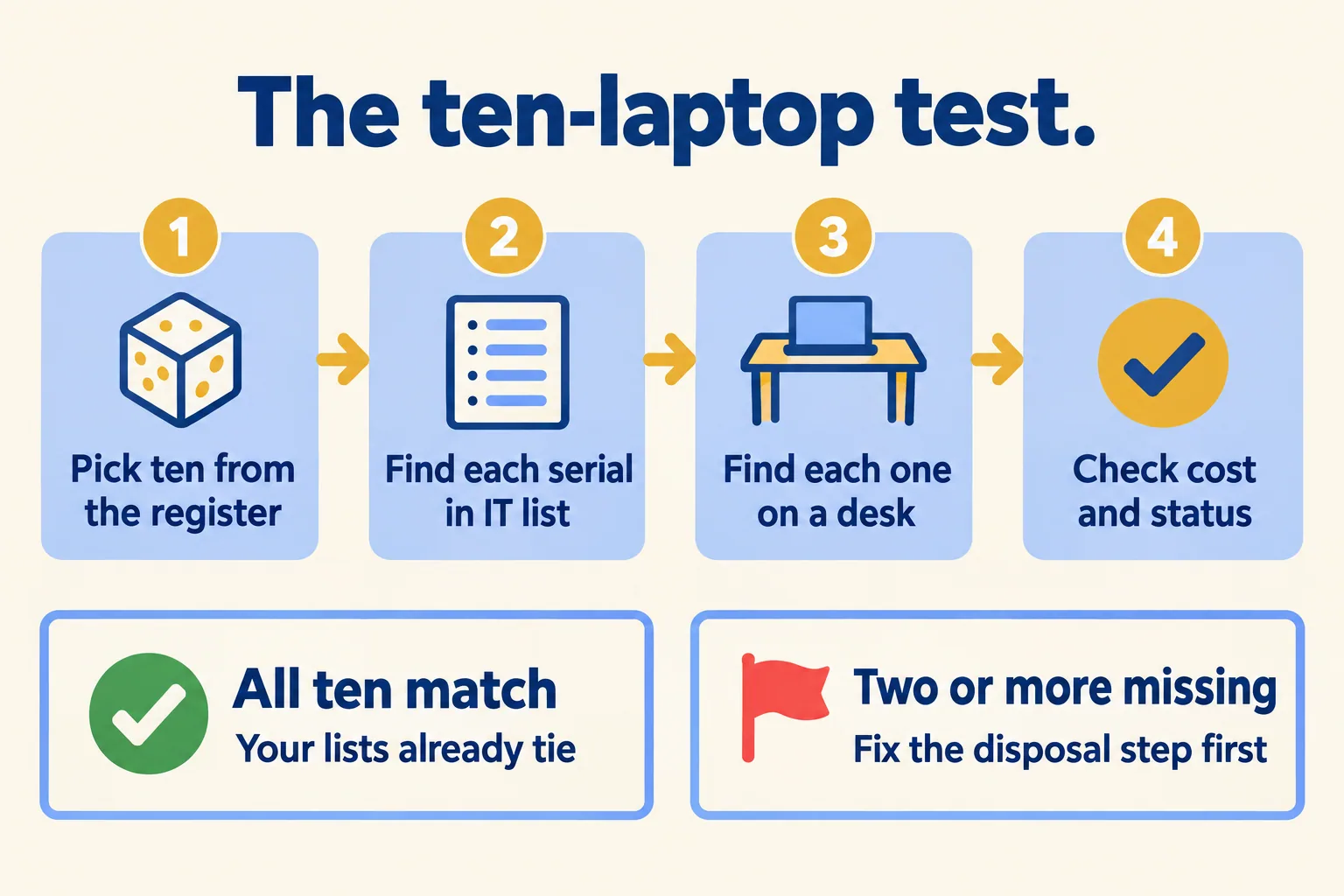
- Pick ten laptops from finance's register at random, not the newest ten.
- Find each serial in IT's list. Write down any you cannot find.
- Find each laptop on a desk, in a drawer or in the store room. Write down any nobody can find.
- Check the cost and the status in both lists for the ones you found.
- Then run it backwards: pick five laptops off desks and find each one in finance's register. This catches the laptop bought on a card that never became a row.
If all ten match, your lists already tie and the auditor's question is a report, not a project. If two or more are missing, retired or at a different cost, the gap is in the process: a disposal or a local purchase that never reached finance. A new tool will not find those laptops for you.
What goes to the auditor is short: the sample and its result, the list of differences with who fixes each, and the disposals booked with their proof.
Who signs a laptop out of both lists?
Most of the gaps start here. IT clears a store room of old laptops, wipes them and hands them to a recycler. Finance hears nothing, and the laptops keep depreciating on the books.
We write one rule: IT marks the laptop retired and keeps the proof (the wipe record, the recycler's note, or the police report for a lost one), and finance records the disposal from that proof in the same month. Who approves a write-off, a sale or a donation is finance's call. Keep the proof with the disposal, because it is part of the record of assets the FTA expects you to keep.
The same rule covers leavers. When a laptop does not come back at exit, IT records it as missing on the person's record, and finance decides whether it is a write-off. We set out the handover side in a paper handover form or a signed-for record.
When is finance's spreadsheet enough?
Often. If laptops are expensed, the register is vehicles, fit-out and plant, and IT's list is a separate spreadsheet that nobody needs to tie. If one person in IT edits the list and the ten-laptop test passes, keep both spreadsheets and add the serial column to finance's.
A list stops being enough when two people edit it, when signatures must sit on the record, or when a leaver's clearance waits on someone finding the file. We wrote about those signs in when an asset register template stops being enough. Labelling only the kit you hand out is covered in which devices to tag.
What does Mindcat Assets hold, and what stays in your books?
Mindcat Assets is IT's list with the fields finance needs on each record. Each laptop, phone or tool carries its serial, the named holder who signed for it, purchase cost, supplier, order number, warranty end and depreciation, so its current value shows on the screen. Each office shows cost in its own currency: a Riyadh laptop in SAR, a Dubai one in AED. Depreciation, activity and custom reports export to CSV for your ERP or the auditor. QR labels and a phone scan record the yearly count by office.
It is not your general ledger. Your register, journals and corporate tax figures stay in your accounting system, and your auditor still signs. Device sync from Intune, Jamf or Google Workspace is set up during setup. Arabic screens are partly translated today.
If the register you are tying also lists chillers, lifts and pumps, their service history and the technicians' jobs belong in Mindcat Maintain. Assets holds what people carry.
You pay per person holding kit, per month: AED/SAR 5 each for the first 100 people, AED/SAR 3 for 101 to 300, less above that. The shared plan has a minimum of AED/SAR 600 a month, which covers up to 133 people, so nobody pays AED 5 for a single person. IT, HR and finance logins are free, and assets are unlimited. Up to 100 people, the quick start is a fixed package we set up for AED/SAR 2,500, with your register imported from our CSV template, the label template and the handover note people sign. From 101 people we set it up with you to a written plan: for 101 to 300 people the setup is AED/SAR 6,900, one time. A company with 120 people holding kit pays 100 × 5 + 20 × 3 = AED 560, so the AED 600 monthly minimum applies. Label printers and labels are yours. Prices exclude VAT.
If your laptops are expensed and the ten-laptop test passes, you do not need us for this. We call the method Signed-for custody: every item has a named holder who signed for it, and it leaves both lists only with proof. Tell us how many people hold company laptops, phones or tools and where you track them today. We reply with the setup plan and the monthly price per person, in AED or SAR.
