A sales head and a developer in a Dubai office check a launch page on a laptop before it goes live.

Vercel · Core platform

Your team finds the broken page after customers do. Check every change on its own link first.

A price changes, a form field moves, a launch page goes up on Friday night. Today the first people to see it are your buyers. With previews, every change builds its own private link. Sales, marketing and the owner click it, comment on it and approve it. Then it goes live, and one click takes it back.

Salesforce consulting partner since 2010 · MVP Hall of Fame · 200+ agents in production · UAE, India and US desks

The problem

Where a release goes wrong today.

What Previews and CI/CD is

Previews and CI/CD, in plain words.

Facts from Vercel’s own pages, checked on 16 October 2026. The sources are at the end of this page.

What it is
A live, shareable copy of the site for every pull request, built as soon as the change is pushed.
When one is made
On a push to any branch that is not production, a pull request on GitHub, GitLab or Bitbucket, or a CLI deploy without --prod.
Two kinds of link
A branch link that always shows the latest change on that branch, and a commit link that never changes.
Review on the page
The toolbar on a preview takes comments, flag overrides and an accessibility check.
Going back
Instant Rollback returns production to an earlier deployment. On Pro and Enterprise, to any earlier production deployment.
Who can open it
Previews can sit behind Vercel sign-in on every plan, or a password on Pro as a paid add-on.

How it works

From a change to the live site, with a check in between.

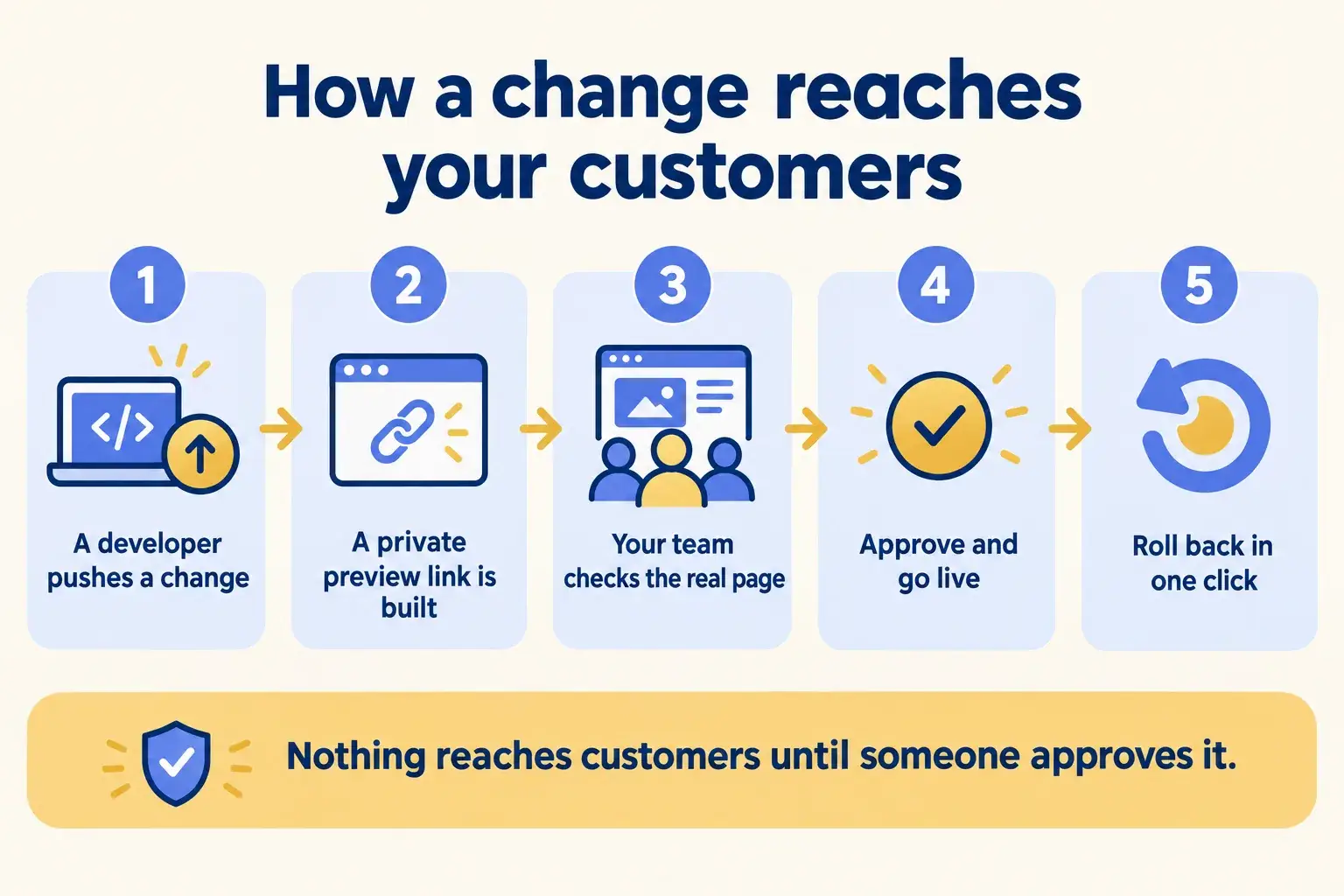
Five steps. The team reviews the real page, not a screenshot, and nothing reaches customers until someone approves it.

Five steps: a developer pushes a change, a private preview link is built, the team reviews it, it is promoted, and it can be rolled back.

Infographic

The same steps are written out below.

Step by step

What happens at each step.

  1. Push

    A developer pushes the change

    To its own branch, never straight to the live site.

  2. Build

    A private preview link is built

    Vercel builds the change and posts the link on the pull request.

  3. Review

    Your team checks the real page

    Sales, marketing or the owner click the link and leave comments on the page itself.

  4. Promote

    Approve and go live

    Merging to the main branch builds it for your domain. A staged build waits for a click, then goes live without rebuilding.

  5. Undo

    Roll back in one click

    If something slips through, production returns to the last good deployment.

How it fits together

Where previews sit between your team and your customers.

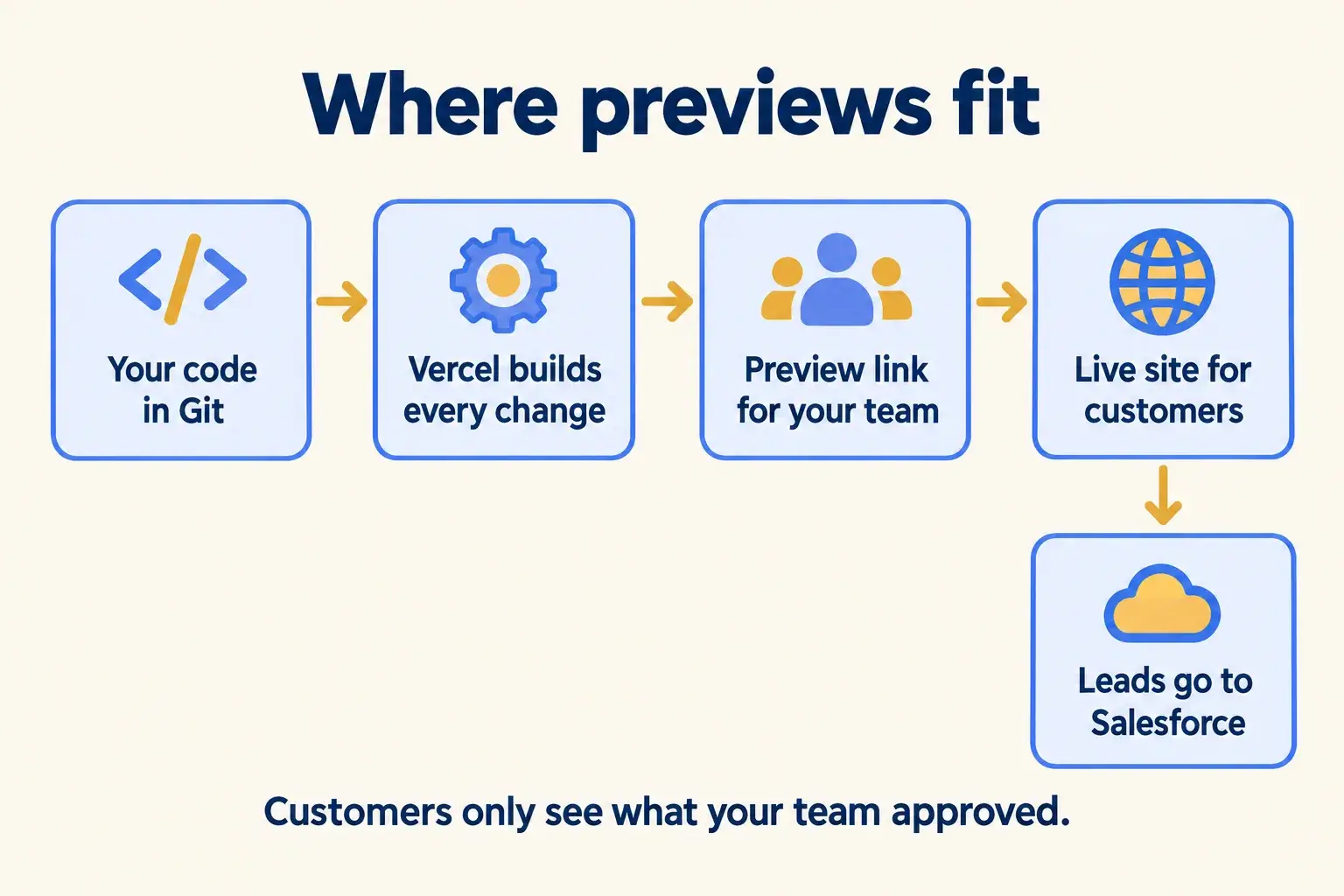
The code lives in your Git repository. Vercel builds every change. Your team reviews the preview. Customers only ever see what was approved, and leads still land in Salesforce.

Code in Git flows to Vercel builds, then to a preview for your team, then to the live site for customers, with leads going to Salesforce.

Infographic

Where it sits next to the systems you run today.

Use cases · worked examples

One worked example in each industry.

How Previews and CI/CD fits into the work of the industries we serve, one step at a time.

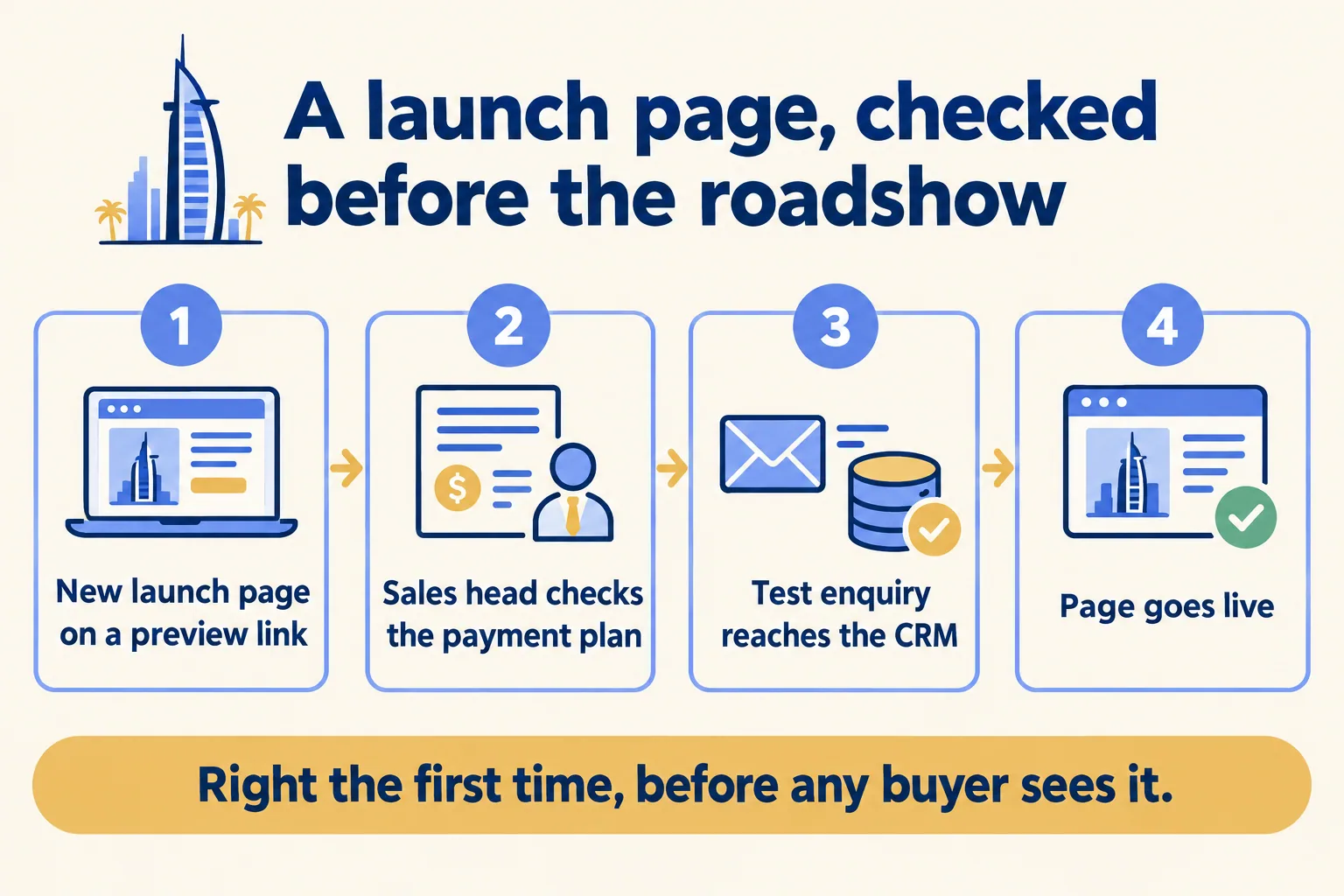
  1. A launch page for an off-plan project is checked on a preview link, approved by the sales head, then goes live with leads going to the CRM.

    Example 1 · Real estate, Dubai · Infographic

    Sales head at a Dubai off-plan brokerage

    Today: A new launch page goes up the night before the roadshow. The payment plan table is wrong and nobody notices until a buyer asks.

    After: The page is built on a preview link first. The sales head and the project’s sales manager check the payment plan, the floor plans and the lead form before it goes live.

    Worked example, step by step

    1. 18:00Developer. Pushes the new launch page to its own branch.
    2. 18:03Vercel. Builds a preview link and posts it on the pull request.
    3. 18:20Sales head. Opens the link on her phone and comments on the payment plan table: 60/40, not 50/50.
    4. 18:45Developer. Fixes the table. A new preview builds on the same branch link.
    5. 19:10Sales head. Sends a test enquiry from the preview form and sees it reach Salesforce as a test lead.
    6. 19:15Developer. Merges. The page is live on the brokerage’s domain.

    The roadshow link is right the first time, and the form is tested before a single buyer uses it.

    Real estate brokers
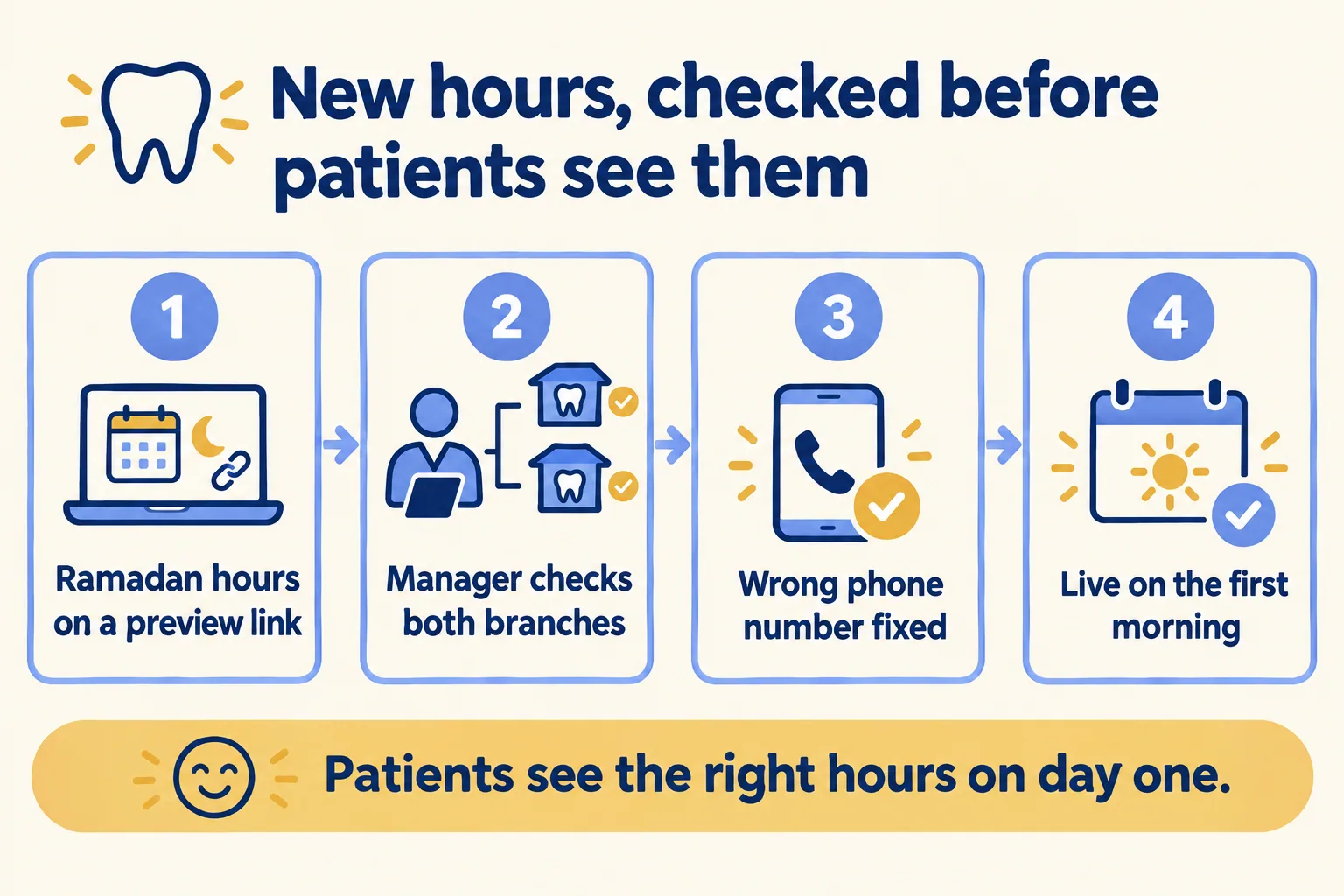
  2. Clinic website update with new hours and a new doctor checked on a preview link by the practice manager, then approved to go live.

    Example 2 · Clinics, Riyadh · Infographic

    Practice manager at a two-branch Riyadh dental clinic

    Today: Ramadan hours and a new orthodontist go on the website. Last year the old hours stayed up for a week and the phones rang all day.

    After: The update is made on a preview. The practice manager checks both branches’ hours in Arabic and English, then approves it the morning it should go live.

    Worked example, step by step

    1. Sun 10:00Developer. Adds Ramadan hours and the new orthodontist on a branch.
    2. Sun 10:04Vercel. Builds the preview link, behind sign-in so only the clinic sees it.
    3. Sun 12:30Practice manager. Checks both branches in Arabic and English. Flags the Jeddah phone number.
    4. Sun 13:00Developer. Fixes the number. The branch link shows the new version.
    5. Sun 15:00Developer. Merges. The production build is staged and waits, off the live site.
    6. Mon 08:00Practice manager. Approves. The developer promotes the staged build, with no rebuild.

    Patients see the right hours on the first day of Ramadan, not the week after.

    Clinics
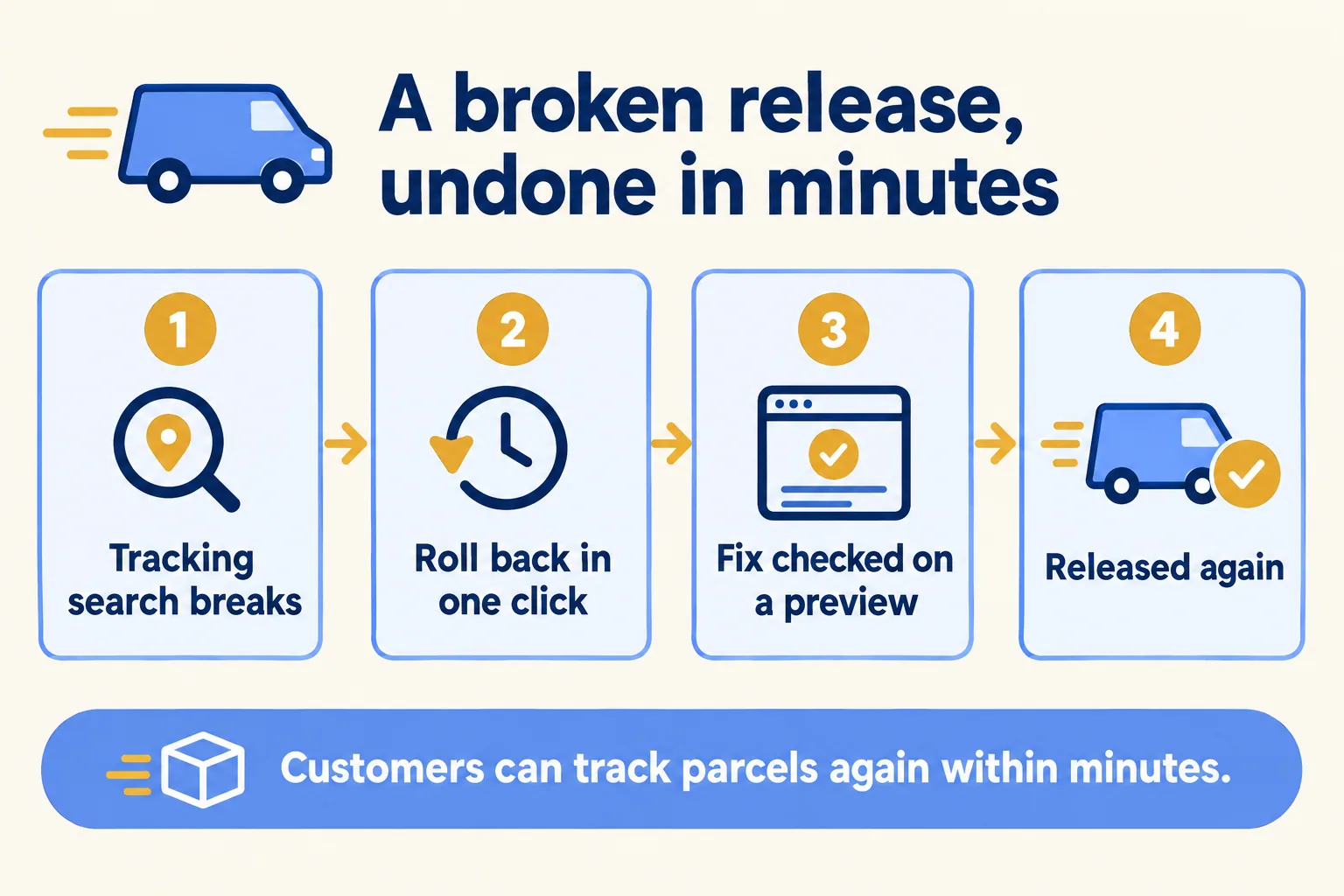
  3. A broken tracking page release is rolled back in one click, fixed on a preview link, checked, and released again.

    Example 3 · Couriers, UAE · Infographic

    Operations lead at a UAE courier company

    Today: A change to the parcel tracking page breaks the search box on a Thursday evening. Drivers’ customers start calling the hotline.

    After: The broken release is rolled back from the dashboard in one click. The fix goes through a preview the next morning.

    Worked example, step by step

    1. 19:40Ops lead. Hears from the hotline that tracking search returns nothing.
    2. 19:42Developer. Uses Instant Rollback. Production returns to yesterday’s deployment.
    3. 19:43Customers. Tracking search works again.
    4. 09:00Developer. Fixes the search on a branch. A preview link builds.
    5. 09:30Ops lead. Tests five real tracking numbers on the preview, then approves.

    A broken evening becomes a three-minute rollback, and the fix is checked before it goes back out.

    Couriers and delivery
Examples of the work, not client stories. Times in each example show the order of events, not a measured result.

Is it for you

When Previews and CI/CD fits, and when it doesn’t.

Good fit

Not for you yet

Marketing or sales changes the site every week
The site changes twice a year
Several people must approve a page before launch
It lives in a page builder that has its own preview
You need to undo a bad release without a developer on call
You expect rollback to undo database changes: it does not
Your site or app is in Git, or can move there
One person edits and approves everything alone

What Mindcat does

We build it, then we run it.

The assessment is free: a short read of the org and a written note. If you go ahead, the first build week is a fixed AED/SAR 14,900 (about USD 4,050), credited in full when you sign the build within 60 days. After go-live, we keep it patched, watched and changing every month.

FAQ

What teams ask about Previews and CI/CD.

Does a preview cost extra?
Previews come with every Vercel plan. Builds use build minutes, which Vercel meters on Pro. Putting previews behind a password is a paid add-on on Pro as of 16 October 2026, while Vercel sign-in protection is included on every plan.
Can people outside the company see our previews?
Only if you let them. Previews can require Vercel sign-in, or a password on Pro. We usually keep previews behind sign-in and share a link with the people who approve.
Does rollback undo database changes?
No. Instant Rollback switches which deployment serves your domain. Environment variables and anything the old code wrote to a database or Salesforce stay as they are. That is why we write a rollback rule before go-live.
Do we need GitHub?
You need the code in Git: GitHub, GitLab, Bitbucket or Azure DevOps. If your site lives somewhere else today, moving it into your own repository is the first step of the build.
Can preview forms send real leads to Salesforce?
They should not. We point preview forms at a Salesforce sandbox or tag them as tests, so your sales team never chases a lead that was a developer checking the form.


Sources

Where these facts come from.

Start here

Tell us what you want built, and where it runs today.

One or two lines is enough. You hear back within 24 hours from the person who signs the work.

Salesforce consulting partner since 2010 · MVP Hall of Fame · 200+ agents in production · UAE, India and US desks