

Industries · IT service desks and MSPs
“I emailed IT yesterday” becomes a ticket number, an owner and a one-hour first reply.
For IT service desks at head offices in Riyadh, Jeddah, Dubai and Abu Dhabi, and for MSPs that run IT for dozens of SMEs. Mindcat Desk turns every email, call and portal request into a ticket with an owner and an SLA clock on your own working week, lets users follow it on their phone, and answers in Arabic or English. Hosted in the UAE or the Kingdom, or on your servers, from AED/SAR 99 per agent a month.
Where an IT desk loses the day
Four things that cost an IT service desk its SLA and its credibility.

How one request moves
From the user’s email to the month-end report, on one ticket.
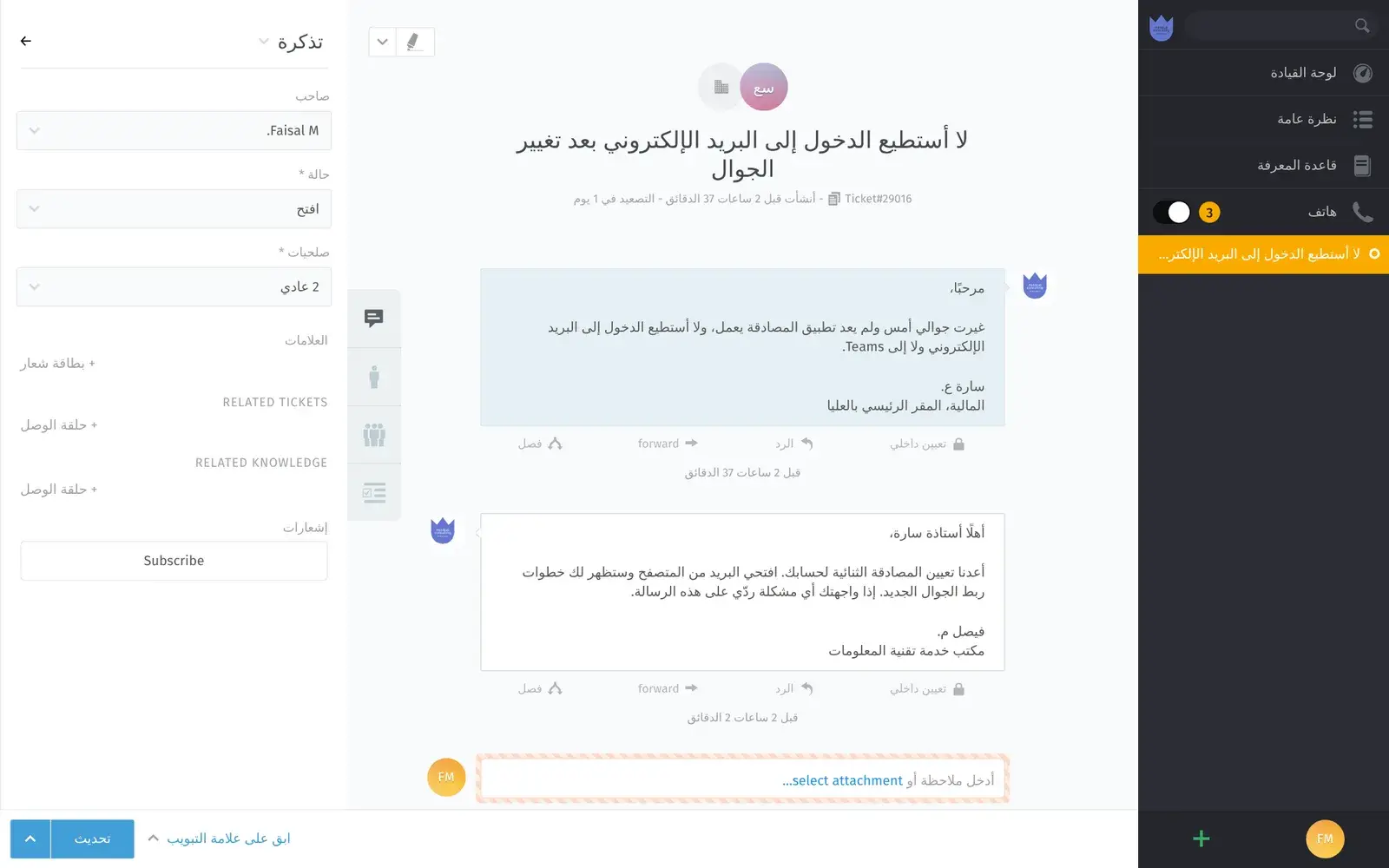
A Sunday-morning lockout at a Riyadh head office.
- 01UserWrites to ITAn email in Arabic to itdesk@: she changed her phone and the authenticator stopped working.On: Email
- 02IT deskGets a ticketThe email becomes ticket #29016 in the IT Riyadh queue, with a one-hour first-reply clock on the Sunday-to-Thursday calendar.On: Open tickets
- 03EngineerAnswers in ArabicA saved Arabic reply with the reset steps, and an internal note for the identity team.On: Ticket
- 04UserFollows itShe sees the reply and the ticket state in the portal on her phone, and replies there.On: Customer portal
- 05IT managerReports the weekTickets created, closed and in backlog per week, with the list behind each line ready for the monthly IT review.On: Reports
Real screens
What your IT team, users and clients see.
Captured from our own running copy with invented sample data. Names, numbers and addresses are not real.
“I can’t tell which requests are about to miss the SLA.”
Every open ticket, sorted by time left
One list per team with the owner, priority and the next deadline. Overdue tickets turn red; unassigned and escalated ones have their own views.
- Used by
- Service desk manager, team leads
- On screen
- An IT Riyadh queue with VPN, Wi-Fi, e-invoice and laptop tickets beside a facilities team’s, sorted by escalation.
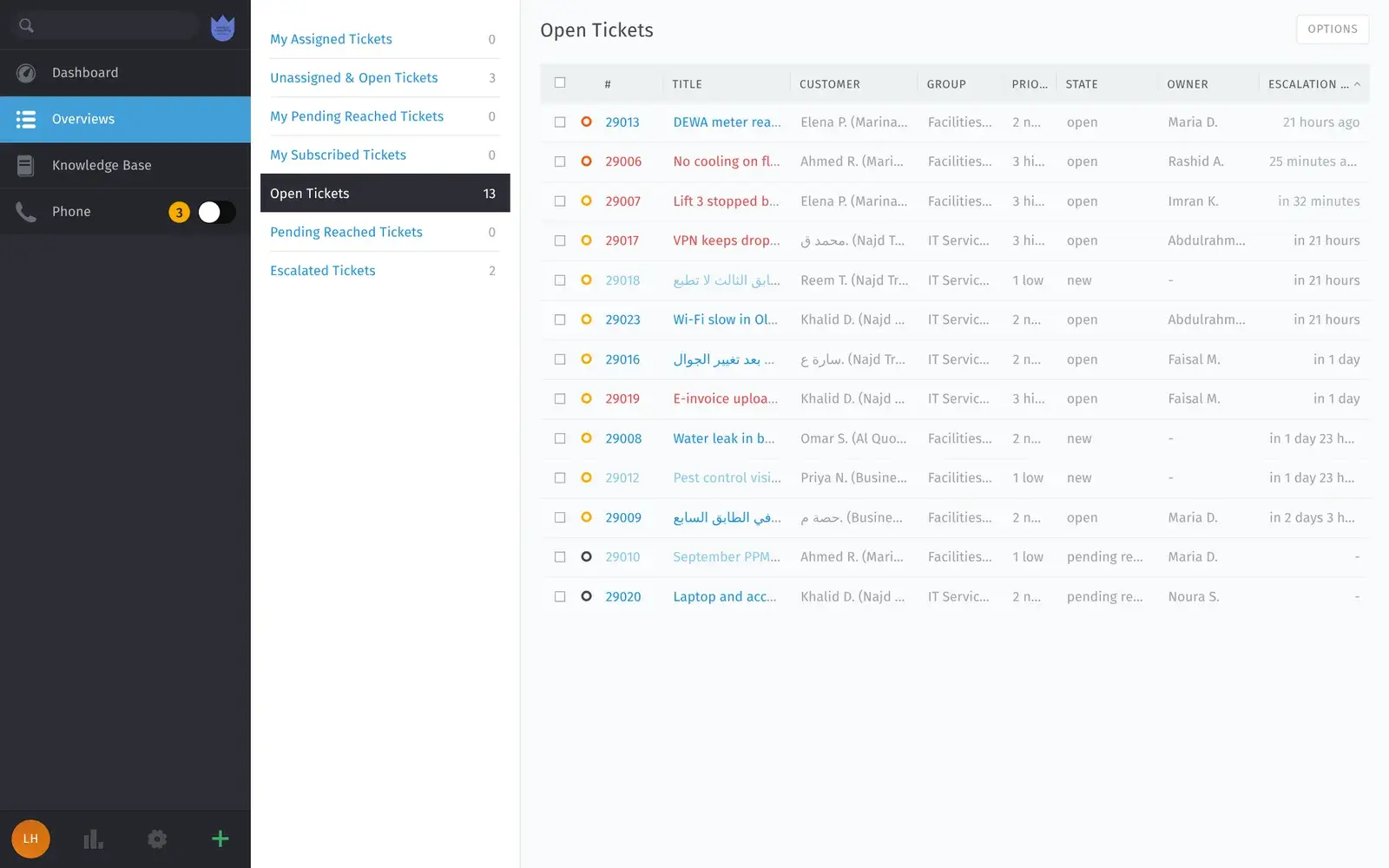
Open tickets: the next deadline first. “Riyadh and Dubai don’t work the same week.”
SLA rules on each office’s calendar
First reply, update and solution times per team, priority or client, each on its own calendar with time zone and holidays.
- Used by
- Service desk manager, MSP owner
- On screen
- IT Riyadh: one hour first reply on the Riyadh office calendar, Sunday to Thursday.
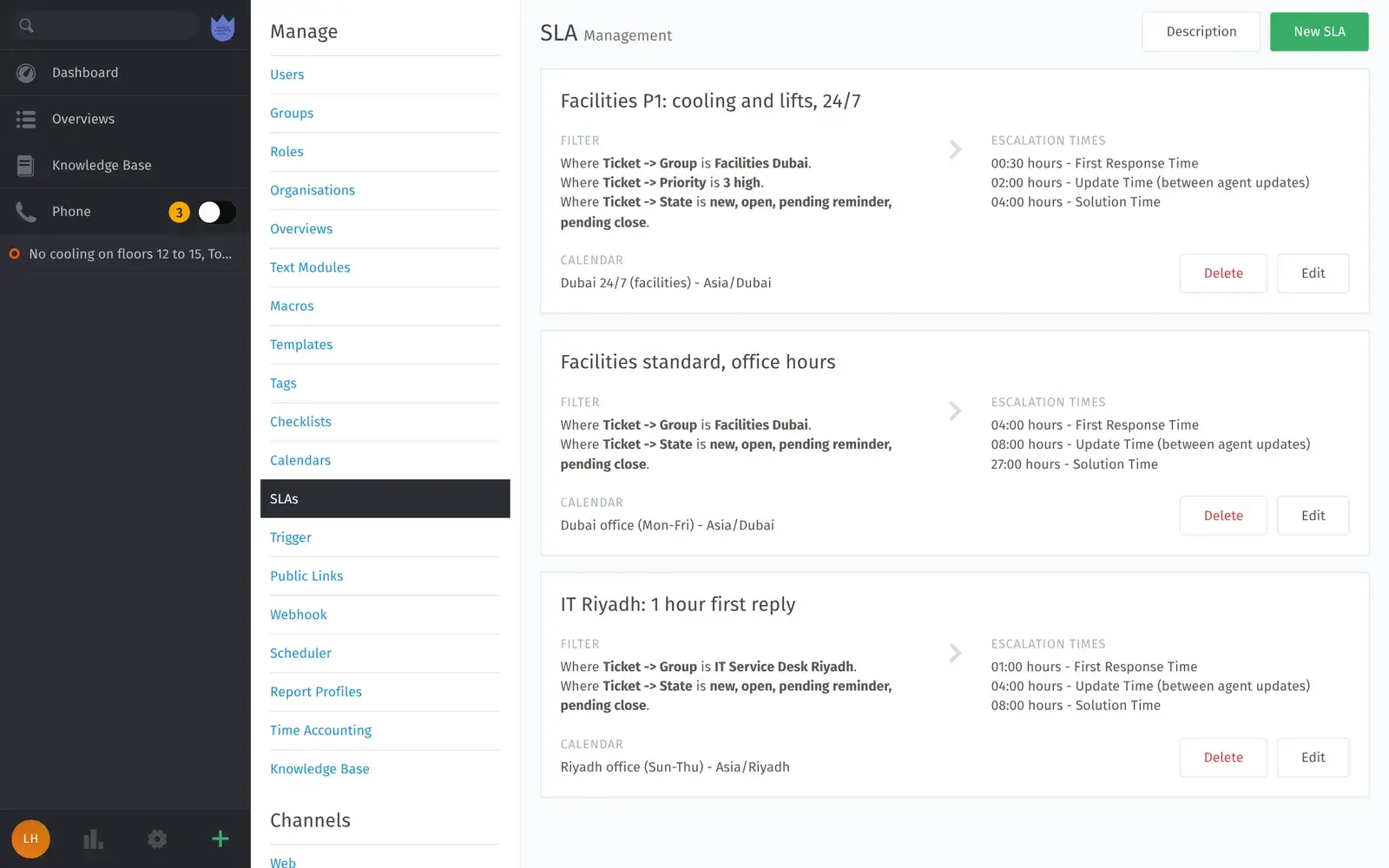
SLA rules: each office on its own week. “Users email three times to ask for an update.”
A portal on the user’s phone
Users and MSP clients see their tickets, the state and the latest reply in the phone’s browser, and reply there.
- Used by
- Staff, MSP clients
- On screen
- An organisation’s ticket list and one open ticket at phone size.
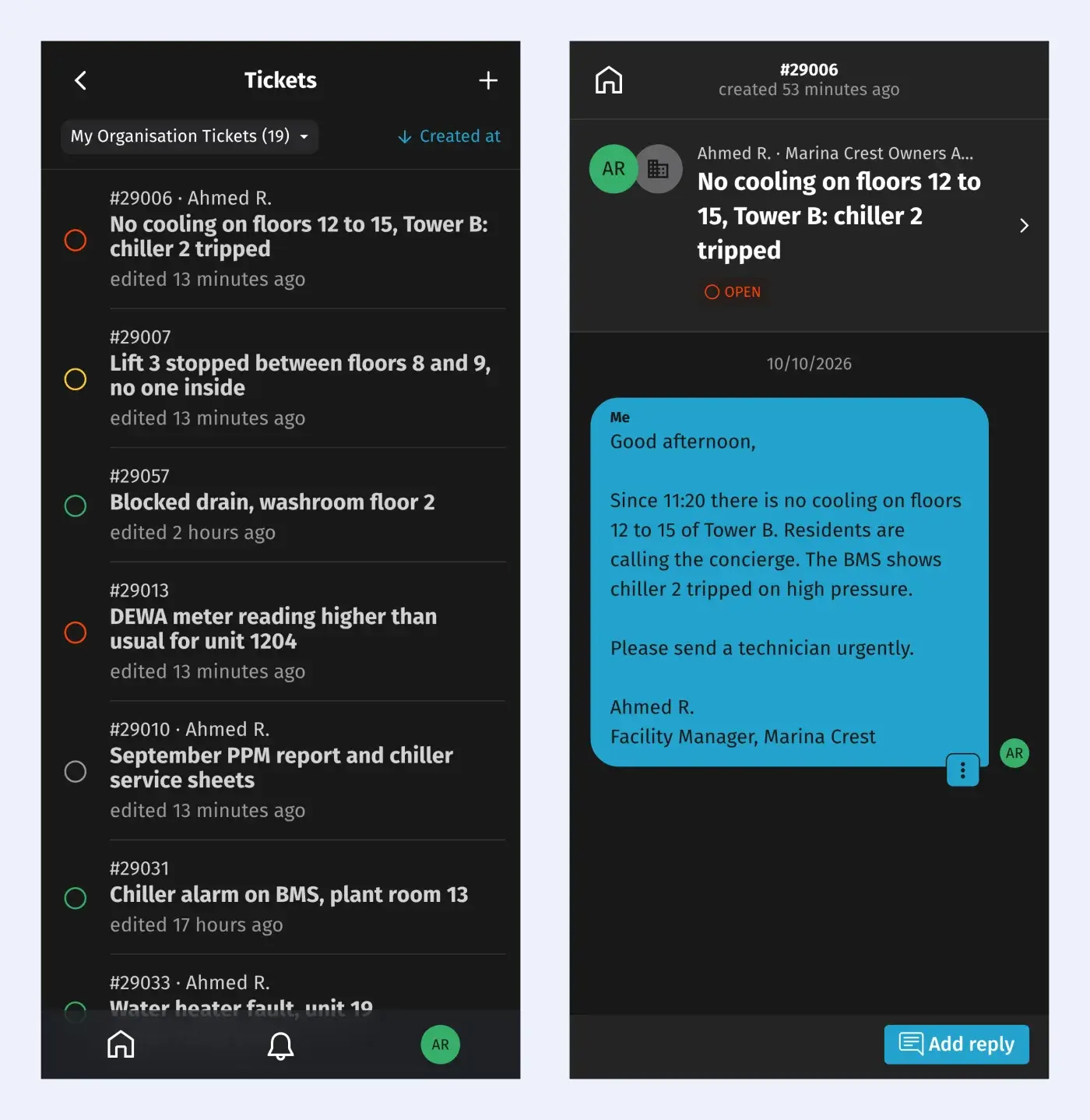
Portal: the user checks instead of calling. “The monthly IT review takes two days to prepare.”
Reports by week, month and team
Created, closed and backlog by day, week, month or year, per team or per MSP client, with the ticket list ready to download.
- Used by
- IT manager, MSP owner
- On screen
- A sample week with 28 records ready to download.
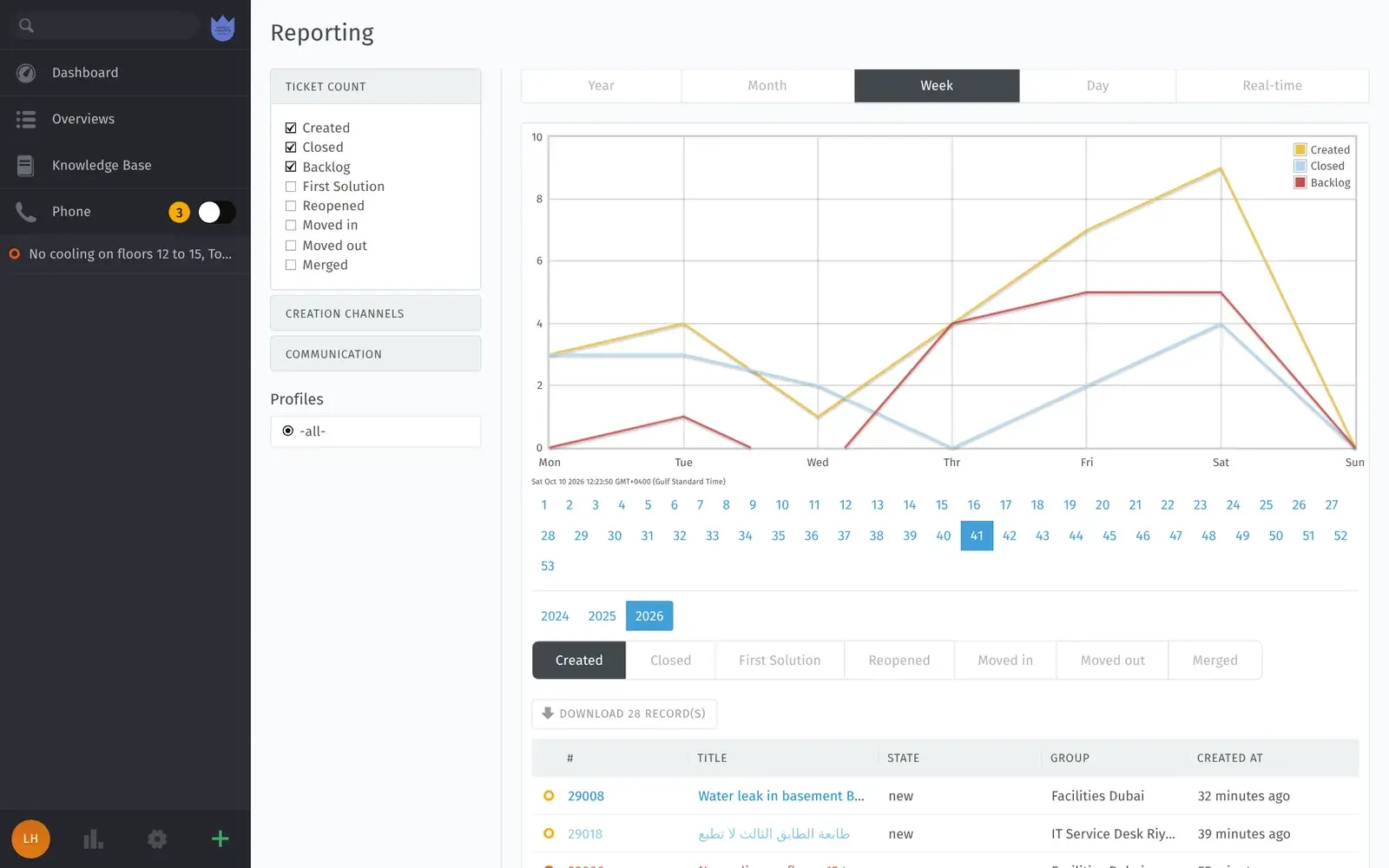
Reports: the month-end review from the system.
Three IT desks, before and after
Olaya, Al Quoz and Al Khobar.
Invented businesses in real districts, built from how Gulf IT teams describe their work.
Built for Gulf IT teams
What is ready today, and what we add during setup.
What it costs
Per agent, in riyals or dirhams, falling as you grow.
AED/SAR 99 per agent for the first 5, 69 for agents 6 to 20, 49 for 21 to 50 and 39 above that. A 20-agent IT desk pays 5 × 99 + 15 × 69 = AED/SAR 1,530 a month on the shared option. Your own servers hosted by us are twice the agent price. No per-ticket fees, and users who raise requests are free. Price your own team on the Desk page.
FAQ
What IT managers ask about a ticketing system.
- Does it make us compliant with Saudi PDPL or the NCA controls?
- No, and no ticketing system can on its own. It keeps your tickets in the Kingdom or the UAE, or on your servers, with roles, two-factor sign-in and a way to delete a person’s data on request. Your policies and controls stay with you.
- Can Riyadh and Dubai run different working weeks?
- Yes. Each team gets its own calendar, so Riyadh counts Sunday to Thursday and Dubai Monday to Friday, with their own holidays.
- Can an MSP give each client its own SLA and portal?
- Yes. Each client is an organisation with its own SLA rules, portal logins and reports, in your one copy.
- Does it manage assets and changes like a full ITSM suite?
- Partly. It handles requests, incidents, SLAs, a help centre and reports. It is not a full ITSM suite with a CMDB and change approvals; if you need those, tell us and we will say plainly whether Desk fits.
- Can users sign in with Microsoft 365?
- Yes. We connect Microsoft 365 or Google sign-in and your mailboxes during setup.
- What counts as an agent?
- Anyone on your IT team who answers or works on tickets in a month. Staff who raise requests are free.
The brief · one email
Tell us your agent count and the SLA you promise.
The honest no: if the work is a software factory with a named delivery date, we are the wrong partner.