

Industries · fit-out and interior contractors
Approvals, long-lead orders and handover on one programme per job, with your client watching.
For fit-out, joinery and MEP contractors running offices in DIFC and Business Bay, restaurants, villas in Jumeirah, and clinics and mall units in Riyadh. Mindcat Projects puts each job’s Civil Defence, DEWA and landlord approvals on a Gantt that moves when they do, shows every job’s status on one list, and gives your client a free read-only login. Hosted in the UAE or the Kingdom, from AED/SAR 5,349 a month for up to 78 members.
Where a fit-out job slips
Four things that move a handover date.

How one approval moves
From the sprinkler comment to the tenant’s new date, in one week.
An invented office fit-out on Level 14 of a DIFC tower.
- 01Site engineerPosts the comment“Two heads too close to the server room door. Resubmitting Thursday.” On the Civil Defence task, from a phone.On: Task on the phone
- 02Project managerMoves the approvalPushes the Civil Defence date back; demolition and MEP first fix move with it.On: Gantt
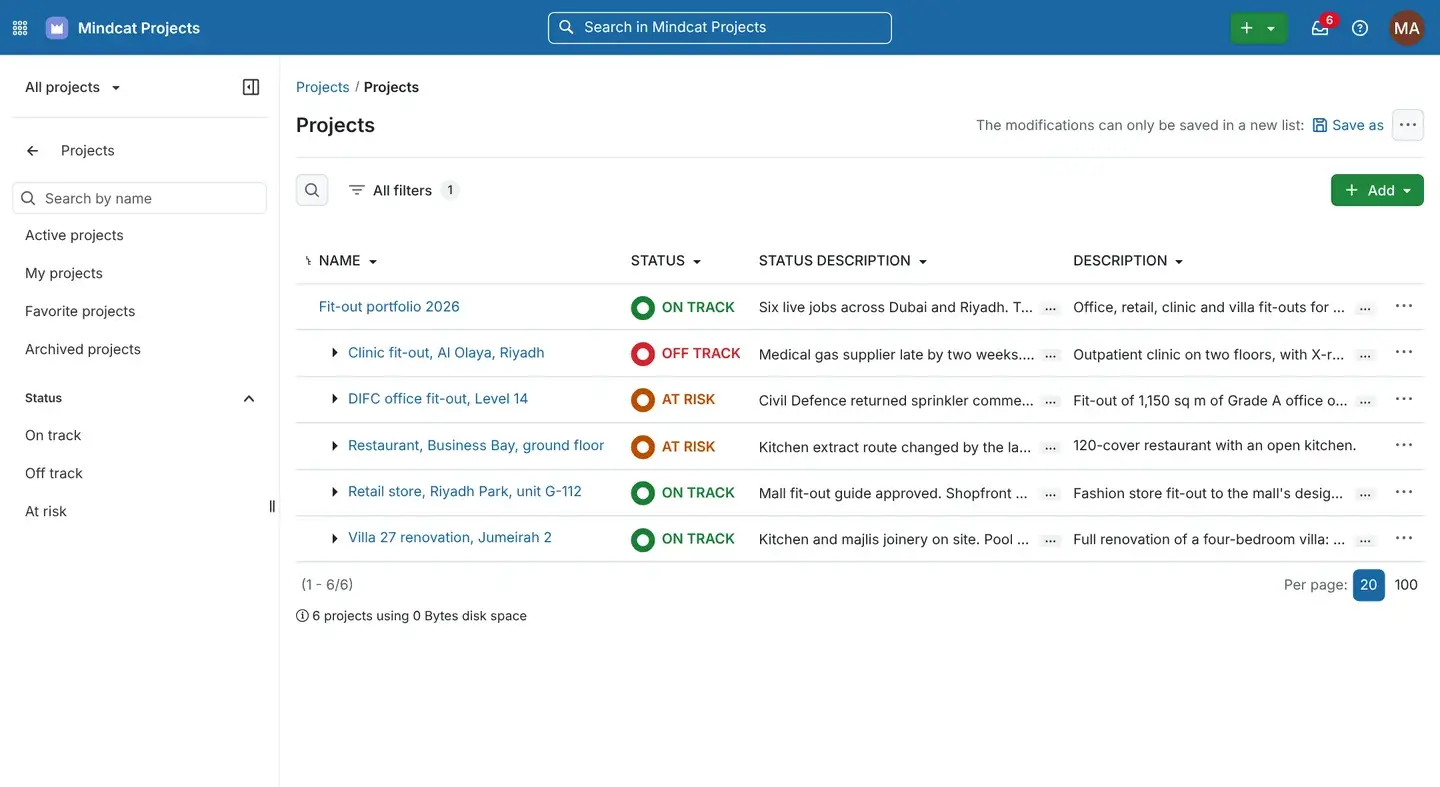
- 03Operations directorSees the riskThe project manager marks the DIFC job At risk with the reason, and it shows on the list of live jobs.On: Project list
- 04Site teamAgrees the weekMonday’s site meeting runs from the open tasks and their status.On: Meetings
- 05Tenant’s PMReads the new dateIn her free read-only login, before Tuesday’s meeting.On: Client view
Real screens
What your PMs, site engineers and clients see.
Captured from our own running copy with invented sample data. Names and numbers are not real customers.
“One comment from Civil Defence and the Excel programme is out of date.”
A Gantt per job that moves with the approvals
Design and approvals, construction and handover as summary tasks, each task linked to the one it waits on, and milestones for the permit and the final inspection.
- Used by
- Project managers, planners
- On screen
- The DIFC job, September 2026 to January 2027.
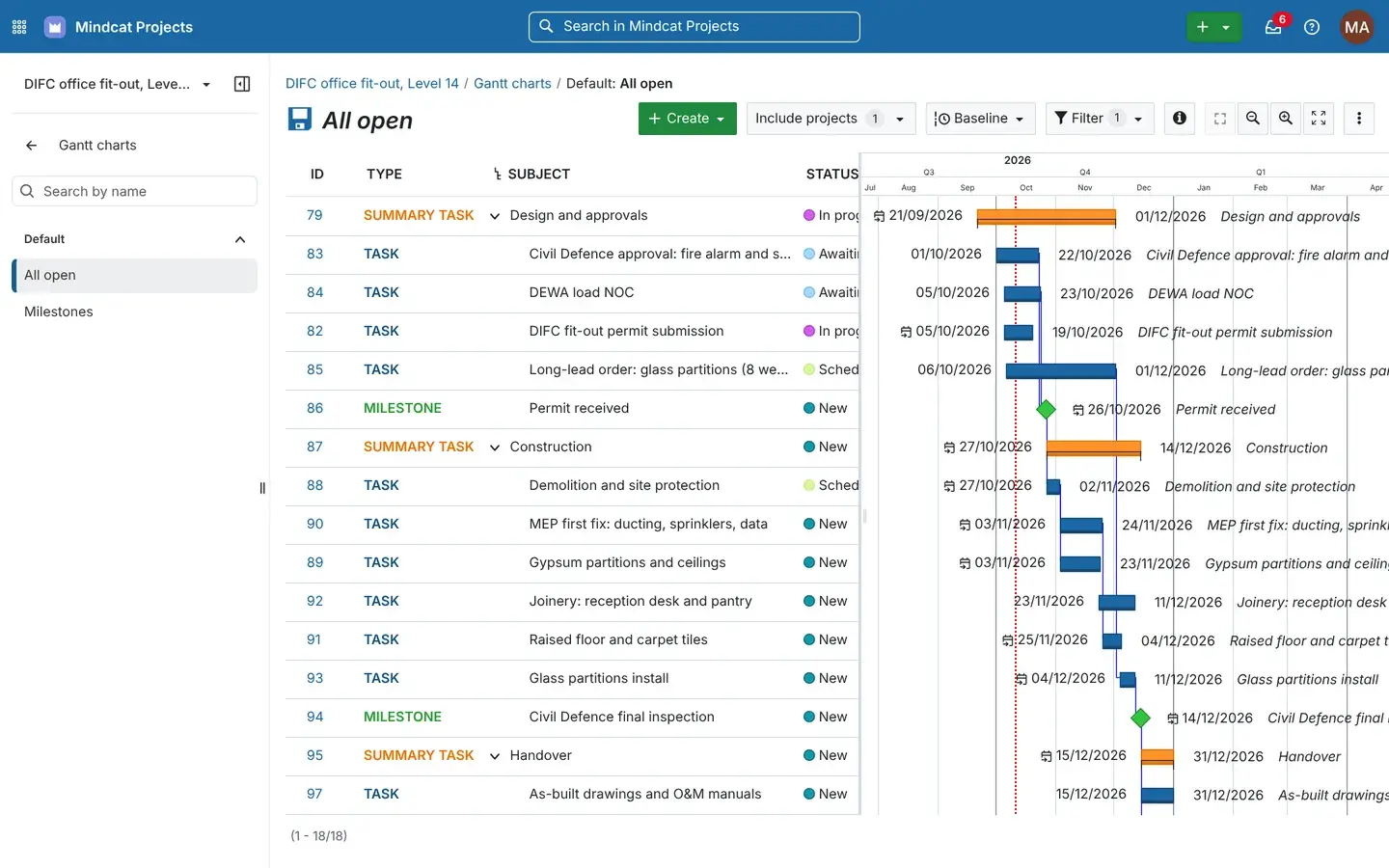
Gantt: the approval moves, the work after it moves too. “The instruction was in a WhatsApp group.”
Comments on the task
The consultant’s comment, the reply and the hours spent sit on the task, with @mentions that notify the person named.
- Used by
- PMs, site engineers, QS
- On screen
- The Civil Defence task with two comments and 9.5 hours logged.
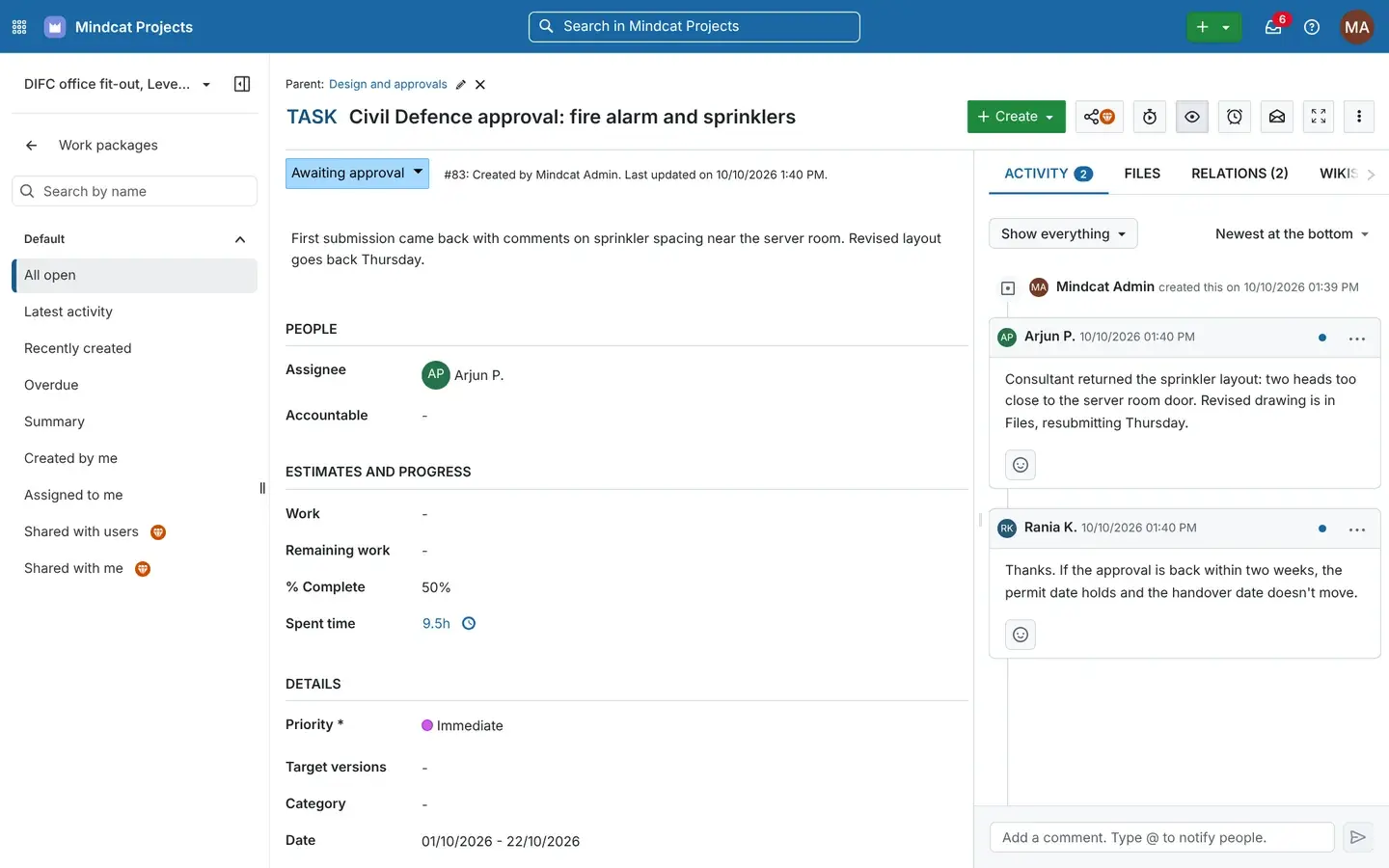
Task detail: what changed, when, and who said it. “The site team doesn’t sit at a laptop.”
On the site engineer’s phone
Their tasks, the inbox of updates and the task itself in the phone’s browser. Nothing to install.
- Used by
- Site engineers, foremen
- On screen
- Tasks across a villa, a restaurant and the DIFC office.
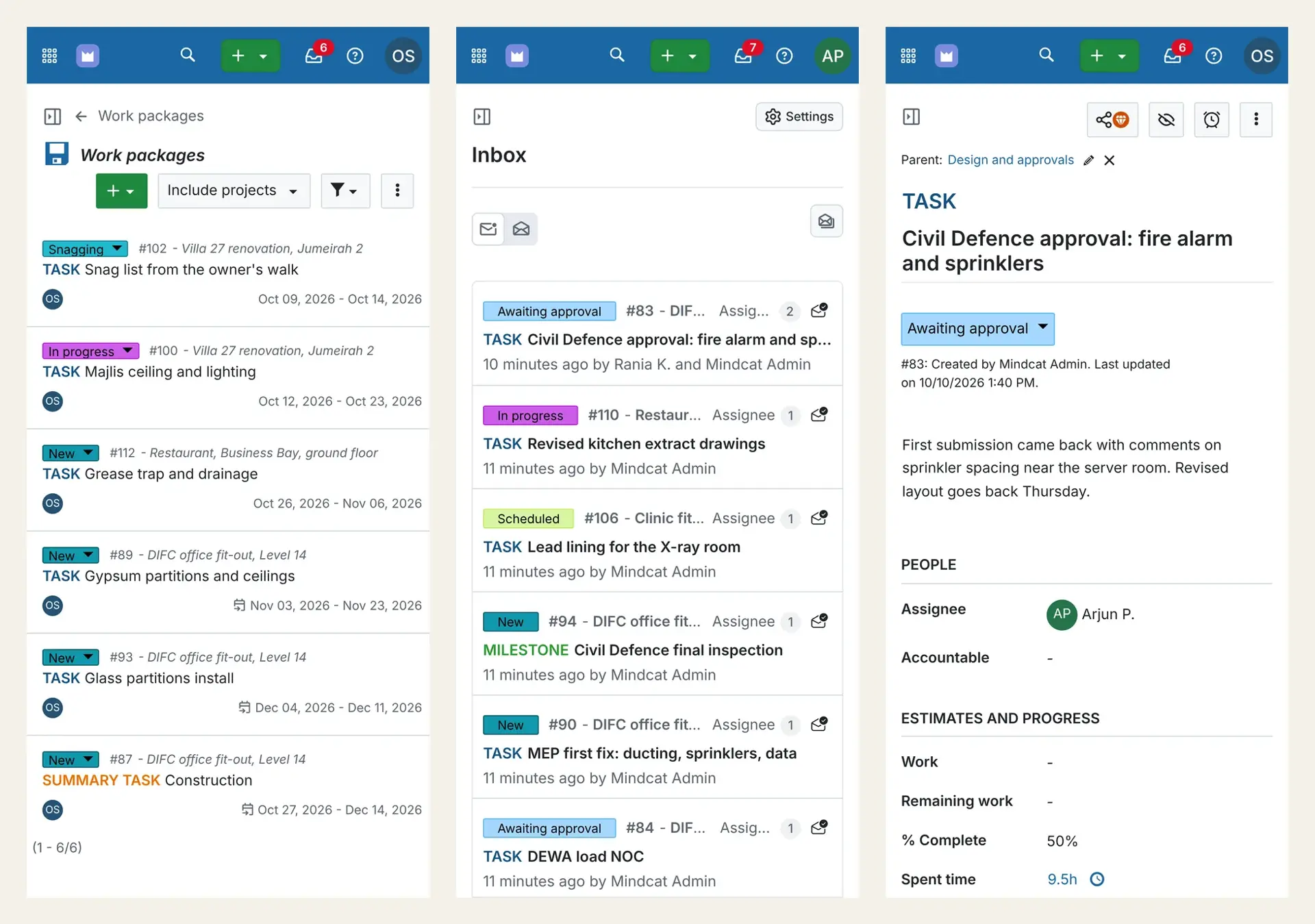
Phone view: the site’s tasks without voice notes. “The client hears the new date from someone else.”
A free login for the client
Tenants, consultants and the landlord’s fit-out coordinator read the status, the timeline and the tasks, and can’t change anything.
- Used by
- Clients, consultants
- On screen
- The sample tenant’s representative on her phone.
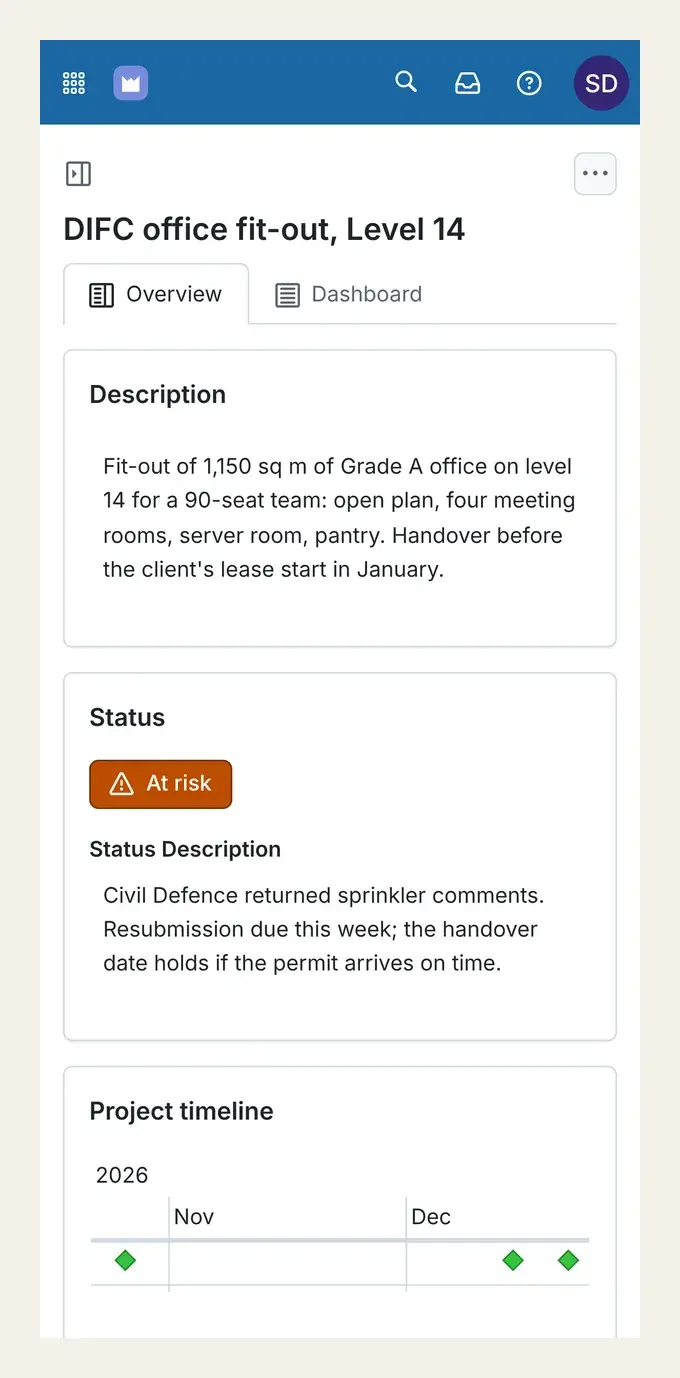
Client view: the status and the reason, on her phone.
Three jobs, before and after
DIFC, Business Bay and Al Olaya.
Invented jobs in real districts.
Example
Project manager on an office fit-out on Level 14 in DIFC
Today: Civil Defence returns the sprinkler layout, the planner reworks Excel on Sunday and the tenant hears on Tuesday.
After: The comment is on the task, one date moves and the rest follow, and the tenant reads the new date in her own login.
Example
Site engineer on a restaurant fit-out in Business Bay
Today: The landlord changes the kitchen extract route and the grease trap and Food Control inspection dates are lost in a chat.
After: The revised drawings task, the grease trap and the inspection are linked on the Gantt, and the job shows At risk until the drawings are back.
Example
Operations director on a clinic fit-out in Al Olaya, Riyadh
Today: The medical gas supplier is two weeks late and the MOH inspection booking waits on a phone call.
After: The delivery task carries the supplier’s written date, the inspection milestone moves with it, and the PMO in Riyadh sees the job Off track with the reason.
Built for Gulf fit-out
What is ready today, and what we add during setup.
From the form to go-live
What happens after you send the form.
Today
Send your count
The form on this page, with how the work runs today.
Within 24 hours
A reply from a person
Where a quick start fits, a payment link. Otherwise a written setup plan and price.
Setup
Your data goes in
Your lists come in from your spreadsheet or our CSV template, checked by a person before import.
Before go-live
Your screens are set up
The screens and reports on this page, configured for your company.
Go-live day
Your team works in it
The monthly fee starts that day, not before.
What it costs
Per member, in dirhams or riyals, with clients free.
AED/SAR 179 per member for the first 10, 69 for 11 to 30, 45 for 31 to 100 and 29 above that, on your own copy hosted by us, with a AED/SAR 5,349 monthly minimum that covers up to 78 members. A contractor with 60 members comes to 10 × 179 + 20 × 69 + 30 × 45 = AED 4,520, so it pays the AED 5,349 minimum (USD 1,456.50). Clients and consultants are free. Price your own team on the Projects page.
AI co-workers
Where an AI co-worker would start here.
One co-worker on the desk where work waits longest. It takes the checking, chasing and typing; your people keep the decisions.
FAQ
What fit-out contractors ask first.
- Does it make our jobs compliant with Civil Defence or Dubai Municipality?
- No, and no software can. It keeps each submission, comment round and inspection as a task with its dates and files. The approvals stay with you and your consultant.
- Do we have to drop Primavera?
- No. Keep it for the baseline your client asks for. We load your live jobs from an export during setup, and the team, the site and the client work from one live programme here.
- Can our subcontractors use it?
- Yes. Give the joinery, glass or MEP subcontractor a member login for the tasks they do, or a free read-only login to follow the programme.
- Can the landlord’s fit-out team see the job?
- Yes, on a free read-only login, alongside the tenant and the consultant.
- Where is our data stored?
- In your own copy in Dubai or Abu Dhabi, in Jeddah or Riyadh, or in your own cloud.
- What counts as a member?
- Anyone who creates or edits tasks, logs time or runs meetings. Clients, consultants and read-only users are free.
Setup plan and price
Tell us your live jobs and how you plan them today.
We reply by email within 24 hours with the setup plan and the monthly price.