



An IT support engineer in a thobe and shemagh hands a boxed laptop to a new employee in an abaya at a Riyadh office, while she signs on her phone.

Mindcat Assets · IT asset management: who holds every laptop, signed for

Know what every leaver still holds, before HR asks for your signature.

For IT teams in Dubai, Riyadh and Al Khobar, then contractors with tool stores, schools that lend devices and Saudi government affiliates. Every laptop, phone, tool and licence seat is checked out to a named person who signs for it on the phone, with a return date, a warranty date and a renewal date. When someone leaves, IT opens one record and signs the clearance the same day, inside the 14 days a UAE employer has to settle their dues. Hosted in the UAE or the Kingdom from AED/SAR 5 per person holding kit a month, set up by us, with the go-live date in writing after one call with your IT lead.

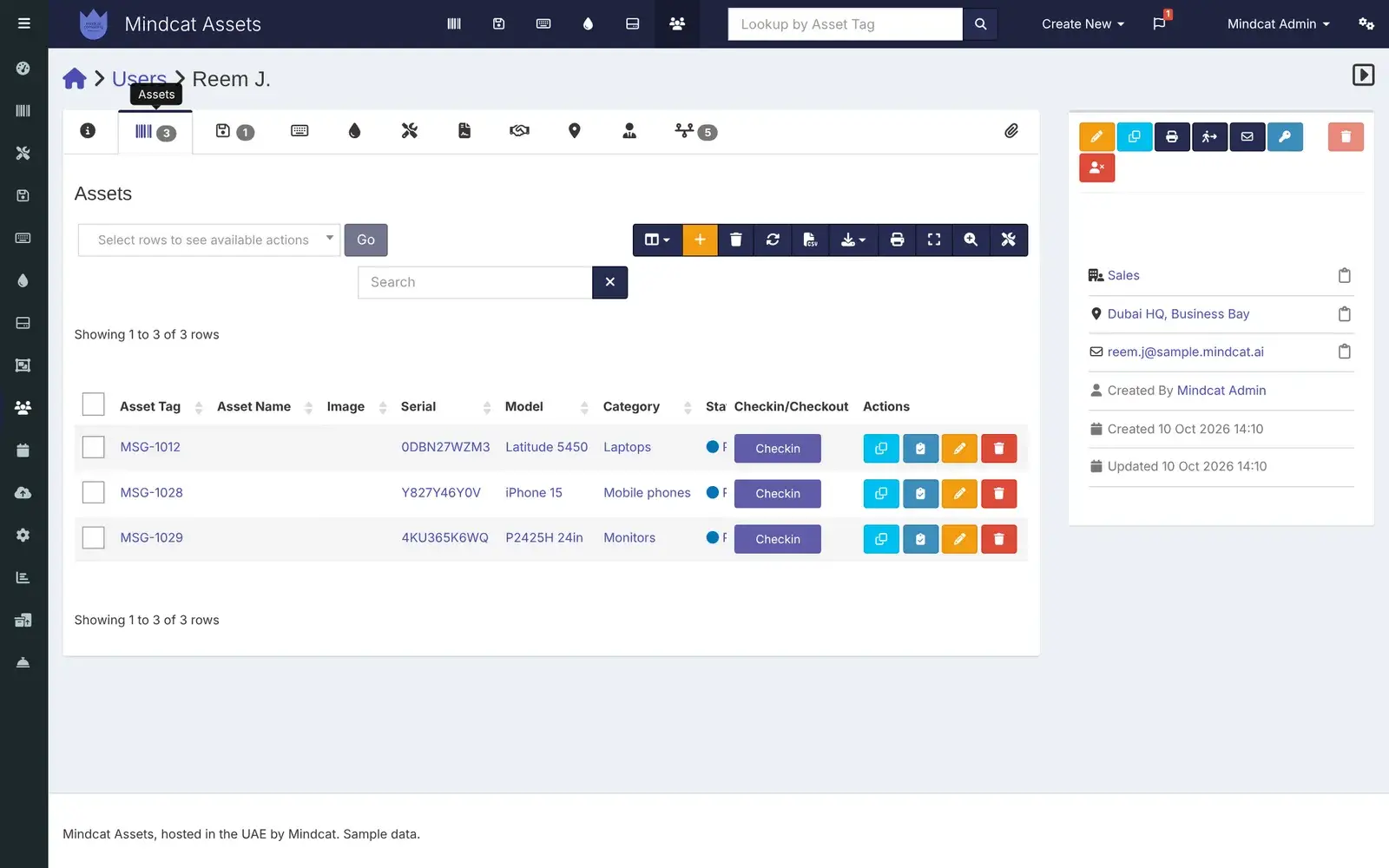
Mindcat Assets IT asset management: the record of Reem J. at Dubai HQ, Business Bay, with three assets checked out to her: a Latitude 5450 laptop, an iPhone 15 and a 24-inch monitor, each with serial number and a check-in button.
A leaver’s record in Dubai: the laptop, iPhone and monitor she still holds, each one a click from check-in.Real screen, sample data

Where the laptops go

Five places a Gulf company loses track of what it owns.

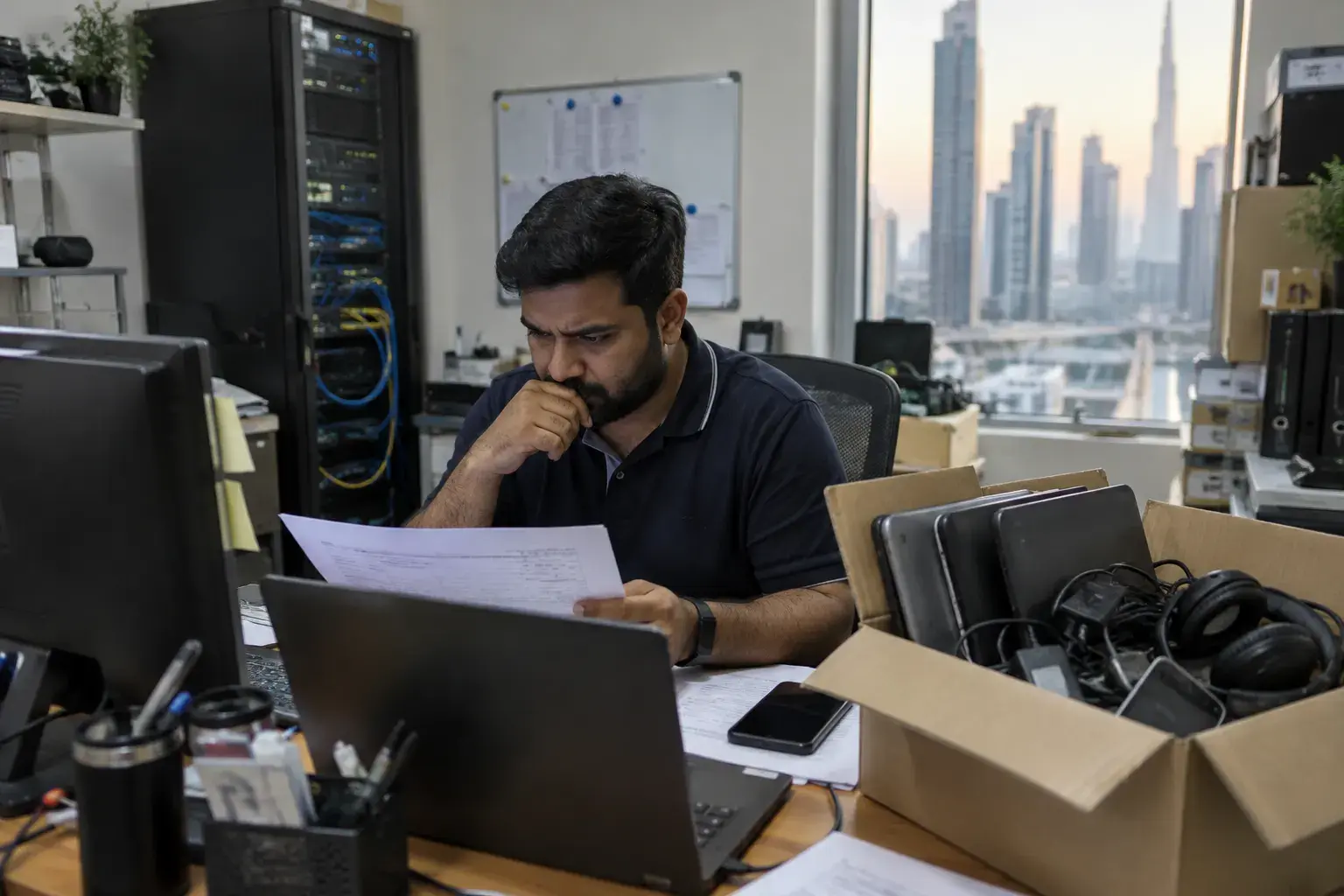
An IT officer in a Business Bay office frowns at a printed spreadsheet beside a cardboard box of returned laptops, chargers and a headset, a server rack behind him.
Before: a printed spreadsheet with ticks in pen, and a box of returned laptops nobody has checked in.Illustrative photo

Signed-for custody · how one laptop moves

From the new joiner’s first day to the exit clearance.

A laptop for a new joiner at a Riyadh office on Olaya Street, followed through every person who touches it.

  1. 01ITAdds the laptopThe new ThinkPad arrives with its serial number, cost in SAR, supplier, warranty end and a QR label printed for the lid.On: Asset record
  2. 02ITChecks it outTo Noura H. at Riyadh Office, Olaya, with an expected return date if it is a loan. She gets an email asking her to accept it.On: Check-out
  3. 03EmployeeSigns on the phoneShe opens the email, reads the handover note, ticks “I accept” and signs with her finger. A signed copy goes to her email and onto the record.On: Phone
  4. 04ITCounts itAt the yearly count a technician scans the QR label with his phone and records the audit with its location.On: Phone and label
  5. 05IT managerSees the datesWarranties ending, licences expiring and returns overdue, in the lists and in a daily email at the intervals you set.On: Lists and email
  6. 06IT and HRClears the leaverOn her last week, IT opens her record, checks in what she returns and signs the clearance. Anything missing is on the list, with its serial number.On: Person record
Step 1 uses device sync from Intune, Jamf or Google Workspace once we connect it during setup; without it, IT adds the laptop by hand or from a spreadsheet. Alert emails start once your mail server is connected during setup. Everything else works on day one.

What it does · real screens

The IT asset management screens your team and staff will use.

“Intune already lists our laptops” is the belief that keeps the spreadsheet alive. Intune lists managed devices; it doesn’t list the monitor, the Hilti kit or who signed for them. The first screen below is a leaver’s record with a monitor on it, next to her laptop and phone. Every screen is captured from our own running copy with invented sample data: a Dubai trading and services company with an Al Quoz warehouse, a Riyadh office on Olaya Street, a Jeddah showroom and an Al Khobar site office. Names, serial numbers and addresses are not real.

  1. “HR wants my signature on her clearance today, and I don’t know what she still holds.”

    Everything a person holds, on one record

    Open anyone’s record and see every laptop, phone, monitor, accessory and licence seat checked out to them, with serial numbers and the history of what they returned. Check items in from the same screen.

    Used by
    IT managers, HR
    On screen
    Reem J., leaving the Business Bay office, still holds a Latitude 5450, an iPhone 15 and a 24-inch monitor.
    Mindcat Assets person record for Reem J. at Dubai HQ, Business Bay: the Assets tab with three items, MSG-1012 Latitude 5450, MSG-1028 iPhone 15 and MSG-1029 monitor, with serial numbers and check-in buttons.
    Leaver’s record: what she holds, before the clearance is signed.
  2. “The custody form is paper, and half of them aren’t signed.”

    The handover, signed on the phone

    When IT checks an item out, the person gets an email, opens the item on their phone, reads your handover note, accepts or declines it, and signs with a finger. The signed copy is kept on the record and emailed to them. Their own list of everything they hold is one tap away.

    Used by
    Every employee who holds kit, IT, HR
    On screen
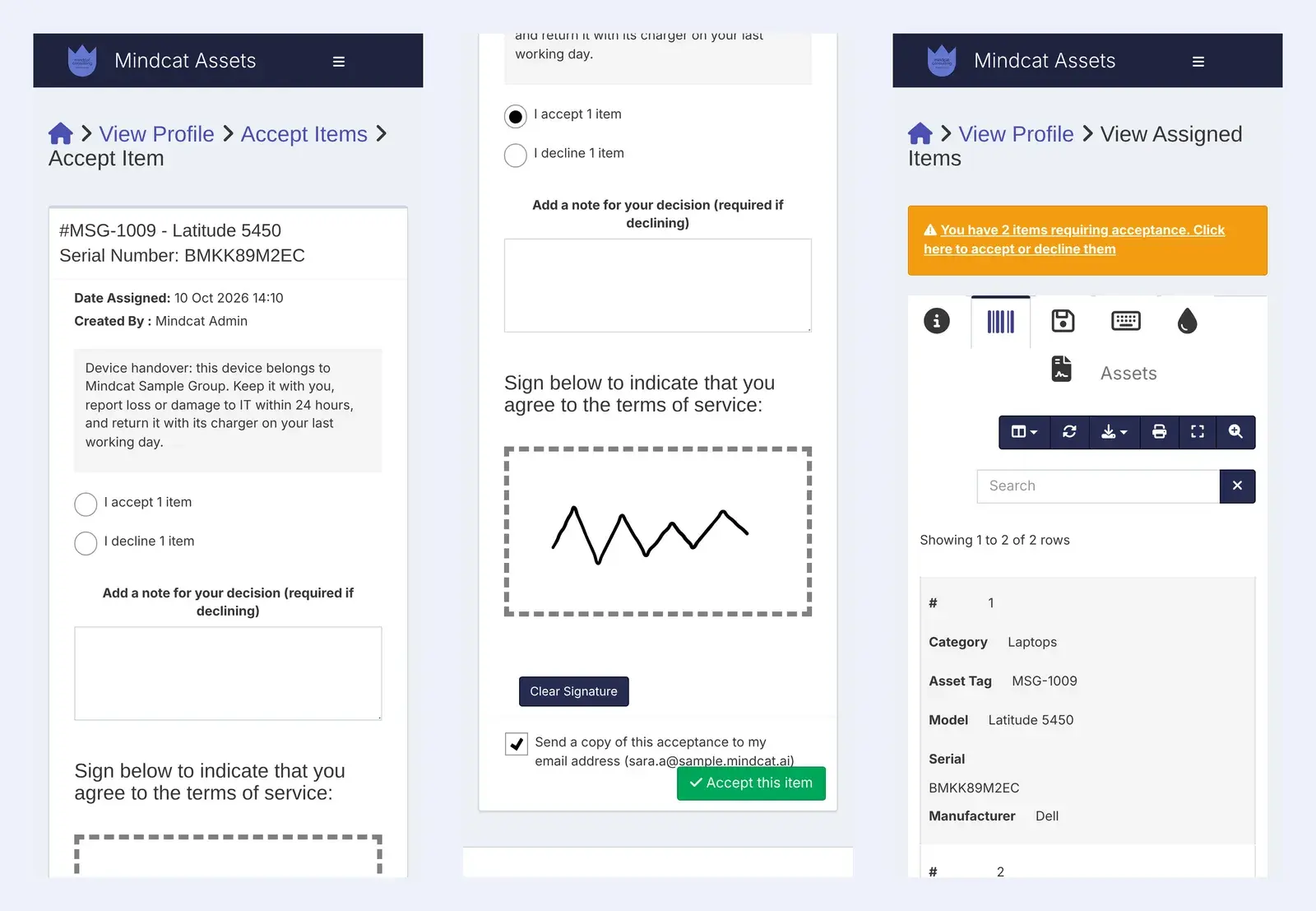
    Sara A. accepts a Latitude 5450, signs, and sees the two items she holds, with the reminder for the one still waiting.
    Three phone screens of Mindcat Assets: the handover note for laptop MSG-1009 with accept and decline options, a finger signature in the signing box with an Accept this item button, and the employee’s list of assigned items with a reminder that two items need acceptance.
    Signed handover: the custody form, on the employee’s own phone.
  3. “We pay for licence seats of people who left months ago.”

    Licence seats, by name, with the renewal date

    Each licence shows how many seats you bought, who holds each one, how many are free, the cost and the expiry date. Take a seat back when someone leaves, before the renewal invoice arrives.

    Used by
    IT managers, finance
    On screen
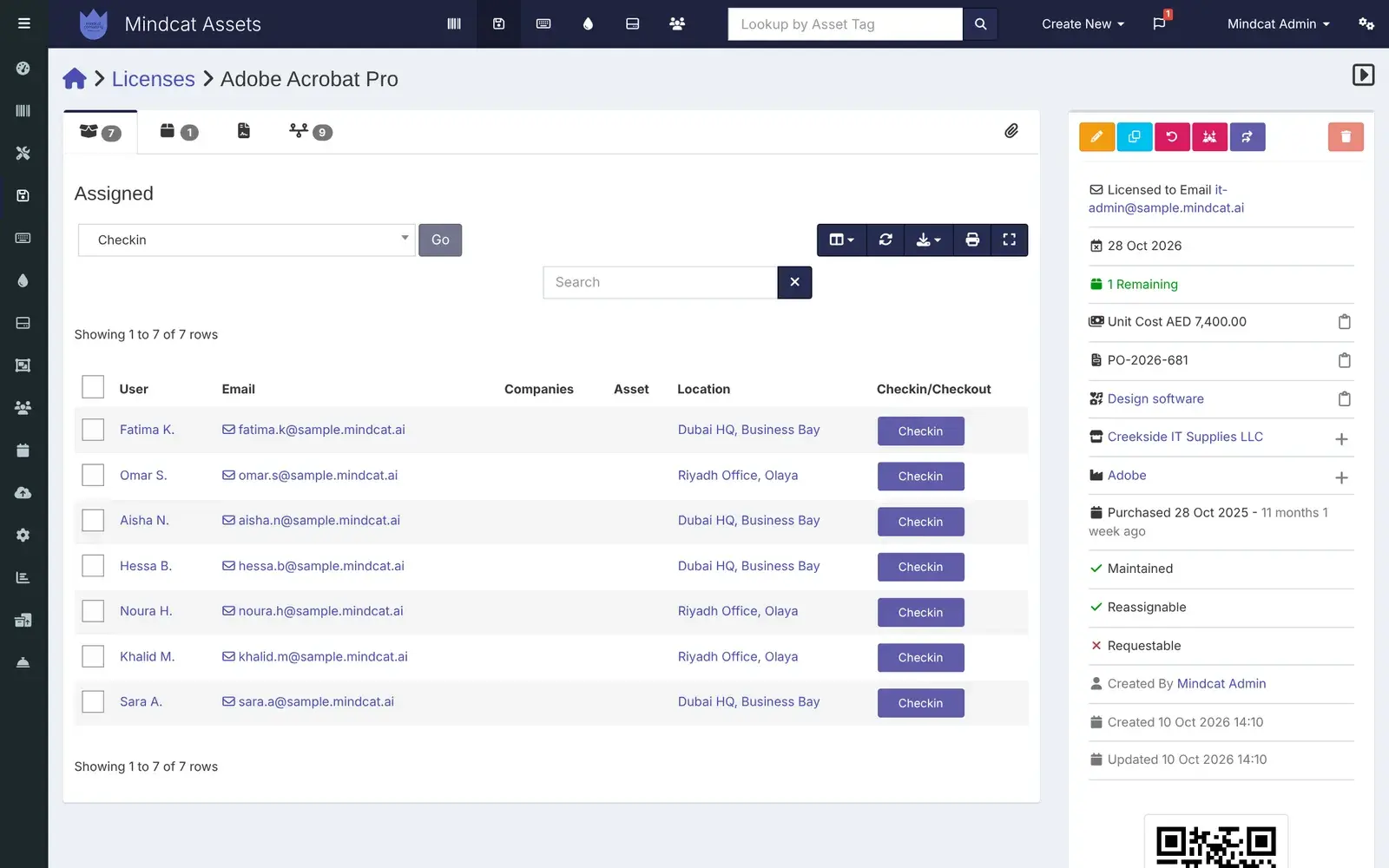
    Adobe Acrobat Pro: 7 of 8 seats assigned across Dubai and Riyadh, expiring on 28 October.
    Mindcat Assets licence page for Adobe Acrobat Pro: seven seats assigned to named people at Dubai HQ and Riyadh Office, one remaining, expiry 28 Oct 2026, unit cost AED 7,400 and the supplier Creekside IT Supplies LLC.
    Licence seats: who holds each one, and when it renews.
  4. “Kits leave the store and nobody knows when they should come back.”

    Tools and loans with a return date

    Check an item out to a person, a site or another asset, with an expected return date. The overdue list shows what is late and who has it, and a daily email reminds IT once alerts are on.

    Used by
    Storekeepers, site managers, IT
    On screen
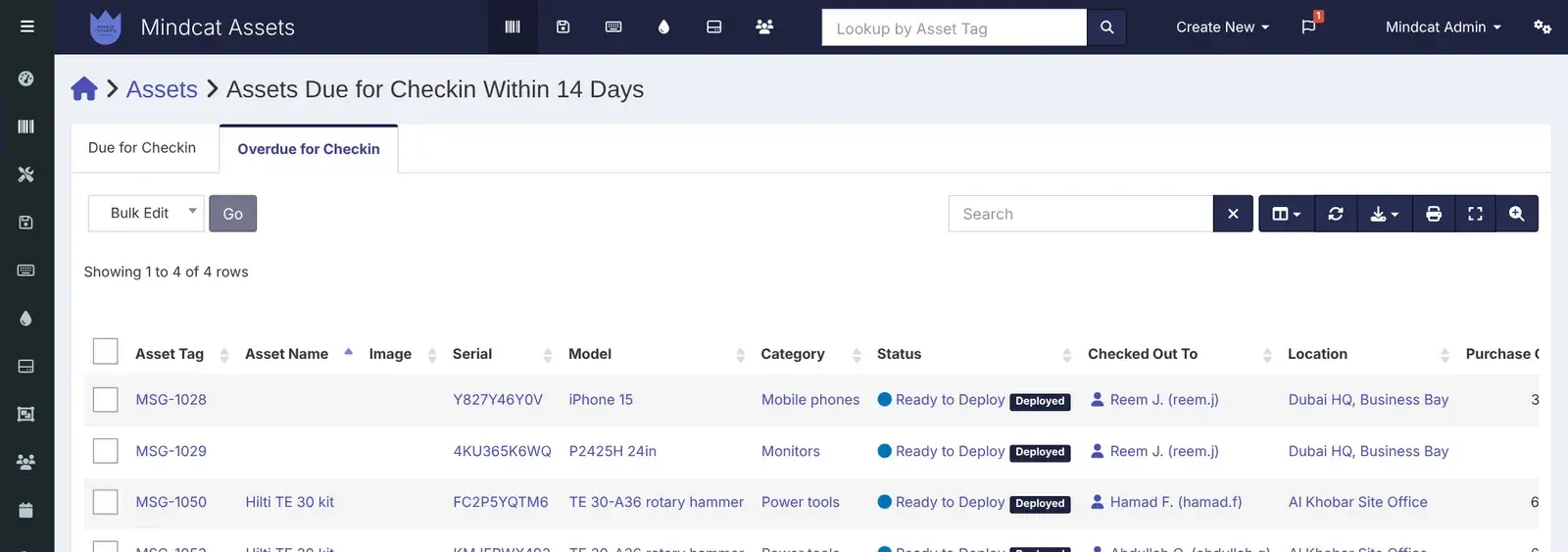
    Four items overdue: Reem J.’s phone and monitor in Dubai, and two Hilti kits at the Al Khobar site office.
    Mindcat Assets overdue for check-in list: MSG-1028 iPhone 15 and MSG-1029 monitor checked out to Reem J. at Dubai HQ, and Hilti TE 30 kits checked out to technicians at the Al Khobar Site Office.
    Overdue returns: what is late, and who has it.
  5. “The yearly count takes a week with a clipboard.”

    Counts and QR labels

    Every asset gets a label with a QR code and a barcode. Scan it with a phone camera to open the record, then record the audit with its location. Lists show what is due or overdue for audit by office.

    Used by
    IT technicians, auditors
    On screen
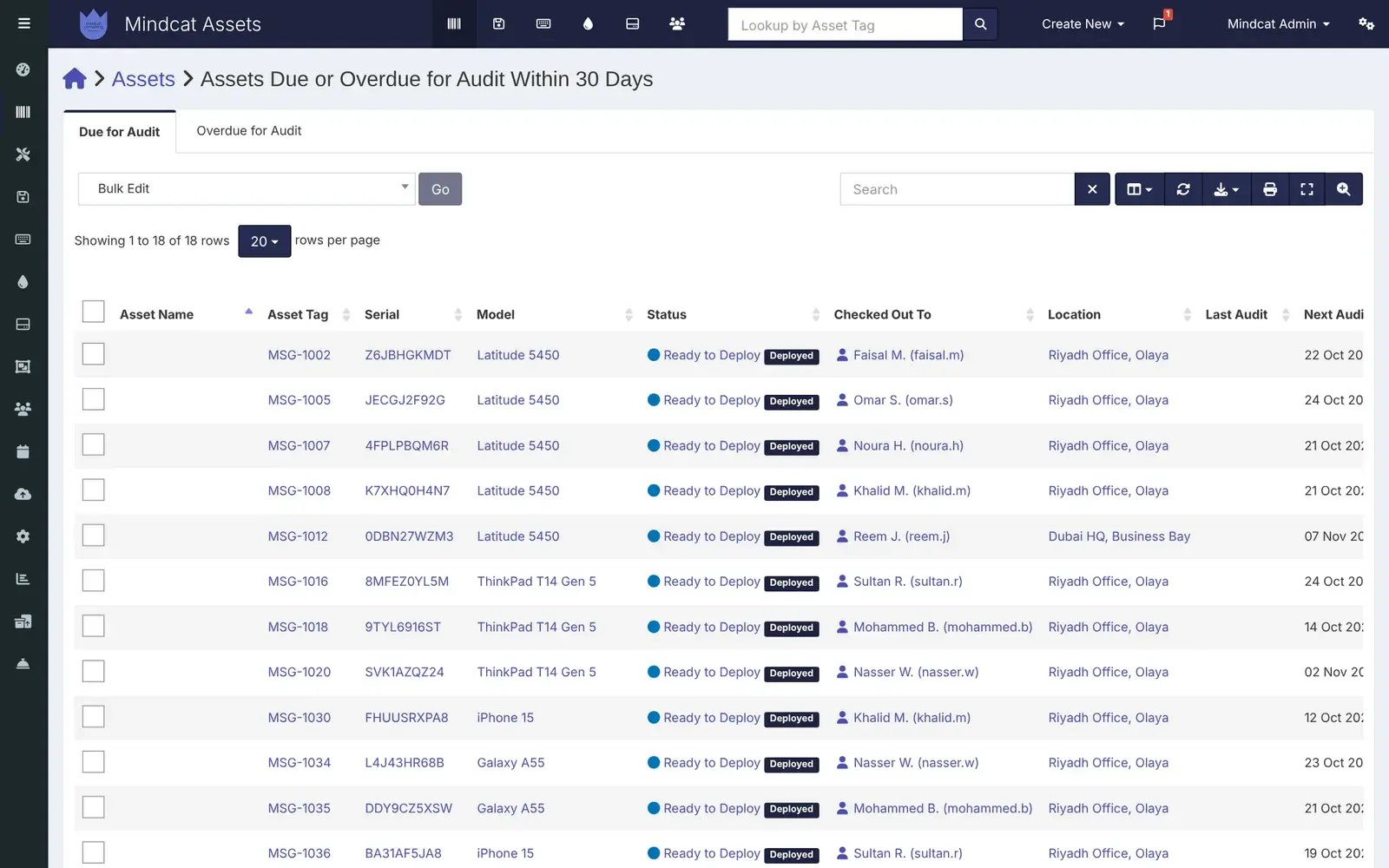
    Eighteen assets due for audit in the next 30 days, most of them at the Riyadh office.
    Mindcat Assets list of assets due for audit within 30 days: Latitude 5450, ThinkPad T14, iPhone 15 and Galaxy A55 devices checked out to named staff at Riyadh Office, Olaya, with their next audit dates.
    Audit due: the count, office by office.
  6. “My storekeeper won’t sit at a laptop.”

    The label, the phone and the audit form

    The QR label opens the asset on the phone’s browser. From there IT can see who holds it and record the audit. There is no app to install; it is the web app at phone size.

    Used by
    Storekeepers, IT technicians
    On screen
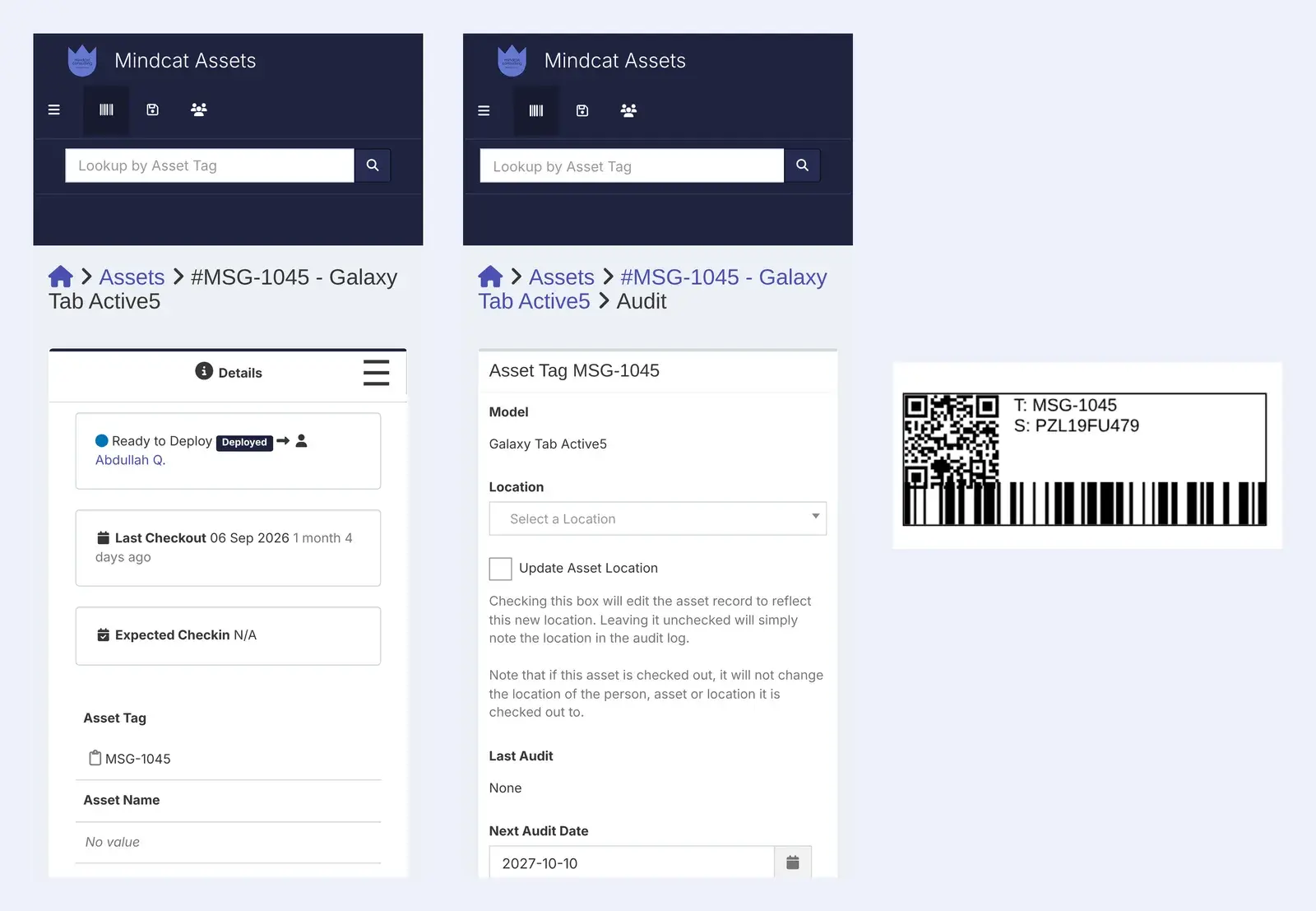
    A rugged tablet at the Al Khobar site: its record, its audit form and its printed label.
    Two phone screens of Mindcat Assets for asset MSG-1045, a Galaxy Tab Active5 checked out to Abdullah Q., and its audit form with location and next audit date, beside the printed label with a QR code, barcode, tag and serial number.
    Label and phone: scan, check, record.
  7. “Half my Riyadh team works in Arabic.”

    Arabic screens, right to left

    Anyone can switch their screens to Arabic, and the layout runs right to left. Some labels are still in English today; we finish the screens your team uses during setup.

    Used by
    Riyadh, Jeddah and Al Khobar staff
    On screen
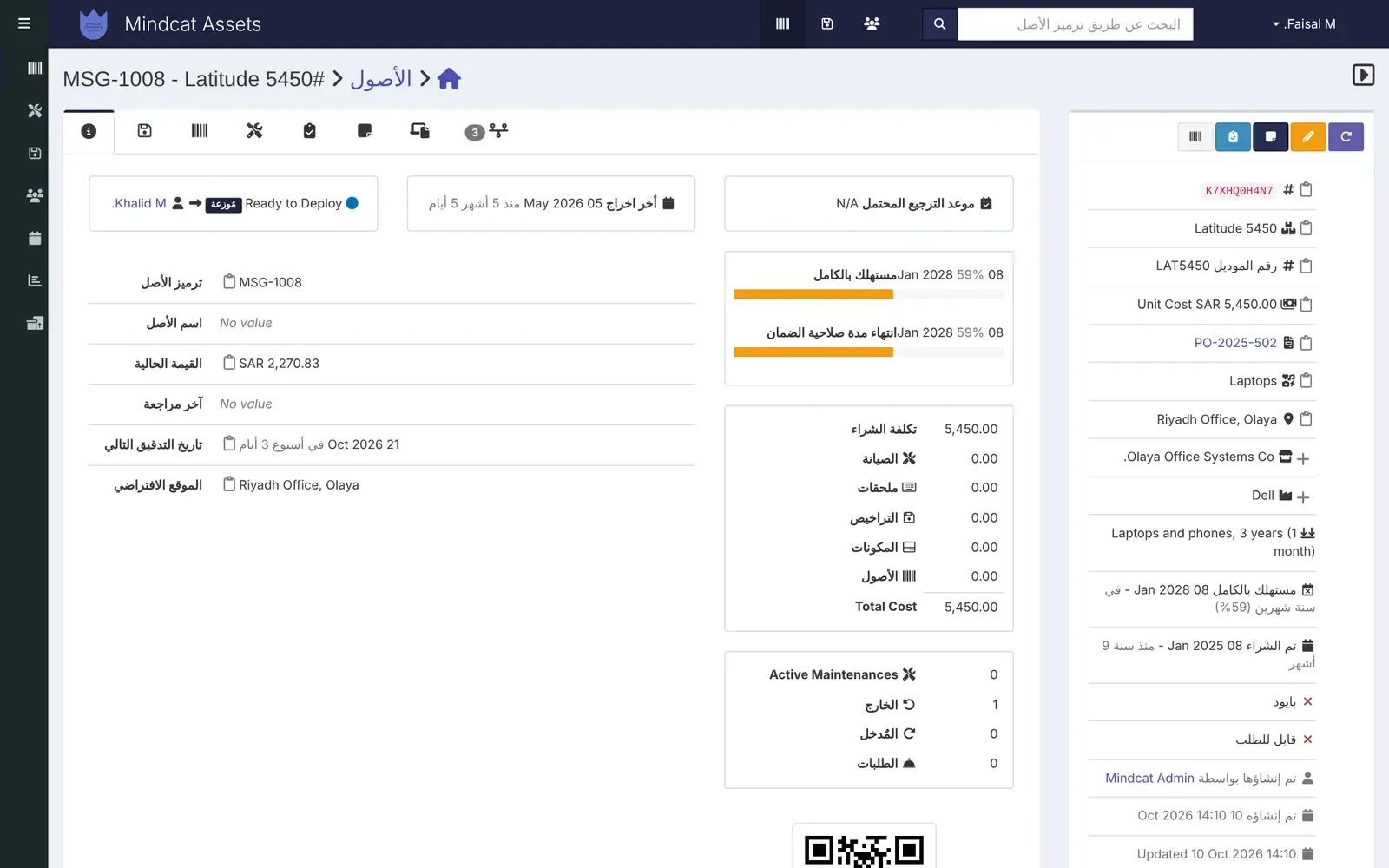
    A Riyadh laptop’s record in Arabic, with its cost and current value in SAR.
    Mindcat Assets in Arabic, right to left: the record of laptop MSG-1008 at Riyadh Office, Olaya, checked out to Khalid M., with asset tag, current value SAR 2,270.83, next audit date and purchase cost SAR 5,450.
    Arabic screens: partly today, finished during setup.
  8. “Finance’s register says 162 laptops and IT’s says 140.”

    A register finance can use

    Each record carries purchase cost, supplier, order number, warranty end and depreciation, so the current value is on the screen. Reports and CSV exports go to your ERP or the auditor.

    Used by
    Finance controllers, auditors
    On screen
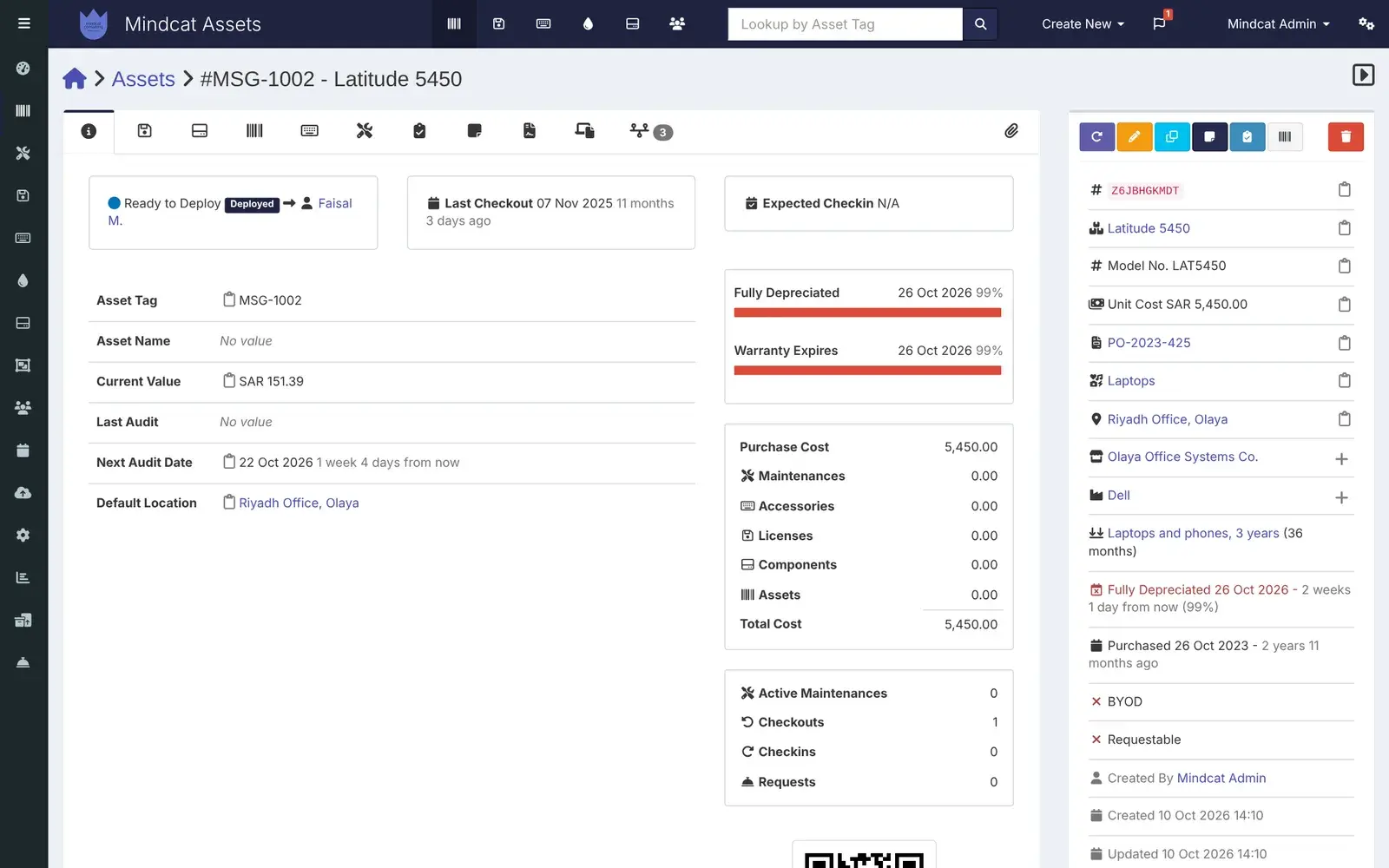
    A Riyadh laptop bought in October 2023 for SAR 5,450, warranty and depreciation ending this month, both shown in red.
    Mindcat Assets record for laptop MSG-1002 at Riyadh Office, Olaya: checked out to Faisal M., current value SAR 151.39, warranty expires 26 Oct 2026 shown in red, purchase cost 5,450, supplier Olaya Office Systems Co. and next audit date.
    Asset record: cost, warranty and value, in the office’s currency.

Also included

The rest of the asset register, in one line each.

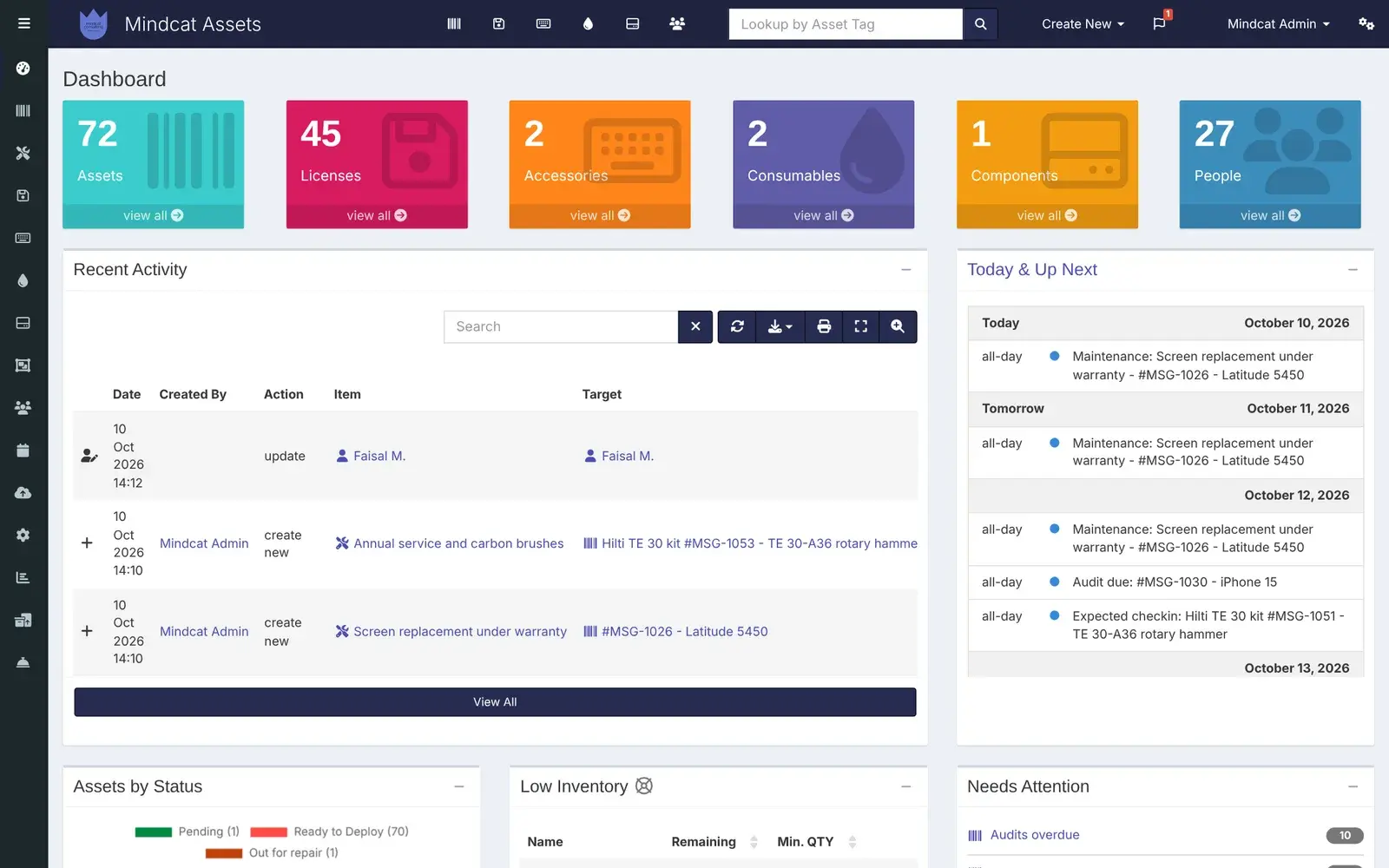
Mindcat Assets dashboard: counts of assets, licences, accessories, consumables, components and people, recent activity, the Today and Up Next list with maintenance, an audit due and an expected check-in, and Needs Attention with audits overdue.
The dashboard: 72 assets, 27 people, what is due today, and audits overdue.Real screen, sample data

Who it is for

Three Gulf teams that hand out kit, before and after.

A departing employee puts a laptop, a phone and an access card on an IT officer’s desk in a Dubai office, while an HR officer in a hijab waits with a folder and a box of personal items sits on the floor.
IT teams and MSPs

IT teams at Gulf companies, and the MSPs that run IT for them

Before: a trading group with offices in Business Bay, Al Quoz and Olaya keeps a spreadsheet per office and paper custody forms, and a leaver’s clearance waits two days on IT. After: her record lists the laptop, phone and monitor she holds, IT checks them in at the counter and signs the clearance that afternoon, and the four unused Microsoft 365 seats are dropped before renewal.

Leaver recordSigned handoverLicence seats
A storekeeper in a hi-vis vest hands a hard tool case through the hatch of a wire-mesh tool store in Al Quoz to a technician in blue coveralls holding his phone.
Contractors with tool stores

MEP, fit-out and FM contractors

Before: the storekeeper at the Al Quoz tool cage writes kits out in a paper book, and test meters turn up on the wrong site. After: he scans the label, checks the kit out to a technician with a Thursday return date, and on Thursday afternoon the overdue list shows the two kits still in Al Khobar.

Return datesQR labelsCalibration records
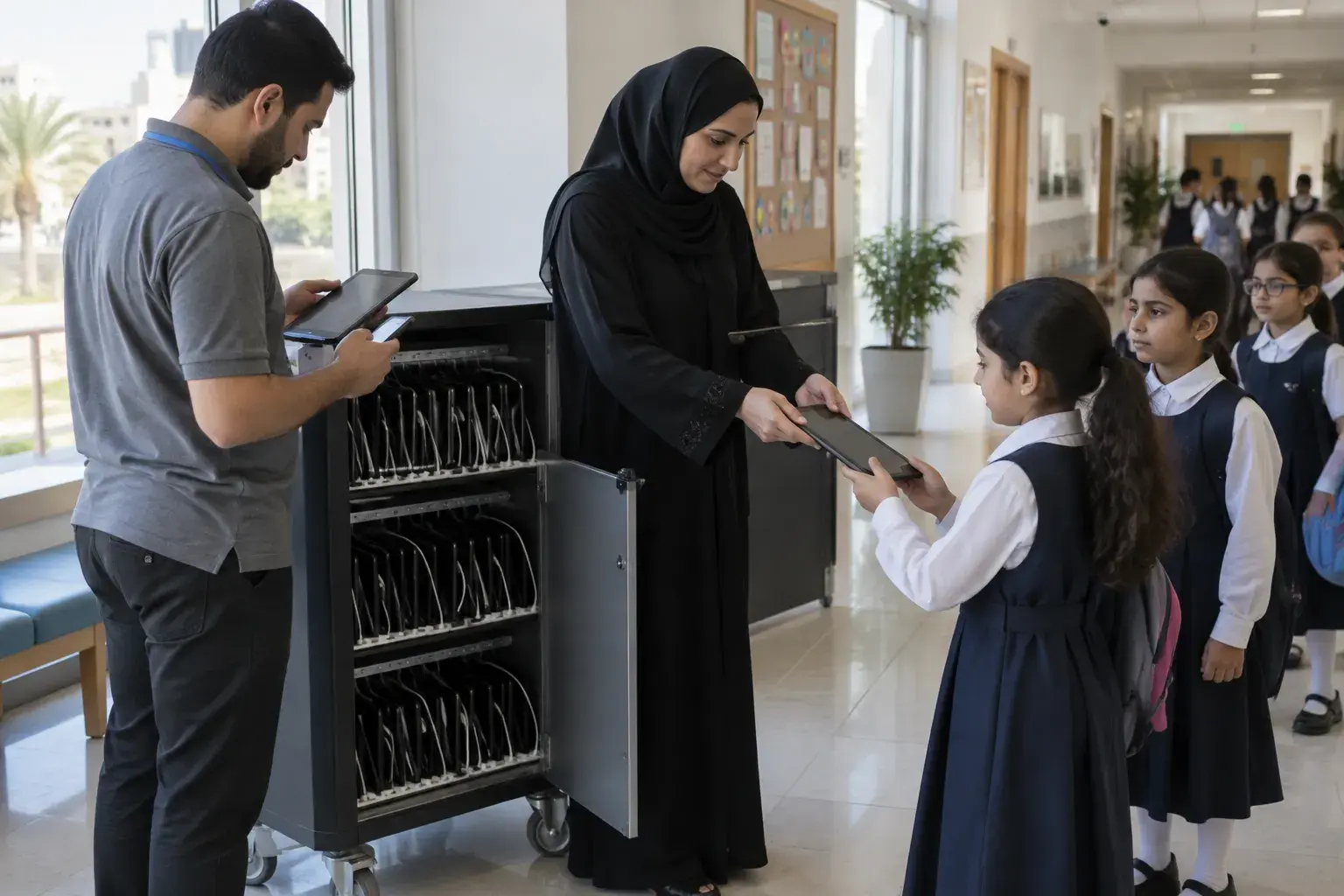
A teacher in a hijab hands a tablet from a charging trolley to a schoolgirl in uniform in a Riyadh school corridor, while a school IT technician checks another tablet against his phone.
Schools

Private schools that lend tablets and laptops

Before: a Riyadh school with 20 tablet trolleys keeps a list per trolley, and at the end of the year nobody knows which tablets went home. After: each tablet is checked out to a student with a return date, a parent signs on the screen at the trolley when one goes home, and the list in June shows what is still out.

Loans with return datesParent signatureCounts by classroom

Also used for

Government affiliates, clinics and growing tech firms.

A young IT technician in an empty open-plan office in Al Khobar scans the label under a monitor with his phone, a laptop bag over his shoulder, the corniche behind the windows.
The yearly count in an Al Khobar office: scan the label, record the audit, move on.Illustrative photo

Assets, Maintain or Desk?

Three apps, three jobs. Pick the one that matches your work.

Built for the Gulf

What is ready today, and what we add during setup.

Every row is true today, partly true today, or work we do during your setup. We say which.

What Gulf IT, HR and finance teams needWhere it stands
Data in the UAE or Saudi ArabiaToday. Every client gets a separate copy, hosted in the UAE or the Kingdom, or on your own servers.
Riyals and dirhamsToday. Each office has its own currency, so a Riyadh laptop shows its cost in SAR and a Dubai one in AED.
The custody form, signedToday. The person signs on the phone with a finger, and the signed copy is kept on the record and emailed to them. We write your handover note in Arabic and English during setup.
Arabic screensPartly today. People can switch the screens to Arabic and the layout runs right to left, but about 54% of the labels are translated and the rest show in English. One layout bug pushes Arabic pages sideways; we fix it and finish the screens your team uses during setup.
Hijri datesNo. Dates show in the Gregorian calendar.
Sign-in with MicrosoftSet up during setup: single sign-on with Entra ID, or your Active Directory.
Laptops from Intune, Jamf or Google WorkspaceSet up during setup: managed devices arrive once a day with their serial numbers. Tools, monitors and SIMs are added from your spreadsheet or by hand.
Finding unknown devices on the networkNo. There is no network scanner. Device sync covers the laptops and phones your MDM already manages.
Wiping a phone when someone leavesNo. That stays in your MDM. The person record lists every device to wipe.

بالعربية

Mindcat Assets in Arabic, for Saudi and Emirati teams.

Mindcat Assets · إدارة أصول تقنية المعلومات

كل لابتوب وجوال وعدّة ورخصة برنامج مسجلة باسم الموظف الذي استلمها ووقّع عليها من جواله، مع موعد الإرجاع وانتهاء الضمان وتجديد الرخصة.

عند إخلاء الطرف، يفتح قسم تقنية المعلومات ملف الموظف ويرى كل عهدة لم تُرجع بعد، فيوقّع في اليوم نفسه. وفي الجرد السنوي تُمسح ملصقات QR بالجوال، ويظهر ما تأخر جرده في كل موقع.

البيانات مستضافة في الإمارات أو في المملكة، أو على خوادمكم. السعر لكل موظف يحمل عهدة شهريًا بالريال أو الدرهم، ويقل كلما كبرتم. واجهة النظام بالعربية جزئيًا اليوم، ونكمل الشاشات التي يستخدمها فريقكم أثناء الإعداد.

Prices

Price your asset register: per person holding kit, in AED and SAR.

Set how many people hold company kit and where it should run. IT, HR and finance logins are free, and assets are unlimited. Every price is also listed in full below.

Where should it run?

Your monthly price

AED 950

SAR 950 · USD 258.68 · about AED 4 per person

One-time setup
AED 6,900
Per-asset fees
None

AED and SAR are the same number. Excludes 5% UAE VAT and 15% Saudi VAT. Label printers and labels are yours to buy. Annual prepay takes 15% off.

The full price list

Every band, option and fee, in writing.

You pay per person holding kit, per month: anyone with at least one laptop, phone, tool or licence seat checked out to them. The price per person drops as you grow: each band’s price applies only to the people inside that band. IT, HR and finance logins are free, and so is everyone with nothing checked out. Assets, licences and locations are unlimited.

People holding kitAEDSARUSD
1 to 100551.36
101 to 300330.82
301 to 1,000220.54
Above 1,000110.27

Worked example. A company with 250 people holding kit pays 100 × 5 + 150 × 3 = AED 950 a month (SAR 950, USD 258.68). With 500 people it is AED 1,500 (USD 408.44). With 1,500 it is AED 3,000 (USD 816.88). The shared option has a minimum of AED/SAR 600 a month (USD 163.38), which covers up to 133 people.

How you run it changes the multiplier.

OptionPriceMinimum a month
Shared: your own separate copy on our servers, in the UAE or Saudi ArabiaThe per-person price aboveAED/SAR 600 (USD 163.38)
Your own servers, hosted by us in the UAE or Saudi ArabiaPer-person price × 2AED/SAR 1,999 (USD 544.32)
In your own cloud or data centre, run by usPer-person price × 0.75, and you pay your cloud bill directlyAED/SAR 1,999 (USD 544.32)

One-time setup. Up to 100 people: AED/SAR 3,900 (USD 1,061.95). 101 to 300: AED/SAR 6,900 (USD 1,878.83). 301 to 1,000: AED/SAR 12,900 (USD 3,512.59). Above 1,000: from AED/SAR 19,900 (USD 5,418.65), scoped in writing. Setup covers the import of your current spreadsheet, your categories, offices, suppliers and asset tag format, the handover note in Arabic and English that people sign, alert emails through your own mail server, sign-in with Microsoft or Active Directory, the label template, device sync from Intune, Jamf or Google Workspace if you use one, and one training session. Tagging and counting on site is quoted separately. Extra work is AED/SAR 450 an hour (USD 122.53).

Not in the price. Label printers and labels are yours to buy. There are no per-asset fees. Annual prepay takes 15% off. Prices exclude 5% UAE VAT and 15% Saudi VAT.

Compare asset management software

What 250 people and 500 assets cost with each option.

The same company with 250 people holding kit and about 500 assets, priced from each option’s own published price list. Checked on 10 October 2026. VAT is extra everywhere.

Swipe the table sideways to see every column.

OptionA month, about 500 assetsData in the UAE or KSAWho sets it upSource
Excel and paper custody formsNo software bill. The cost is the laptop nobody can find and the clearance that waits on IT.On a shared driveNobodyYour week
Mindcat Assets, sharedAED/SAR 950 (USD 258.68), assets unlimited. One-time setup AED/SAR 6,900.Yes. UAE or the Kingdom, or your own serversWe do, in Arabic and EnglishThis page
ManageEngine AssetExplorer Cloud, 500 IT assetsUSD 225 billed monthly, or USD 2,345 a yearNot stated on the price pageYou do, or a partnermanageengine.com
EZOfficeInventory Advanced, 500 itemsUSD 117.11 as listed. Advanced is the plan that lists custodyNot statedYou doezo.io
AssetTiger Basic, 500 assetsUSD 20 billed monthlyNot statedYou do, in Englishassettiger.com
Install an asset system yourselfA server, plus an engineer to install, update, back up and secure itWherever you host itYour engineerYour quote

The cheapest tools cost less than we do. Our price adds the copy in the region, the Arabic handover note, the import and sign-in done for you, and a team that answers in your time zone. Ask each option three questions: where the records sit, who imports your current spreadsheet, and how a leaver’s list reaches HR on the day they leave.

How we start

From headcount to go-live, with the date in writing.

No demo maze and no annual contract to start. You see the plan and the price before you pay anything.

An IT support engineer in a thobe hands a boxed laptop across a desk to a new employee in an abaya, who signs on her phone, with the Riyadh skyline behind them.
The handover we set up for you: the box, the phone, the signature.Illustrative photo

Why Mindcat

Hosted in the region. Set up and run for you.

Where it fits

Your industry and your seat.

FAQ

What buyers ask about IT asset management.

What counts as a person?
Anyone with at least one laptop, phone, tool, accessory or licence seat checked out to them that month. IT, HR and finance logins are free, people with nothing checked out are free, and assets are unlimited.
Can our records stay in the UAE or Saudi Arabia?
Yes. Your copy runs in the UAE or the Kingdom on our servers, or in your own cloud or data centre at the per-person price × 0.75, with the source code handed over. Each client has a separate copy and database.
Can employees sign for a laptop on their phone?
Yes. They get an email, open the item on their phone, accept it and sign with a finger. The signed copy is kept on the record and emailed to them. We write the handover note in Arabic and English during setup.
Does it find devices on our network?
No. There is no network scanner. If you use Intune, Jamf or Google Workspace, we connect device sync during setup and managed laptops and phones arrive once a day. Everything else comes from your spreadsheet or is added by IT.
We already have Intune. Why do we need this?
It depends on what you track. Intune knows the managed laptops and phones. It doesn’t hold the monitors, tools, SIMs and licence seats, who signed for each one, the return dates or the cost and warranty for finance. Assets holds all of that, and takes the laptops from Intune.
Does it work in Arabic?
Partly. Anyone can switch the screens to Arabic and the layout runs right to left, but about 54% of the labels are translated today. We fix the layout and finish the screens your team uses during setup.
Can we import our Excel register?
Yes. We import your assets, people, licences and accessories from your spreadsheet during setup, and check the serial numbers and offices with you before go-live.
Does it replace the fixed asset register in our ERP?
No. Keep the register in your ERP. Assets holds where each item is and who has it, with cost, warranty and depreciation, and exports to CSV for your ERP and auditors.
Does it help with exit clearance in Saudi Arabia?
Yes. IT opens the leaver’s record, checks in what comes back and sees what is missing, then signs the exit clearance form. Assets doesn’t connect to your HR system today; the record is what IT signs from.
What is it built on?
Mindcat Assets is built on Snipe-IT, licensed under AGPL-3.0, and any changes we make to it will be released under the same licence. We are not affiliated with Grokability, Inc. Your copy will link to the source code of our version.

The brief · one email

Tell us how many people hold kit and where you track it today.

The honest no: if the work is a software factory with a named delivery date, we are the wrong partner.