A project manager in a hi-vis vest holds a tablet while a site engineer in a hard hat points up at sprinkler pipes in an office fit-out on a high floor of a DIFC tower, with metal stud partitions half boarded.

Mindcat Projects · Project management software for Gulf fit-out

When Civil Defence sends comments back, every date after it moves and your client sees it the same day.

For fit-out and MEP contractors running offices in DIFC and Business Bay, villas in Jumeirah and clinics and shops in Riyadh. One live programme per job: approvals, long-lead orders and handover on a Gantt, every job’s status on one list, site engineers updating from their phones, and a free read-only view for your client. Hosted in the UAE or the Kingdom. AED/SAR 1,790 a month covers your first 10 members, then less per member as you grow. You get the written plan, go-live date and price after one working session with your operations lead.

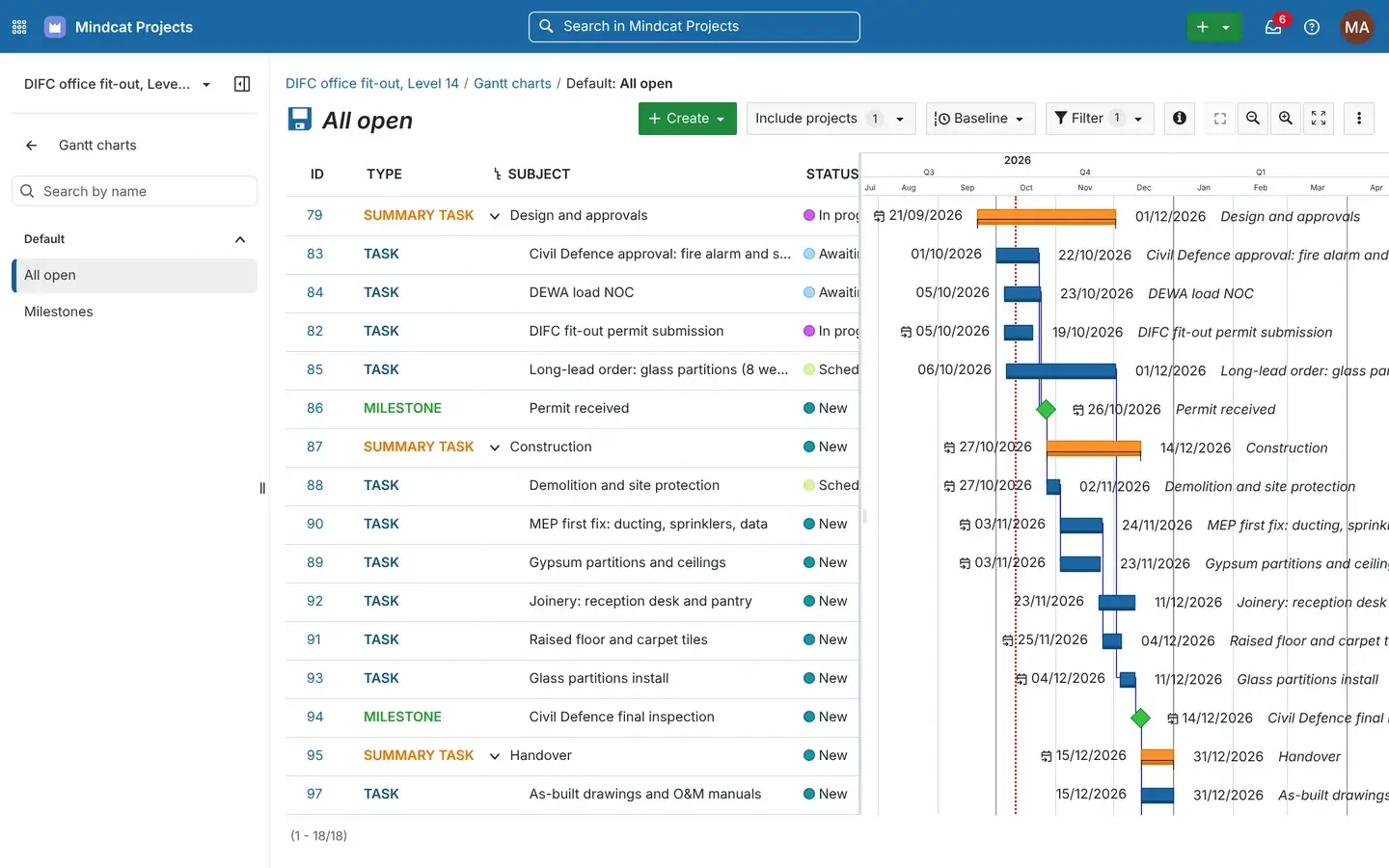
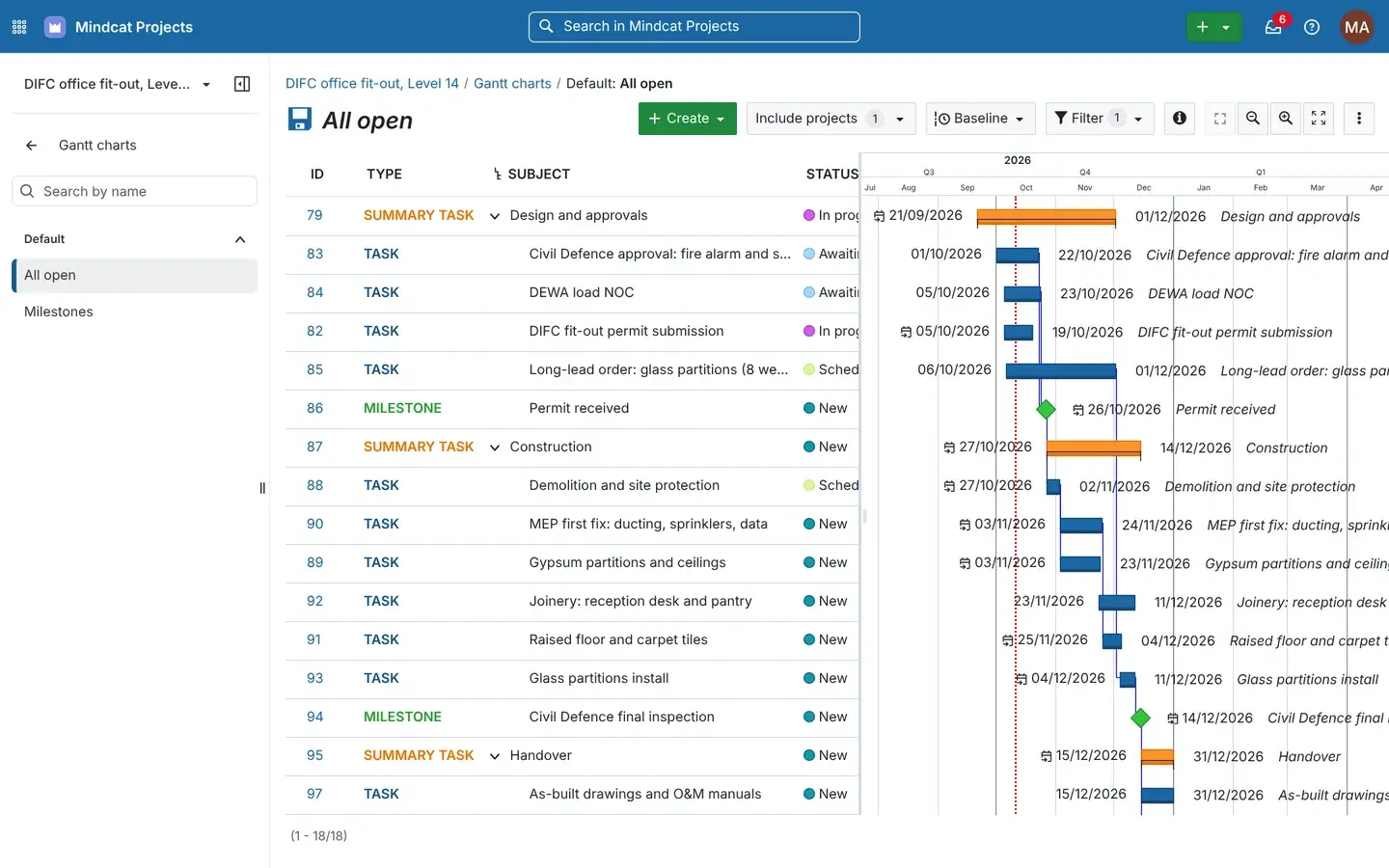
Mindcat Projects Gantt chart for the DIFC office fit-out, Level 14, with summary tasks Design and approvals, Construction and Handover, tasks such as Civil Defence approval, DEWA load NOC and long-lead glass partitions, and milestones Permit received and Civil Defence final inspection, from September to December 2026.
One job’s programme: design and approvals, construction and handover, with the Civil Defence approval driving the dates after it.Real screen, sample data

Where the programme goes wrong

Five places a Gulf fit-out job loses its handover date.

A tired project manager at a fit-out contractor’s office in Al Quoz in the evening, with a printed programme pinned to the wall covered in handwritten changes, rolled drawings on the desk and a phone face down beside a laptop.
Before: a printed bar chart with handwritten changes, rolled drawings and a phone that won’t stop buzzing.Illustrative photo

One programme per job · how one approval moves

From the consultant’s comment to the client’s new date, nobody retypes the programme.

A week on an invented office fit-out on Level 14 of a DIFC tower, followed through every person who touches it.

  1. 01Site engineerPosts the comment from site“Consultant returned the sprinkler layout: two heads too close to the server room door. Resubmitting Thursday.” On the Civil Defence task, from a phone.On: Task on the phone
  2. 02Project managerGets the notificationArjun mentions Rania in the comment, so it lands in her inbox in the app and by email, with the task, the job and who wrote it.On: Notifications
  3. 03Project managerMoves the approval dateShe pushes the Civil Defence approval back. Demolition, MEP first fix and the partitions that follow it move with it, skipping the weekend.On: Gantt
  4. 04Operations directorSees the job at riskThe project manager marks the DIFC job At risk with one line saying why, and it shows on the list of all six live jobs.On: Project list
  5. 05Site teamAgrees the week on MondayThe weekly site meeting runs from an agenda built from the open tasks, with their status beside each one.On: Meetings
  6. 06Client’s representativeSees the new dateSara, the tenant’s project manager, opens her free read-only login and reads the status and timeline before Tuesday.On: Client view
Every step works on day one in your own copy. Your approval stages, working week and holidays, and client logins are set during setup.

What it does · real screens

The screens your team will open every day.

Captured from our own running copy with invented sample data: six live jobs in DIFC, Business Bay, Jumeirah 2, Al Olaya and Riyadh Park, nine sample users and 30 open tasks. Names and numbers are not real customers.

  1. “One comment from Civil Defence and the whole Excel programme is out of date.”

    A programme that moves with the approvals

    Each job has one Gantt: summary tasks for design and approvals, construction and handover, tasks linked so one follows another, and milestones for the permit and the final inspection. Move one date and the linked tasks after it move too, skipping your weekend and public holidays. During setup we set linked tasks to move this way.

    Used by
    Project managers, planners
    On screen
    The DIFC job: the Civil Defence approval and DEWA load NOC drive the permit milestone and the construction tasks after it.
    Gantt chart of the DIFC office fit-out with 18 open tasks and milestones from September to December 2026, bars linked from Civil Defence approval to Permit received to demolition and MEP first fix.
    Gantt: the approval moves, and the work that waits on it moves too.
  2. “Which of our jobs is actually at risk this week?”

    Every job’s status on one list

    All live jobs with their status (on track, at risk, off track), a line saying why, and the job description. Group them under a portfolio, filter by status, and open any one in a click.

    Used by
    Operations directors, managing directors
    On screen
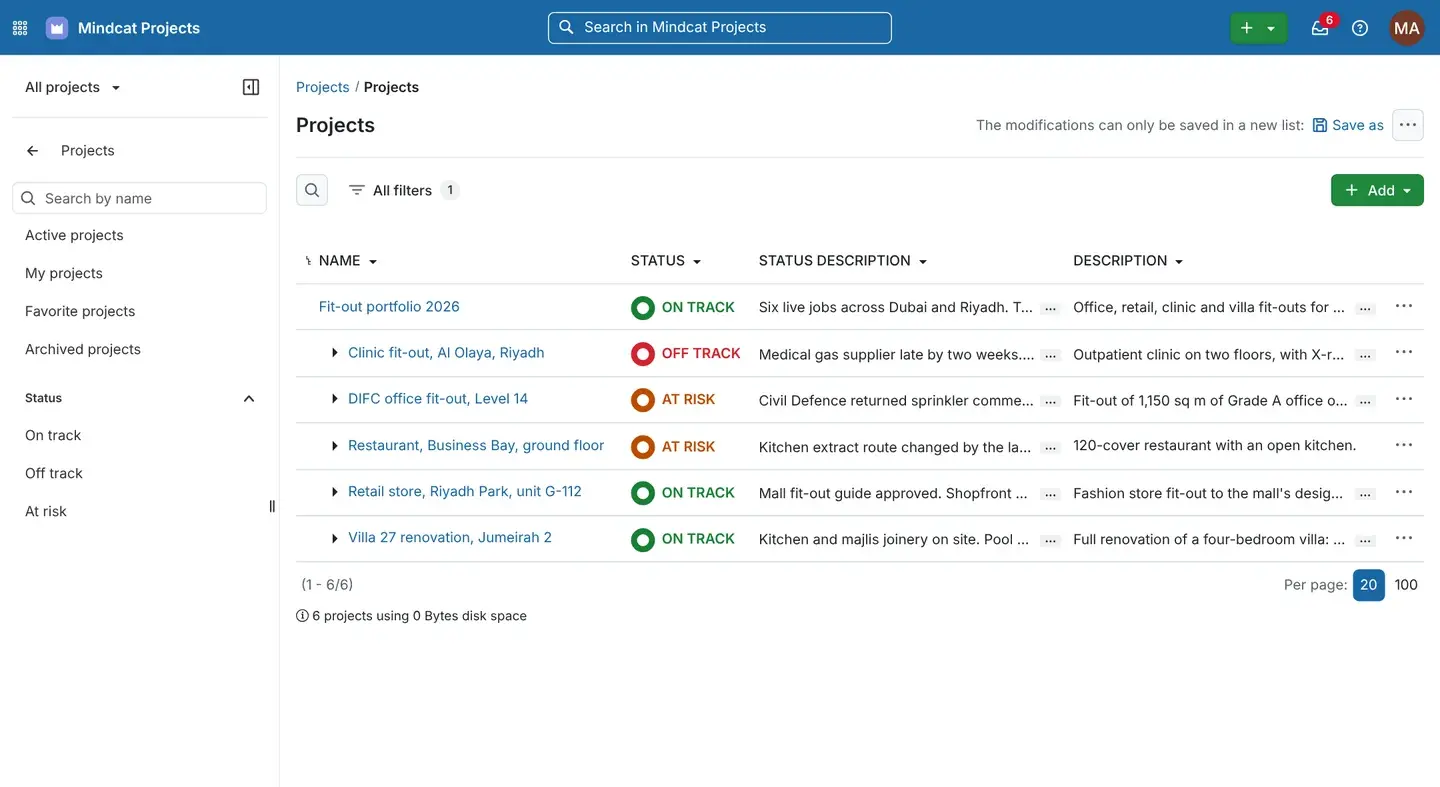
    Six sample jobs: the DIFC office and a Business Bay restaurant at risk, a clinic in Al Olaya off track because a supplier is late.
    Project list with Fit-out portfolio 2026 and five jobs: clinic fit-out in Al Olaya, Riyadh off track; DIFC office fit-out Level 14 and restaurant in Business Bay at risk; retail store at Riyadh Park and villa 27 renovation in Jumeirah 2 on track, each with a status description.
    Project list: the jobs at risk, and why, without a status meeting.
  3. “The instruction was in a WhatsApp group. Nobody can find it now.”

    Every comment on the task it belongs to

    Each task keeps its description, assignee, dates, progress, hours spent and every comment, with @mentions that notify the person named. When the consultant asks what changed and when, the answer is on the task.

    Used by
    Project managers, site engineers, QS
    On screen
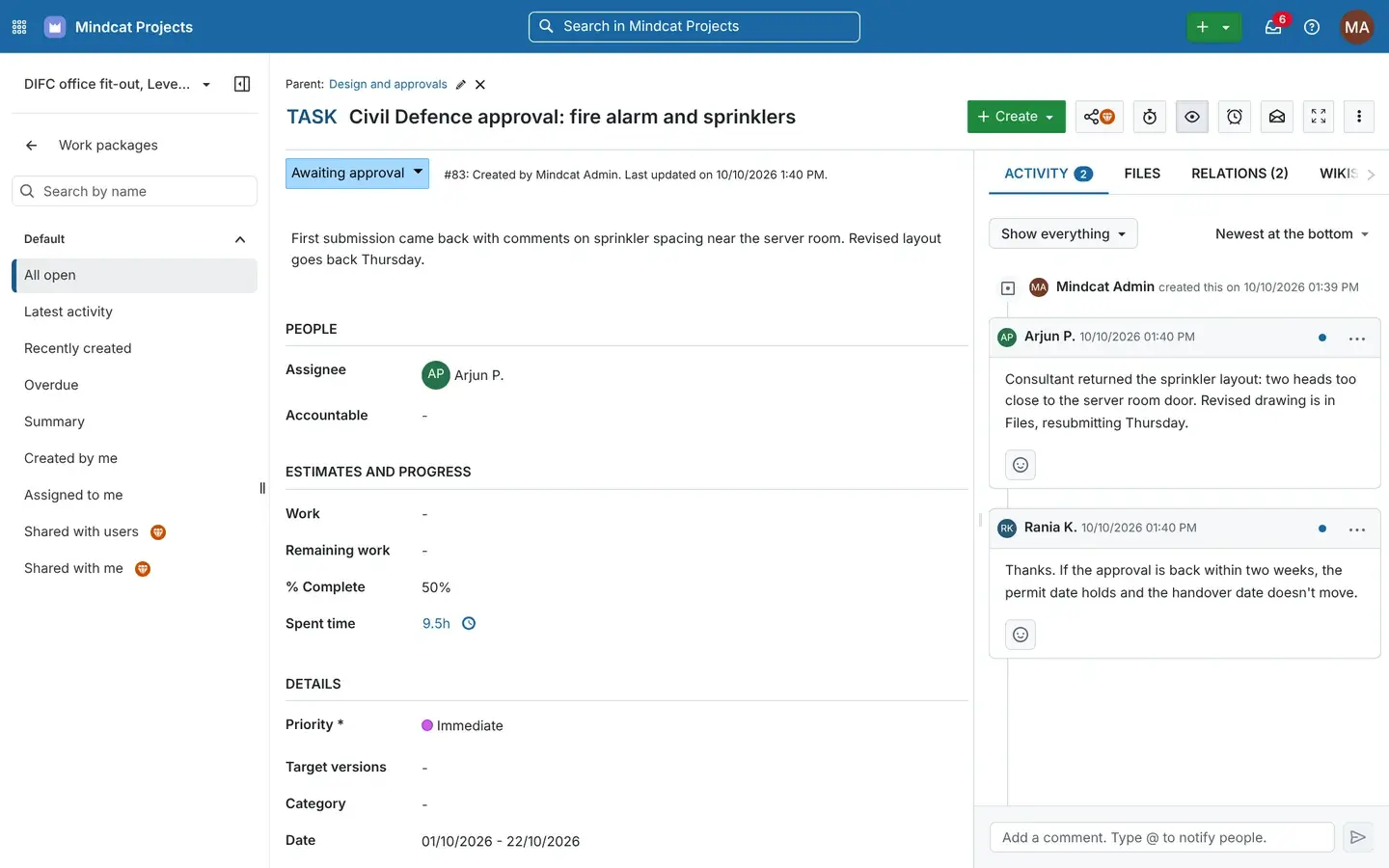
    The Civil Defence task: Arjun’s note about the sprinkler heads, Rania’s reply about the handover date, 9.5 hours logged.
    Task Civil Defence approval: fire alarm and sprinklers, status Awaiting approval, assignee Arjun P., half complete, 9.5 hours spent, priority Immediate, dates 1 to 22 October 2026, with comments from Arjun P. and Rania K. in the activity panel.
    Task detail: the comment, the date and who said it, in one place.
  4. “The site team doesn’t sit at a laptop.”

    On the site engineer’s phone

    Site engineers and foremen open their own tasks, the inbox of mentions and changes, and the task itself in the phone’s browser. Nothing to install, and the office sees the update as soon as it is saved.

    Used by
    Site engineers, foremen
    On screen
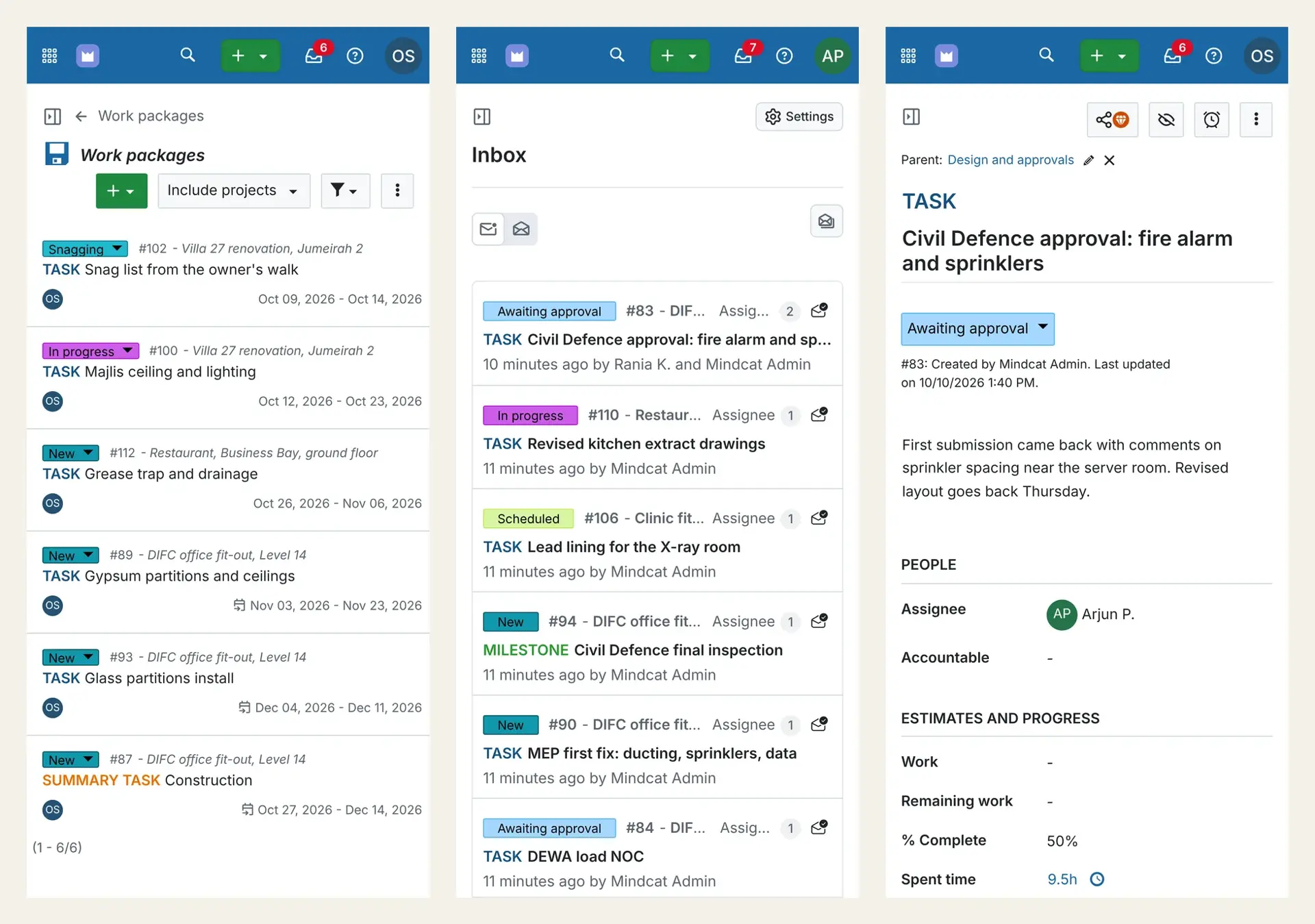
    Three phones: Omar’s open tasks across three jobs, Arjun’s inbox, and the Civil Defence task.
    Three phone screens of Mindcat Projects: a site engineer’s task list with snag list, majlis ceiling and grease trap tasks across a villa, a restaurant and the DIFC office; an inbox of updates on Civil Defence approval, kitchen extract drawings and the X-ray room lining; and the Civil Defence approval task.
    Phone view: the site’s tasks and updates, without a voice note.
  5. “The client wants to know the handover date, and gets a week-old PDF.”

    A free view for your client

    Give the tenant’s project manager, the consultant or the landlord’s fit-out coordinator a read-only login. They see the status, the timeline and the tasks, and can’t change anything. It costs nothing per client.

    Used by
    Clients, consultants, landlords
    On screen
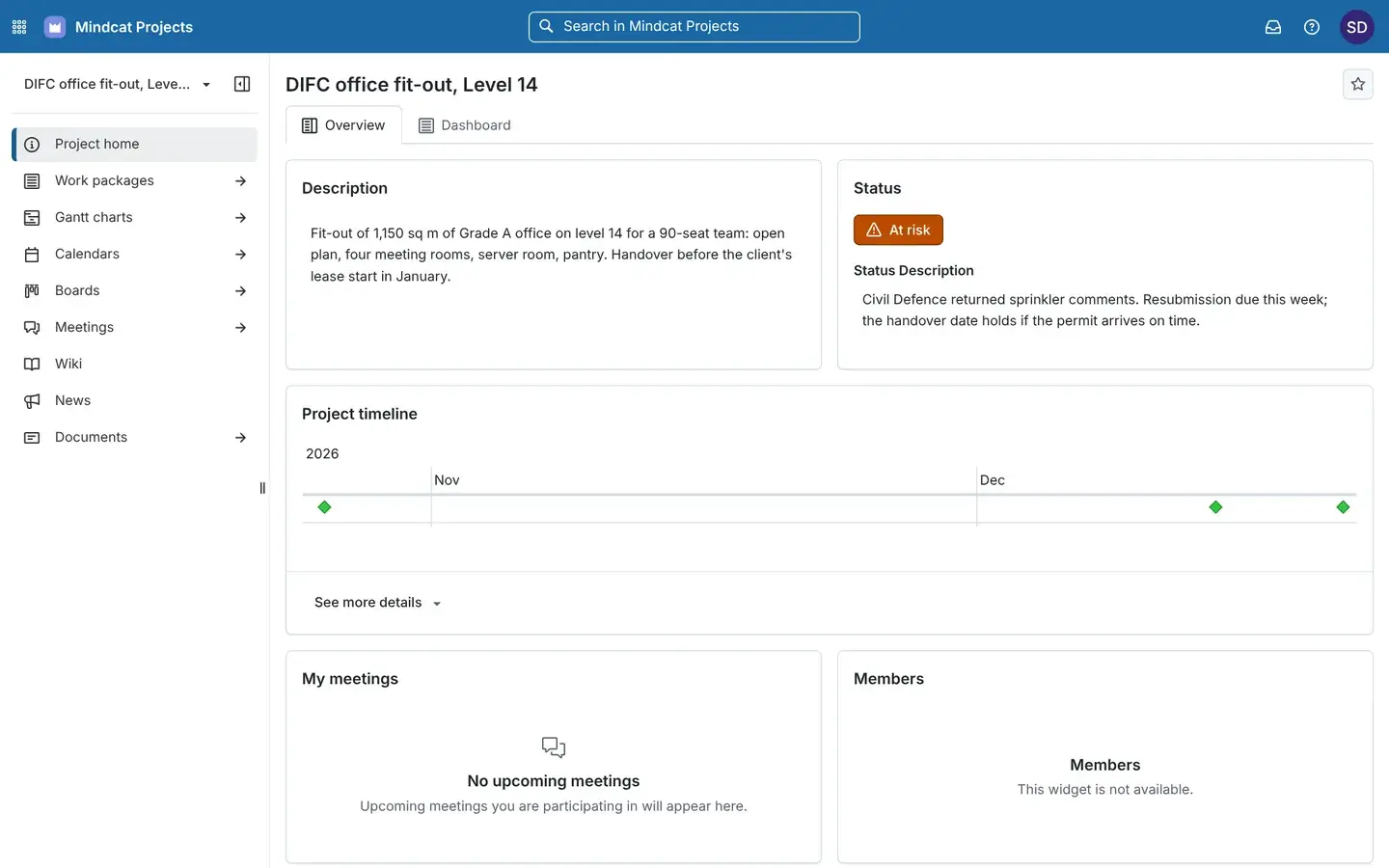
    Sara, the sample tenant’s representative, sees the DIFC job at risk with the reason, on a laptop and on her phone.
    Read-only client view of the DIFC office fit-out, Level 14: the description, status At risk with the note that Civil Defence returned sprinkler comments, and the project timeline with milestones in November and December.
    Client view: the status and the reason, without a weekly PDF.
  6. “The weekly site meeting starts with “where are we on…””

    Site meetings built from the tasks

    Each meeting has its date, place and participants, and agenda items linked to tasks with their current status. Calendar invites go out by email, and outcomes are recorded on the meeting.

    Used by
    Project managers, site teams
    On screen
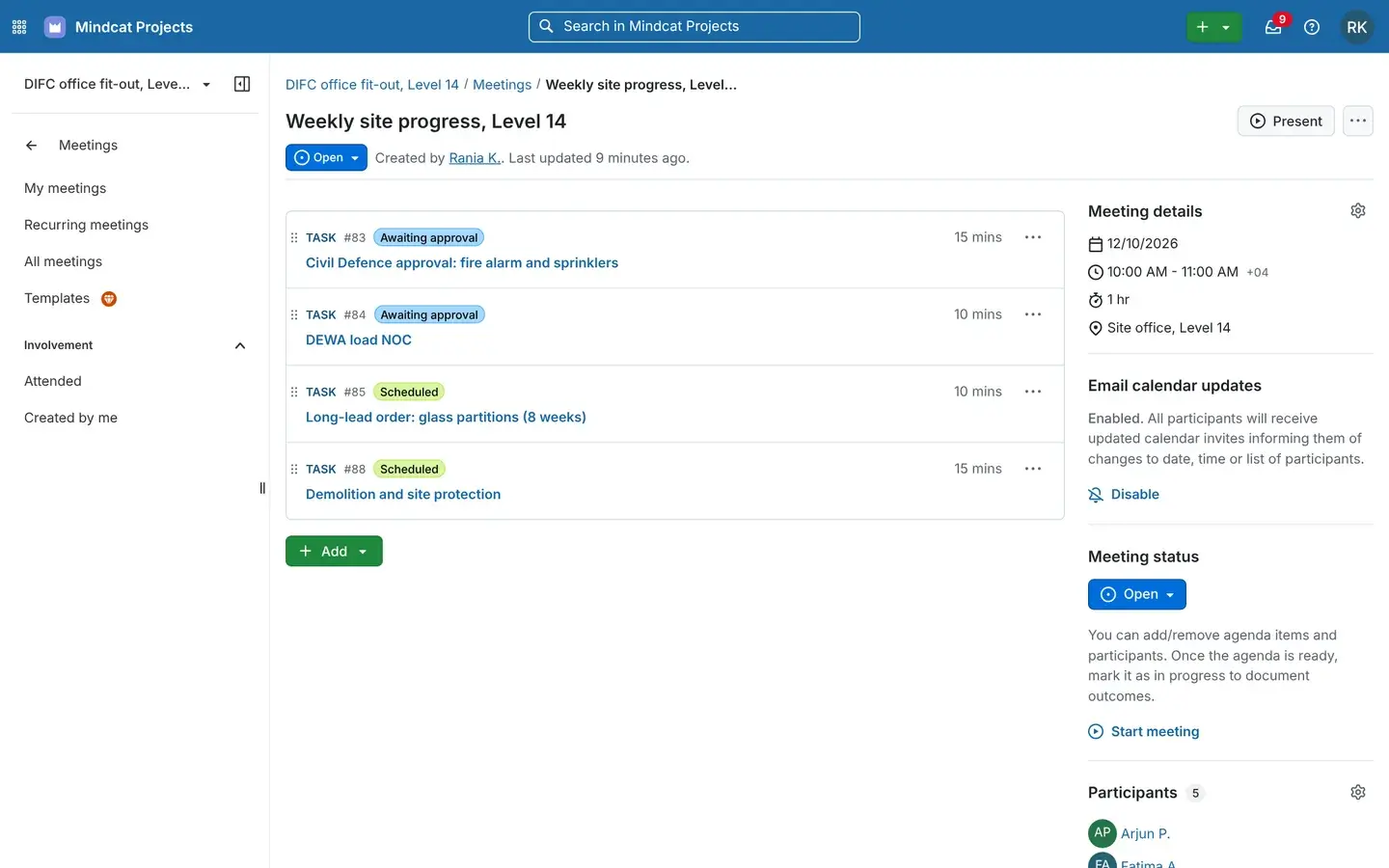
    Weekly site progress, Level 14: Civil Defence, DEWA, the glass partitions and demolition, Monday 10:00 in the site office.
    Meeting Weekly site progress, Level 14, on 12 October 2026 from 10:00 to 11:00 Gulf time in the site office, with four agenda items linked to tasks Civil Defence approval and DEWA load NOC awaiting approval, and glass partitions and demolition scheduled.
    Meetings: the agenda is the open tasks, with their status beside them.
  7. “The office wants to see what is waiting on approval at a glance.”

    Boards by status

    A board per job with a column for each stage: new, awaiting approval, scheduled, in progress. Drag a card to change its status.

    Used by
    Project managers, office team
    On screen
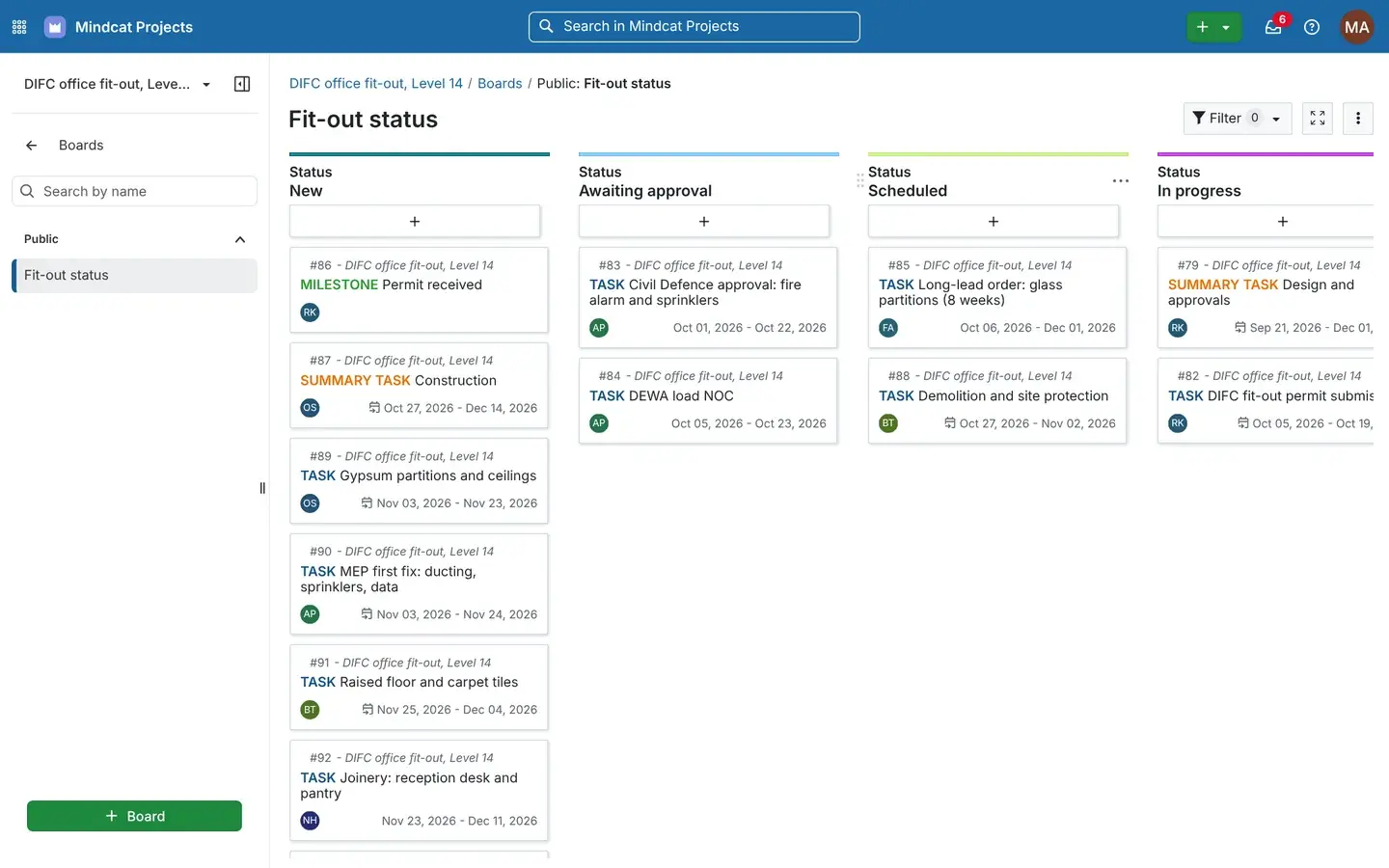
    The DIFC job’s status board with Civil Defence and DEWA in Awaiting approval.
    Board Fit-out status with columns New, Awaiting approval, Scheduled and In progress, and cards such as Civil Defence approval, DEWA load NOC, long-lead glass partitions and DIFC fit-out permit submission.
    Board: what is waiting on an authority, in one column.

Also included

The rest of the system, in one line each.

Who it is for

Fit-out, MEP and the PMO, before and after.

A project manager with a tablet and a site engineer in a hard hat look up at sprinkler pipes in an office fit-out in a DIFC tower.
Fit-out and interiors

Fit-out contractors in Dubai and Riyadh

Before: Civil Defence returns the sprinkler layout on a DIFC office, the planner moves dates in Excel on Sunday, and the tenant hears on Tuesday. After: the site engineer posts the comment on the task, the PM moves one date and the rest follow, and the tenant reads the new date in her own login.

Gantt per jobClient viewSite phones
An MEP engineer and an architect lean over a large printed drawing at a standing desk in an Abu Dhabi consultancy studio, one marking it with a pen.
Engineering and MEP consultancies

Consultancies in Abu Dhabi, Dubai and Riyadh

Before: design stages and Dubai Municipality and Civil Defence submissions for twelve clients across Abu Dhabi and Dubai live in one engineer’s spreadsheet, and fee hours are guessed at month end. After: each client is a project with its design stages and authority submissions on a Gantt, hours are logged on each task, and the client checks progress on a read-only login.

Design stagesHours per clientClient view
A Saudi PMO manager in a thobe and shemagh stands beside a wall screen with an out-of-focus timeline, with colleagues at a table in a Riyadh meeting room.
PMOs in the Kingdom

Project offices at Saudi developers and semi-government entities

Before: each contractor sends its own programme format, and the weekly status to leadership is rebuilt from email. After: every contractor’s job is a project with its status and a reason, the PMO reads one list, and the data stays in the Kingdom.

Status across projectsData in the KingdomMeeting agendas

Also used for

Developers, IT firms and event builders.

A site supervisor with a clipboard and a homeowner in a kandura look at a newly fitted kitchen in a renovated villa in Jumeirah, with masking tape marks on a cabinet door.
A snag walk on a renovated villa in Jumeirah: the kind of handover task that sits on the programme.Illustrative photo

بالعربية · In Arabic

What works in Arabic today.

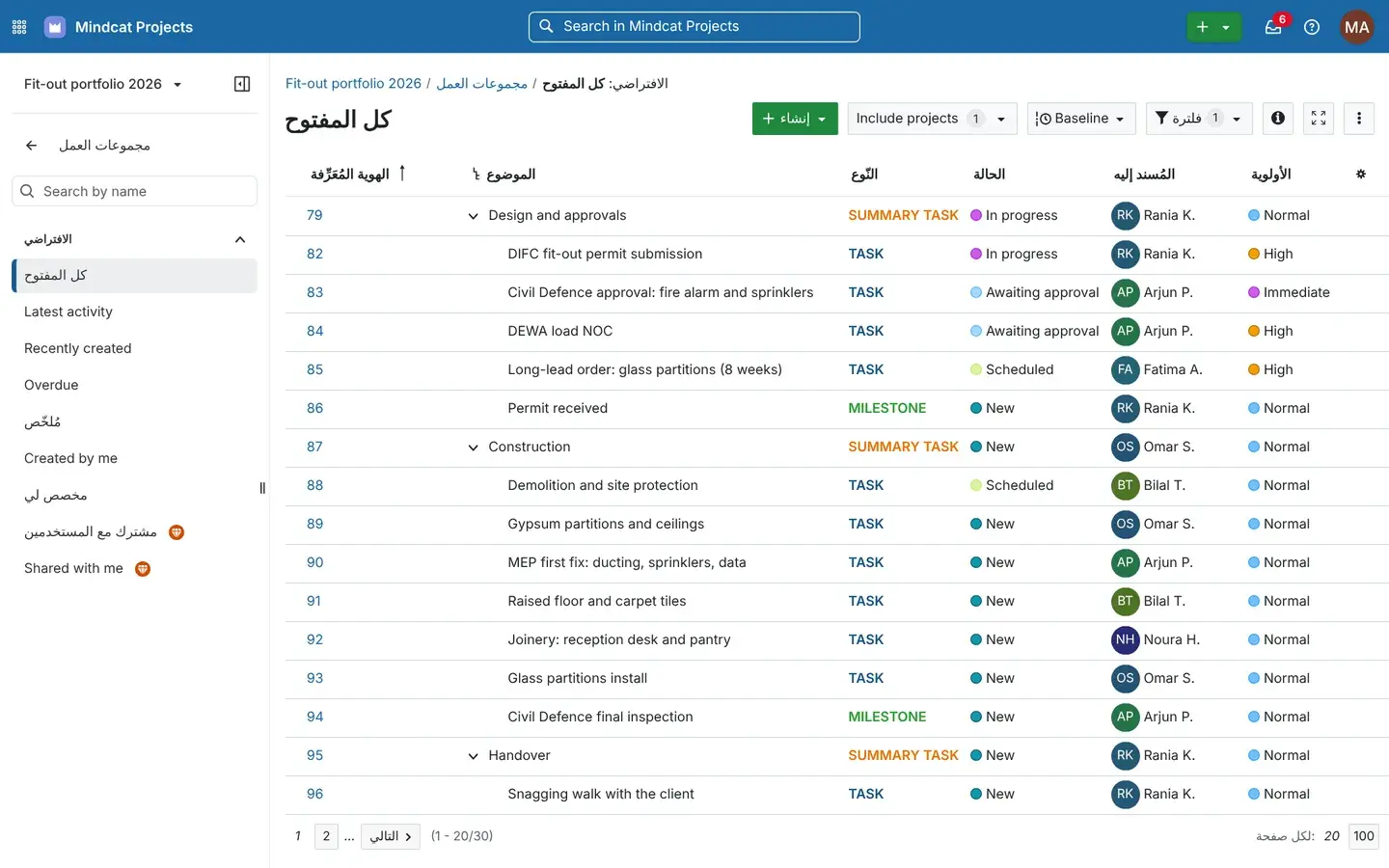
Mindcat Projects task list with the language set to Arabic: column headings and some menu items in Arabic, other labels and the task names in English, in a left-to-right layout.
The same task list with the user language set to Arabic: some labels switch, many stay in English, and the layout stays left to right.Real screen, sample data

Mindcat Projects · نظام إدارة المشاريع لمقاولي التشطيبات في الخليج

عدّل موعد موافقة الدفاع المدني مرة واحدة، وتتحرك معه بقية مهام المشروع، ويطّلع العميل على موعد التسليم الجديد في اليوم نفسه.

مخطط جانت لكل مشروع، وحالة جميع المشاريع في قائمة واحدة، ومهندس الموقع يحدّث مهامه من جواله. والبيانات مستضافة في الإمارات أو داخل المملكة.

الواجهة العربية غير مكتملة حالياً: بعض القوائم معرّبة، والصفحات تُعرض من اليسار إلى اليمين. خلال الإعداد نعرّب الشاشات الأكثر استخداماً لدى فريقك. التسعير بالريال لكل مستخدم، ودخول العميل والاستشاري مجاني.

In English: change the Civil Defence approval date once, the rest of the job moves with it, and the client sees the new handover date the same day. A Gantt chart per job, every job’s status on one list, and site engineers updating their tasks from their phones, hosted in the UAE or the Kingdom. The Arabic interface is incomplete today: some menus are in Arabic and pages run left to right. During setup we put the screens your team uses most into Arabic. The price is per member in riyals, and clients and consultants log in free.

Built for the Gulf

What is ready today, and what we add during setup.

Every row below is true today, work we do during your setup, or not offered. We say which.

What Gulf project teams needWhere it stands
Data in the UAE or Saudi ArabiaToday. Your own copy runs in Dubai or Abu Dhabi, in Jeddah or Riyadh, or in your own cloud.
Authority stages as statusesToday. Our sample copy uses Awaiting approval, Scheduled, In progress, Snagging and On hold. We set your own stages during setup.
Your working week and public holidaysToday. Non-working days are skipped when tasks move. We load the UAE or Saudi calendar during setup.
Clients and consultants watching progressToday, on free read-only logins.
Site engineers on phonesToday, in the phone’s browser. Nothing to install.
ArabicPartly. Some menus and labels are in Arabic today, many are still in English, and the layout stays left to right. Task names and comments in Arabic work. We add Arabic for the screens your team uses most during setup.
Updates on WhatsAppNot offered. Updates arrive by email and in the app’s inbox.
Dubai Municipality, Civil Defence, DEWA or Balady portalsNot connected. Each submission is a task with its own dates, comments and files.
Hijri datesNot today. Dates are Gregorian.

Prices

Price your team: per member, in AED and SAR.

Set your member count and where it should run. Clients, consultants and read-only users are free. Every price is also listed in full below.

Where should it run?

Your monthly price

AED 3,170

SAR 3,170 · USD 863.17 · about AED 106 per member

One-time setup
AED 9,900
Per-project fees
None

AED and SAR are the same number; USD at 3.6725 to the dirham. The maker’s Enterprise add-ons are optional and billed at cost, from EUR 5.95 per user a month at the maker’s list price with a 25-user minimum. Excludes 5% UAE VAT and 15% Saudi VAT. Annual prepay takes 15% off our part.

The full price list

Every band, option and fee, in writing.

You pay per member per month. The price drops as your team grows: each band’s price applies only to the members inside that band. A member is anyone with a login who creates or edits tasks, logs time or runs meetings, so project managers, planners, site engineers, QS and admins count. Clients, consultants and anyone with read-only access are free.

MembersAEDSARUSD
1 to 1017917948.74
11 to 30696918.79
31 to 100454512.25
101 and up29297.90

Worked example. A fit-out contractor with 30 members pays 10 × 179 + 20 × 69 = AED 3,170 a month (SAR 3,170, or USD 863.17). With 100 members it is AED 6,320 (USD 1,720.90). With 250 it is AED 10,670 (USD 2,905.38). Your clients’ and consultants’ read-only logins add nothing.

How you run it changes the multiplier.

OptionPriceMinimum a month
Your own copy, hosted by us in the UAE or Saudi ArabiaThe member price aboveAED/SAR 1,790 (USD 487.41)
In your own cloud or servers, run by usMember price × 0.75, and you pay your cloud bill directlyAED/SAR 2,490 (USD 678.01)
Shared with other companiesNot offered. The software keeps users and settings across one whole install, so every company gets its own copyn/a

One-time setup. Up to 10 members: AED/SAR 4,900 (USD 1,334.24). 11 to 30: AED/SAR 9,900 (USD 2,695.71). 31 to 100: AED/SAR 19,900 (USD 5,418.65). Above 100: from AED/SAR 39,900 (USD 10,864.53), scoped in writing. Setup covers your live jobs and their programmes loaded from Excel or an MS Project or Primavera export, statuses for your approval stages, your working week and public holidays, logins for your team, read-only logins for your clients, your branding, the Arabic wording your team sees most, and training in Arabic and English.

Billed at cost, outside the member price. The maker’s Enterprise add-ons are optional and billed at cost, from EUR 5.95 per user a month at the maker’s list price with a 25-user minimum. You only need them for the team planner, single sign-on, baseline comparison, Gantt PDF export, or portfolio and resource management. No per-project fees. Annual prepay takes 15% off our part. Prices exclude 5% UAE VAT and 15% Saudi VAT.

Compare your options

What 30 members cost with each option.

The same team of 30 members, priced from each option’s own published price list. Checked on 10 October 2026. VAT is extra everywhere.

Swipe the table sideways to see every column.

Option30 users a monthData in the UAE or KSAWho sets it upSource
Excel and a WhatsApp group per jobNo software bill. The cost is the Sunday spent moving dates by hand and the client who hears last.On staff laptops and phonesNobodyYour last handover
Mindcat Projects, your own copyAED/SAR 3,170 (USD 863.17). Clients and consultants freeYes. Dubai, Abu Dhabi, Jeddah or RiyadhWe do, in Arabic and EnglishThis page
SmartsheetUSD 570 on Business (USD 19 a member billed yearly, 24 monthly)Not statedYou dosmartsheet.com
WrikeUSD 750 on Business (USD 25 a user, billed yearly)Not statedYou dowrike.com
monday.com work managementUSD 360 on Standard, 570 on Pro (USD 12 or 19 a seat, billed yearly)Not statedYou domonday.com
Primavera P6 or MS Project on the planner’s deskLicensed per planner, by quote from a reseller. Usually only the planner can update the programmeOn the planner’s laptop or your serverYour plannerYour reseller
OpenProject cloud (the maker of the software we build on)EUR 178.50 on Basic (EUR 5.95 a user, 25-user minimum)No. Hosted in the EUYou doopenproject.org
Install it yourselfNo licence fee for the Community edition, plus a server with 4 cores and an engineer to run, update and back it upWherever you host itYour IT teamopenproject.org

The cheapest line is not always the cheapest handover. Ask each option three questions: where the data sits, who loads your live jobs and approval stages, and whether your client can watch the programme without a paid seat.

How we start

From your live jobs to go-live, with the date in writing.

No demo maze and no annual contract to start. You see the plan and the price before you pay anything.

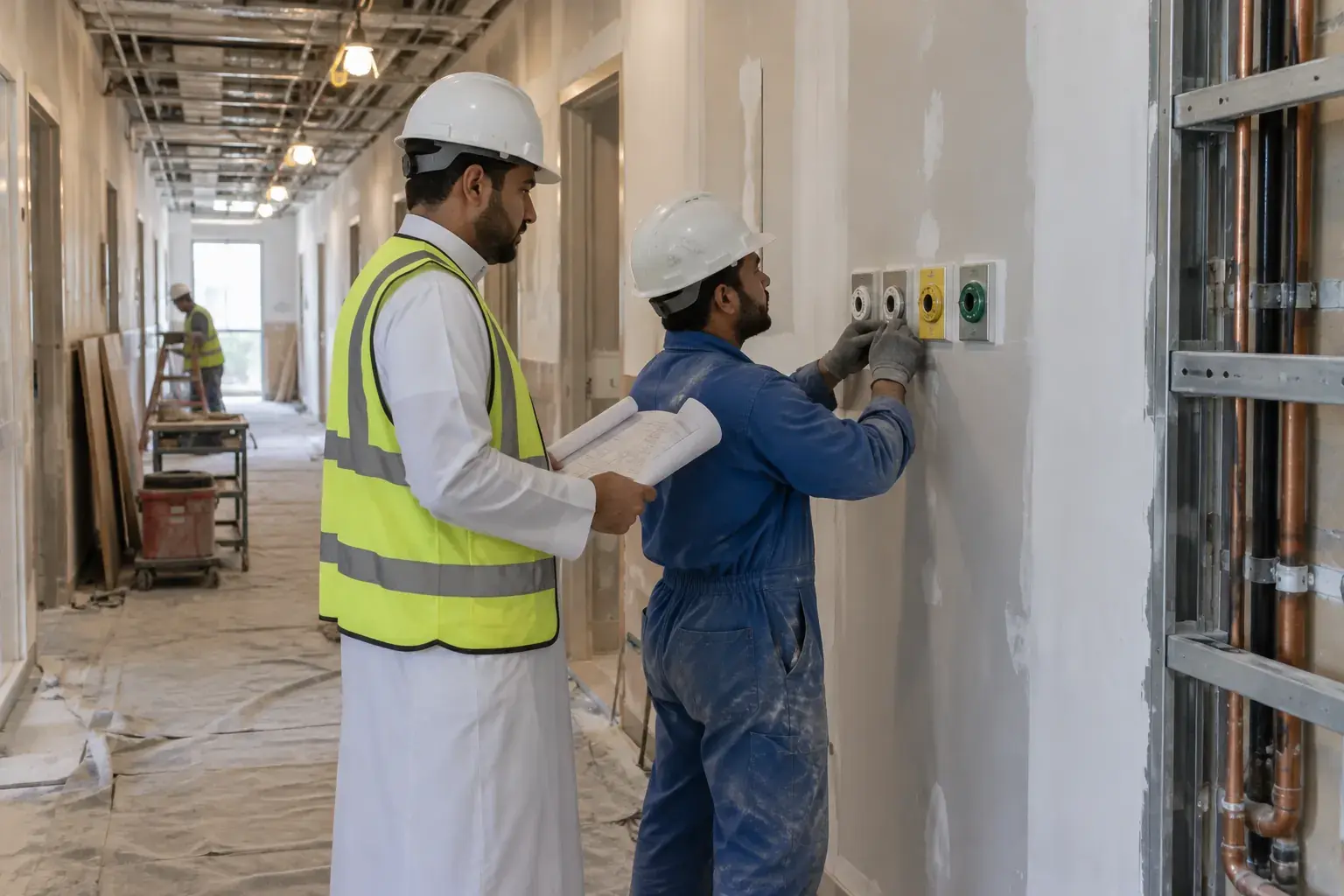
A Saudi project engineer in a hard hat and a technician in coveralls check medical gas outlets being installed on a corridor wall of a clinic fit-out in Riyadh, with dust sheets on the floor.
A clinic fit-out in Al Olaya, Riyadh: one of the jobs we load during setup.Illustrative photo

Why Mindcat

Hosted in the region. Set up and run for you.

FAQ

What contractors and PMOs ask first.

Do we have to drop Primavera or MS Project?
No. Keep them if your client or consultant asks for a baseline programme in that format. During setup we load your live jobs from an Excel, MS Project or Primavera export, and from then on the team, the site and the client work from one live programme here.
Will our site engineers actually use it?
Yes, if it asks little of them. They open their own tasks and the inbox on their phone’s browser, post a comment or change a status, and that is it. We train them during setup in Arabic and English.
Can our client see progress without paying for a seat?
Yes. Clients, consultants and landlords’ coordinators get read-only logins for free. They see the status, the timeline, tasks and comments, and can’t change anything.
Does it make our job compliant with Civil Defence or Dubai Municipality?
No, and no software can. It keeps each submission, comment round and inspection as a task with its dates and files, so you see what is waiting on whom. The approvals stay with you and your consultant.
Where is our data stored?
In your own copy in Dubai or Abu Dhabi, or in Jeddah or Riyadh, whichever you choose. In your own cloud, it stays wherever your account is. We back it up, and you can take a full copy of the database and files at any time. Our invoices are in AED or SAR with VAT shown.
Does it work in Arabic?
Partly. Some menus and labels switch to Arabic today and many are still in English, and the layout stays left to right. Task names and comments in Arabic work fine. During setup we add Arabic for the screens your team uses most.
Can we sign in with Microsoft 365 or our company directory?
Yes, with the maker’s Enterprise Professional add-on, billed at cost. Without it, each person signs in with an email and password.
What counts as a member?
Anyone with a login who creates or edits tasks, logs time or runs meetings: project managers, planners, site engineers, QS and admins. Clients, consultants and anyone with read-only access are free.
How is it different from Mindcat Maintain?
Mindcat Projects runs jobs with a start, a programme and a handover. Mindcat Maintain runs the building after handover: complaints, work orders and planned maintenance.
What is it built on?
Mindcat Projects is built on OpenProject, licensed under GPL-3.0, and any changes we make to it will be released under the same licence. When we run it on your own servers, the source of our version comes with it, and our copy will link to that source. The maker’s Enterprise add-ons, such as the team planner and single sign-on, are optional and billed at cost.


The brief · one email

Tell us your live jobs and how you plan them today.

The honest no: if the work is a software factory with a named delivery date, we are the wrong partner.