A PRO officer in a white kandura feeds documents into a desktop scanner at a typing centre counter in Al Karama while a customer waits with a plastic folder.

Mindcat Vault · Document management system: Arabic search, expiry alerts

Every licence, ID and tenancy contract searchable in Arabic, with a reminder before it expires.

For PRO and typing centres, brokerages, law firms and HR teams in the UAE and Saudi Arabia. Scan or upload at the counter, and every page is read in Arabic and English and filed by client, property or employee. The dashboard lists what expires in the next 90 days, and your desk gets an email 30 days before each date. Hosted in the UAE or the Kingdom from AED/SAR 59 per user a month, set up by us, with the go-live date in writing after one session with your office manager.

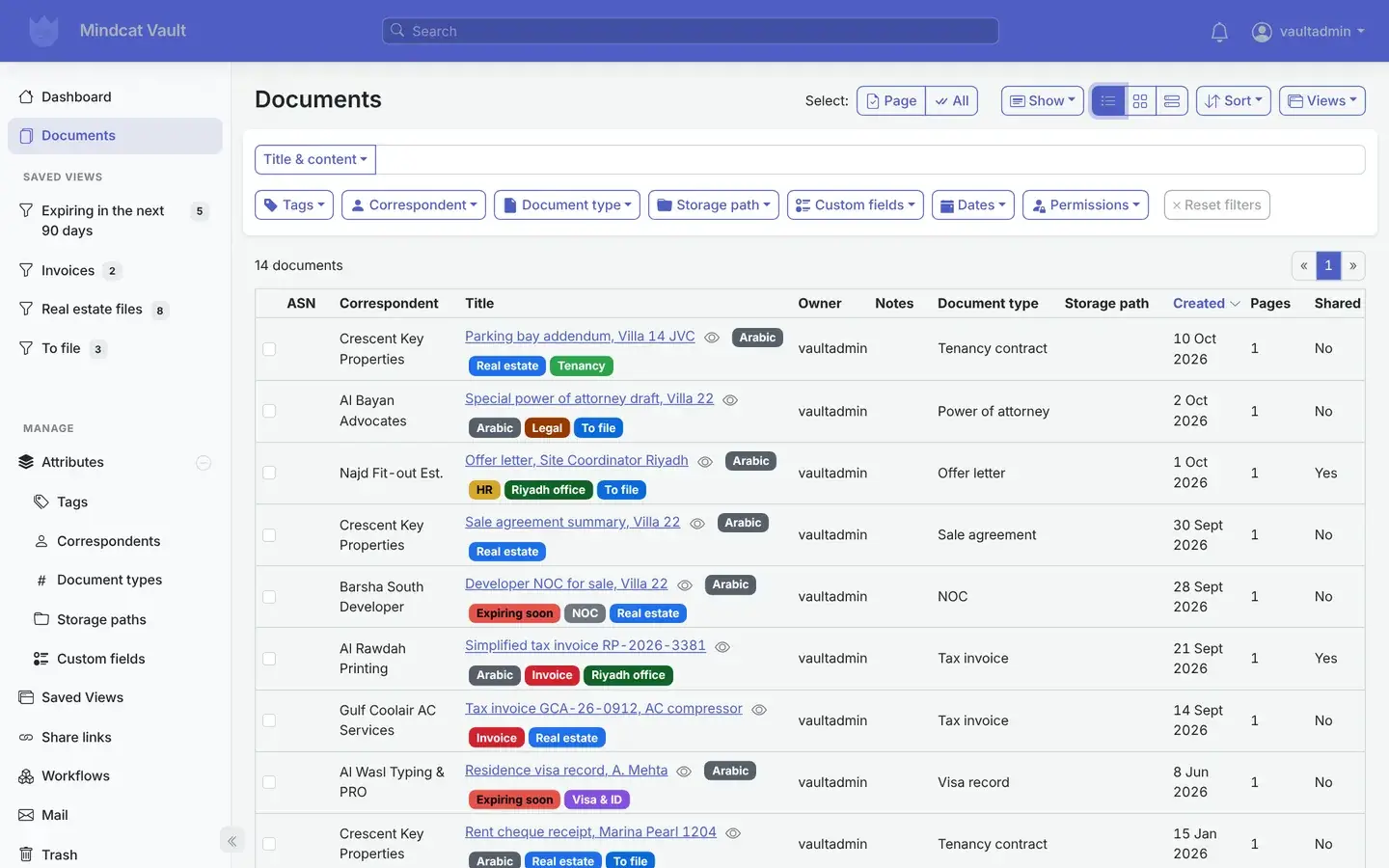
Mindcat Vault document management system: the document list with fourteen sample files such as a parking bay addendum for Villa 14 JVC, a power of attorney draft for Villa 22, an offer letter for Riyadh and tax invoices, each with its correspondent, labels such as Arabic, Real estate and Expiring soon, document type and date.
Fourteen sample documents: tenancy contracts, NOCs, a trade licence, invoices and a power of attorney, each with its client and labels.Real screen, sample data

Where Gulf paperwork goes wrong

Five ways a missing paper costs a Gulf office money or a client.

An office manager in a Karama office searches a metal cabinet crammed with ring binders while holding his phone, a colleague flipping through photocopies behind him.
Before: the file is in one of these binders, or on someone’s phone.Illustrative photo

Nothing expires unseen · how one licence moves

From the counter to the renewal, on one record the office keeps.

A renewed trade licence for Sahel Coffee Trading in Al Quoz, expiring on 15 November, followed through everyone who touches it.

  1. 01PRO clerkScans it at the counterDrops the PDF on the dashboard, or scans to the office scanner’s Vault folder. The upload shows in the task list.On: Upload and tasks
  2. 02VaultReads the Arabic and EnglishThe text on the page is read and stored with the file, so any word in it can be searched.On: Document content
  3. 03PRO clerkFiles it to the clientClient Sahel Coffee Trading, type Trade licence, expiry date 15 November 2026, client file PRO-1102.On: Document details
  4. 04PRO managerSees it on MondayIt joins the “Expiring in the next 90 days” list on the dashboard, next to an NOC, a tenancy contract and a visa.On: Dashboard
  5. 05PRO deskGets the reminderOn 16 October, 30 days before the date, the licence is labelled Expiring soon and the desk gets an email with it.On: Email
  6. 06PRO officerFinds it at the ministryTypes “trade licence” on the phone and opens the copy at the counter.On: Phone
Arabic text reading and the reminder email are switched on during setup; the scanner folder or mailbox in step 1 too. Everything else works on day one.

Document management system · real screens

The document management screens your office will use every day.

Captured from our own running copy with invented sample documents, each marked SAMPLE: tenancy contracts, a trade licence, a title deed, NOCs, invoices and an offer letter. Names and numbers are not real.

  1. “I find out a licence expired when the client calls.”

    What expires next, on the dashboard

    A saved list of every document whose expiry date falls in the next 90 days, with its client and labels. Invoices, real estate files and documents still to file get their own lists.

    Used by
    PRO manager, office manager
    On screen
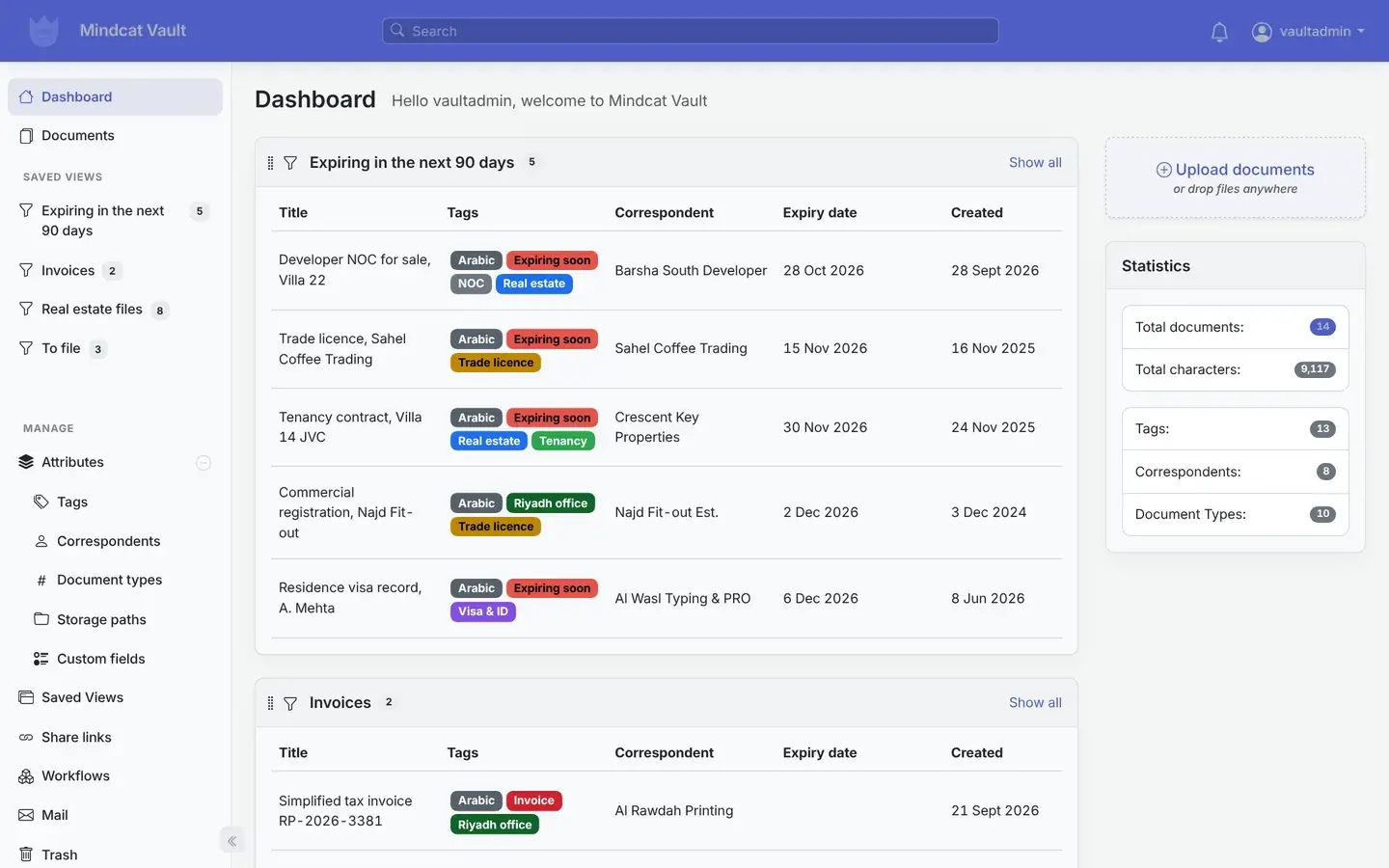
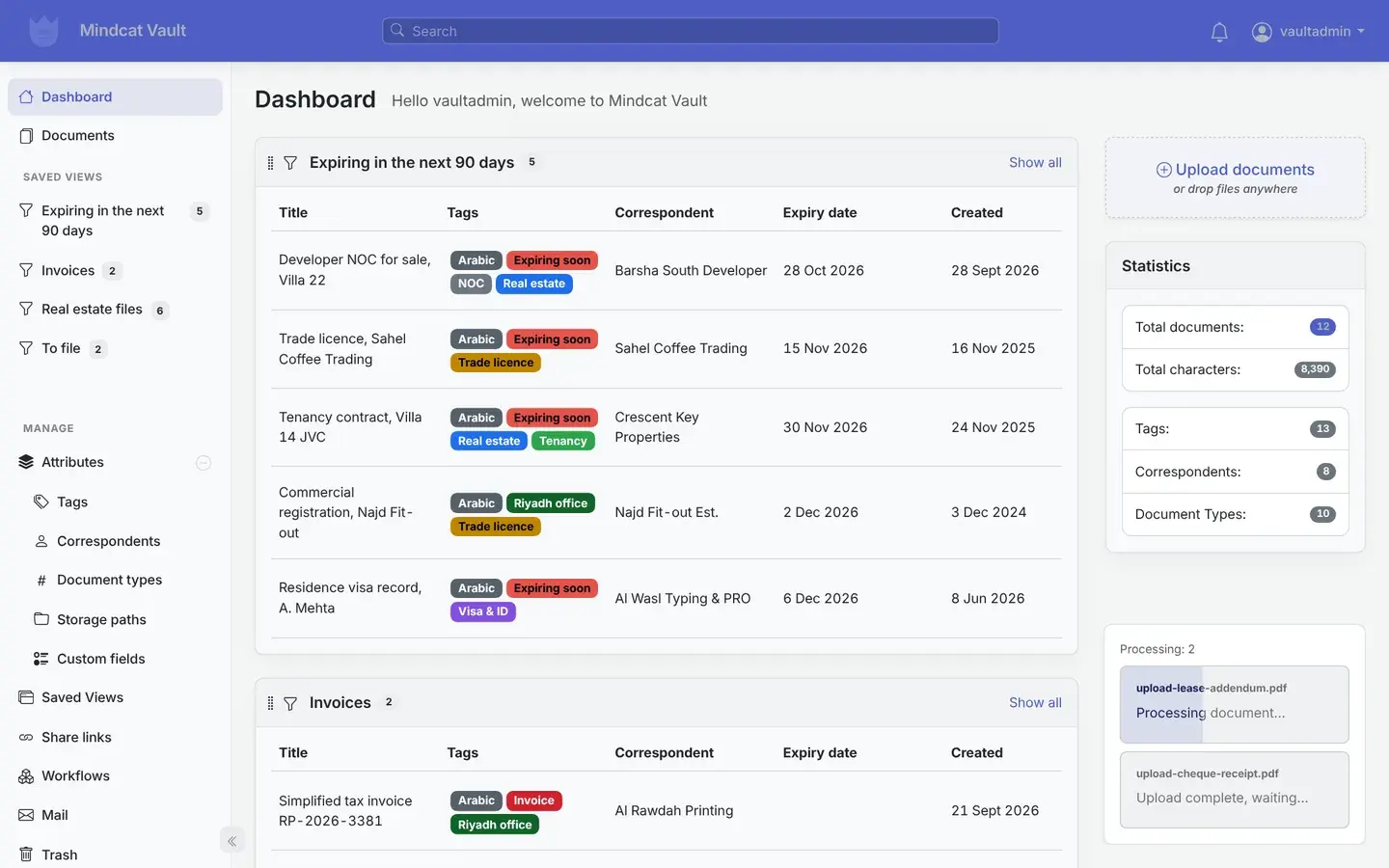
    Five sample documents expiring between 28 October and 6 December: an NOC, a trade licence, a tenancy contract, a Saudi CR and a visa record.
    Mindcat Vault dashboard with the saved view Expiring in the next 90 days: Developer NOC for sale Villa 22, trade licence Sahel Coffee Trading, tenancy contract Villa 14 JVC, commercial registration Najd Fit-out and residence visa record A. Mehta, each with its expiry date.
    Dashboard: the renewals list is the first thing you see.
  2. “Renewals depend on one person remembering.”

    A reminder 30 days before each date

    A rule that runs on the expiry date field: 30 days before, it labels the document Expiring soon and emails your desk. Change the days, the label or who gets the email.

    Used by
    PRO desk, HR, property managers
    On screen
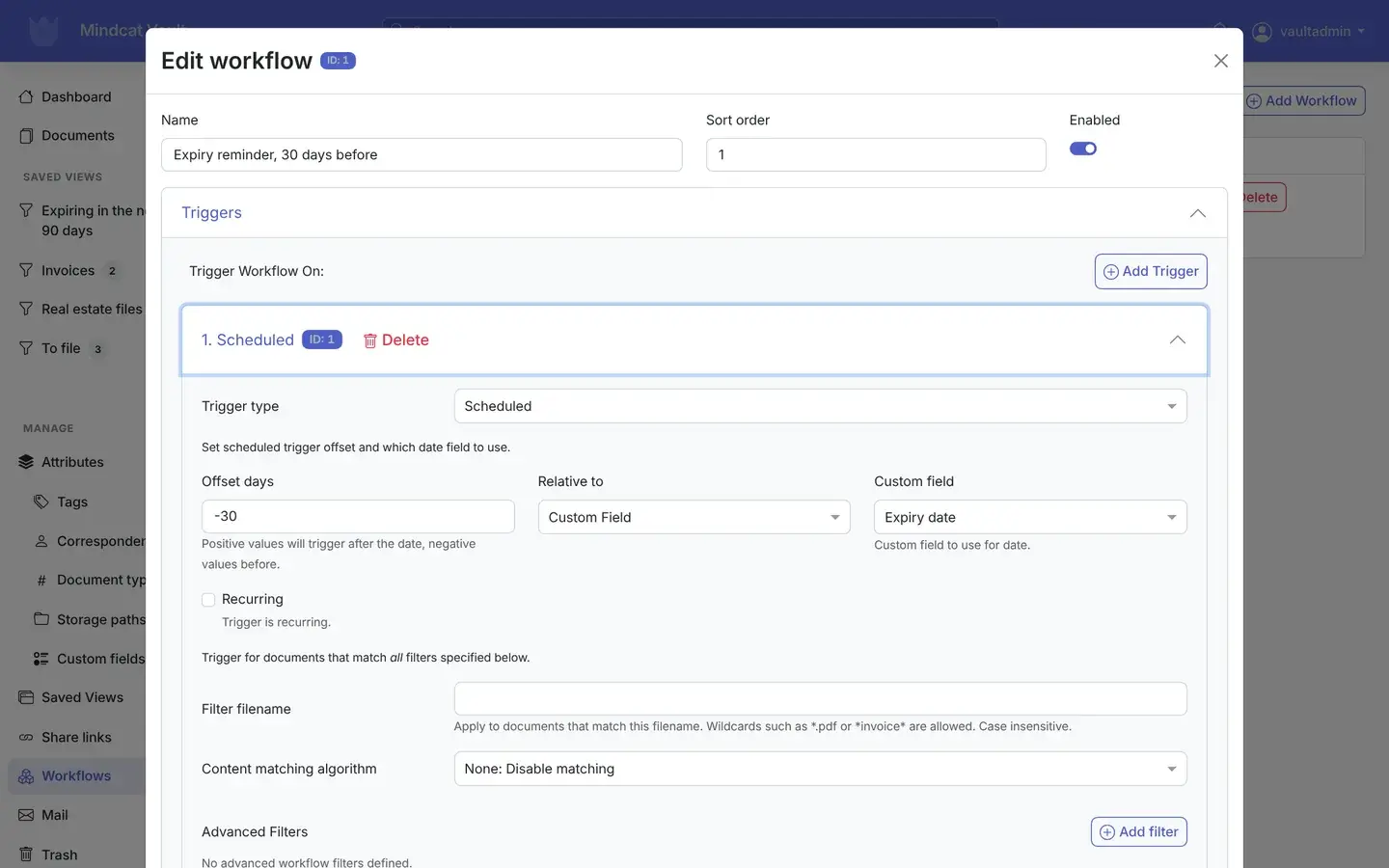
    The rule “Expiry reminder, 30 days before”, scheduled at −30 days on the Expiry date field.
    Mindcat Vault workflow editor: the rule Expiry reminder, 30 days before, with a scheduled trigger, offset −30 days, relative to the custom field Expiry date.
    Reminder rule: set once, runs for every document with a date.
  3. “Our Arabic papers are pictures nobody can search.”

    Arabic OCR on every scan

    Each page is read in Arabic and English when it arrives, and the text is kept with the file. Clean scans read well; faint ones get some words wrong, so we test your own documents in setup.

    Used by
    Everyone who searches
    On screen
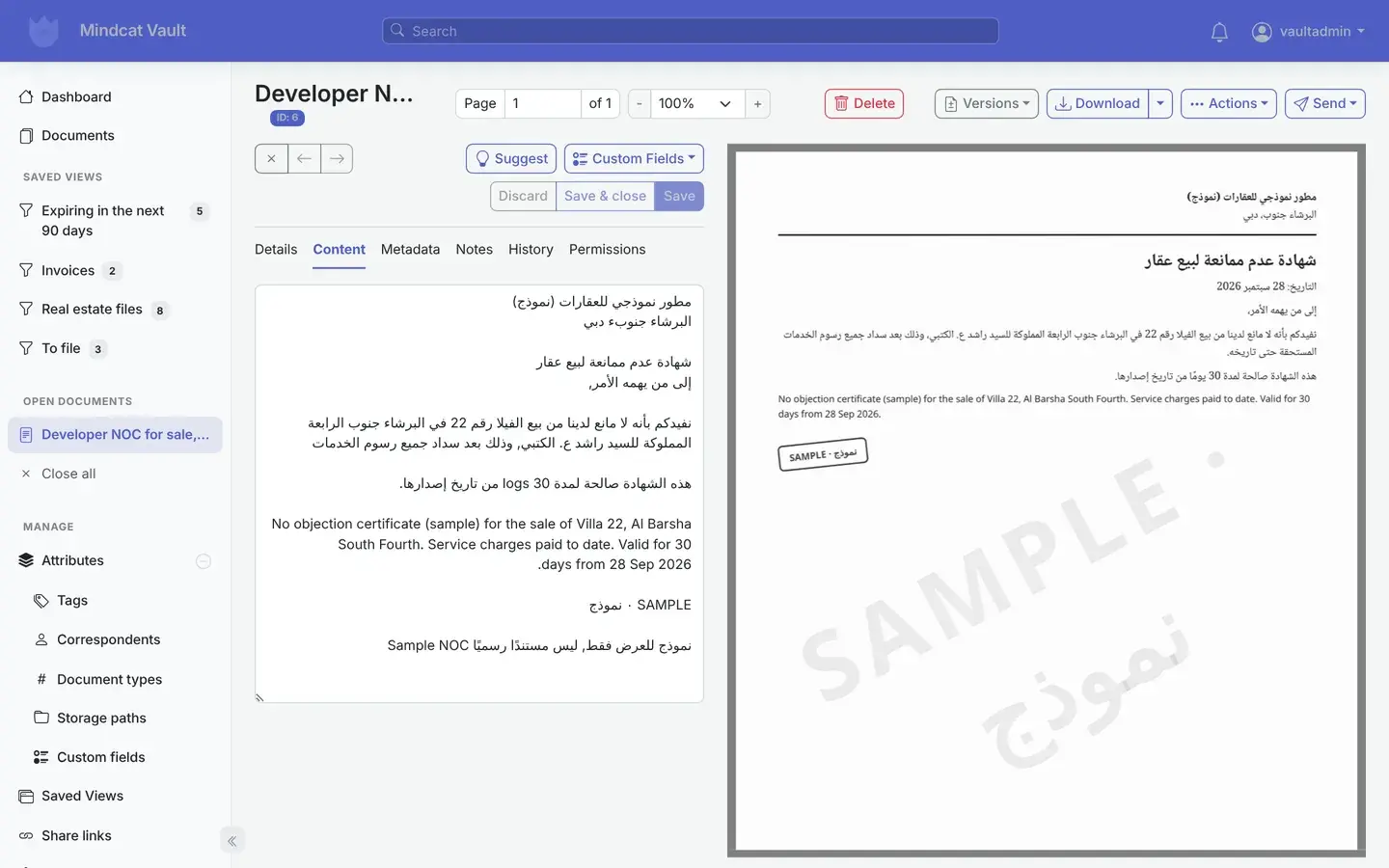
    A sample developer NOC for Villa 22 in Al Barsha South, scanned as an image, with the Arabic text read from it.
    Arabic OCR in Mindcat Vault: the content tab of a sample developer NOC for Villa 22 Al Barsha South, showing the Arabic and English text read from the scan beside the scanned page marked SAMPLE.
    Arabic text read from a scan, beside the page.
  4. “The bank wants last year’s contract today.”

    Search by any word, in Arabic or English

    Type a name, a villa number or a licence number and get every document with it in the text or the fields, with the words highlighted.

    Used by
    Everyone
    On screen
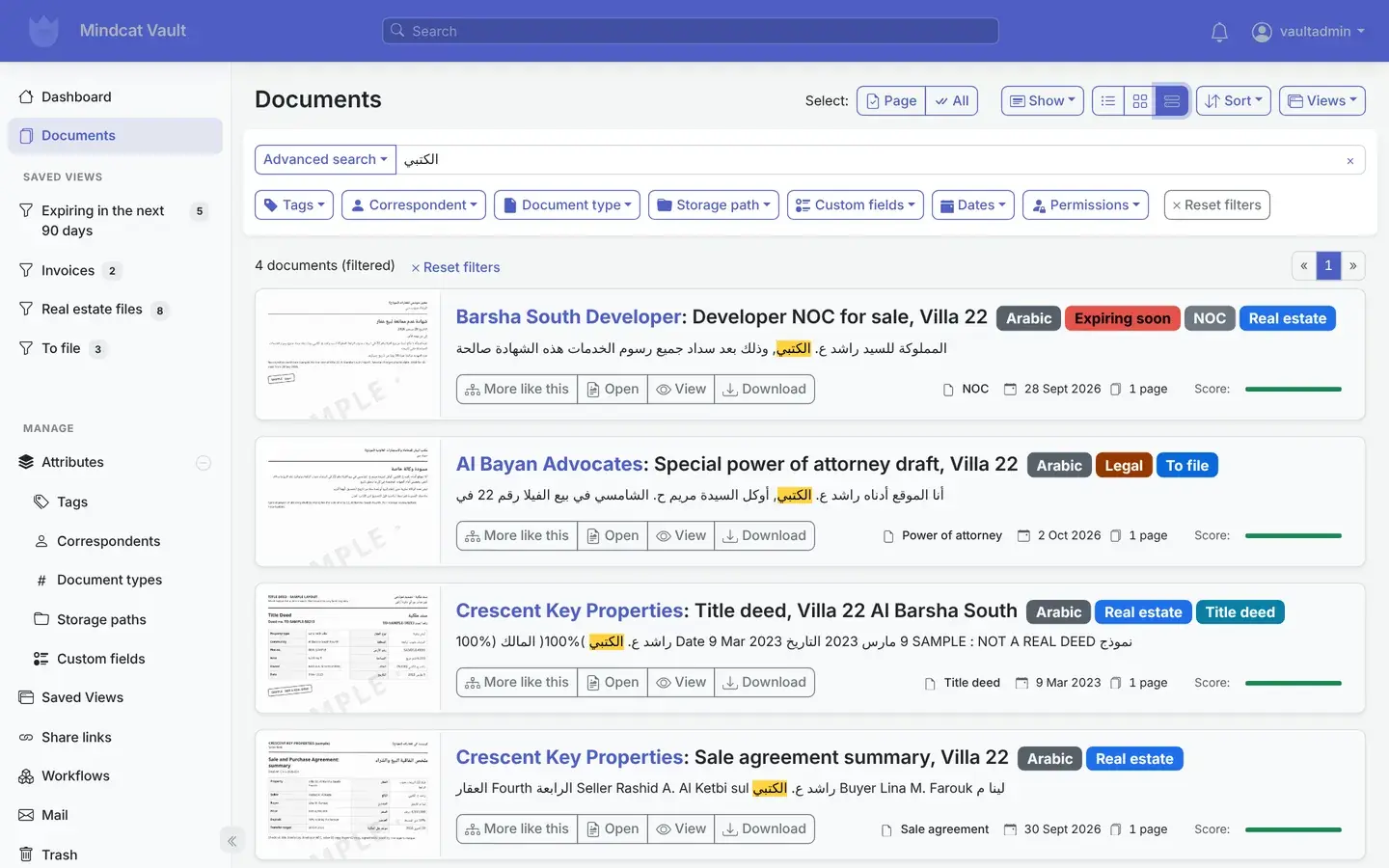
    A search for the Arabic family name الكتبي returns an NOC, a power of attorney, a title deed and a sale agreement for Villa 22.
    Mindcat Vault search results for the Arabic name الكتبي: four sample documents for Villa 22, an NOC, a power of attorney draft, a title deed and a sale agreement summary, with the name highlighted in the Arabic text.
    Search: one Arabic name, every file it appears in.
  5. “We have 400 clients and one shared drive.”

    Filed by client, property or employee

    Each document gets its client, a type, labels and your own fields: expiry date, client file number, property or employee. Vault learns from your filing and suggests them for the next one.

    Used by
    PRO clerk, office manager
    On screen
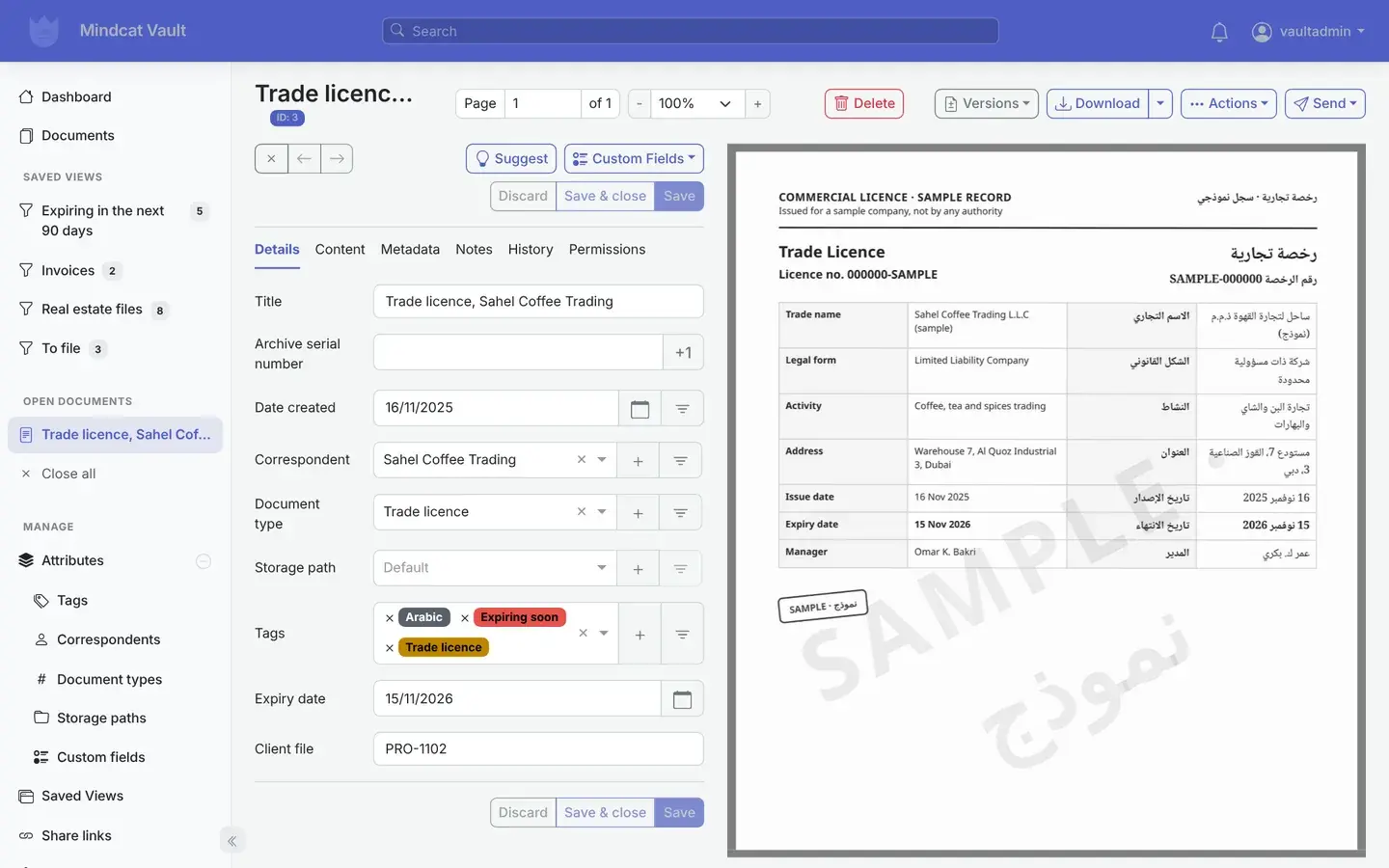
    A sample trade licence for Sahel Coffee Trading with expiry date 15 November 2026 and client file PRO-1102.
    Mindcat Vault document details for a sample trade licence of Sahel Coffee Trading: correspondent, document type Trade licence, labels Arabic, Expiring soon and Trade licence, expiry date 15 November 2026 and client file PRO-1102, beside the bilingual licence scan.
    Details: the expiry date and client file on the document.
  6. “The Riyadh team shouldn’t see Dubai’s client files.”

    Each office or team sees its own files

    Every document has an owner, and you choose which people or groups can view or edit it. Staff sign in with a password and an optional authenticator code, and each document keeps a history of changes.

    Used by
    Partners, HR managers, office managers
    On screen
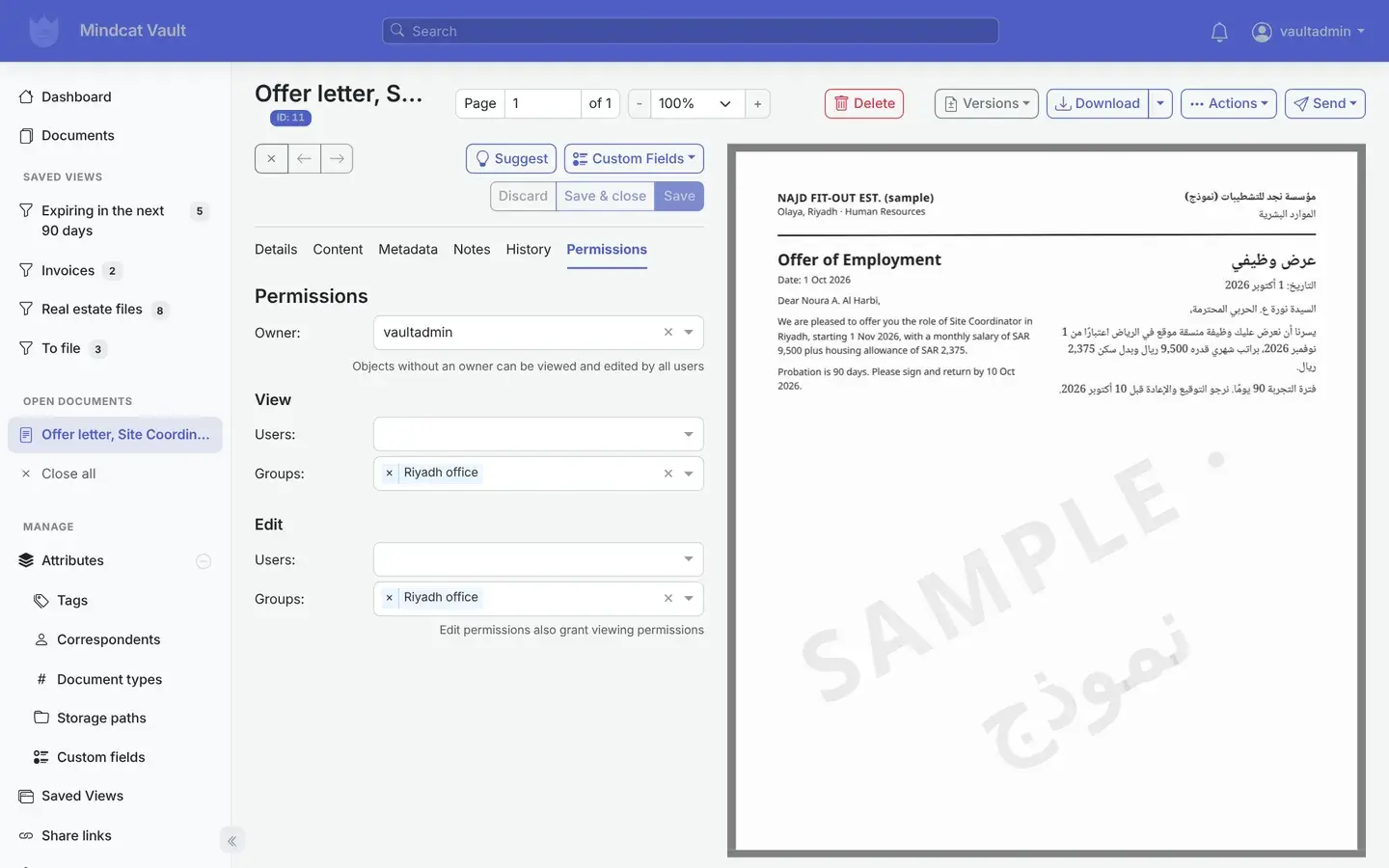
    A sample Riyadh offer letter visible and editable only by the Riyadh office group.
    Mindcat Vault permissions tab for a sample offer letter from Najd Fit-out in Riyadh: owner vaultadmin, view and edit granted to the group Riyadh office only.
    Permissions: the Riyadh office sees Riyadh files.
  7. “Papers arrive at the counter, by email and on WhatsApp.”

    Upload, scan to a folder or email it in

    Drag files onto the page, scan to the office scanner’s folder, or forward to a mailbox Vault reads. The same document scanned twice is flagged.

    Used by
    Reception, PRO clerks
    On screen
    A parking bay addendum and a rent cheque receipt uploading while the dashboard stays open.
    Mindcat Vault dashboard with two sample files uploading, upload-lease-addendum.pdf processing and upload-cheque-receipt.pdf waiting, beside the Expiring in the next 90 days list.
    Upload: drop the files and keep working.
  8. “I need the NOC while I’m at the trustee office.”

    The same Vault on your phone

    Open Vault in the phone’s browser: the renewals list, search and each document’s details. Nothing to install.

    Used by
    PRO officers, field brokers
    On screen
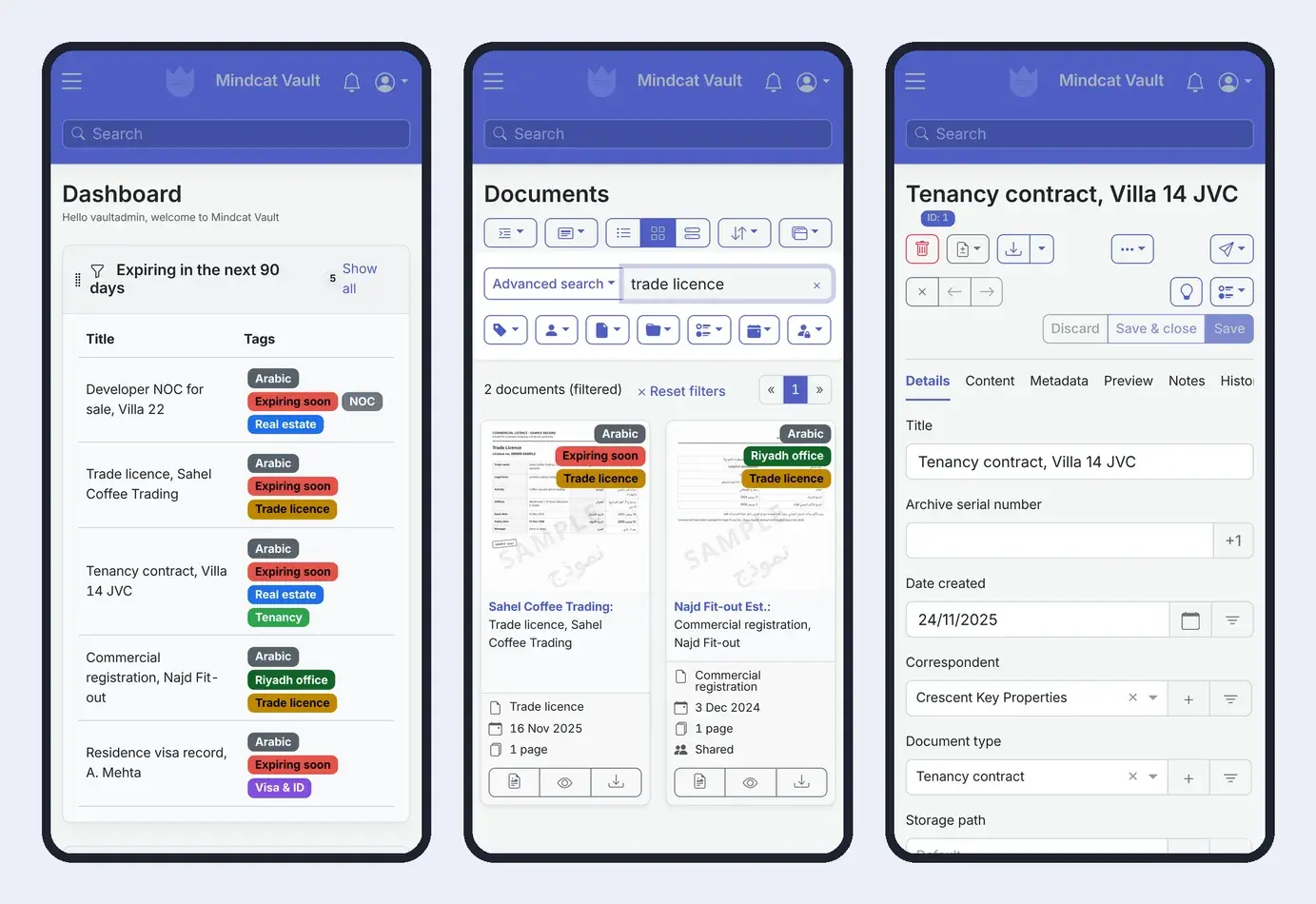
    The dashboard, a search for “trade licence” and a tenancy contract for Villa 14 JVC at phone size.
    Three phone screens of Mindcat Vault: the dashboard with documents expiring in the next 90 days, search results for trade licence showing two licences, and the details of a sample tenancy contract for Villa 14 JVC.
    On the phone: find the copy at the government counter.

Also included

The rest of the system, in one line each.

Who it is for

Three Gulf offices that live on paper, before and after.

A PRO officer in a white kandura scans documents at a typing centre counter in Al Karama while a customer waits.
PRO and typing centres

PRO firms in Karama, Sharjah and Riyadh

Before: 400 clients’ licences, IDs and visas in Excel and box files, renewals chased from memory. After: every scan filed by client and searchable in Arabic, the renewals list on Monday morning, and an email 30 days before each date.

Expiry listRemindersFiled by client
A leasing manager in a Business Bay office works at a laptop with a colleague leaning in, a tenancy folder and a set of keys on the desk.
Real estate

Brokerages and property managers

Before: tenancy contracts, Ejari certificates, title deeds, NOCs and cheque copies across WhatsApp and a shared drive. After: one file per property, the lease end date on the dashboard, and the NOC found from a phone at the transfer.

File per propertyLease datesPhone search
A paralegal in a hijab works through an open box of documents beside a scanner in a Deira law office, a senior lawyer reading by the window over the Creek.
Law firms

Law firms in Deira and Riyadh

Before: boxes of Arabic filings and powers of attorney with no way to search them. After: every scan searchable by a client’s name in Arabic, each matter seen only by the people on it, and files on servers in the region.

Arabic searchPermissionsExpiring links

Also used for

HR teams, contractors and more.

A Saudi HR officer in a thobe and shemagh checks an employee folder at his desk in Olaya, Riyadh, while a colleague in an abaya points at it, grey filing cabinets behind them.
An HR desk in Olaya: one employee file, and the iqama date inside it.Illustrative photo

Built for the Gulf

What is ready today, what we add during setup, and what isn’t there yet.

Every row is true today, work we do during your setup, or a gap. We say which.

What Gulf offices needWhere it stands
Data in the UAE or Saudi ArabiaToday. Shared copies run in the UAE; your own copy can run in Jeddah or Riyadh, or on your own servers. We store your copy on encrypted disks; the app itself does not encrypt files.
Arabic text on scansToday, switched on during setup. It reads Arabic and English on the same page. Clean scans read well; faint or skewed ones get some words wrong, so we test your own documents in setup.
Reminders before expiry datesToday. The email goes out once we connect your mail during setup.
Arabic screensPartly. More than half of the screen text is in Arabic today, but the layout runs left to right. We finish the Arabic for the screens your team uses during setup. Right to left is not there yet.
Hijri datesNot today. Dates are Gregorian; for iqama and CR dates, use the Gregorian date printed beside the Hijri one.
Clients seeing their own filesNot today. There is no client portal or client login. You send a link to a file or a bundle that stops working on a date you set.
WhatsApp, UAE PASS and NafathNot today. Staff sign in with their email, a password and an optional authenticator code.

Records rules

What the record-keeping rules say, and what Vault does about them.

Vault keeps the original file and a searchable PDF copy for as long as you keep them, with who added or changed what. It does not decide what the law requires you to keep. Three rules our clients ask about:

RuleWhat it saysHow Vault helps
UAE VAT recordsKeep records for 5 years after the tax period, and records about real estate for 15 years (Federal Tax Authority).Invoices and contracts stay searchable for as long as you keep them, with the date added.
Saudi Commercial RegistrationConfirm the CR every year. 90 days after a missed date, the CR and every licence on it are suspended; fines go up to SAR 50,000 (Commercial Register Law, 2024).The confirmation date sits on the CR as a field, and the reminder goes out before it.
Scans instead of paperWhether a scan can replace a paper original depends on the document and who asks for it.Ask your lawyer. Vault keeps the scan, its date and its history; the paper original stays with you.

بالعربية

Mindcat Vault in Arabic, for Saudi and Emirati offices.

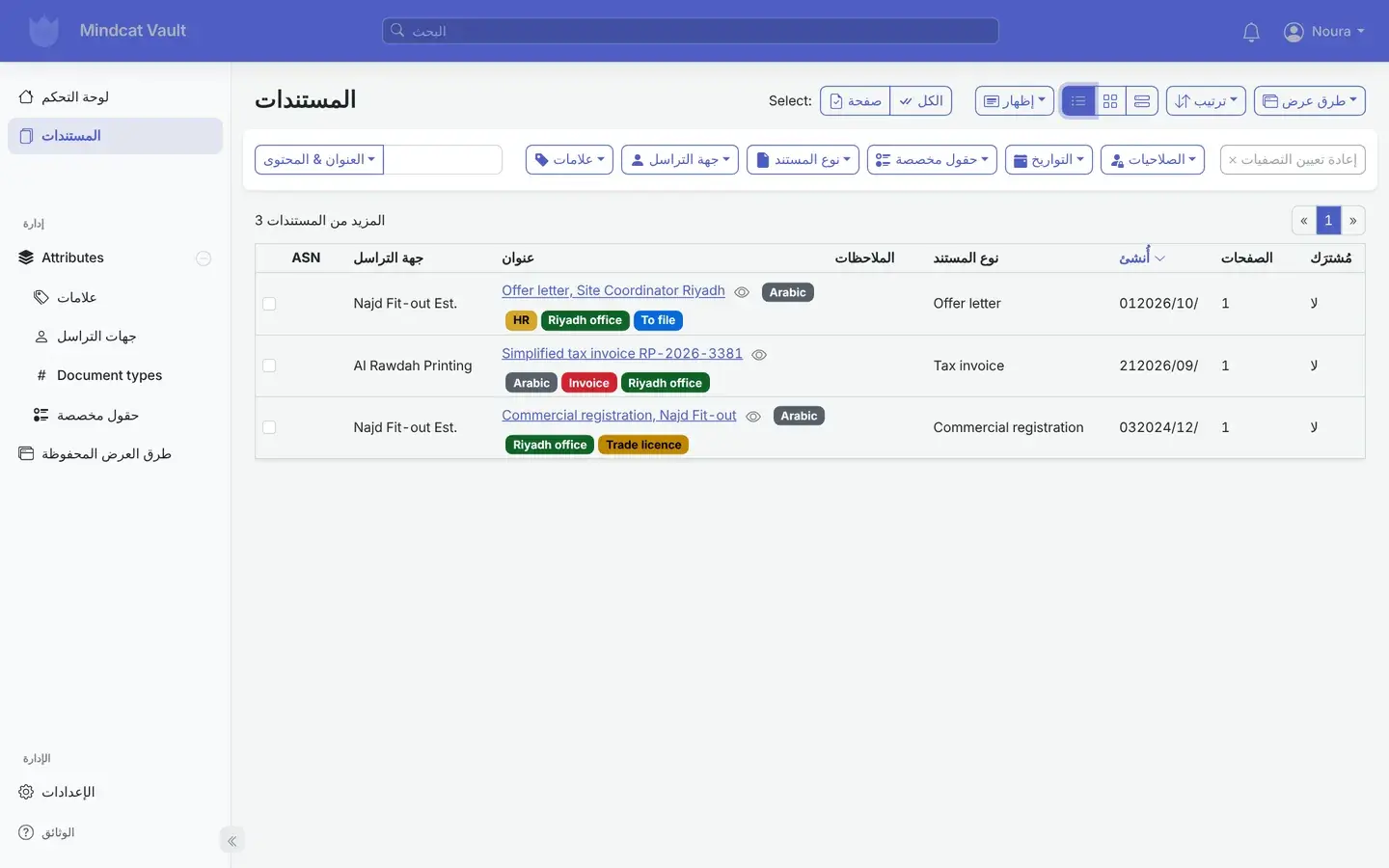
Mindcat Vault with the interface switched to Arabic for a Riyadh user: the documents list headed المستندات with three Riyadh office files, an offer letter, a tax invoice and a commercial registration, menus partly in Arabic and the layout left to right.
A Riyadh user with the screens in Arabic: partly translated today, layout left to right.Real screen, sample data

Mindcat Vault · نظام أرشفة إلكترونية: بحث بالعربية وتنبيه قبل انتهاء الصلاحية

كل رخصة وهوية وعقد إيجار في مكان واحد. تمسح المستند ضوئيًا أو ترفعه، فيقرأ النظام النص العربي والإنجليزي، وتؤرشفه باسم العميل أو العقار أو الموظف، ثم تبحث عنه بأي كلمة فيه.

تظهر في لوحة التحكم كل المستندات التي تنتهي خلال تسعين يومًا، ويصلكم بريد تنبيه قبل تاريخ الانتهاء بثلاثين يومًا. ولكل فرع أو فريق ملفاته التي لا يراها غيره.

نستضيف بياناتك في الإمارات، أو في الرياض أو جدة إذا اخترت نسخة خاصة. تدفع اشتراكًا شهريًا عن كل مستخدم بالدرهم أو الريال، وينخفض السعر مع زيادة عدد المستخدمين. الواجهة معرّبة جزئيًا حاليًا واتجاهها من اليسار إلى اليمين، ونكمل تعريب الشاشات التي يستخدمها فريقك خلال مرحلة الإعداد.

Prices

Price your team: per user, in AED and SAR.

Set how many people sign in and where it should run. Every price is also listed in full below.

Where should it run?

Your monthly price

AED 685

SAR 685 · USD 186.52 · about AED 46 per user

One-time setup
AED 4,900
Per-document fees
None

AED and SAR are the same number. 20 GB of storage per user included. Excludes 5% UAE VAT and 15% Saudi VAT. Annual prepay takes 15% off.

The full price list

Every band, option and fee, in writing.

You pay per user per month. A user is anyone who signs in during the month. The price per user drops as your team grows: each band’s price applies only to the users inside that band. There are no per-document or per-page fees.

UsersAEDSARUSD
1 to 5595916.07
6 to 20393910.62
21 to 5029297.90
51 and up19195.17

Worked example. An office with 15 users pays 5 × 59 + 10 × 39 = AED 685 a month (SAR 685, USD 186.52). With 40 users it is AED 1,460. With 100 it is AED 2,700. The shared option has a minimum of AED/SAR 449 a month, so a 3-person office pays 449.

Storage. 20 GB per user is included. Above that, AED/SAR 0.50 per GB a month.

How you run it changes the multiplier.

OptionPriceMinimum a month
Shared: your own separate copy on our UAE serversThe user price aboveAED/SAR 449 (USD 122.26)
Your own servers, hosted by us in the UAE or Saudi ArabiaUser price × 2AED/SAR 1,999 (USD 544.32)
In your own cloud or servers, run by usUser price × 0.75, and you pay your cloud bill directlyAED/SAR 1,999 (USD 544.32)

One-time setup. Up to 5 users: AED/SAR 2,500 (USD 680.74). 6 to 20: AED/SAR 4,900 (USD 1,334.24). 21 to 50: AED/SAR 9,900 (USD 2,695.71). Above 50: from AED/SAR 19,900, scoped in writing. Setup covers your branding, Arabic text reading, your labels, document types and fields (expiry date, client, property or employee), the expiry list on the dashboard and the reminder emails, one scanner folder or mailbox, and training. From 6 users it also covers permissions per office or team, a second intake, Word, Excel and email files, and the Arabic screens your team uses. From 21 users it covers moving your existing shared drive in. Extra work is AED/SAR 450 an hour (USD 122.53).

Not in the user price. Scanning a paper archive, which we quote separately. Optional Microsoft text reading or an AI provider, if you ask for them, on your own account at cost. Annual prepay takes 15% off. Prices exclude 5% UAE VAT and 15% Saudi VAT.

Compare document management systems

What 15 users cost with each option.

The same office with 15 users, priced from each option’s own published price list. Checked on 10 October 2026. VAT is extra everywhere.

Swipe the table sideways to see every column.

Option15 users a monthData in the UAE or KSAWho sets it upSource
Excel, WhatsApp and a shared driveNo software bill. The cost is the renewal nobody saw and the file nobody can find.On staff phones and laptopsNobodyYour week
Mindcat Vault, sharedAED/SAR 685 (USD 186.52). One-time setup AED/SAR 4,900.Yes. UAE, or your own copy in Jeddah or RiyadhWe do, in Arabic and EnglishThis page
Microsoft 365 Business StandardUSD 187.50 (USD 12.50 per user, paid yearly). Includes Office, email and file storage.Not stated on the plan pageYou do: folders, fields and remindersmicrosoft.com
M-Files EssentialsUSD 975 (USD 65 per seat)Not statedTheir partnersm-files.com
Laserfiche ProfessionalUSD 1,095 (USD 73 per user, billed yearly, from 5 users). Setup extra.Not statedTheir partnerslaserfiche.com
Mondoir Vault (UAE)Price on request. Lists a client portal, Arabic screens right to left, and invoicing.Yes, UAE (stated)Their teamdocsafe.ae
Build it yourselfServers, a developer to install, update, back up and secure it, and Arabic text reading set up by handWherever you host itYour developerYour quote

If your clients need to log in and see their own files, an option with a client portal fits better today. If you already pay for Microsoft 365, keep it for email and Office; Vault holds the scans, the expiry dates and the reminders. Ask each option three questions: where the files sit, who reads the Arabic scans, and how you leave with every file.

How we start

From team size to go-live, with the date in writing.

No demo maze and no annual contract to start. You see the plan and the price before you pay anything.

A setup specialist wearing a headset smiles during a call at a tidy desk on Al Reem Island, Abu Dhabi, an open document box beside her laptop.
The setup session: your document types, your dates, who sees what.Illustrative photo

Why Mindcat

Hosted in the region. Set up and run for you.

Where it fits

Your industry and your seat.

FAQ

What offices ask about a document management system.

Can it remind us before a trade licence, Emirates ID or visa expires?
Yes. Each document can carry an expiry date. The dashboard lists what expires in the next 90 days, and a rule labels the document and emails your desk 30 days before the date. You choose the days and who gets the email.
How well does it read Arabic scans?
It depends on the scan. Clean, straight scans read well, including Arabic and English on the same page. Faint, skewed or handwritten pages get some words wrong. We test your own documents during setup so you know before you rely on it.
Are the screens in Arabic?
Partly. Each user can switch the screens to Arabic, and more than half of the text is translated, but the layout runs left to right. We finish the Arabic for the screens your team uses during setup.
Where are our files stored?
In the UAE on the shared option. Your own copy can run in Jeddah or Riyadh, or on your own servers. We store it on encrypted disks and back it up every night.
Can each client or office see only its own files?
Partly. Inside Vault, you choose which people or groups can see or edit each document, so the Riyadh office sees only Riyadh files. There is no client portal or client login: you send a client a link to a file or bundle that stops working on a date you set.
Can we scan from the office scanner or a phone?
Yes. Scanners that save to a network folder send straight into Vault once we set the folder up. Staff can also upload from a phone’s browser or forward attachments to a mailbox Vault reads.
Does it replace Tasheel, Amer, Ejari or Qiwa?
No. Those are where you apply and register. Vault keeps the papers they issue, with their dates, so you know what to renew and can find the copy.
Can we leave with all our files?
Yes. We export every original, every searchable copy and all your labels and fields, and hand them over. You can also move Vault onto your own servers and keep us running it.
Can it run on our own servers?
Yes. We install and run it in your own cloud account or data centre. You receive the full source code of the version we run, under the GNU General Public License v3, with the same rights to change and share it.
What counts as a user?
Anyone who signs in during the month. People who only receive a shared link don’t count.

The brief · one email

Tell us your team size and the papers you hold.

The honest no: if the work is a software factory with a named delivery date, we are the wrong partner.