Painted scene: an agency director and a property developer’s client at a meeting table in a Dubai Media City studio, a sheet reading “October retainer” on the table and launch mood boards on the wall.

Mindcat Hours · timesheet software for firms that bill by the hour

The extras you can’t prove, logged the day they happen.

For agencies, consultancies and law firms in Dubai, Abu Dhabi and Riyadh. Your team logs time against each client as it works, and at month end the client opens the hours from a link, without logging in. Your go-live date is in writing, counted from the day your import file arrives.

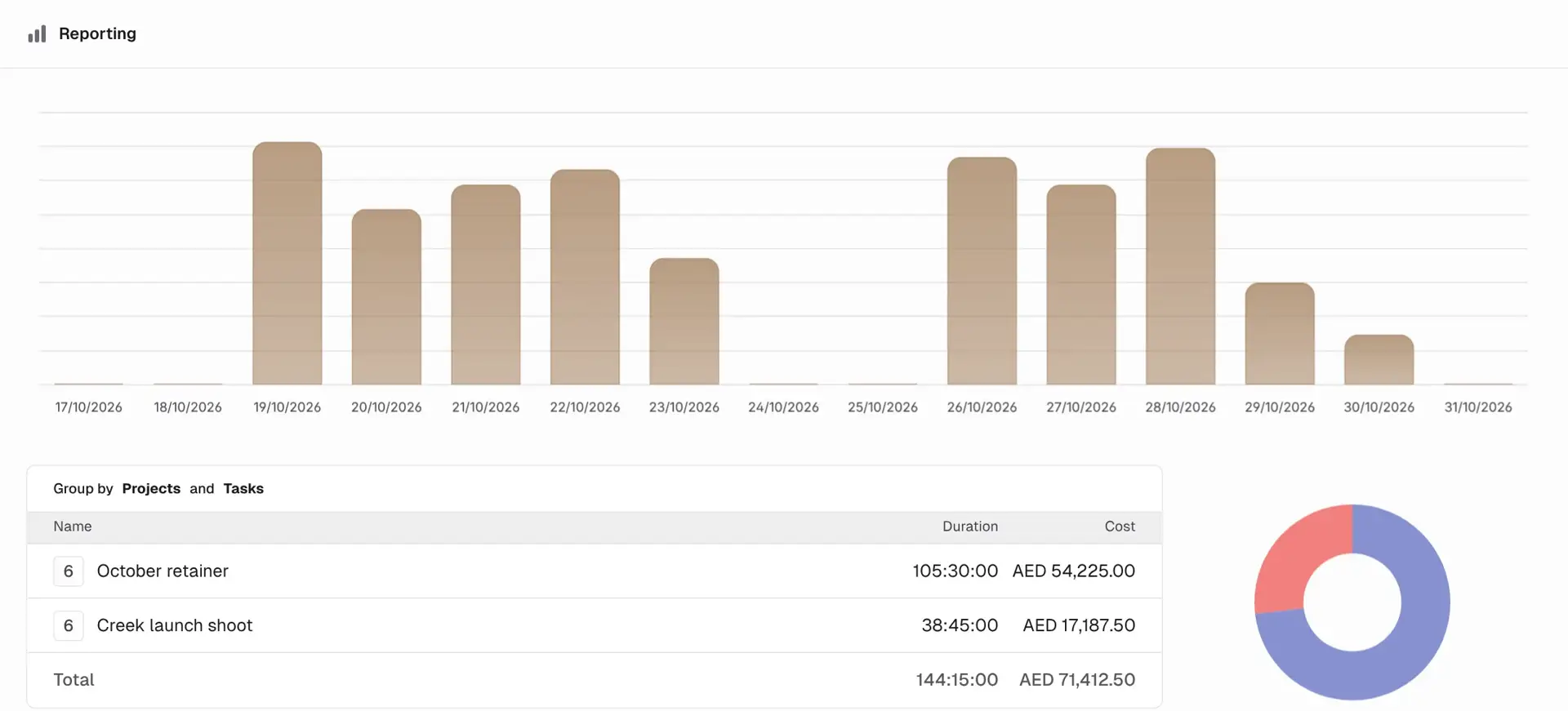
Mindcat Hours shared client report for October 2026: a daily bar chart and a table with October retainer at 61 hours, AED 31,850 and Creek launch shoot at 29 hours 15 minutes, AED 13,512.50, total 90 hours 15 minutes, AED 45,362.50.
October’s hours for one client, opened from a link with no login: 90 hours 15 minutes across two projects.Real screen, sample data
AED/SAR 39
per user a month
Client report link
opened with no login
UAE or Kingdom hosting
or in your own cloud

Where billable time leaks

Four places a Gulf firm loses hours every month.

Painted scene: an account lead at a Dubai agency desk at dusk, scrolling a phone of chat messages beside a laptop and a sticky note reading “Who approved the extras?”
Before: the extras approved on WhatsApp, and nobody can say who approved them or how long they took.Illustration

One retainer, one month · how the hours move

From the first timer to the report the client opens.

October at a Dubai Media City agency with a property developer on a monthly retainer, followed through everyone who touches the hours.

  1. 01DesignerStarts the timerPicks the client, the retainer and the task (Design), and the timer runs in the browser or the desktop app.On: Timer
  2. 02CopywriterFills a gapDrags Wednesday’s Arabic copy into the calendar, tagged as an extra, not in scope.On: Calendar
  3. 03Account leadWatches the retainerThe project list shows 61 of 70 hours used. The launch shoot is over its 24 hours and the bar is red, so the extra gets priced now, not in March.On: Projects
  4. 04DirectorChecks the ratesEach person’s rate on this retainer is set, so the hours have an AED amount before anyone builds a spreadsheet.On: Rates
  5. 05ClientOpens the linkAt month end the developer’s marketing manager opens the report from a link on her phone: hours by project and task, with no account to create.On: Client report
  6. 06FinanceInvoices the monthThe priced hours go to Mindcat Accounts for the VAT invoice, or out as PDF or Excel for your accounting system.On: Export
Priced hours sent to Mindcat Accounts (step 6) are set up during managed setup. Everything else works on day one.

What it does · real screens

The timesheet screens your team and your client will use.

“Our people won’t track time, and clients never read timesheets anyway” is the belief that keeps the extras unbilled. The screens below are one agency’s October. Every screen is captured from our own running copy with invented sample data: Saffron Lane Creative in Dubai Media City, with clients Dune Crest Properties, Palmline Hospitality and Corniche Logistics. Names and amounts are not real.

  1. “The client says the hours aren’t real.”

    A report the client opens without logging in

    Save a report for one client and send the link. They see hours by project and task, with the amounts if you choose, on a laptop or a phone. Links can expire, and an expired link goes private.

    Used by
    Account leads, partners, the client
    On screen
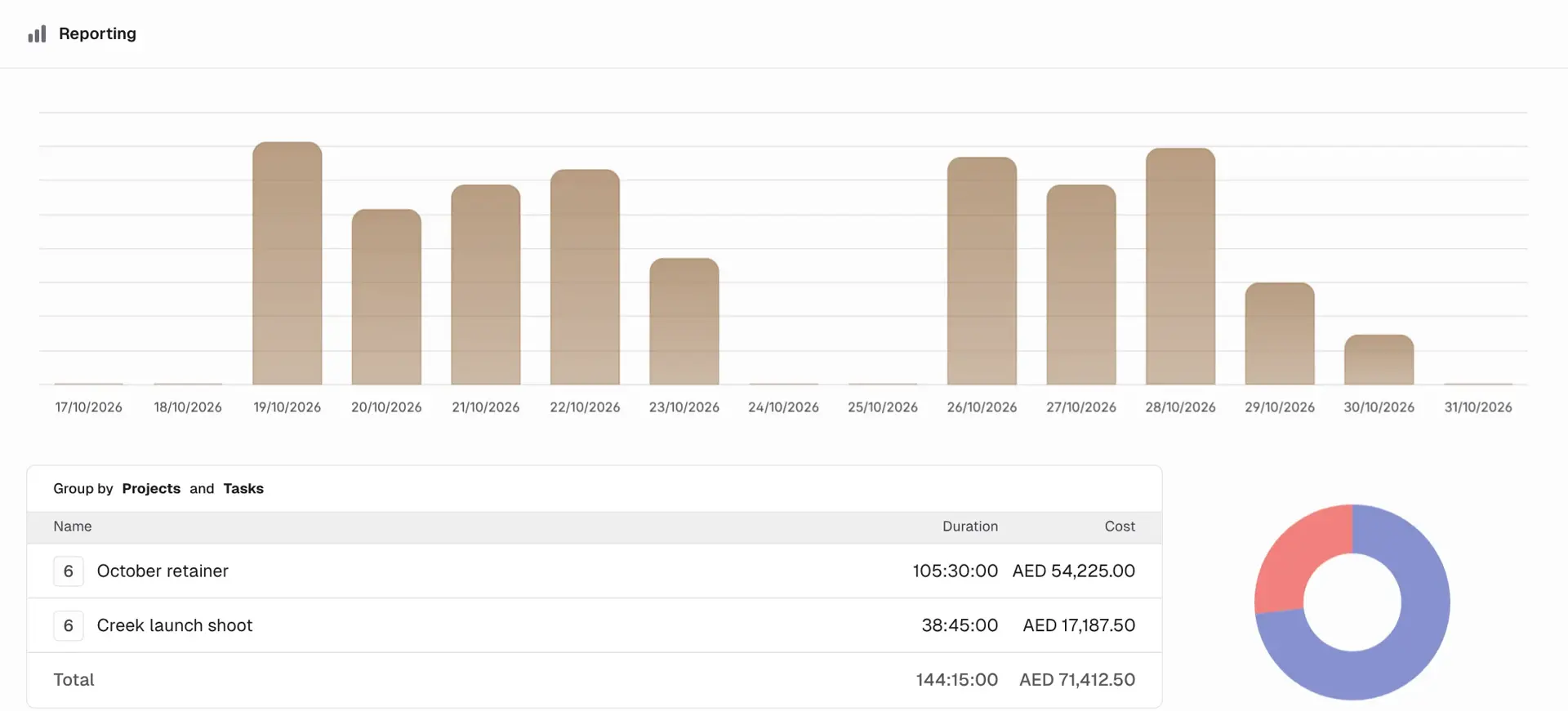
    October for Dune Crest Properties: the retainer at 61 hours and the launch shoot at 29 hours 15 minutes.
    Mindcat Hours shared report opened without a login: a bar chart of October days and a table grouped by project and task, October retainer 61 hours AED 31,850, Creek launch shoot 29 hours 15 minutes AED 13,512.50.
    Client report link: the month’s hours, no account needed.
  2. “We find out the retainer ran over when the year ends.”

    Retainers you can see running out

    Give each retainer or project an hour estimate. The list shows hours used against it, and the bar turns red past 100%.

    Used by
    Account leads, project managers
    On screen
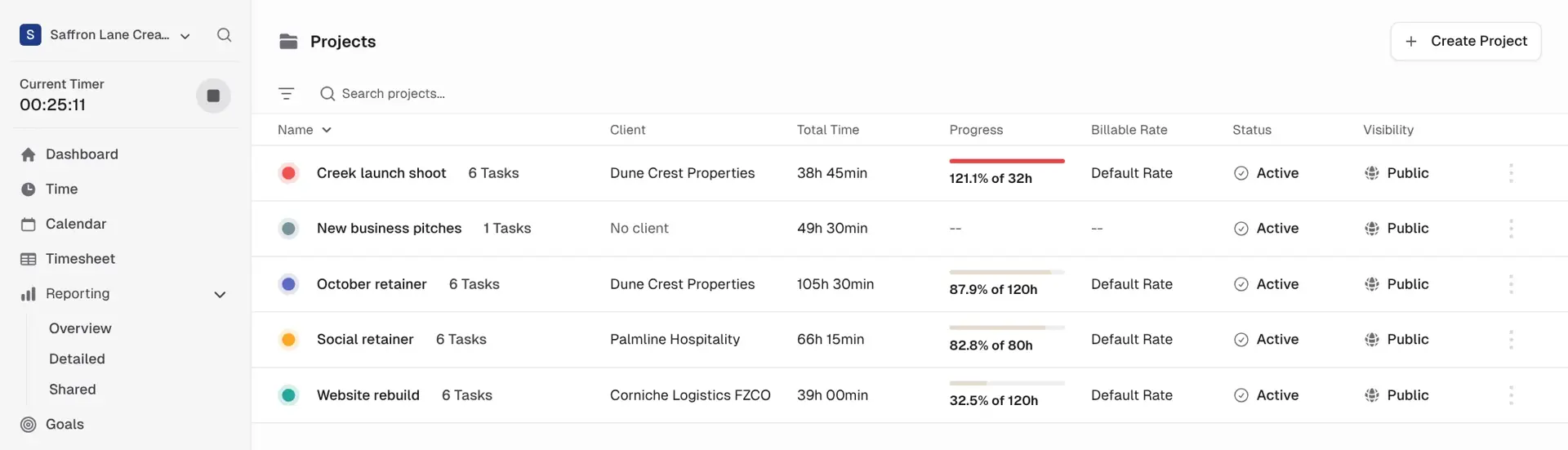
    Creek launch shoot at 121.9% of 24 hours, the October retainer at 87.1% of 70 hours.
    Mindcat Hours projects list for a sample agency: Creek launch shoot at 121.9% of 24 hours in red, October retainer at 87.1% of 70 hours, Social retainer at 84.4% of 40 hours and Website rebuild at 32.5% of 120 hours.
    Projects: hours used against each retainer.
  3. “Every invoice starts with a rate spreadsheet.”

    Rates per person, per client and per project

    Set a rate for the firm, for each person, for a project, or for one person on one project, in AED or SAR. Every hour gets its amount as it is logged.

    Used by
    Partners, directors, finance
    On screen
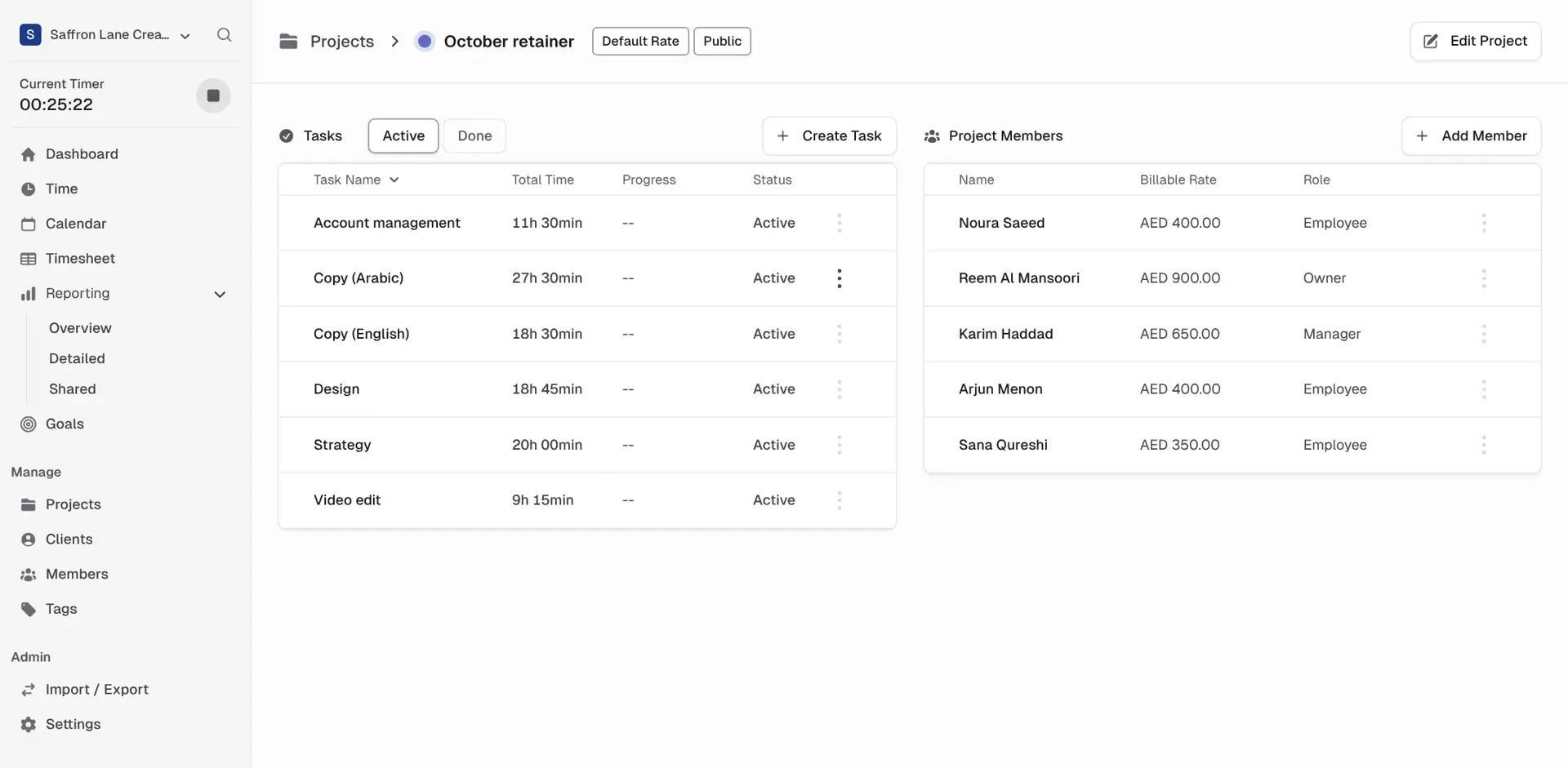
    Five people on the October retainer, from AED 350 to AED 900 an hour.
    Mindcat Hours project page for October retainer: tasks such as Copy (Arabic) at 18 hours 15 minutes and Strategy at 11 hours, and project members with billable rates from AED 350 to AED 900 an hour.
    Project members: the rate each person bills on this retainer.
  4. “Short calls never make it onto the timesheet.”

    A timer for every call and draft

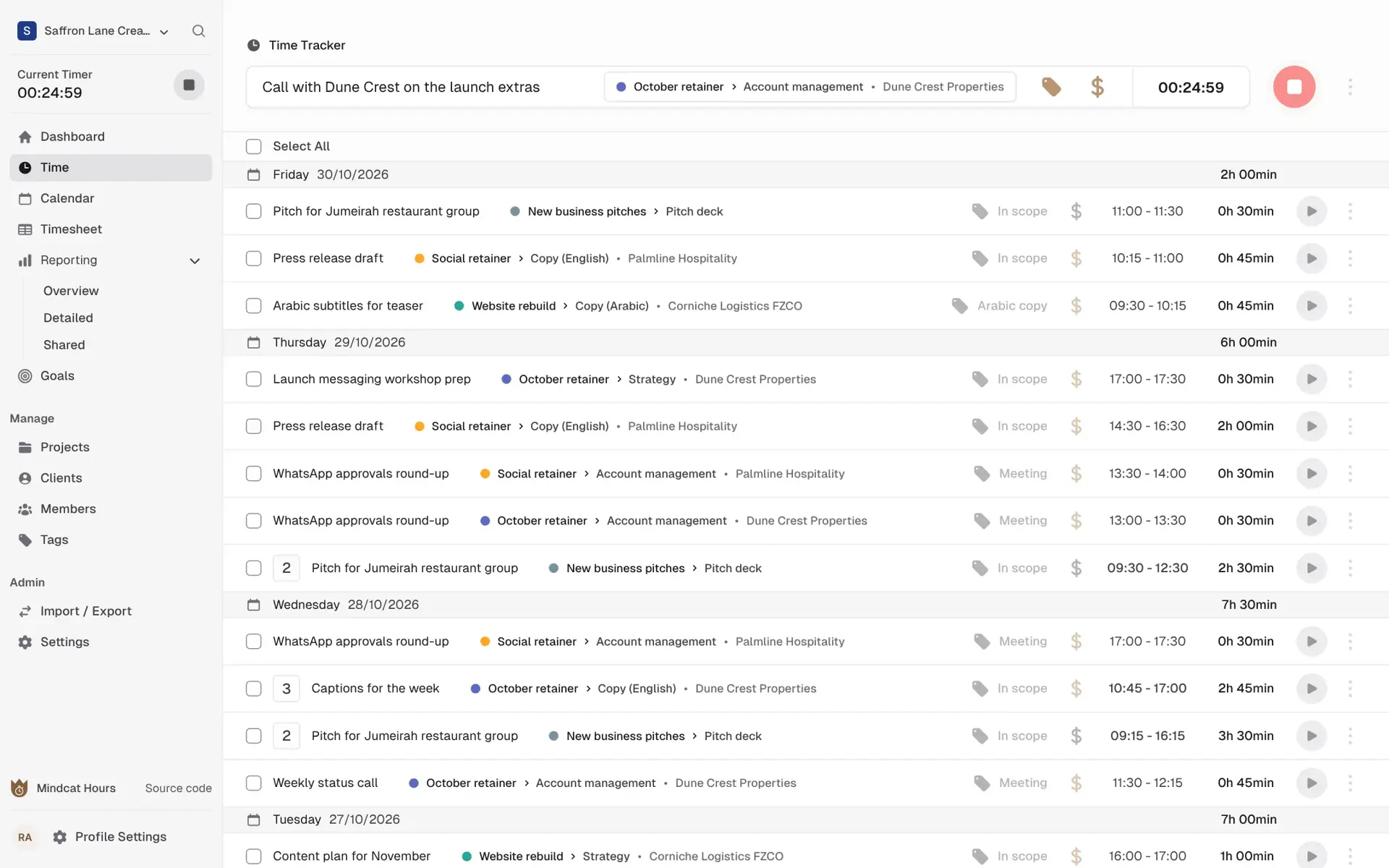
    Start the timer from the top bar with the client, project, task and a tag such as “In scope”, “Extra” or “Meeting”. The week lists every entry, grouped by day, to fix in bulk.

    Used by
    Everyone who bills time
    On screen
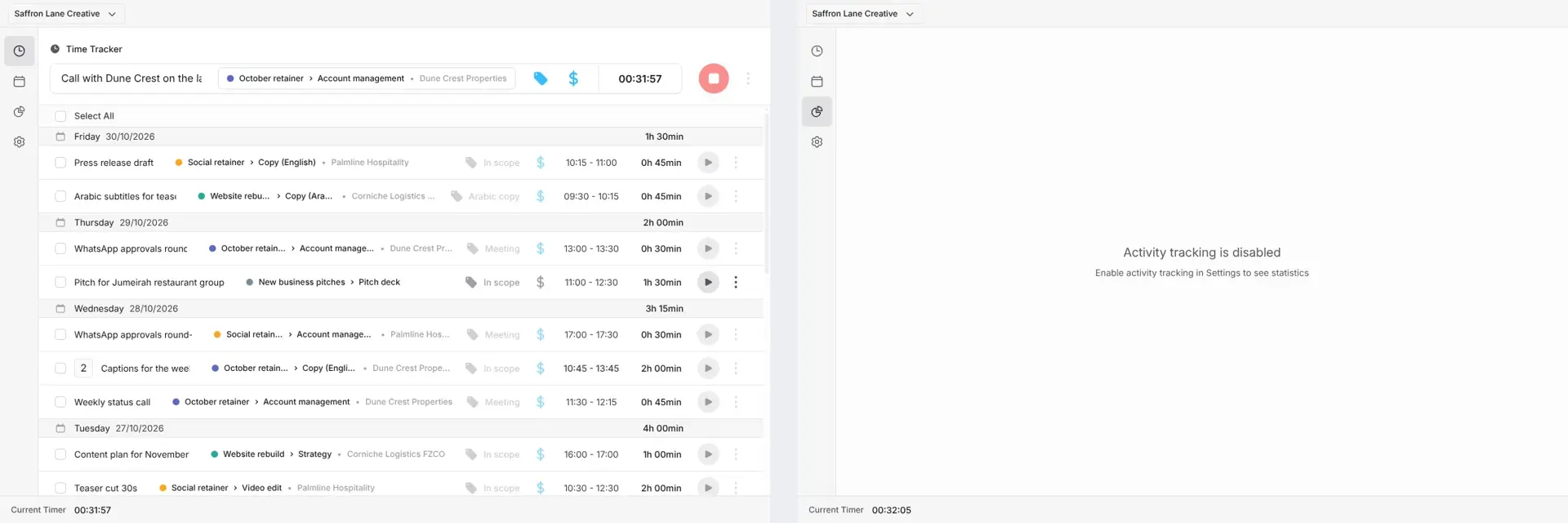
    A 30-minute WhatsApp approvals round-up and a call on the launch extras, both on the retainer.
    Mindcat Hours time list: a running timer for a call with Dune Crest on the launch extras, and the week’s entries by day, such as Arabic subtitles for teaser and WhatsApp approvals round-up, with project, task, tag and times.
    Time list: every entry, tagged in scope or extra.
  5. “People fill the week in from memory on Friday.”

    The calendar and the weekly grid

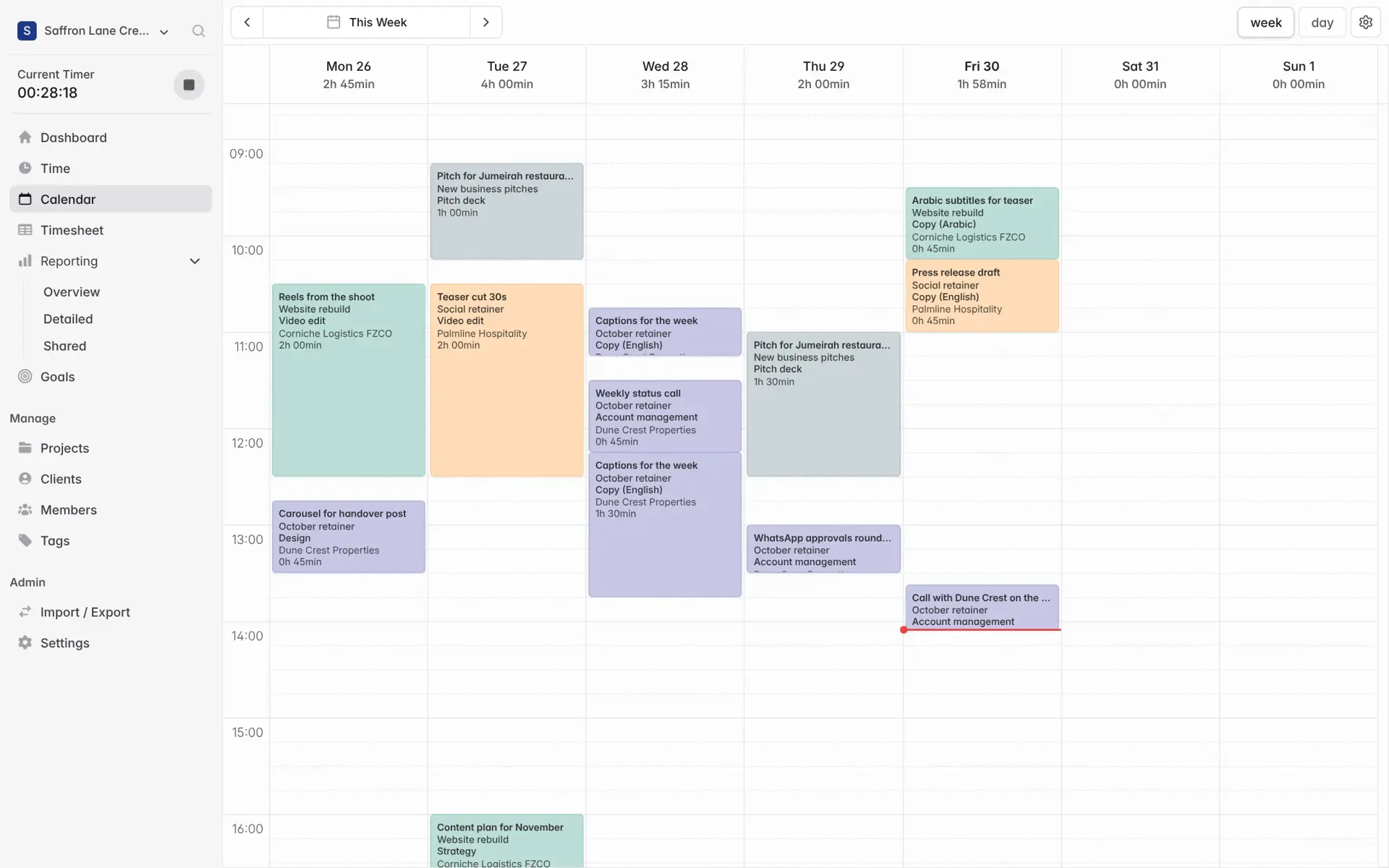
    Drag a block into the calendar to fill a gap, or type the week into a grid by project and task. Set your week to start on Sunday or Monday.

    Used by
    Designers, consultants, associates
    On screen
    One agency’s week: 13 hours 58 minutes across three clients and a pitch, laid out by day.
    Mindcat Hours week calendar from Monday 26 to Sunday 1: coloured blocks for Reels from the shoot, Teaser cut 30s, Captions for the week and Arabic subtitles for teaser, with each day’s total.
    Calendar: drag the hours you missed into place.
  6. “Our consultants send a timesheet once a month, late.”

    A weekly timesheet in one grid

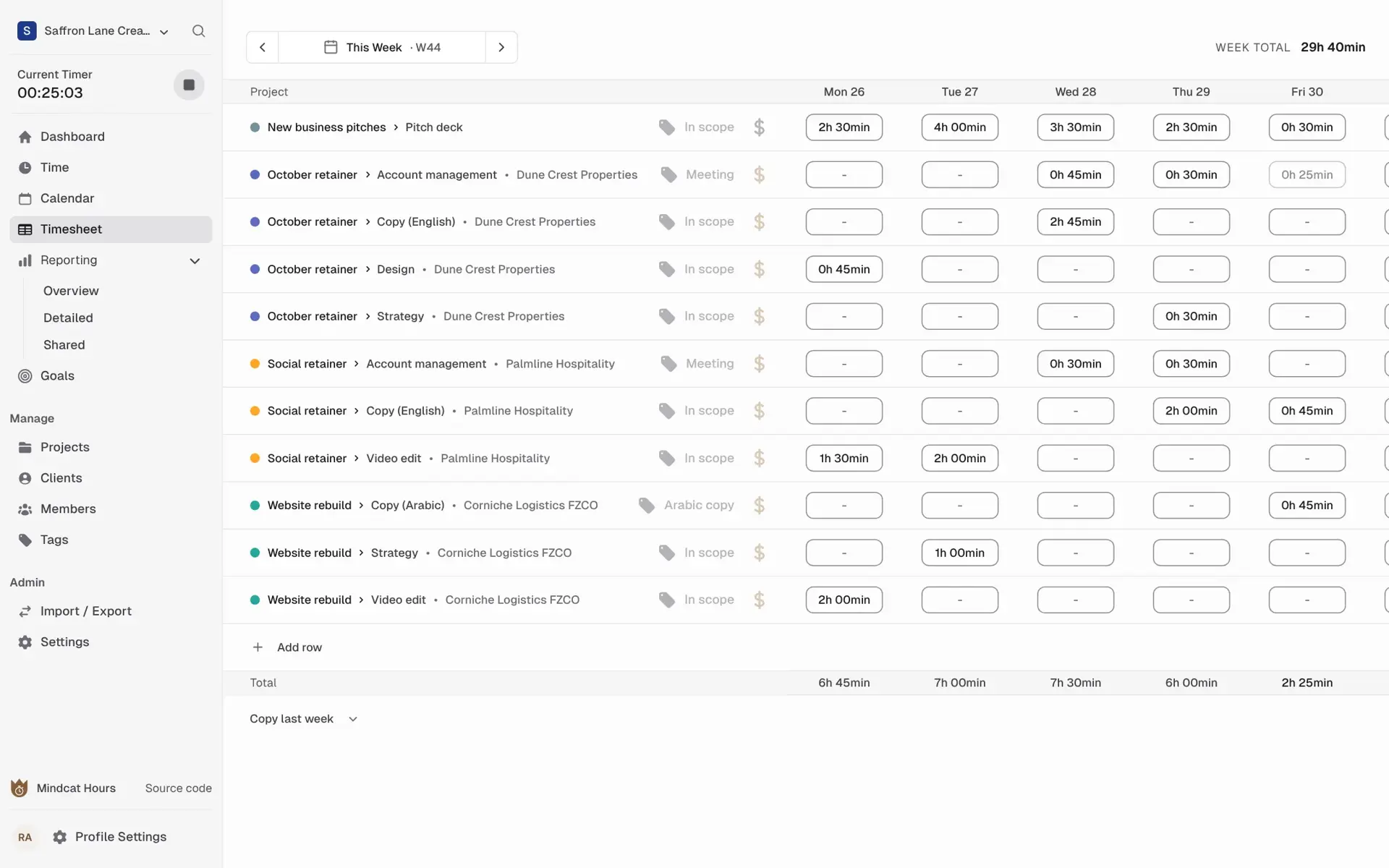
    Each row is a project and task, each column a day. Copy last week’s rows and type the hours.

    Used by
    Consultants, engineers, associates
    On screen
    Week 44: ten rows across three clients and new business, 13 hours 57 minutes.
    Mindcat Hours weekly timesheet for week 44: rows such as October retainer, Copy (English), Dune Crest Properties and Website rebuild, Video edit, with hours per day from Monday 26 to Friday 30.
    Timesheet: the week in one grid.
  7. “I can’t say which client made money this month.”

    Reports by client, person, task and tag

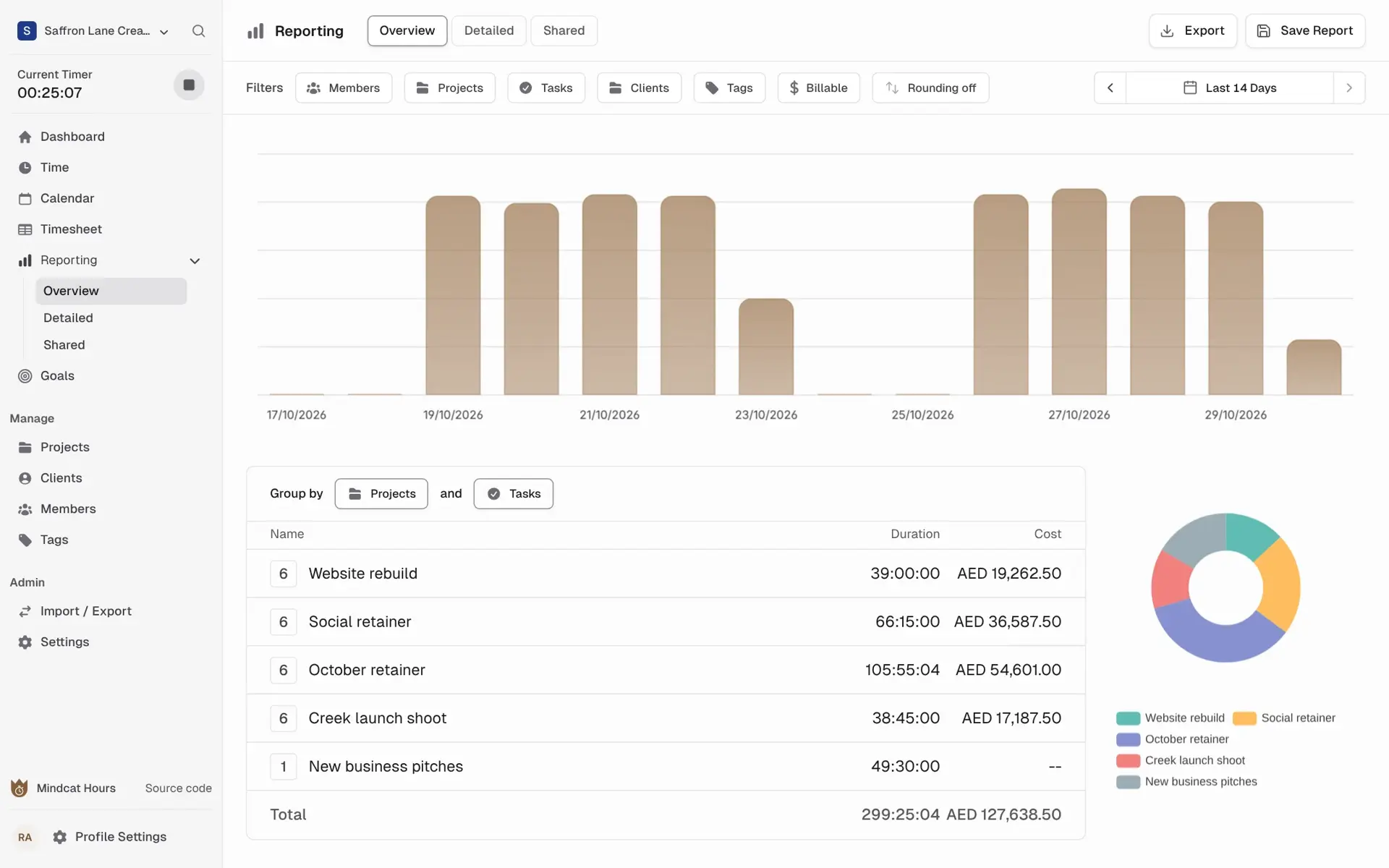
    Group hours by client, project, task, person or tag, filter billable time, round to 6 or 15 minutes, and export to PDF, Excel or CSV.

    Used by
    Directors, partners, finance
    On screen
    The last 14 days at the agency: 177 hours and AED 83,094.75 billable across five projects.
    Mindcat Hours reporting overview for the last 14 days: daily bars, and hours and amounts by project, October retainer AED 32,269.75, Website rebuild AED 19,262.50, total 177 hours 12 minutes and AED 83,094.75.
    Reports: hours and amounts by client and project.
  8. “My team works on laptops all day and forgets the browser tab.”

    A desktop app for Mac, Windows and Linux

    The timer in its own window, with idle detection that asks whether to keep the time. Its activity record is off by default; if you switch it on for someone, it stays on their laptop.

    Used by
    Designers, developers, consultants
    On screen
    The same week in the desktop app, with activity tracking showing as disabled, our default.
    Mindcat Hours desktop app: the time tracker with a running call and the week’s entries, beside a panel that reads Activity tracking is disabled.
    Desktop app: timer and idle check, no screenshots.
  9. “I log hours between meetings, on my phone.”

    The timer on the phone

    Start, stop and edit entries in the phone’s browser, and see the last seven days. There is no app to install.

    Used by
    Account leads, partners out of the office
    On screen
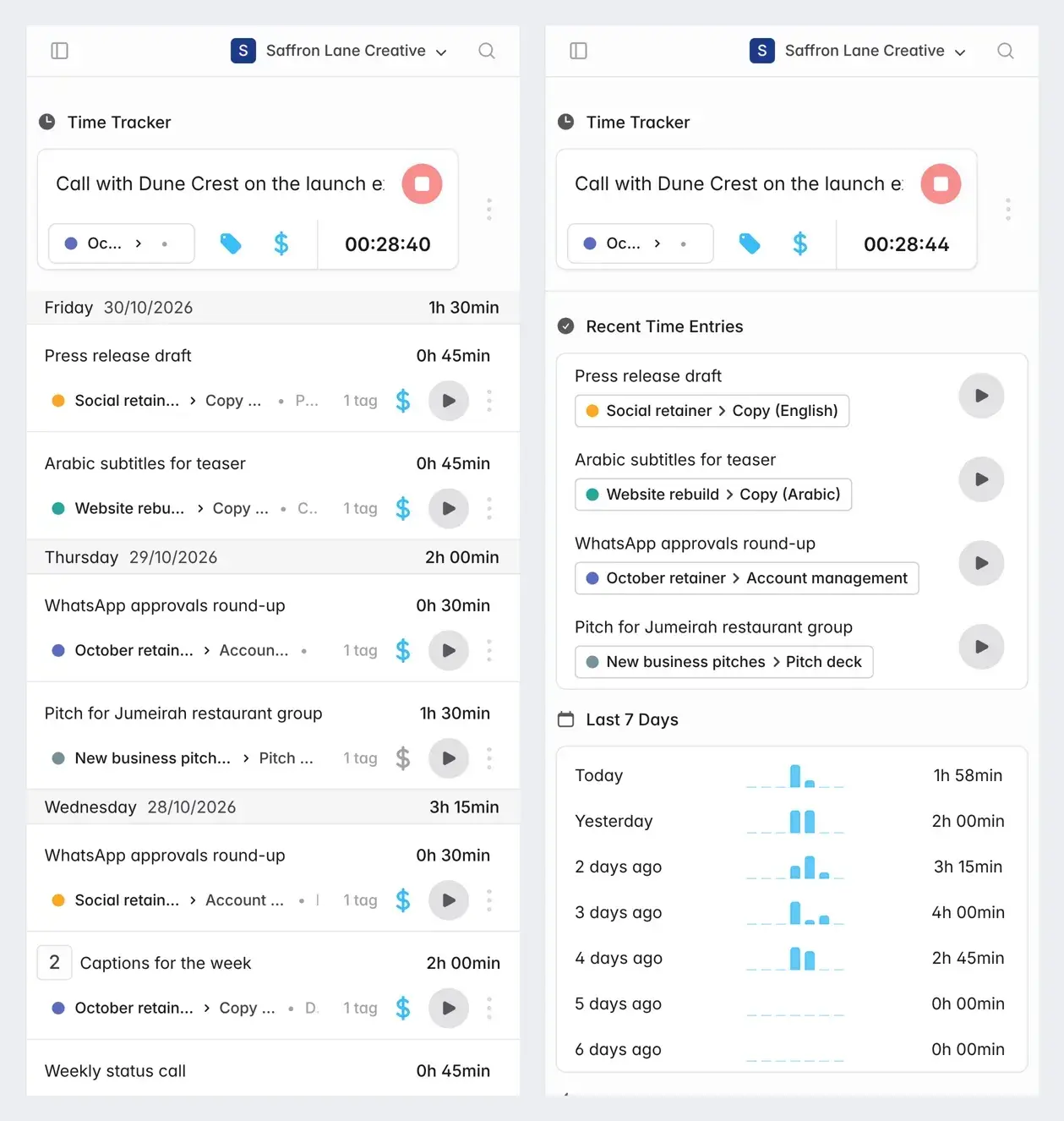
    A running timer, recent entries and the last seven days on a phone.
    Two phone screens of Mindcat Hours: a running timer for a call with Dune Crest above the week’s entries, and recent entries with a last 7 days summary from 1 hour 58 minutes today.
    Phone: the timer between meetings.

Also included

The rest of time tracking, in one line each.

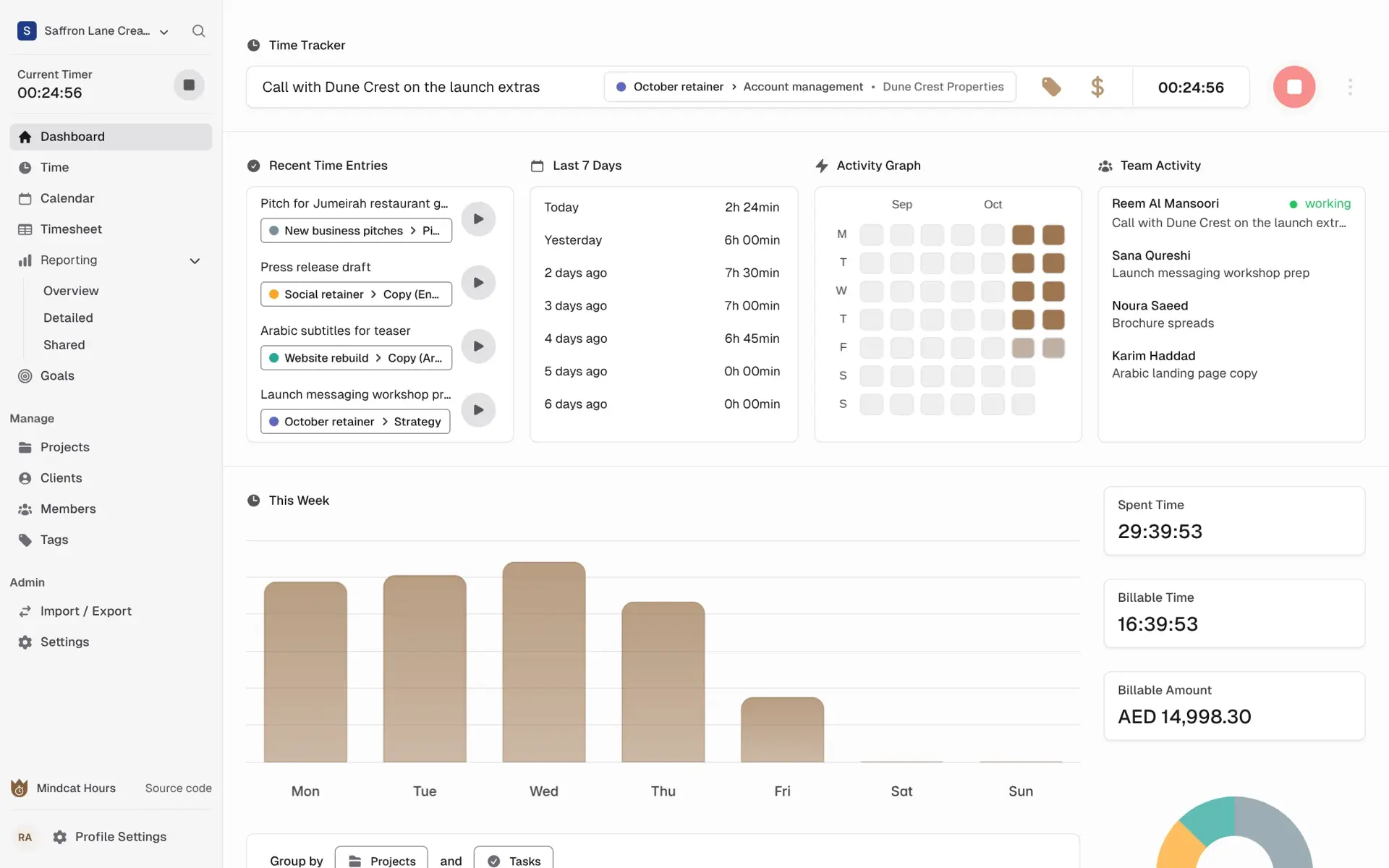
Mindcat Hours dashboard for a sample agency: recent entries, last 7 days, team activity with four people and what each is working on, and this week’s spent time 13 hours 57 minutes, billable time 11 hours 27 minutes and billable amount AED 10,317.05.
The director’s dashboard: this week’s hours, billable time and amount, and who is working on what.Real screen, sample data

Who it is for

Three kinds of Gulf firm that bill time, before and after.

Painted scene: an agency director and a property developer’s client at a meeting table in a Dubai Media City studio, with a sheet reading “October retainer”.
Agencies

Creative, marketing, digital and PR agencies on retainers

Before
a Dubai Media City agency’s account lead says yes to extras on WhatsApp, and the month-end report is a deck of deliverables.
After
every extra is tagged as it is logged, the retainer bar shows what is left, and the developer client opens the month’s hours from a link.
Client report linkRetainer hoursExtras tagged
Painted scene: two consultants review a printed sheet reading “Hours for March” with a client project manager in a Riyadh office.
Consultancies

Management, IT and ERP consultancies with Saudi clients

Before
consultants seconded to a Riyadh client send a monthly Excel timesheet, and the invoice waits for the client’s project manager to sign it.
After
the team logs each day against the engagement, the client’s PM reads the engagement’s report link before the invoice, and the hours sit on a server in the Kingdom.
Sunday weekHours in the KingdomReport by engagement
Painted scene: a lawyer at a desk in a DIFC office reviewing a printed sheet reading “Statement of costs”, with case files beside a laptop.
Law firms

Law firms in DIFC, ADGM and Riyadh

Before
a partner rebuilds a month of time from emails the night before a DIFC costs hearing.
After
each matter is a project, each fee earner has a rate by seniority, entries round to 6 minutes, and the report gives hours, rate and fee earner per matter.
Rates by seniority6-minute unitsYour own copy

Not for you if

Who should look elsewhere.

Also used for

Audit firms, software houses and design studios.

Built for the Gulf

What is ready today, and what is not there yet.

Every row is true today, work we do during your setup, or not there. We say which.

What Gulf firms askWhere it stands
Hours kept in the UAE or Saudi ArabiaAgreed in your plan: our servers in the UAE or the Kingdom, your own copy, or your own cloud.
AED and SARToday. One currency per organisation, so a Dubai firm with a Riyadh branch runs two organisations under one login.
A Sunday-to-Thursday weekToday. The week starts on the day you set, per organisation.
Billing in 6- or 15-minute unitsToday. Round up, down or to the nearest unit in reports and exports.
Invoices with UAE VAT or ZATCANot in Hours. During managed setup we send priced hours to Mindcat Accounts, which issues the invoice, or export them for your accounting system.
A DIFC costs scheduleDuring setup. The report already gives hours, rate and fee earner per matter, the items RDC 38.34 asks for; we set up a layout for your filing. It is not the court form.
Arabic screensNo. The screens are in English today. Entry descriptions, client and project names can be typed in Arabic.
Manager approval and locked monthsNo. Hours can still be edited after the report goes out. Today the client reviews the report link; an approval step is fork work we scope with you.
A phone appNo app to install. The timer and time list work in the phone’s browser.
Microsoft 365 sign-inNo. Email and password with two-factor login today; single sign-on is scoped work.

بالعربية

Mindcat Hours in Arabic, for Saudi and Emirati firms.

Mindcat Hours · تايم شيت وساعات قابلة للفوترة

برنامج تسجيل ساعات العمل (تايم شيت) للوكالات والشركات الاستشارية ومكاتب المحاماة في الإمارات والسعودية: يسجّل فريقكم الوقت على كل عميل ومشروع، ويفتح العميل تقرير ساعات الشهر من رابط دون تسجيل دخول.

سعر الساعة لكل شخص ولكل مشروع بالدرهم أو الريال، مع التقريب إلى 6 أو 15 دقيقة، وتقارير PDF وExcel. البيانات مستضافة في الإمارات أو في المملكة، أو على خوادمكم.

لا لقطات شاشة ولا مراقبة للموظفين: سجل النشاط في تطبيق سطح المكتب متوقف افتراضيًا، ويبقى على جهاز الموظف. السعر لكل مستخدم شهريًا ويقل كلما كبر الفريق، والعميل الذي يفتح رابط التقرير لا يُحتسب. الشاشات بالإنجليزية اليوم.

Prices

Price your timesheet software: per user, in AED and SAR.

Set how many people log time and where it should run. Clients who open a report link are free. Up to 50 users on the shared option, the quick start is a fixed AED/SAR 2,500. Every price is also listed in full below.

Where should it run?

Your monthly price

AED 925

SAR 925 · USD 251.87 · about AED 37 per user

Quick start, fixed
AED 2,500
Managed setupAbove 50 users, or your own copy or cloud
AED 4,900
Per-client or per-project fees
None

Quick start, set up by us. Your clients, projects and rates imported from our template or your Clockify, Toggl or Harvest export, AED or SAR, your working week, the desktop app, recorded training and ticket support. We send the payment link within 24 hours.

Start now

The monthly fee starts on go-live day. Later invoices come 7 days before they are due. Cancel by email at any time; the plan ends with the month already paid. Billing terms

AED and SAR are the same number. Excludes 5% UAE VAT and 15% Saudi VAT. Up to 50 users on the shared option, setup is the fixed quick start; above that, and on every own-copy or own-cloud plan, it is the managed setup. Annual prepay takes 15% off the part above the minimum.

The full price list

Every band, option and fee, in writing.

You pay per user, per month: anyone with a login who tracks time or manages it. Clients who open a report link have no login and pay nothing, and so do imported names with no login. The price per user drops as you grow: each band’s price applies only to the users inside that band.

UsersAEDSARUSD
1 to 20393910.62
21 to 10029297.90
101 to 30019195.17
Above 30012123.27

Worked example. An agency with 25 users pays 20 × 39 + 5 × 29 = AED 925 a month (SAR 925, USD 251.87). With 50 users it is AED 1,650 (USD 449.29). With 100 it is AED 3,100 (USD 844.11). With 250 it is AED 5,950 (USD 1,620.15). The shared option has a minimum of AED/SAR 690 a month (USD 187.88), which covers up to 17 users.

How you run it changes the multiplier.

OptionPriceMinimum a month
Shared: your own organisation on our servers, in the UAE or Saudi Arabia, up to 50 usersThe per-user price aboveAED/SAR 690 (USD 187.88)
Shared, above 50 users (managed)The per-user price aboveAED/SAR 2,590 (USD 705.24)
Your own copy, hosted by us in the UAE or the KingdomPer-user price × 2AED/SAR 3,990 (USD 1,086.45)
In your own cloud or servers, run by usPer-user price × 1.5, and you pay your cloud bill directlyAED/SAR 5,590 (USD 1,522.12)

Two ways to start.

StartWho it is forOne-time feeWhat it covers
Quick startShared, up to 50 usersAED/SAR 2,500 (USD 680.74), fixedYour organisation on our servers in the UAE or Saudi Arabia, your logo, your clients, projects and rates imported from our spreadsheet template or your Clockify, Toggl or Harvest export, AED or SAR, your working week, the desktop app for your team, and recorded training. Support by ticket. Monthly by card.
Managed setupAbove 50 users, and every own-copy or own-cloud planUp to 50 users: AED/SAR 4,900 (USD 1,334.24). 51 to 200: AED/SAR 9,900 (USD 2,695.71). Above 200: from AED/SAR 19,900 (USD 5,418.65), scoped in writing.A discovery brief, your rate card per person, client or matter, years of history imported, report layouts for your clients (or a costs schedule layout for a law firm), priced hours sent to Mindcat Accounts or your accounting system, and live training. A named contact.

Extra work is AED/SAR 900 an hour (USD 245.06), or 10 hours for AED/SAR 8,100.

Not in the price. Invoices are made in Mindcat Accounts or your own accounting system, priced separately. Annual prepay takes 15% off the part of the monthly bill above the minimum. Prices exclude 5% UAE VAT and 15% Saudi VAT.

Compare time tracking in the UAE and KSA

What 25 users cost with each option.

The same agency with 25 users, priced from each option’s own published price list. Checked on 30 October 2026. VAT is extra everywhere.

Swipe the table sideways to see every column.

OptionA month, 25 usersWhere the hours are keptWho sets it upSource
Excel and WhatsAppNo software bill. The cost is the extras nobody logged, and the timesheet filled in from memory on Friday.Laptops and phonesNobodyYour month
Mindcat Hours, sharedAED/SAR 925 (USD 251.87). One-time quick start AED/SAR 2,500.The UAE or Saudi Arabia, agreed in your planWe do: rates and history importedThis page
Zoho Projects, Premium, billed yearlyAbout USD 100 (about USD 4 a user). Projects and tasks as well as timeZoho runs data centres in Dubai, Abu Dhabi, Riyadh and JeddahYou do, or a partnercostbench.com, zoho.com
Clockify Standard, billed yearlyUSD 137.25 (USD 5.49 a user)The US, the EU, the UK or AustraliaYou doclockify.me
Toggl Track StarterFrom USD 225 (from USD 9 a user)Not stated on the price pageYou dotoggl.com
Harvest Teams, billed yearlyUSD 225 (USD 9 a user), with invoices includedNot stated on the price pageYou dogetharvest.com
Odoo, Timesheets as the one free appUSD 0 on Odoo Online for one app. A second app moves you to a paid plan per userNot stated on the price pageYou do, or a partnerodoo.com

Every tool in this table costs less per user than we do, and Zoho also keeps data in the region. Our price pays for the setup (your rates, clients and history imported, the report your client opens), a team in your time zone, your own copy or cloud for a law or audit firm, and priced hours sent to Mindcat Accounts for the invoice. Ask each option three questions: can my client open the month’s hours without an account, who sets up our rates, and where are the hours kept.

How we start

From team size to your first client report, with the date in writing.

Two ways in, by size. You see the plan and the price before you pay anything.

Painted scene: consultants and a client project manager review a printed sheet reading “Hours for March” in a Riyadh office.
The first month: your team logs time, and the client reads the report link before the invoice goes out.Illustration
  1. Today

    Up to 50 users: start now

    Ask for the quick start. We send the payment link within 24 hours, then the spreadsheet template for your clients, projects, people and rates, or you send your Clockify, Toggl or Harvest export. Your go-live date counts from the day the file comes back complete.

  2. Within 24 hours

    Above 50, or your own copy: send your team size

    How many people log time, how you bill (hourly, retainer, fixed fee), what you use today and where the hours should be kept. We reply by email within 24 hours.

  3. Before setup

    A written plan

    You get the plan, the go-live date and the monthly price in AED or SAR in writing, with the report layout your clients will see.

  4. Go-live date

    Setup and the first month

    For managed setup, we import your history, set up your rates per person, client or matter, the report links, and the priced hours sent to Mindcat Accounts or your accounting system.

  5. Before you pay

    The plan you sign is the promise

    The go-live date, the monthly price and what setup covers are written into the plan you sign before you pay. If the plan and this page differ, the plan wins. Read our terms.

  6. Your part

    What we need from you

    Your import file by the agreed date, one named admin who answers within two working days, your rate card and billing unit (6, 15 or 30 minutes), your logo and the list of people to invite. If you want the desktop activity record on for anyone, your written notice to them first. The go-live date moves if these move.

Why Mindcat

Set up for you. Hours your client can open.

Where it fits

Your industry and your seat.

FAQ

What firms ask about timesheet software in the UAE and KSA.

What counts as a user?
Anyone with a login who tracks time or manages it. Clients who open a report link pay nothing, and names imported from your history with no login are free.
Can my client see the hours without an account?
Yes. Save a report for that client and send the link. They open it on a laptop or phone with no login. You choose whether it shows amounts, and you can set the link to expire.
Can the client approve the month in the app?
Not today. The client reviews the report link, and hours can still be edited afterwards. An approval step and locked months are fork work we can scope with you.
Does it send invoices?
No. Hours records and prices the time. During managed setup we send the priced hours to Mindcat Accounts, which issues the invoice with UAE VAT or ZATCA, or we set up an export for your accounting system.
Does the desktop app take screenshots?
No. It has a timer and an idle check. Its record of which apps and tabs were open is off by default; if you switch it on for someone, the record stays on their laptop and is not sent to the server. Give them written notice first.
Can it give the hours a DIFC costs statement needs?
The report gives hours, rate and fee earner for each matter, the items RDC 38.34 asks for. During setup we lay it out for your filing. It is not the court form itself, and seniority comes from the rate you set for each person.
Can we sign in with Microsoft or Google?
Not today. Sign-in is email and password, with two-factor login for each user. Single sign-on is not there yet.
Where are the hours stored?
In the UAE or Saudi Arabia on our servers, as agreed in your plan, or in your own cloud. Law and audit firms usually take their own copy, with a separate install and database.
Does it work in Arabic?
The screens are in English today. Your team can type entries, clients and projects in Arabic.
What is it built on?
Mindcat Hours is built on solidtime, licensed under AGPL-3.0, and we publish our changes under the same licence. Every user can get the source of our version from inside the app. We are not affiliated with the makers of solidtime.


Setup plan and price

Tell us your team size and how you bill today.

We reply by email within 24 hours with the setup plan and the monthly price.

Which is closest to you? (optional)

Hosted in the UAE, Saudi Arabia or your cloud · English screens today · Reply by email within 24 hours