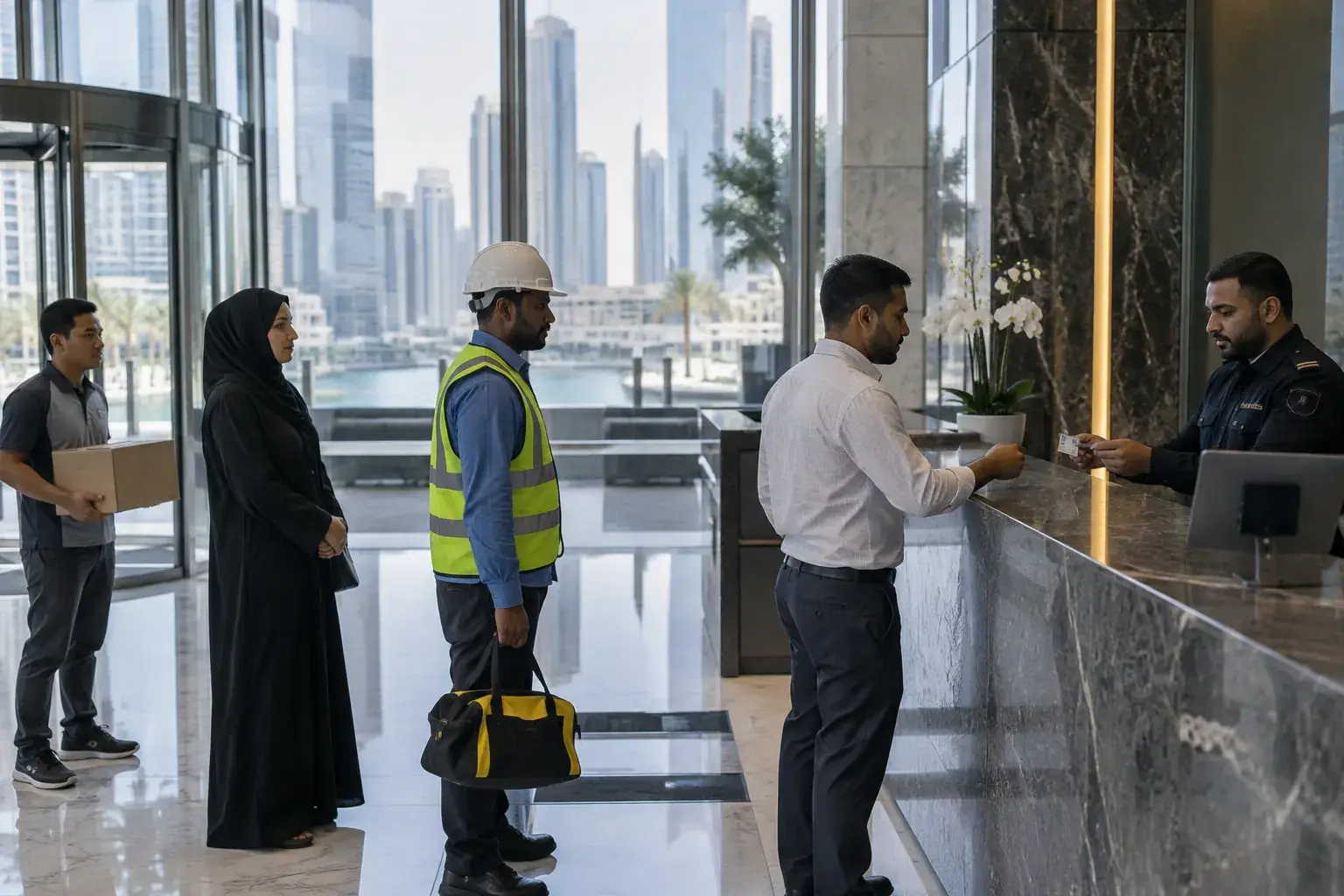
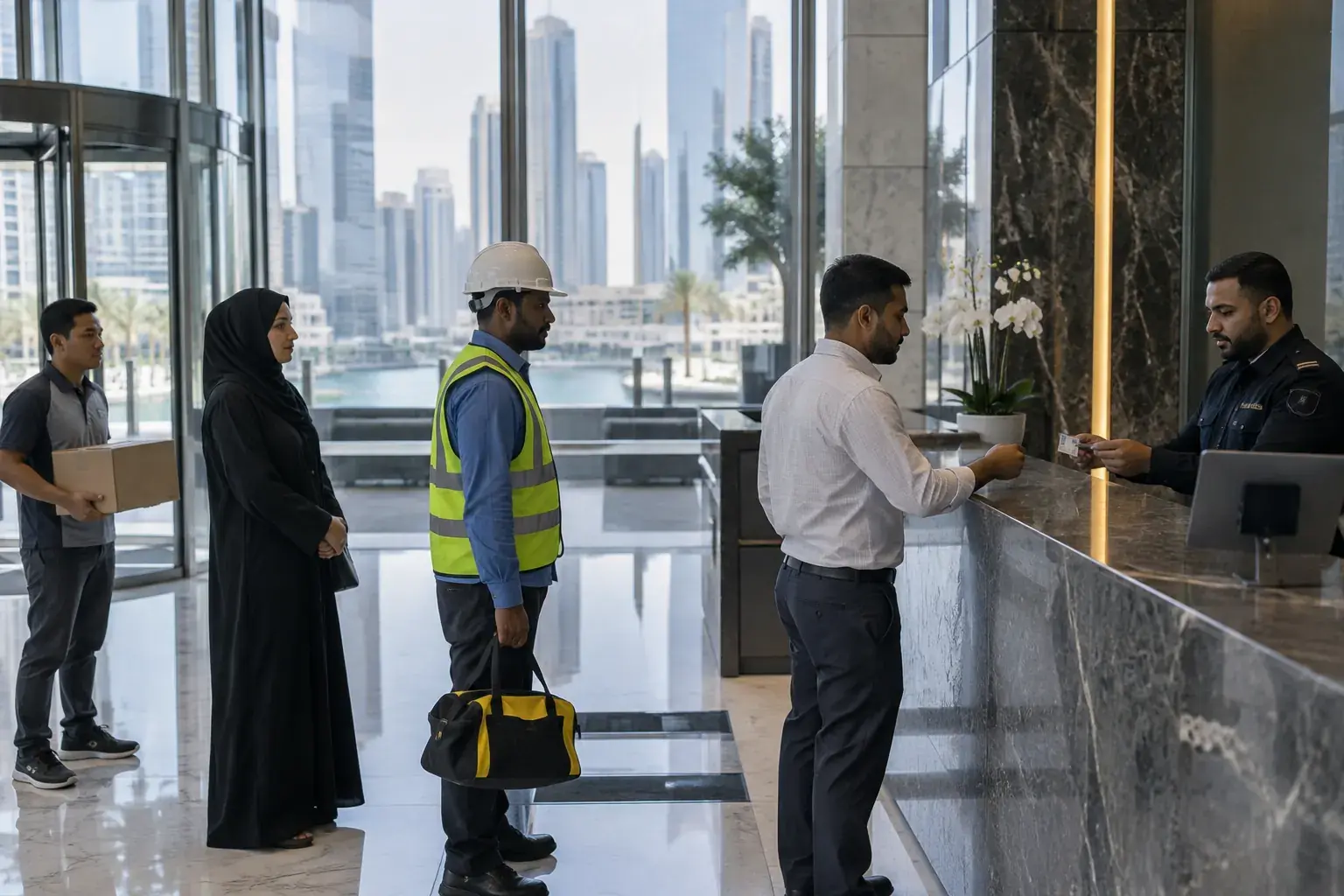


A security guard at the marble reception counter of a glass office lobby takes an ID card from a visitor, while a man holding a parcel, a woman in an abaya and a contractor in a hard hat wait, with towers and a canal outside.

Mindcat Lobby · Visitor management system for Gulf towers and sites

Every visitor checked against their card, and no ID copies left in the drawer.

For managers of office towers and FM sites in Dubai, Abu Dhabi and Riyadh. The guard scans the back of an Emirates ID or a passport and the pass fills itself, contractors arrive with an approved pass for the loading bay, and the card image is deleted when the visitor leaves. Your own copy goes live on the date in your written plan.

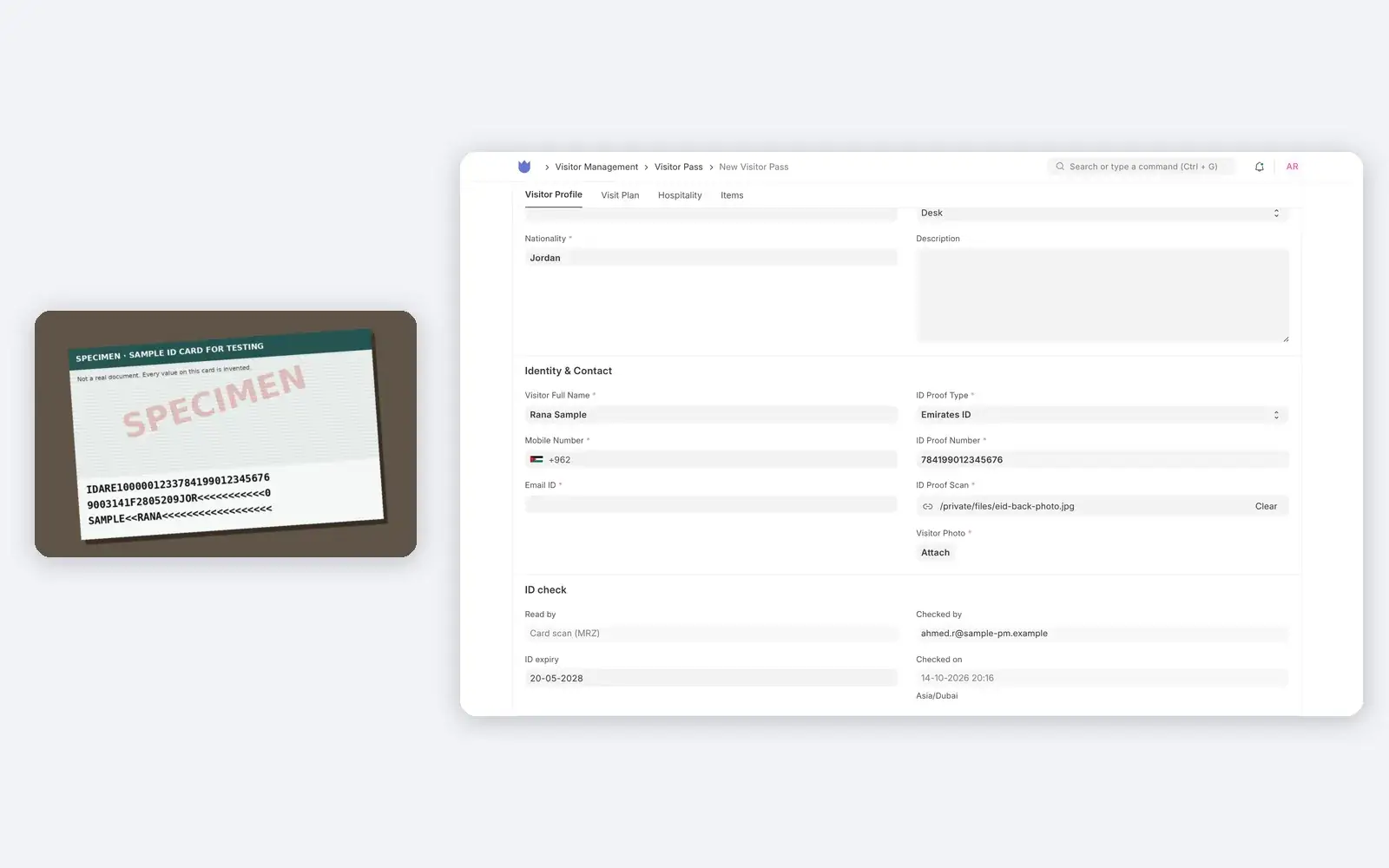
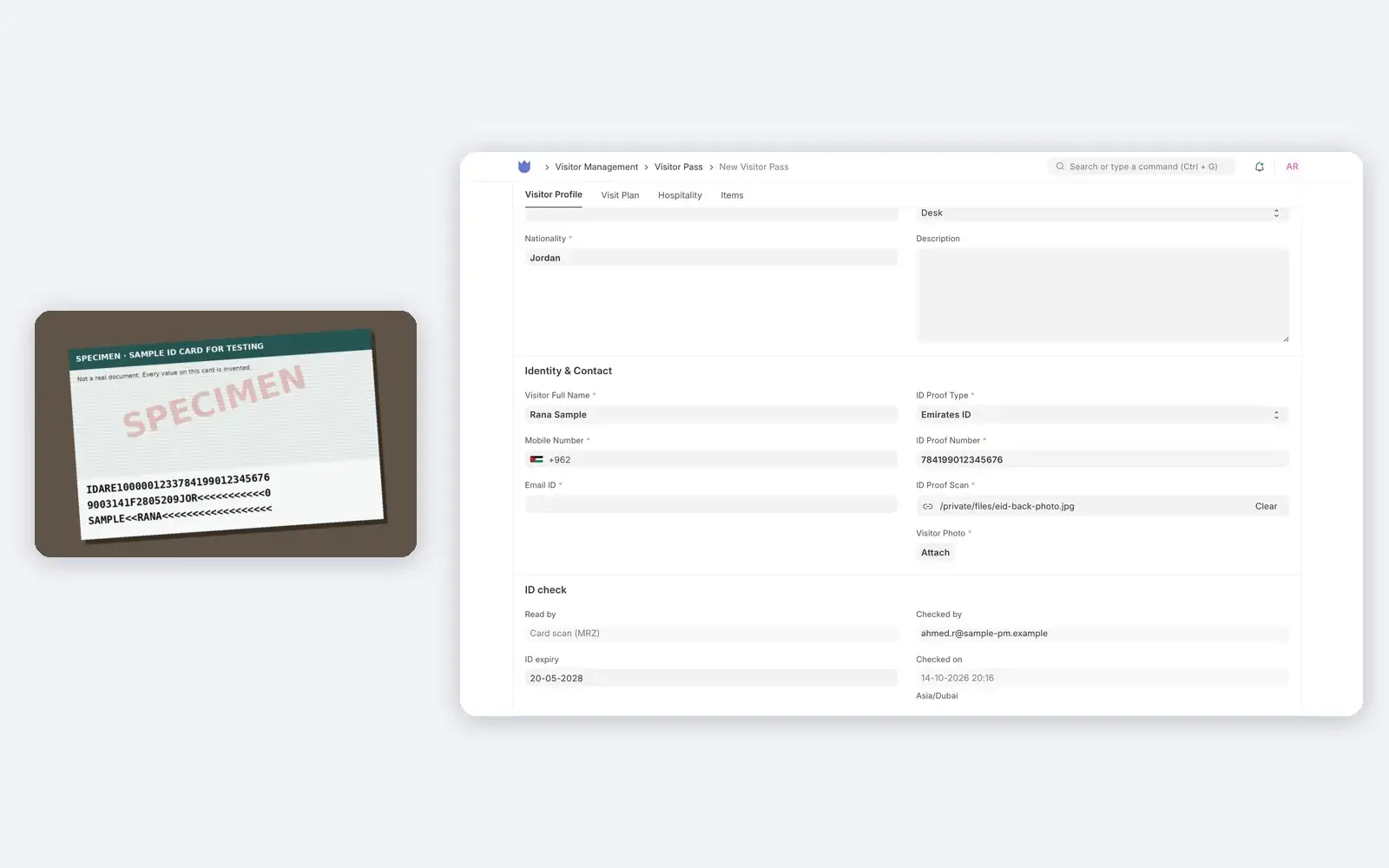
A specimen Emirates ID card on a desk beside the Mindcat Lobby pass it filled: Rana Sample, Emirates ID 784199012345676, nationality Jordan, expiry 20-05-2028, read by card scan and checked by the security supervisor.
A specimen Emirates ID, photographed on a desk, and the pass it filled.Real screen, sample data
AED/SAR 1,490
per site a month, logins free
Your own copy
in the UAE, the Kingdom or your cloud
Go-live date in writing
after one call

Where the lobby loses track

Five ways a Gulf tower loses track of who came in.

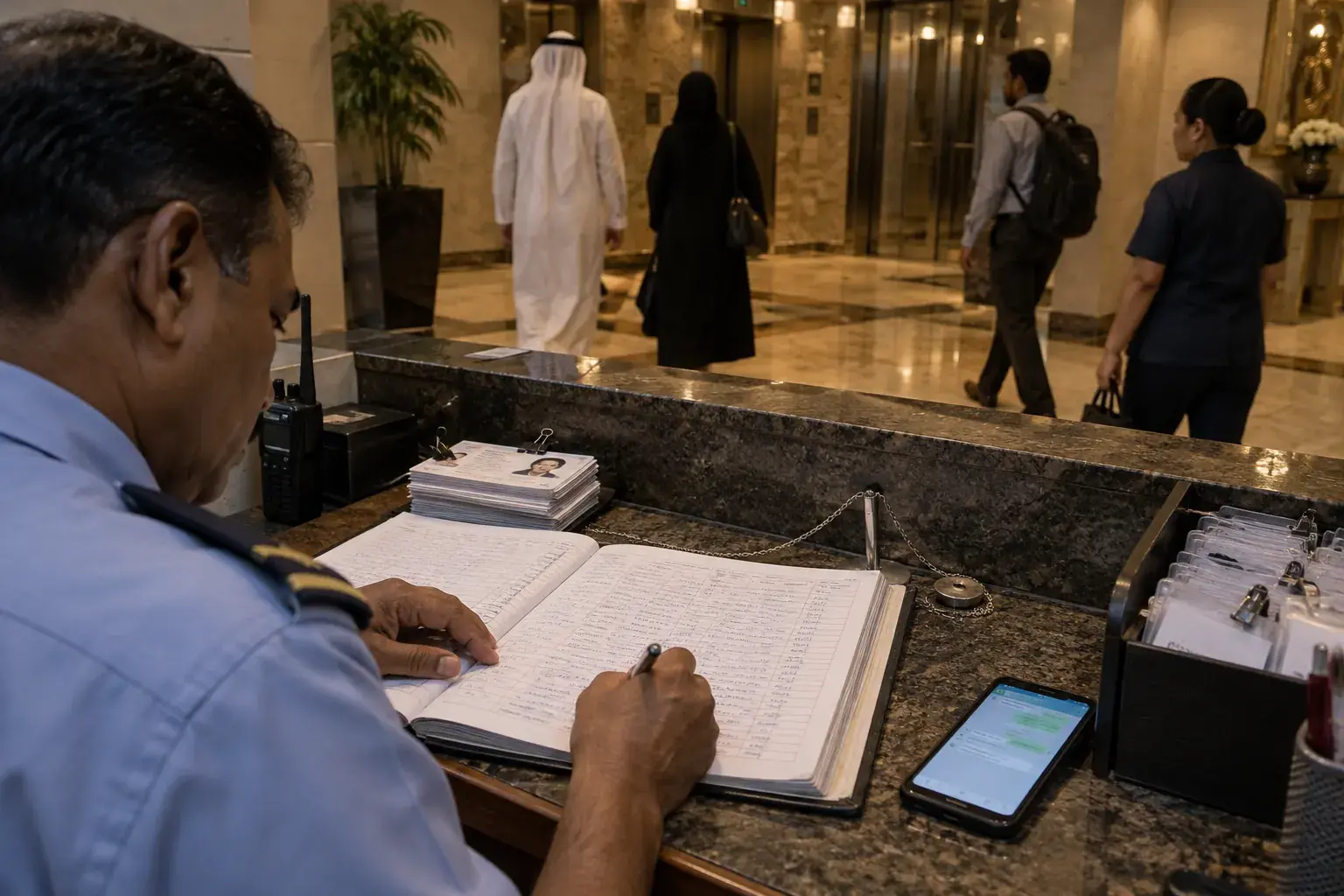
A security guard writes in a thick paper visitor logbook at a granite lobby desk in the evening, beside a stack of photocopied ID cards, a phone with a chat open and a tray of plastic visitor badges.
Before: the visitor book, a pen on a string, ID photocopies and a phone full of tenant messages.Illustrative photo

Scan, check, delete · how one visit moves

From the tenant’s invitation to the card image deleted at check-out.

A viewing of a vacant office on level 15 of a sample Business Bay tower, followed through everyone who touches it.

  1. 01Leasing team (host)Sends the invitationVisitor type, date, times and purpose, “Viewing of vacant office 1505”. The visitor gets a link by email.On: Invitation
  2. 02VisitorFills it on the phoneOmar types his name and +971 number, picks Emirates ID and adds a photo. What the host set is locked.On: Phone form
  3. 03Building managerApproves the passThe pass waits under “To approve” until the host or manager approves it. A pass for a VIP waits for the head of department.On: Today list
  4. 04Security supervisorChecks him in at the counterScans the pass QR, compares Omar’s face with his ID and pass photo, and prints the badge. A walk-in’s card is scanned here instead.On: Gate check
  5. 05Mindcat LobbyDeletes the card image at check-outWhen Omar checks out, the card image is deleted and the number kept as its last 4 digits, with who checked it and when.On: Pass
Invitations go by email today. WhatsApp is not part of the app.

What it does · real screens

The screens your guards, hosts and managers will use.

“The guards know everyone” is the belief that keeps the book. The second screen below is the part no book can do: the card image gone at check-out, and the number kept as its last 4 digits. Every screen is captured from our own running copy with invented sample data for a Dubai property management company. Names, ID numbers and cards are specimens, not real.

  1. “The guard copies 15 digits by hand while the queue builds.”

    Scan the card, the pass fills itself

    Photograph the back of an Emirates ID or a passport’s photo page with the counter’s camera or tablet. The name, ID type, number, nationality and expiry fill in, the card’s check digits are checked, and an expired card is flagged. If a card won’t read, the guard types the number and the app checks its format.

    Used by
    Security supervisors, receptionists
    On screen
    A specimen Emirates ID photographed at an angle on a desk: name, number, nationality Jordan and expiry filled, “Card scan” recorded with the supervisor’s name.
    A specimen Emirates ID photographed on a desk beside the Mindcat Lobby pass it filled: Rana Sample, Emirates ID number 784199012345676, nationality Jordan, expiry 20-05-2028, read by card scan, checked by the security supervisor.
    Card scan: tested on specimen cards; your cards and camera are tested during setup.
  2. “We keep photocopies of visitors’ IDs because nobody deletes them.”

    The card image deleted at check-out

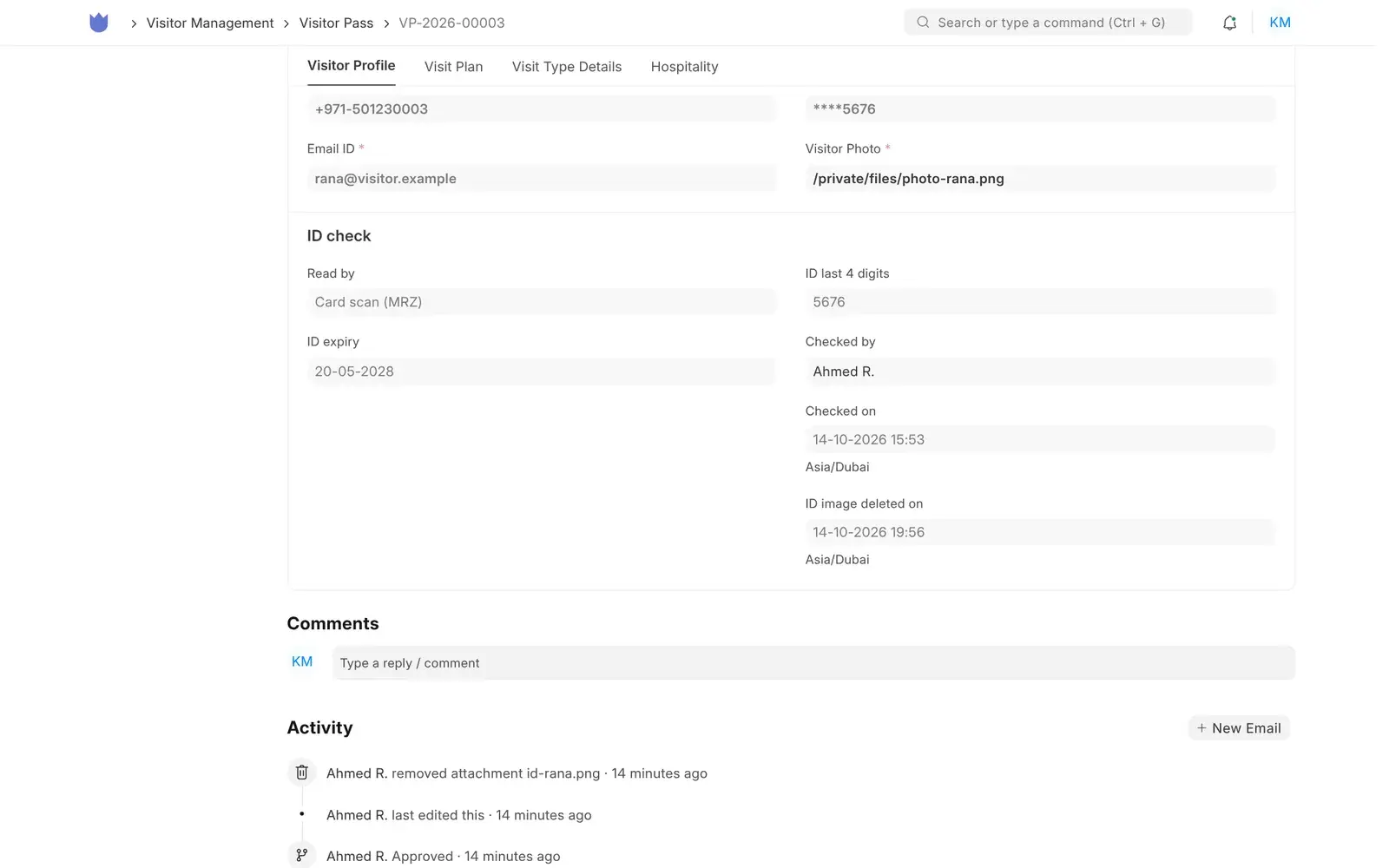
    When the visitor checks out, the card image is deleted, and the number on the pass and the gate log is masked to its last 4 digits. The expiry, the read method, who checked it and when stay on the record. A site can keep images for a set number of days instead.

    Used by
    Building managers, data protection leads
    On screen
    A checked-out visitor’s pass: ID shown as ****5676, read by card scan, checked by the supervisor, and the time the image was deleted.
    Mindcat Lobby pass after check-out: ID proof number masked as ****5676, ID check section with read by card scan, last 4 digits 5676, expiry, checked by the security supervisor and the time the ID image was deleted, and the activity log showing the attachment removed.
    After check-out: last 4 digits and who checked them, no image.
  3. “The pass, the face and the card are checked by eye, if at all.”

    The gate check, in one record

    Scan the pass QR, take a live photo, compare it with the ID and the pass photo side by side, tick both, check the declared items and record the gate and the officer. Check-out is the same screen. A gate record is not edited afterwards.

    Used by
    Security supervisors
    On screen
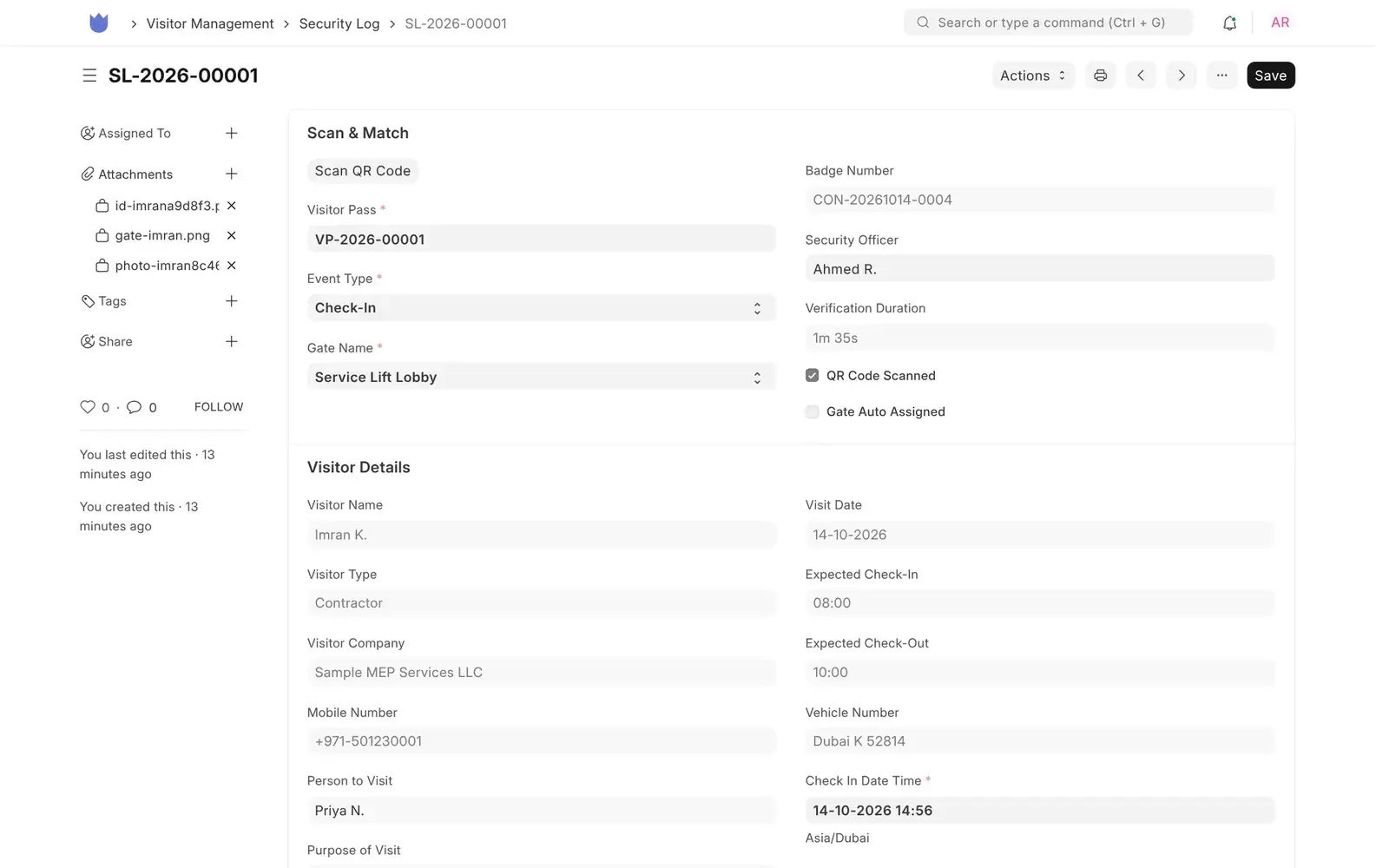
    A contractor checked in at the service lift lobby by the supervisor, verified in 1 minute 35 seconds, with his refrigerant gauge set to verify.
    Mindcat Lobby gate check for a sample contractor: pass number, check-in at the Service Lift Lobby gate, security officer Ahmed R., verification duration 1m 35s, QR code scanned, and visitor details including company, host Priya N., vehicle and check-in time.
    Gate check: who, which gate, which officer, how long.
  4. “Guests wait at the counter while the PA is called down.”

    Invited guests fill it in on their phone

    The host sends an invitation. The guest opens the link, types a name and phone number, picks the ID type and adds the card and a photo. The date, times, host and purpose the host set are locked.

    Used by
    Tenants, leasing teams, guests
    On screen
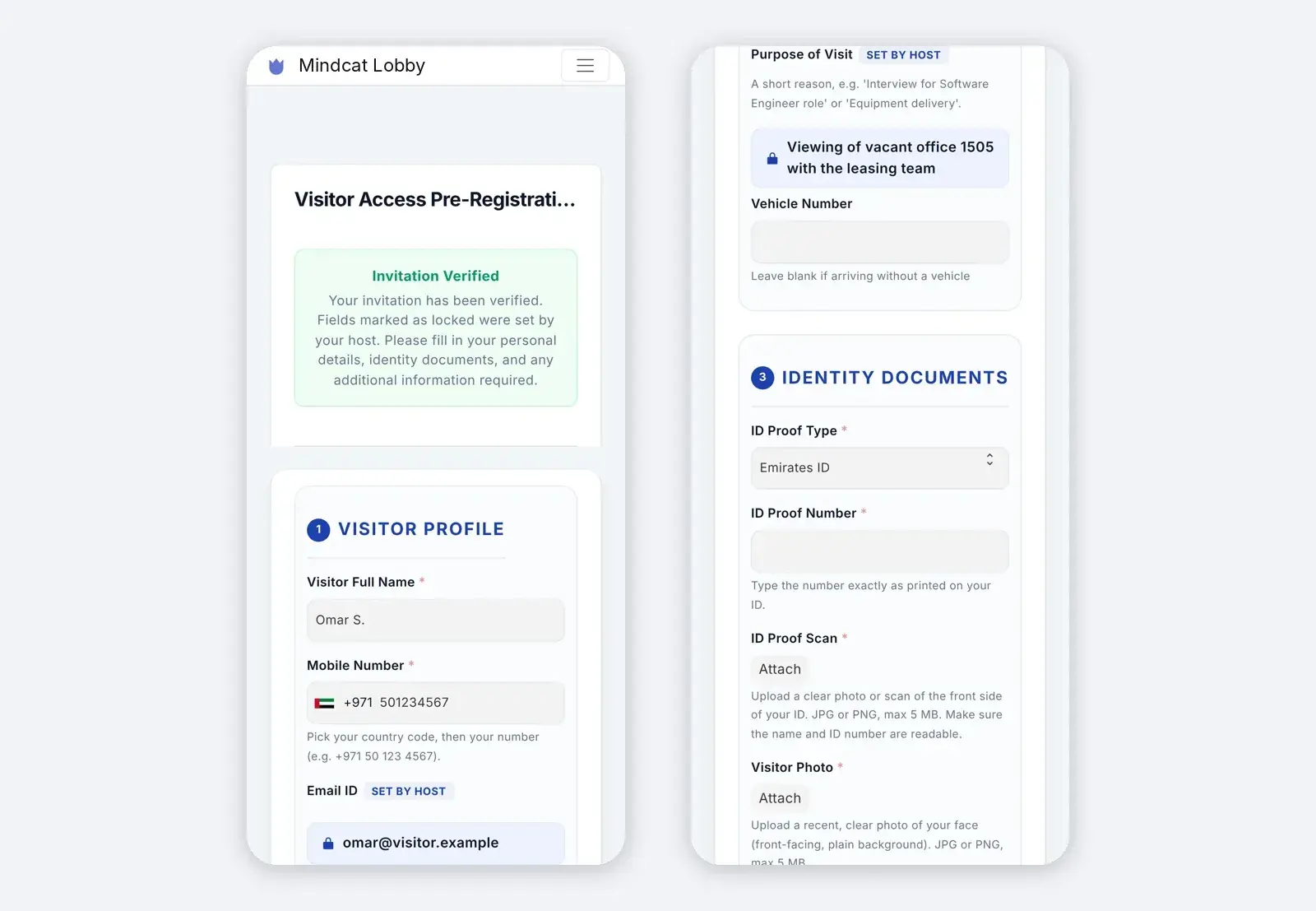
    Omar, invited for a viewing on level 15, fills the form on his phone with a +971 number and Emirates ID.
    Two phone screens of the Mindcat Lobby invitation form: invitation verified, name Omar S., +971 mobile number and his email set by the host; then the purpose “Viewing of vacant office 1505 with the leasing team” locked by the host, and identity documents with Emirates ID selected.
    Invitation form: the guest’s part done before arrival.
  5. “At 18:00 nobody knows who is still inside.”

    Today’s visitors, by state

    Every pass for today with a state the guard reads at a glance: Inside, Left, Expected or To approve, with visitor type and approval state.

    Used by
    Security supervisors, building managers
    On screen
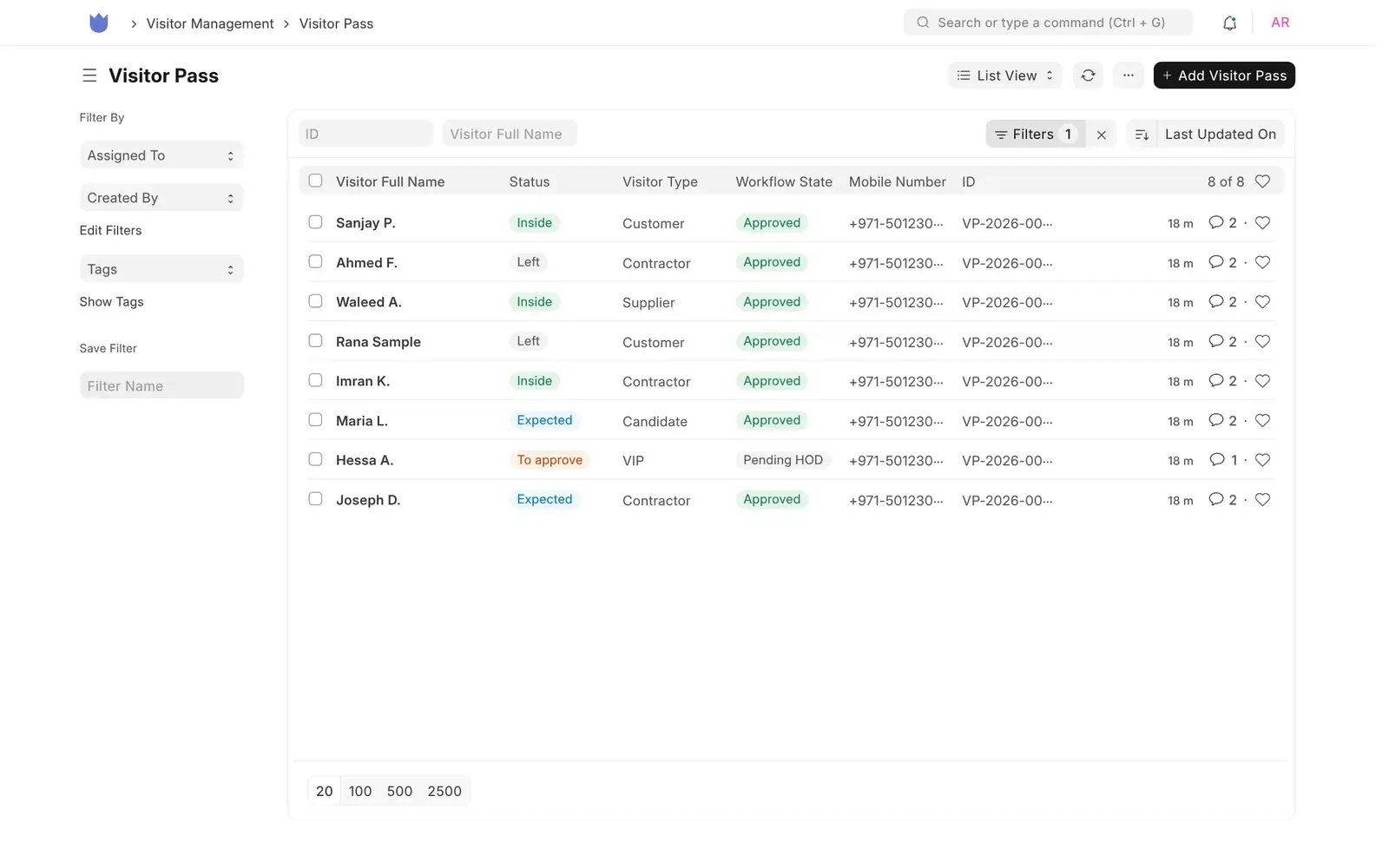
    Eight visitors in a sample tower: three inside, two left, two expected and a VIP waiting for approval.
    Mindcat Lobby list of today’s passes: eight sample visitors marked Inside, Left, Expected or To approve, with visitor type Customer, Contractor, Supplier, Candidate or VIP and the approval state.
    Today: who is inside, who left, who is expected.
  6. “Contractors get a sticker with a name written on it.”

    A badge with a QR code

    A printed badge with the photo, company, host, purpose, date, valid-till time and the pass QR, tagged with the visitor type.

    Used by
    Receptionists, contractors
    On screen
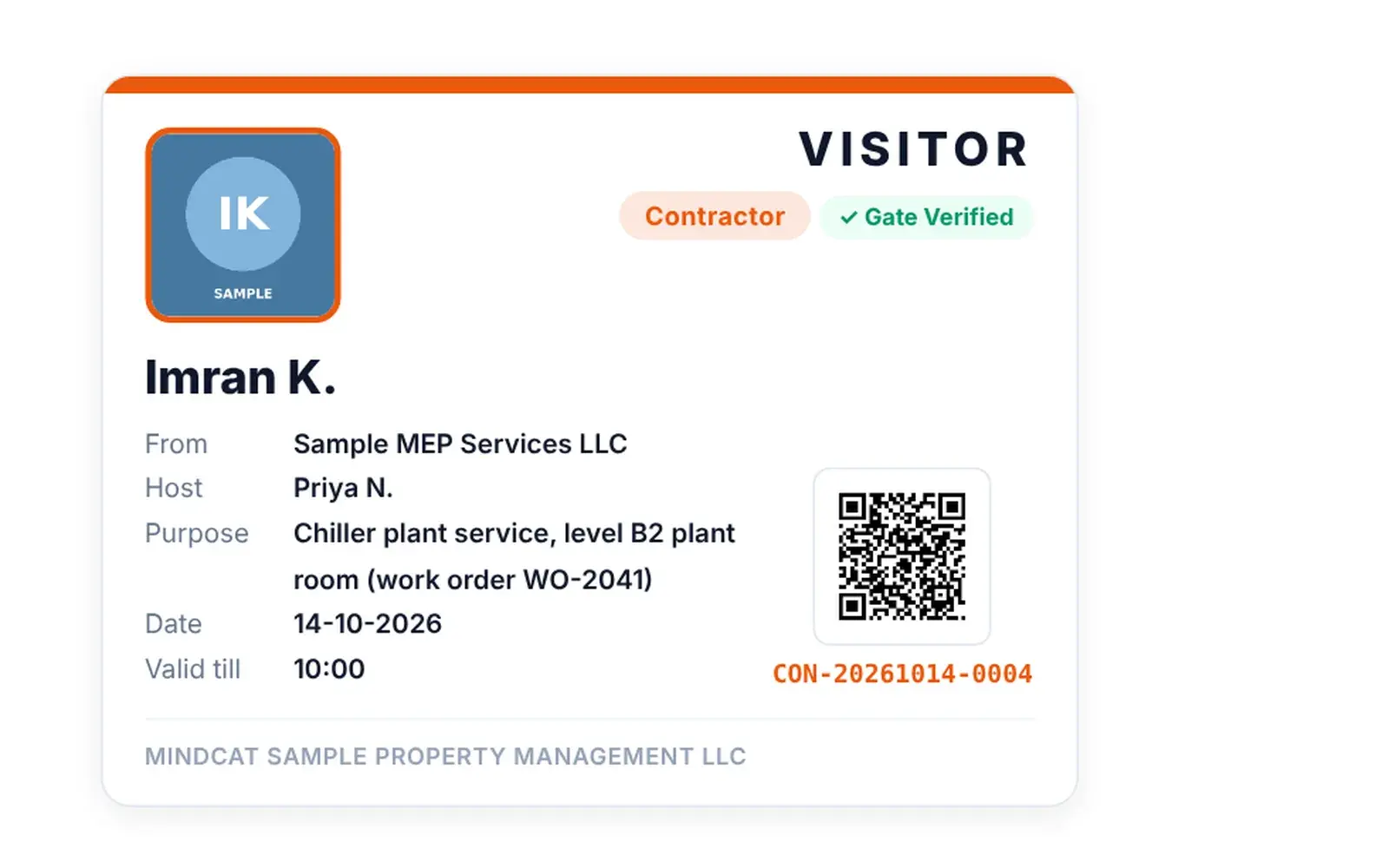
    A contractor’s badge for chiller plant service on level B2, work order on the badge.
    Mindcat Lobby badge for a sample contractor, Imran K. of Sample MEP Services LLC: host Priya N., purpose chiller plant service level B2 plant room with work order WO-2041, date, valid till 10:00, a QR code and the pass number.
    Badge: printed at the counter, scanned at check-out.
  7. “The man banned last month walks back in on the night shift.”

    A watchlist checked at the gate

    Blocked visitors by ID number, with the reason and who blocked them. At check-in the gate blocks or warns, as the site chooses.

    Used by
    Building managers, security
    On screen
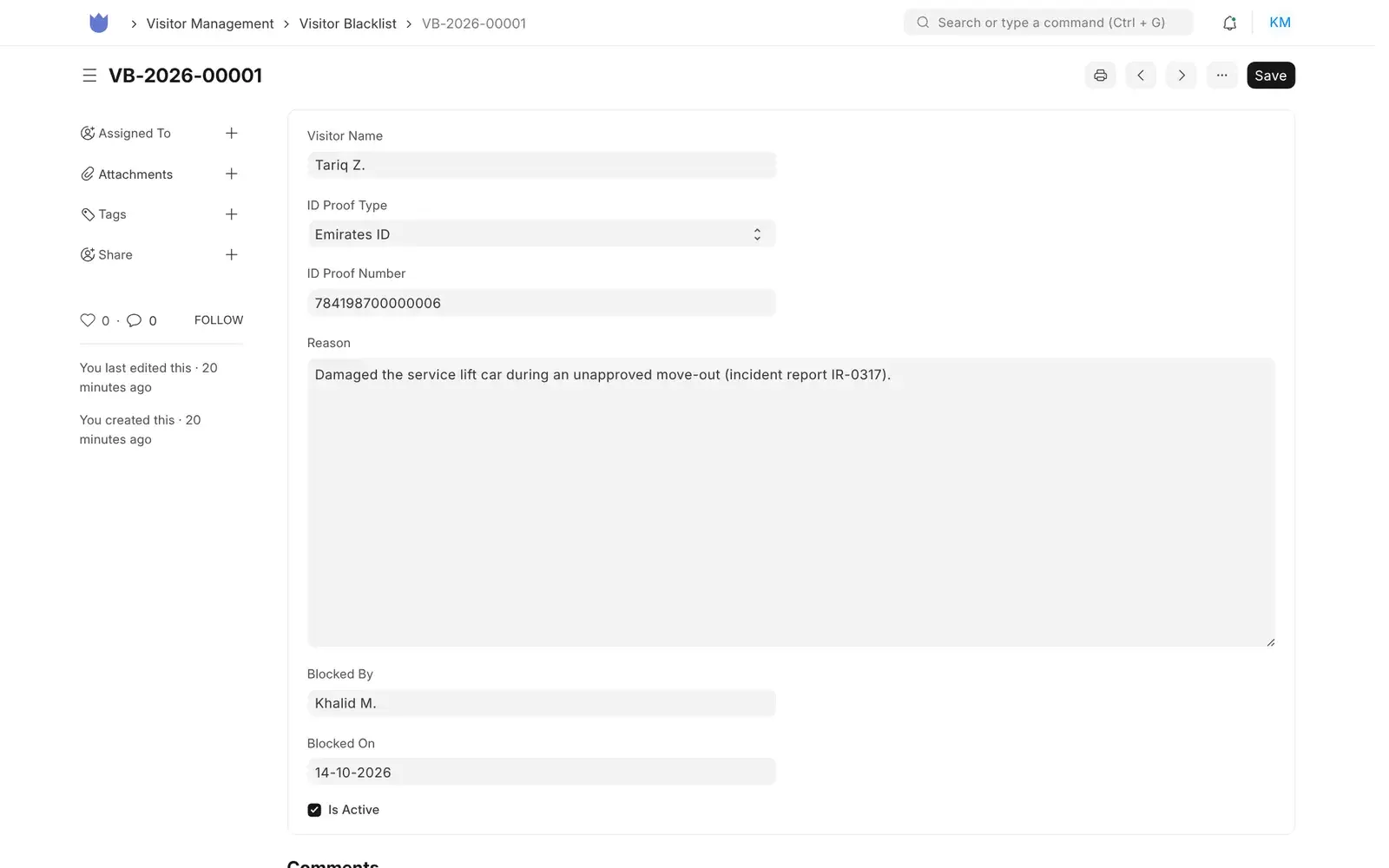
    A visitor blocked after damaging the service lift during an unapproved move-out, with the incident number.
    Mindcat Lobby watchlist entry for a sample visitor: Emirates ID, reason “Damaged the service lift car during an unapproved move-out (incident report IR-0317)”, blocked by the building manager, active.
    Watchlist: by ID number, checked at every check-in.

Also included

The rest of the gate, in one line each.

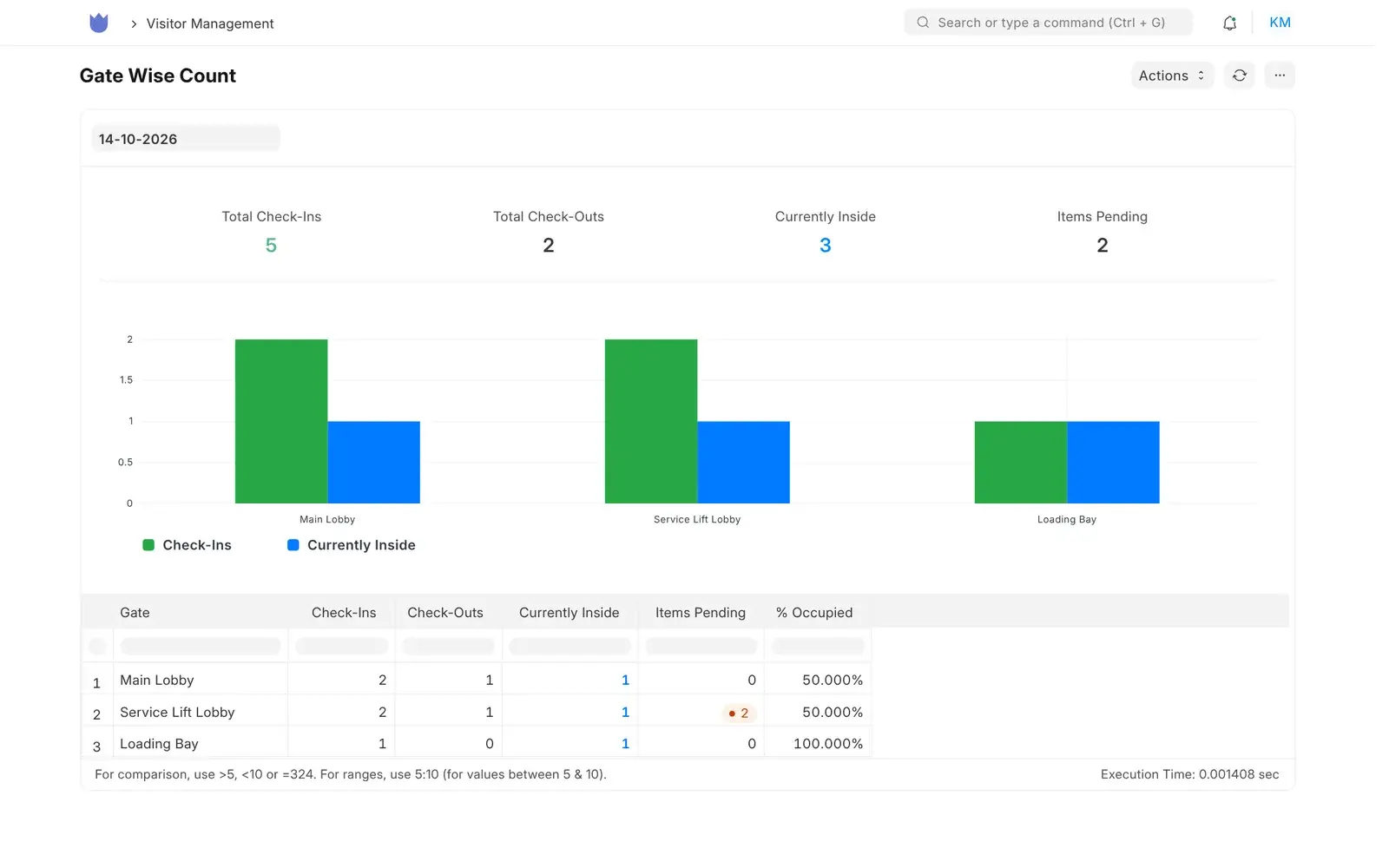
Mindcat Lobby Gate Wise Count report for a sample tower: 5 check-ins, 2 check-outs, 3 inside and 2 with items pending, with a bar chart and a table for Main Lobby, Service Lift Lobby and Loading Bay.
Gate count for the day: check-ins, check-outs and who is still inside, per gate.Real screen, sample data

Who it is for

Three Gulf buildings with people at the door, before and after.

A security guard takes a visitor’s ID card at the marble reception counter of an office tower lobby while three people wait.
Office towers

Managers of office and mixed-use towers in Business Bay, JLT and Olaya

Before
the lobby guard copies names into a book, photographs IDs on his own phone and calls tenants on the intercom.
After
invited guests arrive with their details already in, the card is scanned at the counter, and the image is gone when they leave.
Card scanInvitationsNo ID copies
At a Dubai tower’s loading bay at sunrise, a security guard with a tablet checks the ID card of a contractor in a hi-vis vest beside a truck loaded with air-conditioning units.
Contractors

Fit-out and MEP crews working in occupied buildings

Before
a crew arrives at the loading bay at 7:00 and waits while the guard phones the building manager.
After
each crew member’s pass was approved the day before with the work order and tools, and the guard checks the card against it.
Approved passesItems declaredGate per type
A property operations manager in a navy blazer looks at a laptop while a security supervisor points at the screen, residential towers behind the office window.
FM companies

FM and security companies running client sites

Before
on sites from Al Quoz to Riyadh’s financial district, each guard post keeps its own book and sends the client a weekly log as a photo on WhatsApp, so the question about last Tuesday takes a day.
After
the same pass, gate and card check on every site, and a report per client from one copy.
Same rules per siteReports per clientYour own copy

Not for you if

Three buyers we turn away, and why.

Built for the Gulf

What is ready today, and what we add during setup.

Every row is true today, work we do during your setup, on request, or not offered. We say which.

What Gulf buildings ask forWhere it stands
Read the Emirates ID or passport instead of typing itToday, from a photo of the back of the card or the passport’s photo page. It fills the name, number, nationality and expiry, checks the card’s own check digits and warns on an expired card. Captured on specimen cards; we test your camera and the cards you see most during setup.
Iqama, Saudi national ID, GCC national IDsAdded during setup, on the same card-scan path. Until then, the guard picks the type and types the number, and the app checks its format.
Reading the Emirates ID chip, signing in with UAE PASSOn request, subject to approval. Both need approval from the issuing authority, and neither is part of the app today.
No ID copies keptToday. The card image is deleted at check-out and the number kept as its last 4 digits. A site can keep images for a set number of days instead. Anonymising older records after the period you choose is switched on during setup.
Data in the UAE or the KingdomToday. Your copy runs in the UAE, in the Kingdom, or in your own cloud. The card is read on that server; the image is not sent anywhere else.
Arabic screensPartly. The screens switch to Arabic and run right to left, but the visitor pass labels are still in English. We translate the screens your guards use during setup.
+971 and +966 numbersToday. The visitor’s phone form starts on the UAE code and takes any country code.
WhatsApp invitations and host alertsNot today. Invitations and alerts go by email, and SMS through your own provider during setup.
Self check-in kioskNot today. Guards and receptionists check visitors in; visitors fill their details on their own phone before they arrive.
Turnstiles, barriers and door accessNot offered. We don’t sell or connect access-control hardware.

بالعربية

Mindcat Lobby in Arabic, for Saudi and Emirati buildings.

Mindcat Lobby · سجل الزوار وتصاريح المقاولين

نظام تسجيل الزوار للأبراج التجارية ومواقع إدارة المرافق في الإمارات والسعودية. يصوّر موظف الأمن ظهر بطاقة الهوية الإماراتية أو صفحة جواز السفر، فيُعبّأ الاسم والرقم والجنسية وتاريخ الانتهاء في التصريح دون كتابة يدوية.

يصل المقاول بتصريح معتمد مسبقًا لرصيف التحميل مع رقم أمر العمل والأدوات المصرّح بها. وعند خروج الزائر تُحذف صورة البطاقة ويُحفظ آخر أربعة أرقام فقط.

لكل عميل نسخته الخاصة، في الإمارات أو المملكة أو في سحابتكم. السعر لكل موقع شهريًا بالريال أو الدرهم. قراءة الإقامة والهوية الوطنية السعودية بالمسح تُضاف أثناء الإعداد، وتُترجم شاشات الأمن إلى العربية مع فريقكم.

Prices

Price your sites: per site, in AED and SAR.

Set how many sites you run and where it should run. Every client gets a copy of its own, set up with you; there is no shared plan. Logins are free. Every price is also listed in full below.

Where should it run?

Your monthly price

AED 4,470

SAR 4,470 · USD 1,217.15 · about AED 1,490 per site

One-time setup
AED 14,900
Per-visitor fees
None

Managed only. Every client gets a copy of its own, set up with you to a written plan with the go-live date and the monthly price. We set up each site’s gates, visitor types and approvals, so there is no self-serve start. We reply by email within 24 hours.

Tell us your site count

AED and SAR are the same number. Excludes 5% UAE VAT and 15% Saudi VAT. Annual prepay takes 15% off the part above the minimum.

The full price list

Every band, option and fee, in writing.

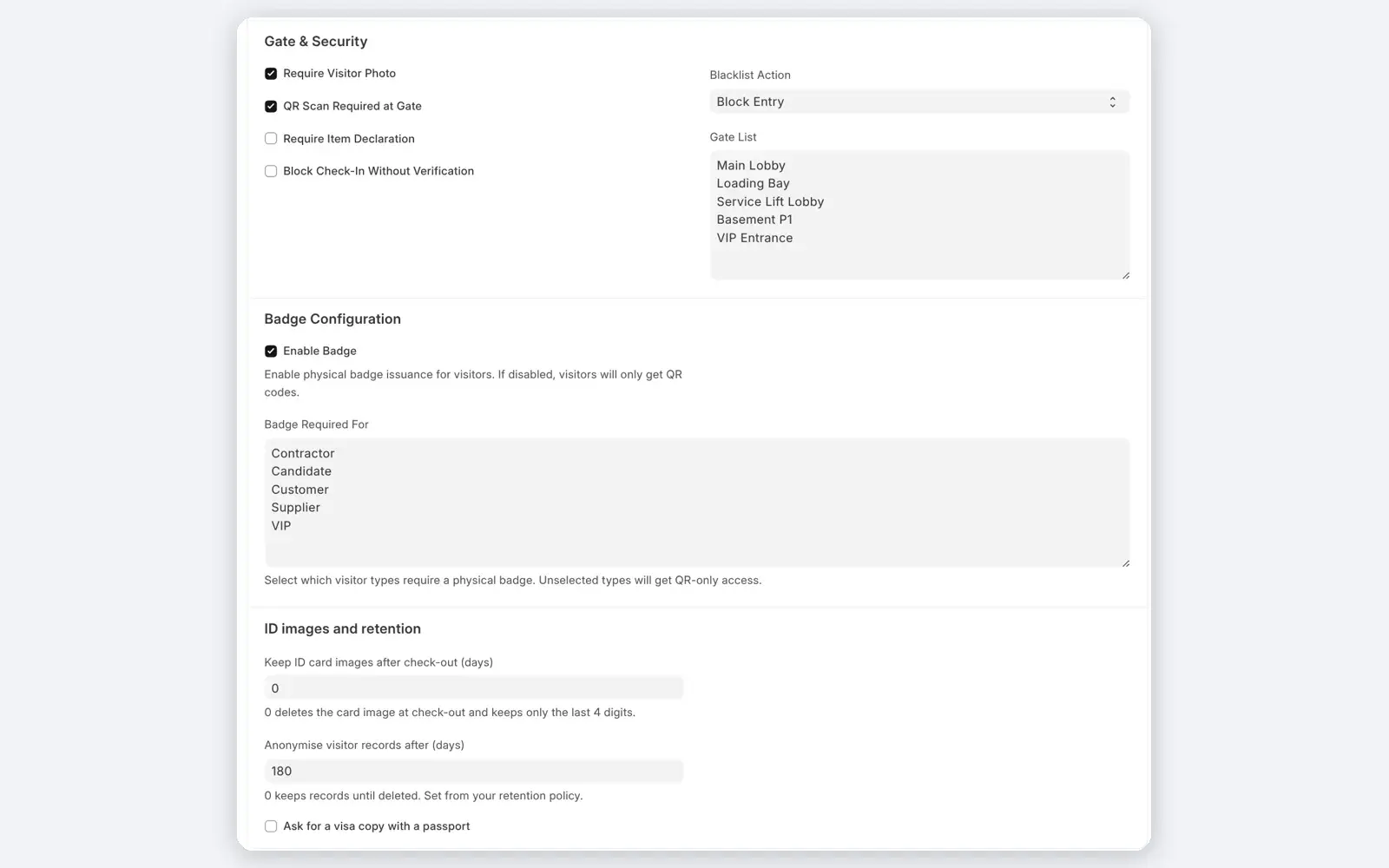
Mindcat Lobby settings for a sample site: require visitor photo and QR scan at gate, block entry for watchlisted visitors, the gate list, badge settings, and ID images and retention with 0 days to keep card images after check-out and 180 days before records are anonymised.
Site settings: gates, badges, and how long card images and visitor records are kept.Real screen, sample data

You pay per site, per month. A site is one building or compound with its own reception or gate; a tower with a lobby and a loading bay is one site. The price per site drops as you add sites: each band’s price applies only to the sites inside that band. Logins for guards, receptionists, hosts and managers are free, and visitors never need an account.

SitesAEDSARUSD
1 to 31,4901,490405.72
4 to 101,1901,190324.03
11 to 30990990269.57
Above 30890890242.34

Worked example. A manager with 10 towers pays 3 × 1,490 + 7 × 1,190 = AED 12,800 a month (SAR 12,800, USD 3,485.36). With 3 towers it is AED 4,470 (USD 1,217.15). One tower pays the minimum below.

Where it runs. Every client gets a copy of its own. There is no shared plan.

OptionPriceMinimum a month
Your own copy, hosted by us in the UAE or Saudi ArabiaThe per-site price aboveAED/SAR 3,790 (USD 1,031.99)
In your own cloud or data centre, run by usThe per-site price above, and you pay your cloud bill directlyAED/SAR 3,490 (USD 950.31)

One-time setup. 1 site: AED/SAR 7,900 (USD 2,151.12). 2 to 5 sites: AED/SAR 14,900 (USD 4,057.18). 6 to 20 sites: AED/SAR 24,900 (USD 6,780.12). Above 20: from AED/SAR 39,900 (USD 10,864.53), scoped in writing. In your own cloud, add AED/SAR 4,900 (USD 1,334.24) for the install. Setup covers your copy with your logo, the gates and visitor types of each site, approval rules, your hosts imported from our template, the badge layout, the card scan tested on your camera or tablet, the retention period you choose, and two recorded trainings in Arabic and English. Extra work is AED/SAR 900 an hour (USD 245.06), or 10 hours for AED/SAR 8,100.

Not in the price. Cameras, tablets, badge printers and turnstiles: we don’t sell hardware. SMS from your own SMS provider is billed by that provider. There are no per-visitor or per-scan fees. Annual prepay takes 15% off the part above the minimum. Prices exclude 5% UAE VAT and 15% Saudi VAT.

Compare visitor management systems

What 3 towers cost with each option.

A manager with 3 towers, priced from each option’s own published price list. Checked on 14 October 2026. VAT is extra everywhere.

Swipe the table sideways to see every column.

OptionA month, 3 towersCard scanData in the UAE or KSASource
The visitor book and the guard’s phoneNo software bill. Names copied by hand, ID photos on a personal phone, and no list of who is inside.NoOn the guard’s phoneYour lobby
Mindcat Lobby, your own copyAED/SAR 4,470 (USD 1,217.15). One-time setup AED/SAR 14,900.Emirates ID and passport today; Gulf IDs during setupYes. UAE or the Kingdom, or your own cloudThis page
Envoy PremiumUSD 1,086 (USD 362 per location, billed yearly)Enterprise plan onlyNot statedenvoy.com
SwipedOn EnhancedUSD 315 (USD 1,260 per site a year)Included from EnhancedNot statedswipedon.com
iLobby VisitorOS CorporateFrom USD 675 (from USD 225 per location, iPad included)Add-onNot statedilobby.com
Local visitor systems with ID readersQuote only; no published pricesUsually, with a card readerUsuallyYour quote

The global tools cost less than we do for 3 towers. Our price adds a copy of the app that is yours alone, in the UAE, the Kingdom or your own cloud, the card read on that server and deleted at check-out, Gulf ID types, contractor passes with your gates, and the setup done for you. If you run one small office and only need an iPad sign-in, a global plan may be all you need.

How we start

From your site list to go-live, with the date in writing.

No demo maze and no annual contract to start. You see the plan and the price before you pay anything.

A property operations manager and a security supervisor look at a laptop together in a facilities office.
The setup call: your sites, gates, visitor types and who approves, in Arabic or English.Illustrative photo
  1. Within 24 hours

    Send your site list

    How many towers or sites, their gates and counters, how visitors and contractors are logged today, and where it should run. We reply by email within 24 hours.

  2. One session

    One call with your operations lead

    We go through your gates, visitor types, approvals and how long you keep ID data, in Arabic or English. Then you get a written plan, the go-live date and the monthly price in AED or SAR.

  3. Go-live date

    Pay the setup and go live

    We set up your copy, each site’s gates and visitor types, your hosts and badges, test the card scan on your camera and train your guards. Then we keep it updated, backed up and watched.

  4. Before you pay

    The plan you sign is the promise

    The go-live date, the monthly price and what setup covers are written into the plan you sign before you pay. If the plan and this page differ, the plan wins. Read our terms.

  5. Your part

    What we need from you

    Your sites with their gates and visitor types, your host list on our template and the retention period in writing, by the date we agree, a camera or tablet and a badge printer at each counter, and one named admin. The go-live date counts from the day these arrive.

Why Mindcat

A copy of your own. Set up and run for you.

FAQ

What buyers ask about a visitor management system.

What counts as a site?
One building or compound with its own reception or gate. A tower with a main lobby, a service lift lobby and a loading bay is one site. Logins for guards, hosts and managers are free, and there are no per-visitor fees.
Does it read the Emirates ID chip?
No. It reads the machine-readable lines on the back of the card from a photo. Reading the chip needs the issuing authority’s toolkit and a certified reader; we can apply for it on request, subject to approval.
What if a card won’t scan?
The guard picks the ID type and types the number, and the app checks its format. The pass records whether the card was scanned or typed, and who checked it.
Do you keep a copy of the visitor’s ID?
Not after check-out, unless you choose to. The card image is deleted when the visitor checks out and the number is kept as its last 4 digits. A site can keep images for a set number of days, and records are anonymised after the period you set with your own adviser.
Does it work with Iqama and Saudi IDs?
The guard can record an Iqama, Saudi national ID or GCC national ID today by typing the number. Reading those cards by scan is added during setup.
Can visitors sign in on a tablet themselves?
Not today. Invited visitors fill their details on their own phone before they arrive, and a guard or receptionist checks them in.
Can tenants invite their own guests?
Partly. During setup we add each tenant’s contacts as hosts with their own login, and they invite guests from there. A directory where each tenant manages its own hosts is not built yet.
Does it open turnstiles or doors?
No. We don’t sell or connect access-control hardware.
Can the data stay in the UAE or Saudi Arabia?
Yes. Your copy runs in the UAE, in the Kingdom or in your own cloud. There is no shared plan.
Is the software ours to keep?
In your own cloud, yes: you receive the source code and the licence notices with the install. The app is licensed under MIT and runs on a business framework licensed under GPL-3.0.

Setup plan and price

Tell us your site count and how visitors get in today.

We reply by email within 24 hours with the setup plan and the monthly price.

Which is closest to you? (optional)

One copy per client in the UAE, Saudi Arabia or your cloud · Arabic screens finished during setup · Reply by email within 24 hours