

If a ticket can sit late for a day and the first person to notice is the user, this is for you. It is not for a desk with one agent and no promised reply times, or a team with no one who owns the queue: a matrix will not create the owner.
Why does a late ticket go nowhere?
Because nobody wrote down whose problem it is once it runs late. The agent who has it is busy with something louder. The IT manager assumes the queue is fine because nobody has complained. Then the finance director walks over to ask why the payroll printer has been down since yesterday, and that is how the manager finds out.
A desk can have priorities and even written reply times and still miss the next line: when the time runs out, who hears about it, and how. Without that line, a reply time is a wish.
There is a step before this one. A request that never became a ticket can never escalate. A six-person IT team lead at a 1,400-person company put it plainly on Reddit in April: "probably half our requests never make it there. People just DM whoever they know in IT." If that is your desk, start with one place for requests, which we cover in four things to set up before ITIL, then come back here.
What goes in an escalation matrix?
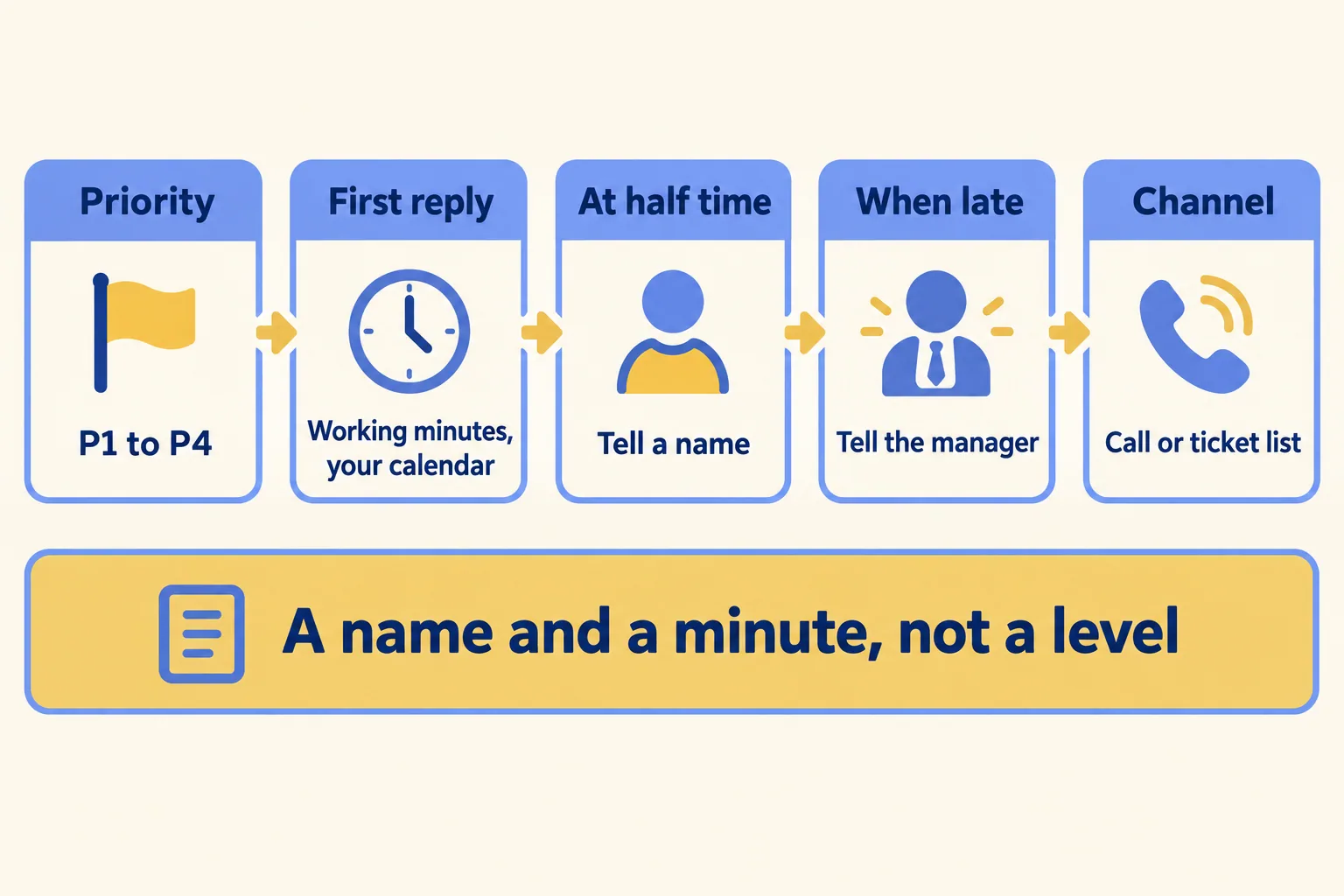
Four things for each priority. Mpathic, writing on 12 November 2026, says every row needs "the trigger, the destination, the time limit, and the handoff content", and that if any is missing, "agents fill the gap with judgment, and judgment varies by shift." Here is how we write them for a small desk:
- The first-reply time, in working minutes on a named calendar. "Two hours" means nothing until you say whose hours. Dubai works Monday to Friday, Riyadh Sunday to Thursday, and Ramadan shortens the day. We set this out in SLA agreements for Gulf service desks.
- Who is told at half that time. A name, not "L2". At half time the ticket can still be saved.
- Who is told when it is late. Usually the IT manager. ServiceTonic's guide puts it plainly: "An alert sent to the whole team at once usually ends up with no owner."
- The channel. A phone call for anything that stops the office. The ticket list or an email for the rest.
Many templates on the first page of Google list L1, L2 and L3 with no clock and no calendar. Those are the levels of skill a ticket moves through, which the trade calls functional escalation. A small desk needs the other half first: telling someone with authority that time is running out, known as hierarchical escalation. InvGate sums up the split: functional and hierarchical escalation "are about who should handle the issue. SLA escalation is about when it must be handled."
A sample matrix for a 30-person Dubai IT desk
This is a sample plan, not a client's. Change every number to your own reply times and your own people.
Three things to notice. Nobody above the IT manager is in it: on a 30-person desk, the manager is the top. P4 has no half-time alert, because a laptop request a day late annoys nobody enough to interrupt anyone. And the P1 row is on the phone, because an email about an outage is read after the outage.
In Ramadan, the same 30 minutes and 2 hours count on the shorter day. Write the Ramadan calendar before the month starts, not during it.
On a three-person desk the IT lead is often the one working the ticket. Then the half-time person is whoever else is on shift, and the late call goes to the manager the lead reports to. If staff message IT on WhatsApp, whoever receives the message copies it into the ticket list the same day, or its clock never starts.
When is a call to the manager enough?
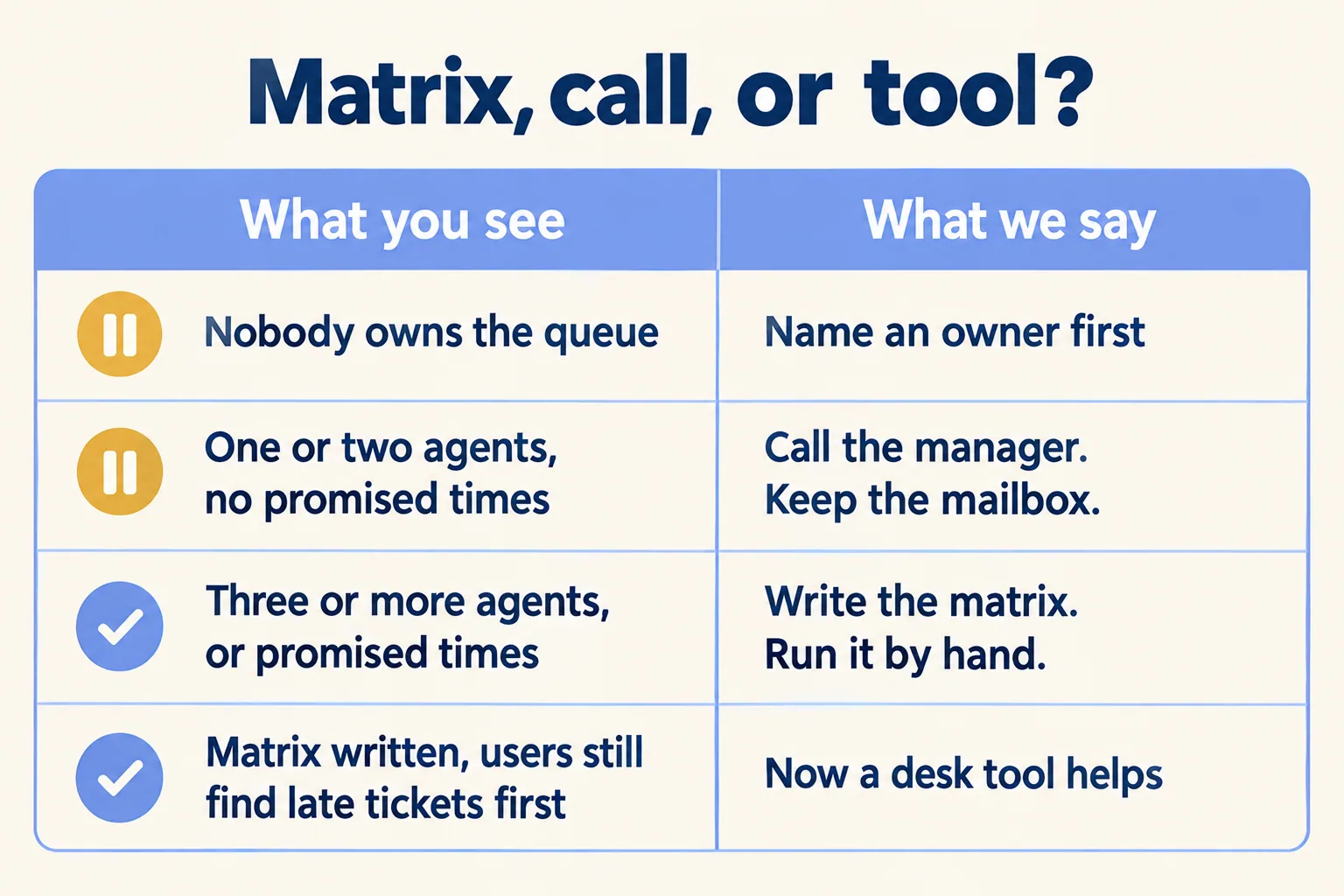
When the desk is one or two people and you have promised no reply times to anyone. Then the matrix is one line: if something stops work and you cannot fix it within the hour, call the manager. A tool adds nothing to that yet.
A long-time admin said the same about a mailbox on Reddit in July: "Our mailbox was our ticketing system... It was simple, but it worked well at the time. Have clear rules on how you mark the status of things... The software is secondary." We agree, up to a point. Here is how we decide.
- One or two agents, no promised times. Write the one line. Keep the mailbox.
- Three or more agents, or a reply time promised to a client or a manager. Write the full matrix. Run it by hand first.
- The matrix exists and the user still finds late tickets first. Now a desk tool earns its place, because the problem is that nobody can see the clock, not that nobody owns it.
- Nobody owns the queue. Name that person first. No matrix and no tool changes anything until they exist.
Run it by hand for two weeks
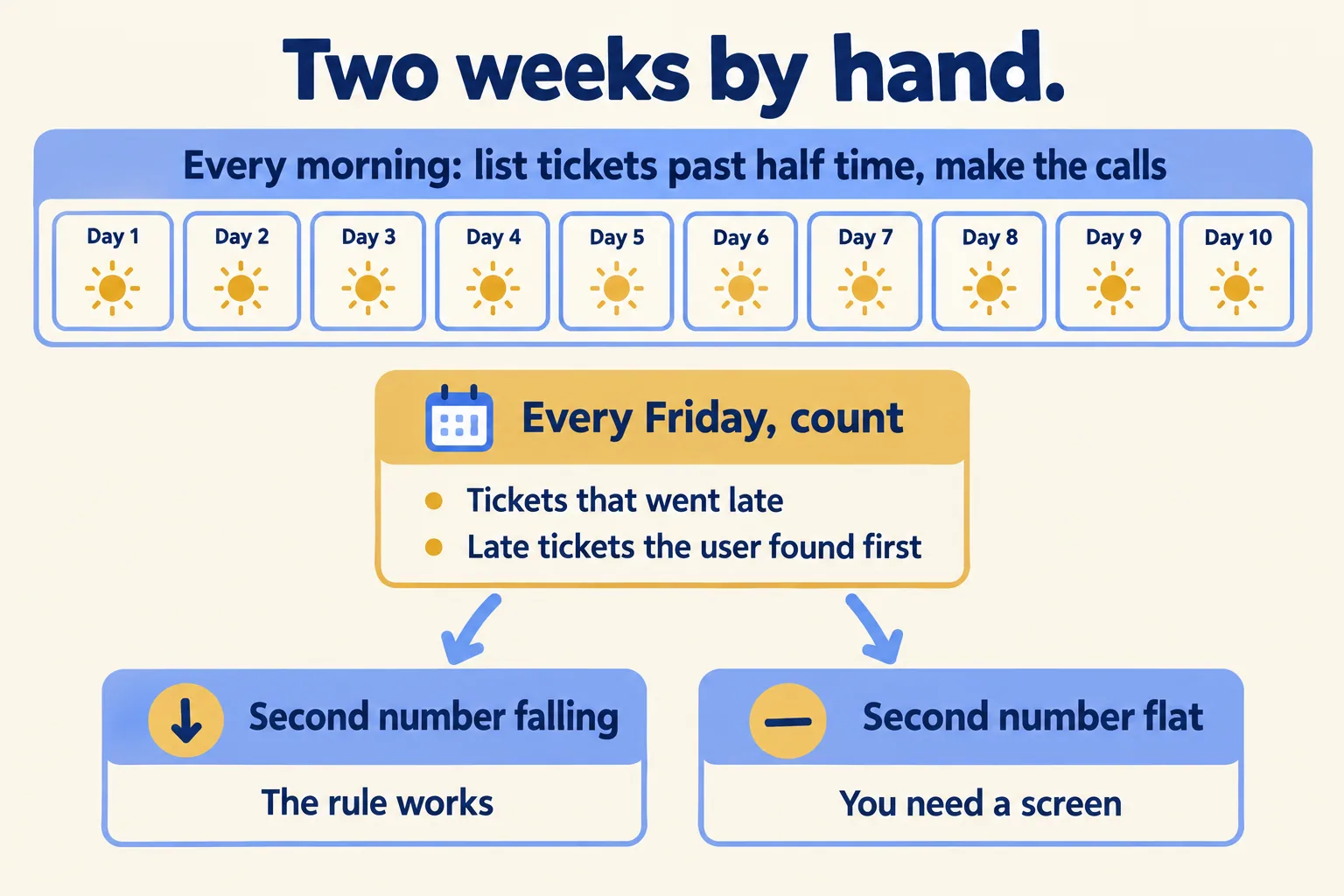
Before you change any tool, run the matrix by hand. Every morning, the IT lead lists open tickets past half their reply time and makes the calls the matrix says. Every Friday, count two things: how many tickets went late, and how many the user reported before anyone on the desk saw them.
If the second number is falling, the matrix works and your current setup may be enough. If it stays the same, the matrix is right but nobody can see the clock in time. That is the case for a desk tool.
The after-sales team in that July thread listed the symptoms: "Emails get missed or forgotten", "It's unclear who is handling what", "No real way to measure response times or workload." Two weeks by hand tells you which of those a written rule fixes and which needs a screen.
What does Mindcat Desk do once the matrix exists?
Mindcat Desk shows the matrix on screen. Each ticket shows when it was created and when its next deadline falls. The open list is sorted by time left and shows priority, owner and escalation time. When the first reply is late, the escalation turns red in the ticket and in every list, and the ticket moves to Escalated tickets, so the lead sees it while it can still be fixed. A trigger can escalate a high-priority ticket to the lead. Your working week and public holidays go into the clock during setup, and Ramadan hours are added during setup each year.
WhatsApp tickets can be connected during setup, with Meta's fees on your own account. It does not page anyone by SMS or phone out of the box. SMS and your phone system are connected during setup and billed at cost. It has no on-call rota, so the P1 phone call in the sample stays a call your lead makes. If you are weighing whether your current desk can do this, we wrote about when to stay, upgrade or move.
Each agent is priced a month in bands: AED 99 for agents 1 to 5, AED 69 for 6 to 20, AED 49 for 21 to 50 and AED 39 from 51. The shared plan has a monthly minimum of 5 agents, AED 495, so nobody buys a single agent at the per-agent rate. Staff who raise requests are free. Up to 20 agents, the quick start is a fixed package we set up for AED 2,500, one time, with one reply-time rule on your working week with public holidays, one support mailbox and the customer portal. Larger teams get a written plan. AI drafts on your own account, SMS and your phone system are billed at cost. Prices exclude VAT.
Desk is for requests with a promised reply time. If your team mostly answers sales leads on WhatsApp, start with Mindcat Inbox instead.
If nobody owns your queue yet, wait: a matrix and a tool both need that person first. We call the method Every request on the clock. Tell us how many people answer IT requests, your priorities and the reply times you want to promise. We reply with the setup plan and the monthly price per agent, in AED.
