
If the notice in your lobby still announces last month's water shut-off, this is for you. It is not for a board nobody has changed in a year: a glass case does that job for less.
Why does the notice board go stale?
Because taking a notice down is nobody's job. Someone pins the lift works notice on Sunday. The works end on Wednesday. The notice stays until the next one covers it, and residents, parents or patients learn to stop reading the board.
A screen does not fix that by itself. School IT staff on the EduGeek forum described exactly this in 2019. One school had nine screens: "Most people ignore them and although I frequently ask staff for stuff to put on them I rarely get anything. The stuff that is on there now has been on since Sept and no-one has asked me to change it." Another school ran six screens that "do look good, and are useful", with the content updated by the head's PA. Same hardware, different owner.
A third writer put it plainly: "The biggest issue is formalising who is creating the content, as it should not be IT." Those are UK schools, but a Dubai tower, clinic or school runs into the same thing.
How we decide: screen or glass board
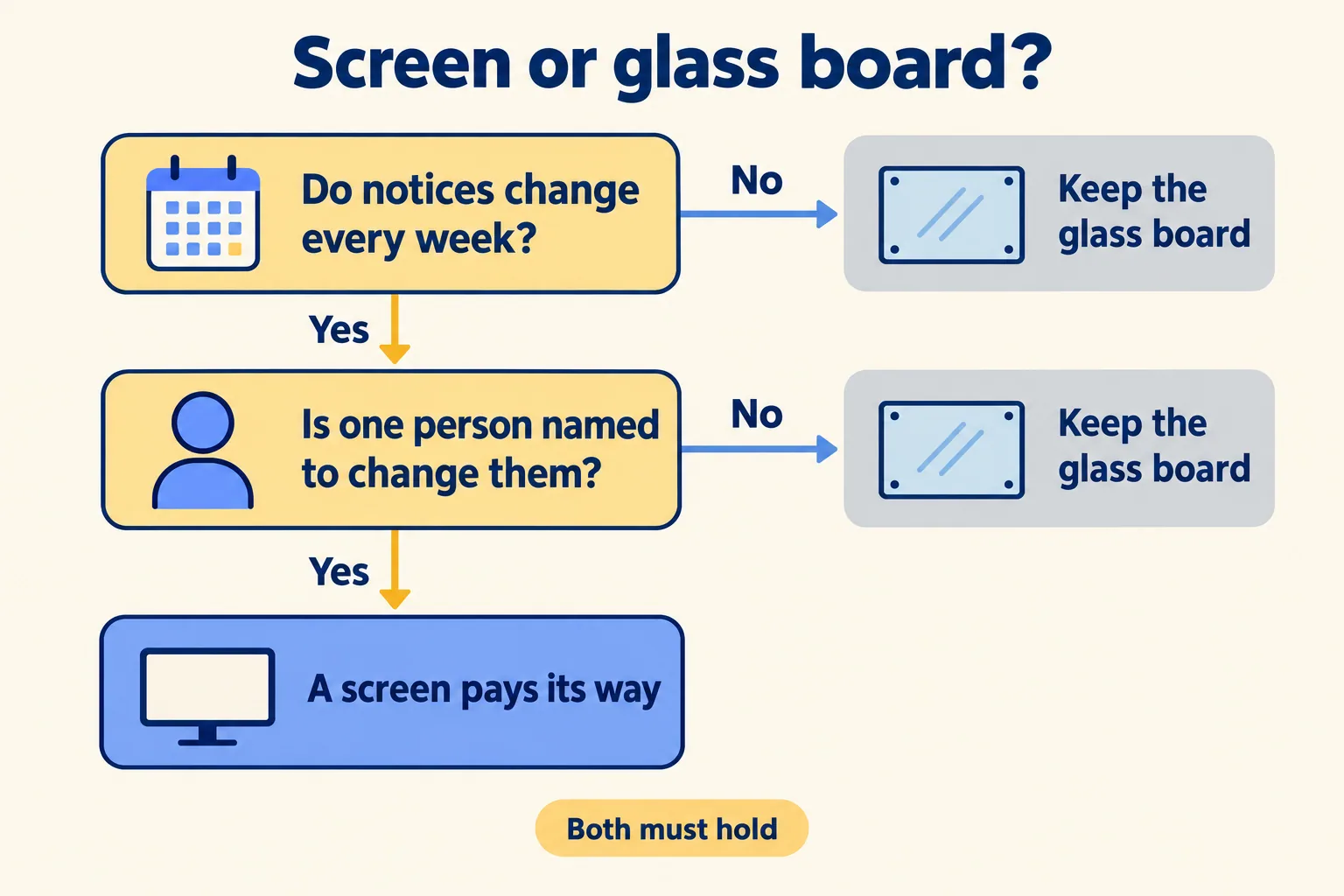
Two conditions, and both must hold.
- The notices change at least once a week. Water and power shut-offs, lift and pool works, the doctor rota, Ramadan hours, exam dates, the school bus timetable.
- One named person will change them from a desk. A building manager, the school office, the clinic coordinator. Named, not "admin".
If both hold, a screen pays its way: notices go up from a desk, start and stop on their own dates, and show in Arabic and English. If the board changes twice a year, keep the glass case. If nobody is named, a screen will show last month's notice in brighter colour.
The one-month count
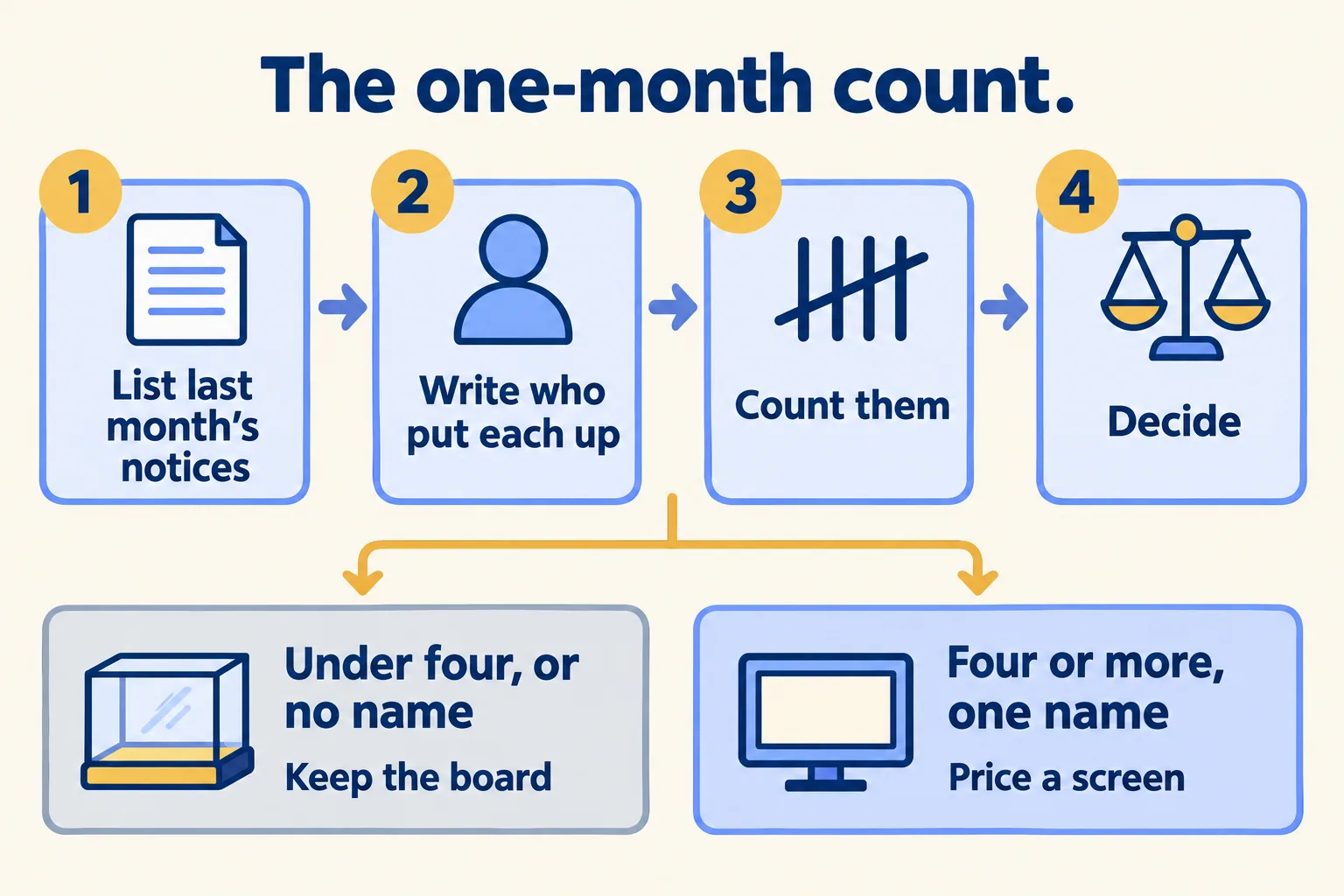
Run this before you get a quote. It takes ten minutes with whoever holds the key to the glass case.
- List every notice put up in the last month, including the ones already taken down.
- Next to each, write who put it up.
- Count them.
- Fewer than four, or no name that repeats: keep the board. Four or more, and one name on most of them: that person is the screen's owner, and the screen is worth pricing.
Most boards fail one of the two tests. That is a good result. It saves you a screen that would have stayed on one slide until next term.
Who owns the screen?
The person who writes the notices. In a tower that is the building or community manager, who already sends the shut-off emails. In a school it is the office that sends the parent letters. In a clinic it is whoever sets the rota.
IT sets up the screen and the logins, then steps back. When IT becomes the owner by default, the screen goes stale, because IT does not know when the lift works end.
Name a backup too, for the weeks the owner is on leave. And make the screen part of the job the owner already does: when the shut-off email goes to residents, the same notice goes on the screen in the same sitting, with the date the water comes back as its end date. If the screen is a second task done later, it will be done late.
Two rules keep it tidy:
- Every notice gets an end date. DigitalSignage.com, a signage software company, puts the case simply: "Every item carries a start and end date and disappears on its own." The water shut-off notice leaves the screen the evening the water comes back.
- Notices that never change sit in a fixed corner. Reception hours and emergency contacts stay in one place on the screen, so people learn where to look. The rest rotates.
Which notices earn a screen?
The ones with a date on them. Shut-offs, works, events, the rota, holiday and Ramadan hours, exam weeks. A screen shows these on the day they apply and drops them after.
Notices that change once a year can stay on paper in the glass case: licences, insurance certificates, building rules. Pinning them to a screen only adds slides people learn to skip.
Notices that need an answer do not belong on any board. A tenant's leak or a parent's question goes to whoever handles requests, by phone, email or a form.
Which screen does the wall need?
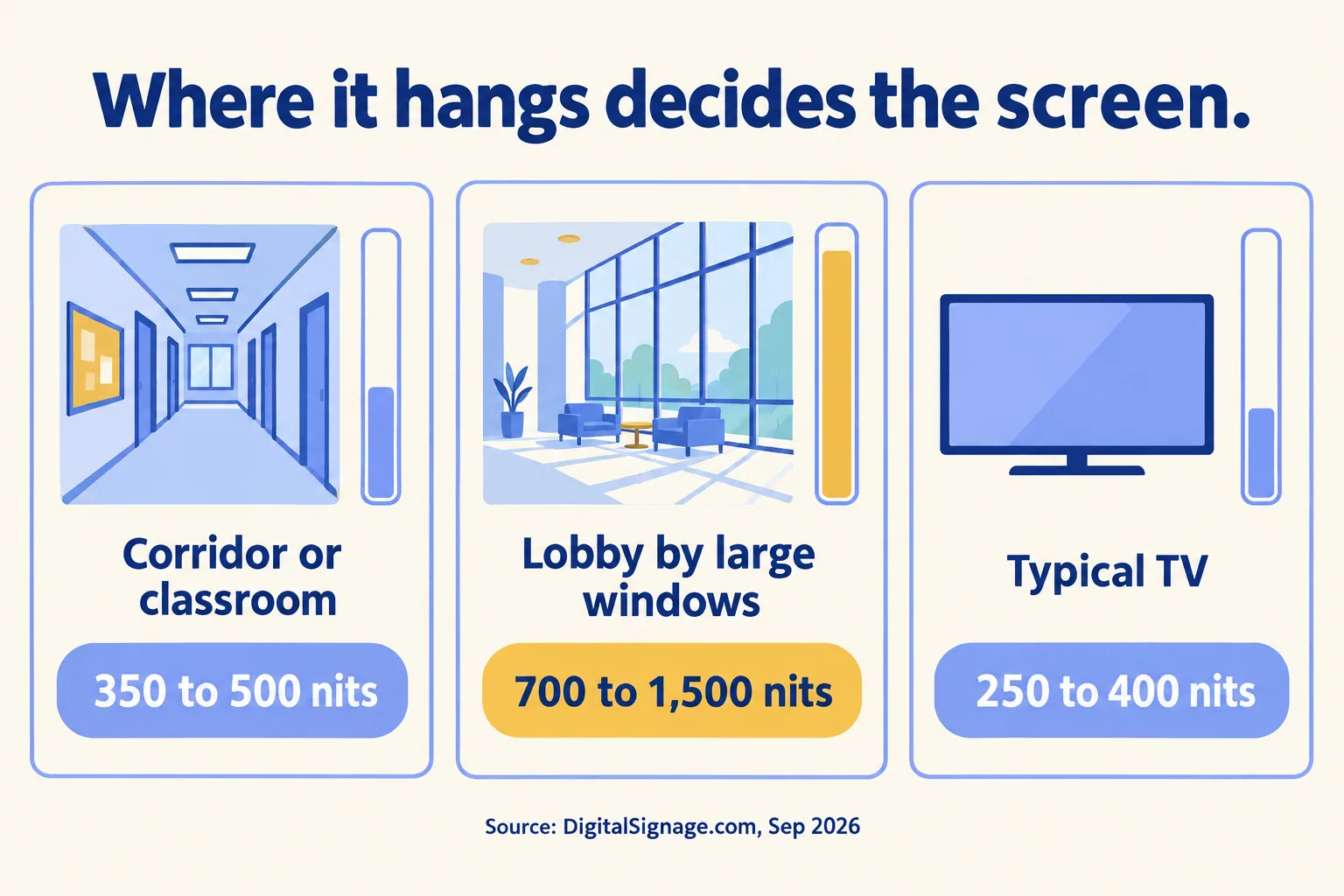
The same notice needs a brighter screen in a glass-walled lobby than in a corridor. DigitalSignage.com's brightness guide, from 24 September 2026, gives these ranges:
- Office, classroom or corridor: 350 to 500 nits.
- Lobby, atrium or anywhere near large windows: 700 to 1,500 nits.
- A typical consumer TV: 250 to 400 nits.
So a TV may be fine in a school corridor or a windowless clinic waiting area. Opposite a tower lobby's glass wall in Dubai afternoon light, it washes out and you need a commercial panel. We compared the two in a TV or a commercial screen for signage.
What Mindcat Screens does here, and what it does not
For one screen in one building, a slideshow on a stick behind a TV can do the job. Schools on that EduGeek thread run Google Slides that way. The software is rarely the cost. The owner is.
Mindcat Screens is for when there are several screens across buildings, branches or campuses and one person should change them all from a desk. One edit, every branch. Each notice is scheduled to a group of screens with a start and an end. A dataset, a simple table, feeds the doctor rota or a class timetable into a layout, so the coordinator edits a row, not a slide. Arabic and English sit on the same screen, with Arabic running right to left. The displays list shows which screens are up to date and which are not, and screens keep playing when the internet drops. Logins for the people who post are free, and each can be limited to their own building's screens. We wrote about owning a schedule like this in who changes the Ramadan menu board.
What it does not do: the console your team uses is partly in Arabic today, and we translate the screens your team uses during setup. We do not sell or install screens; your AV installer does. Player software on a Windows media player costs nothing; on Android, Samsung, LG and ChromeOS screens it is a one-off licence per screen from the player's maker, billed at cost if we order it for you.
The price is AED/SAR 49 a screen a month for screens 1 to 10, falling in bands above that. The shared plan, hosted by us in the UAE, has a minimum of AED/SAR 590 a month, so a building with three screens pays 590, not 147. A group with one lobby screen in each of four towers pays the same 590, because the four screens run in one system. Up to 10 screens, the quick start is a fixed package we set up for you for AED/SAR 2,500, one time, and your installer connects the screens with our guide. Prices exclude VAT. Clinic groups and property managers can see how we work with them on the clinics and property management pages.
If your board changes twice a year, or nobody will own the screen, keep the glass case. Tell us how many screens you run, in which buildings, and how notices reach them today. We reply with the setup plan and the monthly price per screen, in AED or SAR.
