
Digital signage and menu boards (Mindcat Screens)

UAE

Digital signage display quote says 'screens included'? Ask which player runs on each one

By Shivanath DevinarayananPublished 5 min read
Written forOperations or sales lead at a mid-market UAE business“Leads go cold before anyone replies.”

The short answer

Which player should each menu screen in a Gulf restaurant chain run, and does it add a licence per screen?

A small Windows box behind each screen carries no player licence. An Android box adds a one-off licence per screen, and a Samsung or LG commercial display adds a higher one. Consumer smart TVs often cannot run a player. At Mindcat, we ask which screens you own and how many branches you will add first.

A restaurant menu screen on a wall with a small player box on a shelf beside it, a price tag hanging from the box

Takeaways

  1. 01'Screens included' covers the display, not what plays on it. The player decides whether each screen carries a licence.
  2. 02One-off player licences per screen: USD 28 Android, USD 49 ChromeOS, USD 85 Samsung or LG. The Windows player is free.
  3. 03Twenty screens cost USD 0, USD 560 or USD 1,700 in player licences depending on the route, before any box or screen.
  4. 04Mindcat Screens prices the screen. The player licence is paid to the maker, never inside our price.

If an installer's quote says "screens included" and never says what plays on them, this is for you. It is not for a single branch with one TV: a USB stick and a printed menu are enough.

What does 'screens included' leave out?

The player. A digital signage display shows whatever a small program tells it to show. That program is the player. It takes the schedule from your signage system, stores the menus and plays them on the screen, even when the branch internet drops.

Where the player runs decides what it costs. The player's maker publishes the prices, and they differ by route, not by screen size or brand. A quote that lists displays, mounts and fitting can be complete and still leave you with a licence to buy for every screen.

That is a small line on one screen and a real line on forty. It is easy to miss because nobody on the installer's side is hiding it. The installer sells screens. The player is someone else's product.

If your branches already have screens and the menu is still changed by hand, see how Mindcat Screens sends one edit to every branch, or read the page for restaurants and cafes.

Which four routes can run the player?

The player's maker sells its Windows player free. It sells a one-off licence for Android, ChromeOS, Samsung (Tizen) and LG (webOS). DigitalSignage.com's summary of the maker's prices, updated on 21 October 2026, gives the figures below. Hardware prices are not in it and differ by supplier.

RoutePlayer licence per screen (the maker's, one-off)Check before you buy
A small Windows box behind the screenNone. The Windows player is freeYou still buy, power and look after the box
An Android box behind the screenUSD 28The box must run Android. We check the model
A Samsung (Tizen) or LG (webOS) commercial displayUSD 85The player runs inside the display, so no extra box. Highest licence
A consumer smart TVOften cannot run a playerNeeds a small box behind it, so it joins one of the routes above

ChromeOS screens are USD 49. The licences are perpetual and include minor upgrades. A major upgrade later is extra: USD 17 on Android, USD 28 on ChromeOS and USD 50.50 on Samsung and LG.

The same summary lists Apple TV and Roku as not supported. A streaming stick from a TV shop is not a cheaper way in.
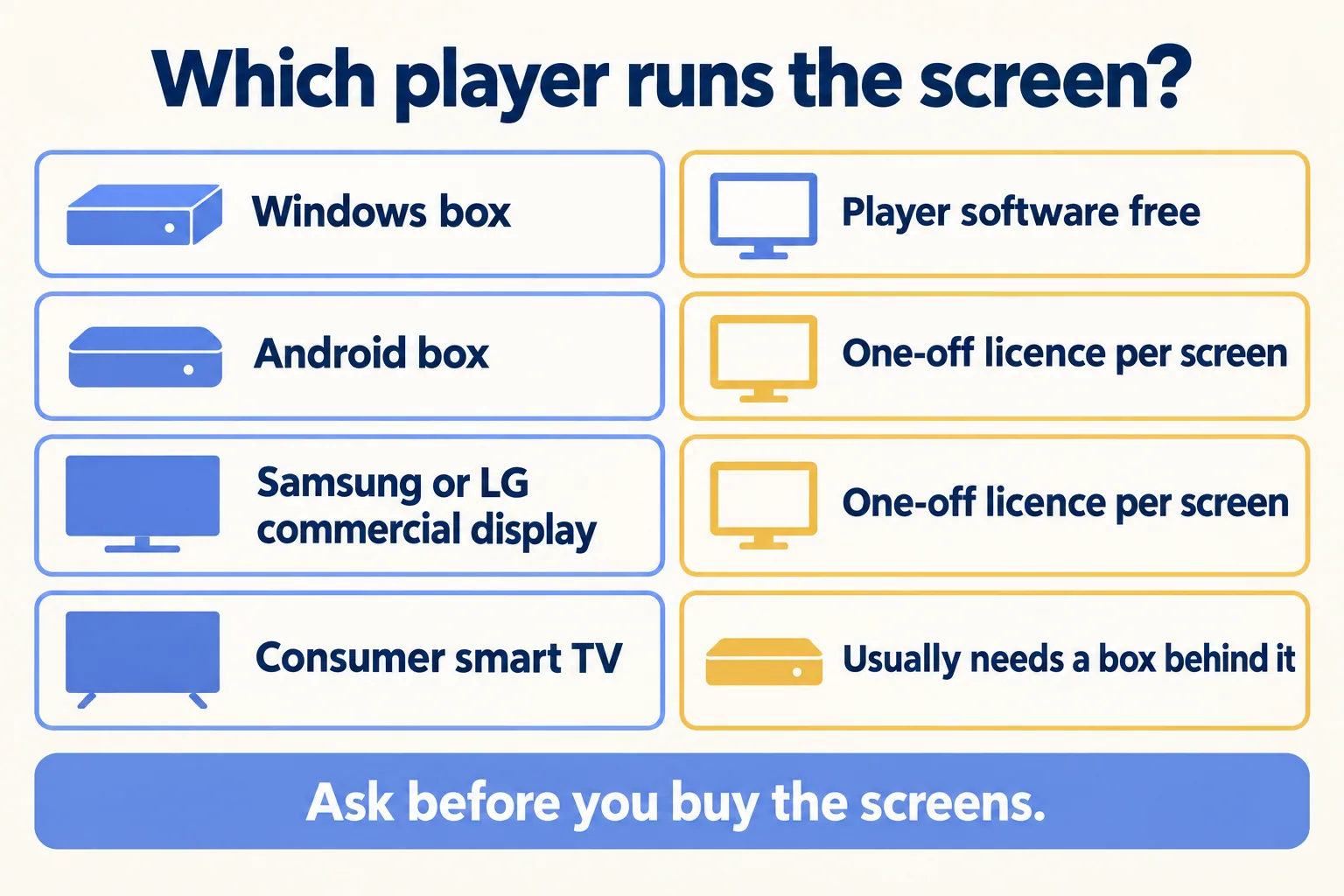
Four rows: Windows box, Android box, Samsung or LG display, consumer smart TV, and what each adds
Four routes, one question: who pays for the player?

What do 20 screens cost in player licences?

Multiply by the route:

RoutePer screen20 screens
Windows boxesUSD 0USD 0
Android boxesUSD 28USD 560
Samsung or LG displaysUSD 85USD 1,700

Free player software is not a free screen. The Windows route has no licence line, and it has a box to buy for each screen. Ask your installer to price the Windows box and the Android box side by side. The licence line is the only part of that comparison that is public.

Our default when you are buying new is a small Windows box behind each screen. No licence line grows with every branch you add. When you already own commercial Samsung or LG displays, the licence is the price of not buying a box: USD 85 a screen against what a box and its fitting would cost you. That sum is the one to run on your own quote.
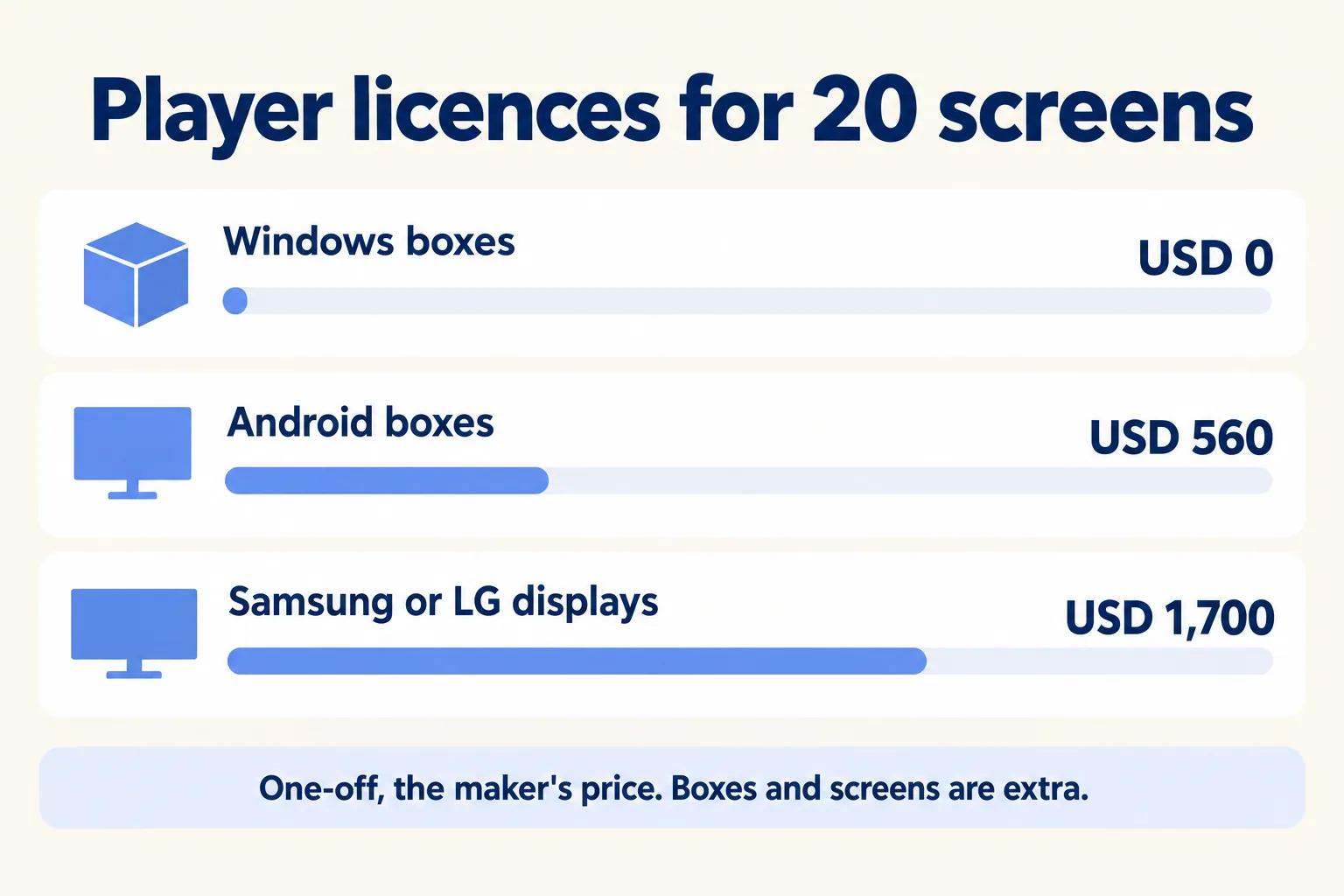
Three bars for 20 screens: Windows USD 0, Android USD 560, Samsung or LG USD 1,700
Player licences for 20 screens, one-off.

Which two questions come first?

Two answers pick the route before any price does:

  1. 01Which screens do you already own? Commercial Samsung or LG displays can run the player inside. Consumer smart TVs usually need a box behind them.
  2. 02How many branches will you add? A licence per screen is small at 20 screens and a budget line at 200. A route with no licence grows more slowly.

If you own nothing yet, you are choosing on the second question alone. If you own twenty consumer TVs, the first question tells you the boxes are coming whatever you decide, so the licence decision is Windows against Android.
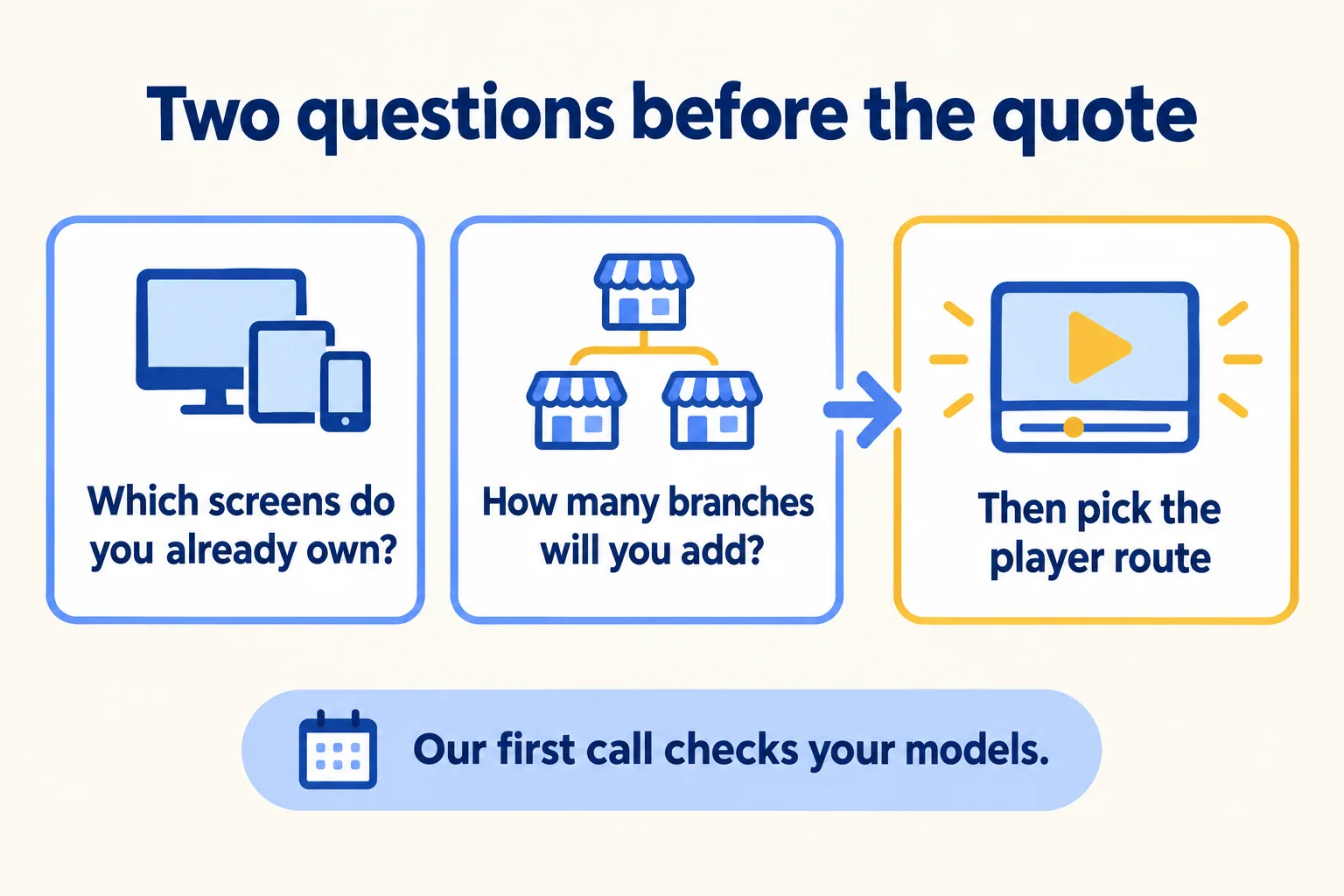
Two questions, screens you own and branches you will add, lead to the player route
Two questions before the quote.

What should the quote say about the player?

Ask for four lines in writing:

  1. 01The model of every screen and every box, and which player runs on each.
  2. 02The player licence per screen, and who buys it.
  3. 03The name the licences are bought in, so they stay yours if you change installer.
  4. 04The price of a major player upgrade later, since minor ones are included.

Then check one behaviour: the screen keeps playing when the branch internet drops. The maker's player page says its player stores content locally and keeps playing its schedule through a network drop. Ask your installer to show it by unplugging the router.

What does Mindcat Screens charge, and what is separate?

Our price is for the screen: AED 49 a screen a month for screens 1 to 10, AED 35 for 11 to 50, AED 25 for 51 to 200 and AED 19 from 201. The same numbers apply in SAR. Logins for marketing, operations, branch managers and IT are free. The shared plan has a monthly minimum of AED 590, so no one can buy one screen at the per-screen rate. Nine screens pay the AED 590 minimum. Twenty-five screens pay 10 × 49 + 15 × 35 = AED 1,015 a month. UAE VAT is 5 percent and Saudi VAT is 15 percent on top.

Up to 10 screens, the quick start is a fixed package we set up for AED 2,500, one time. Your installer connects the screens with our player guide. From 11 screens, we start with one call with your operations or marketing lead.

Player licences for Android, Samsung, LG and ChromeOS screens are paid to the maker, once per screen. You buy them, or we order them in your name at cost. The Windows player costs nothing. Screens, media players, mounts and installation come from your AV installer, or we quote them separately.

We call the method One edit, every branch. Tell us how many screens you run, in which branches, and what they are today. We reply with the setup plan and the monthly price per screen, in AED or SAR, and we check your screen models in the first call. If you run one branch and your menu changes a few times a year, we say so and point you back to the stick. If the Thursday price change is what hurts, our post on USB sticks, an installer's bundle or a per-screen service puts the three options side by side.

Filed under

Digital signage and menu boards (Mindcat Screens)digital signage playerdigital signage for restaurantsmenu board screens
Useful to someone on your team?

FAQ

Questions teams ask next

Do I pay for player software on every digital signage display?
It depends on the route. On a Windows media player the player software costs nothing. On Android boxes, Samsung (Tizen), LG (webOS) and ChromeOS screens it is a one-off licence per screen from the player's maker. You buy it, or we order it in your name at cost. It is never inside our screen price.
Can I use the smart TV I already have?
Consumer smart TVs often cannot run a player. A small Windows or Android player behind the TV can. Commercial Samsung and LG displays can usually run a player and then need the licence. We check your models in the first call.
How much do the player licences cost?
The maker's published one-off prices, as summarised by DigitalSignage.com on 21 October 2026, are USD 28 for Android, USD 49 for ChromeOS and USD 85 for LG webOS and Samsung Tizen, with minor upgrades included. A major upgrade later costs extra: USD 17, USD 28 and USD 50.50. The Windows player is free.
What does Mindcat Screens cost?
From AED 49 a screen a month for screens 1 to 10, AED 35 for 11 to 50, AED 25 for 51 to 200 and AED 19 from 201, in AED or SAR, with a shared monthly minimum of AED 590. Twenty-five screens pay AED 1,015 a month. The fixed quick start for up to 10 screens is AED 2,500, one time. Prices exclude VAT.
What is Mindcat Screens built on?
Mindcat Screens is built on Xibo, licensed under AGPL-3.0, and any changes we make to it will be released under the same licence. Your copy carries the licence notice and will link to the source of our version.

Sources

  1. 01DigitalSignage.com: player licence prices summary (updated 21 October 2026)Accessed 22 Oct 2026
  2. 02The player maker's pricing page: free Windows player, perpetual licences for Android, LG webOS and Samsung TizenAccessed 22 Oct 2026
  3. 03The player maker's player app page: supported systems and offline playbackAccessed 22 Oct 2026
  4. 04Mindcat Screens: prices, player licences and FAQ (live page)Accessed 22 Oct 2026
Shivanath Devinarayanan, founder of Mindcat

Written by

Shivanath Devinarayanan

Founder, Mindcat Consulting · Salesforce MVP Hall of Fame

Runs 200+ agents in production. Reads every brief that comes in and signs the work that goes out.

About Shivanath

Mindcat Screens · the written assessment

We work in real estate and right now, leads go cold before anyone replies.

Industry
Problem

Brief: Real estate. Leads from portals and WhatsApp. Follow-up has no owner. An agent on a named process. A reviewer on the exceptions. From: /blog/digital-signage-display-which-player.