
If you are about to mount a menu screen over your counter and nobody has stood at the back of the queue to read it yet, this is for you. Not for a cafe with no wall behind the till: a table QR code or a printed menu fits better.
What decides which way the screen faces?
Two measurements. The longest line on the menu decides the shape. The distance from the screen to the back of the queue decides how big that line has to be.
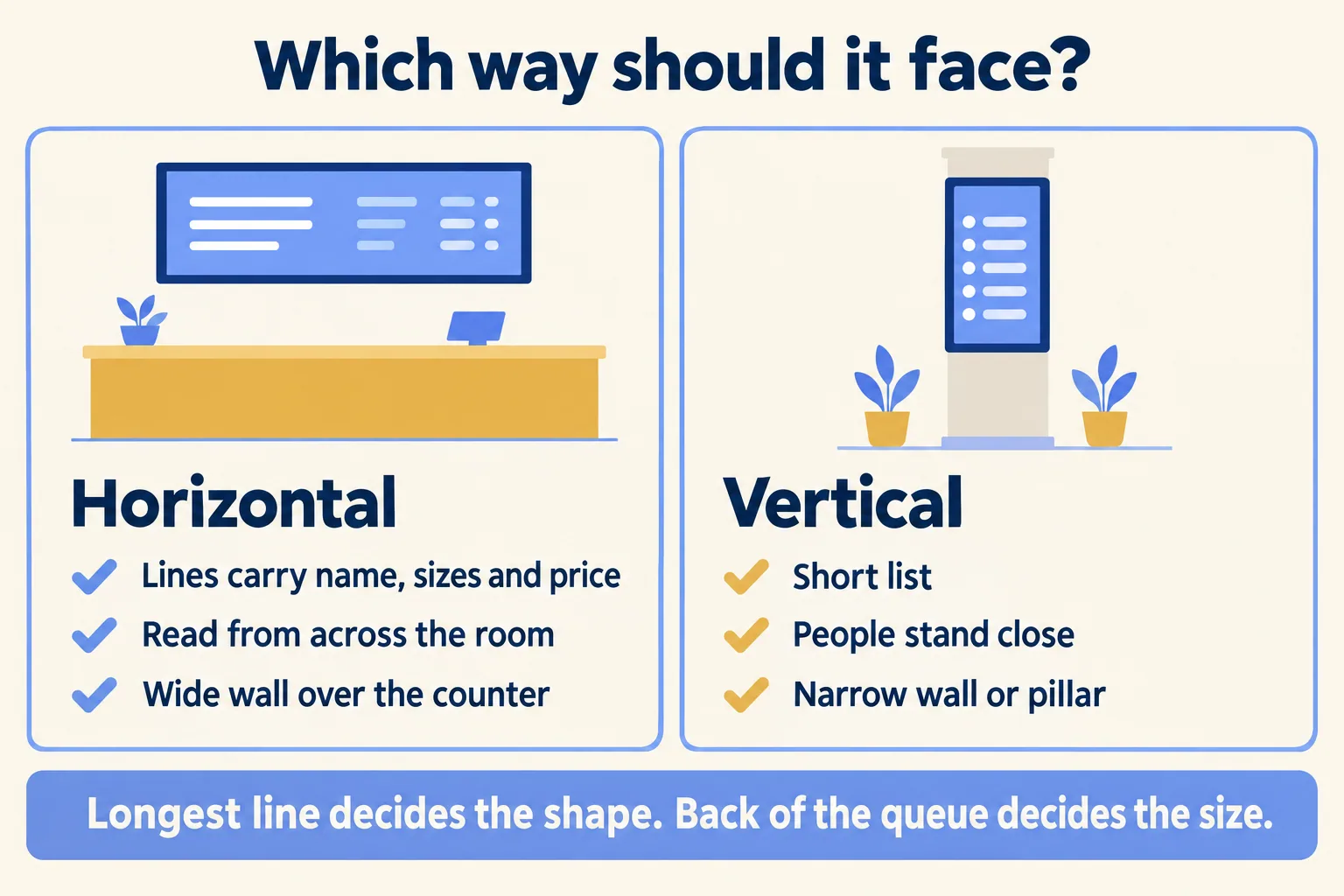
TapDisplay, a menu screen maker, puts the rule in one sentence: keep the screen horizontal unless your longest line fits the narrower vertical width. Its rule of thumb was written for a bar's drinks list. It works for a cafe counter too:
- Horizontal when each line carries every field (the name, sizes and prices), people read from across the room, and the wall is wider than it is tall, as over a counter.
- Vertical when the lines are short, people stand close, or the space is tall and narrow: a pillar, the strip beside the till, a window.
Jonza, another signage seller, adds the warning that matters most: a wide menu squeezed onto a tall screen leaves you with tiny text and wasted space. Whichever shape you pick, the layout has to be made for it.
How big must the letters be from the queue?
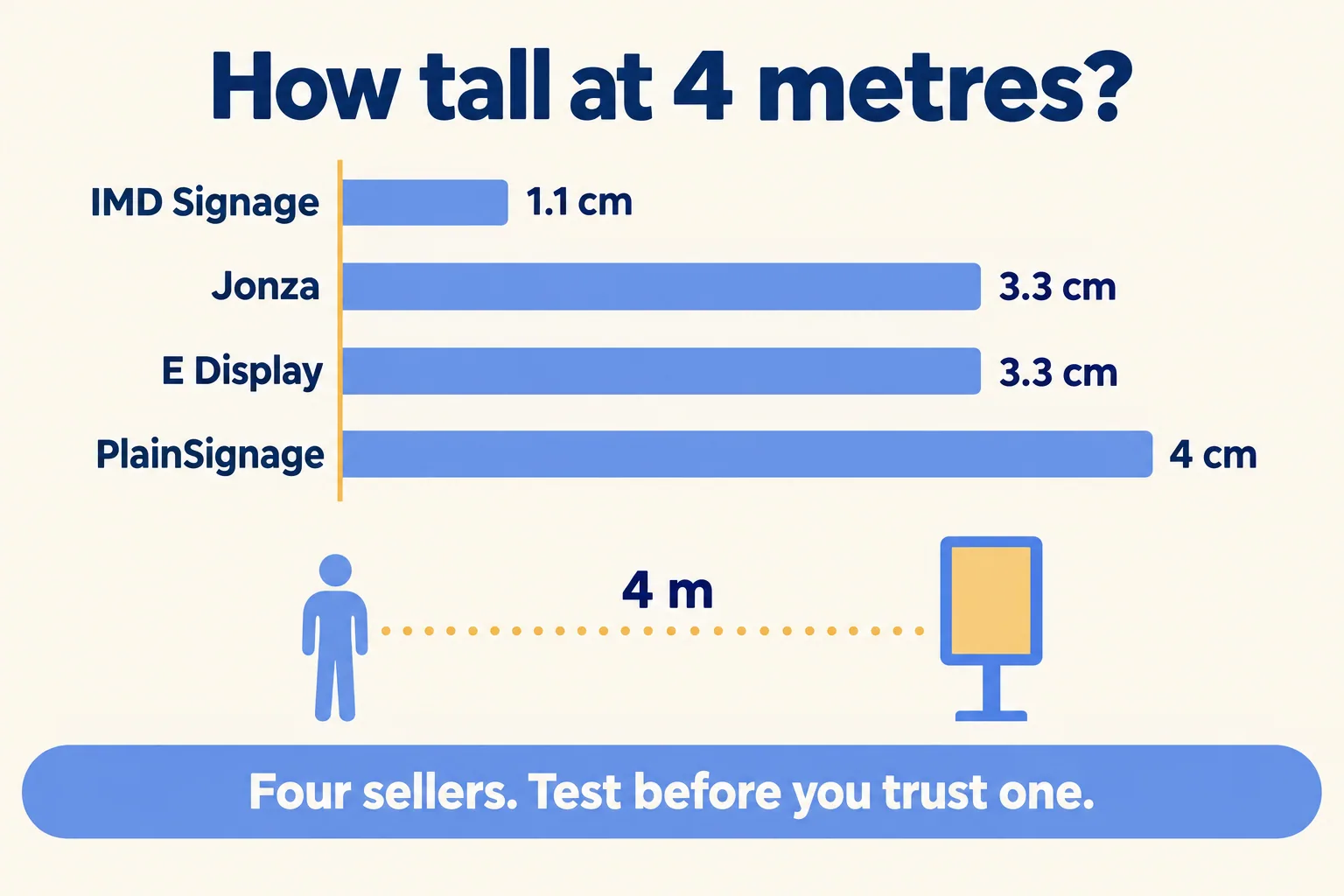
Big enough for the back of the queue, and the published rules do not agree on how big. Here are four published by signage sellers, worked out for a queue 4 metres deep.
The loosest and the strictest differ by about 3.6 times. IMD says plainly that its figure comes from road signs, which "are not menus," and calls its layout tables "calculated layout allowances, not tested reading distances." That is the honest position for all four.
So we use the rules only to pick a starting size, near the larger end, and let the room decide. Jonza's test is the one we keep: "Take a photo from the back of the queue at the busiest hour. If you can't read the prices in that photo, neither can your customers."
Why does the longest line decide the shape?
Because turning the screen trades width for lines. A 16:9 screen on its side gives each line 56 percent of the horizontal width, and holds about 1.8 times as many lines, as TapDisplay works out.
IMD's table shows the same trade on a 55 inch screen read from 20 feet: 7 menu lines horizontal, 14 vertical. Vertical wins on count, as long as every line still fits at the size the back of the queue needs.
On a board in Arabic and English, the line is the English name, the Arabic name and the price together. Arabic has no capital letters, so none of the rules above sizes it. Print the Arabic name so it reads as large as the English beside it, and judge both from the back of the queue. Then measure that full line, at the size you picked, against the vertical width. If it fits, vertical is open to you. If it wraps, either shorten the name or stay horizontal. A wrapped line takes two rows and breaks the price column.
What if the menu is too long for one screen?
Add a screen before you shrink the letters. Gradiently, a design guide, says it directly: "Splitting a long menu across several screens, or rotating it slowly, reads better than shrinking everything onto one."
Jonza puts the comfortable load at four to eight items with prices a screen, and says that past ten or twelve "text has to shrink and people stop reading." IMD's worked example lands in the same place: a cafe that needs 12 lines readable from 20 feet gets 6 on a 43 inch horizontal screen, so two screens carry the menu in two complete panels.
Split the menu the way people decide: hot drinks on one screen, cold drinks and food on the other. If one screen rotates between groups, Jonza suggests holding each page ten to fifteen seconds, so nobody watches the prices vanish halfway through reading.
We made the same call on where the guest stands in QR menu or counter screen: a queue reads a screen, a seated guest has time for a phone.
How we test a wall before anyone drills
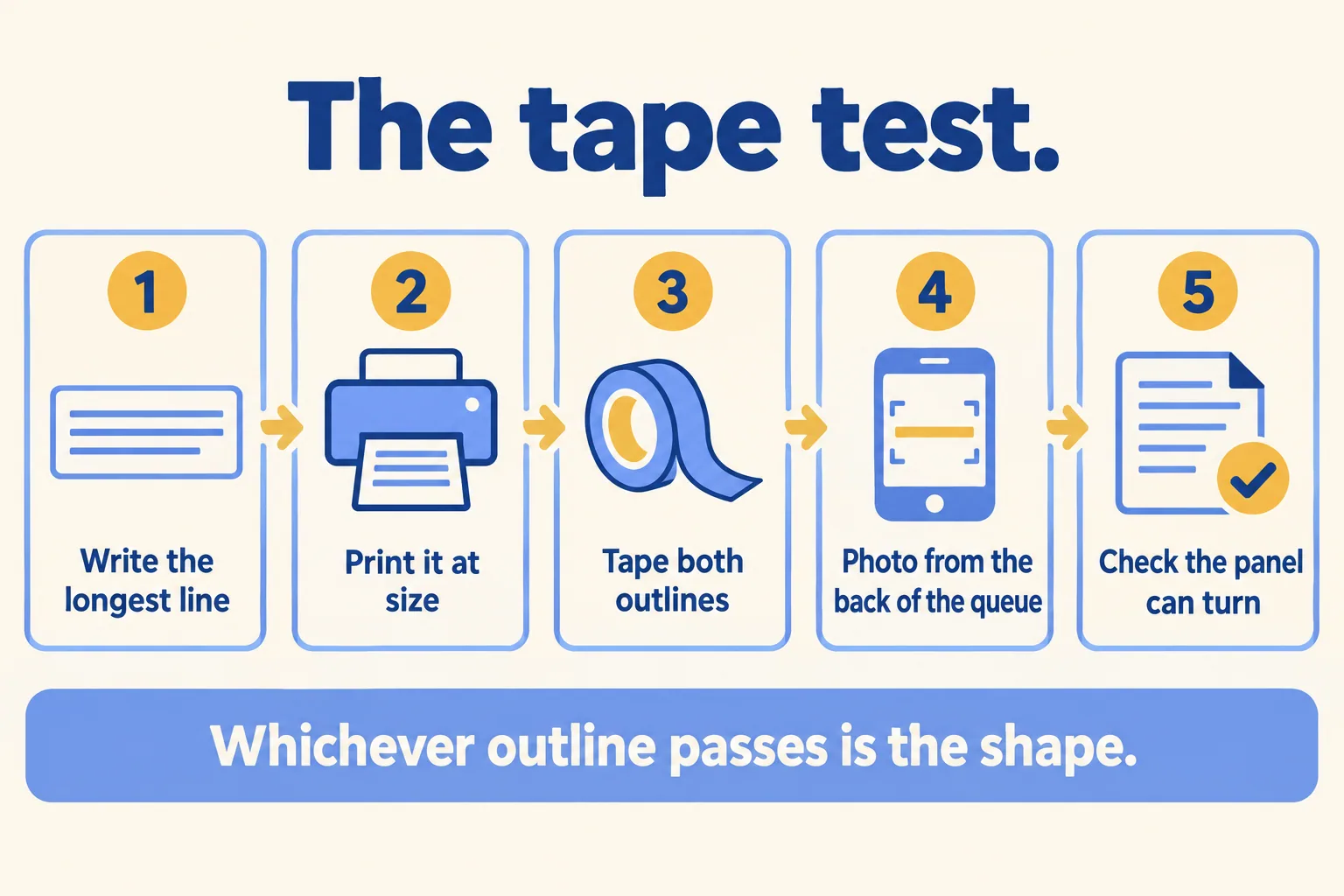
Twenty minutes, a printer and a roll of masking tape. This is the order we follow with a cafe before its installer mounts anything.
- Write the longest line. The item with the longest name, in English and Arabic, with its sizes and prices.
- Print it at your starting size. Use the larger rules above for the distance from the wall to the back of your queue.
- Tape both outlines on the wall. The screen's horizontal and vertical outlines, with the printed line inside each. Jonza puts the centre a little above head height for a standing customer; E Display keeps the bottom edge no lower than 6 feet, about 1.8 metres, so the front of the queue does not block it. In a mall unit, ask the mall what its fit-out rules need before anyone drills.
- Read it from the back of the queue at the busiest hour. Take a photo from there, as Jonza suggests. Check glare from the door or a window at the bright hour too.
- Check the panel before turning it. ChannelOS and CrownTV both warn that many consumer TVs are not rated for vertical mounting, and the warranty can say so. Check the spec sheet, a bracket that rotates, and room for the cables at the new bottom edge.
Whichever outline passes is the shape. If neither passes, you need a bigger screen, a second screen or a shorter line. With several branches, run it in each one: counters differ, and the photo from each queue goes in the brief for your AV installer.
If you have already chosen the screens, which player they need is the next question, covered in which player your menu screens need.
What Mindcat Screens gives you for either shape
One edit, every branch. Mindcat Screens has menu board templates in Arabic and English, horizontal and vertical, in the quick start, with a daypart and a Ramadan and prayer schedule template. Arabic runs right to left in the same layout as the English. Each board reads its prices from one menu, so a price change reaches every screen, whichever way it faces.
The price is AED/SAR 49 a screen a month for screens 1 to 10, falling in bands above that. The shared plan has a minimum of AED/SAR 590 a month, so a cafe with two screens pays 590, not 98. Up to 10 screens, the quick start is a fixed package we set up for you for AED/SAR 2,500, one time. Prices exclude VAT. The screens, mounts and installation come from your AV installer. Player software on a Windows media player costs nothing; on Android, Samsung, LG and ChromeOS screens it is a one-off licence per screen from the player's maker, billed at cost if we order it for you.
If you run one cafe with one printed board that you change twice a year, a printed board may stay the cheaper answer. Tell us how many screens you run, in which branches, and how content reaches them today. We reply with the setup plan and the monthly price per screen, in AED or SAR.
