
If your invoicing program prints a QR code but nobody has told you whether it can connect to Fatoora by 1 February 2027, this is for you. It is not for a business whose program already clears invoices with ZATCA in production: keep it.
Is your business in wave 25?
Check one number: your revenue subject to VAT, year by year. ZATCA announced on 24 July 2026 that wave 25 includes "all taxpayers whose revenues subject to VAT exceeded (SAR 187,500) during 2022, 2023, 2024 or 2025". It will notify each of them to integrate their e-invoicing solutions with Fatoora "by no later than February 1, 2027".
Read the test the way ZATCA wrote it: one year over the line is enough. You do not need four years of revenue above SAR 187,500, only one. EY's alert adds that this is the first wave to count 2025, so a business set up in 2025 can be in scope. Do not wait for the letter to start: the test is your own VAT return figures, and your accountant can check them against the returns you already filed.
The threshold halved from wave 23 to 24, and again from 24 to 25. Wave 25 reaches smaller traders who never had to connect to Fatoora, and 1 February 2027 is eleven weeks from now. Many of them run an invoicing program that already prints a QR code, which makes it look finished.
Is a QR code on the invoice enough?
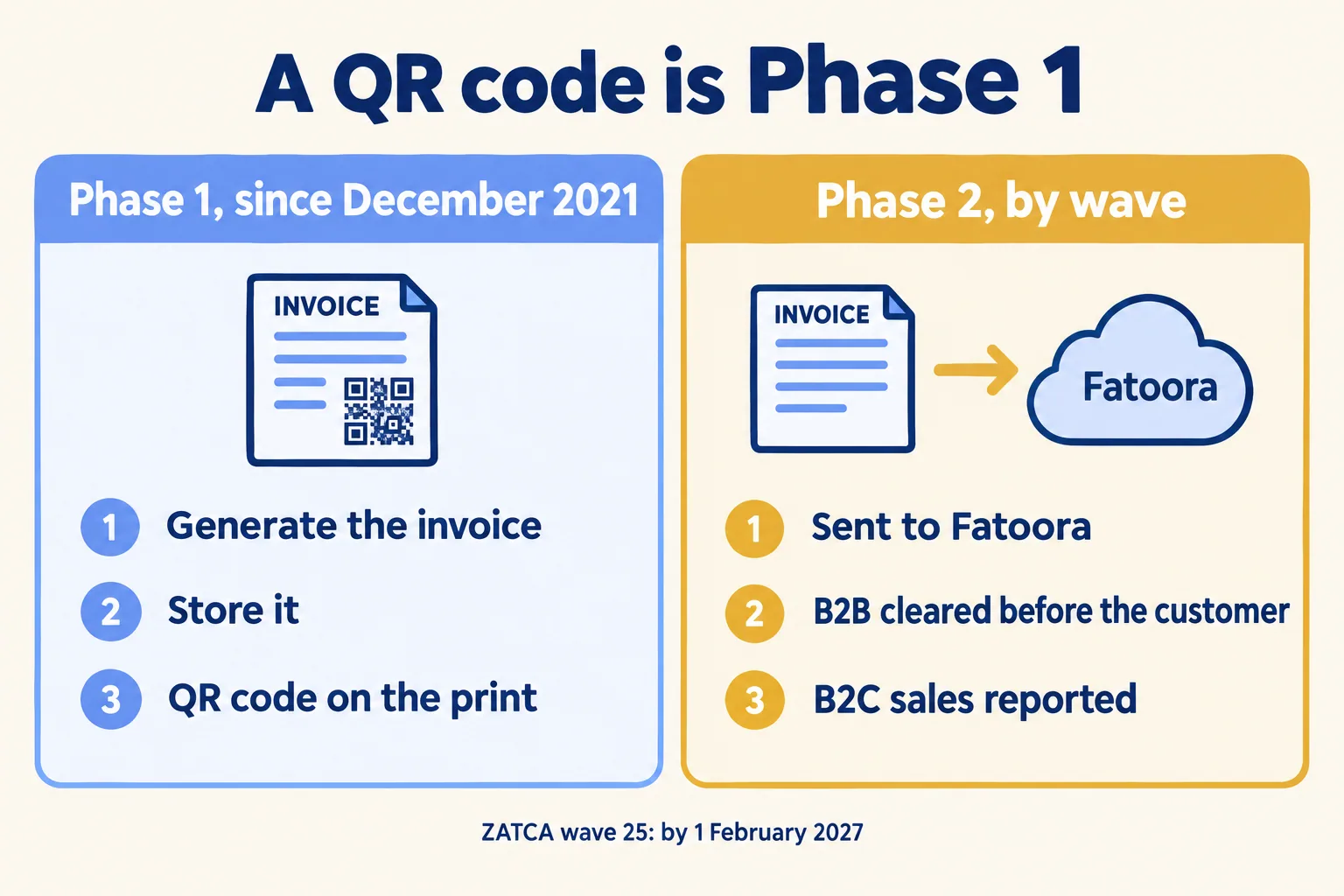
No. The QR code is Phase 1, in force since 4 December 2021. Phase 1 stopped handwritten and spreadsheet invoices and asked you to generate and store e-invoices with the required fields, including the QR code. Phase 2 asks for more. In ZATCA's words, it requires you "to integrate taxpayers' E-invoicing solutions with ZATCA's platform (Fatoora), issue E-invoices based on a specific format, and include additional fields in the invoice."
In practice, a Phase 2 program sends each standard (B2B) invoice to ZATCA for clearance before it reaches your customer, and reports each simplified (B2C) sale. ZATCA's how-to sheet adds that the solution must connect to the internet and produce invoices as XML, or as PDF/A-3 with the XML inside. A desktop program that prints a neat PDF with a QR code can do none of that on its own.
What do you ask the vendor you have?
Two questions, in writing, this month.
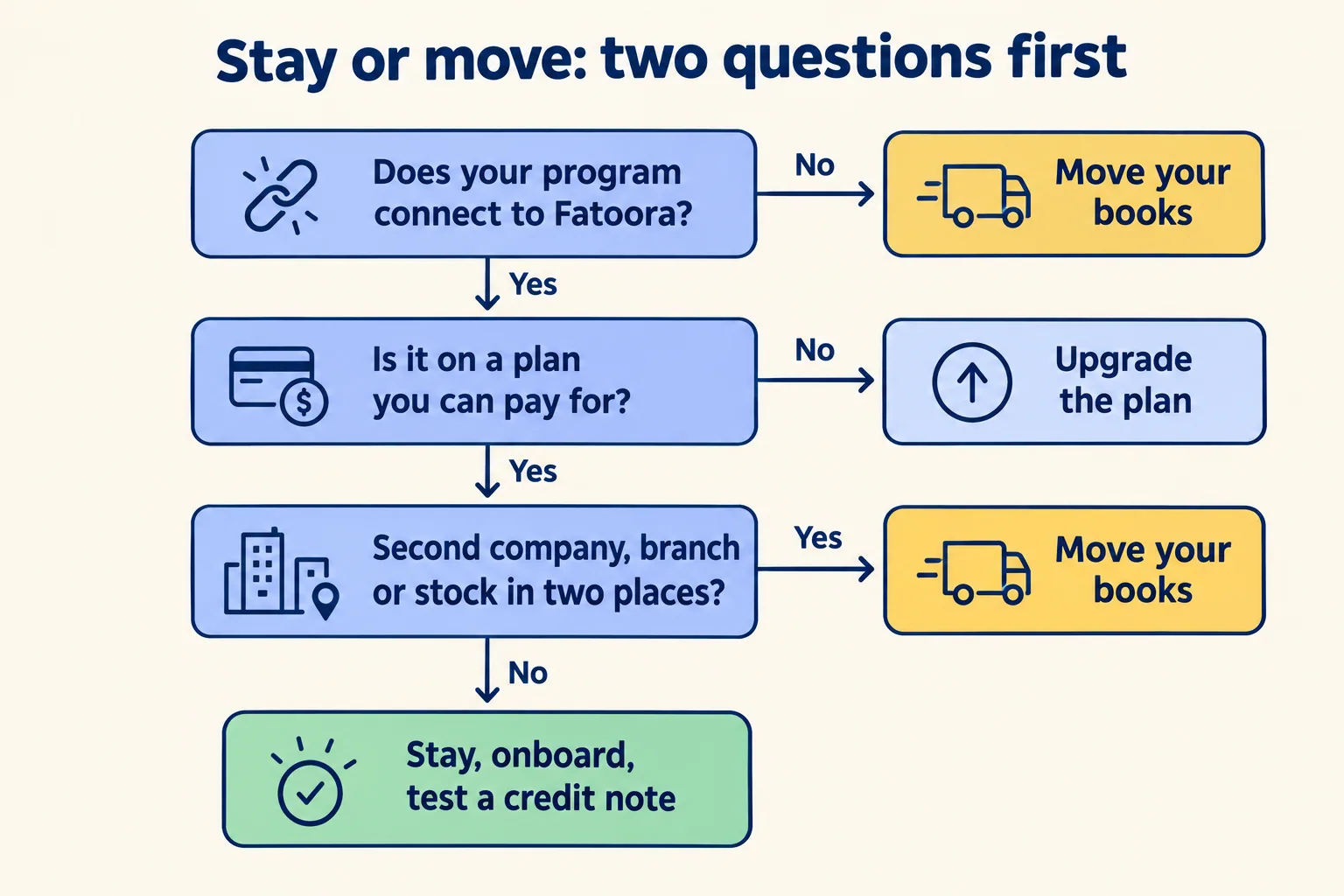
- Does my program have a Phase 2 connection to Fatoora? Not "is it ZATCA ready", which any seller can answer yes. Ask for the connection itself: where you enter the Fatoora code, and what the program shows when ZATCA answers.
- On which plan? A connection can exist and still not be on the plan you pay for. Qoyod's own help page, dated 3 June 2026, says it plainly: "Phase 2 connection is not available on the Basic plan."
Some programs never got a connection. On a user forum for a desktop accounting program, a Saudi user wrote in April 2024, days before an earlier wave's deadline, that the maker had no Fatoora link yet. Another user in the same thread described the local market: "Most of local accounting software they are doing this service with extra charge ( 1 for upgrading the system and 2 for doing the integration)." And then the line most owners feel: "I really want to continue using the system unless otherwise I am forced to by law."
Then ask for one thing to see: a cleared invoice and a rejected credit note, on the vendor's own system, with ZATCA's reason shown. A program that cannot show you a rejection has not been tested where it matters.
Do not ask "are you on ZATCA's list". ZATCA's Solution Providers Directory calls it "a guiding list (non-legally binding to taxpayers)" and says it "is not considered as an approval by ZATCA of the e-solutions provided". The same page says you may get e-invoicing services from any company, as long as the solution meets the requirements.
Stay or move: how do we decide?
Our decision rule, so you can argue with it. The wave letter alone is not a reason to change accounting systems.
Stay when the maker of your program shows a working Phase 2 connection on a plan you can pay for. Upgrade the plan if you must, onboard each invoicing unit, and test a credit note before January.
Move when either of these is true:
- The program cannot connect to Fatoora at all, and the maker gives no date you would bet your invoicing on.
- Something else was going to end it anyway: a second company, a branch with its own till, or stock held in two places that you already reconcile in Excel.
The second case is the one owners miss. If you were going to move within a year for stock or a second company, moving twice costs more than moving once, before the deadline. We wrote the UAE version of this choice in when an invoicing app is enough and when stock decides it. The same test holds in Riyadh.
Who has to be in the room for onboarding?
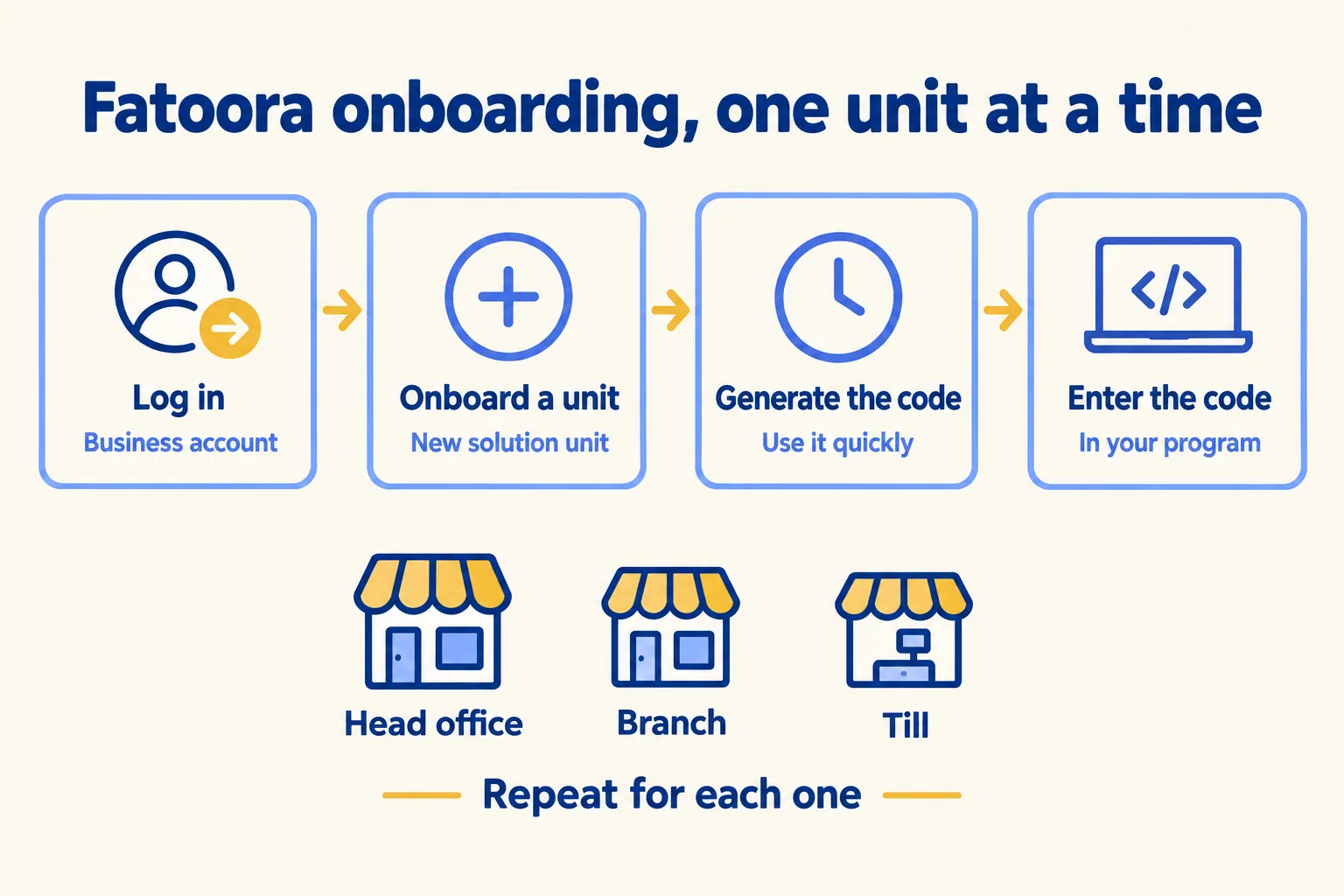
Whoever holds the Fatoora login, and whoever enters the code in your program, in the same hour. ZATCA's how-to sheet gives four steps:
- 01Log in to fatoora.zatca.gov.sa with the business account.
- 02Choose "Onboard new solution unit/device".
- 03Generate the OTP code.
- 04Enter that code in your invoicing program.
The code does not wait. Qoyod's help page lists "a verification code that has expired (more than an hour)" among the common causes of a failed connection, along with a tax number off by one digit and a personal login used instead of the business account. So book the slot: the owner or finance lead with the login (or your external accountant, if they hold it), the person at the program, and the vendor on the phone.
Do it once for each invoicing unit. A head office, a branch counter and a till are separate units, so a company with three branches books three slots. Start with the unit that issues the most B2B invoices.
Then test a correction before January. Once ZATCA has an invoice, you cannot cancel it: a return or a price change goes through a credit or debit note, with its reason. On our own copy, connected to ZATCA's sandbox, a credit note for returned goods came back rejected because it had no reason on it. The next one, with a reason, was accepted. That is the test to run on whichever program you keep.
Who should keep what they have?
A trader whose program already connects, on a plan it pays for, with one company and one warehouse. Keep it, onboard it and test a credit note. Moving would cost you a cut-over before the deadline for no new result.
When the move is due, our method is cleared, then sent: every Saudi B2B invoice goes through Fatoora before it reaches your customer. At Mindcat, we set up Mindcat Accounts for traders in this spot. It clears B2B invoices and reports B2C sales, each with ZATCA's answer in a log. We ran it against ZATCA's sandbox; your production onboarding needs your Fatoora OTP and happens during setup. For a distributor or trader with stock, the manufacturing and supply chain page shows the warehouse side.
The price, from the live page: SAR 209 per user a month for the first five users (only the people who work in the books need one; your auditor's read-only login is free), with a shared plan minimum of SAR 1,045 a month, so one to five users pay the same. The quick start is SAR 2,500, fixed: we set up one company and onboard one invoicing unit with your OTP. From six users, or with branches and several warehouses, we set it up with you to a written plan. Prices exclude 15% VAT.
Tell us which program you use today, how many people work in the books and how many branches issue invoices. We reply in writing within 24 hours with the plan, or with the reason to keep what you have.
