

If your brokers answer leads from their own phones, this is for you. It is not for a team of one or two, or a brokerage where one person owns the number and every chat on it.
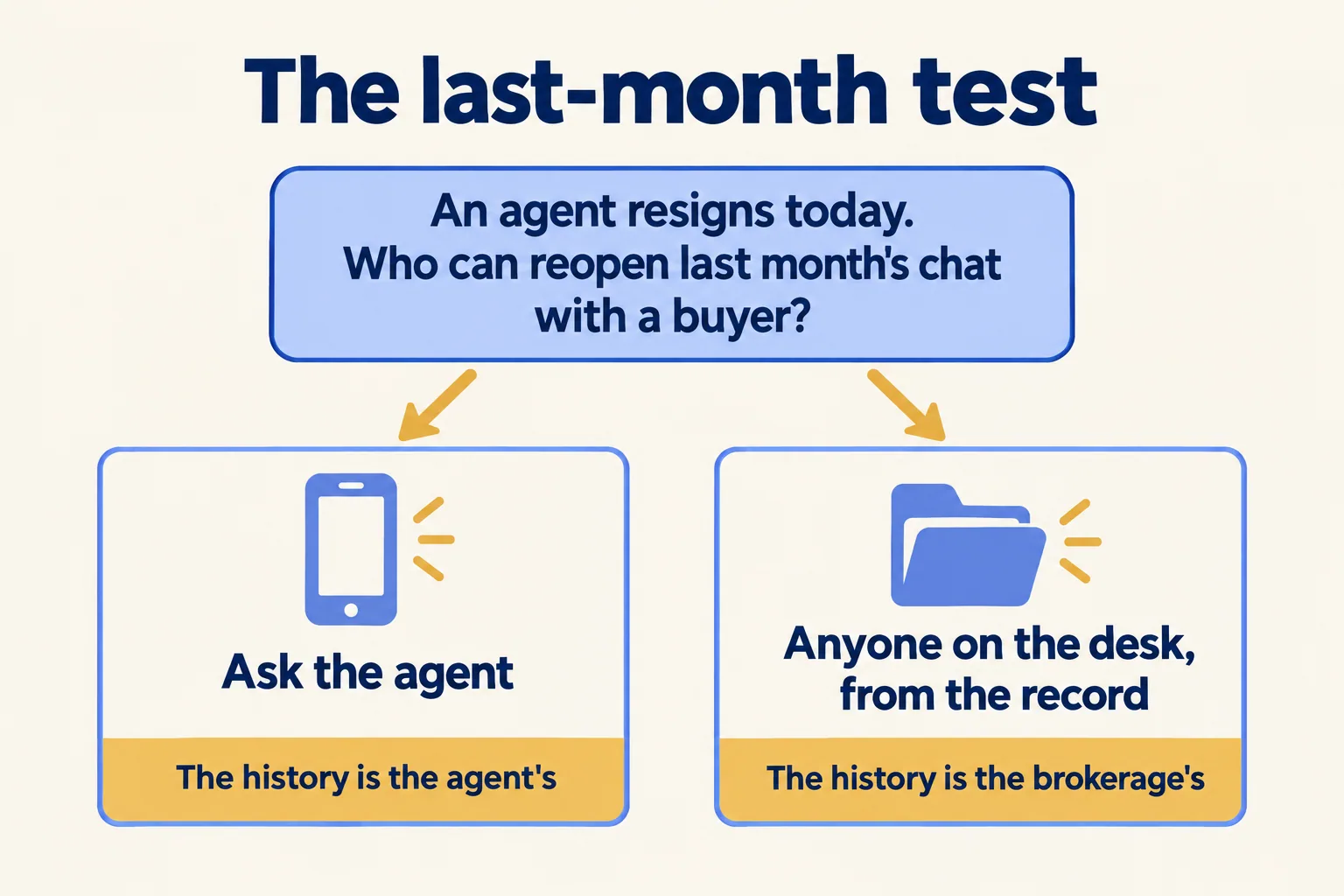
Who could reopen last month's chat today?
Pick one buyer your team spoke to last month. Now picture the agent who had that chat handing in a resignation this morning. Who in the office could open the conversation, read what was offered and promised, and reply before the buyer goes quiet?
If the honest answer is "ask the agent", the history belongs to the agent, whatever the contract says.
A CRM vendor's playbook for Dubai agents describes the day it goes wrong: "A senior agent resigns and the SIM goes with him." With the SIM go the prices discussed, the handover dates promised and the reservations agreed. "The agency inherits a name and a phone number." That is a seller's blog, but the risk it names is the one brokerage owners describe.
We compared the phone app with a shared desk in our post on WhatsApp Business in the UAE. This post is about the exit: who keeps the chats.
What does WhatsApp Business allow for multiple users?
Most guides on WhatsApp Business multiple users explain how to link devices. Here is what WhatsApp's own Help Center says, read on 11 November 2026.
- The free app: "You can use up to four linked devices and one phone at a time." Linked devices work without the phone online, "but will log out if your phone is unused for over 14 days." Broadcast lists cannot be created or viewed on linked devices.
- Multi-agent, paid: with a Meta Verified or Meta One subscription you can connect up to 10 devices, assign chats to agents and see which agent or device sent a message. The subscription sets the exact limit, and the Help Center says the feature may not be available to you yet. If the subscription ends, "only your four most recently active devices will remain linked."
- What the customer sees: customers "won't be able to see which agent or which device a message was sent from."
WhatsApp's own business site, in a guide dated 28 July 2026, points teams that need "automation, CRM integrations, or unlimited team members" to the WhatsApp Business Platform on the same number.
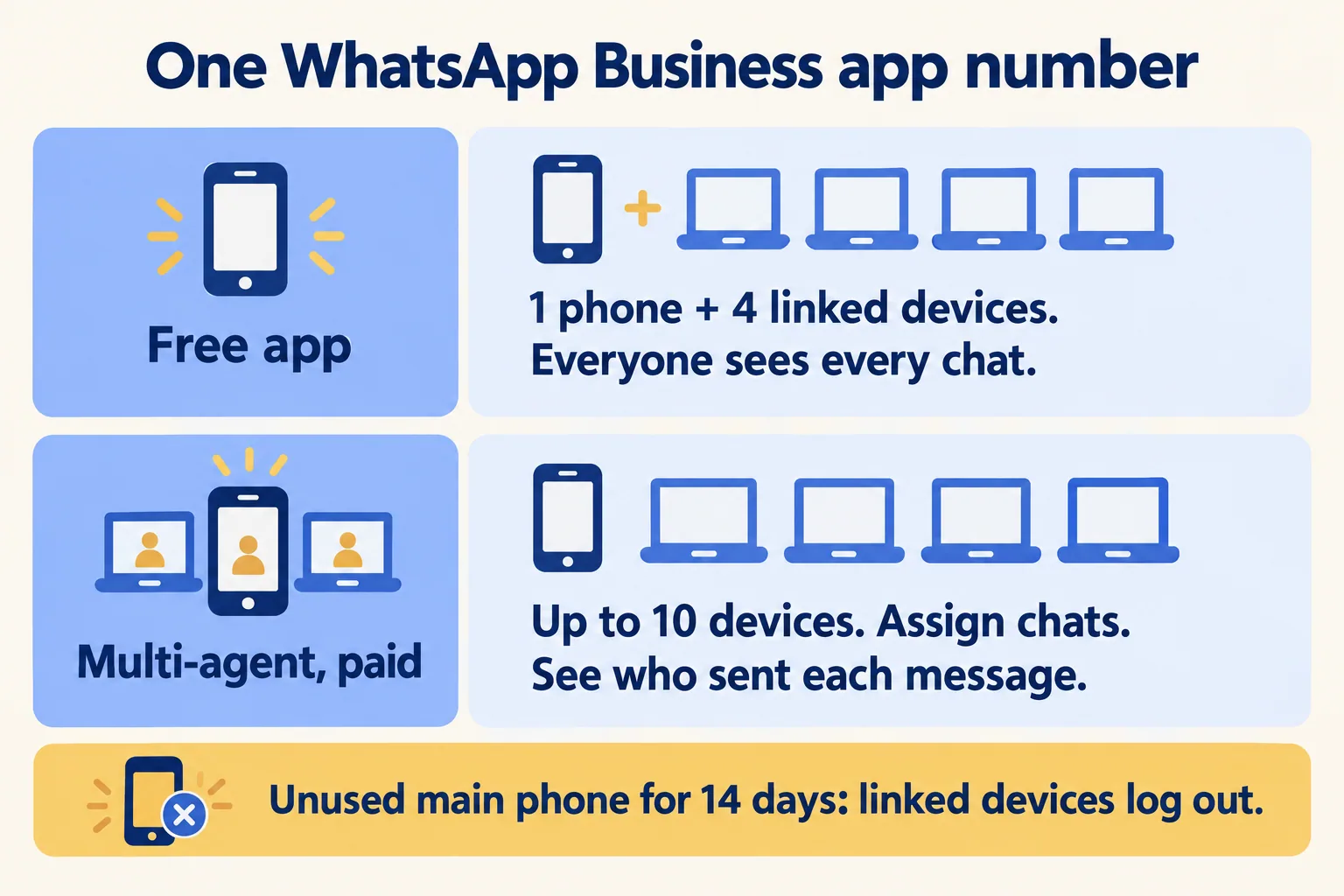
Notice what those limits count: devices, not people. Every linked device is the business. The question they answer is how many people can reply. They don't answer who keeps the history when one of those people leaves, because the history lives with the account on the main phone. If that main phone is an agent's personal SIM, the number and its chats are the agent's.
When are linked devices enough?
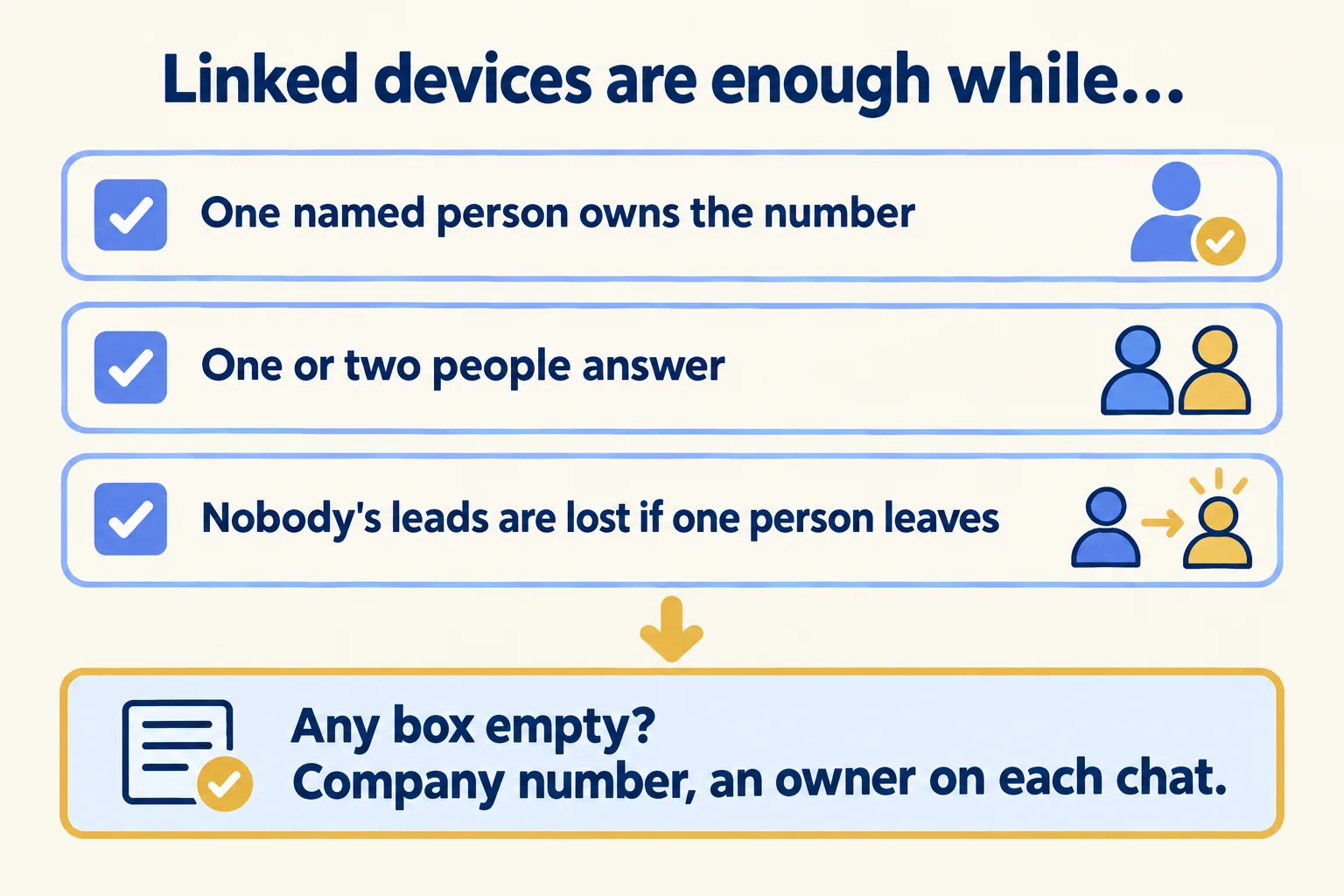
Stay on the app, with linked devices, while all three of these hold:
- One named person owns the number, and it is a company SIM, not an agent's own.
- One or two people answer, and they sit close enough to tell each other who has which buyer.
- Nobody's leads would be lost if one person resigned, because the owner of the number can read every chat.
A two-person brokerage where the founder owns the number passes all three. So does a front desk with one receptionist and a manager. That team does not need software from us.
When do the chats belong on a company number?
When any of the three boxes is empty. Usually it is the third. The day a second agent's leads would walk out with that agent, the chats need to live on a number the brokerage holds, in one place the manager can read, with a named owner on each conversation.
Another brokerage CRM vendor, Majlis CRM, puts the cause in one line: "Most client loss comes from where the data lives: personal WhatsApp numbers, personal phones, private spreadsheets and portal profiles the agent controls." Its guide is honest about the limit, too. Clients are free to choose their broker, so no system stops a buyer who wants to follow an agent. What the brokerage can keep is the record: what was said, offered and promised, so a colleague can pick up the deal the same day.

What happens on the day an agent resigns?
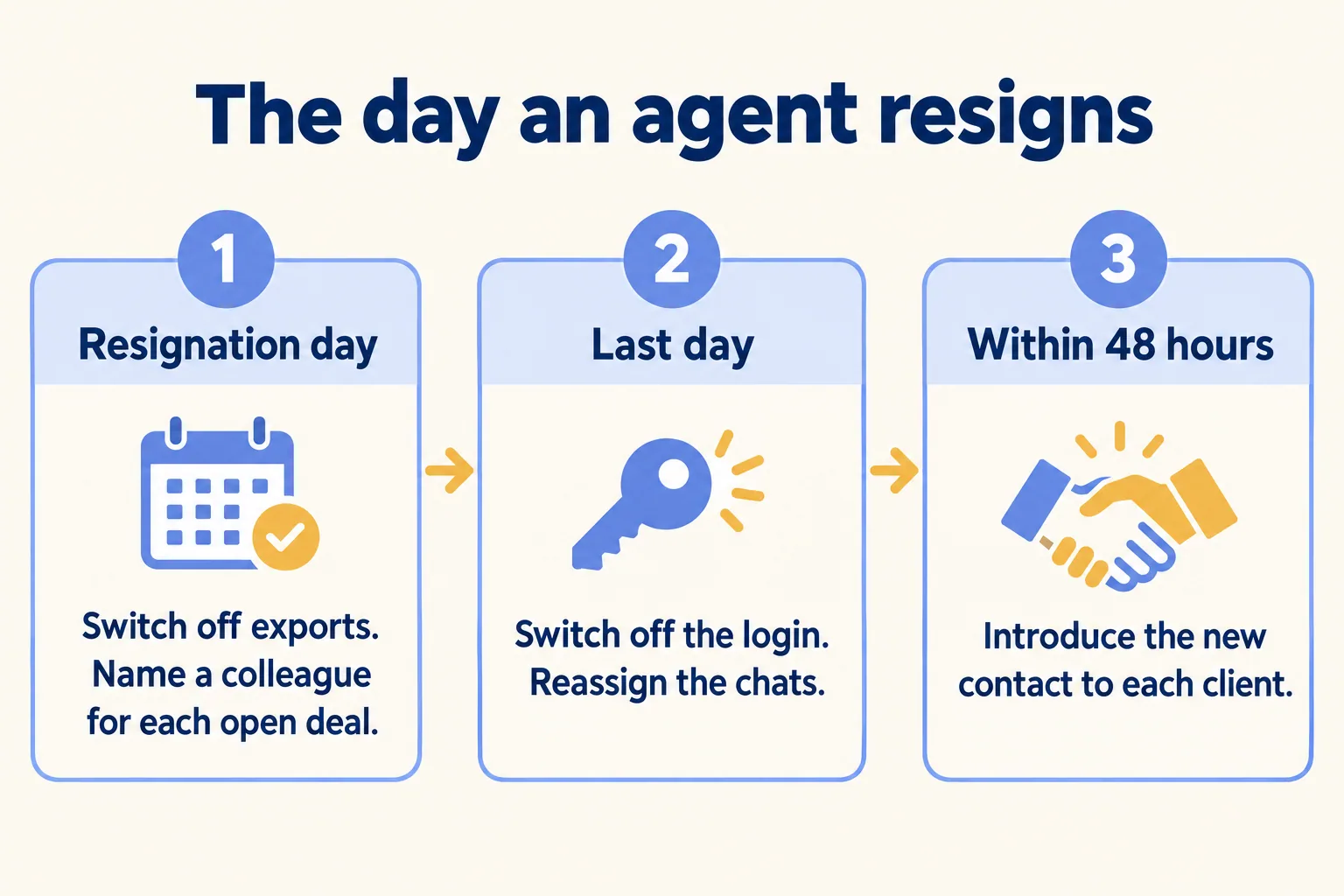
This is where the setup earns its keep. Majlis CRM publishes an offboarding checklist we agree with. Here are its steps, shortened:
- 01Resignation day: remove export rights, check recent exports, and name a colleague to shadow every open deal.
- 02Last working day: close the agent's access, move or disconnect their WhatsApp number, and reassign their leads.
- 03Within 48 hours: send each active client a short, neutral message introducing their new contact.
On a shared inbox, the second step is a few clicks. The Mindcat Inbox page says what happens: "You switch off the agent's login and reassign the conversations. The full history, notes and lead fields remain." Each conversation shows which agent has it, and the owner's reports show first reply time per agent and per desk.
On personal phones, the second step is a request to the departing agent for screenshots.
What about the chats already on agents' phones today? A new company number starts with no history, so it protects next month, not last month. For the deals open right now, this week and with no software, ask each agent for a list of their open deals, with the buyer's name, what was offered and the next step, and keep it where the sales manager can read it. Then every new lead goes to the company number from the day it is connected.
Contract clauses on clients and non-competes are a question for a UAE employment lawyer. This is not legal advice.
What does a shared inbox cost a brokerage?
Mindcat Inbox is priced per agent a month, graduated: AED/SAR 89 for agents 1 to 5, 59 for 6 to 20, 45 for 21 to 50 and 35 from 51. Each band applies only to the agents inside it. A brokerage with 12 agents pays 5 × 89 + 7 × 59 = AED 858 a month. The shared plan, hosted by us in the UAE, has a minimum of 3 agents (AED/SAR 267 a month). One read-only owner login is free.
The quick start, for 1 to 5 agents on the shared plan, is a fixed AED/SAR 2,500, and we set it up: your WhatsApp number connected once Meta has verified it, our real estate template and your contacts imported. From 6 agents, setup is managed and starts with one morning with your sales manager. Meta's WhatsApp message fees are billed at cost, and Meta bills them to your own account. Prices exclude 5 percent UAE VAT and 15 percent Saudi VAT.
Two limits today. Arabic screens are partly translated, and we finish the screens your team uses during setup. Portal leads arrive on WhatsApp; a direct portal feed is built in setup for teams of 21 agents and up. If what you need is a promised reply time on requests rather than leads, that is Mindcat Desk, not Inbox.
For how a brokerage weighs this against a WhatsApp tool it already pays for, see our earlier post on a WATI alternative for Dubai brokerages. Our real estate brokers page has the rest of the setup.
How do we decide?
Our method is called Every lead has an owner. Before we set anything up, we ask the last-month question about one real buyer. If the founder can open that chat today, and the team is one or two people, we tell you to stay on the app. If the answer is "ask the agent", we put the number on the company's name, every chat in one inbox, and an owner on each.
This is not for you if one person owns the number and answers every chat, or if nobody owns the lead after the first reply. Tell us how many agents answer your WhatsApp leads and where the leads come from. We reply with the setup plan and the monthly price per agent, in AED or SAR.
