

Why look for a WATI alternative?
Because a brokerage uses WhatsApp for a different job than the one WATI's plans are written around. A lead from a Bayut ad messages one of your brokers on Sunday evening. By Tuesday it sits in that broker's own WhatsApp, and nobody on the desk can say whether anyone replied.
A shared inbox fixes that, and WATI is the name many teams meet first. Its pricing page describes what its plans are for: broadcasts, click-to-WhatsApp ads, a product catalog and Shopify order messages. A brokerage needs something else. Every lead has one owner, the permit on the ad is checked, and the chat stays when the broker leaves.
So we read WATI's published plans against that job, for a team of ten agents, and then did the same sum for our own product, Mindcat Inbox. Where we cost more or do less, we say so. If WATI is not on your list, the sections on fields and on who owns the chats apply to any vendor.

What do ten agents meet on WATI's plans?
The user limit comes first. On 12 October 2026, WATI's pricing page showed Growth with 3 users and no way to add more, Pro and Business with 5 users each, and extra seats at USD 24 on Pro and USD 69 on Business. WATI's help centre confirms that seats can only be added on Pro or Business.
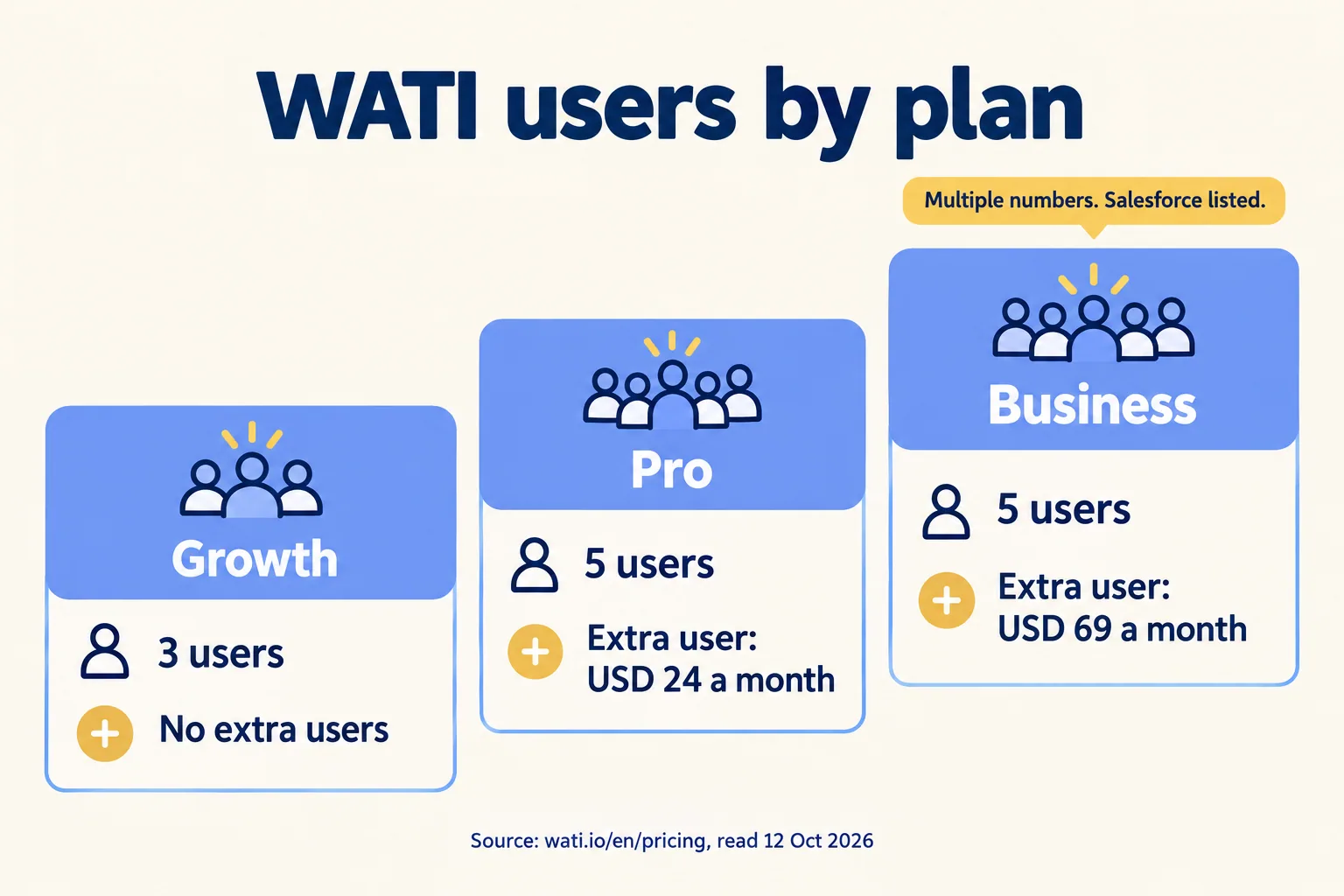
Seat prices are not the trap. The gates are. The page names multiple WhatsApp numbers and Salesforce only in the Business column. If you run a Dubai desk and a Riyadh desk on separate numbers, or you want leads to land in Salesforce, you read the Business column, and its extra seats cost almost three times Pro's. One Capterra reviewer put the number problem in one line: "Unable to manage multiple whatsapp numbrs on 1 account" (sic).
One number is missing from that table: the plan fee. WATI's page draws it with a script, and it was not in the text we could read. Two trackers disagree on it. Chatarmin listed Pro at USD 119 a month billed annually in February 2026, and SetSmart listed about USD 99 in July. We have added neither to any total here. Ask WATI for the fee in writing, and ask whether you can pay monthly.
What does the same team pay on Mindcat Inbox?
AED 740 a month for ten agents, plus a one-time setup. Mindcat Inbox charges per agent in bands: AED 89 for agents 1 to 5 and AED 59 for agents 6 to 20, with the same figures in SAR. The shared plan has a minimum of 3 agents (AED 267 a month), so nobody buys a single seat at the per-agent price.
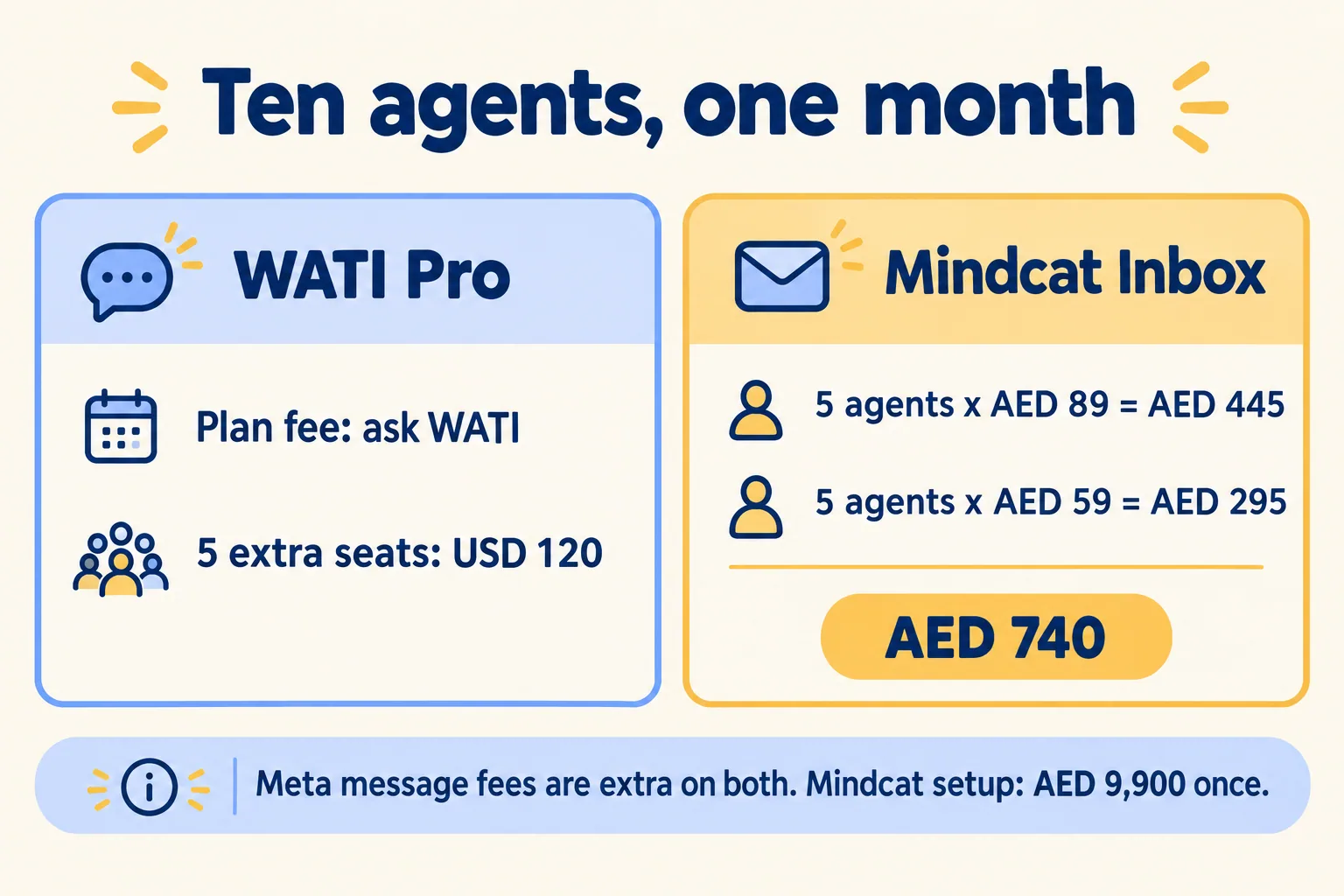
Up to 5 agents, the quick-start package is AED 2,500 one time: self-serve, a fixed package where you send your contacts in our CSV template, with no call. From 6 agents we set it up with you. For AED 9,900 you get your WhatsApp number on Meta's official API, website chat, your lead fields, labels, saved replies in Arabic and English, Slack alerts and training, plus teams by desk, automatic assignment and Salesforce lead sync. Setup is a real cost, and it is why our first year is the bigger number.
One limit at your size, up front: portal leads from Bayut and Property Finder reach the inbox on WhatsApp today. A direct portal feed is built for teams of 21 agents and up. WATI's page lists "zero-fee WhatsApp setup", so put its onboarding terms next to ours before you compare.
Meta's message fees are separate on both sides. On Mindcat Inbox, Meta bills them to your own WhatsApp Business account, so you see the bill. WATI's page says message charges follow the WATI rate card. Our WhatsApp API pricing post shows what Meta's 1 October rates cost a Dubai brokerage per number.
What happens in week one?
This is how we plan setup for a brokerage of ten agents. It is a sample plan built from the steps on our product page, not a report on a named client. The plan you sign carries your own dates.
- You send your agent count. How many agents answer customers, where the leads come from, and where the data should sit. We reply by email within 24 hours.
- One morning with your sales manager. We map how leads arrive, who answers them and what has to be checked before a reply, such as the permit and the Madmoun QR, in Arabic or English. We also agree which fields each lead carries into Salesforce, so the record your admin sees matches the conversation.
- A written plan. You get the go-live date, the monthly price in AED and what the AED 9,900 setup covers, before you pay anything.
- Your part. Your contacts in our CSV template, one named admin on your side, and your WhatsApp number verified with Meta. The go-live date counts from the day all three arrive. Meta's verification time is outside our control, so start that step first.
- Setup and go-live. We register the number with Meta, set up desks, lead fields, saved replies and templates, connect Slack and Salesforce, and train the agents. We stay with you through the first weeks.
One gap to know before you sign: Mindcat Inbox does not escalate a lead automatically when it sits unanswered. Each new conversation posts to a Slack channel your managers can reply from, and reports show first reply time per agent, so a lead that nobody picked up is visible on the day, not at Monday's meeting.
Who answers when something breaks? On the quick start, support is by ticket. On a managed setup, one named admin on your side raises it with us, and we stay with you through the first weeks, then keep the inbox updated, backed up and watched. We don't advertise an out-of-hours phone line, so ask for the support hours in your written plan and name who covers the inbox on a Friday.
We don't promise a number of days to the first reply from the company number, because Meta's verification sits outside our control. The date in your plan is the promise, and if the plan and the page differ, the plan wins.
What does a seat count hide?
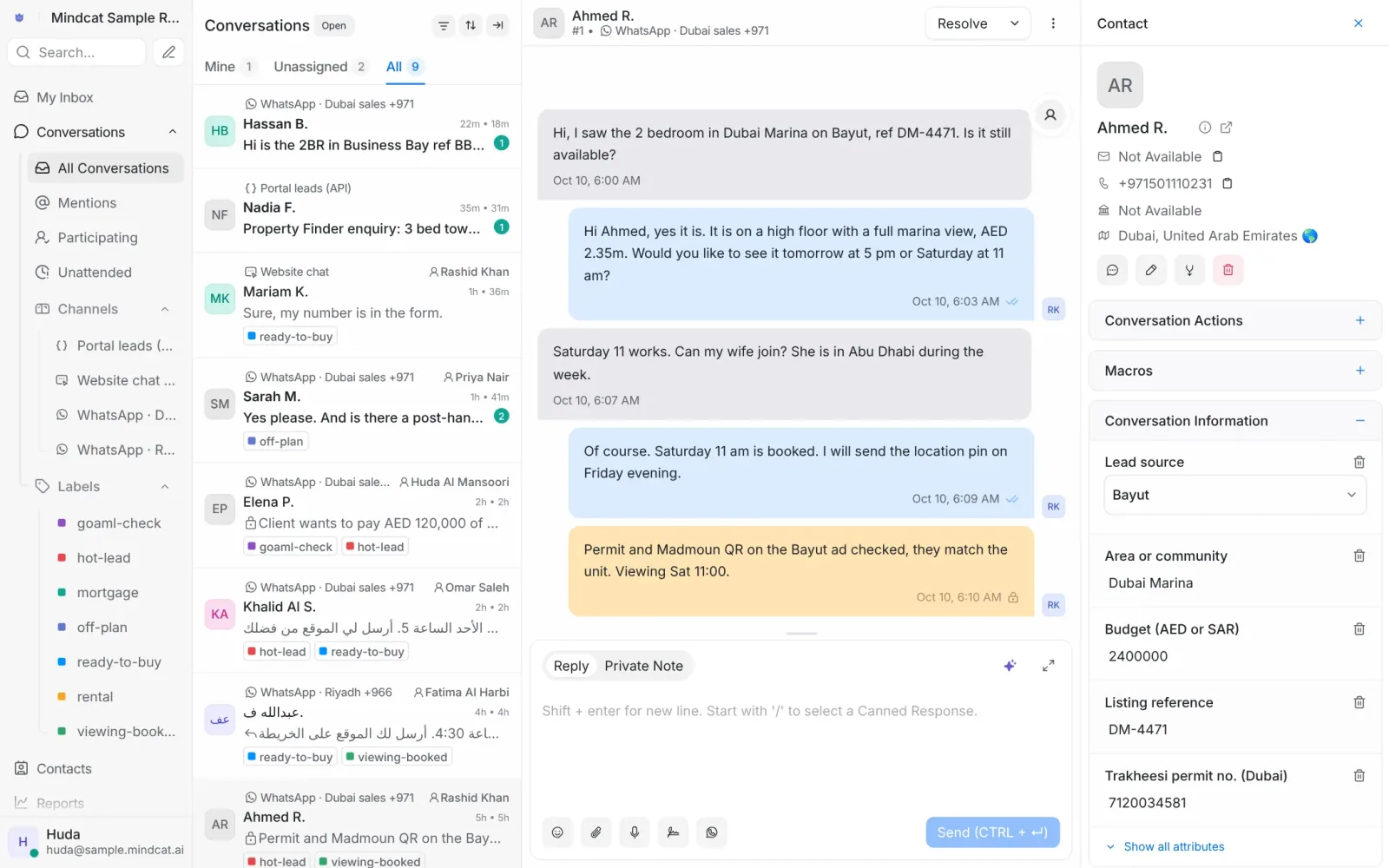
Who builds the fields, and what they actually do. A brokerage needs the Trakheesi permit, the Madmoun QR and the REGA ad licence on the lead, so the agent and the manager can see them. In most inboxes you can add custom fields yourself. The question is who builds them and who checks them.
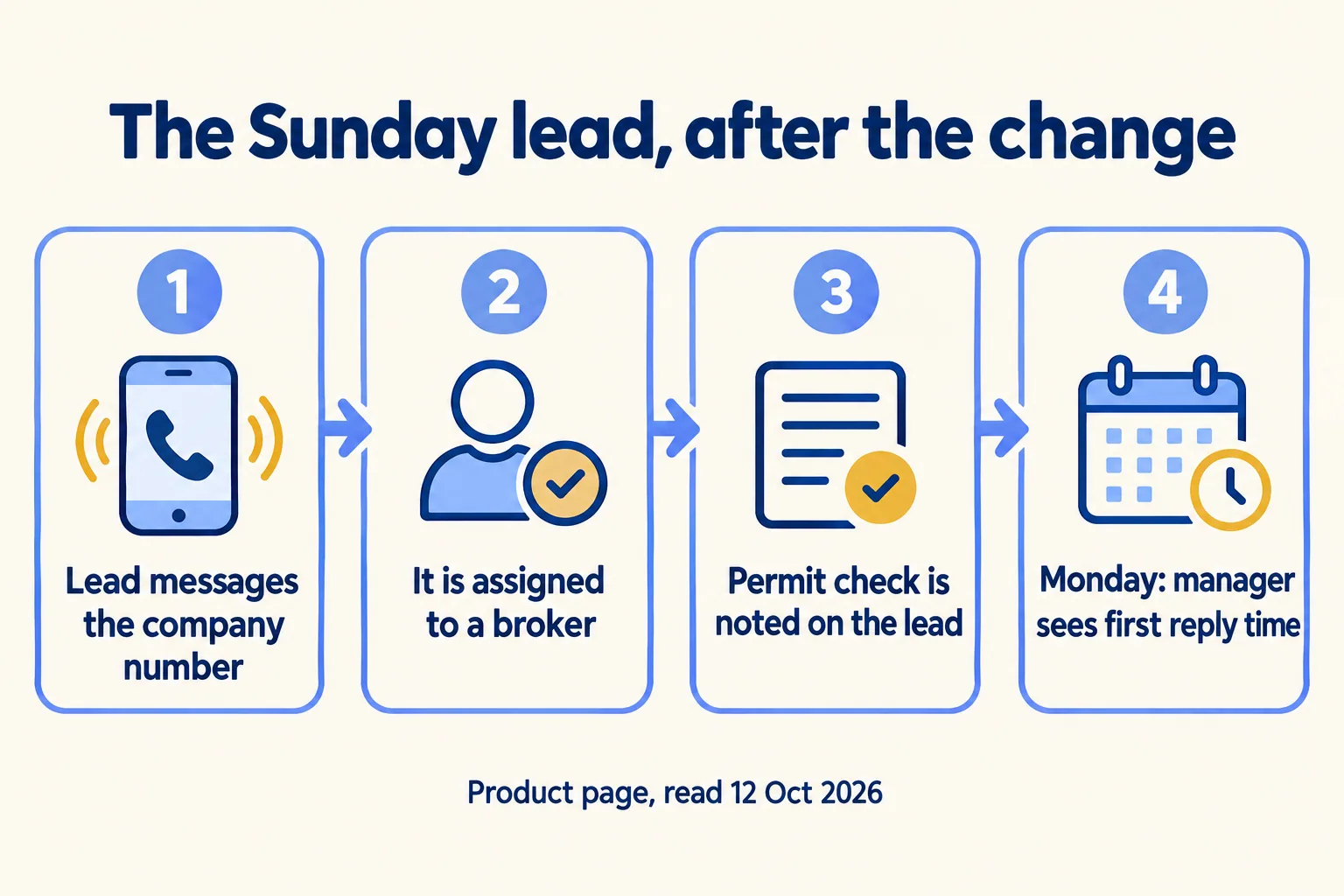
Here is the Sunday lead after the change. The enquiry arrives on the company number, not a personal one. It is assigned to a broker, and the permit and QR check sits on the lead as a private note. On Monday the manager opens reports and sees first reply time and resolutions per agent. Slack alerts for new conversations are connected during setup.
If the people messaging you are tenants or customers with requests, not buyers with questions, that is a ticket queue. Mindcat Desk is built for that, and it is a separate product from Inbox: sales leads go to Inbox, service requests go to Desk.
Who owns the chats when a broker leaves?
Whoever holds the number in Meta's system. If the number sits on an agent's phone, the agent holds it, and the chats go with them. The fix is a number registered to your company's own Meta business account, with the conversations stored where you control them.
Meta's own pages set the limits. The WhatsApp Business app can link up to four companion devices to one account, which does not stretch to ten brokers. Moving to the API with Meta's coexistence route keeps the app working on the same number and can synchronise the most recent six months of one-to-one chats. It does not synchronise group chats, and it turns broadcast lists off. Plan on older chats staying on the agent's phone unless the agent exports them.
Three questions decide it, for us and for WATI:
- Whose name is the number registered in?
- Where do the conversations sit, and in which country?
- Who answers when a broker cannot log in on a Friday?
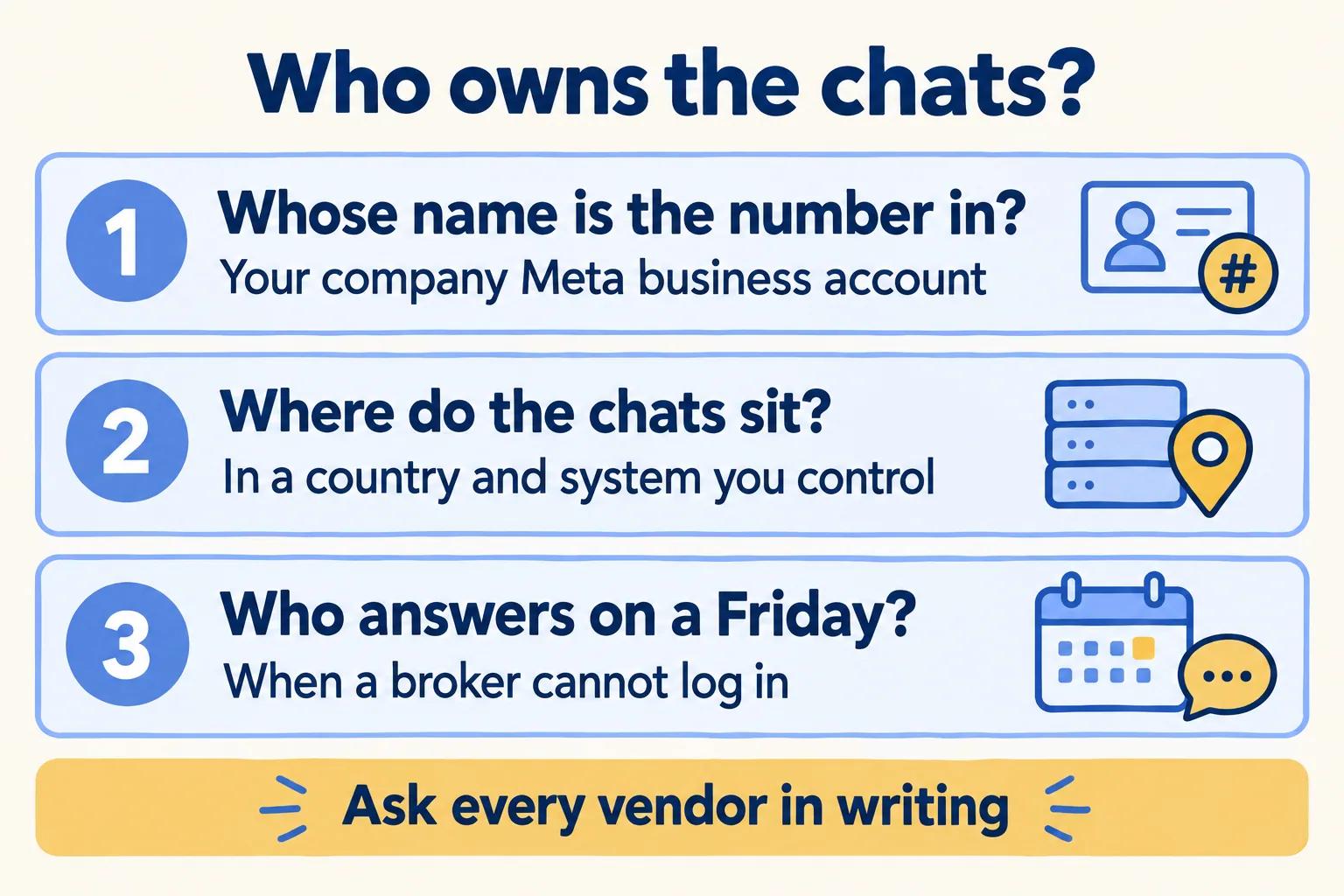
Mindcat Inbox runs in the UAE, or in your own copy in Jeddah or Riyadh. We register your number with Meta during setup, and Meta's verification time is outside our control. Which onboarding route brings your existing chats across is a question to put to every vendor, us included, before you sign. Your legal team will ask where the conversations sit too. Our real estate CRM post covers what the UAE PDPL (Federal Decree-Law No. 45 of 2021) means for a brokerage.
What do WATI's own users say?
The picture is mixed, and worth reading before you decide. On Capterra, WATI scored 4.6 from 207 reviews when we looked. One reviewer: "I find their broadcasts very reliable." Another: "WATI is very reliable when we use it directly through the platform but the pricing and maintenance charges are relatively on the higher side."
The complaints that match a brokerage are about seats and numbers. One reviewer wrote that they "cant used that for multi-agent, only one user has to handle this." Another says the monthly fee "is on the higher side". We cannot tell which plan either was on, and a review is one person's week, so treat these as questions to put to WATI, not a verdict.
When should you stay on WATI?
When the job is the one its pricing page describes, and three users are enough. A small team that mostly sends broadcasts, runs click-to-WhatsApp ads or sells through Shopify can sit on Growth. Nothing in this post says otherwise.
Look elsewhere when you need a different tool than either of us:
- Listings, portal sync and commissions in one tool. That is a real estate CRM, and it costs more than an inbox. Our comparison on the Inbox page shows one next to the others.
- Salesforce is already your system of record. The inbox should feed it, and the CRM is the bigger decision. Our Dubai real estate CRM post covers it.
- A direct Bayut or Property Finder feed on day one for a small team. Ours is built during setup for teams of 21 agents and up, and portal leads arrive on WhatsApp until then.
What should you ask before you sign?
Ask every vendor the same six questions, in writing, and compare the answers side by side.
- How many users does the plan include, and what does the tenth seat cost?
- Which plan holds the second number and the Salesforce link?
- What is the plan fee, and can you pay monthly?
- Which Meta business account owns the number, and how do the existing chats come across?
- Who builds the permit and cash fields, and is that in the price?
- Where do the conversations sit, and can you take a full copy when you leave?
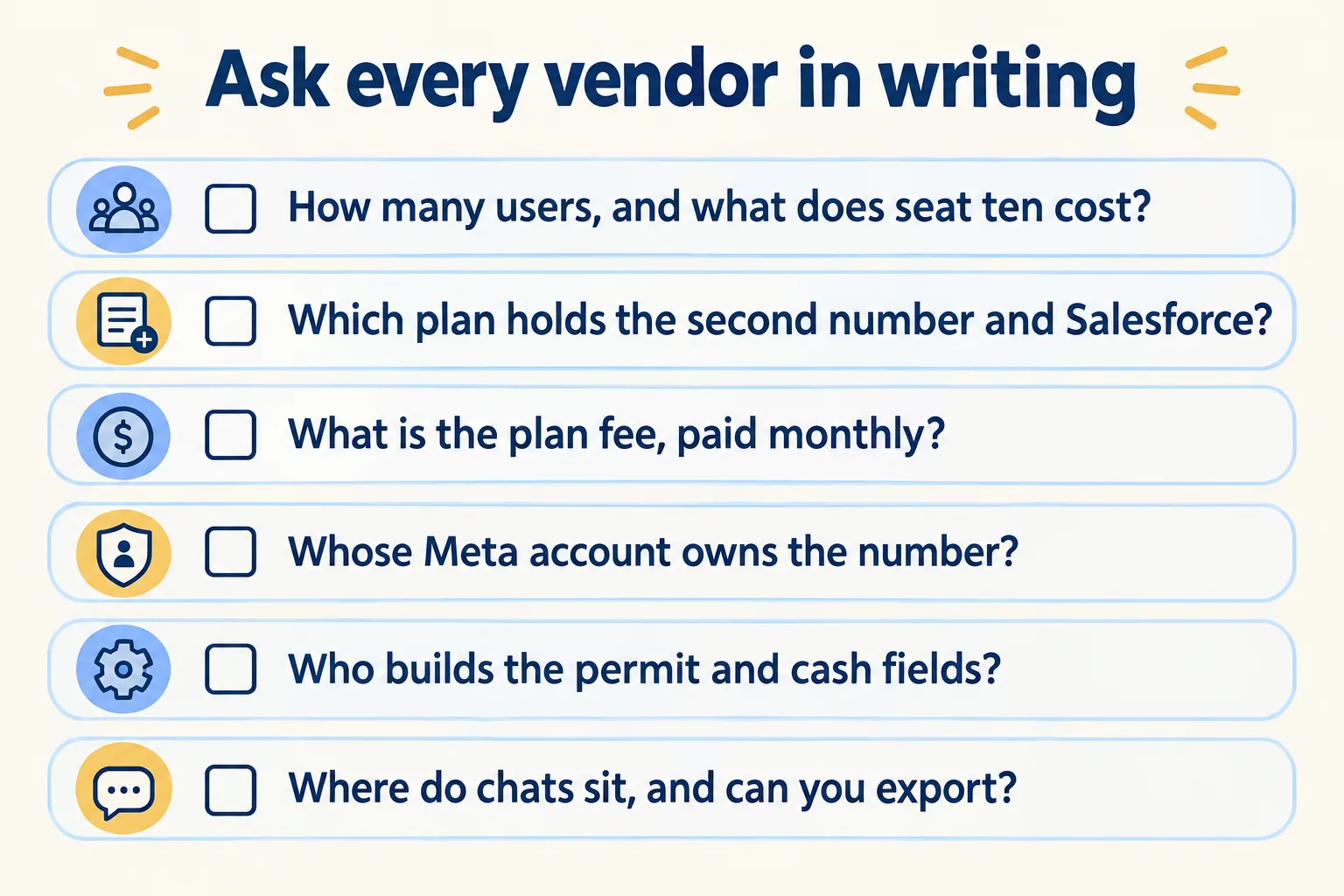
Here are our answers, as the product page states them today. The tenth seat costs AED 59. The lead fields are built during setup and sit inside the AED 9,900. Data stays in the UAE, or in your own copy in Jeddah or Riyadh, and you can take a full export whenever you want it. Prices move, so check the page the day you read this.
