
If your cashier in Saudi Arabia decides at the counter whether a customer gets a receipt or a tax invoice, this is for you. It is not for a shop that sells only to people buying for themselves, or for a business outside Saudi VAT: the rules below are ZATCA's.
Which invoice does each customer get?
Ask who is buying, not how much they spend. Saudi VAT law sorts invoices by the buyer.
Article 53(1)(a) of the VAT Implementing Regulations, as amended on 9 November 2021, says a tax invoice is issued when you sell "to another Taxable Person or to a non-taxable legal Person or to an establishment (sole proprietorship) or to any other entity established in accordance with the laws of the Kingdom". Article 53(7) says a simplified tax invoice is issued for a supply to anyone else.
So the test is the buyer's status. A contractor's company buying 40 bags of cement gets a tax invoice. So does a sole establishment with a commercial registration and no VAT number. A homeowner buying the same 40 bags for their own villa gets a simplified tax invoice, whatever the total.
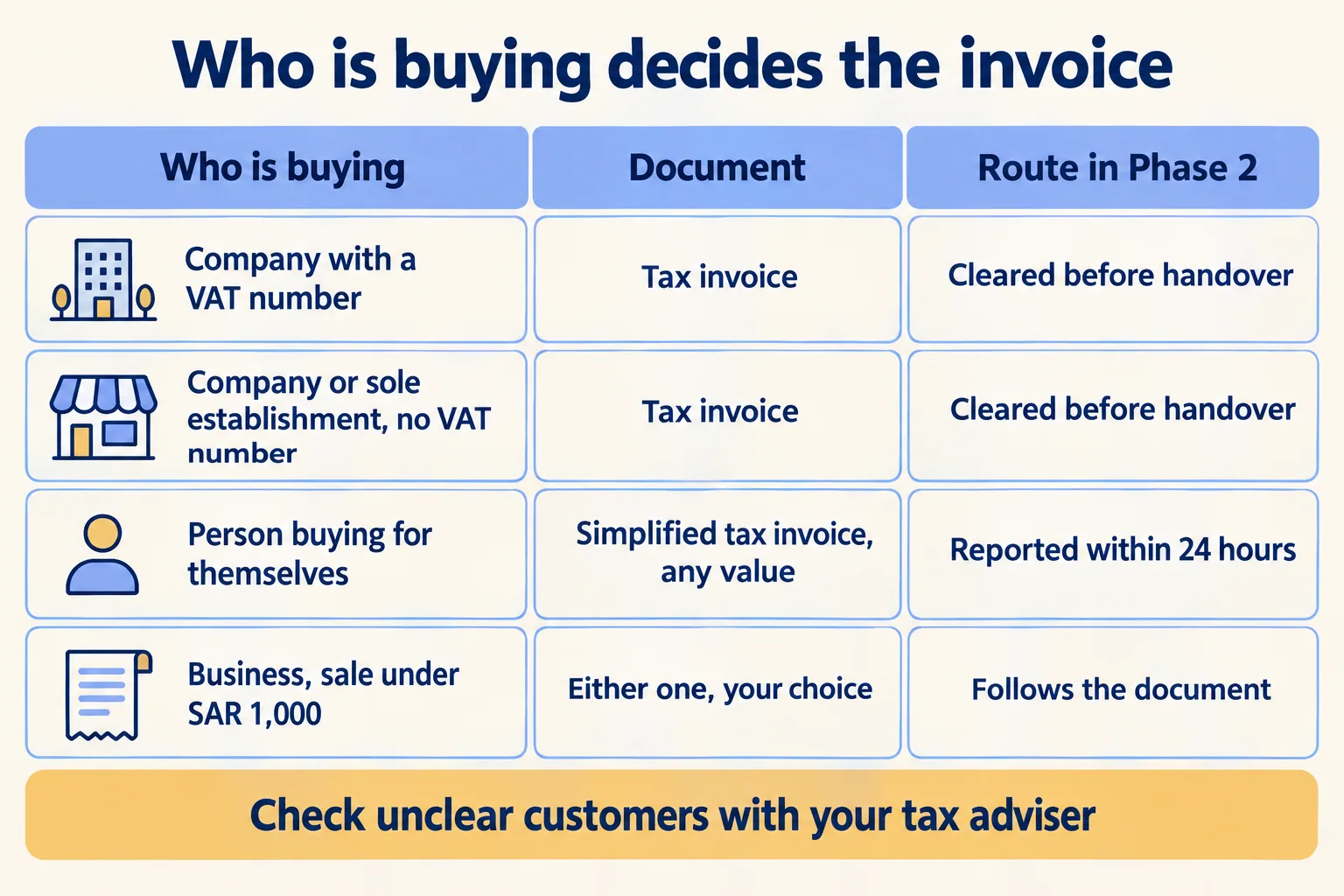
The two documents carry different details. A simplified tax invoice needs the date, your name, address and VAT number, what you sold, the price and the VAT (Article 53(8)). ZATCA's E-Invoicing Detailed Guideline adds that it "does not generally include the buyer's details". A tax invoice carries the buyer's name and, where they have one, their VAT number.
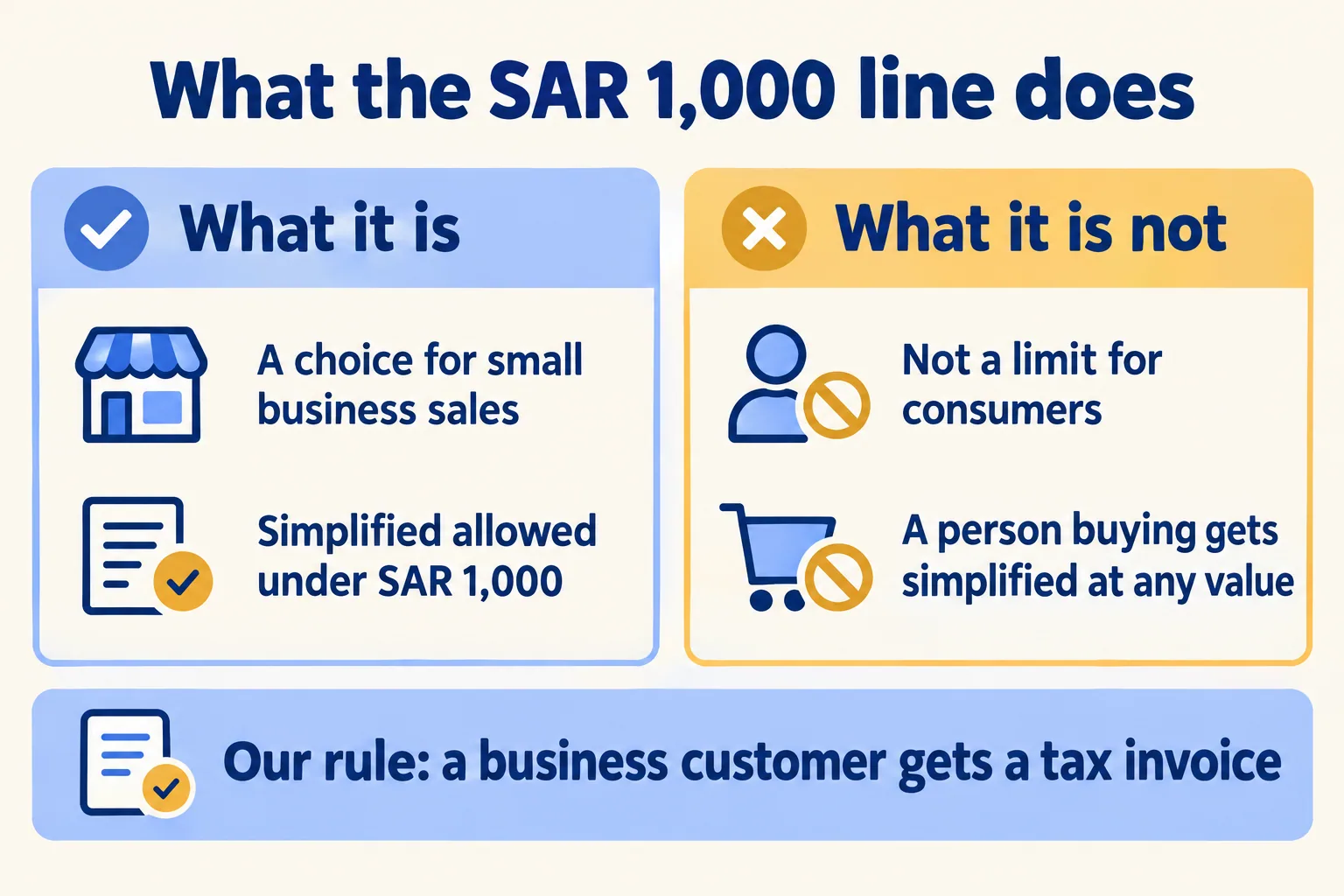
Is a simplified tax invoice only for sales under SAR 1,000?
No. This is the belief that sends traders the wrong way, and many glossary pages still define the simplified invoice by the amount.
ZATCA's guideline, section 4.2.1, is plain about it: simplified invoices for a business-to-consumer sale "can be generated for any value (even for transactions where value of Taxable Supplies exceed 1,000 SAR)". The SAR 1,000 figure "is only applicable when the supplier chooses to issue Simplified Tax Invoice for B2B transactions".
The option comes from Article 53(1)(c), which ZATCA's guideline reads this way: for a sale to a business worth less than SAR 1,000, you may issue a simplified invoice instead. You may. Nothing makes you.
What changes at the counter in Phase 2?
Until your wave goes live, both documents leave the till the same way. Once you integrate with Fatoora, they take different routes.
ZATCA's guideline, section 6.4, says each tax invoice "must be cleared by the Authority as a prerequisite for sharing them with the buyers". Simplified invoices and their credit and debit notes are "uploaded to the FATOORA Portal within 24 hours from issuance".
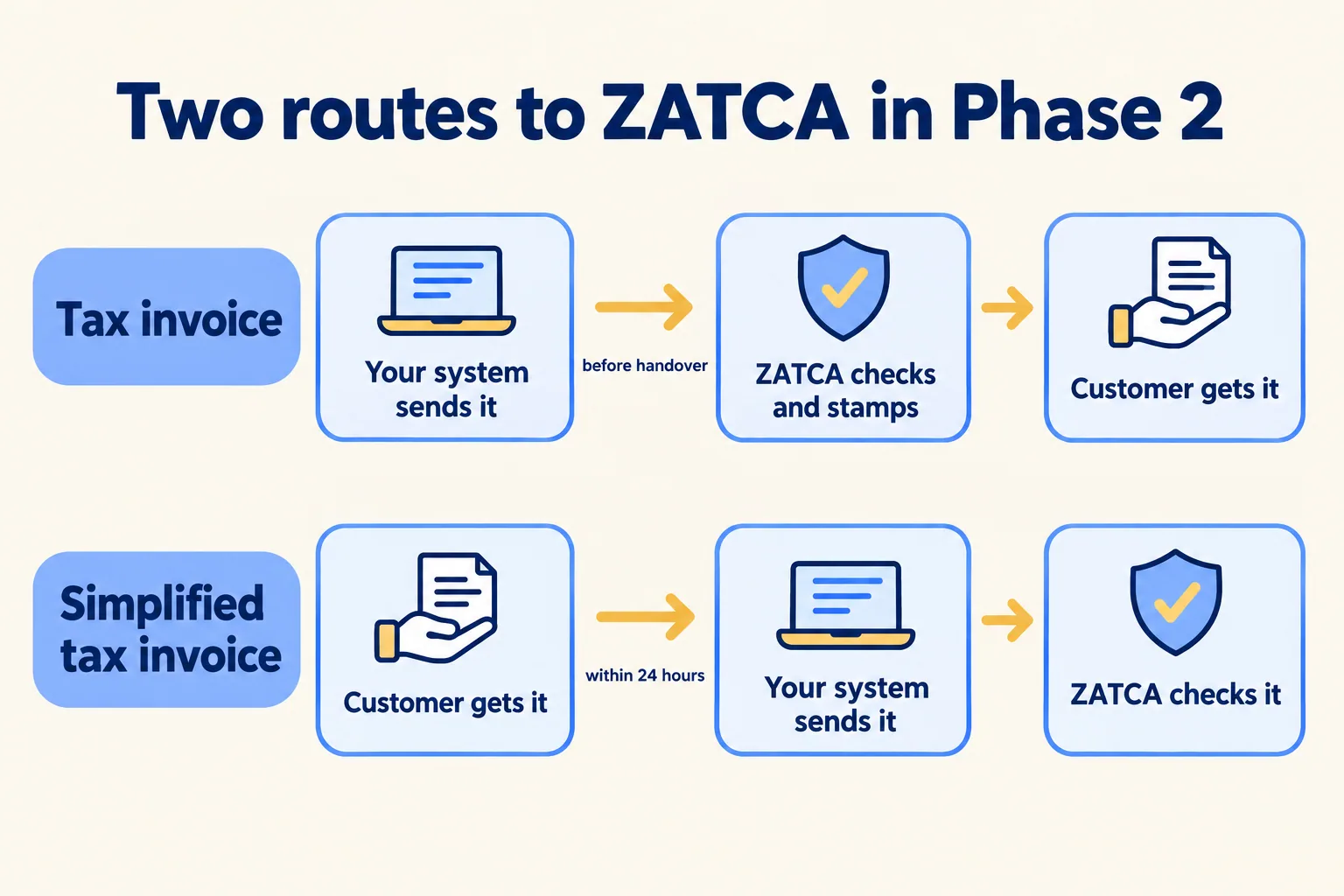
At a till, that means the contractor waits. ZATCA's technical guideline, section 3.5.4, covers tills that send through a server: "Standard documents (B2B) are still expected to be submitted prior to completing the transaction as the Buyer is expected to receive a valid document which has been cleared by ZATCA." A walk-in sale prints at once and is reported afterwards.
The deadline is close. ZATCA's wave 25 covers every taxpayer whose VAT-subject revenue passed SAR 187,500 in 2022, 2023, 2024 or 2025, to integrate with Fatoora "by no later than February 1, 2027". If you have not yet decided whether to connect the program you have or move, start with our wave 25 decision rule, then come back to the counter.

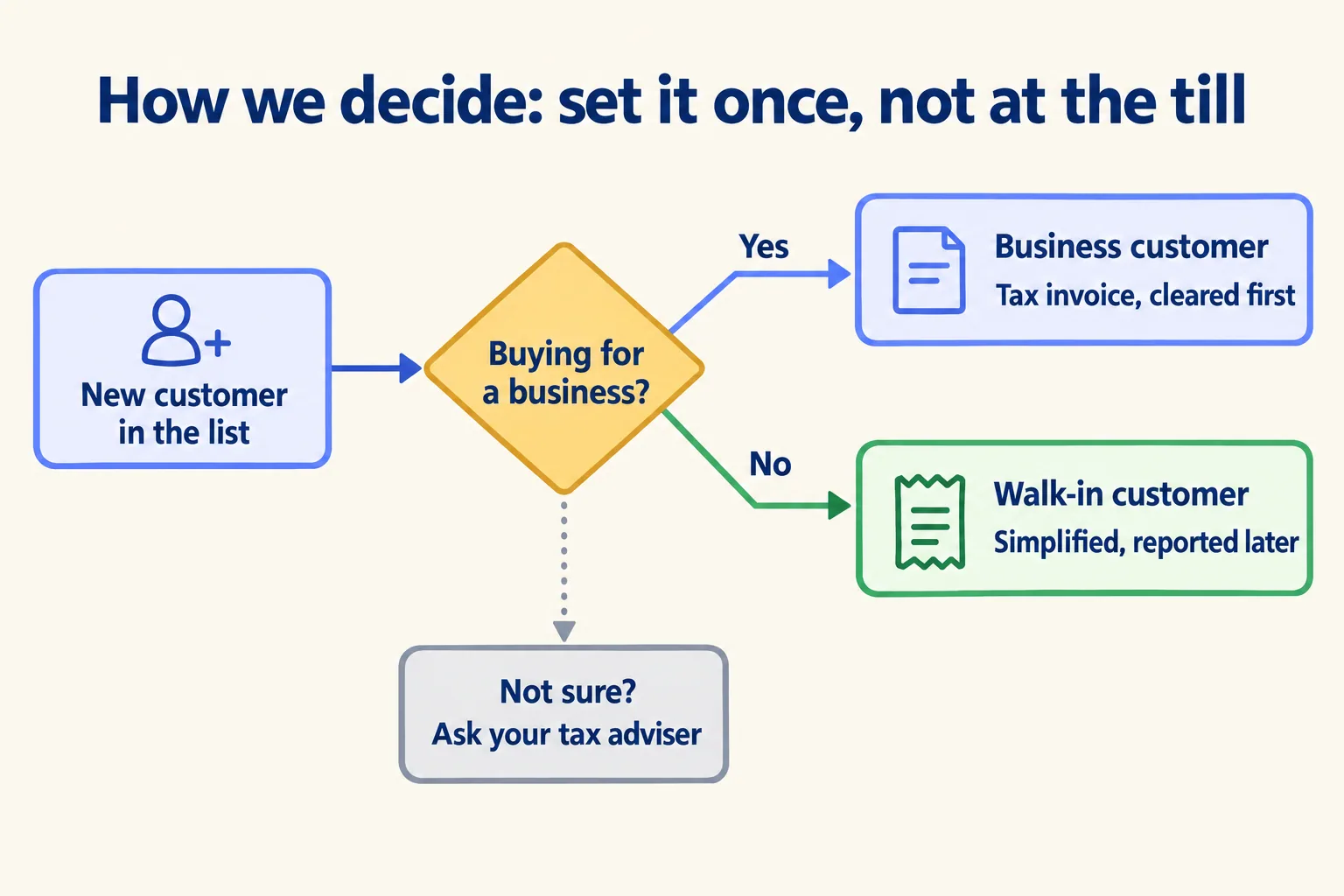
How we decide: set it once, not at the till
Our rule, so you can argue with it. The cashier never chooses the invoice type. The customer list does.
- Every trade customer is set up once, before they buy. Company name, VAT number if they have one, commercial registration, address. Their type is "business". From then on, every sale to them is a tax invoice, cleared first.
- Everyone else is a walk-in. The till starts on a walk-in customer, and every sale is a simplified tax invoice, reported afterwards.
- A business sale under SAR 1,000 still gets a tax invoice. The option in Article 53(1)(c) is legal, but it puts the amount back into the cashier's head. One rule per customer is easier to train and easier to audit. The buyer also gets their details on the invoice, which a simplified invoice leaves out.
- A new business buyer at the counter is added to the list before the sale, by whoever your branch names, not typed into a free-text box on the receipt.
The exception is a counter where small trade sales come all day (two bags of grout, a box of screws) and the clearance wait would hold up the queue. Time it first (step 4 below). If the wait is a problem, take the Article 53(1)(c) option for business sales under SAR 1,000, write it down as the branch rule, and keep it the same for every cashier.
Write the awkward cases into the same branch rule, agreed with your adviser, so nobody improvises at the till:
- A driver says "put it on the company", and the company is not in the list. Who can add it while the driver waits, and what happens if nobody can confirm it.
- A buyer comes back a week later and says the walk-in sale was for their company. ZATCA does not let you cancel an invoice it already has, so the fix goes through a credit or debit note. Agree the steps with your adviser before the first one happens.
Where the customer record goes wrong
Most invoicing systems pick the route from the customer record. One vendor's troubleshooting guide, dated 28 July 2026, says its system "chooses the submission route from the Company Type on the customer record", and "there is no separate setting on the invoice". Set one customer wrong and their invoices go down the wrong route, and the error looks like a network fault.
The hard case is the buyer with a commercial registration and no VAT number. A user in the Saudi e-invoicing thread of an ERP community forum wrote in September 2025: "some of our customers do not have a VAT number but do have a commercial registration number (CRN) or another valid identification number." Their program would only submit a business invoice with a VAT number.
The way some programs handle this is to treat that buyer as a walk-in. Read Article 53(1)(a) before you accept that default: it names "an establishment (sole proprietorship)" and "any other entity established in accordance with the laws of the Kingdom", with no VAT number required. Take the list of those customers to your tax adviser and set each one with them. A program's default is not tax advice.
The reverse question comes up too. On ZATCA's own developer forum, someone asked in October 2023 whether walk-in customers need a VAT number in their record for a simplified invoice to be accepted. The answer posted: "VAT registration number is not mandatory for Simplified tax invoices."
What to do at the counter before 1 February
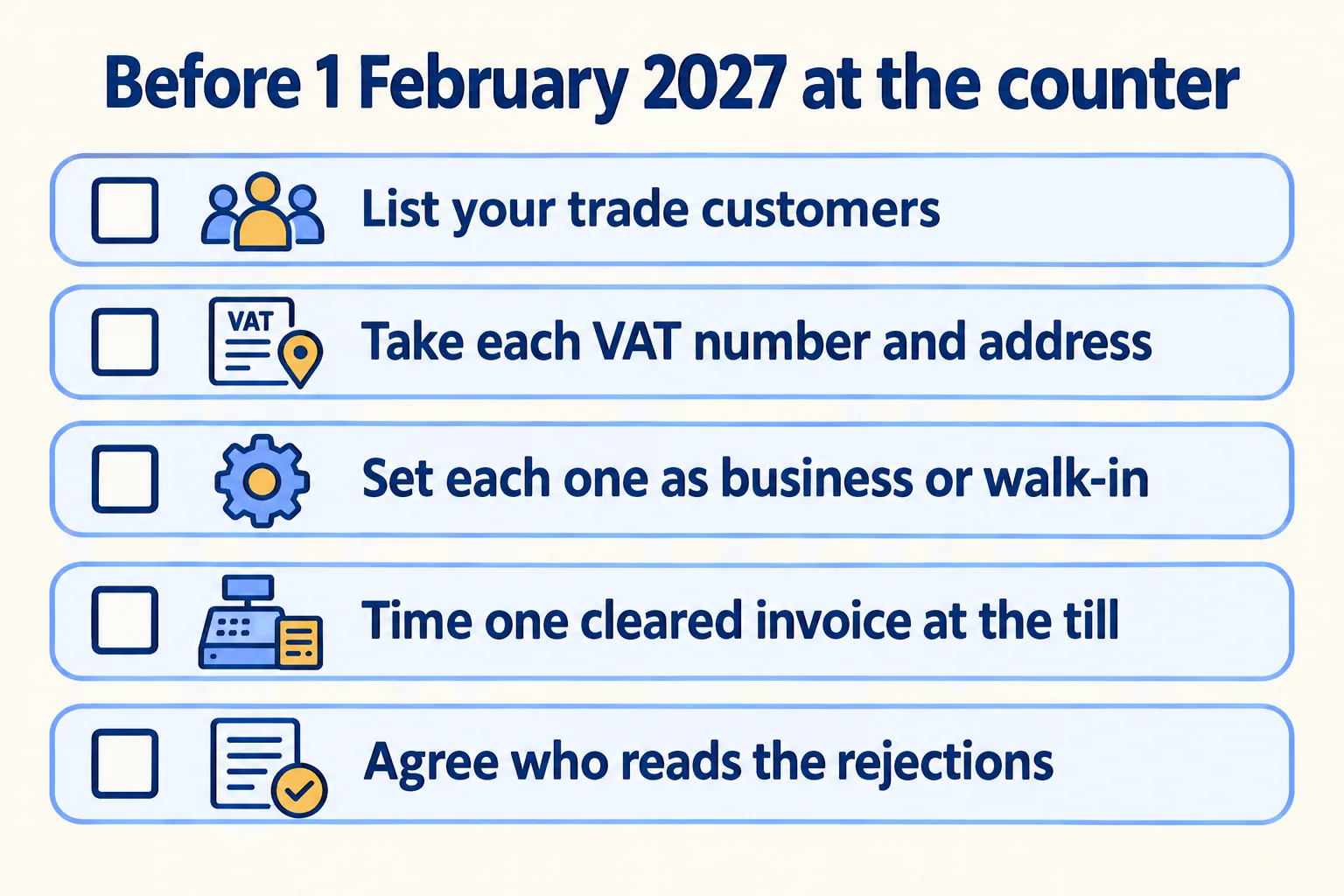
- 01List the trade customers who bought at the counter in the last three months. Your sales report has them.
- 02Collect each one's VAT number if they have one, commercial registration and address. Ask on their next visit, not at the till with a queue behind them.
- 03Set each one as business or walk-in in the customer list, with your adviser for the ones without a VAT number.
- 04Time one cleared tax invoice at the till on your test setup, so you know how long a contractor waits.
- 05Agree who reads ZATCA's rejections each morning, and who fixes the customer record behind them.
What Mindcat Accounts does at the counter
At Mindcat, we set up Mindcat Accounts for traders who sell to both kinds of buyer. Our method is cleared, then sent: every tax invoice goes through Fatoora before it reaches your customer. Tax invoices (B2B) go to ZATCA for clearance and simplified invoices (B2C) are reported, each with its status in a log. We ran it against ZATCA's sandbox. Your production onboarding needs your Fatoora OTP and happens during setup.
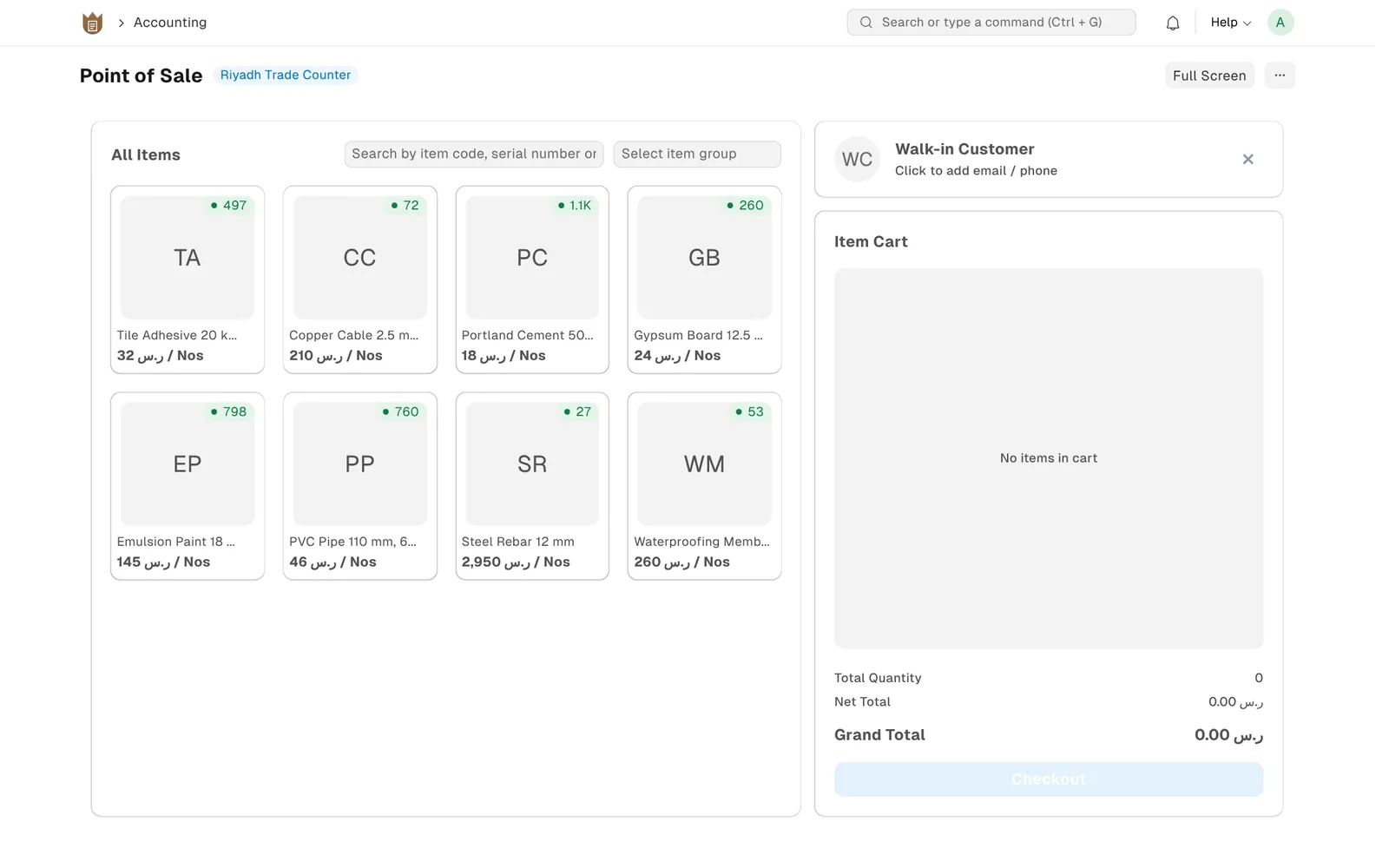
The till starts every sale on a walk-in customer, and branch tills issue simplified invoices. During setup we load your trade customers from our CSV templates and agree the branch rule above with you before the first sale. A return or a price change after ZATCA has an invoice goes through a credit or debit note with its reason, never a cancelled invoice.
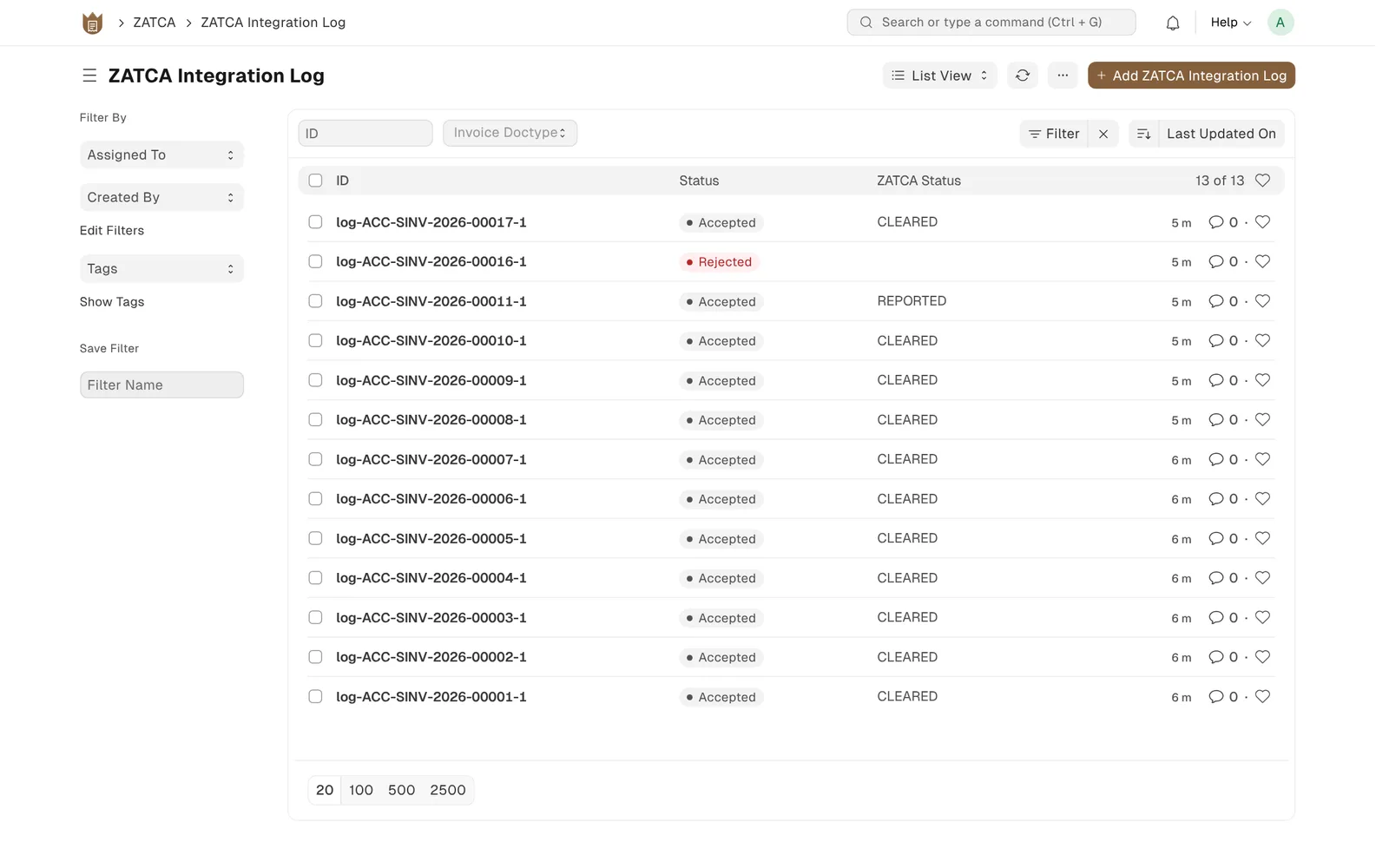
Where the line sits today: some ZATCA labels and report names on the screens show in English, and dates are Gregorian. The printed invoice uses the Arabic and English layout we set up with your logo. Branch tills are part of a managed setup, not the quick start. Your adviser files the VAT return; Accounts gives them the figures. For a distributor with stock in more than one place, the manufacturing and supply chain page shows the warehouse side, and the retail page shows branch tills.
The price, from the live page. SAR 209 per user a month for the first five users, with a shared plan minimum of SAR 1,045 a month, so one to five users pay the same.
One office, no branch tills: the quick start is SAR 2,500, fixed. We set up one company and onboard one invoicing unit with your OTP.
Branch tills, or six users and up: we set it up with you to a written plan. Setup for 1 to 20 users is SAR 14,900, with ZATCA onboarding per branch. Receipt printers and payment gateway fees are billed at cost, and prices exclude 15% VAT.
Who should leave the till as it is?
A shop that sells only to people buying for themselves. Every sale there is a simplified tax invoice, so there is nothing for the cashier to decide. Check that your till reports within 24 hours once your wave goes live, and stop there.
Tell us how many people work in the books, how many counters or branches you run and which program you use today. We reply in writing within 24 hours with the setup plan and the monthly price per user, in SAR.
