
If a setting changed last month and nobody can say who changed it, this is for you. Salesforce already keeps a free record of setup changes. The screen shows 20 rows, so it is easy to stop there. The record answers more than that, it deletes itself at 180 days, and from January 2027 more people may be able to read it than you expect. This is not for you if your org has no named Salesforce admin or owner yet.
Which question are you asking?
Start with the question, not the tool. "Who changed it" means four different things in Salesforce, and each lives in a different place.
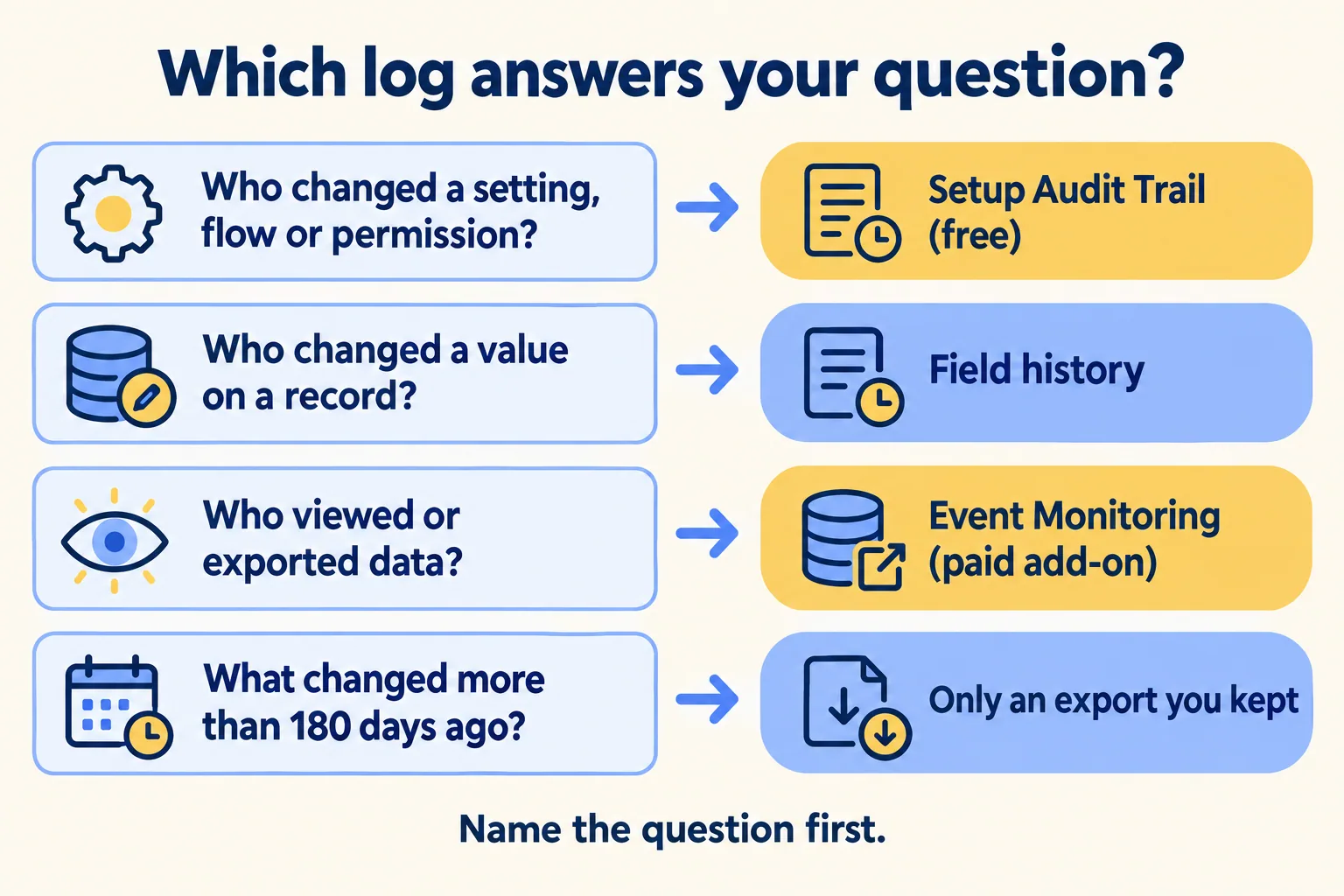
Gearset's guide puts the difference in one line: Setup Audit Trail tells you who modified the validation rule, and field history tells you who changed the value that triggered it. If people suddenly cannot save opportunities, read the trail. If a forecast moved, read field history.
What does Setup Audit Trail show?
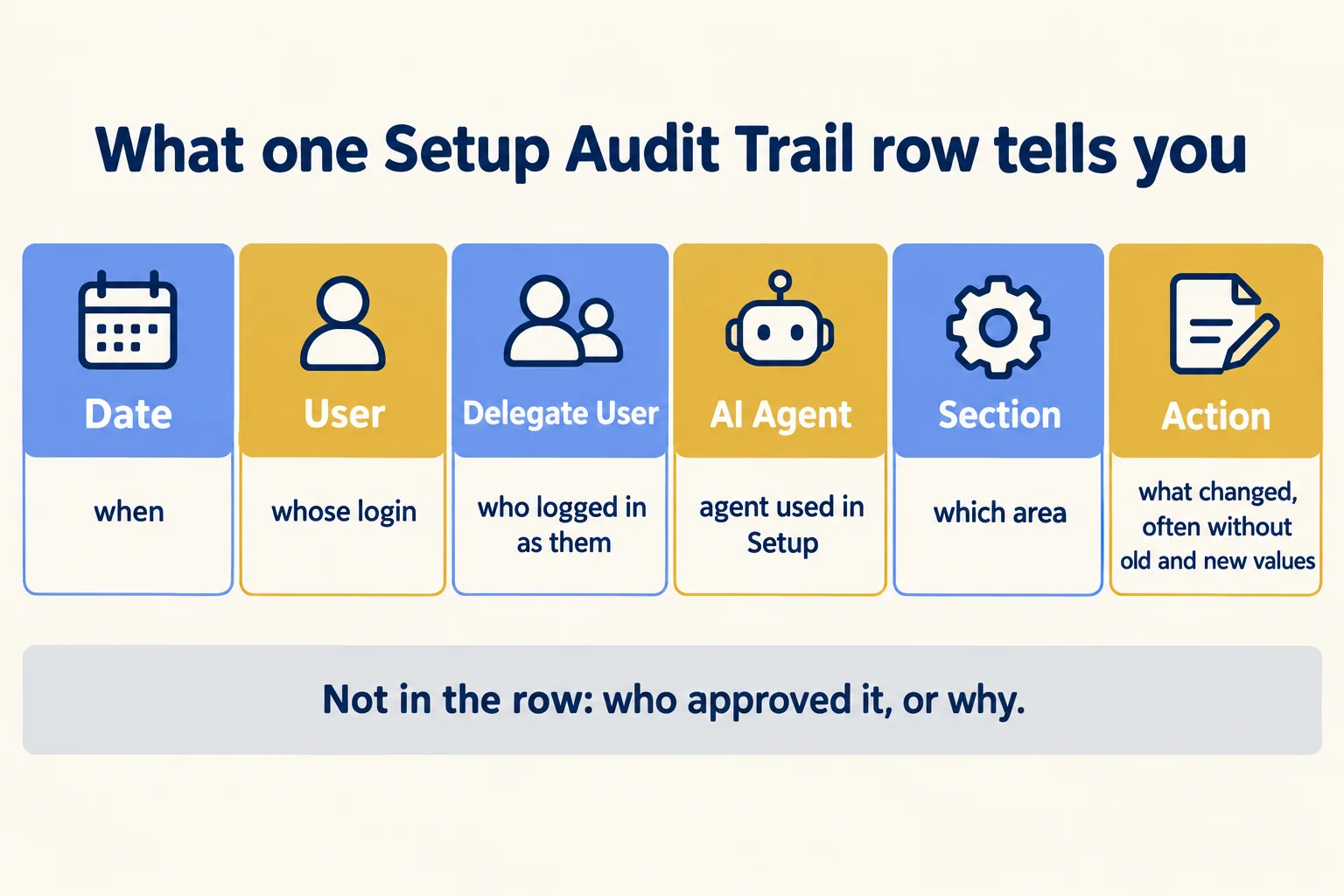
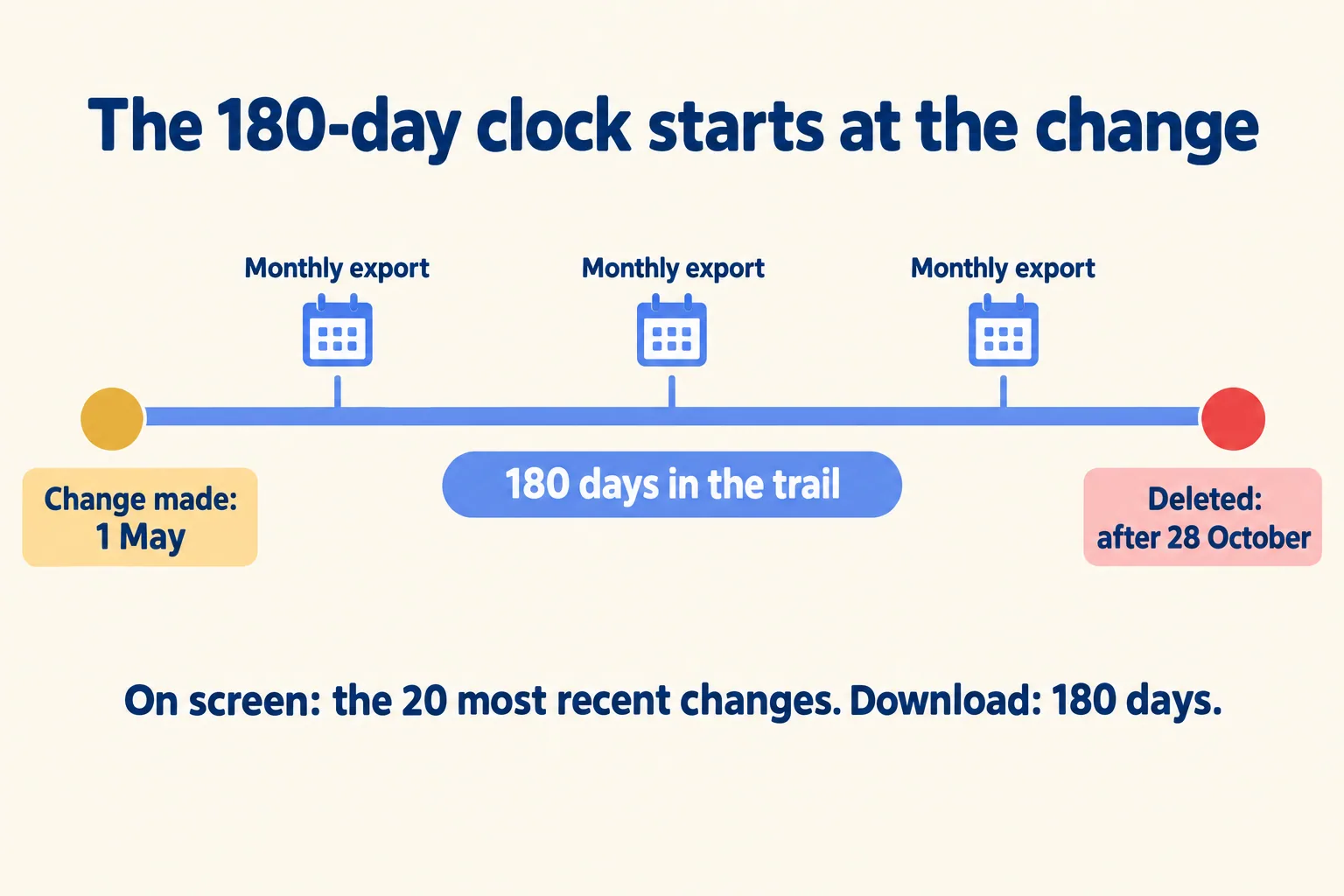
More than the first screen suggests. Salesforce Help says, "The history shows the 20 most recent setup changes made to your org," with the date, who made it and what the change was. The Download button gives "your org's complete setup history for the past 180 days."
Two columns answer questions owners ask.
- Delegate User. One admin asked on Salesforce Stack Exchange how to prove a change came from an admin logged in as someone else: "the changes are logged on behalf of User Y. How we can verify/ confirm that these changes happened because of the User X?" Salesforce Help's answer: the Delegate User column shows the delegate's username, and the User column shows the person who granted access.
- AI Agent. If an admin makes a change through Setup with Agentforce (Beta), Salesforce Help says the agent's name and ID appear in the AI Agent column and the admin in the User column.
So, for changes made in Setup, the trail already separates a person, a login-as and an agent. It does not cover an agent or an integration user writing records through the API; that is field history and Event Monitoring ground. The coverage is wide too: profiles, permission sets and their assignments, sharing rules, password and session policies, custom fields, validation rules and more, listed on the same Help page.
Where does the trail stop?
It says that something changed, often not what. Gearset's guide notes that some profile or permission changes show a value moving from one setting to another, but "an entry like 'Modified validation rule' tells you that something changed, but not what changed inside the rule." AuditForce makes the same point about profiles: the trail shows "Changed profile System Administrator", not which permissions were added or removed.
Two more limits matter to an owner:
- It deletes. Salesforce Help: "After 180 days, setup entity records are deleted." Gearset spells out the clock: a change made on 1 May is gone for good after 28 October, whether or not anyone looked at it.
- It has no approval. No column says who asked for the change, who approved it, or why. That lives in a ticket, an email or a chat, if it lives anywhere.
When the row only says that a profile or rule changed, the detail lives in the metadata. AuditForce's guide points to a snapshot of the profile before and after, compared side by side. In practice that means comparing against a sandbox or the copy in your source control, if the team keeps one.
The trail is also evidence, not a brake. To stop someone in the middle of a problem, freeze the user or remove the permission set, then read the trail.
What changes in Spring '27?
Who can read the trail. Today, reading it needs View Setup and Configuration, which also opens the rest of Setup. A Salesforce release update adds a dedicated View Setup Audit Trail permission, so someone can read the trail without seeing everything else.
The catch is in how it is switched on. Salesforce Ben's Spring '27 guide (Tom Bassett, 11 November 2026) says that when the update is enforced from January 2027, "any Profile or Permission Set with View Setup and Configuration will also get View Setup Audit Trail." The update keeps every broad grant you already have. The review is yours to do.
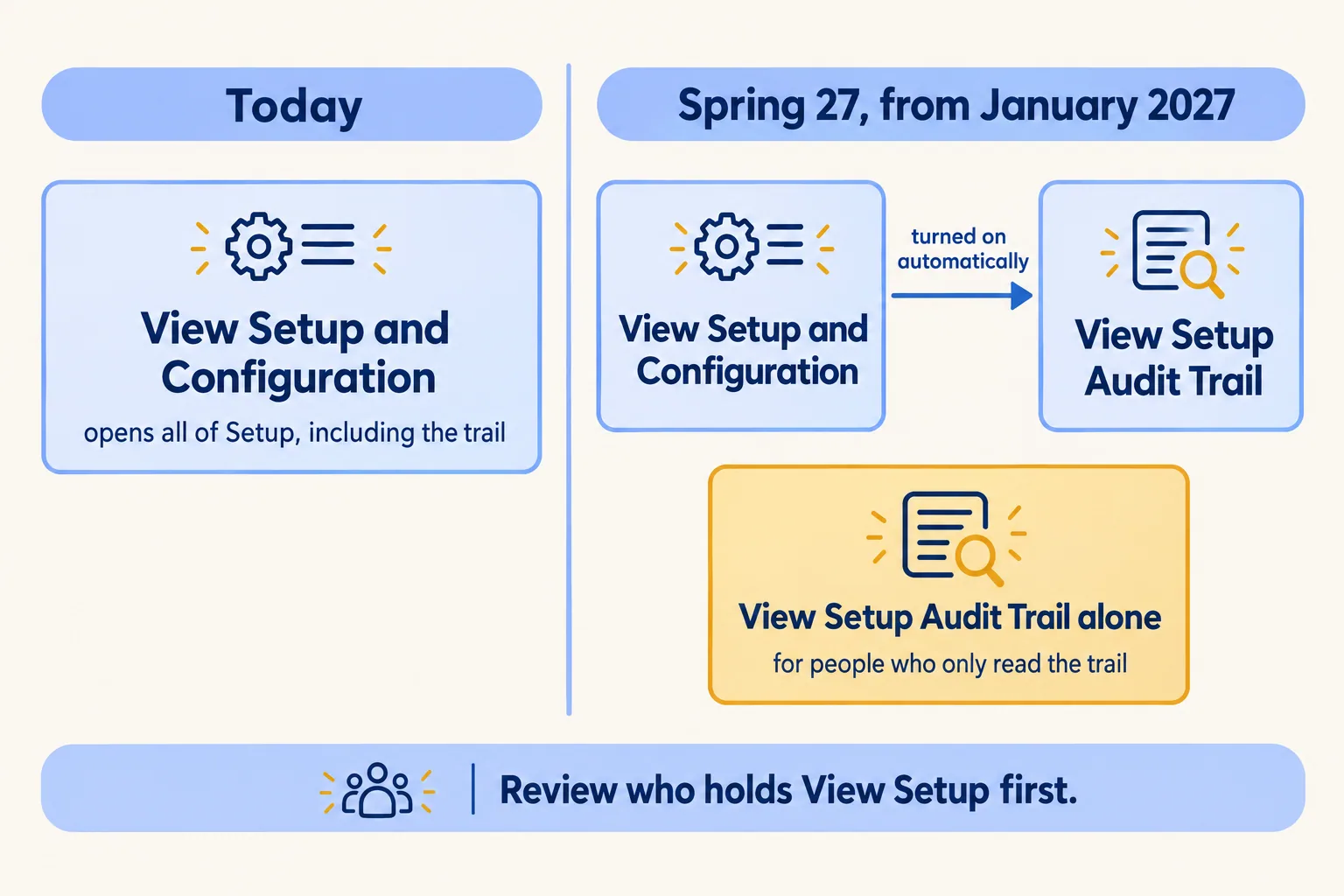
The same guide gives the no-code way to see who holds it: create profile and permission set list views filtered by View Setup and Configuration. Remove it wherever the job does not need Setup. Where someone only needs to read the trail, such as an auditor or a security lead, grant View Setup Audit Trail on its own. Check Salesforce Trust for your org's release date, and test the update in a sandbox first.
How do we decide what an org needs?
We answer in this order. It is our method, not a Salesforce rule.
- 01Write the question down in one line: a setting, a record value, or who saw the data.
- 02If it is a setting, download the trail today. Anything older than 180 days is already gone, and the oldest rows go next.
- 03Read the download for the change, then the User and Delegate User columns. A row that names a person nobody recognises is the first finding.
- 04If the question is a record value, check whether Field History Tracking is on for that field. It only records from the day it is switched on.
- 05If the question is who saw or exported data, the free logs cannot answer it. That is when Event Monitoring is worth a quote, and not before.
- 06Set a monthly download and keep the files where only the admin who saves them can write, so the next question can reach back further than 180 days. The SetupAuditTrail object can be queried with SOQL, so a scheduled script can replace the manual click.
- 07List who holds View Setup and Configuration before January 2027, and cut it to the people whose job needs Setup.
For a question about a setting, the answer is usually steps 2, 6 and 7, and nothing to buy. The paid add-on earns its place when someone has to prove who exported data, not who changed a setting.
The change log is the other half. The trail says who and when; only your team can record who asked and who approved. One line per change in a shared list, with the request and the approver, closes the gap the trail leaves. It is a habit, not a control, so the monthly read checks the list against the trail.

The trail is one of three reads we do on who can act in an org. The other two are covered in which integrations stop on 20 February 2027 (who signs in) and when a shared integration user should be split (what each system writes as).
What would we do first?
At Mindcat, we read the last 180 days of the trail in the first days of "The rescue week: finish, cut, or rebuild". We download it, sort it by section and user, and mark each change nobody on the team can explain. The written call at the end of the week names those changes, who holds View Setup and Configuration, and the first fix. You can see a sample read, on an invented org, before you send us anything.
The assessment is free: a short read of the org and a written note. If you go ahead, the first build week is a fixed AED/SAR 14,900 (about USD 4,050), credited in full when you sign the build within 60 days. We will not fix-price a rescue we have not assessed. If the read shows the org needs tuning, not rescue, our Salesforce optimization work covers it.
Not for you if your org has no named admin or owner yet. Name the owner first; the trail can only tell you who, and someone has to answer for it.
