
If your Salesforce org holds personal data of people in India and someone has sent you a DPDP checklist that maps each rule to a Salesforce product, this is for you. It is not for an org with no personal data of people in India, or a small org with no named Salesforce admin to own the changes.
When do the DPDP Rules reach your Salesforce org?
On 13 May 2027, for the duties that touch your org. The checklists going round say the "consent manager framework" activates in November 2026, and that part is true. But Rule 4, which came into force on 13 November 2026, only lets Consent Managers register with the Data Protection Board. It puts no new duty on the company that runs the CRM.
Rule 1 of the DPDP Rules, 2025 sets three start dates. The government's press release of 14 November 2026 repeats the last one: the rights of Data Principals, the obligations of Data Fiduciaries and the Board's penalty process "are scheduled to come into effect on 13 May 2027."
When each part of the DPDP Rules starts
13 Nov 2025
Rules 1, 2 and 17 to 21: definitions and the Data Protection Board
13 Nov 2026
Rule 4: Consent Managers can register. No new duty on your org
13 May 2027
Rules 3, 5 to 16, 22 and 23: notice, security, breach, retention, rights. Your org's duties
Two caveats. In January 2026, MeitY proposed cutting the 18-month window to 12 months. We found no amendment notified as of 18 November 2026, and the 14 November release still names 13 May 2027. And the Board itself had no chairperson or members as of 16 November 2026. Neither is a reason to wait. Six months is about right for the work below, and most of it is not buying a licence.
Which rule asks for what, and what covers it?
Four rules decide most of the work in a Salesforce org: Rule 6 (security), Rule 7 (breach notice), Rule 8 (erasure and logs) and Rule 14 (rights requests). The checklist you were sent maps them to products. Here is the same map with the part no product covers.
Read the last column first. Every row has one, and two rows have no product at all.
Why are 30 days of logs a problem?
Because Rule 6(1)(e) asks you to keep logs and personal data for one year, and Rule 8(3) asks you to keep "such personal data, associated traffic data and other logs" for at least one year from the processing. Salesforce Event Monitoring does not keep that long unless someone changes it.
Without Shield or the Event Monitoring add-on, Salesforce gives you a few event types for one day (Event Monitoring FAQ). With Shield or the add-on, Salesforce Help says event log files are kept for 30 days by default, and an admin can extend retention up to one year, in Setup or through the eventLogRetentionDuration field of the EventSettings metadata.
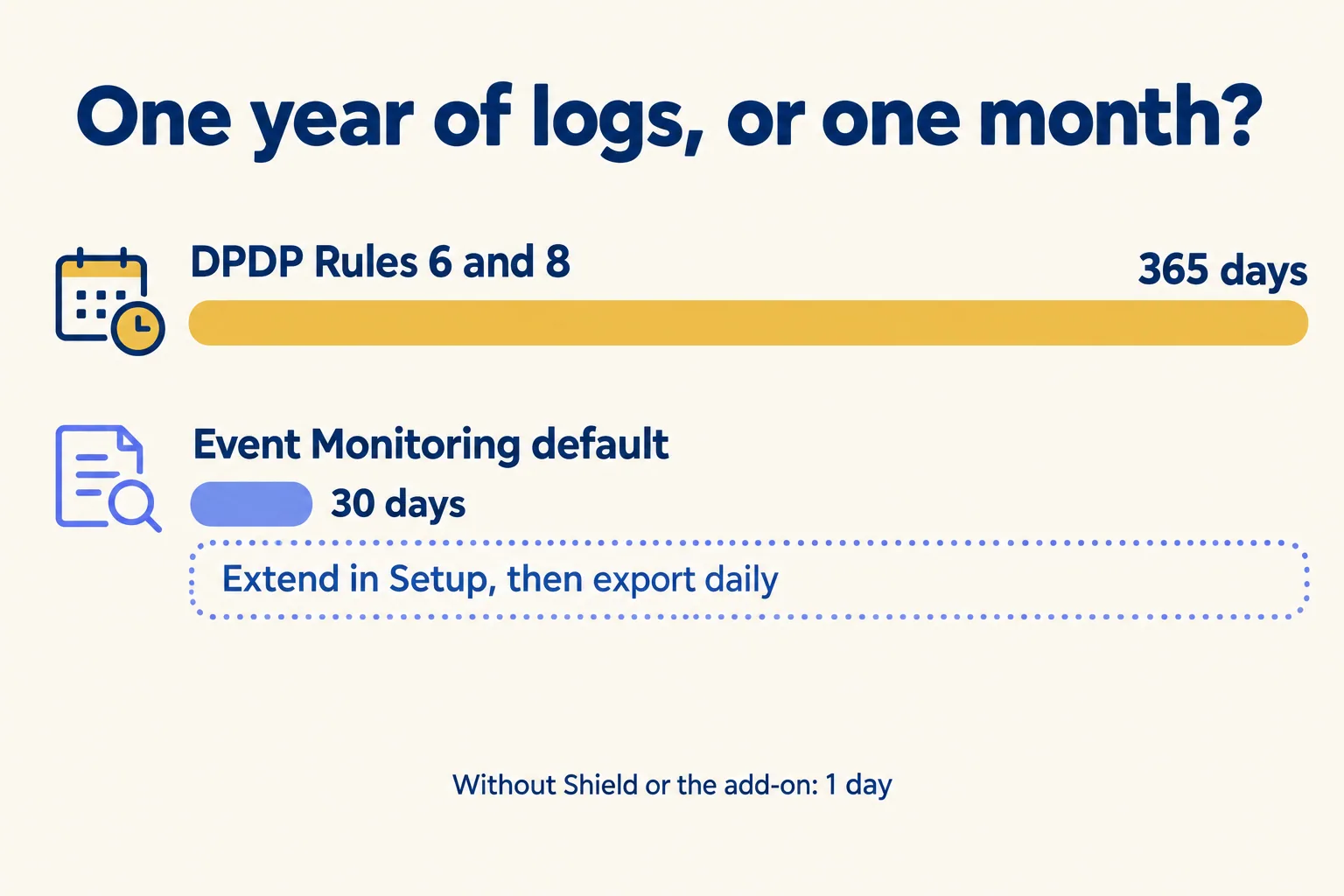
Extending the setting is not the end of it. The Salesforce REST API guide says event log files "aren't a system of record" and that data loss can occur. If you need a year of logs to answer the Board, export them daily to storage you control and check that the export ran.
Field history is the other log people count on. Standard Field History Tracking keeps 18 to 24 months for up to 20 fields an object. Field Audit Trail, part of Shield or sold alone, tracks up to 200 fields an object and keeps history until you delete it (Field Audit Trail). That length helps with Rule 8(3). It causes the problem in the next section.
One default changed this year without anyone buying anything. Salesforce now asks for step-up authentication when someone exports more than 10,000 records from a report in the browser, enforced in production from 13 July 2026. It does not cover API or Data Loader exports. Those still need a Transaction Security policy of your own, on API events, that blocks or asks for MFA above a row count you choose.
Does deleting a record erase the person?
No. When you delete a Contact, the record goes to the Recycle Bin and then away. The person's old values can stay in three other places.
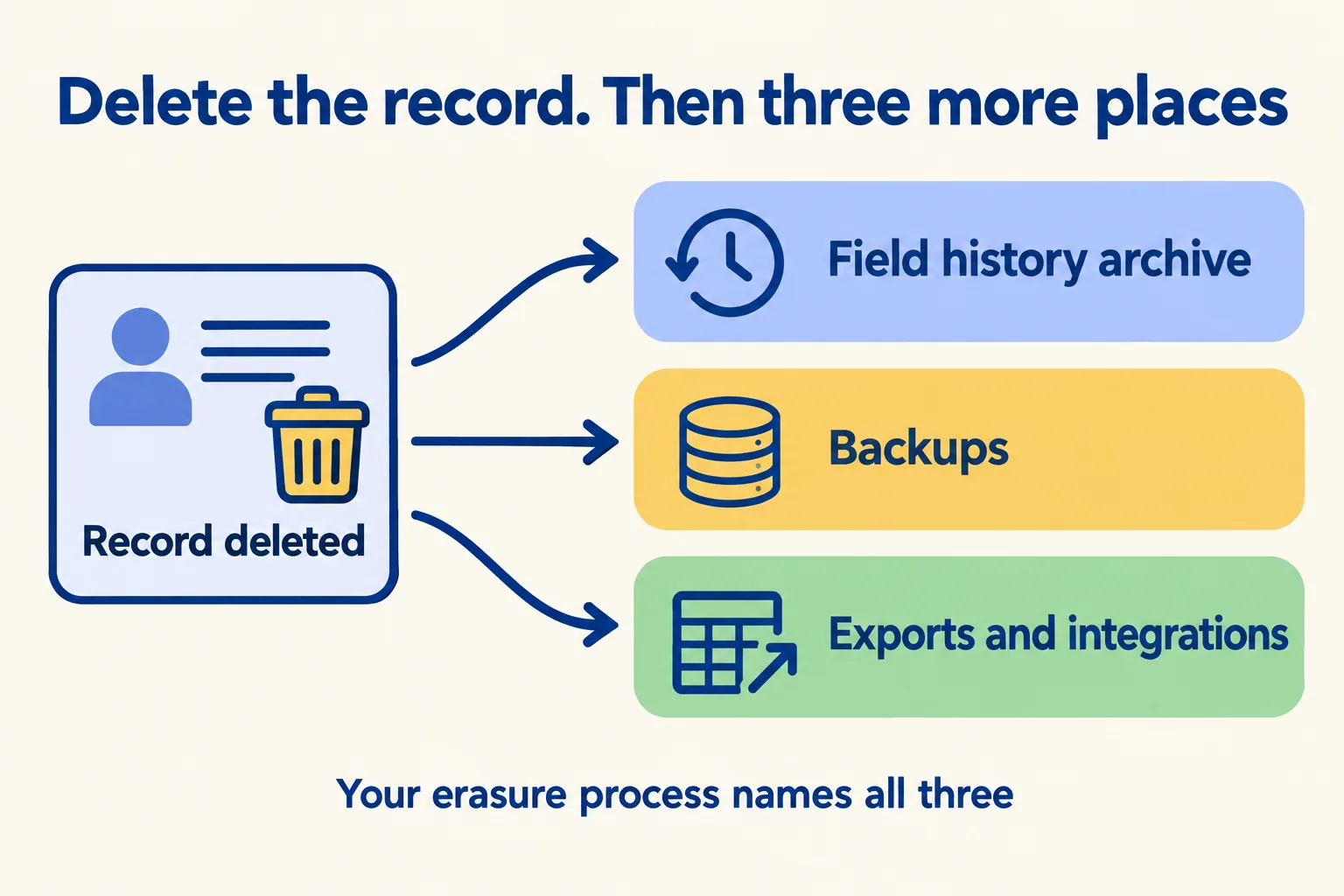
- Field history. Field Audit Trail copies history to an archive object and keeps it until deleted. Deleting the record does not delete its archived history.
- Backups. Salesforce Backup & Recover, formerly Own Recover, keeps 99 years of backups by default, with policies you can shorten. Any other backup tool keeps its own copies.
- Exports and integrations. The data warehouse, the marketing tool and last quarter's spreadsheet export.
Rule 8 asks you to erase data once its purpose is served, and Rule 14 lets a person ask for erasure. Your erasure process has to name all three places.
The one-year log rule pulls the other way. Section 8(7) of the Act lets you keep data where a law requires it, and Rule 8(3) is such a requirement for logs. So keep the logs a year even after an erasure request, restrict who can read them, and delete them on schedule. Have counsel confirm that reading for your org. Privacy Center, a paid add-on, can run retention policies and right-to-be-forgotten requests and can remove field history and Field Audit Trail records. Backup & Recover has its own right-to-be-forgotten step for backups. Without them, an admin does it by hand, and writes down that it was done.
What does no Salesforce licence do for you?
Four things, and the penalties reach them. The Act's Schedule allows up to ₹200 crore for failing to notify a breach, and up to ₹250 crore for failing to take reasonable security safeguards, which Rule 6 says include the contract terms below (DPDP Act Schedule).
- Breach notice (Rule 7). Tell each affected person without delay, in plain language, and tell the Board without delay. Within 72 hours, send the Board a detailed report. That needs a runbook, a named owner and a drafted notice, ready before the first incident.
- Rights requests (Rule 14). Publish on your website or app how a person makes a request and what details you need to identify them. Answer grievances within a period not over 90 days. A Service Cloud queue can hold the case; it cannot write the policy.
- Processor contracts (Rule 6(1)(f)). Your Salesforce partner, AppExchange vendors and integrators process your data. Your contracts with them need security terms.
- Notice and consent records (Rule 3, Act sections 5 and 6). A notice in clear language for each purpose, and a record of who agreed to what. Salesforce has consent objects; what goes in them is yours. Our EMI reminder calls checklist shows what those records look like for a calling agent.
What should you do before 13 May 2027?
- 01List every object and field that holds personal data of people in India, and the purpose for each.
- 02Check Setup: is Event Monitoring on, and what is the event log retention? Extend it to 365 days and start a daily export.
- 03Decide retention per purpose, and write down where history, backups and exports keep copies.
- 04Encrypt only fields where the risk is real. Encrypted fields lose some filtering, sorting and formula use, so test reports, search and AppExchange packages in a sandbox first.
- 05Write the Rule 7 breach runbook and the Rule 14 request page, with named owners.
- 06Add security terms to every processor contract that touches the org.
- 07Run one rehearsal: a fake breach and a fake erasure request, end to end.
Do steps 1 and 2 this week; they cost nothing and tell you how far apart the checklist and your org are. Buy licences after step 3, when you know which gaps a product closes. We are not lawyers: have your counsel read the notice, the runbook and the contracts.
This list is not for you if your org holds no personal data of people in India, or if nobody owns Salesforce day to day; name that owner first.
At Mindcat, we read your org against these rules and give you a written list: settings to change, licences you need and do not need, and the process work with an owner for each. It runs like our rescue week: we price the fixes after the read, not before. The work is run from our India company in Kochi.
