
If the next import is planned for one afternoon, or the last one left contacts with no account, read this first. The tool most teams open first, the free Salesforce Data Import Wizard, cannot load the open deals. It also has a few ways to finish a load with no error while the records are wrong. This is not for you if your data is already clean and your team only adds records by hand.
What can the import wizard load?
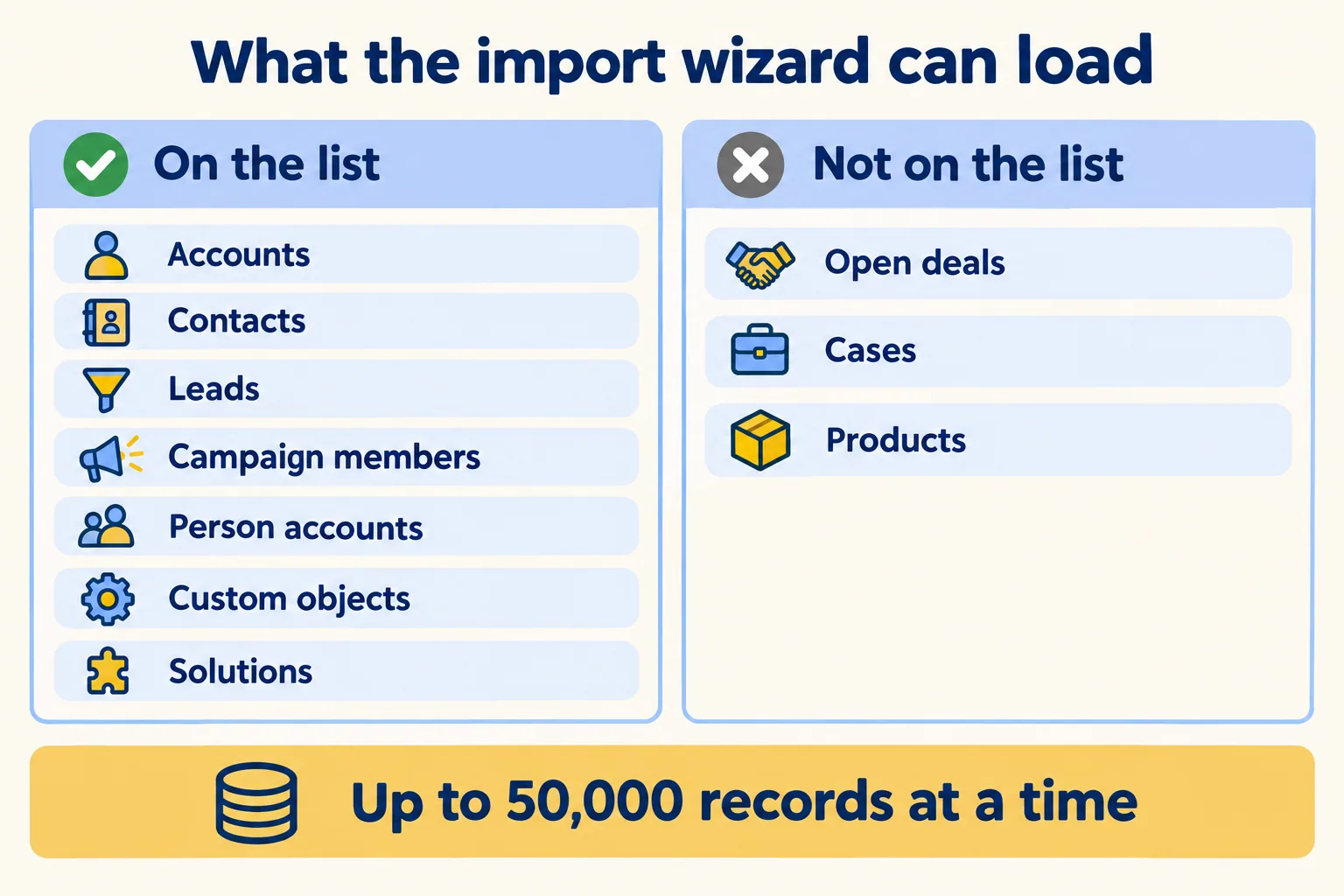
A short list, and the open deals are not on it. Salesforce Help: "You can use the Data Import Wizard to import accounts, contacts, leads, solutions, campaign members, person accounts, and custom objects. You can import up to 50,000 records at a time."
Opportunities are missing from that list. So are cases and products. Skyvia's comparison (23 October 2026) says the same in plain words: objects with complex relationships, "such as Opportunities, Cases, and Campaigns, are not supported through the Wizard." Campaign members load; the campaign records themselves do not.
That matters because the open deals are usually the first thing a sales team wants to see on day one. A plan that says "the admin imports the CSV" works for the accounts and contacts, then stops at the pipeline.
The wizard has real strengths. It runs in the browser, it is in every edition except Database.com, and it can skip duplicates by matching on account name and site, contact email or lead email. Salesforce also recommends that "you test a small CSV file first," and that you do not run more than one import job at a time.
When does Data Loader take over?
The Salesforce Data Loader guide gives the cases:
- You must load into an object the wizard does not support, such as opportunities.
- The same load has to run again, on a schedule.
- The mappings are complex and must be repeated the same way each time.
- The file is past 50,000 records, or the object has 50 fields or more. The same guide puts the Data Loader ceiling at 150 million records in one CSV file.
One line in that guide is easy to miss. Data Loader is listed as "Available in: Enterprise, Performance, Unlimited, and Developer editions." Professional is not on that list. If you are on Pro Suite and the open deals must come across, ask your Salesforce account executive which route your contract allows before the go-live plan depends on it.
What fails without an error?
Four loads that finish and still leave the records wrong. Salesforce documents two of them, admins describe the third in their own words, and the fourth is already in your org.
Contacts that arrive without their company. One admin on the Trailblazer Community: "the new companies and their contacts imported as individual records and not connected. For example, the Account had no contact and the contact had no Account." The reply: you load one object at a time, accounts in one import and contacts in another. Another admin, in 2025, matched contacts with valid 18-digit Account IDs and still found that one duplicate contact "ends up with no Account."
A load that creates nothing. Salesforce Help (26 August 2026): when an object's sharing is Private, a non-admin user who matches by Name or Email needs View All Records on that object. Without it, "the import completes but nothing is created or updated."
Duplicates from a tidy-up. Salesforce Help (3 April 2026) says that editing the record owner, account name, account site or contact name in an export file before re-importing it "will result in the creation of duplicate Accounts or Contacts." The same article suggests matching on the Salesforce ID, "since this is a unique identifier."
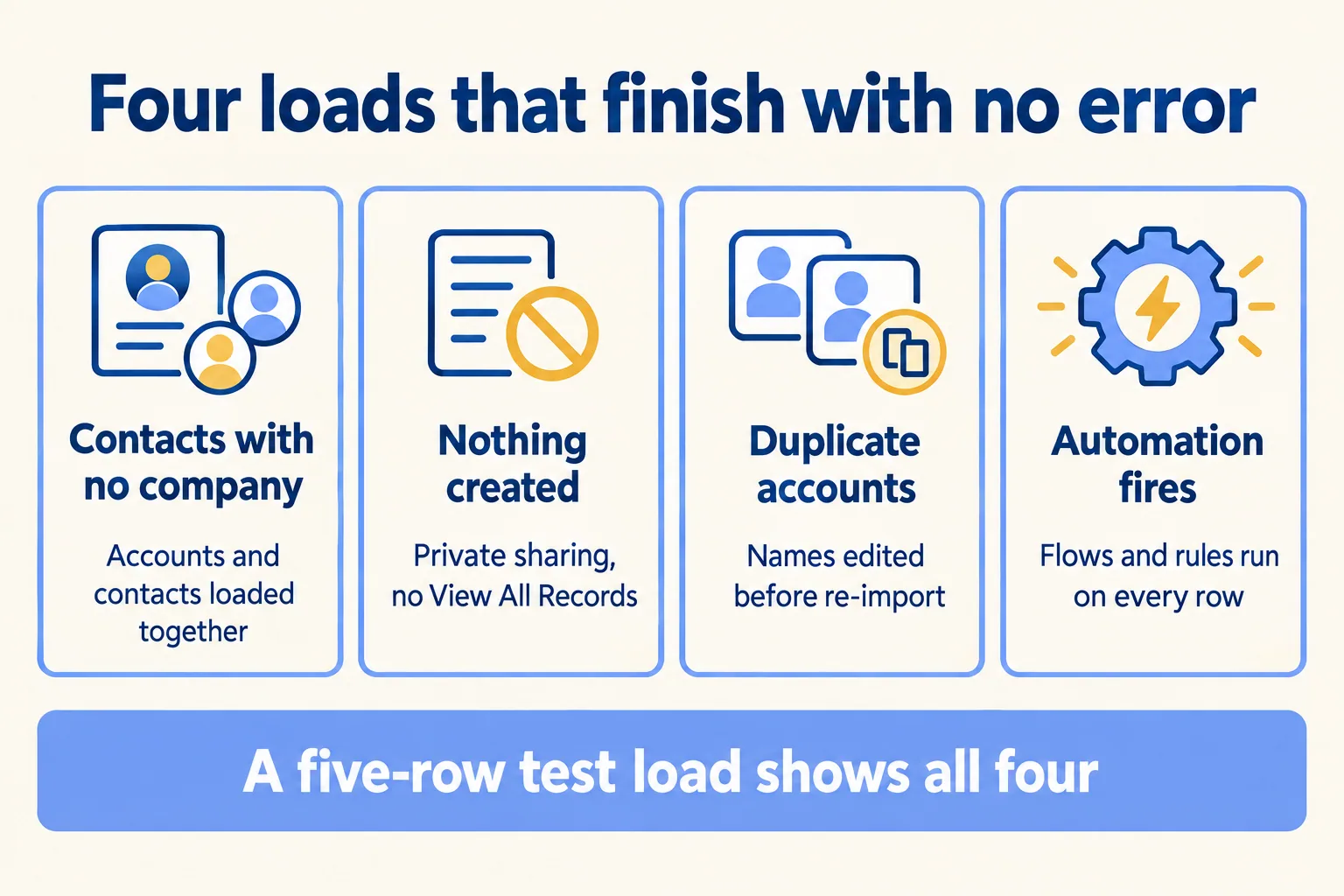
A fourth one is your own org. Flows, validation rules and assignment rules run on records loaded in bulk, the same as on records typed in. A load into an org with old automation can send emails, reassign owners or overwrite fields while every row reports success. Before the load, list what fires when a record is created, and decide what pauses during the load. The way we do it: a bypass switch that the flows and validation rules check, held only by the load user, and assignment rules and emails turned off until the check is done.
None of these shows up as a red error on the screen. A test load of a few rows, opened by the person who will work those records on Monday, shows all four. Run it in a sandbox first if your edition has one, then a few rows in production. Check the duplicate and matching rules already switched on, test one batch at the real batch size so old automation meets real volume, and read the success and error files Data Loader writes after every run.
What order do the records go in?
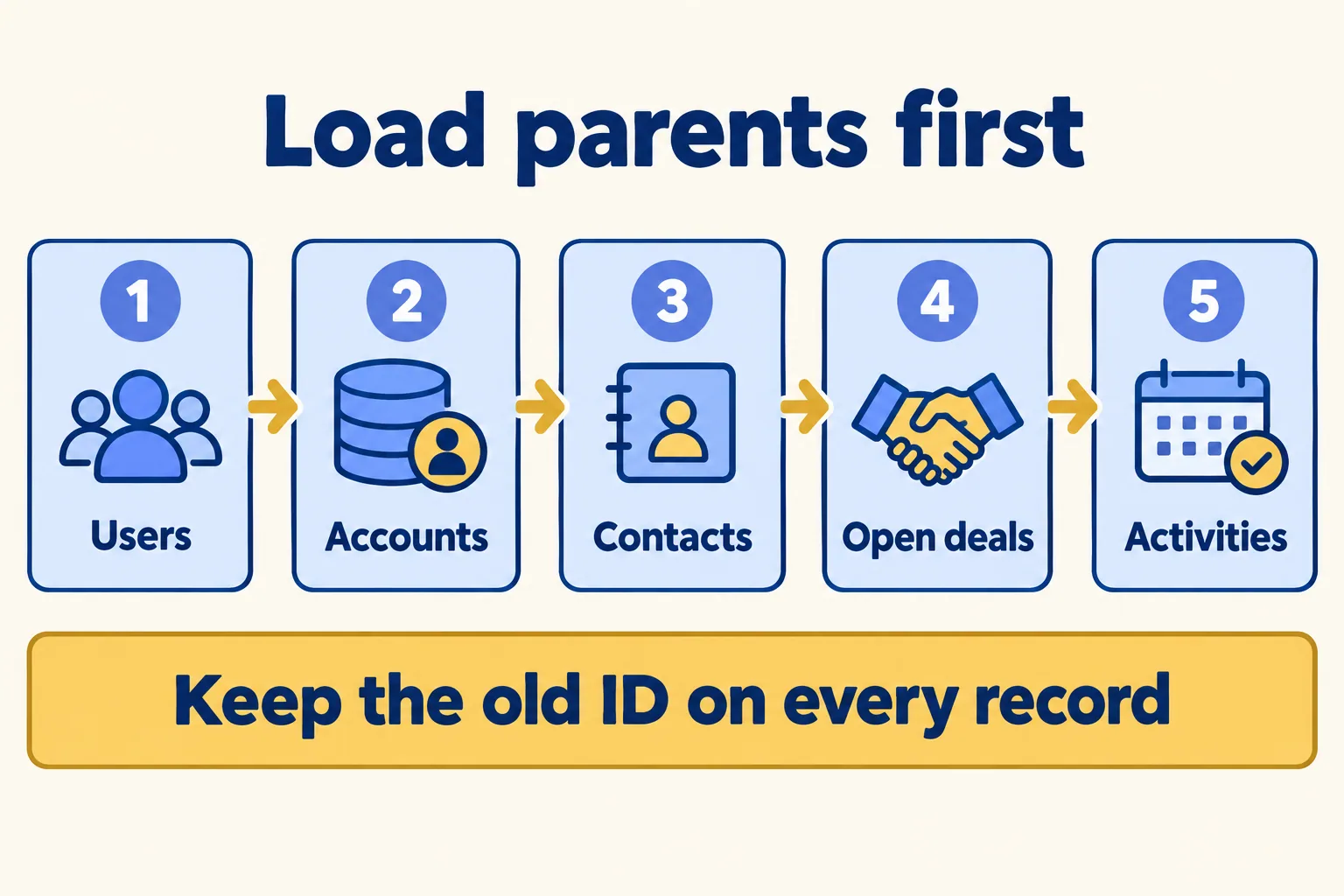
Parents first. A contact needs its account to exist before it can link to it, and a deal needs both. The order we plan:
- 01Users first. Every open deal needs an owner, so decide now who takes the deals of people who have left, or which placeholder owner holds them.
- 02Accounts, with the old CRM's ID in a field of its own, marked as a unique External ID.
- 03Contacts, linked to the accounts by that ID or by the new Salesforce ID.
- 04Open deals, linked to the account and the main contact, with each old stage mapped to a Salesforce stage and the old close dates kept.
- 05Activities and notes last, linked to whatever they belong to.
Picklists break the same way. Every old stage, status or type value needs a matching value in Salesforce before the load, or the row fails or lands on a default. To keep the old created dates, Vantage Point's activity migration guide points to the audit-field permission (Set Audit Fields upon Record Creation), which works only when a record is first created.
The old system's ID on every record is the part teams skip. It is what lets the second file find the first. Marked as an External ID, it lets Data Loader match on it, so a re-run updates the records instead of making a second copy.
If the "old CRM" is a spreadsheet and the deals live in people's phones, the same order holds. Give each row an ID before you start, and write phone numbers in one format. The wizard's duplicate check matches contacts and leads on email, not phone, so phone-only contacts need that ID to be found again.
If the first load already went wrong, the same ID is the way back. A report of contacts with no account, and accounts with the same name, lists what to fix. Re-link those records by the old ID before loading anything else. With no old ID, export the records with their Salesforce IDs and match on those, then merge the true duplicates. When the cleanup is bigger than a week, that is a failed-project rescue, not another import.
Which records to bring at all is the earlier question. We covered it in what to bring from the old CRM, and what to drop. The full plan, with mapping and cutover, is in our Salesforce data migration strategy guide.
How do we decide who runs the load?
Three questions, in this order. It is our rule, not a Salesforce rule.
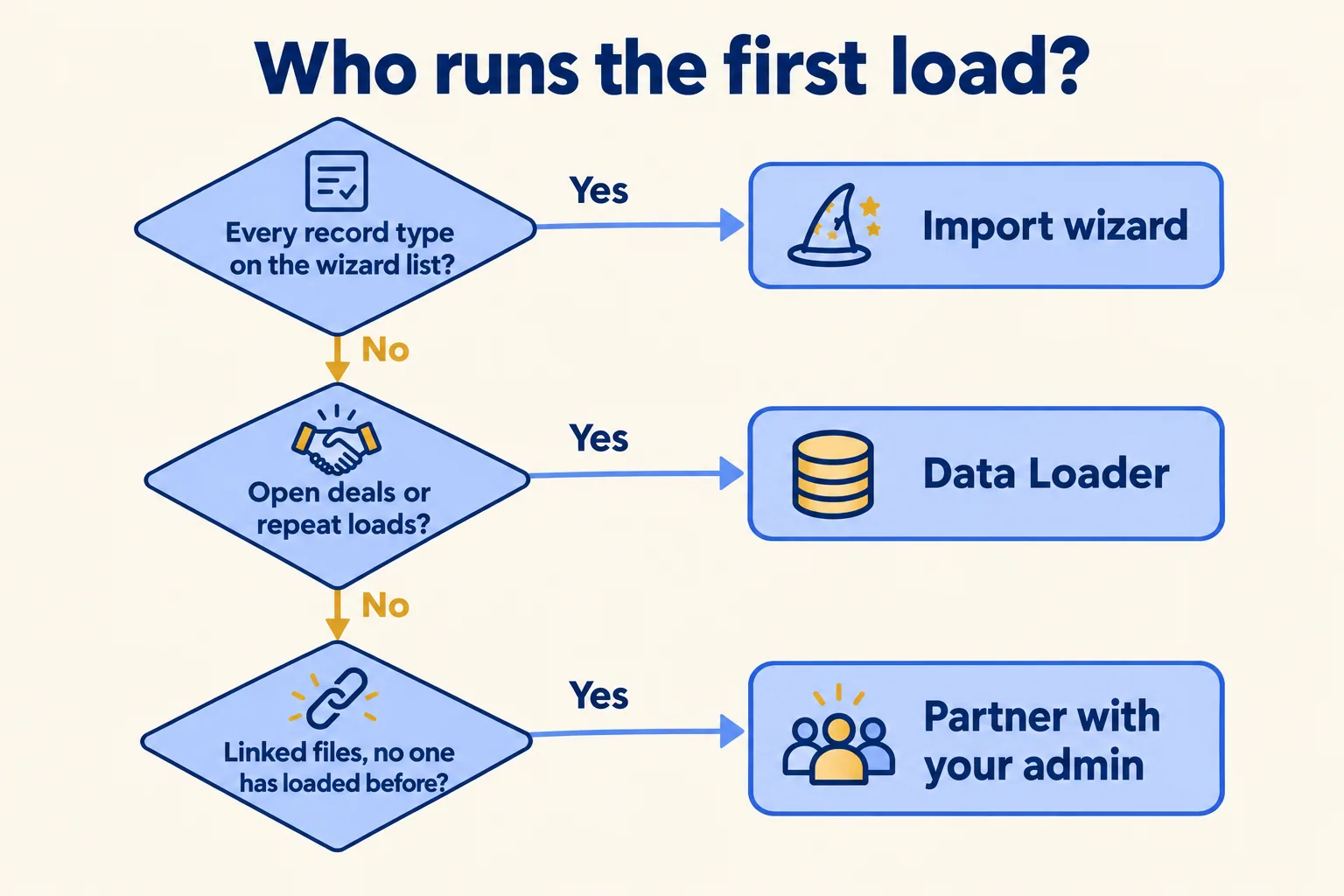
Most first loads land in the middle row. The accounts and contacts would go in with the wizard, but the open deals cannot, so the team needs Data Loader anyway. Running every object through one tool, in one order, is simpler than splitting the load across two.
The edition decides part of this before anyone opens a file. If you are still choosing one, we walked through it in Pro Suite or Core for a 25-person team.

What would we do first?
At Mindcat, we call our method "Find your week." In week one we sit with your real work and write down which records each person opens, and in what order the week needs them. The load plan follows that list: which objects, which tool, which order, and who checks the test load. You can see a sample note, on an invented org, before you send us anything.
The assessment is free: a short read of the org and a written note. If you go ahead, the first build week is a fixed AED/SAR 14,900 (about USD 4,050), credited in full when you sign the build within 60 days. There is no number before week one, and a fixed price for a named piece after it. The build itself is our Salesforce implementation work.
Not for you if your org has no named Salesforce admin or owner yet, or if there are no records to move. Name the owner first; someone has to check the test load, even when a partner runs it.
