
If your Instagram and Facebook logins sit with a freelancer or an agency, this is for you. It is not for a company with one account and one owner who posts it herself: there is nobody to hand anything back.
Who should own it? Our rule
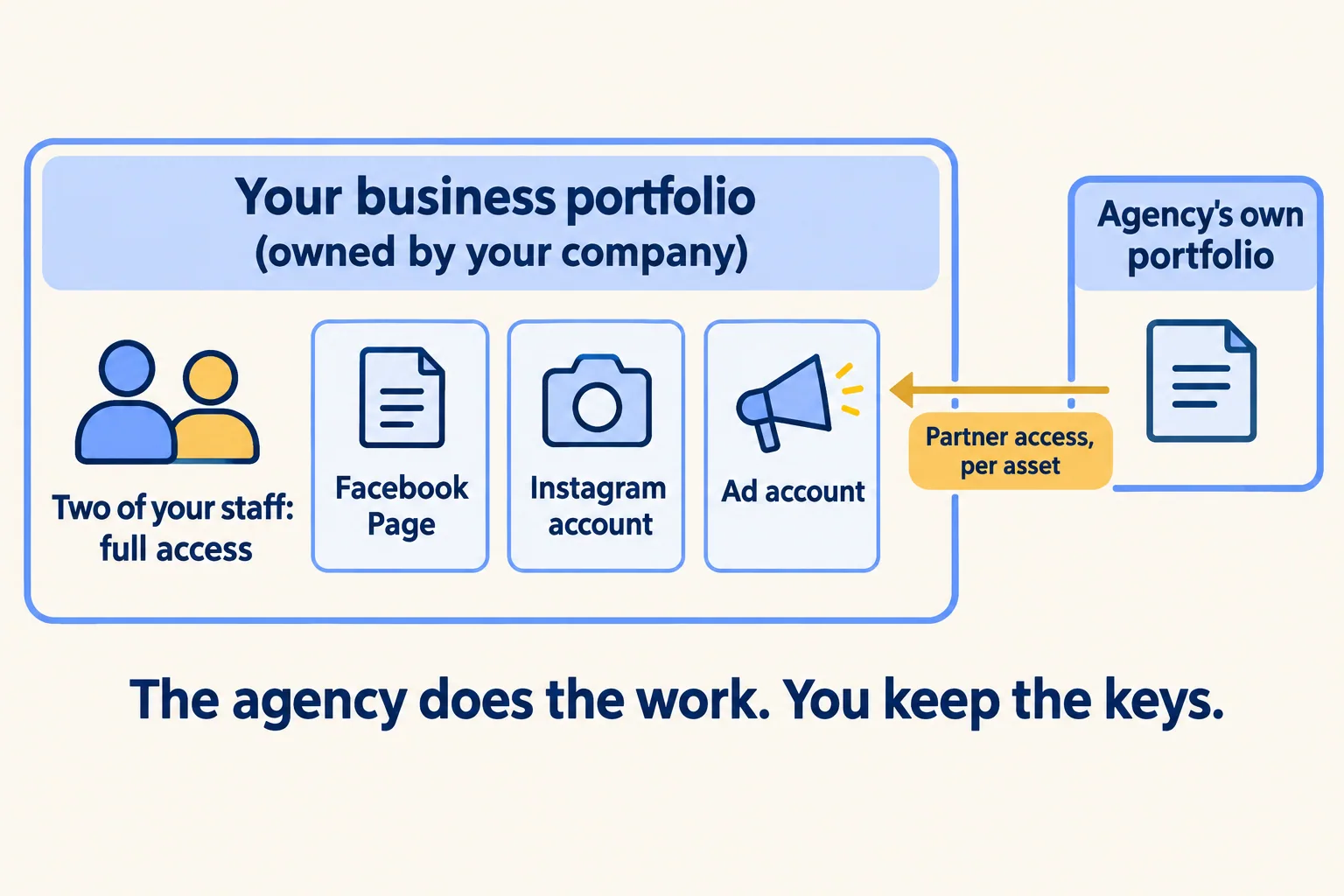
Your company owns the Meta business manager. Two of your own people hold full access, on company email. The agency or freelancer gets access to the Pages and Instagram accounts it works on, and nothing more.
That is the whole rule. The rest of this page is why, and how to check it in your own settings in about fifteen minutes.
Most companies get this backwards for a simple reason. The freelancer set the account up, because the freelancer knew how. The portfolio was created under their personal Facebook profile, the recovery email is theirs, and the company's Instagram was added from their phone. Nothing breaks while they stay. Everything is stuck the day they leave.
What did Meta rename?
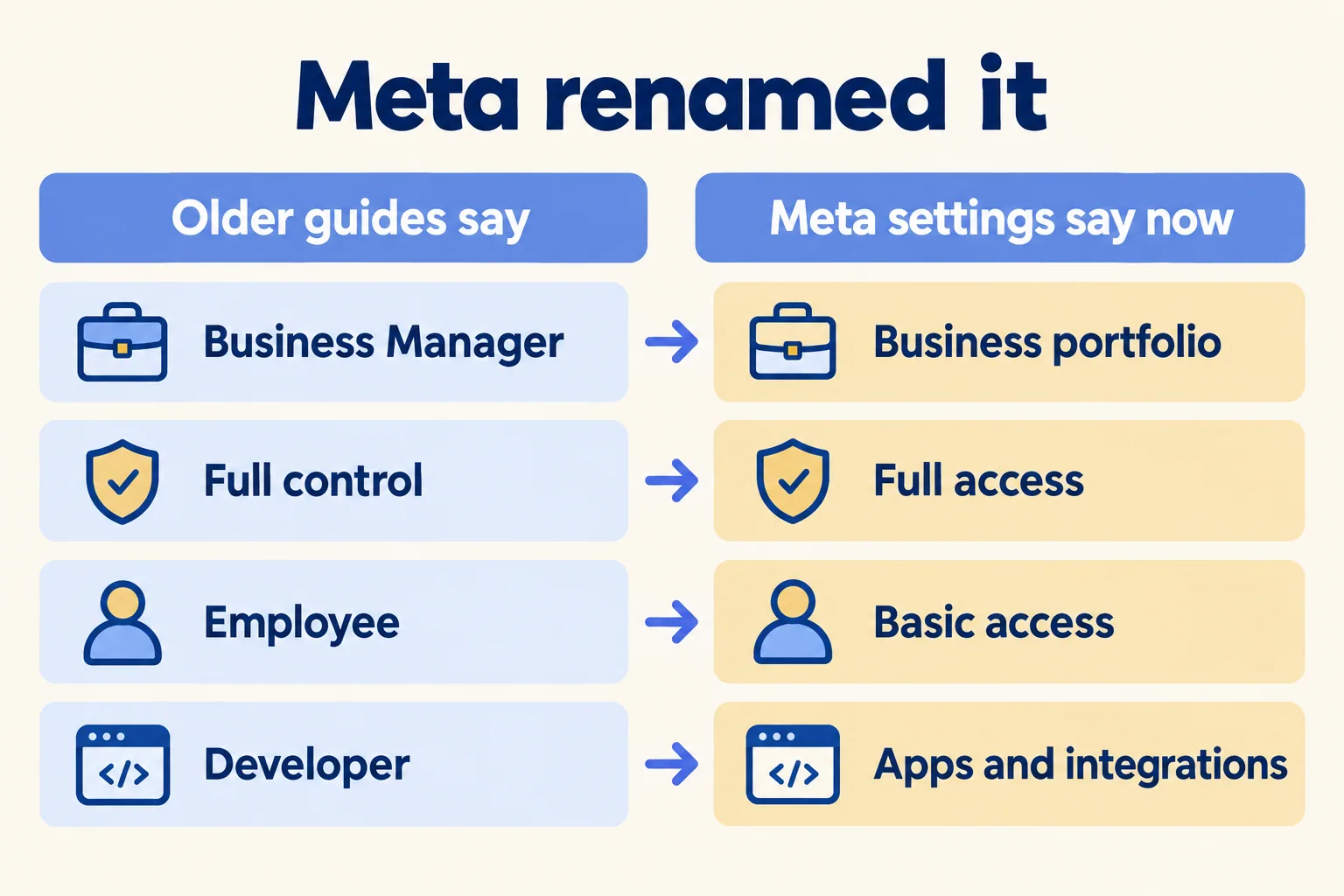
Old guides and new screens use different words, which is half the confusion.
Meta's page on business portfolio permissions, read on 20 November 2026, names two levels of access: full access and partial access. Both apply to the portfolio and to each asset in it, such as a Facebook Page, an Instagram account or an ad account. People with full access can add and remove people and assets, and can delete the portfolio. A few of Meta's own help pages still say "full control". It is the same thing.
What does an agency get instead of your password?
Partner access, through the agency's own business portfolio.
Meta's help page on partners describes the steps. In Meta Business Suite, open Settings, click Partners under Users, click Add, and choose Give a partner access to your assets. Enter the agency's business portfolio ID, pick each Page or account, and choose full or partial access. Partial access covers named tasks, such as creating content, managing ads or answering messages.
Three lines on that page decide who is in charge:
- Only a person with full control of your portfolio can add a partner. If you cannot see Partners in your settings, you are not that person.
- A partner with full control of an asset can manage everything in it but "cannot share the business asset with another business". Only the organisation that owns the asset can.
- Meta asks you to turn on two-factor authentication for the portfolio before you add partners.
So the agency does the work and you keep the keys. When the contract ends, you open Partners, choose the agency, then Options, Remove from business portfolio. Everyone on their side loses access in one step, and nobody has to change a password.
A single freelancer is different: they usually have no portfolio of their own. Add them as a person with basic access to the assets they post to. Meta's permissions page says you can make that access temporary, from 3 to 75 days, and Meta removes the person when it ends. For a three-month contract, set the end date and renew it if you extend.
What happens when the only owner leaves?
You ask Meta for the keys back, and that is slow.
Meta has a form for it. Its help page says you may file a claim when the person with full control "is a former employee or contractor with no ownership rights", among other cases. You send three documents: an ID for the person asking, a document that proves you own the business (a trade licence counts, as does a utility bill or a bank letter), and a signed attestation letter, in a file that cannot be edited.
The page also says to try the former owner first. That is often the hard part. An employee wrote on Meta's developer community forum that their company could not link its Facebook Page and its Instagram account. They had been trying for two to three years: "We do not know who the owner is of the Facebook Portfolio." The Page admins still worked there; the portfolio owner had left and could not be reached. They sent documents to Meta support and, in their words, were asked "not to contact them again". The thread is still marked unresolved.
If the person who left says the account is theirs, that is a dispute about the business, not a settings problem. Speak to a lawyer before you file anything.
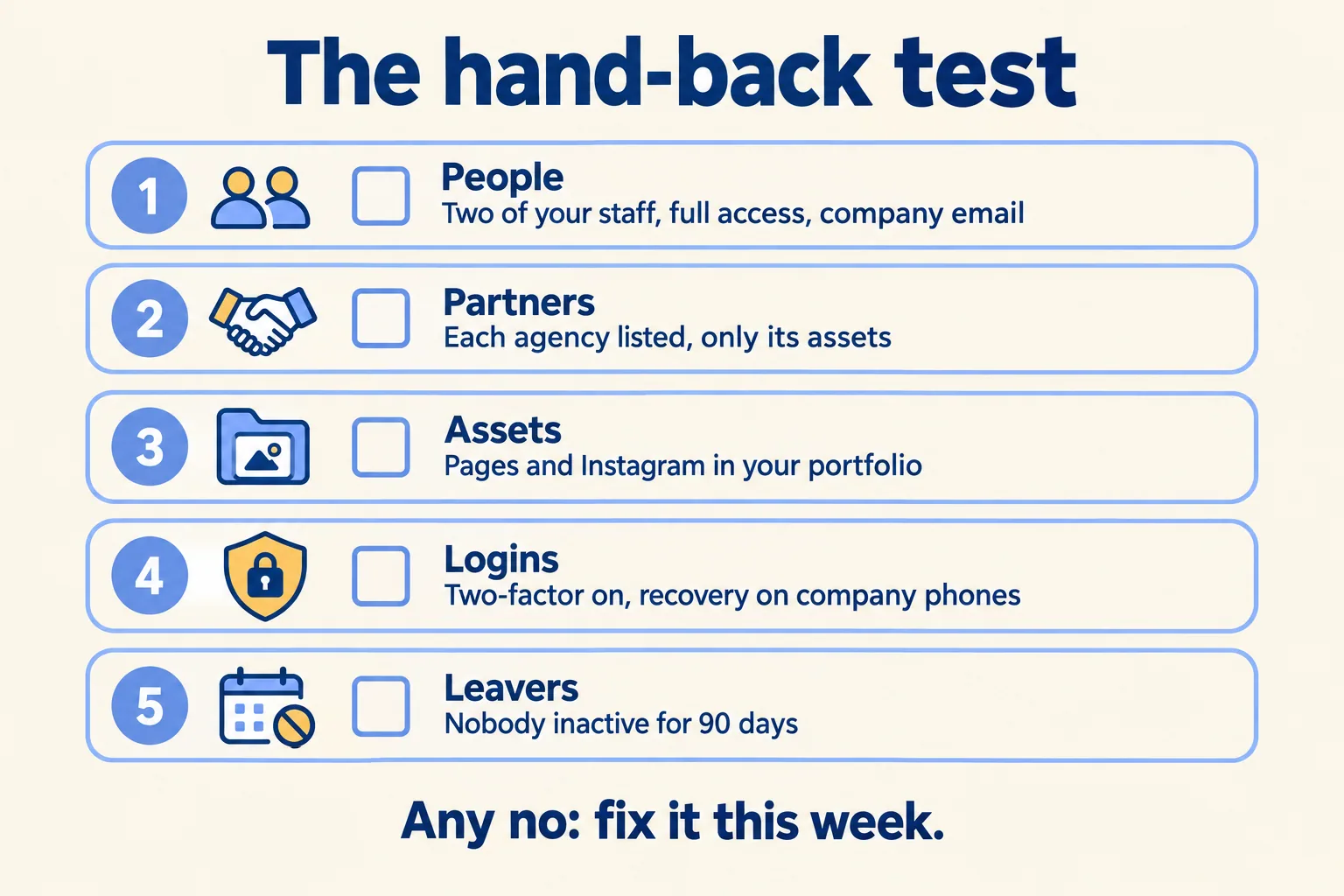
The hand-back test
At Mindcat, we run this test with a company before we connect any of its channels. It takes about fifteen minutes in Meta Business Suite settings, and you can run it today without buying anything.
- 01People: two of your own staff have full access, on company email addresses. Meta recommends two active people with full access, and says to remove people who use public email domains.
- 02Partners: each agency appears under Partners, with access only to the assets it works on. No agency staff sit under People with full access.
- 03Assets: your Facebook Pages, Instagram accounts, ad account and WhatsApp Business account appear in your own portfolio, and the ad account is paid with your company's card. Seeing them in the agency's portfolio is not enough.
- 04Logins: two-factor authentication is on for everyone with full access, and the recovery phone numbers belong to company phones. Meta suggests an authenticator app and saved recovery codes.
- 05Leavers: nobody with full access has been inactive for 90 days. Meta's security page tells you to remove those people first.
A no on any line is a job for this week, while the person who holds the access still answers your messages.
When does a scheduling tool help?
After ownership, never instead of it.
A scheduling tool does not own your Instagram account. It posts to accounts that you connect to it, so a tool on top of a portfolio the freelancer owns only adds a second place where you are locked out.
Once the portfolio is yours, a tool helps when three or more people post for you: an agency, a freelancer for Ramadan, someone in-house who answers the client's comments. Each gets their own login to the calendar, nobody needs the Meta password, and when one leaves you remove that person. If one person posts for one brand, Meta Business Suite is enough, and our post on free Instagram scheduling sets out when that stops being true. If clients approve posts in a group chat, read which posts need the client's yes.
Your WhatsApp Business account sits in the same business portfolio. The conversations themselves run on Mindcat Inbox, not on the posting calendar.
What Mindcat Social does, and what it costs
At Mindcat, we set up one calendar, client-approved, for agencies and in-house teams in the UAE and Saudi Arabia.
We connect each channel with you during setup, so the connection is made from your side. Team members are free and unlimited, with a user or admin role, and your clients approve posts from a link without an account. When a freelancer leaves, you remove them from the workspace and the channels stay connected. Publishing to each network starts once that network approves our app during setup, and Meta and TikTok reviews can take weeks. Your written plan says which networks go live first.
You pay per connected channel a month, where a channel is one Instagram account, Facebook page, TikTok account, LinkedIn page, X account, YouTube channel or Google Business Profile location. Channels 1 to 10 cost AED or SAR 49 each, and the price drops in bands above that. The shared plan has a minimum of AED or SAR 690 a month, which covers up to 15 channels, so a company with four channels pays 690, not 196. There is no self-serve start: every plan begins with a written plan and setup, from AED or SAR 1,900 for up to 10 channels. Paid platform API access, such as X, and AI provider usage are billed at cost. Prices exclude 5 percent UAE VAT and 15 percent Saudi VAT.
If one person in your company posts for one brand and owns the account, you need none of this. Run the hand-back test once and keep posting from Meta Business Suite.
Tell us how many clients and channels you post for, and who holds the accounts today. We reply with the setup plan and the monthly price per channel, in AED or SAR. If the hand-back test shows the portfolio is not yours yet, we say that first.
