

If your submittal log lives in one coordinator's sheet and the programme does not know a tile approval is three weeks late, this is for you. It is not for a firm whose consultant runs every submittal in its own portal and sends the dates back each week: keep reading theirs.
When is a material submittal late?
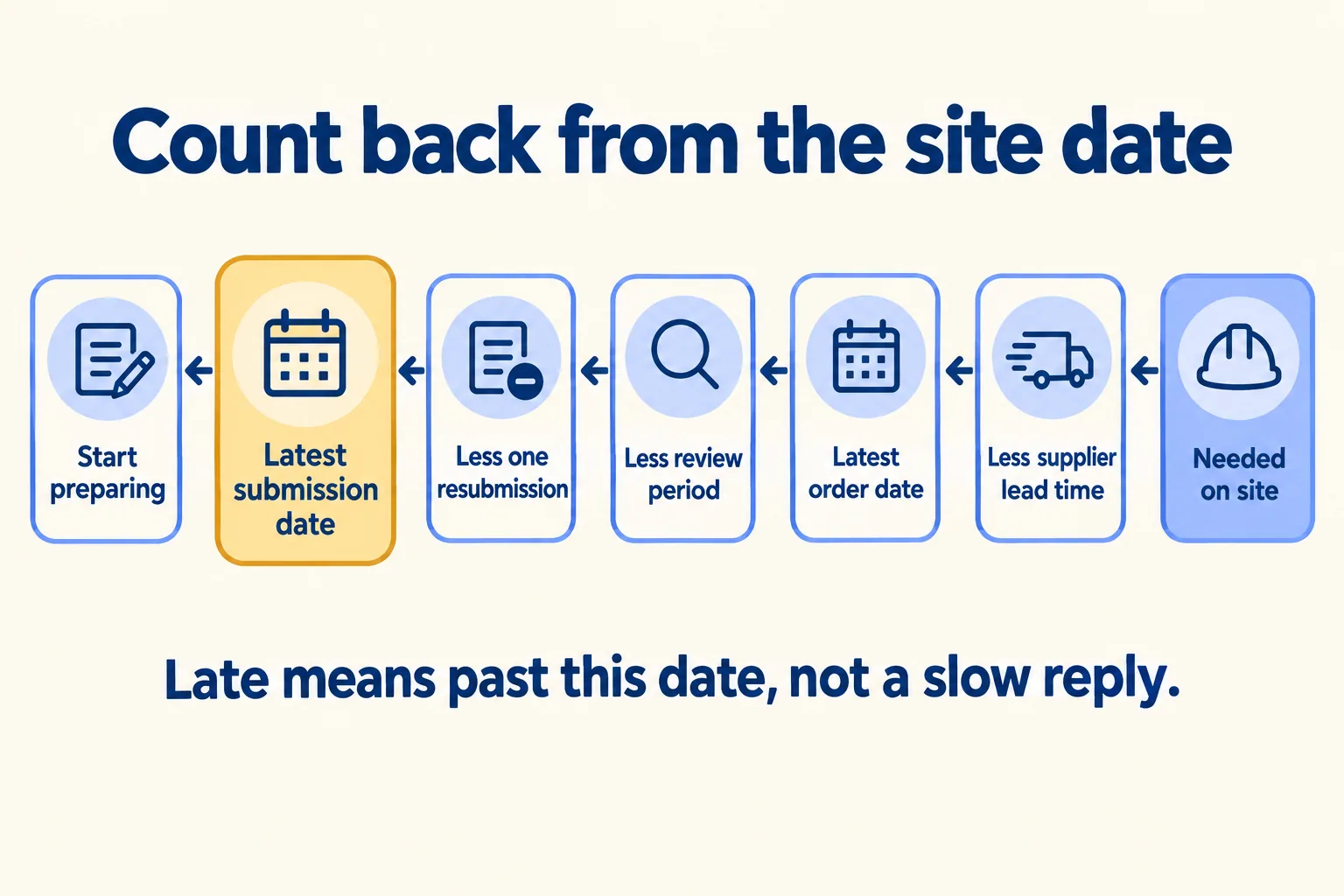
A material submittal is late when it misses its latest submission date, counted back from the day the material is needed on site. It is not late when the consultant replies, and it is not late because someone marked it urgent.
That is our rule, and the rest of this page is how to work the date out and where to keep it.
Most fit-out programmes show the install task and nothing before it. The tiles go on site in week 14, and the bar for laying them is there. The submittal, the review, the order and the six weeks the supplier needs are not. So when the tile submittal has sat with the consultant for three weeks, nobody can say whether that is a problem, because nobody knows the date it had to go in.
The reviewers see the same thing from the other side. One wrote, in a Reddit thread about constant deadlines, that a contractor marked every RFI and submittal as extremely urgent: "if you mark everything urgent, that means nothing is urgent." A date counted back from site tells the consultant which one matters this week. An urgent flag on all of them tells them nothing.
How do you count back from the site date?
Take one item and walk back from the site. A planning guide from imHORA, checked in October 2026, sets out the chain this way, and we use the same order.
- 01Need on site: the day the trade needs the material to start.
- 02Less the supplier's lead time, from order to delivery. Get it in writing.
- 03Latest order date. Less the days your office takes to raise and sign the order.
- 04Latest approval date. Less the consultant's review period from your contract.
- 05Less one revision and a second review: plan for this when the item is new, imported or on a handover date.
- 06Less the main contractor's document control, if you are a subcontractor and your pack goes through them first.
- 07Latest submission date. Less the days to prepare the pack: data sheets, certificates, samples. Ask the supplier how long samples take to arrive.
- 08Start preparing.
Here is a sample with round numbers. Replace each one with your own contract, supplier and office.
The useful number is the second submit date. One round of comments moves the date by a whole review period plus the revision time, three weeks in this sample. If the item has never been approved on this job, plan for that round.
Two checks before you trust the dates. Review periods are usually calendar days; if your specification says working days, count on the consultant's working week and public holidays, and expect year-end and Eid weeks to run slow. And a review period assumes the consultant has room: imHORA's guide warns that thirty submittals sent on one day do not each get the full attention, so send the items with the earliest dates first.
When you chase, whether by email to the consultant or on WhatsApp from site, quote the date: "The tile approval is due on 1 January; after that the handover moves." That is a message the consultant can sort against the others.
Who owns which part of the chain?
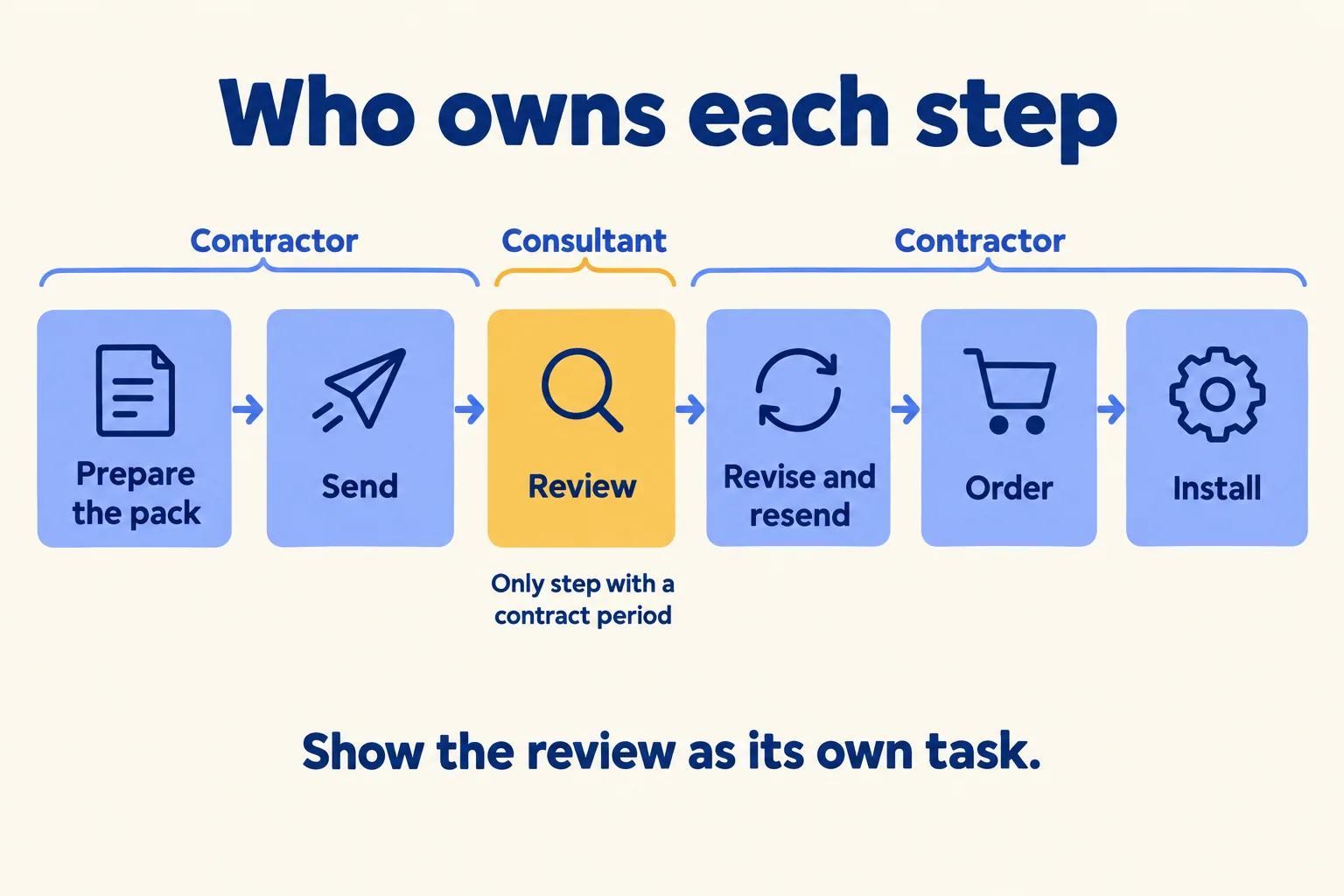
You do, nearly all of it. Preparing, checking, sending, revising and ordering are the contractor's. The consultant owns one step, the review, and that is the only step with a period fixed in the contract.
Under Sub-Clause 4.4 of the FIDIC 2017 Red Book, the Engineer has a review period of up to 21 days for Contractor's Documents. Under Sub-Clause 7.2 of the 1999 Red Book, samples and information go to the Engineer for consent before materials are used. The imHORA guide adds two cautions: Gulf particular conditions often change the period or the wording, and a specification may set its own period for material submittals. Read the signed contract and the specification first. If a period or a deemed approval matters to a claim, ask your contracts lead or counsel.
Two things follow for the programme:
- Show the consultant's review as its own task, with the contract period as its length. When a reply comes on day 30 of a 14-day review, the programme shows that with a date, instead of a feeling.
- An approval does not hand the risk to the consultant. BuilderDraft's guide to the 1999 Red Book notes that under Sub-Clause 3.1 an approval does not relieve the contractor of its responsibility. Order against the approved code, and follow the comments.
Sheet or programme: which one, and when?
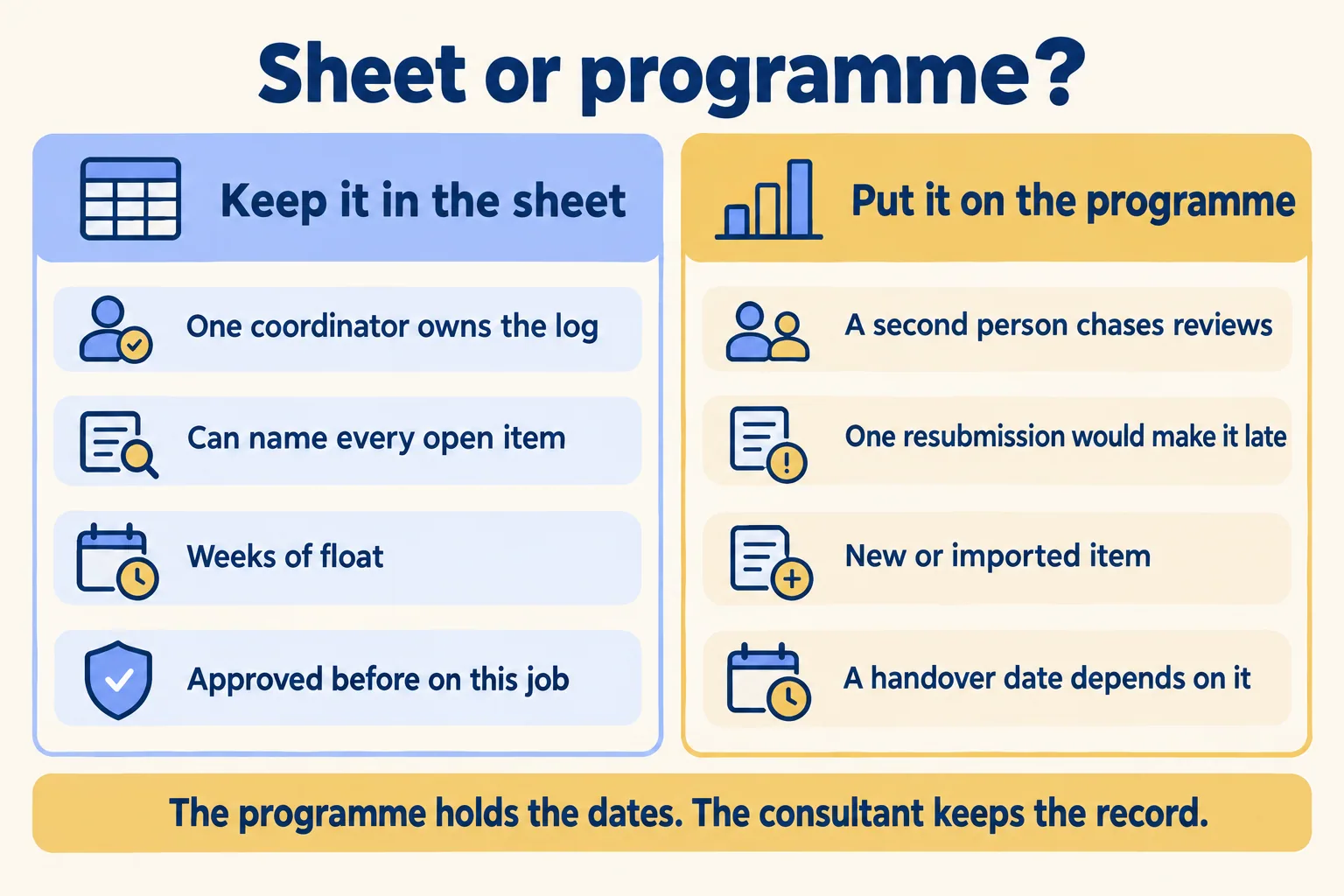
Not every submittal needs a bar on the Gantt. Most jobs have dozens, and a catalogue item with months of float can stay a row in the log.
When an item moves to the programme, it goes in as a short chain: prepare, consultant's review, order, delivery, install, each linked to the next. Then a late review pushes the install date in front of everyone, instead of in one person's head.
The items that stay in the sheet still need the dates. Give the log these columns: reference, item, specification section, needed on site, latest submission date, submitted, review due, code returned, resubmit by. Sort it by latest submission date, not by reference number, and the week's chase list is the top of the page.
A sheet stops working at volume, not at a fixed number. A New York project manager who now uses a submittal product described a 915-submittal job tracked in Excel and email: "At 10 submittals in review, email works fine. At 55, it doesn't." The same post says a job of about 50 submittals over six months, with a tight team, may need nothing more than the sheet. That is a vendor's account from a much bigger job, so we use the condition, not the numbers: when the coordinator can no longer name every open item, the sheet has stopped being a record.
What stays with the consultant?
The programme holds dates. It does not replace the submittal record.
The approval code (A to D on many jobs), the consultant's marked-up comments and the signed submittal stay where your contract says, often the consultant's own portal or a transmittal by email. Keep a copy of the returned pack on the task so the site team can see it, and keep the official record where the contract puts it.
If your consultant already runs every submittal in a portal and sends you the dates each week, you have what you need. Copy the dates of the few items on handover dates into your programme and stop there. If the client is also nervous about the snag list at the far end of the job, our post on who closes a snag covers that.
What Mindcat Projects does for submittals
Mindcat Projects puts each job on one Gantt, and a submittal can sit on it as a task like any other. Each task holds the submittal pack as attached files, the comments and a dated history of who changed what. Our sample copy has an Awaiting approval status, and we set your own stages during setup. Tasks link so one follows another; during setup we set linked tasks to move with the one before them, so a late review moves the order and the install.
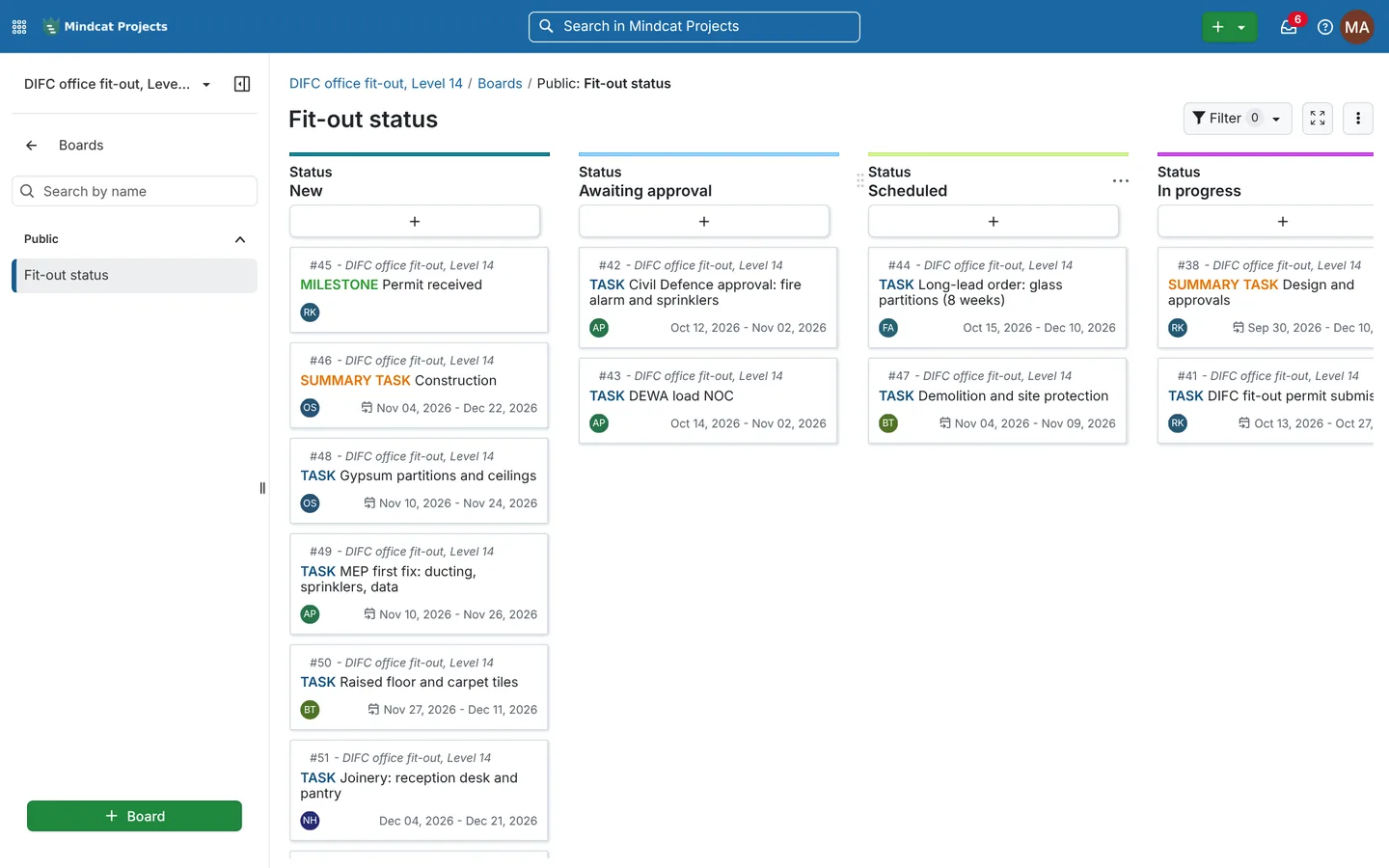
The consultant and the client get free read-only logins. They see the status, the timeline, the tasks and the comments, and cannot change anything, so the consultant can see which of their reviews sits on a handover date.
What it does not do: connect to a consultant's portal or to the Dubai Municipality, Civil Defence or DEWA portals, so nothing imports or syncs. Approval codes are not a built-in field; we set them up as a status or a field during setup. There is no transmittal register or document numbering. The Arabic screens are partly translated and read left to right.
You pay per member a month: anyone who creates or edits tasks. Our page prices members 1 to 10 at AED or SAR 179 each, falling in bands as the team grows. Each plan has a monthly minimum, so no one buys a single member at that rate: the shared plan is AED/SAR 2,499 a month for up to 10 members, and your own copy starts at AED/SAR 5,349. The quick start is a fixed package we set up for AED/SAR 2,500, once. The maker's Enterprise add-ons are billed at cost. Prices exclude 5 percent UAE VAT and 15 percent Saudi VAT.
If your consultant's portal already gives you every date, you need none of this: count back from site once per item and keep reading theirs.
Our method is One programme per job: the approvals, the orders and the install on one live plan. Tell us how many live jobs and members you run, how you plan them today and where it should run. We reply with the setup plan and the monthly price per member, in AED or SAR. Tell us about your jobs. For the trade in full, see Projects for fit-out contractors.
