

If your branches collect feedback on paper or a free form and nobody can say which branch got worse last month, this is for you. If you run one counter and read every card yourself, keep the cards.
What does each feedback form cost a branch?
The software bill is the smallest part of it. The real cost is the person who turns cards or answers into a result per branch, every month, and the customers who never fill the form in.
Three feedback forms for a business with several branches
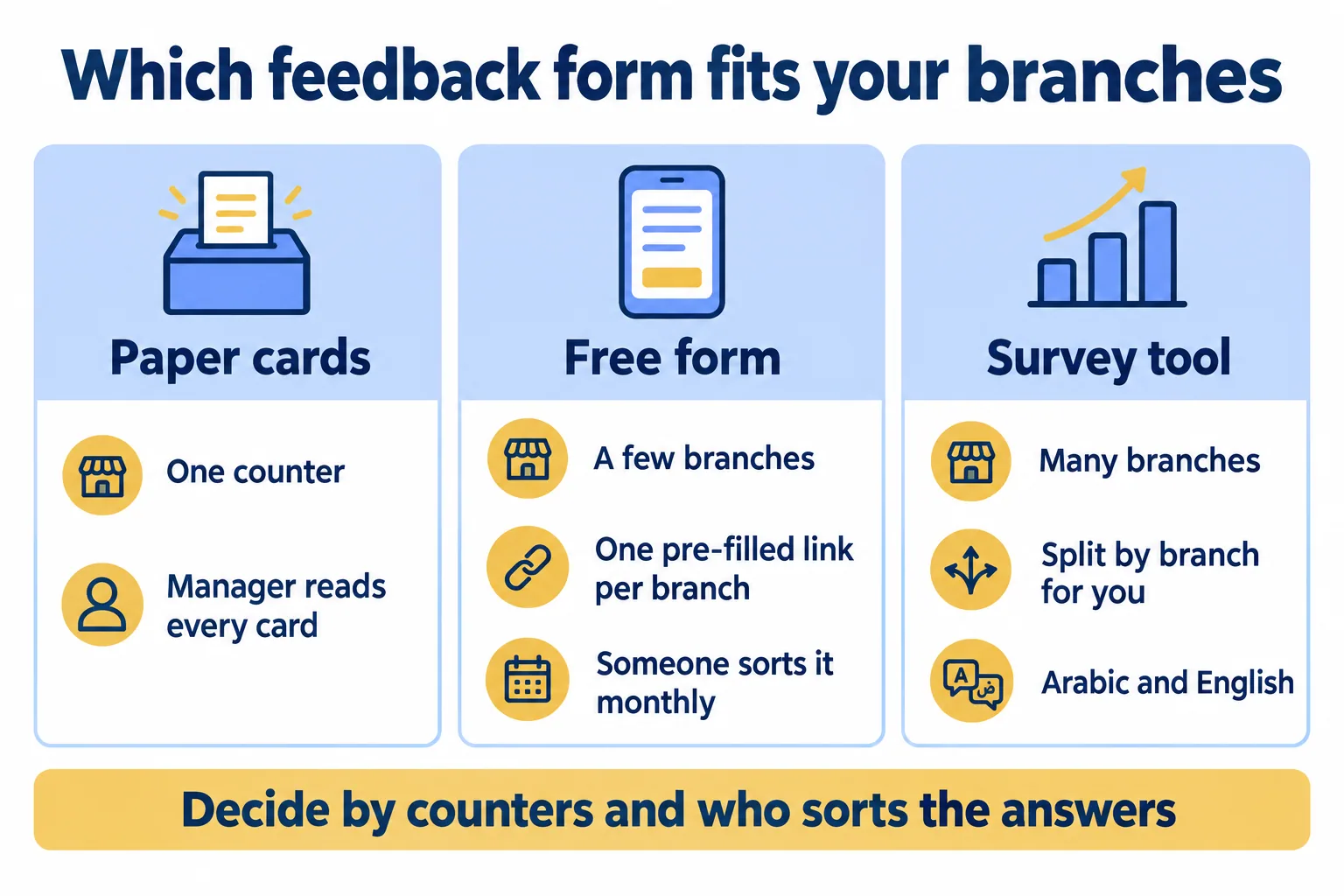
So the question is not which form looks best. It is how many counters you run and who will split the answers by branch.
When are paper cards enough?
For one counter, where the manager reads every card that week. Then the card is a note to the person who can act on it, and no one needs a chart.
Paper gets expensive in two places as soon as there are several branches.
The first is the typing. The founders of Tablevibe, a restaurant survey company, wrote in 2021 that they found paper feedback forms in local restaurants that "almost no one used", and when customers did, staff "spent ~10 mins entering feedback into a spreadsheet." That is a vendor describing what it set out to replace, but the job is the same at any counter: someone types or tallies every card before anyone sees a branch total.
The second is who fills the card in. A restaurant owner quoted in a tablet-survey vendor's case study put it plainly: "Some customers told us they didn't trust comment cards because they thought the server might not turn in negative comments." A card handed back to the person you are rating misses the unhappy customers you most need to hear from.
Neither source is from the Gulf, but picture the same two problems at a clinic reception in Al Barsha (an illustration, not a client): the card goes back to the receptionist who kept you waiting, and someone types the week's cards on Thursday afternoon.
So the rule for paper: one counter, one reader, read weekly. Past that, the cards pile up faster than anyone types them.
How far can a free form go?
Further than most branch managers think. Google Forms can already tell branches apart, if you set it up.
Google's help page describes pre-filled links: open the form, choose Pre-fill form, fill in the answer you want, click Get link and send that link. Add a question "Which branch did you visit?", make one pre-filled link per branch, and print each as a QR code for that branch's counter. Every answer then arrives with its branch already recorded. The same branch link can go in the WhatsApp message you send after a visit, and it still records the branch.
For Arabic and English, the free route is to write each question in both languages in one form, or to run one form per language and merge the answers by hand.
- 01Add a branch question to the form, with every branch as an option.
- 02Open Pre-fill form, choose one branch, click Get link. Repeat for each branch.
- 03Print each link as a QR code and place it only at that branch's counter.
- 04Each month, open the answers in a sheet, filter on the branch column and send each manager their own.
That is the honest way to stay free for a few branches, and we tell people to try it first.
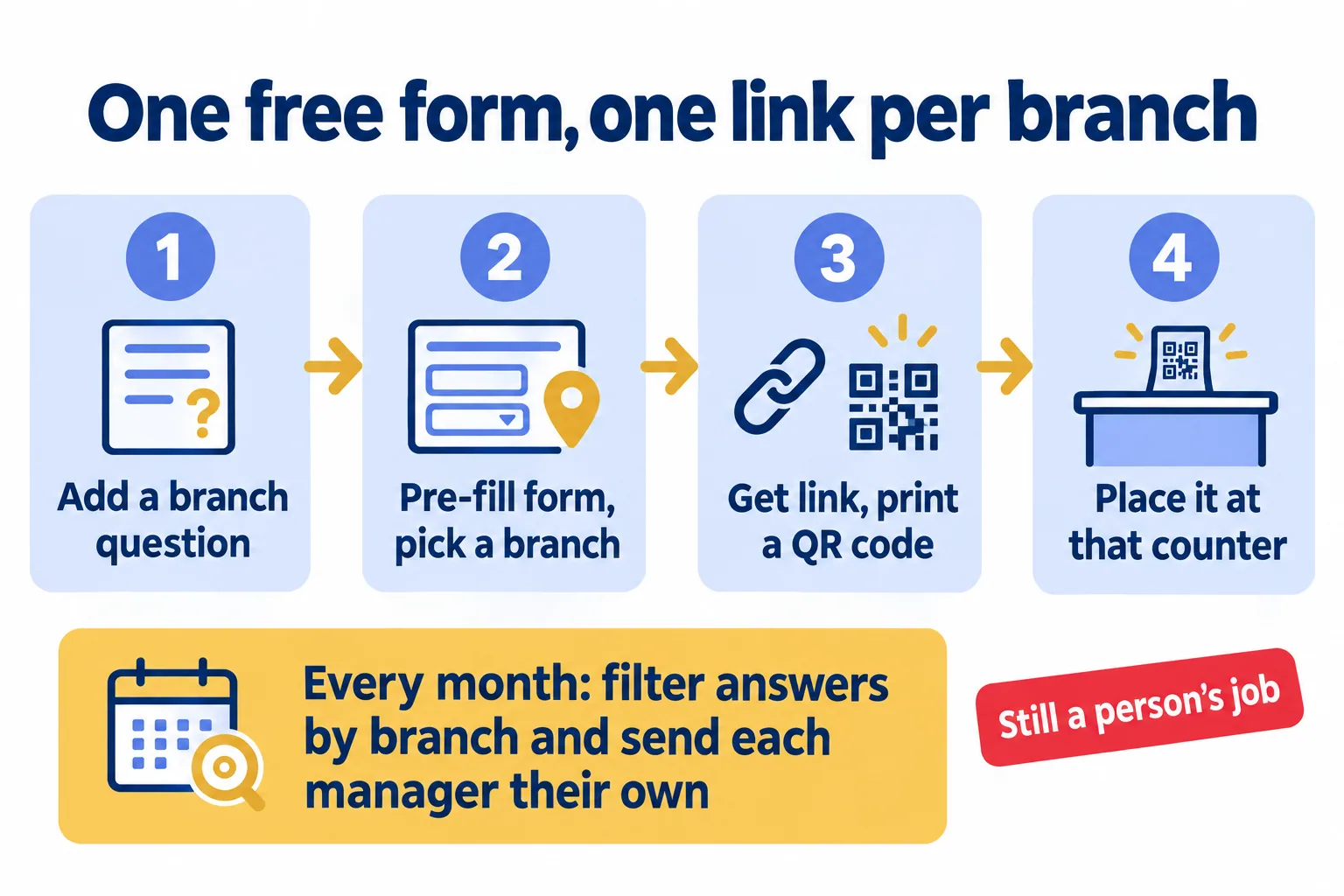
What it leaves to you is the fourth step, every month. Someone exports, filters, counts and writes the summary for each branch. When that person is on leave, the month is missed.
It also leaves a question we always ask: whose account owns the form? A form made in a staff member's personal Google account keeps its answers there. When they leave, the history goes with them. Move the form into a company account before it holds a year of answers. For a clinic, keep health details out of a feedback form altogether: ask about the visit, not the condition.
When does a survey tool earn its bill?
When the split by branch has to happen without anyone sorting by hand. In practice we see three conditions, and a tool earns its bill when they hold together:
- Enough branches that the monthly sort is a job. Each manager needs their own answers, and the person doing the sort has other work.
- Two languages on one survey. Customers at the counter read Arabic or English, and you want one set of results, not two forms to merge.
- Answers that stay with the business. The history belongs to the company, not to whoever built the form, and your IT team asks where the answers are stored.
If only the first holds, a well set up free form with pre-filled links may still be enough. If all three hold, do the sum with your own figures: the hours spent sorting each month, times what that person costs an hour, against AED/SAR 499 a month for a team of up to 3 survey editors on our shared plan.
The three questions we ask a branch manager
Before we quote anything, we ask three questions, in this order:
- How many counters, and who reads the answers? One counter and one reader: keep the cards.
- Who splits the answers by branch today, and how long does it take them each month? If the honest answer is "nobody" or "when they have time", the form is not the problem; the sort is.
- Whose account owns the answers? If it is one person's, fix that first, whatever you choose.
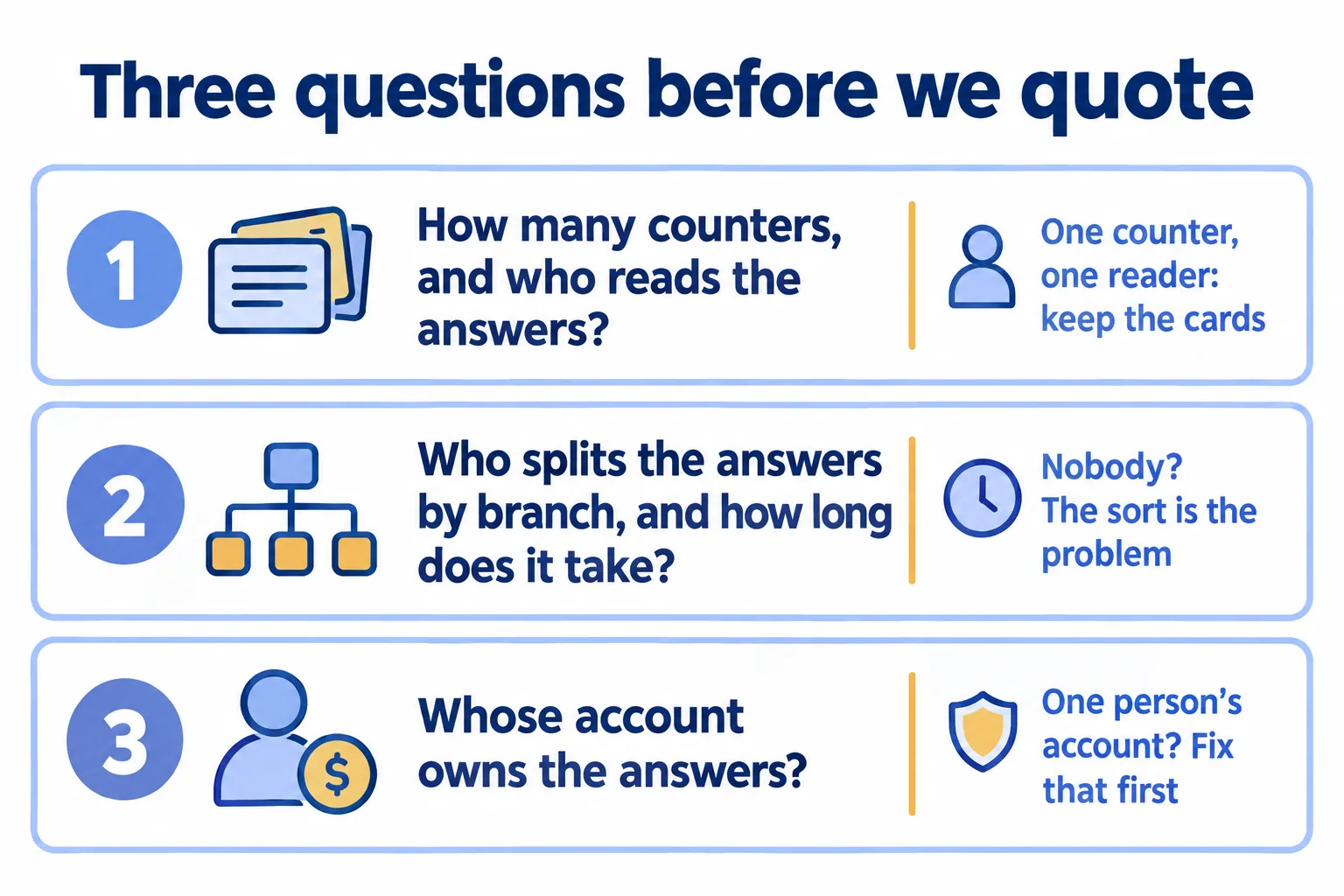
A business with three branches and one office manager who exports the form every month on the first Sunday is fine with a free form. A business with eight branches and a quality lead who builds the report by hand every month is paying for a survey tool already, in that person's hours.
What Mindcat Surveys does at the counter
Mindcat Surveys does the split for you. During setup we make one link and QR code per branch that records the branch, so visitors are never asked where they are. Each survey can be in Arabic, English or both, laid out right to left in Arabic, and the visitor switches language on the phone.
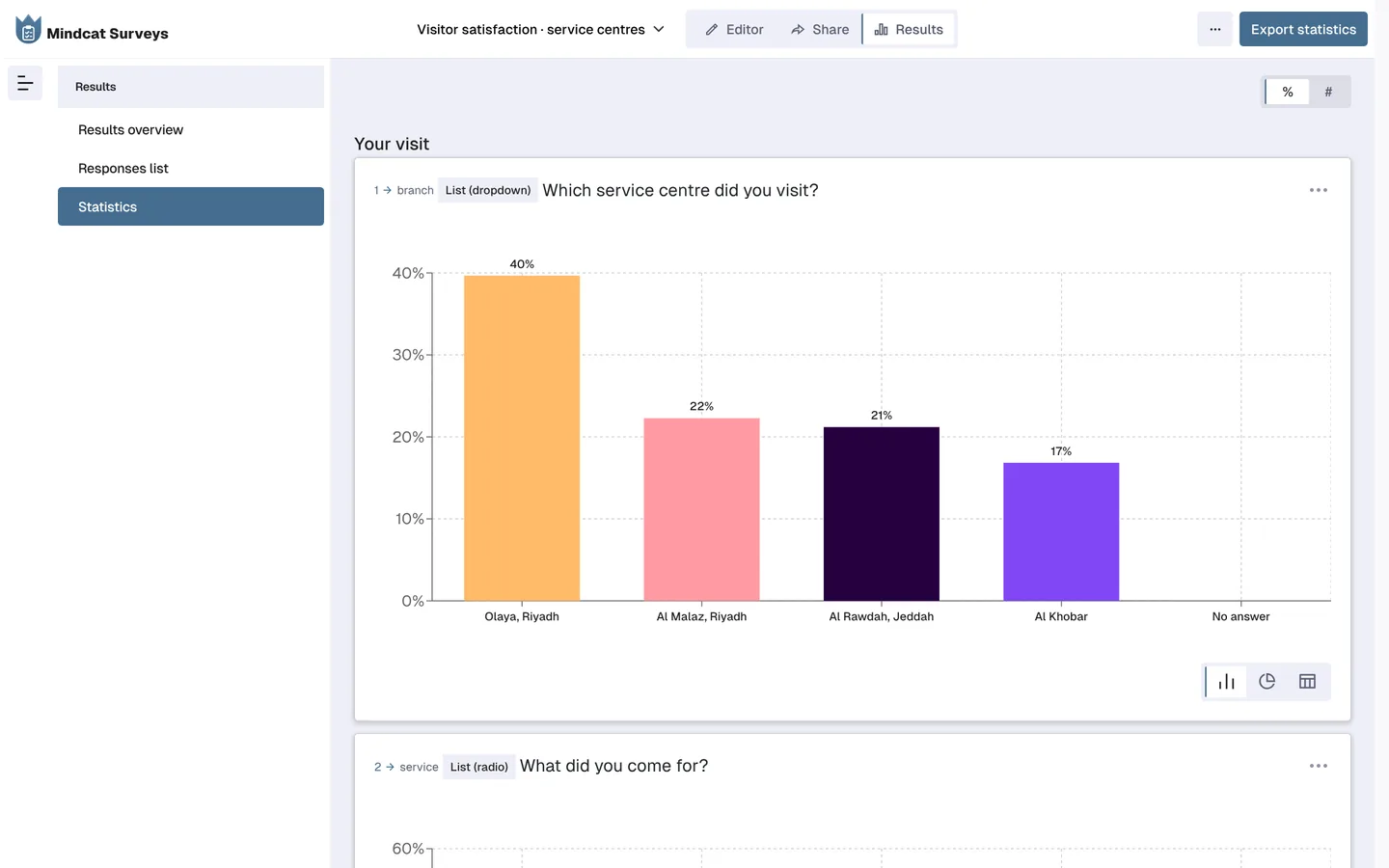
The quality lead opens the statistics, filters to a branch, service or date, and reads that branch's answers and comments. Exports go to Excel, CSV, SPSS and PDF charts for the monthly report. The answers stay in your own separate copy on our UAE servers, and you can take every answer with you when you leave.
What it does not do: it sends no alert to a manager on a bad answer, it has no tablets or kiosks, and invitations by SMS or WhatsApp are not tracked per person. A person reads the results; nothing pages them. The branch link and QR code can be pasted into a WhatsApp message, but WhatsApp and SMS invitations are not tracked per person; email invitations are.
The monthly report changes like this. Before: one person exports the form, filters it eight times and emails eight managers. After: each manager opens the statistics, filters to their branch and reads their own answers. Each manager who signs in to read results counts as a survey editor, so price the team you will really give access.
You pay per survey editor a month, the people who build surveys or read results. The people who answer never count. From 1 to 3 editors it is AED/SAR 99 each, with a monthly minimum of AED/SAR 499 on the shared plan, so a team of 3 pays 499. Up to 3 editors, the quick start is a fixed AED/SAR 2,500: we set up your copy, our five-question satisfaction survey in Arabic and English, and a QR code and link per branch from your branch list. The go-live date is counted from the day your branch list arrives in our CSV template. Prices exclude VAT; the full bands are on the Surveys page. For clinic groups, see how this works at reception.
This is not for a single-counter shop where one person reads every card: keep the cards, or a free form with one link.
We call our method Every branch scored: one survey, a code at every counter, and results per branch as the answers arrive. Tell us who you survey, how many branches you run, and how many people build surveys and read results. We reply with the setup plan and the monthly price per survey editor, in AED or SAR. Tell us about your branches.
