
If a client's Ramadan post was approved as a screenshot in a group chat and an older version still went out at iftar, this is for you. If your client will not name one person who can say yes, fix that first: no calendar can agree an approval routine for you, it only runs the steps you already agreed. If one person runs one brand with no client to ask, skip this.
Which posts need the client's yes?
Not all of them. Sort every post into one of two classes before it goes on the content calendar.
- Class A: fixed copy with no offer, price, date, claim or legal line. A tip, a team photo, a repeat of last month's approved post. The client gives one standing yes to the type, once, and these go out on schedule.
- Class B: anything that states an offer, a price, a date or a claim, or carries a legal line such as a property ad's permit number. A named person at the client says yes to the exact version, on the post itself.
The reason to split is cost. One agency guide from Publion, a scheduling vendor, says requiring client sign-off on every low-risk post "usually creates delay without improving quality" and suggests defining which content classes need final client release and which move under pre-approved guardrails. We agree with the split. What the guide leaves open is who decides the class, and our answer is simple: the rule decides, not the account manager's mood.
What goes in each class?
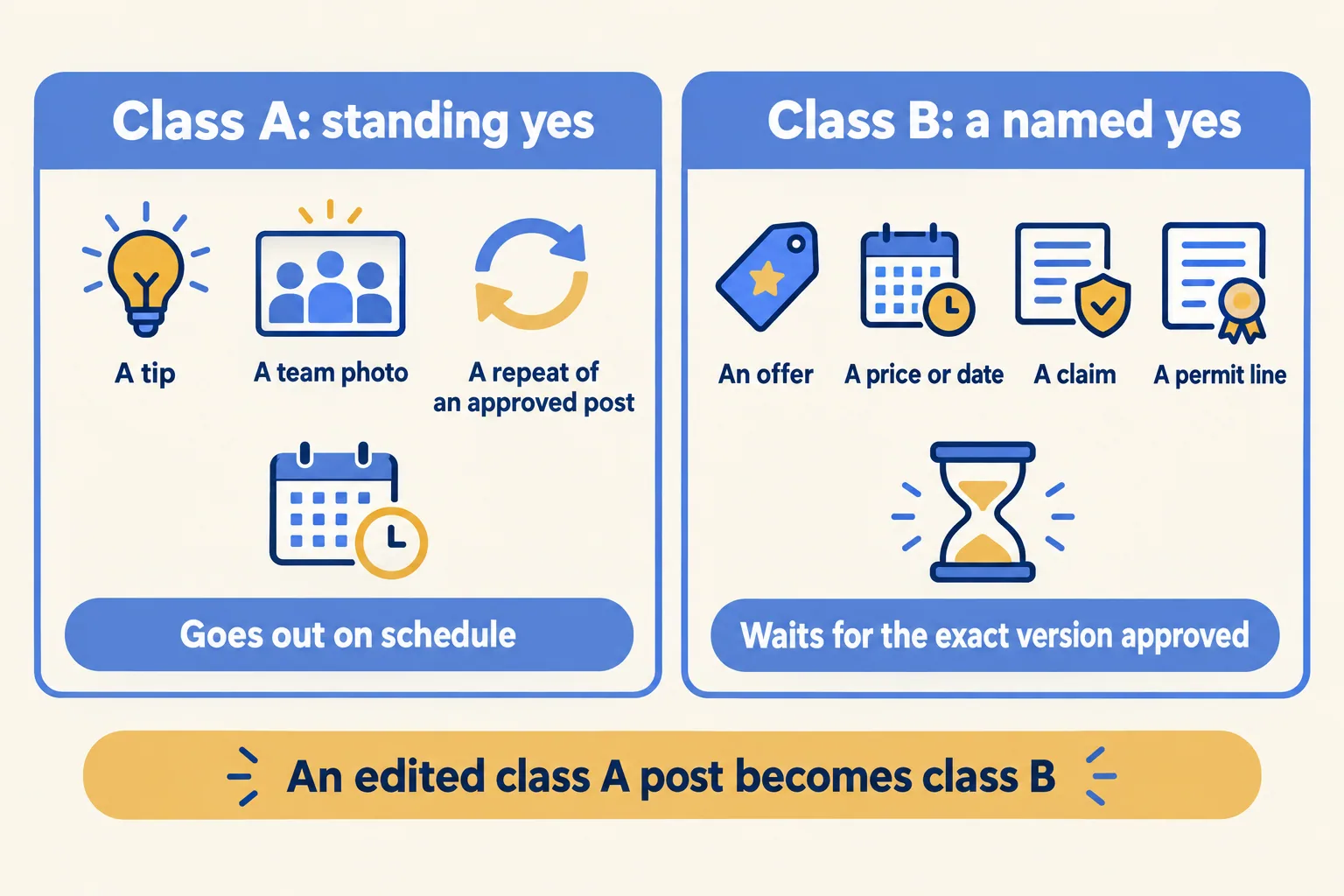
Two checks keep the table honest. A class A post that gets edited becomes class B, so the standing yes covers only the copy the client saw. And the client names the approver for class B at the start. If they will not, you have no approval process, only a risk.
Why is a property post always class B?
Because the rule is written down, not because we prefer caution.
The Dubai Land Department's real estate advertisement permit service lists "Electronic advertisements" among the ad types a permit covers. Permits are requested through the Trakheesi system, and the documents needed include a copy of the advertisement form. Its fee table lists AED 1,000 for permits other than a project launch event (read on 23 October 2026).
RERA's Circular 2-2022, dated 20 July 2022, goes further for the post itself. It says real estate companies that market through channels including social media must obtain an official permit from RERA, and that the permit number must be displayed on the ad.
So the permit number is part of the post. In practice it travels as a saved line, such as "Permit No. ..." in the caption or a signature the whole team uses. Checking that the number is valid and matches the property is the agency's or broker's job. The calendar can hold the line and the state, "Permit checked", but a person does the checking. Saudi brokers should confirm the equivalent rule with the regulator before relying on it.
Where should the yes live?
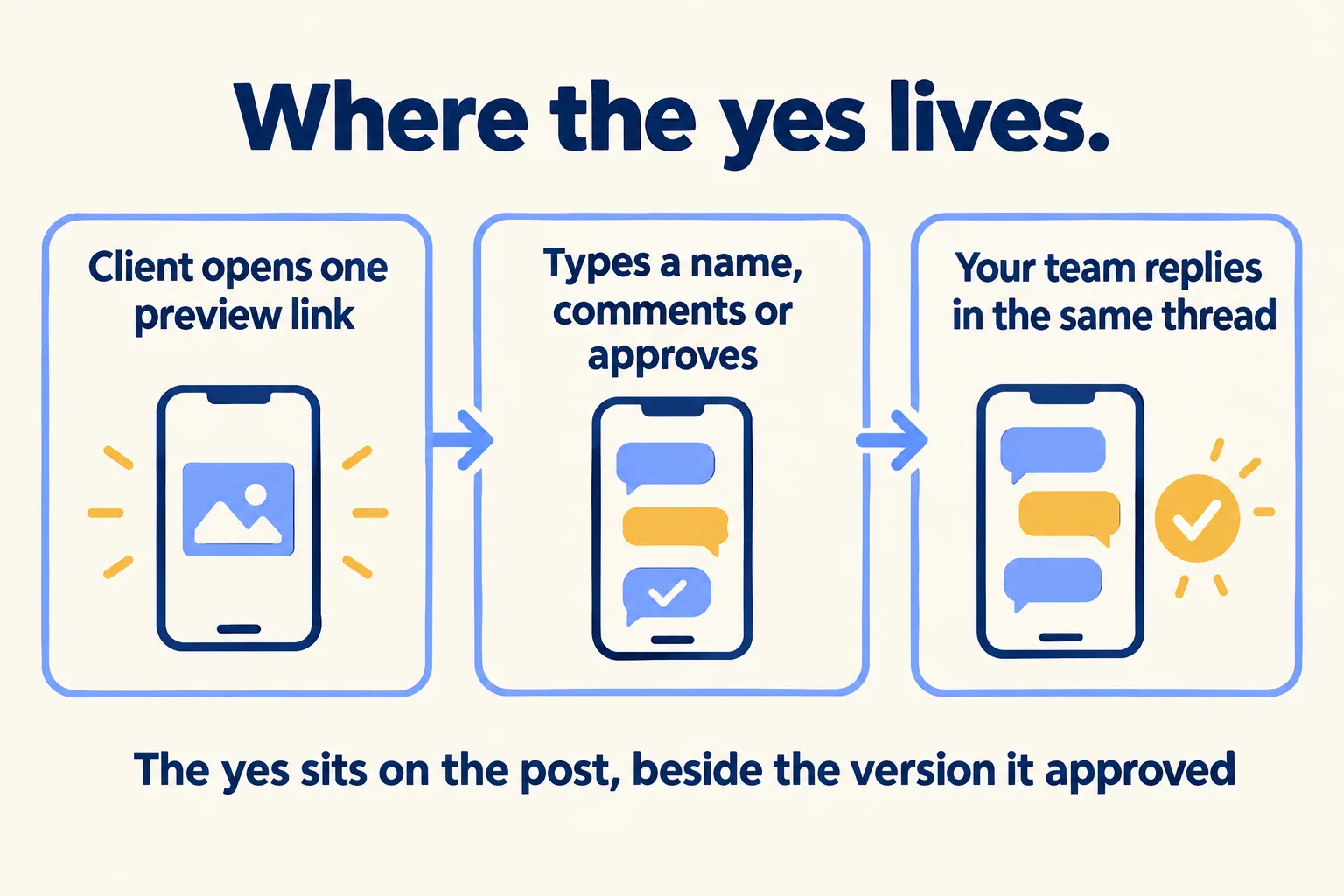
On the post, next to the version it approved.
A thumbs-up in a chat has no version attached. Kontentino, another approval-tool vendor, describes the failure in its own words: "The caption is in a doc. The visual is in an email. The feedback is in WhatsApp. The approval is a thumbs-up emoji from three days ago. Which version was approved? Nobody knows."
The fix is a single link to the real post. The client opens it on their phone, sees the image and the caption as they will go out, types a name and comments or approves. Your team replies in the same thread. A tag on the calendar, such as "Needs client approval" and then "Approved", shows the state to everyone.
One limit to say out loud: the name is typed, not checked. The thread is a record on the post of who said what and when, which is better than a screenshot, but it is not an identity check.
What does one row of the calendar carry?
Most calendars have a date, a caption and a channel. Two more columns do the work in this rule.
- Date and time, and the client.
- Channels this post goes to.
- Caption and the media file.
- Class, A or B.
- Named approver, for class B only.
- State: draft, needs client approval, approved, published, failed.
- Saved line: the permit number or the branch address that must appear.
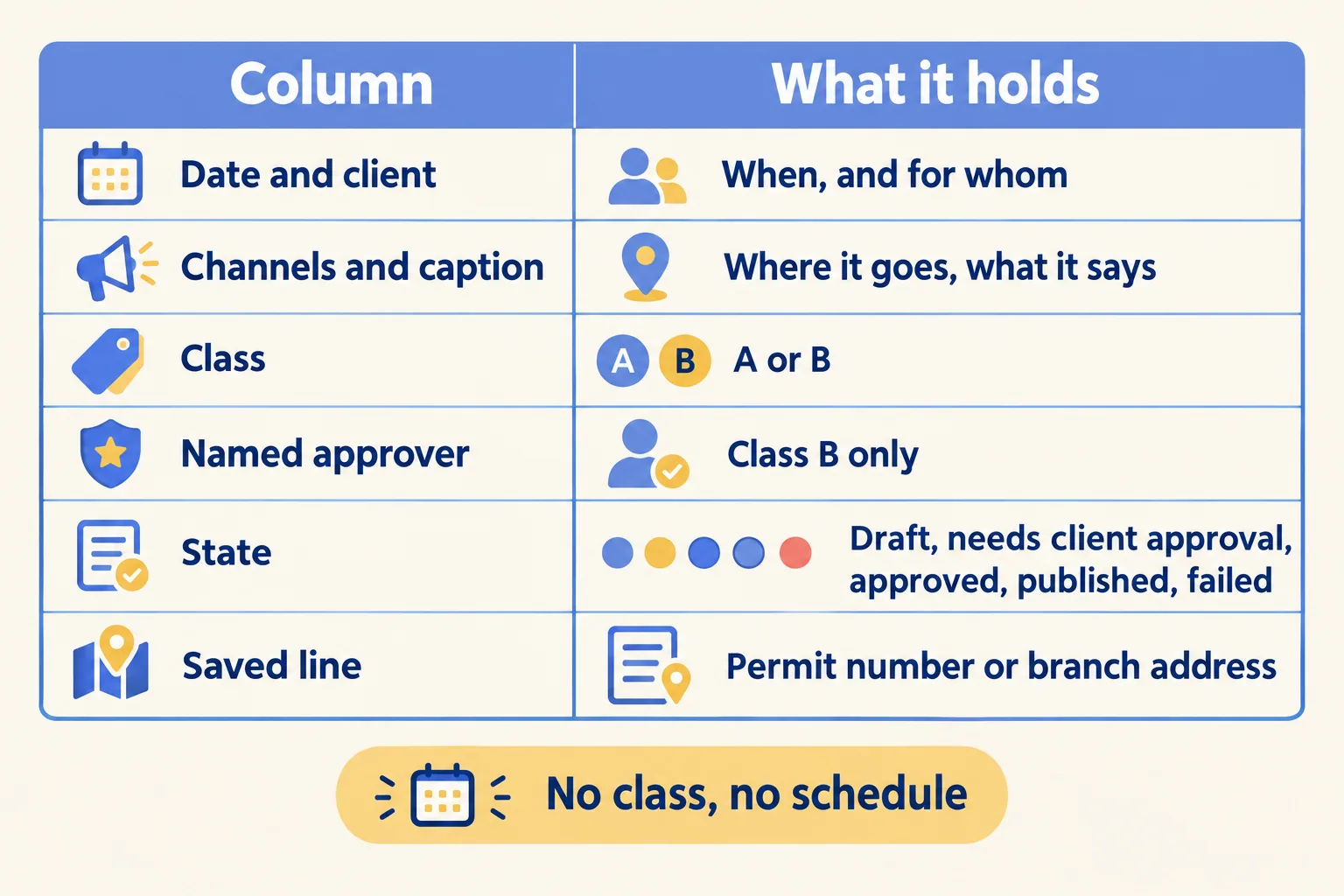
A post with no class does not get scheduled. A class B post with no approver does not either.
What does week one look like?
You can run this in a sheet before you buy anything.
- Day 1: ask each client for two things in one message: the standing yes for class A types, and one named approver for class B, with a named backup for leave.
- Day 2: add the class, approver and state columns to your calendar. Put every post for the next two weeks in a class.
- Day 3: send each class B post as one link or one file with the caption in it, and ask for a reply on that message. A late-night "ok" or a voice note on a class B post does not count until someone types it against the post.
- Day 5: agree a reply time with each client, for example one working day, and say what happens when it passes: the post slips to the next slot. Never auto-release a class B post.
Then look at what slipped, and why.
What happens after the yes?
A yes does not publish a post. A token can expire, a network can refuse a post, and the first anyone hears of it is the client asking where the launch video is.
So decide who looks at the state after the scheduled time, and when. In our calendar a post that a network refuses turns red with the reason and an email goes to the team. That tells you quickly. It does not mean a post cannot fail.
Comments and direct messages that follow a post are a different job. They belong in Mindcat Inbox, not in the calendar.
What does Mindcat Social do today, and what is left out?
At Mindcat, we run Mindcat Social for agencies and brands in the Gulf: every client's posts on one calendar, Arabic and English, with a preview link per post for the client's yes. For agencies the setup is built around this rule: we agree the two classes and the named approvers with you, then set the tags, the saved permit-line signatures and the client filter. Brokerage teams can see the same flow on the page for real estate brokers, and agencies on the page for marketing agencies.
What is not there today:
- Publishing to Instagram, Facebook, TikTok, LinkedIn, X, YouTube and Google Business Profile starts once each network has approved the app that posts for you. Meta and TikTok reviews can take weeks, so your written plan says which networks go first.
- There is no Snapchat channel and no WhatsApp posting.
- The Arabic screens are partly machine-translated. Weeks start on Monday, and there are no Hijri dates.
- The preview link carries the product's name, not yours.
- AI caption help is set up with your own provider key and billed at cost.
- Checking a permit stays with a person.
What does it cost?
You pay per connected channel a month: each Instagram account, Facebook page, TikTok account, LinkedIn page, X account, YouTube channel or Google Business Profile location. Channels 1 to 10 cost AED 49 each, 11 to 30 cost AED 35, 31 to 100 cost AED 25 and above 100 cost AED 15, and each price applies only to the channels inside its band. The shared plan has a minimum of AED 690 a month, which covers up to 15 channels, so a small team pays AED 690, not AED 49 per channel. Team members are free and unlimited, and clients approving on a preview link never count as channels. SAR prices are the same numbers.
An agency with 30 channels pays 10 × 49 + 20 × 35 = AED 1,190 a month. There is no self-serve start: the one-time setup is AED 1,900 for up to 10 channels and AED 3,900 for 11 to 30, and we connect each channel with you. Paid platform API access, such as X, and AI provider usage are billed at cost. Prices exclude 5 percent UAE VAT and 15 percent Saudi VAT.
If you have no clients to ask and five channels, a network's own app or a spreadsheet may be all you need. If several people post for several clients, the class, the approver and the version matter more than the tool.
Tell us how many clients and channels you post for and how approvals work today. We reply with the setup plan and the monthly price per channel, in AED or SAR.
