

If your planner's programme has a critical path nobody on site has opened this month, this is for you. It is not for a job without a planner: someone has to name the driving tasks each week, and no tool does that for you.
The programme for a Dubai office fit-out runs to several hundred activities. The planner updates it, prints it as a PDF and sends it with the monthly report. On site, the supervisor works from a two-week list in a WhatsApp group. When the client asks on Thursday whether handover still holds, the PM rings the planner, and the planner opens a file nobody else can open.
Has anyone on site opened the critical path this month?
Ask the site team one question: which tasks this week, if they slip, move the handover date? If the answer comes from memory, or from the planner by phone, the critical path exists but nobody acts on it.
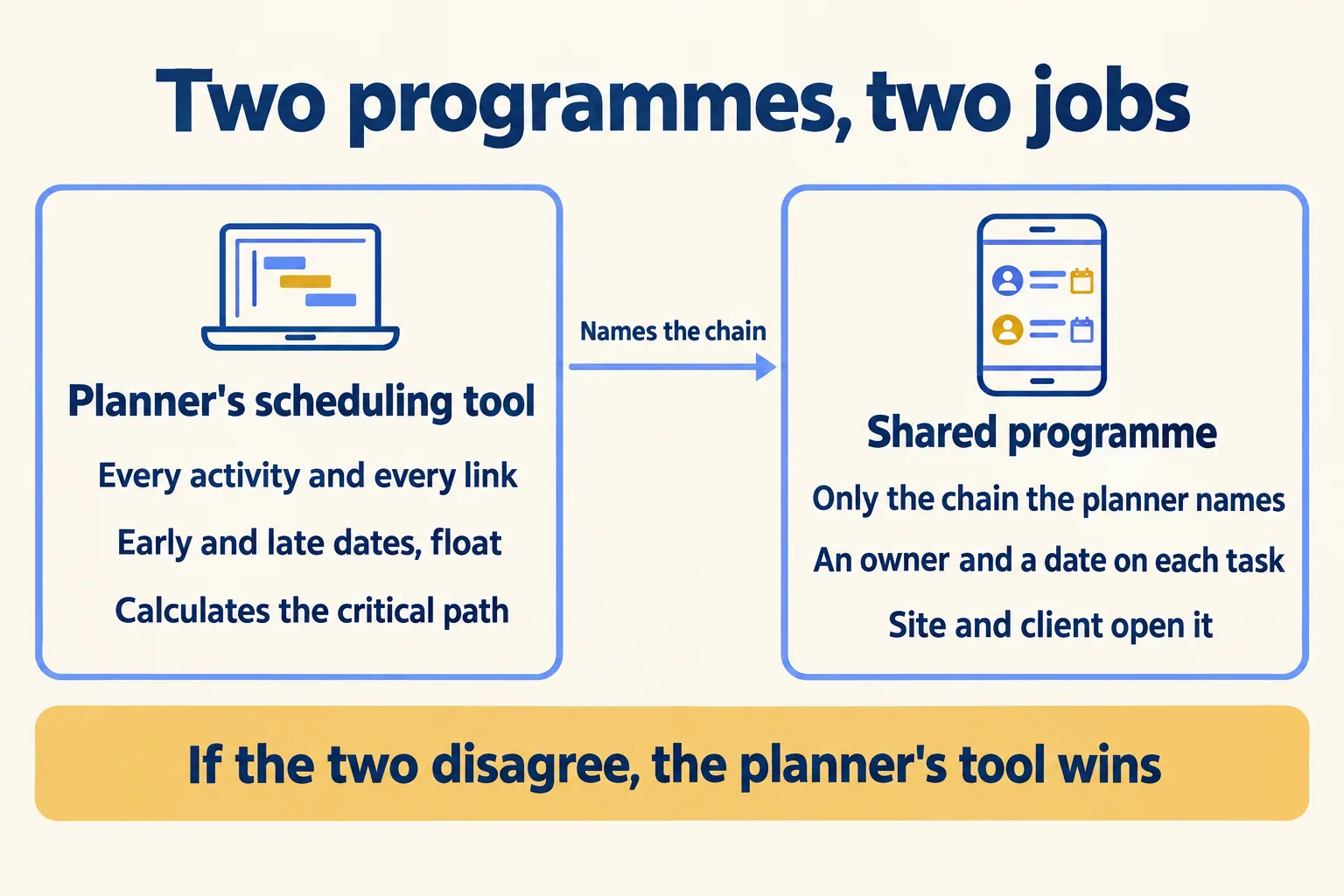
That is not a software problem. The planner's tool did its job: it calculated which chain has no float. The gap is that the result never reaches the people who can move those tasks. The fix we use is a split. The planner keeps the calculation. Everyone else gets the driving chain: the short run of linked tasks that, today, decides the handover date. They see it on a programme they can open on a phone.
Critical path or Gantt chart: what is the difference?
The critical path is the longest chain of linked tasks from the start of the job to completion. A delay to any task on that chain moves the completion date by the same amount. Every task off the chain has float, the time it can slip before it touches completion. A scheduling tool works out both by running through the links and durations forwards, then backwards.
A Gantt chart is the picture: bars on a timeline, with or without links between them. It can show the critical path in red, but the drawing does not calculate it. That difference is the whole of this post. The planner's tool does the arithmetic. The site team needs the answer.
What does a FIDIC 2017 programme have to show?
Read your contract before you decide anything, because on many jobs the critical path is a contract deliverable, not a planning habit. If your fit-out runs on a subcontract or a short-form letter rather than FIDIC 2017, skip to the next section.
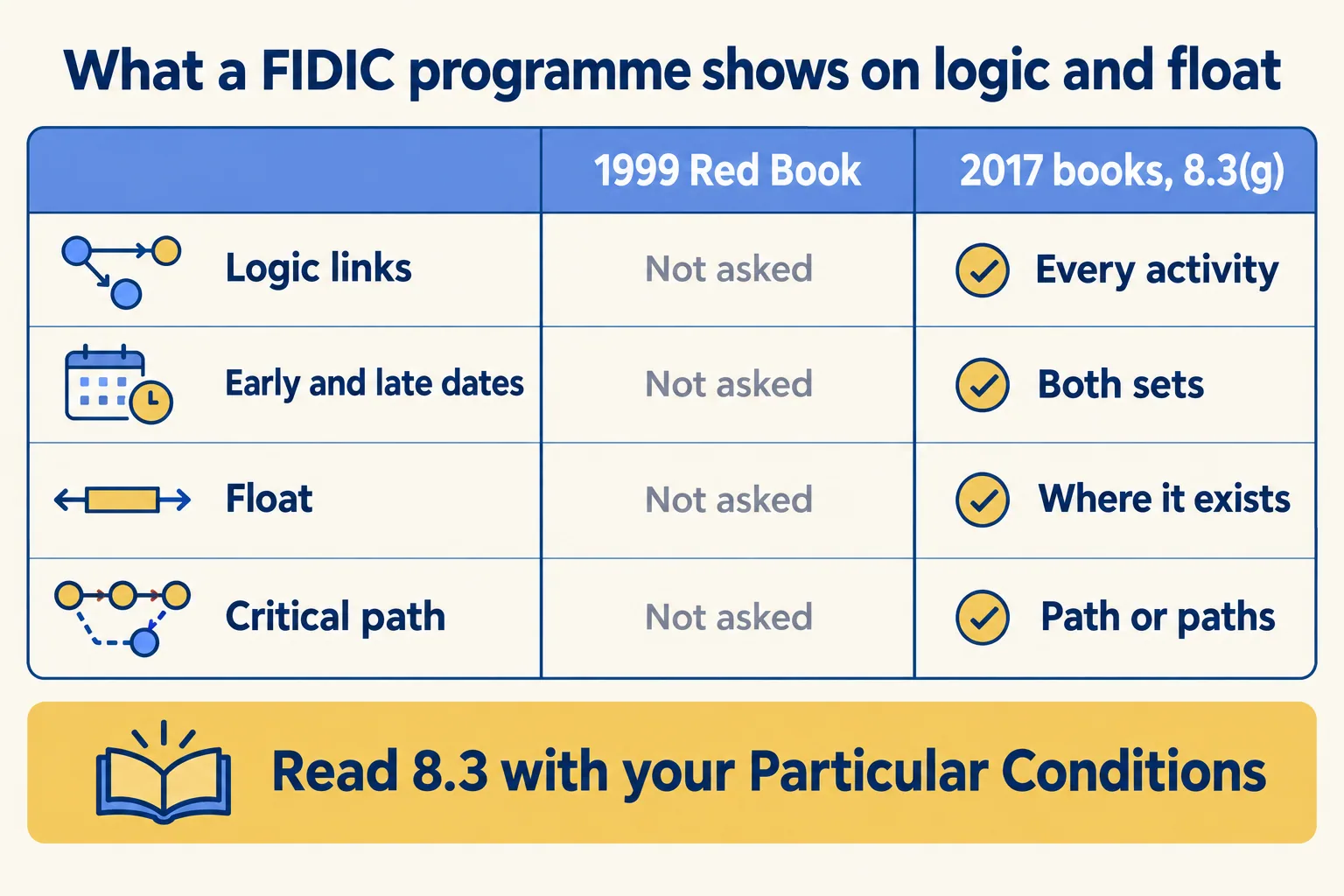
In the 2017 FIDIC Red, Yellow and Silver Books, Sub-Clause 8.3 lists what every programme carries, and item (g) is the one that matters here. ScheduleLens, a scheduling software firm, quotes it in full (7 September 2026): all activities "logically linked and showing the earliest and latest start and finish dates for each activity, the float (if any), and the critical path(s)". The same sub-clause says the programme is prepared in the programming software the Specification names, or software acceptable to the Engineer if none is named. The Engineer has 21 days to object to the initial programme and 14 days to object to a revised one.
That is new. NEC Planning Solutions' guide to Sub-Clause 8.3 (2 October 2026) sets the two editions side by side: the 1999 Red Book "asked for no logic, float or critical path". A contractor who learned programmes on 1999-form jobs can be submitting less than a 2017 contract asks for.
Two cautions. Particular Conditions can change Sub-Clause 8.3, and the Specification sets the software and the level of detail, so read all three together. And this is general guidance on a published standard form, not legal advice: float ownership, review periods and time claims are for your contract and your counsel.
If your contract names the scheduling software, the programme you submit lives in that tool, full stop. Our post on when the contract names P6 for a fit-out programme covers that case.
Why the site team stops reading the programme
Because the full network answers a question the site does not ask.
A project planner put it bluntly in a LinkedIn post (19 May 2026): "Most P6 programmes are technically correct… but operationally useless. And site teams know it." His list of what goes wrong starts with "10,000+ activities… but nobody can answer: What needs to happen THIS WEEK?" And his list of what site teams want is four questions: "What's critical? What's delaying us? What needs to happen next? What happens if this slips?"
The fix is older than any of the current tools. On a Planning Planet thread from August 2022, a senior EPC programme manager with more than 60 years in the trade describes how he ran large projects. He took the schedule, "identified one to two dozen key start activities", did "a backwards pass to allow for submittals, review time and long lead and fabrication", and sent a weekly "Critical Items List to each Project Team Member". On Friday the team updated that week's list so a new one went out on Monday. His summary: "No one ever realized I was feeding them the enhanced schedule in weekly bites."
Both are practitioners outside the Gulf, so read them as experience, not a Dubai rule. The pattern holds on a fit-out: the schedule stays whole in one place, and each person gets the part they act on.
How we decide: the planner's file, or a shared programme
Our rule: keep the float and the critical path in the planner's scheduling tool, because that tool calculates them and the contract may name it. Put only the driving chain the planner names at each update on a shared programme that the site team and the client read, linked in order so a slip moves the handover date in front of everyone. Keep everything in the planner's file and the monthly PDF while one planner runs one job and nobody on site asks what is critical this week.
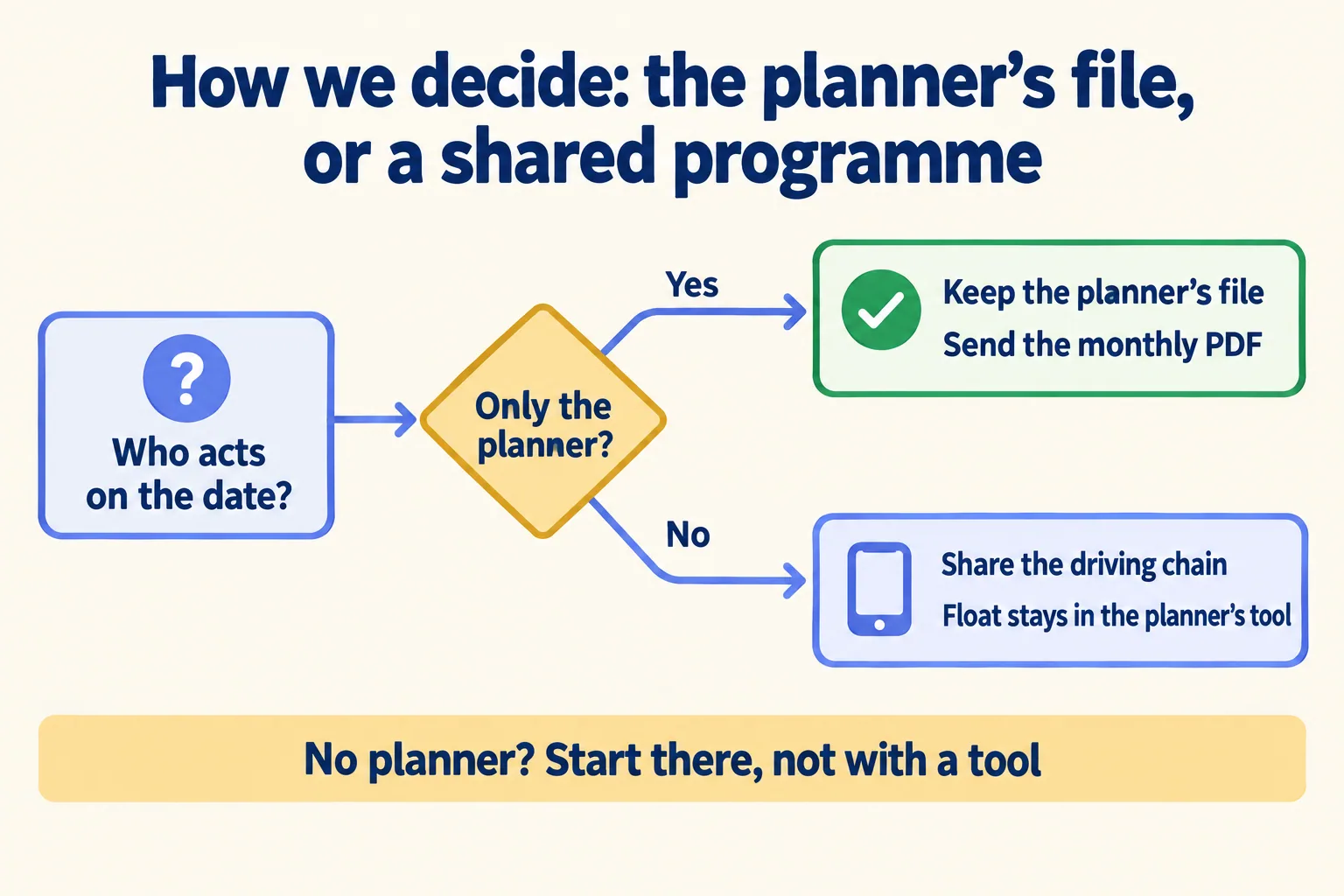
The test is who acts on the date. If the only person who acts on the critical path is the planner, the planner's file is enough. If the supervisor, the consultant or the client's designer has to do something for handover to hold, they need to see their task on the chain, with the date it has to land.
Which tasks go on the shared programme?
The ones the planner names at each update, and no more. We give no fixed number, because the chain changes as the job moves. Early on it runs through design and authority approvals. Near the end it runs through the last trades and the final inspection. What stays the same is the kind of task that tends to sit on it on a fit-out:
- Authority comment rounds. Civil Defence on the fire alarm and sprinklers, the DEWA load NOC, the free zone or landlord's fit-out permit. The submission is not the risk. The second round of comments is.
- Long-lead approvals. The submittal the order waits on, and the order the install waits on. Our post on counting back from the site date works one of these through.
- The client's own sign-offs. Finishes samples, a layout change, a landlord's consent. These are the tasks the client controls and forgets.
- The last trade before handover. Whatever has to finish before the final inspection can be booked.
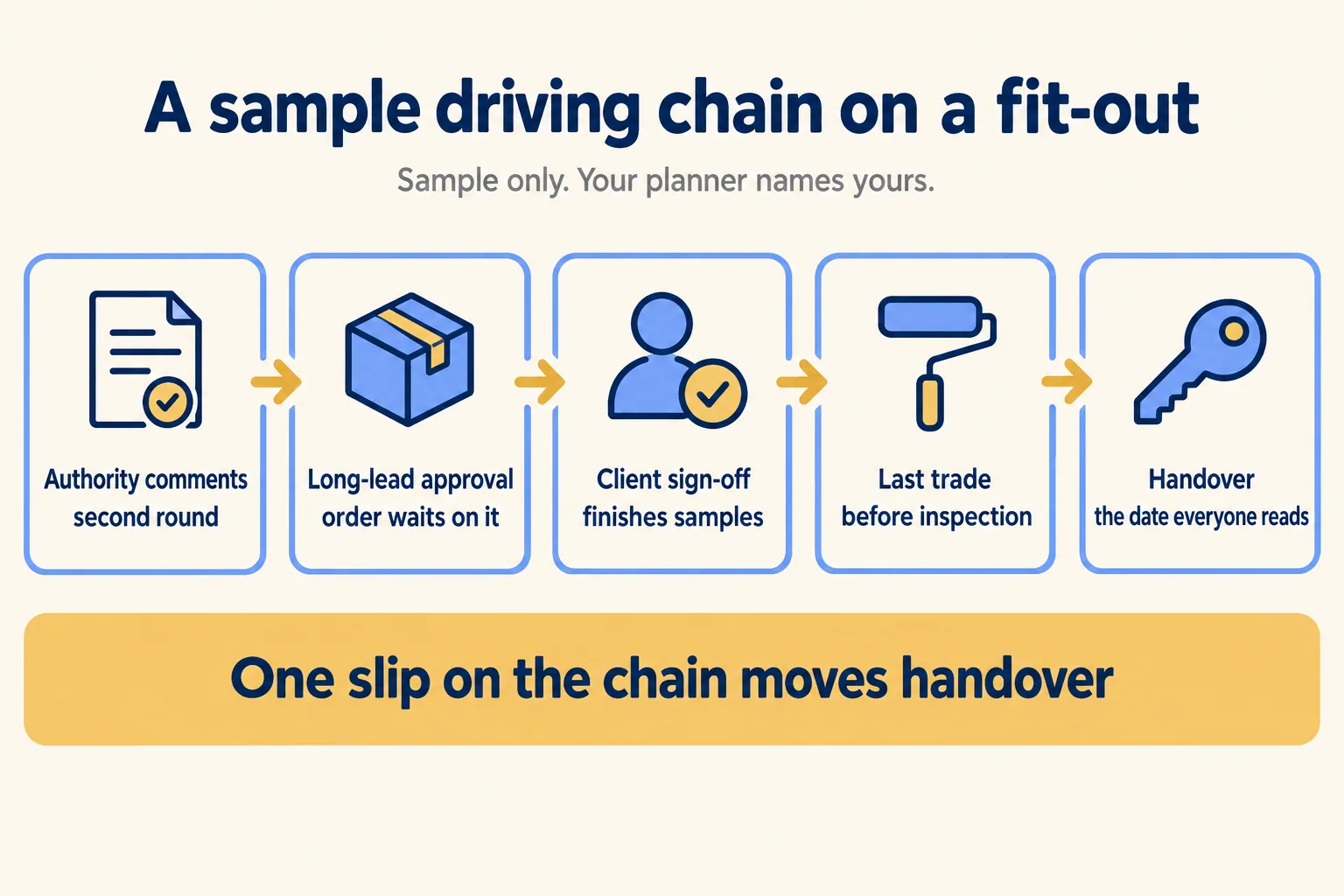
Each task on the shared programme gets three things: an owner by name, the latest date it can finish without moving handover, and a link to the task after it. The link is what makes the chain honest. When the authority comments come back a week late, the tasks after them move, and the handover date the client sees moves with them, the same day.
Before the client gets a login, agree with your contracts lead what the client reads there. A date that moves on the shared programme is not an extension of time; that still goes through the notice route in your contract.
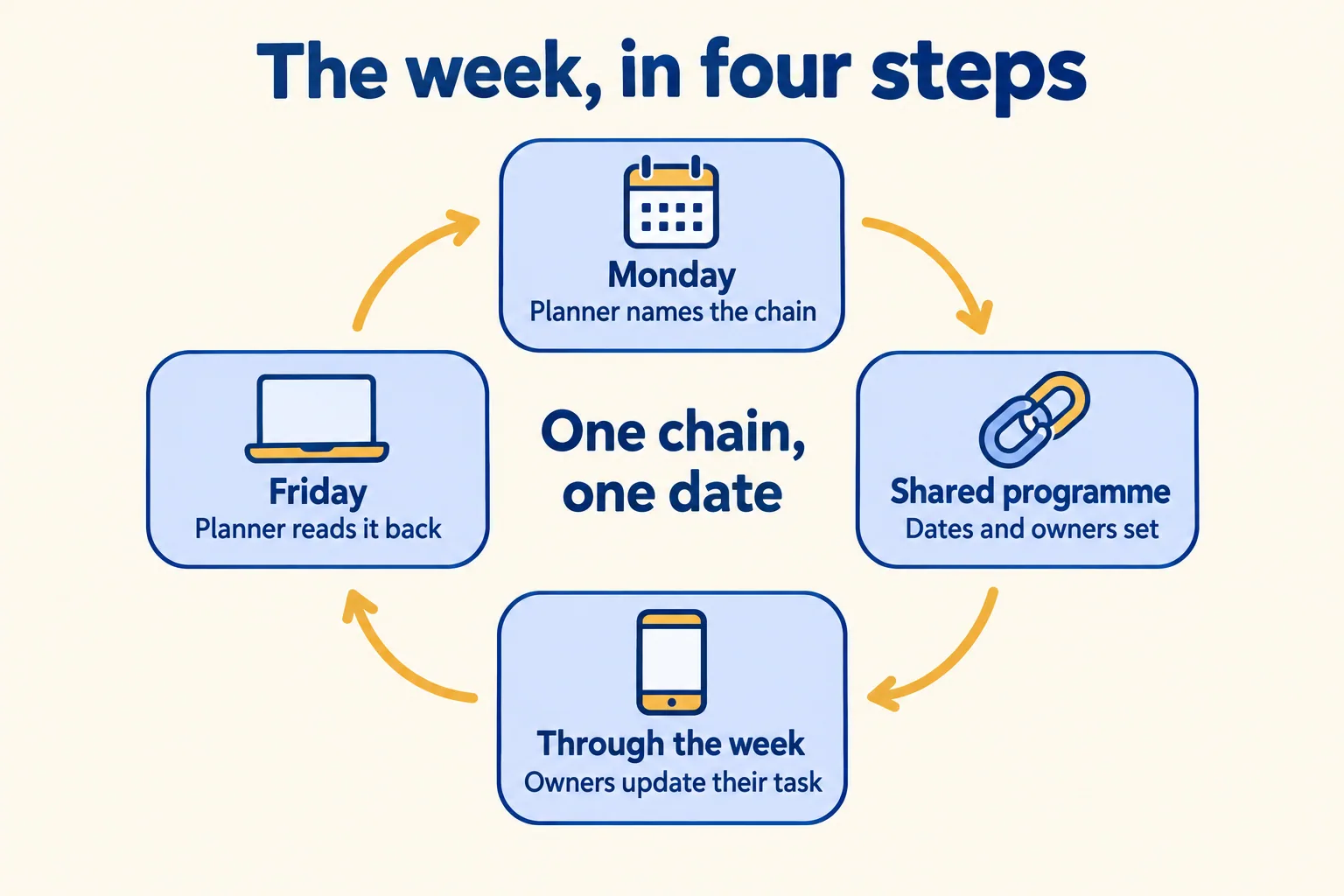
The week runs in four steps, the same rhythm the Planning Planet manager used:
- 01Monday: the planner updates the scheduling tool and names the driving chain.
- 02The planner sets those tasks' dates and owners on the shared programme, linked in order.
- 03Through the week, each owner updates their task from a phone.
- 04Friday: the planner reads the updates back into the scheduling tool for the next run.
If your supervisors live in a WhatsApp group, keep the group. On Monday, post the chain's tasks, owners and dates there with the link to the programme. The supervisor who owns a task on the chain updates that one task; everyone else keeps talking in the group as before. The group is where people talk. The programme is where the date lives.
What stays in the planner's tool
Everything the contract asks for and everything a time claim leans on. The full network, the early and late dates, total float, the critical path or paths, the baseline and each revision's record of progress and delay. That file is the one the Engineer reviews under Sub-Clause 8.3, and the one a delay expert opens years later. Do not move it, and do not let a second copy of the logic grow somewhere else.
The shared programme is a view of the result. It carries the chain and the dates the planner sets. If the two disagree, the planner's tool wins, and the shared programme is corrected at the next update. Updating the shared one is the planner's Monday job, and it stays short because it carries only the chain. The owners' changes during the week are what the planner reads back on Friday, so the two copies drift for a week at most, never a month.

What Mindcat Projects does with the chain
Mindcat Projects gives each job one Gantt: summary tasks for design and approvals, construction and handover, tasks linked so one follows another, and milestones for the permit and the final inspection. During setup we set linked tasks to move with the one before them, so when an approval date moves, the work after it moves too, skipping your weekend and public holidays. That is the chain the planner names, drawn so that everyone sees it move. Our method for this is One programme per job: the approvals, the orders and the install on one live plan.
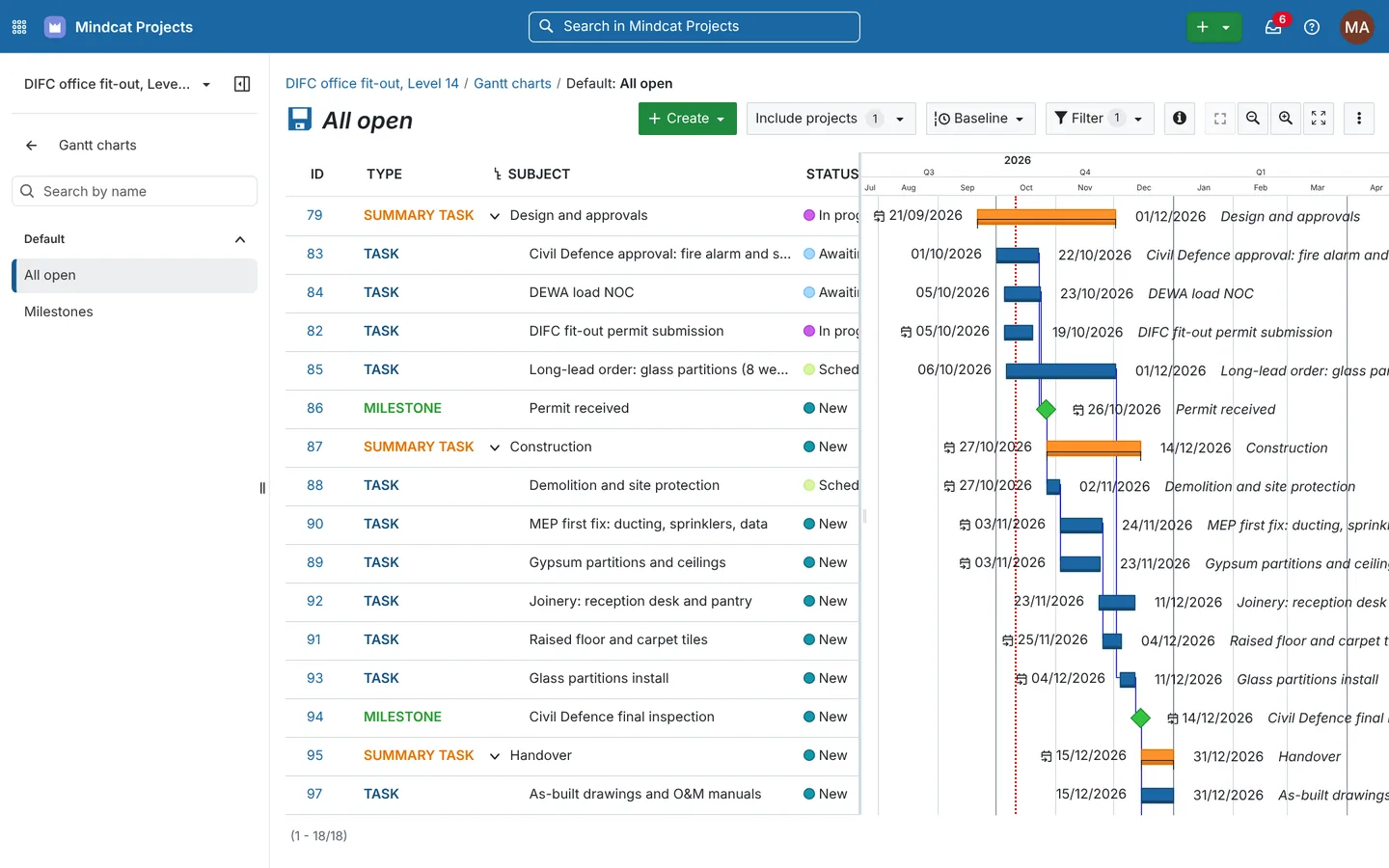
Site engineers update their tasks from a phone browser, with nothing to install. Nothing posts into WhatsApp, so the Monday message to the group stays a person's job. Clients and consultants get free read-only logins: they see the status, the timeline and the tasks, and cannot change anything. Every job's status sits on one list, so the PM with four jobs can see which one is at risk before the client calls.
On a job that is already half built, managed setup loads the planner's current export, and the planner names the chain on the first Monday. Where the line sits: Projects does not calculate float or the critical path. The planner's scheduling tool does that, and the planner tells Projects which tasks are on the chain. It does not connect to P6, MS Project or a consultant's portal, so nothing syncs. On managed setup we load your live programmes from Excel or an MS Project or Primavera export, once. Baseline comparison and Gantt PDF export are the maker's Enterprise add-ons, billed at cost. The Arabic screens are partly translated and read left to right.
For the trade in full, see Projects for fit-out contractors.
Who should not start here?
A job with no planner. Someone has to run the calculation and name the chain each week; a shared programme with nobody naming the chain is one more Gantt that drifts. Also a contractor where one planner runs one job and the site team already asks the planner what is critical every Monday. That is the shared programme, done by voice. Keep it.
What does it cost?
From the live Projects page. You pay per member a month, meaning anyone who creates or edits tasks, graduated by band: members 1 to 10 at AED/SAR 179 each, 11 to 30 at 69, 31 to 100 at 45, and 101 and up at 29. Clients, consultants and anyone with read-only access are free. A supervisor or a subcontractor's foreman who updates a task on the chain is a member; one who only reads it is not. That is why we keep the chain owners few.
Every plan has a monthly minimum, so no one buys a single member at that rate. The shared plan, hosted by us in the UAE for up to 10 members, has a minimum of AED/SAR 2,499 a month. Your own copy, hosted by us in the UAE or Saudi Arabia, has a minimum of AED/SAR 5,349. The page's worked example: 30 members come to 10 × 179 + 20 × 69 = AED 3,170, so they pay the AED 5,349 minimum, which covers up to 78 members.
The quick start is a fixed package we set up for you on the shared plan, 1 to 10 members, for AED/SAR 2,500 once, and it brings our fit-out programme template with approval stages. Larger teams, or your own copy, get managed setup to a written plan, from AED/SAR 4,900 for up to 10 members. The maker's Enterprise add-ons are billed at cost. Prices exclude 5 percent UAE VAT and 15 percent Saudi VAT.
Set that against a handover date the client hears about from the planner by phone, a week after it moved. Tell us how many live jobs and members you run, how you plan them today and where it should run. We reply with the setup plan and the monthly price per member, in AED or SAR.
