
If customers reported your last WhatsApp campaign and you don't know why, read this before you send anything else. It is for an operations or sales lead whose business number on the WhatsApp Business Platform (the API, run from WhatsApp Manager) turned yellow or red, or whose template was paused. If you only answer and never message customers first, it is not your problem yet.
What should you check first?
Stop sending, then read. The reflex after a drop is to change three things at once: new wording, a new list and a new number. Do that and you will never know which one caused the reports, and one of the three, the new number, does nothing.
WhatsApp tells you more than most teams look at. Before anyone edits a template or exports a list, open WhatsApp Manager and write down four things:
- The number's quality rating. Green, yellow or red, under Account tools, Phone numbers. Meta's help article says it is based on how customers received your messages "over the past seven days".
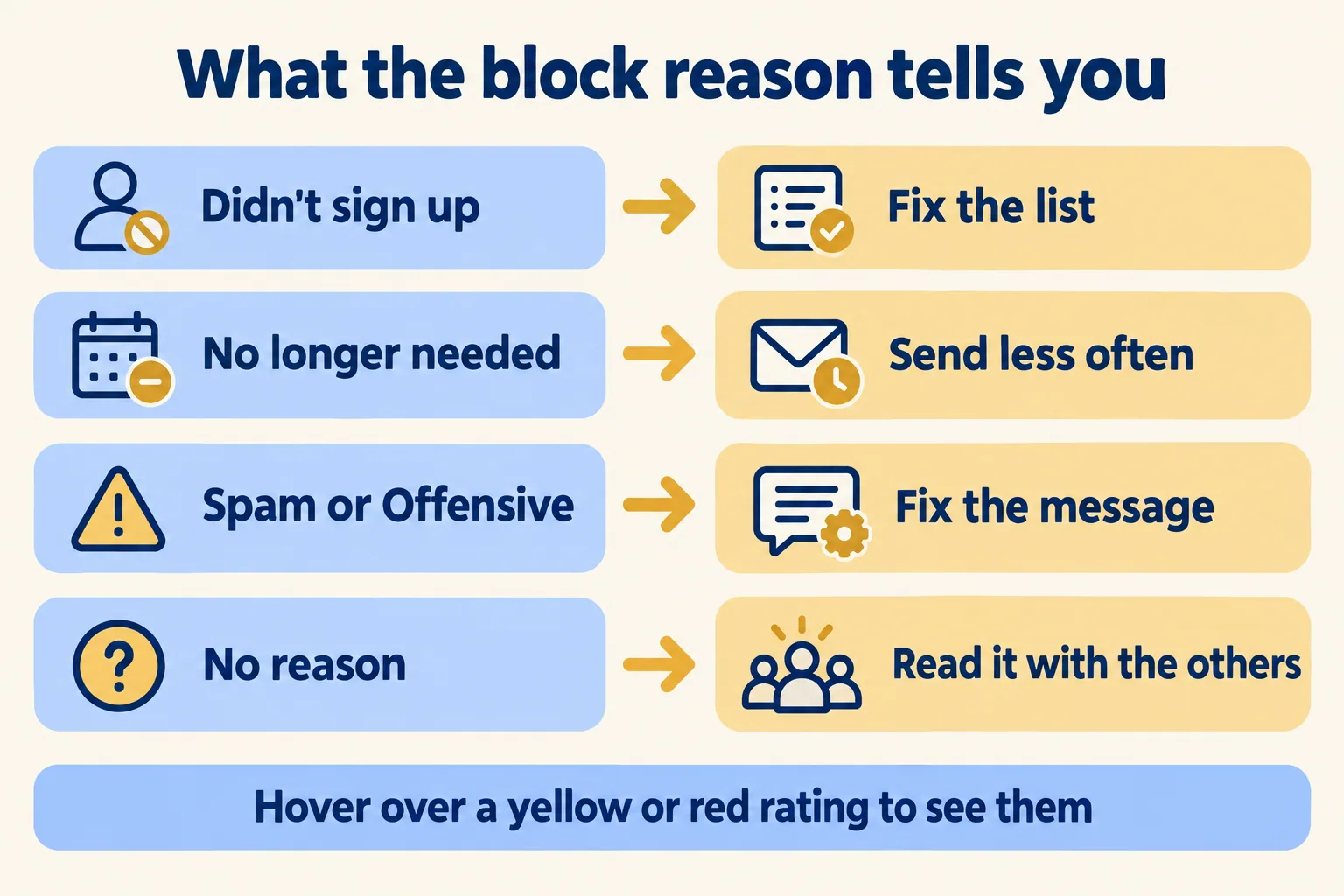
- The block reasons. Hover over a yellow or red rating. Meta shows the reasons people chose when they blocked you, where it has them.
- Each template's rating. In Message templates: Active - High quality, Medium quality or Low quality, or Paused.
- Any message from WhatsApp itself. A warning, or a notice that marketing messages are suspended.
Those four answers decide the fix. Nothing else does.
Where does WhatsApp show why people blocked you?
When someone blocks a business, WhatsApp asks them why. Meta's help article lists five answers: No longer needed, Didn't sign up, Spam, Offensive messages, No reason. That short list is the most useful thing on the page, because each answer points at a different fix.
- Didn't sign up is about the list. These people never asked to hear from you, or asked for something else.
- No longer needed is about the list's age and how often you send. They once wanted you and no longer do.
- Spam and Offensive messages are about the message: what it said, how it was categorised, how often it arrived.
- No reason tells you little alone. Read it next to the others.
The same row has an icon in the Settings column that shows the lowest rating for each day of the last 30. Line that up against your send dates and you will usually see which send moved it.
How do you tell a list problem from a message problem?
Our rule, so you can argue with it:
- One template is low quality or paused, the others are fine: fix the message. Change its category if a promotion went out as a utility message, cut the wording that reads as an advert, add a clear way to stop, and make it match what people signed up for.
- Reports spread across several templates and trace to one list, one import or one source: fix the list. Remove everyone without an opt-in source and time. Remove contacts who have not written to you recently; our default cut-off is 90 days, a working rule of ours, not Meta's. Then send again, smaller.
- WhatsApp has warned you or suspended marketing: treat it as enforcement, not a rating. The Help Center says access comes back on its own at the time shown in the app, and asks you not to send to the same contacts straight after it returns.
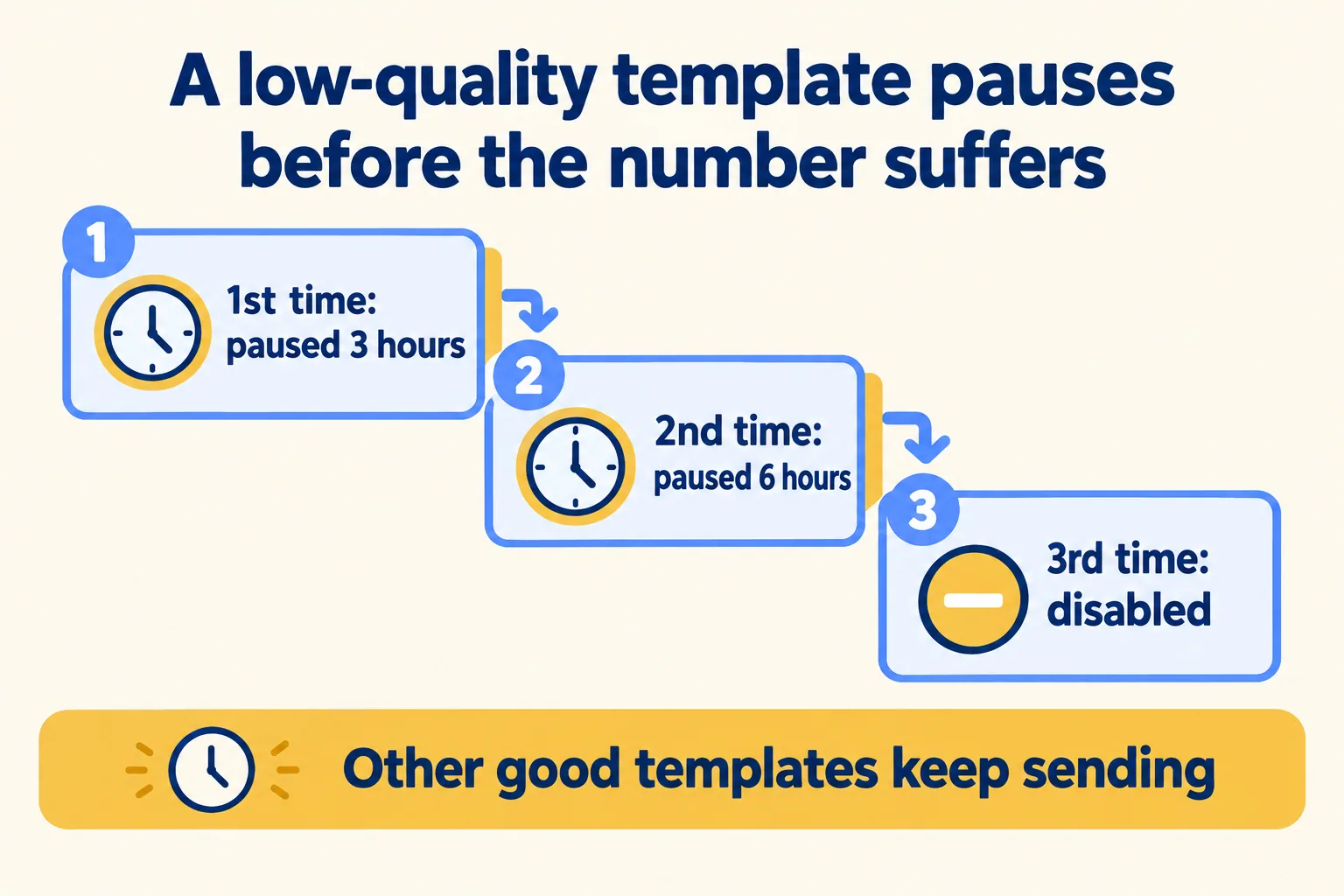
The receipt for the message rule is in Meta's template pausing page. A template that reaches low quality is paused for 3 hours the first time, 6 hours the second, and disabled the third. Meta adds that pausing "will initially not impact the business phone number", and other high-quality templates keep sending. So a paused template is the message problem showing up early, while the number is still fine. Edit the template and it goes back to In Review, and it can't be sent until Meta approves it again.
The receipt for the list rule is in WhatsApp's own advice. The Help Center tells businesses to send marketing "only to people who opted in", to remove "contacts who haven't interacted with your business recently", and to ask for opt-in "for the different categories of messages". WhatsApp's Business Messaging Policy puts it as a condition: you may only contact people who gave you their number and opted in to hear from you. A buyer who wrote to you from a portal listing asked about that listing; ask before you send them offers. Our rules page sets out the UAE side.
Here is how we sort a drop in practice. It is a sample, labelled as one, not a client result.
| What you see | Most likely cause | What we change first |
|---|---|---|
| One offer template paused, block reason Spam | The message | Rewrite it, check the category, add a stop button, resubmit |
| Every template yellow, block reason Didn't sign up, all from last week's import | The list | Remove the import's contacts with no opt-in source and time |
| Ratings fine until the third send this month to the same people, reason No longer needed | How often | Send less often, and drop people who have not replied in months |
| Marketing suspended notice in the app | Enforcement | Wait out the suspension, then send only to recent, opted-in contacts |

Under our method, Answer, book and write it down, the opt-in source and time sit on the contact in your CRM, next to the owner and the last reply. That turns the list check into a report you run, not a guess about where a number came from. Write the finding and the fix on the same record, so whoever runs the next campaign sees why the list was cut.
Why does a new number not fix it?
Because the limit is not on the number. Meta's messaging limits page says limits "are calculated and set at the business portfolio level and are shared by all business phone numbers within a portfolio". New portfolios start at 250 unique people in a moving 24 hours outside an open chat.
The same page says the limit grows automatically only when you send "high-quality messages across all of your business phone numbers and templates" and have used at least half your current limit in the last 7 days. A second number in the same portfolio shares the ceiling and the quality test. It works the other way too: if sales, service and collections send from one portfolio, one team's bad import slows every number you own. Name one person who owns the rating. Send it the same list and the same message, and the same people block it for the same reasons, now from a number they don't recognise.
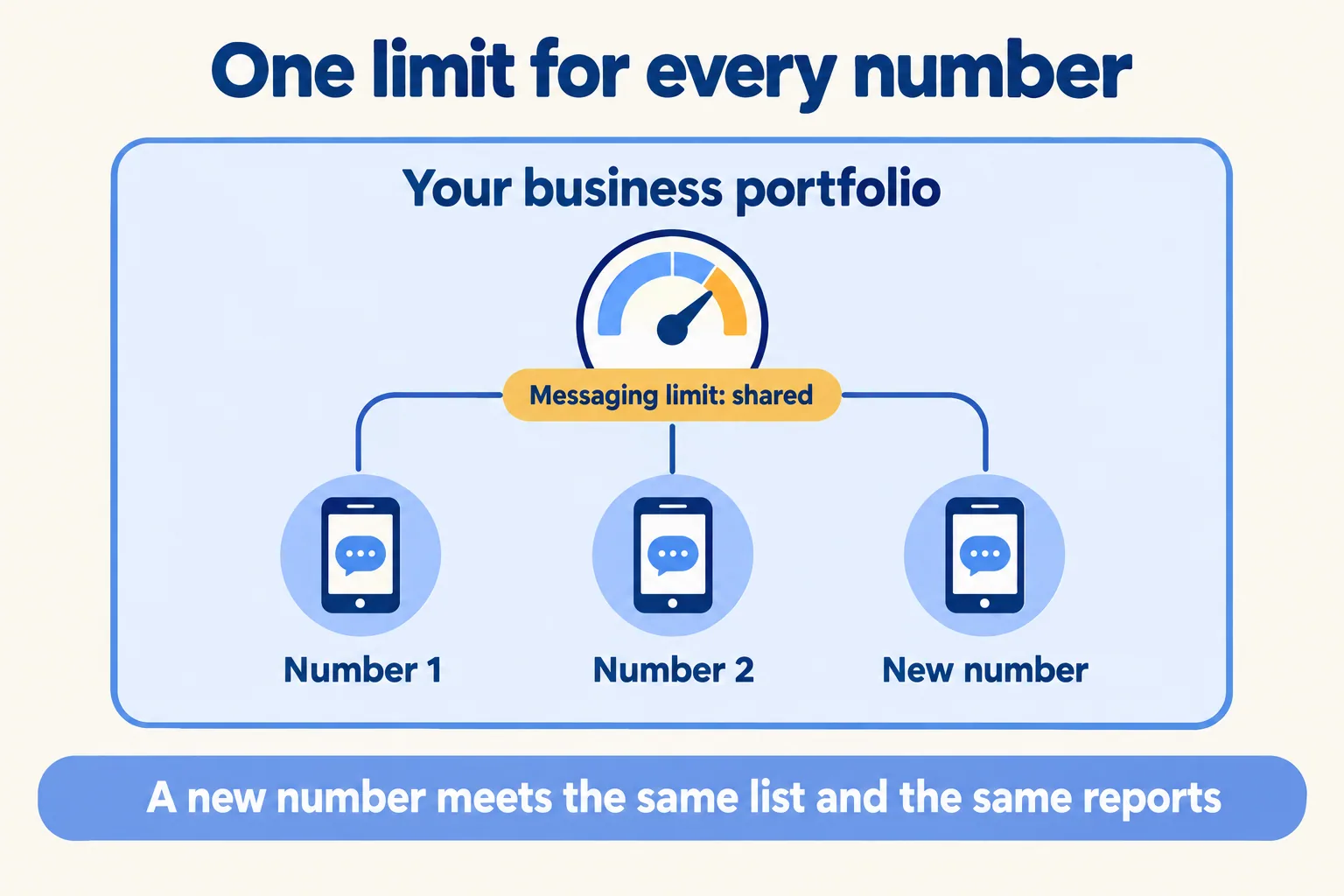
The number is not where the problem lives. The list and the message are, and both travel with you.
What does the first week after the drop look like?
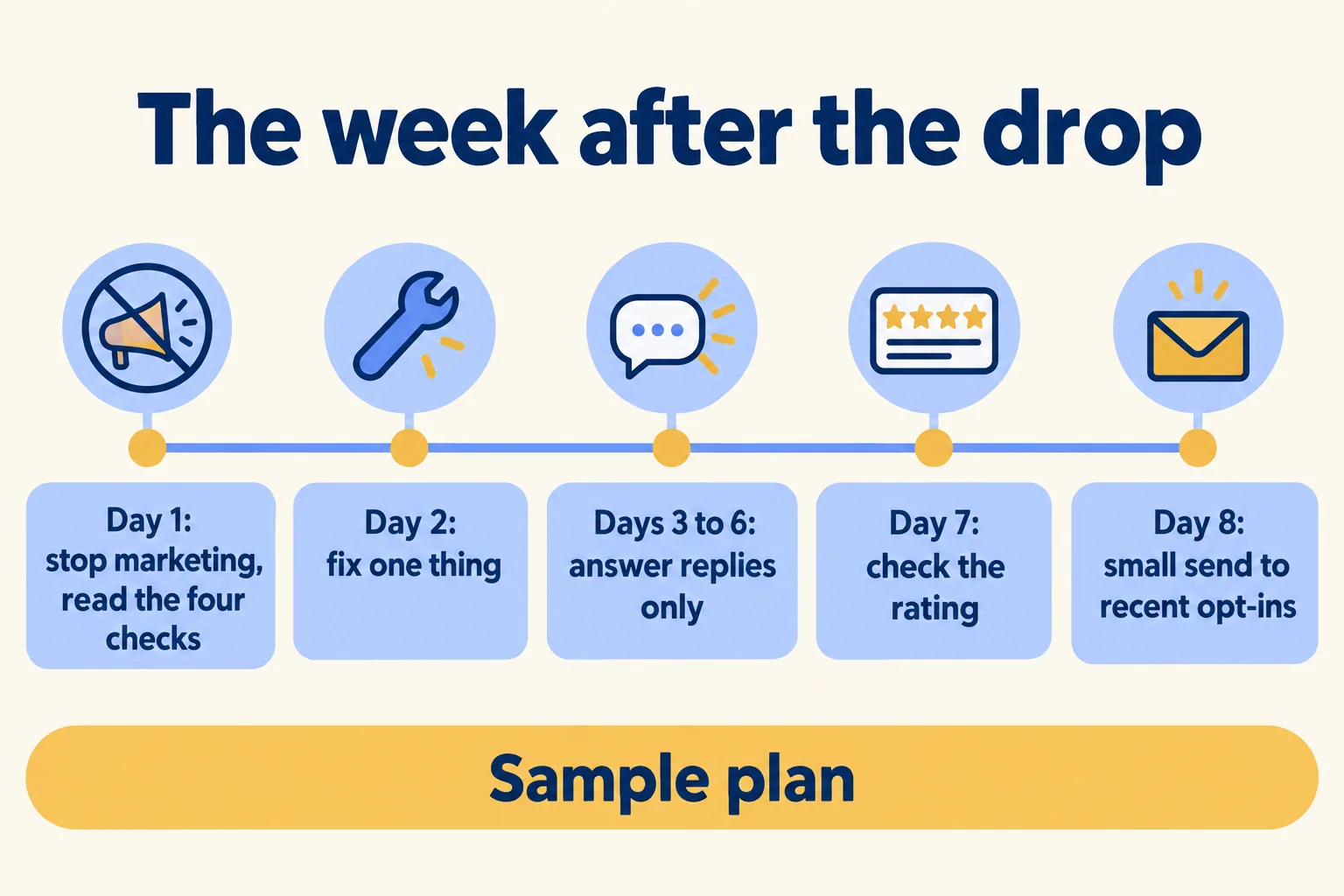
This is the plan we write, as a sample, for a team whose number went yellow after one campaign.
| Day | What happens |
|---|---|
| Day 1 | Stop all marketing sends. Keep answering every reply the same day, routed to the lead's owner by name. Write down the four checks above |
| Day 2 | Sort the drop with the table: list, message, how often, or enforcement. Fix only that one thing |
| Days 3 to 6 | No marketing. Answer replies and send only the utility messages people expect, such as booking confirmations |
| Day 7 | Check the rating again. The seven-day window has moved past the bad send |
| Day 8 onwards | Send the fixed template to the most recent, opted-in contacts only, in a small batch, and read the replies before the next one |
Two costs to keep in view. A marketing template costs USD 0.0576 each time one is delivered to a UAE or Saudi number, on Meta's rates as our WhatsApp page lists them (checked 10 October 2026, billed at cost to your own Meta account). Meta's template pausing page also says you are not charged for trying to send a paused template; the API simply rejects it. So the cost of a bad list is not the failed sends. It is the paid sends that drew blocks, and the week you lose fixing it.
Check the Meta side for your own volumes with the WhatsApp cost calculator. The order we set up the rest in is in what to automate first. If you have not sent your first campaign yet, the three checks in hold the campaign until replies are answered come before all of this.
Who is this not for?
If no one owns a lead after the first reply, a cleaner list will not save the number; the unanswered replies will draw the next round of blocks. Name that person first. If you never message customers first and only answer, your rating risk is low and this post is not your problem yet. If you want people, not automation, answering one shared number, Mindcat Inbox is the better fit (AED/SAR 89 per agent a month, shared plan minimum 3 agents, AED/SAR 267).
If your number has turned yellow and leads still wait until morning for a reply, tell us the number, the job and the system. Under Answer, book and write it down, we set up the replies, the handoff and the opt-in record first, then the next campaign. Our WhatsApp page quotes an answers-and-handoff build from AED/SAR 25,000, about 1 week; Meta's fees sit on your own account at cost.
