

Who approves from outside your company?
Vendors, contractors, external reviewers and auditors. A vendor confirms a delivery before you pay it. A contractor submits hours, and months later an auditor asks who said yes. None of them is on your payroll, and a flow built for staff assumes the approver is.
We learned this on our own desk. At Mindcat, our approvals run in Slack: expense approvals, bank transfers, vendor payments, vendor onboarding requests and hiring requests among them, and external vendors take part. Each approval has several steps: the submitter's immediate manager, then the department head, then finance and the CEO if the request is budget-related. We built that chain first. Contractors, external approvals, external reviews and auditing came later; we built them in after the fact.
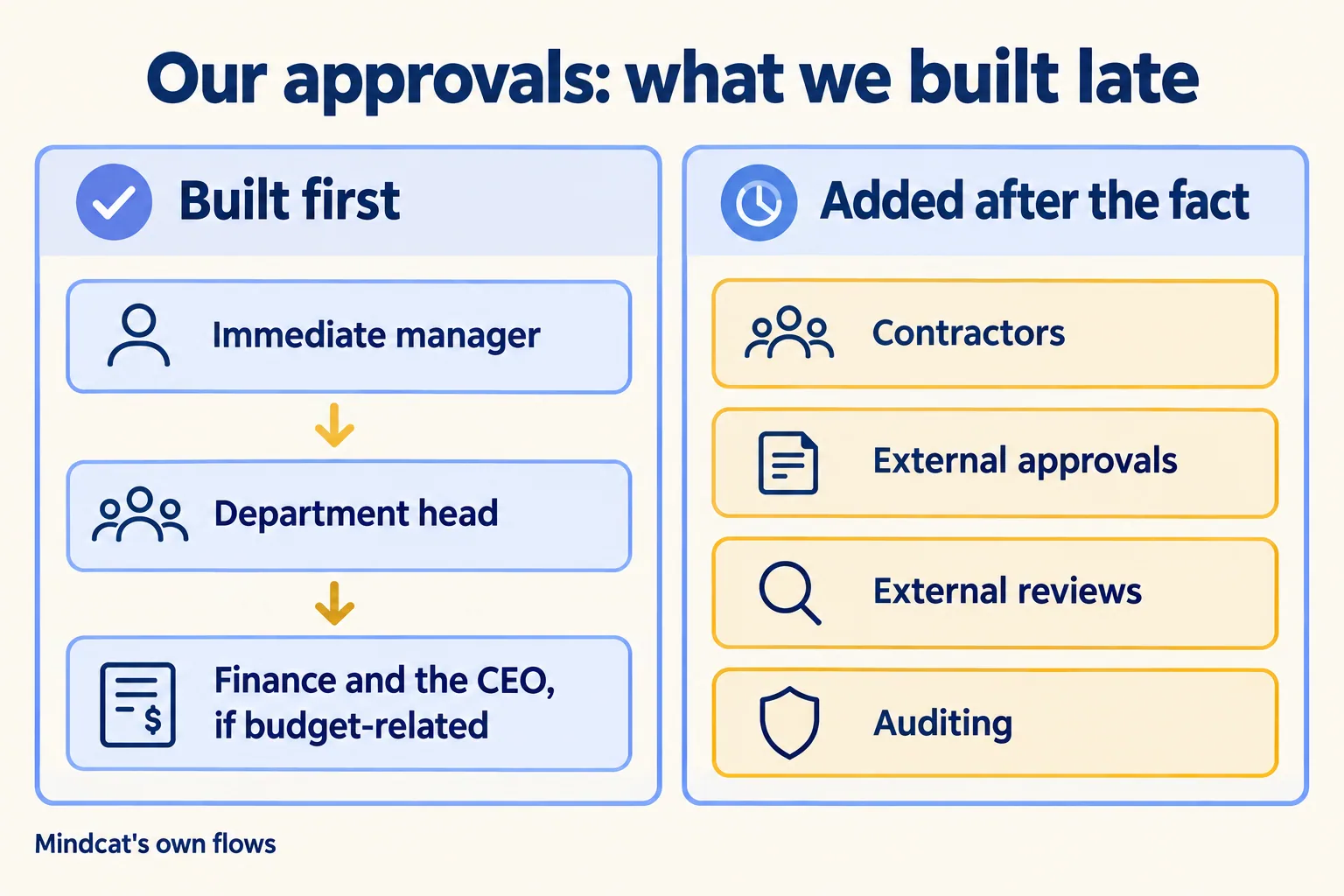
We had to document the process, the exceptions and the scenarios before we automated, and our first write-up left the outside people out. If you are weighing Slack Connect against Teams external access for this work, start where we should have. List who outside approves and what each of them needs. Then pick the tool for each person on that list.
Which door does each outside person use?
You choose one of four per person. Slack and Teams each offer a way to bring another company into a channel, and a way to give one outside person an account with you. The fourth door needs no tool: someone inside records the outsider's answer, with the evidence attached.
Slack sorts people the same way on its own page: freelancers, interns and contractors in guest roles, and clients, vendors and partners in Slack Connect.
If your vendors answer on WhatsApp or email today, those answers already come through the fourth door. Make it a step, with an owner. The person inside pastes or attaches the vendor's message to the request, records who answered and when, and the next approver in the chain sees it before saying yes. Nothing about that needs a new seat.
Here is how the count works on an example (ours, for illustration, not a client): ten vendors, three contractors and one auditor, approvals in Slack.
That gives three new accounts for fourteen outside people. The vendor split in the table is made up; yours comes from the list you write first.
What does Slack Connect ask of a vendor?
Usually a paid Slack plan. Slack's help says one channel can host up to 250 organizations, and each organization must be on a paid plan to work in channels together. Your company owns the channels it creates. Only the owner can invite or remove organizations, manage posting permissions, and keep using the channel after a partner leaves. Slack's help also says you can start a direct message on any plan.
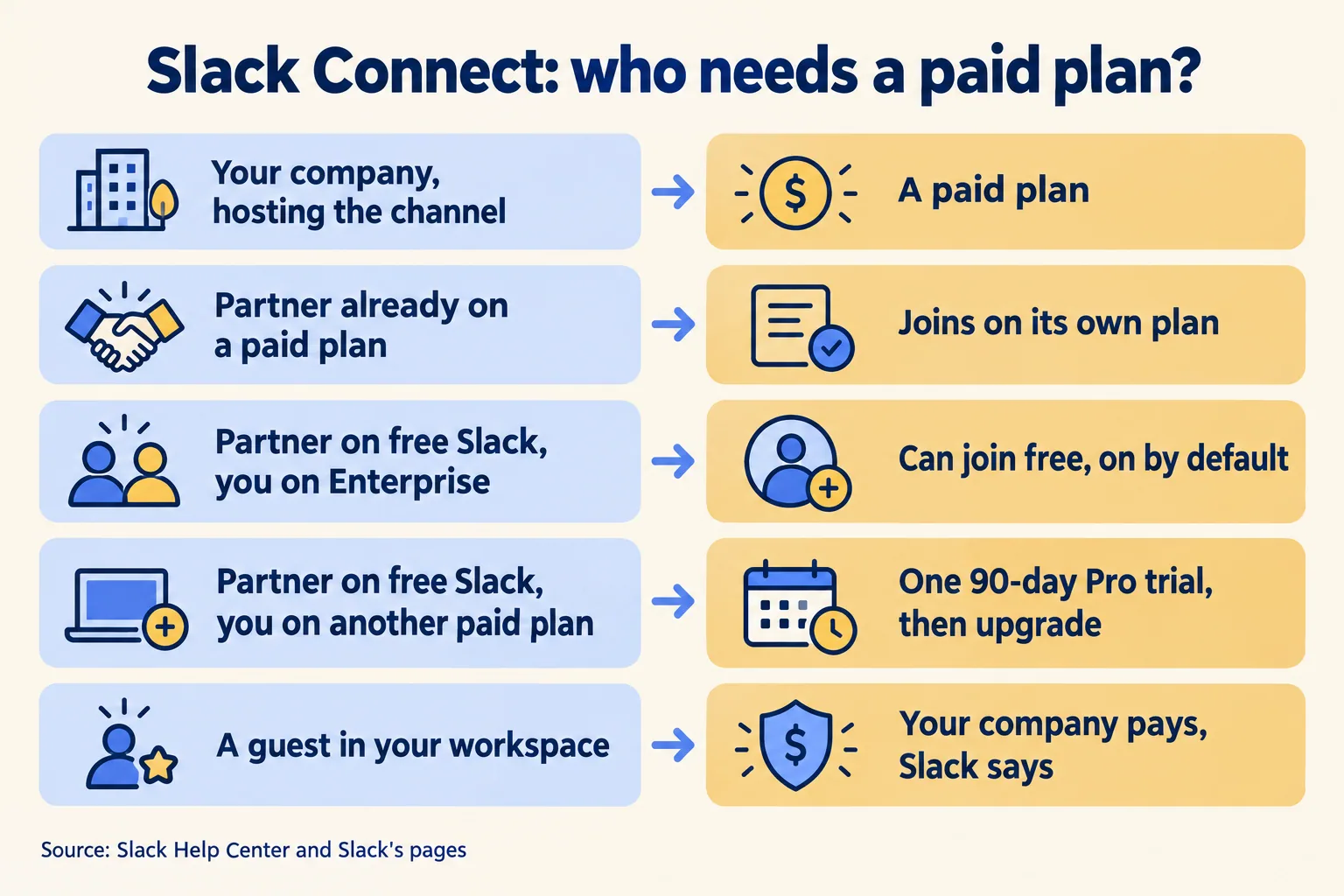
The trial row can stall an approval. A vendor on a trial who does not upgrade drops out of the channel when the 90 days end, and a step waiting on them has nobody left to answer it. If you are not on an Enterprise plan, put free-Slack vendors through the fourth door instead of a trial. On cost, Slack states that each company in a channel needs a paid plan and that guests are yours to pay for; it does not spell out the host's cost for a partner's people. We do not quote Slack prices, so ask for that line on your order form.
What does Teams ask of a vendor?
An admin on their side, for anything beyond chat. Microsoft Learn describes three ways in, and only a shared channel lets the vendor work in your channel with their own company account.
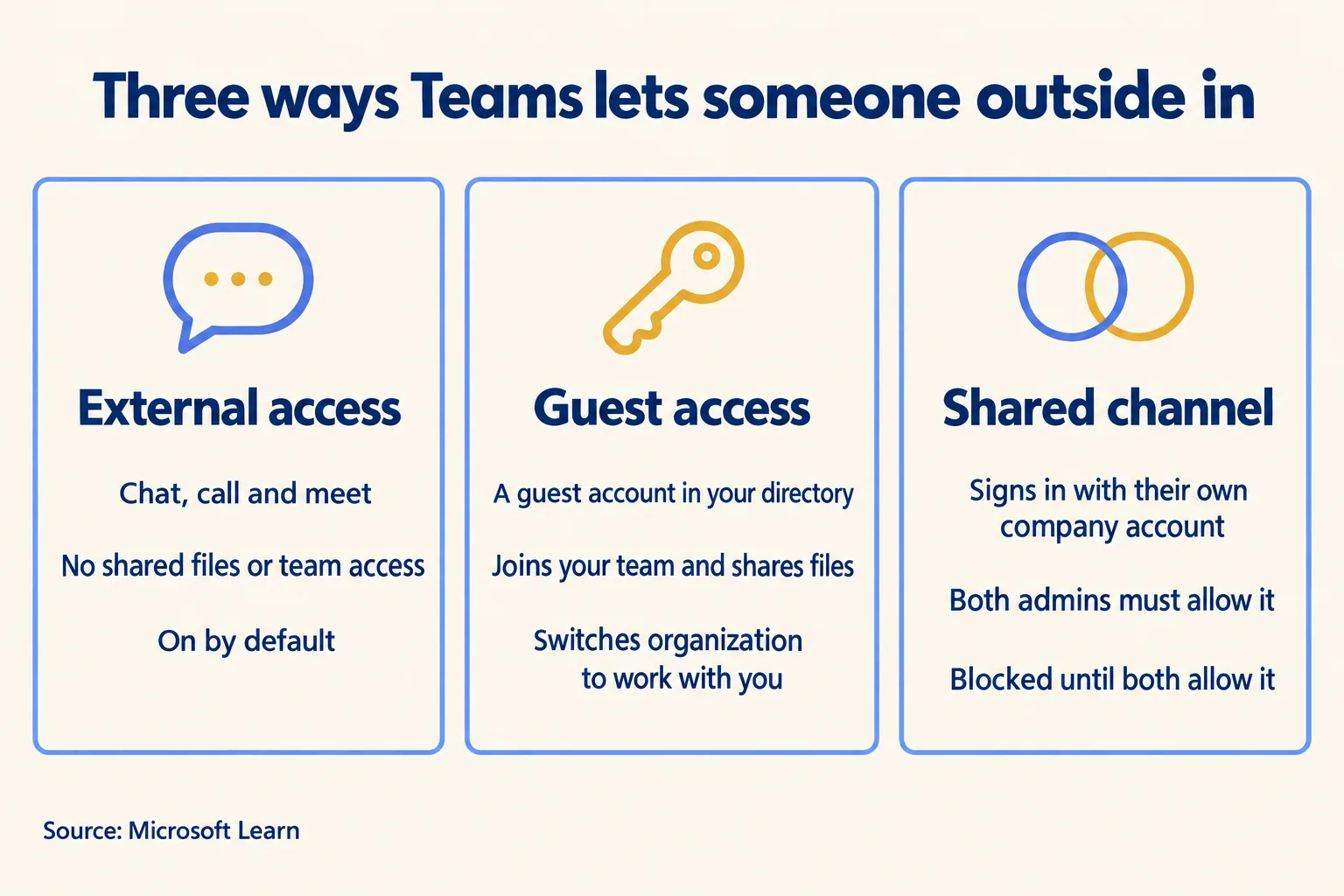
Microsoft says guests cannot be added to a shared channel, so a contractor you made a guest and a vendor in a shared channel sit in different places. Your conditional access policies, such as a demand for multifactor sign-in, can apply to outside participants in a shared channel once you trust their company's sign-in checks. Each shared channel keeps its files on a site in the same region as the parent team's site. For UAE or India workspaces on Slack, we confirm data residency per plan before you sign.
Can the outside approver act inside the flow?
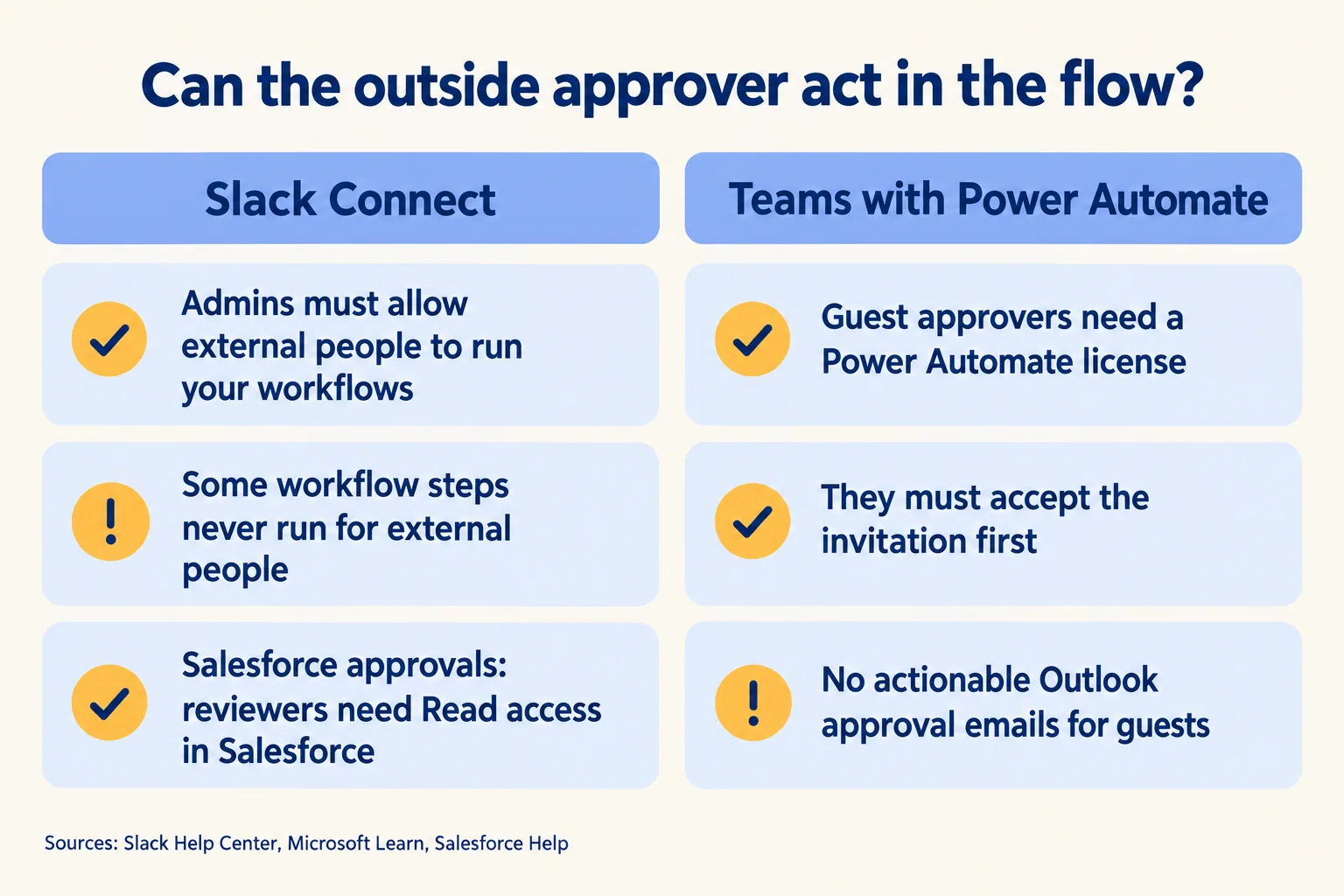
In both tools, admins on your side decide, and some steps stay closed to outsiders. In Slack the limit is which workflow steps outsiders can run; in Teams it is a Power Automate license and an accepted invitation.
In Slack, owners and admins decide whether external people can use workflows your members built, per connected organization if they like, and each workflow must be shared with connected organizations in its settings. Slack lists what an outsider can never run: custom steps your organization built, and connector steps that make them sign in to a third-party account. Workflows that start with a keyword, change user groups, or create or archive channels are closed to them too.
Salesforce approvals are the sharpest case. Salesforce's release notes say reviewers need Read access on the Approval Submission object, and we read that as a Salesforce login. A vendor in a Slack Connect channel has no login in your org, so in our reading they cannot approve a Salesforce approval from Slack. Put that question to Salesforce before you design the flow; until then, route the vendor's answer through the fourth door.
In Teams, Microsoft's Approvals app needs a Power Automate license. A guest approver needs one too, from your tenant or their home tenant. The guest must accept the B2B invitation first, or Power Automate removes them from the assignee list. Actionable approval emails in Outlook do not work for guests, so they approve in the Power Automate portal.
Slack's comparison page, with data as of December 2025, says Slack Connect "supports all features for both orgs" and that Teams "Needs multi-step configuration of Microsoft Entra B2B Direct Connect." Microsoft's docs confirm the second line: both companies set cross-tenant access. The first line clashes with Slack's help, which lists the workflow steps above. If your approval flow uses any of those steps, the comparison does not hold for you, so check your flow against the list.
What does a flow need when the approver is outside?
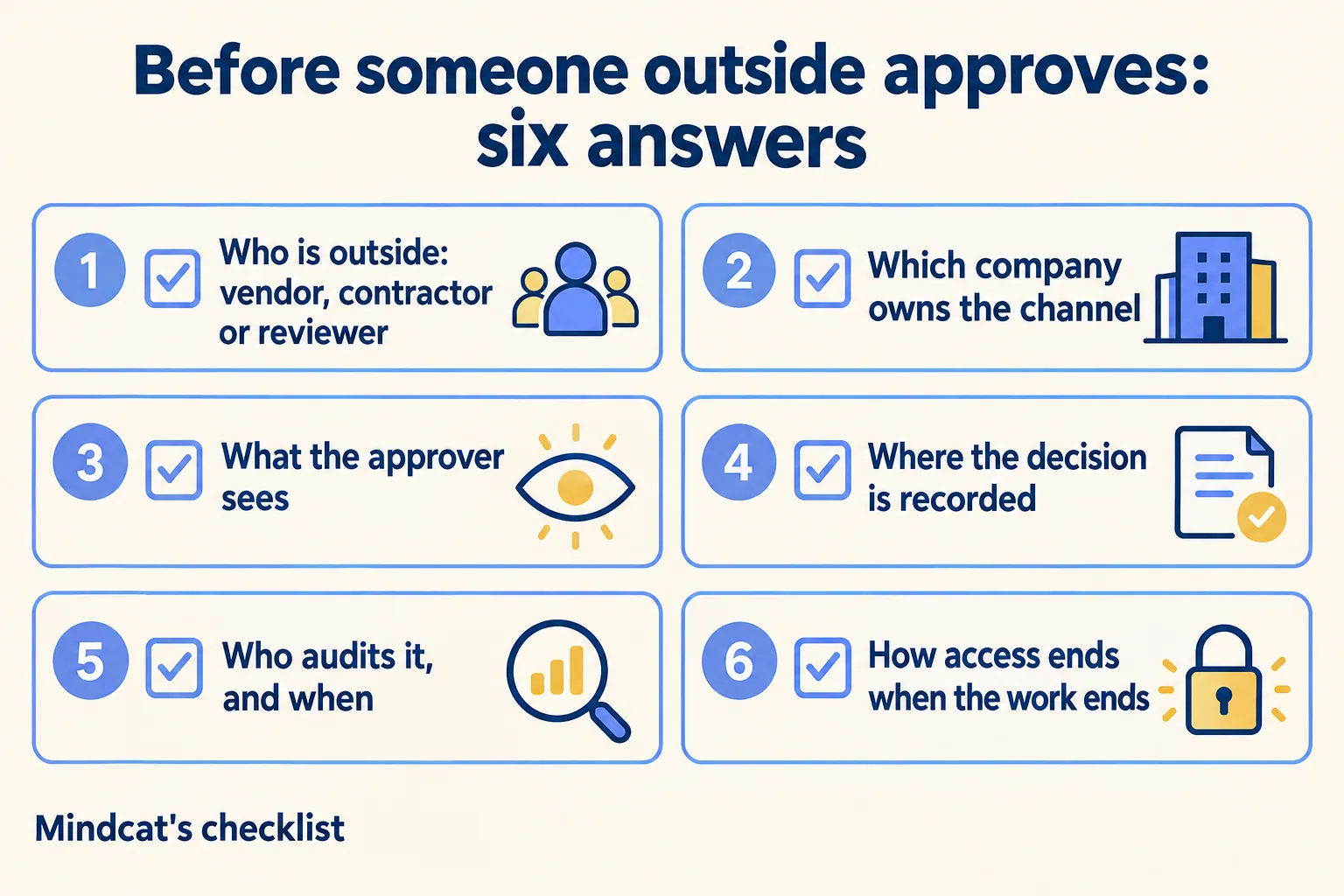
Write six answers on one page before anyone builds.
- 01Name each outside person and their door: vendor, contractor, external reviewer or auditor; Slack Connect, shared channel, guest, or recorded inside.
- 02Decide which company owns the channel. In Slack Connect the owner invites and removes organizations. In a Teams shared channel the channel owner adds and removes people.
- 03Choose what the approver sees. Ours sees four things: the request, who submitted it, the reason, and the impact in cash. An outsider may get fewer.
- 04Record the decision in your system of record. Ours sits in a Slack List while open and writes back to Salesforce when done. If the outsider cannot act there, name who records their answer.
- 05Name the auditor and the date. Microsoft says the Teams Approvals app logs audit events in Microsoft Purview. Slack's External people dashboard lists every outsider in channels you host, on Business+ and Enterprise plans.
- 06Plan the exit. Slack owners and admins can remove an outsider from a channel or disconnect them from every Slack Connect conversation you host. Removing them from channels leaves direct messages open. Give any step still waiting on that person a named owner inside.
On money, our rule of thumb: an outsider confirms facts (the goods arrived, the review is done, the details are right), and a named person inside approves the payment on the chain above.
On our own flows, framing the process took days of discussion and building took about a day each. Your timing may differ.

What would we do first?
Pick one flow with an outside approver and run it end to end. Vendor onboarding and vendor payments are two we run ourselves. If your company runs Teams, keep it for meetings and files; our Slack and Teams page sets out the split and notes that Teams users and Slack users do not share one channel without a third-party bridge. Your IT team's questions about outsiders in Slack are on Slack security. For the approval feature itself, see what to switch on first in Slack's August update, and for support on the same workspace, what changes on 27 October.
Use the form at /contact/run-on-slack and name, in a few lines, the one approval where someone outside your company has to say yes. You hear back within 24 hours from the person who signs the work, with a written note: our Pick your ten, the ten Slack use cases that fit your work, what to build first, and what to leave alone.
