

What changed in Claude Projects?
A project stopped being a folder and became a conversation that hands work to other sessions. Anthropic announced the redesign on 17 September 2026 as a beta in Claude Code. You give a project a goal and some context. A coordinator reads what you send, decides what becomes a thread, and each thread does one piece of work in its own cloud session.
The older Projects in claude.ai chat and Cowork are a different thing. Anthropic's documentation describes them as groups of conversations and reference files, with no threads and no coordinator, and says they keep working as they do today until the new experience reaches them. Cowork is in that second group: the new projects are not there yet.
The rollout is staged. The documentation says the beta is on Pro and Max plans, starting with accounts that have used cloud sessions and have no existing projects in chat or Cowork. It is not on Team or Enterprise plans, and the launch post says those come later, with no date. If Projects is missing from the sidebar at claude.ai/code, you join a waitlist.
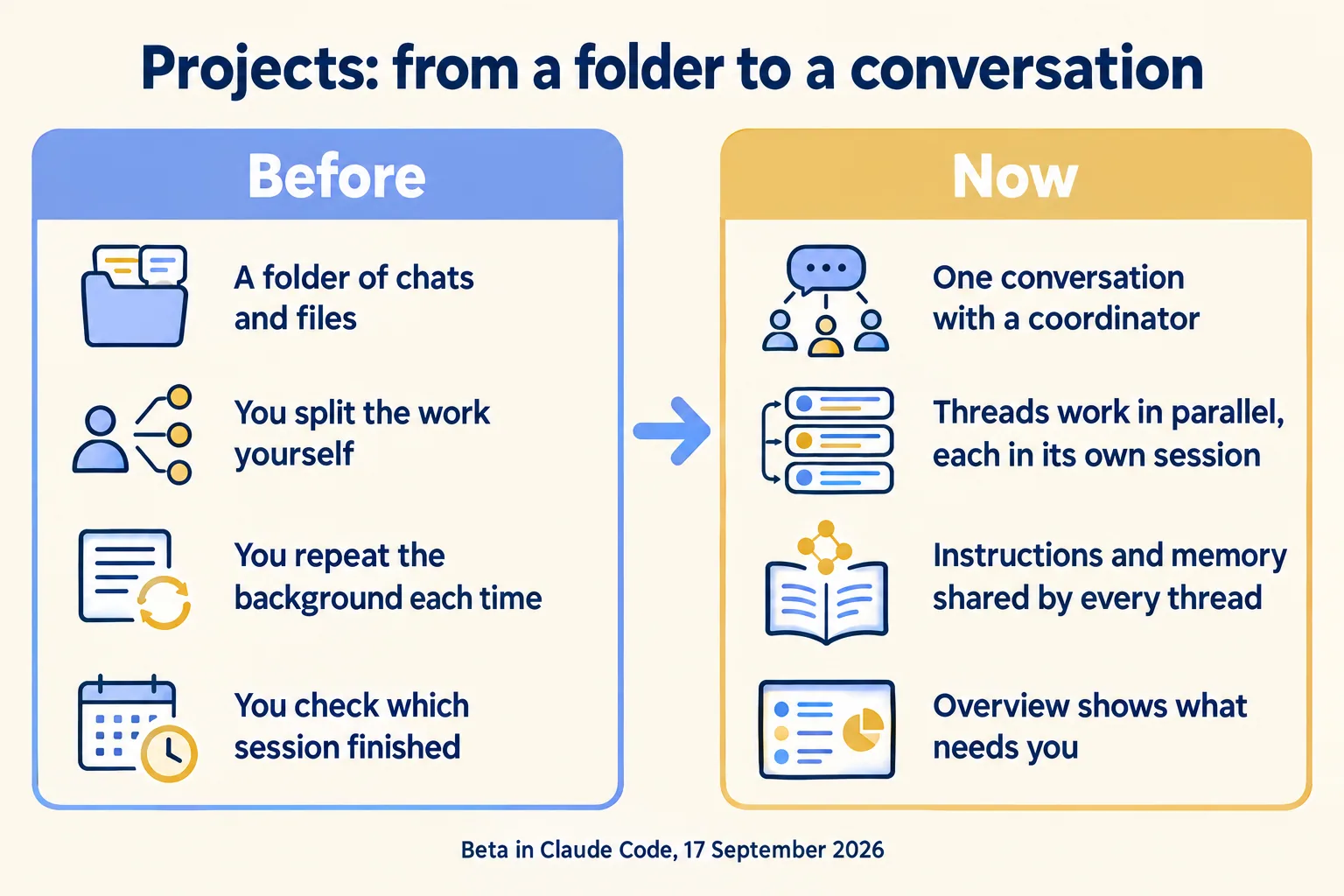
What you gain is mostly bookkeeping. Without a project you decide what each session works on, repeat the same background at the start of each, and check back to see which one finished. With one, you send work to one place, set the context once, and come back to an Overview that shows which threads finished, which pull requests are ready, and which thread is waiting on you.
How does a Claude Code project work?
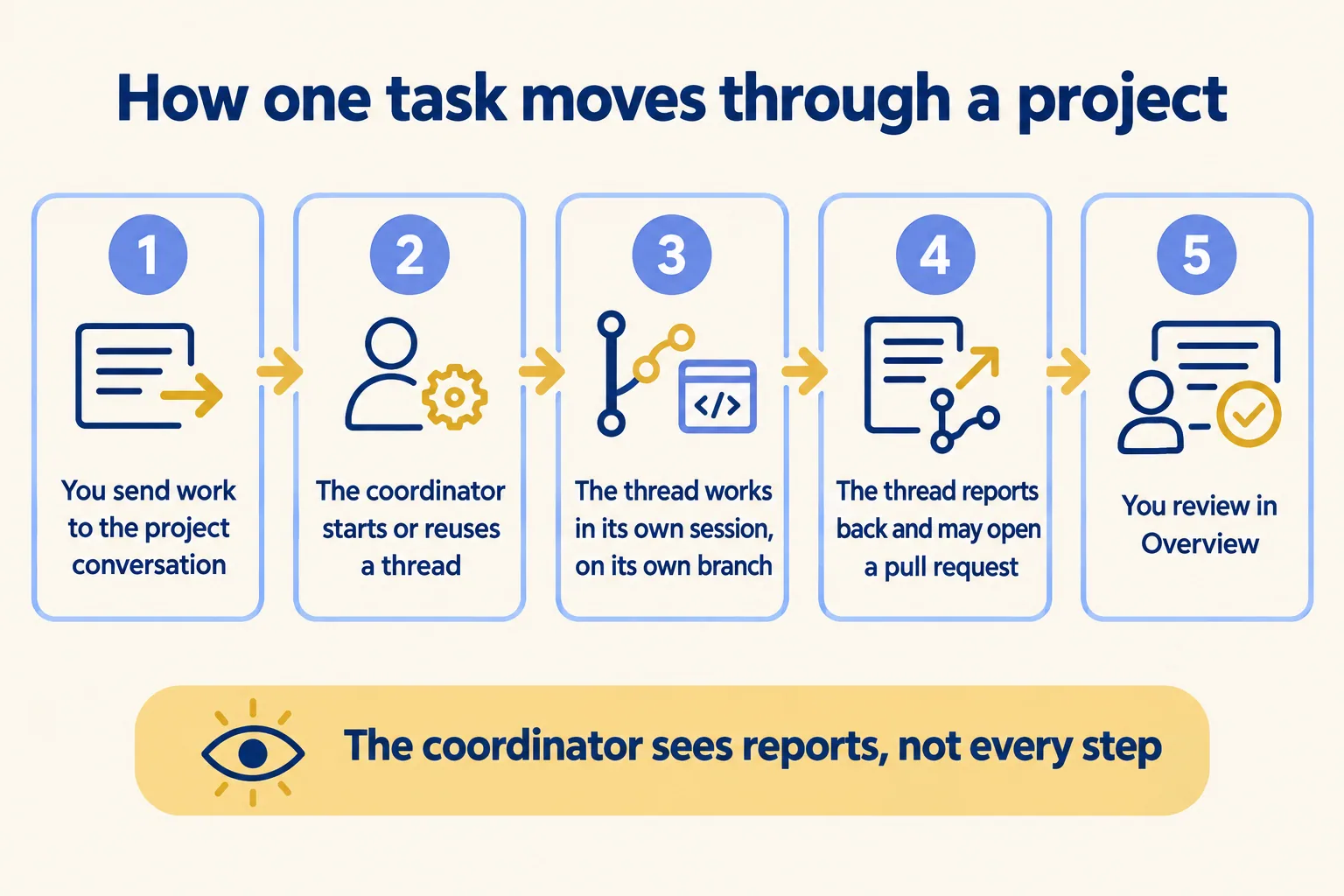
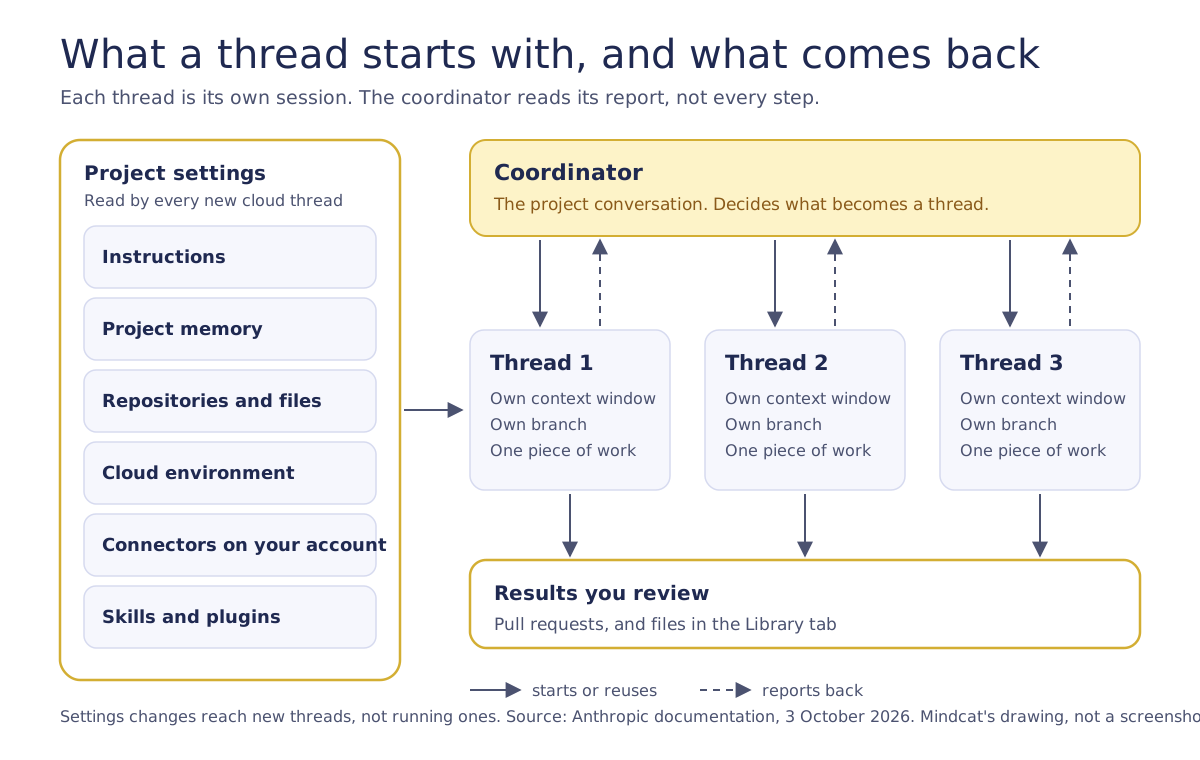
One conversation plus the threads it starts. The conversation is a long-running session where Claude acts as coordinator. It decides what becomes a thread and tracks each one, but it sees what threads report back, not every step they take.
A thread is a separate session with its own context window. It does one piece of work and reports back when it finishes. A cloud thread works on its own branch of the repository and opens a pull request when the work calls for one. A thread can still split its own work with subagents, loops and workflows. If two threads touch the same code, Anthropic says the overlap shows up as an ordinary merge conflict.
Every cloud thread starts with the same things: the project's repositories and files, its instructions and memory, the CLAUDE.md and skills in each repository, the connectors on your claude.ai account, and the cloud environment. Nothing from the Claude Code setup on your own machine comes along.
How do you set up a project, in order?
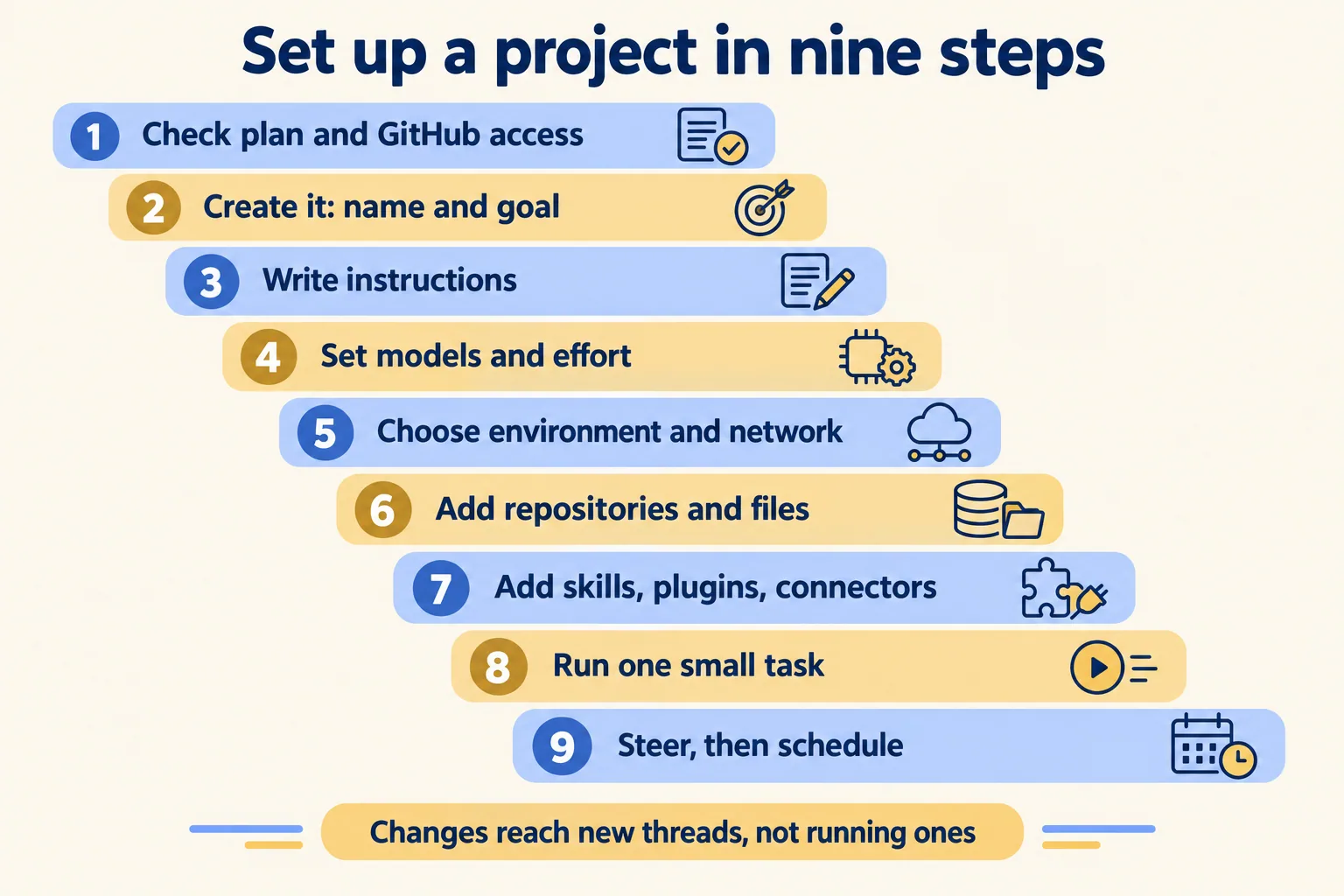
In nine steps, and the order matters because later steps read what earlier ones set. Settings you change after a thread starts reach new threads only, so a gap in step 3 or step 5 gets copied into every thread you launch before you notice. This order is ours; Anthropic's own first-batch list is shorter.
- 01Check the prerequisites: a Pro or Max plan with Projects in your sidebar, and for code, a repository on github.com with the Claude GitHub App installed.
- 02Create the project. Only the name is required. Add a one-line goal and the repositories or files it works on, or add them later.
- 03Write project instructions: the brief every thread starts from.
- 04Set models and effort for the coordinator and for threads.
- 05Choose the cloud environment: network level, variables, setup script, API credentials.
- 06Add context: repositories first, then files and folders in the Library.
- 07Add skills, plugins and connectors.
- 08Send one small piece of real work and open the thread to read what it did.
- 09Steer threads when needed, then put anything that repeats on a schedule as a routine.
Two details about creation. The goal is optional, and Claude in the conversation works toward it; without one, Claude works from the tasks you send. And on your first project, Claude takes a turn of its own as soon as the project exists, which uses your plan. It may start a read-only thread that explores the repository and post setup recommendations for you to switch on or off.
What should instructions, models and memory say?
Instructions say how a thread works, models set what it costs, and memory holds what must survive. Do these three before the first batch.
Write the instructions as a brief. Anthropic suggests covering what the project is for, where the work happens (repositories, starting branch, how to name pull requests), how a thread checks its own work, what to do when something is missing, and what needs your go-ahead. Its own example tells threads to stop and say exactly what is missing rather than substitute, mock or guess.
On models: a new project runs Opus everywhere, at high effort for threads and low effort for the coordinator conversation. Anthropic notes that the thread default draws on your plan fastest. The four settings (thread model, thread effort, coordinator model, coordinator effort) live in Project settings, General.
Project memory is a set of files Claude writes as it works: requirements, decisions, pitfalls. You can ask Claude to remember or forget something, and you can read, edit and delete the files under Memory. It is separate from the CLAUDE.md in each repository and from the auto memory Claude Code keeps on your machine. The conversation works from recent messages, recent threads and memory, so put anything that must never be dropped in memory. Rules about one repository belong in its CLAUDE.md; notes about the project belong in project memory.
What should the cloud environment allow?
As little as the work needs. Every new cloud thread starts in the project's cloud environment, which sets which domains it can reach, which variables it has, which API credentials are added to its requests, and what a setup script installs first. The default is an Anthropic-hosted environment with Trusted network access and nothing else configured.
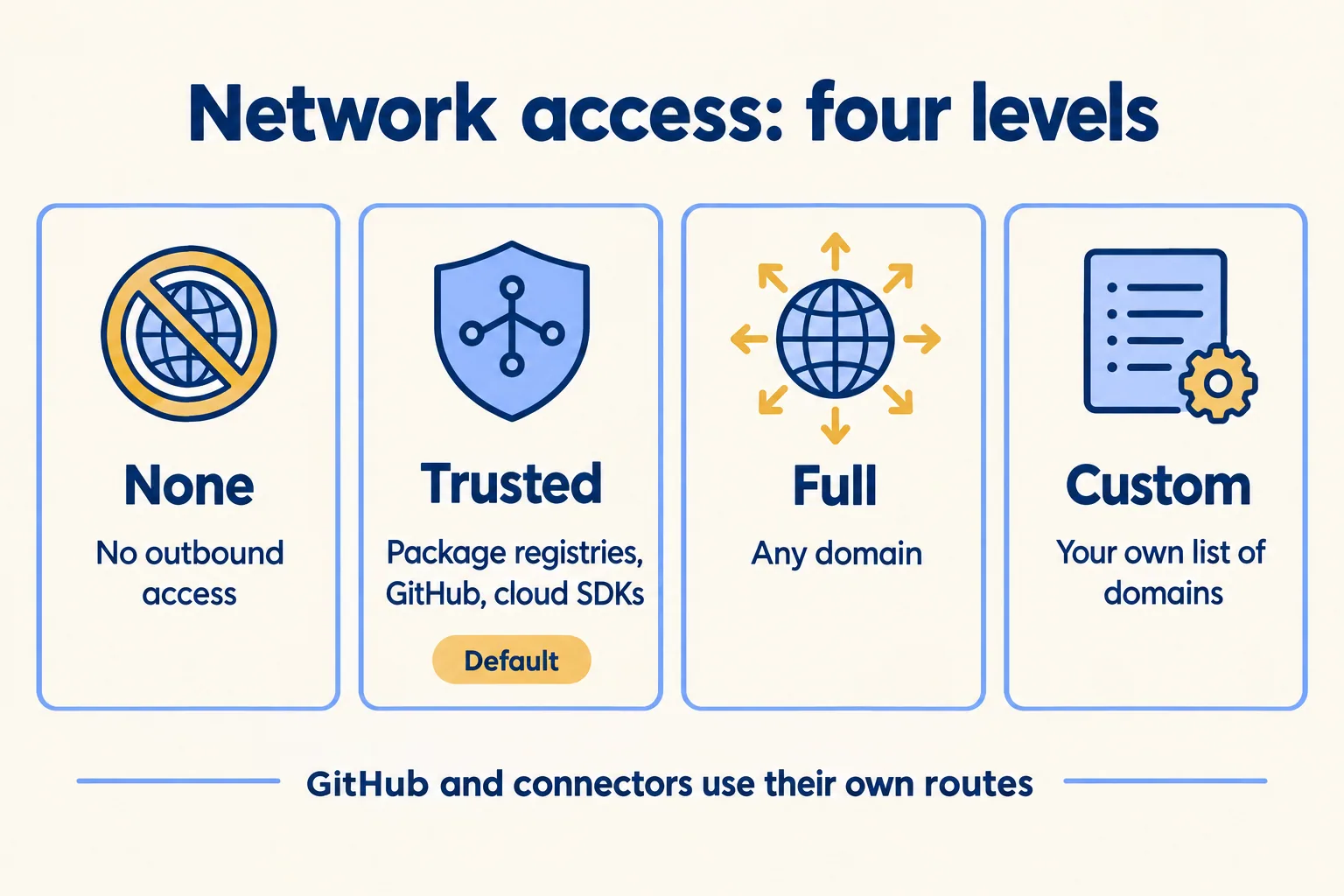
Three exceptions to read before you pick a level. GitHub operations go through a separate proxy that ignores this setting. Connector traffic travels through Anthropic's servers, so connectors work without their hosts on your list. And at None, Claude Code can still reach the Anthropic API. Package installs in a setup script fail at None.
Credentials need care. Anthropic says anyone who uses the environment can read its variables and setup script, and warns against putting secrets in them. On Pro and Max plans there is a narrower tool: an API credential stored on the environment. Anthropic's agent proxy adds the key to requests for the hosts you list, after the request leaves the session's VM, so the key never reaches Claude or the session's variables. You cannot view it after saving or edit it later; to change one, delete it and add it again. It does not apply to GitHub, the Anthropic API, public package registries or setup-script requests.
The setup script is Bash, runs as root on Ubuntu 24.04 before Claude starts, and fails the session if it exits non-zero. Keep it under roughly five minutes so the environment cache can build. Anthropic snapshots the result and rebuilds it when the script or the allowed hosts change, and after about seven days.
How do files, skills and connectors reach a thread?
By living somewhere a cloud thread can read: a repository in the project, a file in the Library, your claude.ai account, or the environment. Anything that exists only on your machine does not arrive.
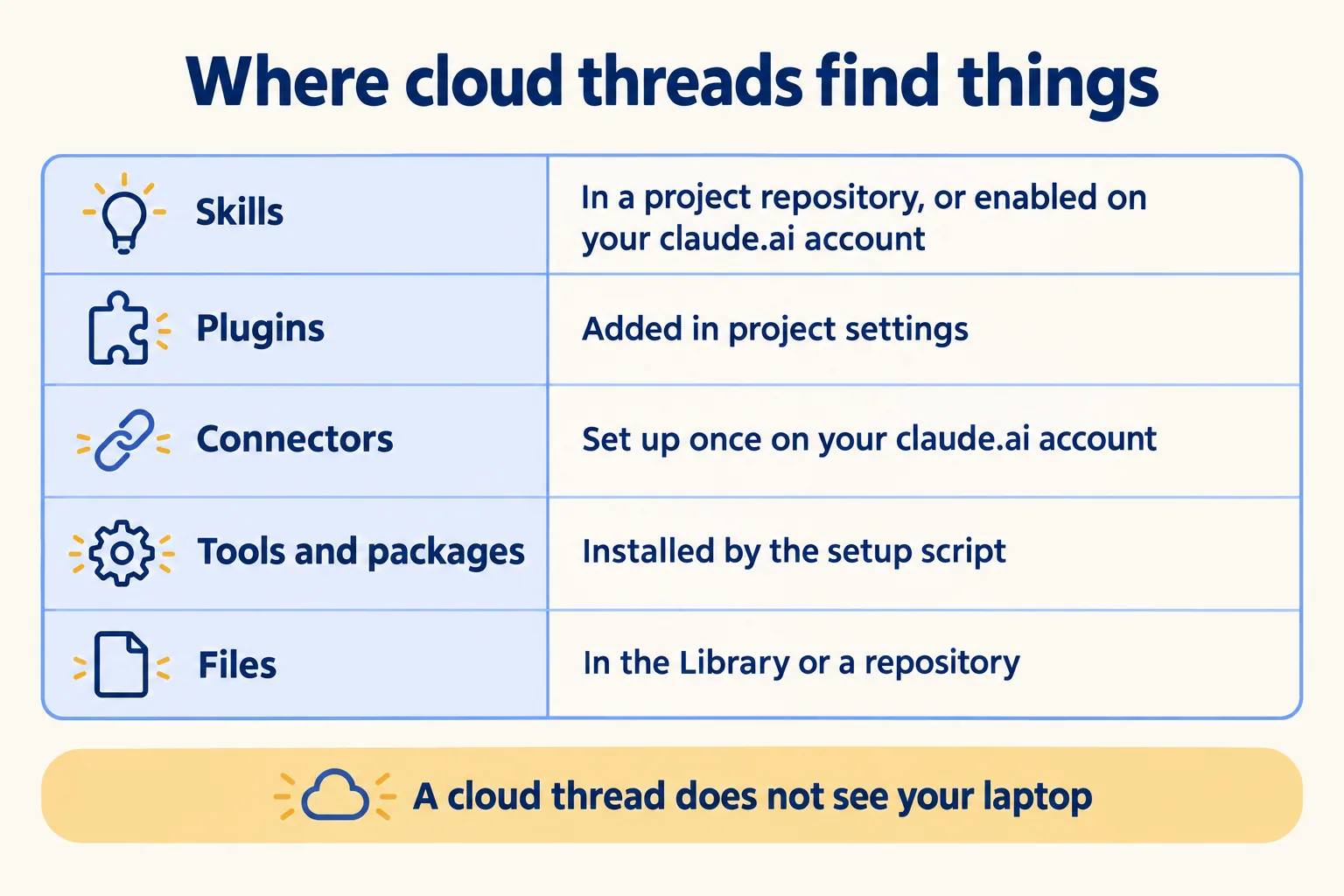
Repositories. Add the one or two that nearly every task touches, and name the others in the instructions. A thread can add another repository to itself mid-task; the next thread starts without it. A project needs no repository at all: its threads can research, write documents and deliver files to the Library.
The Library. Add files and folders from the New project dialog or the Library tab. On the tab you can add up to 100 files and 2 GB in one pick, and a single file can be up to 480 MB. The dialog skips files over 30 MB. A folder copies its first 100 files up to 200 MB, without hidden files or node_modules, and a project holds up to 10 folders and Google Drive folders. Uploads are copies: change a file on your computer and you upload it again and choose Replace.
Skills. There are two routes into a cloud thread. Commit the skill to .claude/skills/ in a repository you added to the project, or enable it for your claude.ai account. Skills in ~/.claude/skills/ on your machine do not load. A thread you run on your own computer uses what is installed there, so a skill that needs a local file or tool belongs to that route.
Plugins and marketplaces. A marketplace is a catalog Claude Code has to know about before you install from it. A cloud session has no plugin browser, so you add plugins to a project in Project settings, Plugins. Plugins you installed locally, or that a repository declares in its settings file, do not load in cloud threads.
Connectors. Cloud threads get their MCP tools from the connectors on your claude.ai account, and every cloud thread can use all of them, with no per-project choice. The coordinator conversation has no connectors, so send work that needs one as a task for a thread. In our reading of the documentation, a skill that calls a database or service outside the cloud runs under the environment's network level like any other command, and one that reads a local file will not find it. Test each skill in a thread before you rely on it.
How do you run, steer and schedule threads?
Send one small task first, then open the thread and read it. Each new thread appears under your message as a card. The Overview pane groups threads as Ready for review, Waiting on you, Working, Landing, Idle and Resolved, so you can see what needs you without reading every transcript.
To steer, open the thread and write in its own message box; that goes straight to the thread. A follow-up in the project conversation reaches a thread only when Claude matches it to that thread. Permission prompts also live inside the thread, and telling the coordinator to go ahead does not answer them. Stop, or Esc, interrupts a thread.
You can tell the coordinator how to run things: propose threads and wait for approval, run at most two at a time, post shorter updates. Claude saves these to project memory, but they are instructions it follows, not enforced limits.
When a cloud thread changes code it works on a new branch and, once it opens a pull request, watches that pull request with auto-fix on. It can push fixes when CI fails and answer review comments. Anthropic's cloud environments page says the GitHub proxy rejects branch deletions and pushes of anything other than a branch, but does not limit which branches a push can update. To restrict that, use branch protection rules or rulesets on GitHub.
For repeating work, ask Claude to put part of it on a schedule. It creates a routine that runs as threads in the project and appears on the Routines tab. Routines are a separate research preview, and a thread a routine started does not wait when it hits a usage limit; its turn stops with an error.
What does a project cost you?
It uses your plan faster than a single session does, and Anthropic says so. A project draws on the same plan limits as your other Claude Code sessions. Each running thread is a full session, several can run at once, and there is no fixed number. A thread limit you ask for is a preference, not a cap. The enforced limit is 200 new threads a day across your projects.
The coordinator spends tokens too, reading what threads report. A thread waiting on a pull request wakes up and uses your plan again when CI fails or a comment arrives. A follow-up sent to a thread that has been idle longer than the cache lifetime, an hour on Pro and Max within your limits, makes it re-read its whole conversation; for new work, a fresh thread can use less.
Project settings has a Usage section showing token use by thread and by model, and how much went to the conversation. A thread that reaches your plan's limit waits and continues when the limit resets. Spending beyond the plan happens only if you turned on usage credits.
Cloud threads or your own computer?
Our view, not Anthropic's: start in the cloud and run a thread locally only for the task that needs your machine. The documentation supports the split. A project still fits when only some tasks need your computer, and it does not fit when every task does.
Cloud thread or thread on your computer
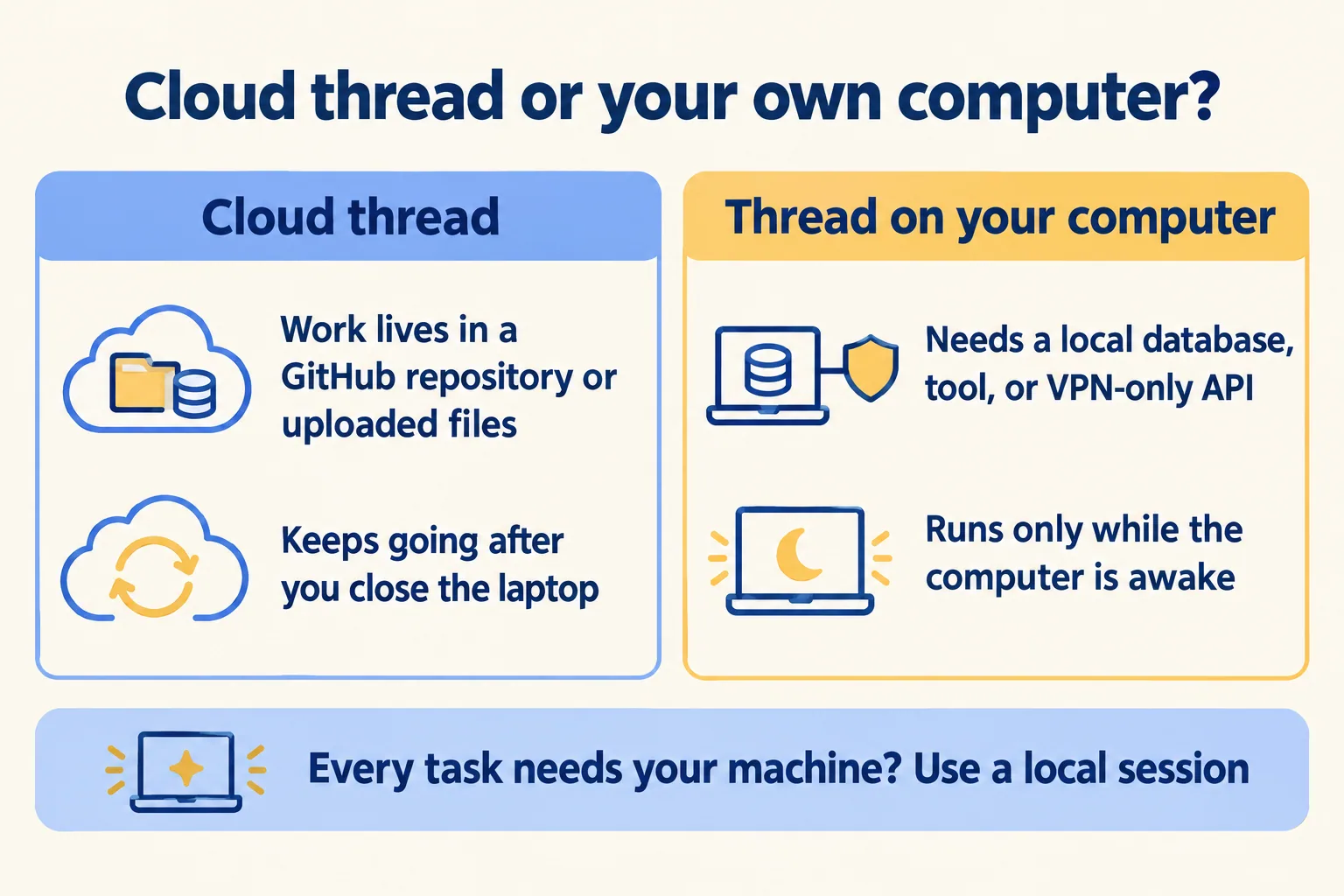
Pick cloud when the work lives in a GitHub repository or in files you can upload, and you want it to keep going after you close the laptop. Pick a local thread for a local database, a device emulator or an API behind your VPN. If every task needs the machine, use a local session instead. If your Salesforce metadata sits in GitLab, Bitbucket or GitHub Enterprise Server, projects cannot clone it today, because the documentation lists github.com only for projects. Plain cloud sessions have separate rules: Anthropic's cloud-session page says GitHub Enterprise Server is supported there on Team and Enterprise plans.
For a team weighing this against a governed agent platform: the beta is single-user, a project cannot be shared, and there are no organisation-level controls yet. We would treat it as a personal tool for one engineer's stream of work until that changes. Our control plane page describes what a team-level version needs, and our Claude enterprise deployment guide covers rolling Claude out to a team.
What are the gotchas?
Most of them come from the same fact: a cloud thread starts clean. Check this list before you build a habit on it.
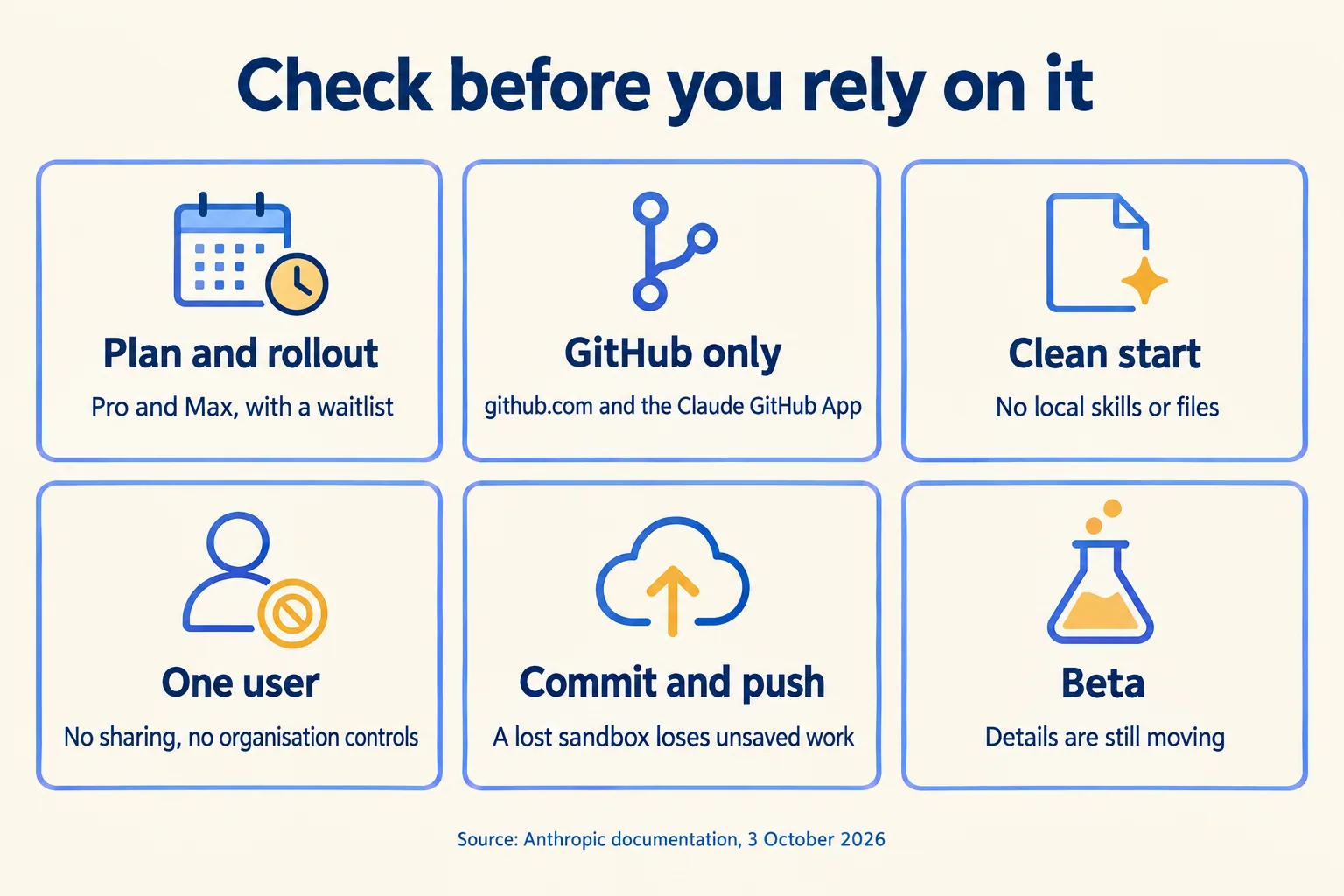
Two more. Settings changes reach new threads, so a fix to the instructions or the environment does nothing for a thread already running. And Anthropic's launch post said running threads on your own machine was coming very soon, while the current documentation already describes a Remote Control route for it, so expect the details to keep moving. A project also cannot run a thread on your computer while Require trusted devices is on for your account.
What would we do first?
One repository, one goal, Trusted network access, and one small task. Read the first thread's transcript before sending anything else. Where it guessed or stalled, fix the gap once in the instructions or the environment and send one more thread to confirm.

Then ask Claude to propose threads and run two at a time, and open the Usage section after the first real day. Add the Library, skills and connectors one at a time, so you know which one changed the result. Put a routine on anything that repeats only after a thread has done it correctly by hand.
Every thread ends in a pull request or a file. Decide before you start who reviews each one, because the person who merges it owns it. A yes only counts as a control if the system checks the action again at the write, which our post on human approval for AI agents shows in a tested case. Our spec-driven engineering guide sets out the same order for agent fleets: spec, shadow run, then a human gate.
