
If a returning customer shows up in your WhatsApp inbox as a stranger, this is for you.
What changes when a customer hides their number?
This is not for teams that have no one who owns the lead after the first reply. Fix that first, because a better-matched record still goes unanswered.
Your inbox used to know every customer by one thing: the phone number on the message. WhatsApp usernames let a customer chat with you without handing that number over. So the message arrives with a user ID, and your CRM has to decide who that is. In plain terms: a customer ID that Meta makes up for you, so you can still reply when you have no number.
Meta calls it a business-scoped user ID, or BSUID. According to Meta's developer page, it appears in the user_id field of every message webhook, whether or not the customer has a username. The phone number is the part that can go missing.
The question a sales or operations lead asks is not "are we compatible?" It is "will a customer we already know turn into a new contact, and will anyone notice?" The answer depends on two things in your setup, and both can be checked this week.

When does the number still arrive?
More often than the headlines suggest. Meta says phone numbers are still included in webhooks if any one of three things is true:
- You messaged or called the customer's number in the last 30 days.
- You received a message or call from it in the last 30 days.
- The customer is in your Contact Book.
The Contact Book is hosted by Meta, and you do no integration work. Once you send to or receive from a customer's number, the number and the user ID are stored, and later webhooks carry the number. It keeps only interactions after it launched, so older chats are not added. You can switch it off in Business Suite, and switching it off deletes what it holds. So the first check is the cheapest: is it on?
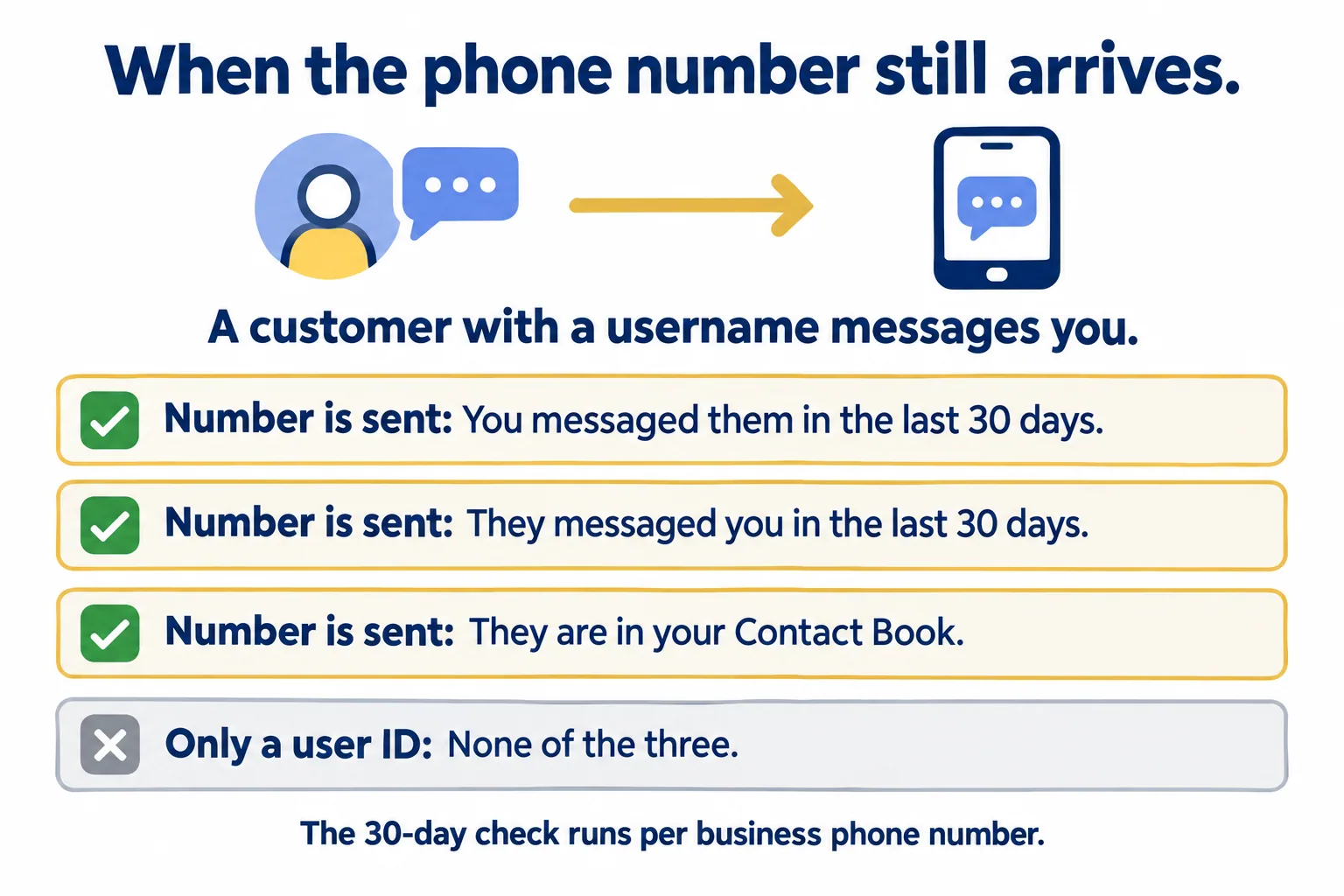
One detail catches teams with more than one number. The 30-day check runs per business phone number. If you message a customer from your sales number, Meta's page says webhooks for your support number will not include their phone number unless that number has also exchanged messages with them. Contact Books are scoped to the business portfolio, so a business with several portfolios records each customer in each one.
So the customer who arrives with no number is mostly a new customer who uses a username, or an old one you have not spoken to since before the Contact Book started.
How do you know if your CRM needs a fix?
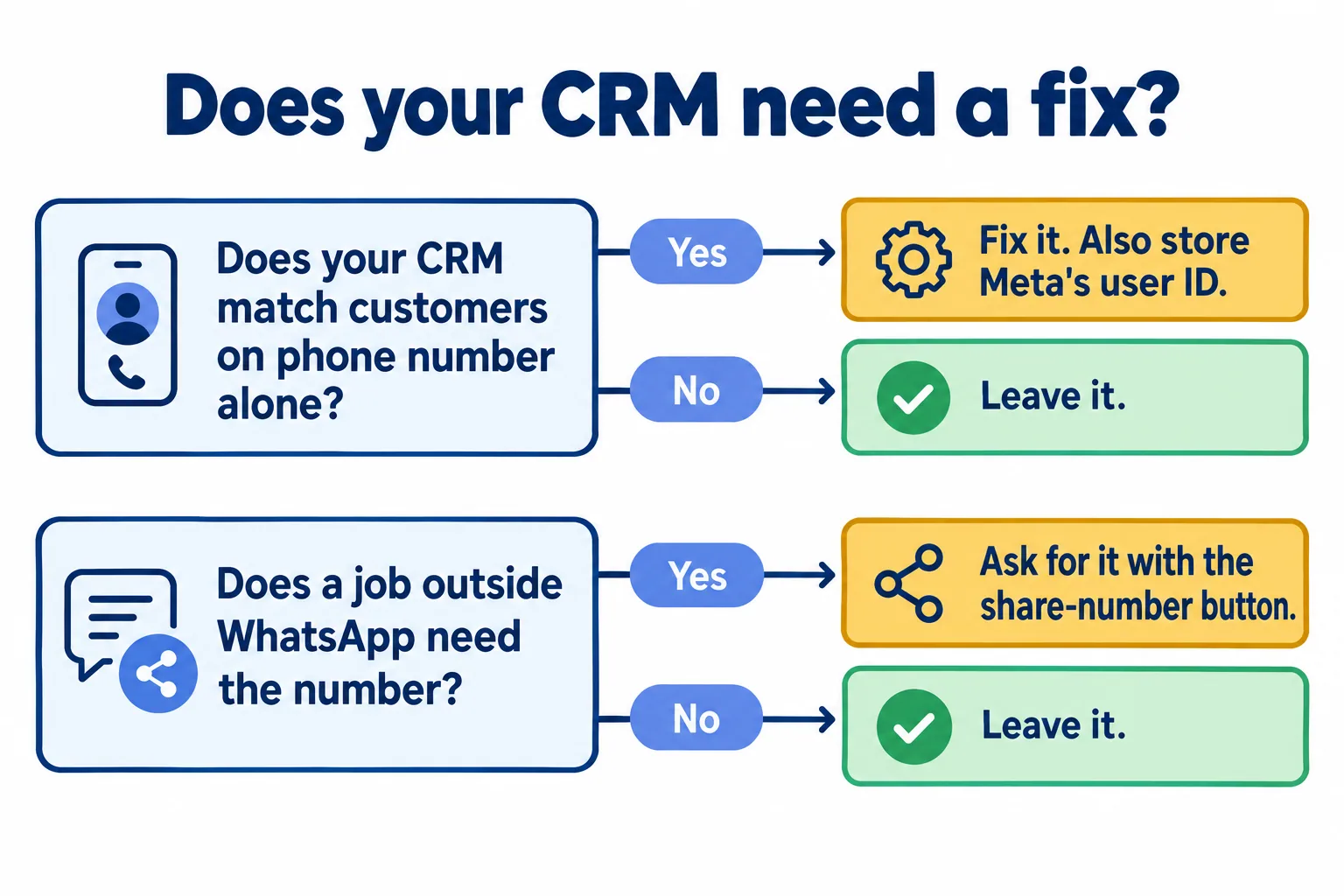
Ask one question: does it match a customer on phone number alone?
If it does, a message with only a user ID looks like a stranger. Nothing errors. The record just splits. A user of a popular shared inbox wrote this down as a prediction in March 2026, in Chatwoot's issue tracker, and the maintainers have since started adding support. The user's worry was that the inbox "will create a duplicate contact (new source_id with the BSUID) instead of matching the existing contact". Your own tool, or your Salesforce org, may do the same: if a duplicate rule or an import matches on the phone field only, a user ID will not match anything. Or it may not. The way to find out is a test, not a vendor email.
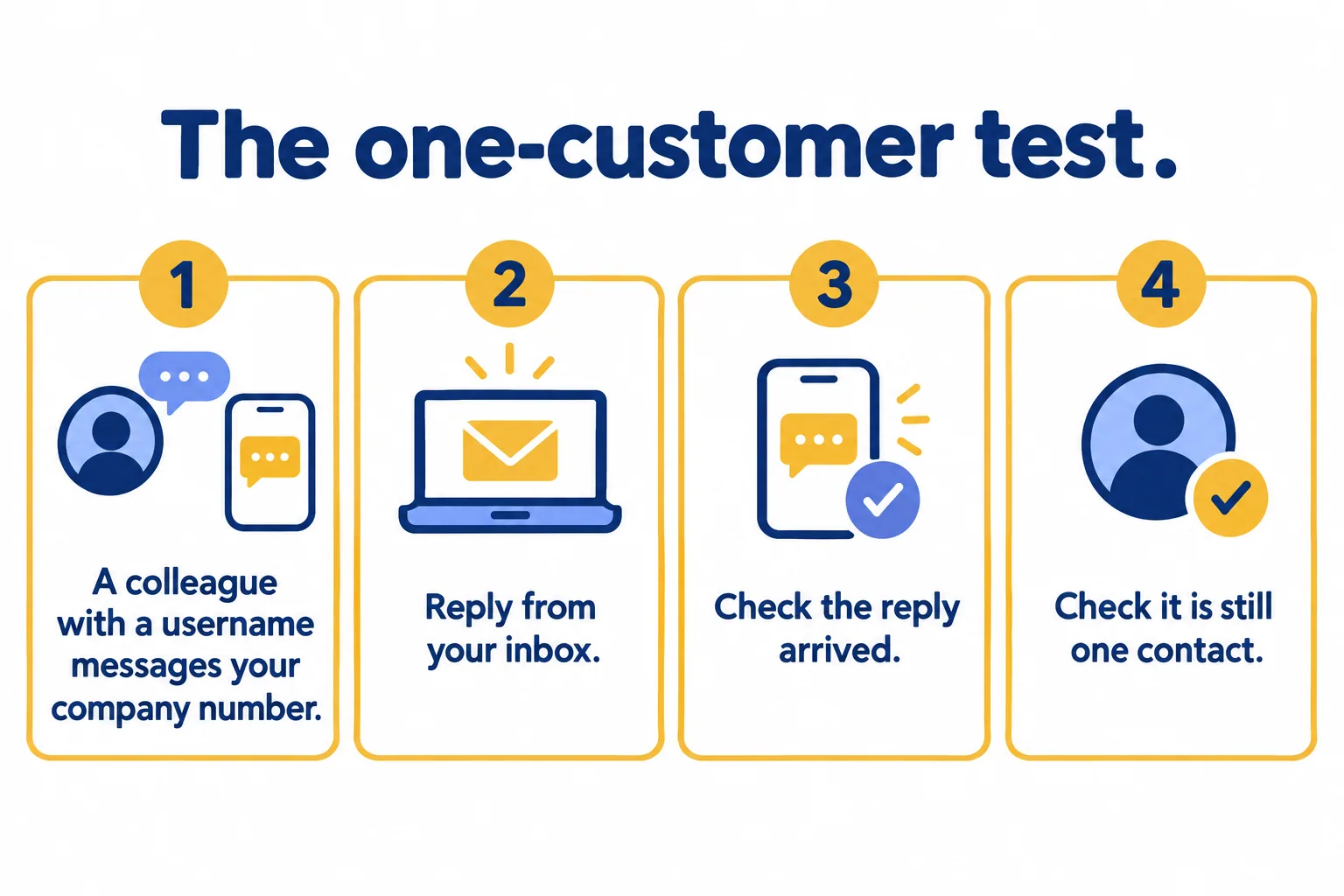
- 01Ask a colleague who has set a WhatsApp username to message your company number from a phone you have never messaged.
- 02Reply from your inbox, not from the phone.
- 03Check the reply reached them.
- 04Check you still have one contact for that person, and that the CRM stored the user ID next to the name.
Meta also lets you test webhooks that mimic a customer with and without a username, from the App Dashboard. Ask your provider whether they ran it.
Also run one report you already have: contacts created since April with no phone number, or two records with one name. That shows whether it has already happened. Someone with the right to merge records, usually your CRM admin, signs off the merges.
If the test passes, leave the setup alone. If the reply never arrives or you now have two contacts, the fix is small and specific: store the user ID next to the phone number, and match on the ID first.
What still needs the real number?
Anything that happens outside WhatsApp. Meta's page says the user ID can be used to send any type of message except the one-tap, zero-tap and copy-code authentication templates, which require the phone number. A send to a user ID for one of those returns error 131062. Meta lists the same ban as an error-code change.
A text message or an ordinary phone call from a delivery driver is the same problem. So is a broker who calls a lead back from a personal phone. Techweez put it plainly on 12 October 2026: the ID helps a business recognise a customer on WhatsApp, but businesses feel it "does not give them a number they can use to contact customers outside the app".
When a job needs the number, ask for it. Meta provides a request-contact-info button for utility and marketing templates and for interactive messages. If the customer taps it, their number is shared in the thread and a webhook carries it. They can decline. So do not ask on every first message. Ask where the job needs it, such as a delivery confirmation or a viewing reminder by text.
Which Gulf jobs does this touch?
Three that most Dubai teams run:
- A portal lead from Bayut, Property Finder or Dubizzle. When the buyer taps the WhatsApp button, the first message comes from a number you have never contacted, so Meta has nothing stored for it. If that customer uses a username, you get an ID and no number. A phone-keyed CRM files it as a new lead, and a broker may chase a person your colleague already spoke to.
- A click-to-WhatsApp ad lead. Same shape: a first message from a stranger, so ask whether your lead form maps the ID.
- A cash-on-delivery confirmation. The WhatsApp reply works. The driver's call does not, unless the customer shared the number.
Here is a sample, labelled as one, not a client case. A buyer taps WhatsApp on a Property Finder listing and writes to your company number from a username. Broker A replies. Next week the same buyer writes again, and the CRM, matching on phone alone, opens a second lead. Broker B calls to introduce themselves. The cost is not a lost lead. It is a warm buyer who now hears from two brokers. Banking, clinics and retail run the same two questions: does anything match on the number alone, and does anything outside WhatsApp use it.
Should you rebuild anything now?
Not on a headline. Techweez says "there is no clear evidence that large numbers of people are deleting their usernames". Budget one afternoon for your CRM admin or your WhatsApp provider: switch the Contact Book on, run the one-customer test, and write down which job, if any, needs the number.
At Mindcat, we write the job, the number and the system down before we build, and this list is the first page of that brief. We have not tested what every provider does with these IDs, so we cannot tell you yours is fine. The test can.
What to ask your provider
Put these in writing, and ask for an answer for each, not a general reassurance:
- Do you store Meta's user ID next to the phone number, and match on the ID first?
- What happens to a message with a user ID and no number: a new contact or a match?
- Can you reply to a customer who has only a user ID, and did you test it?
- Is our Contact Book switched on, and on which business account?
- Which of our jobs need the real number, and how do you ask for it?
If you want a second pair of eyes on the answers, tell us the job, the number and the system. We reply within 24 hours with a written assessment of what your setup needs, and where it needs nothing. How we connect WhatsApp to Salesforce is on our WhatsApp and Salesforce page.
