

If your sign-in page or enquiry form gets thousands of hits a night from the same few addresses, this is for you. It is not for a site that has seen no abuse yet and has no sign-in: the platform's default protection runs on every plan, and writing rules for traffic you do not have only adds things to maintain.
What does the firewall do before you write a rule?
Vercel runs DDoS mitigation on every request on every plan, with no setup, and does not charge for traffic it blocks. Then, in order, it applies your IP blocks, your custom rules and, on Enterprise, the managed rulesets.
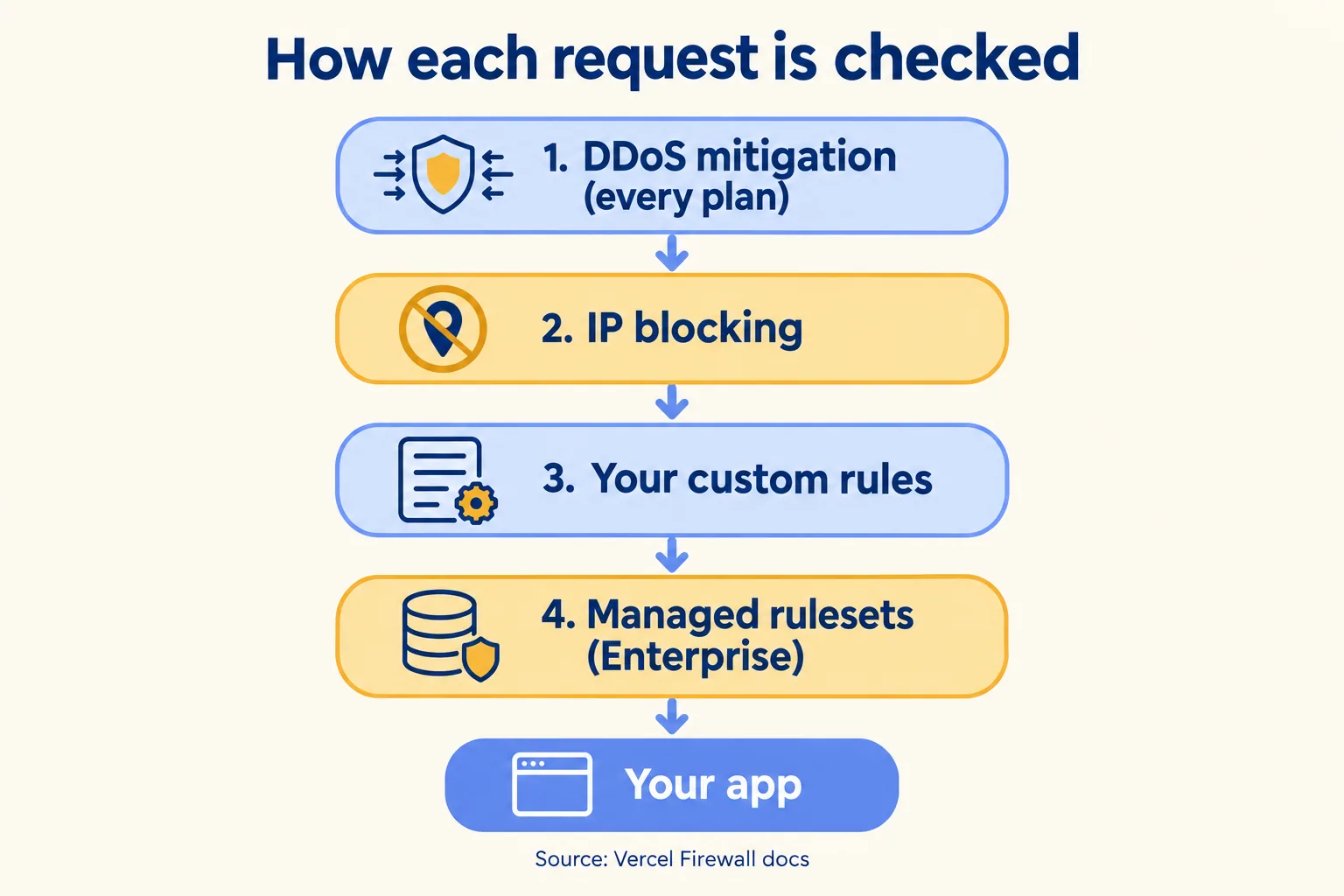
What the defaults do not do is know your site. They cannot tell that 300 sign-in attempts from one address in ten minutes is an attack and 300 page views is a busy morning. That is the job of the rules you write, and the reason the first rules should come from your routes, not from a generic list.
Is Pro enough, or do you need Enterprise rulesets?
For most business sites, Pro is enough. The limits, from Vercel's WAF docs as of 16 October 2026:
WAF limits by plan
Count your routes before you count rules: in the sample plan below, five rules cover a site with a sign-in and two forms, which leaves 35 of Pro's 40 for later. Each rule can match on more than 15 things, including path, country, IP, user agent, headers, cookies and the JA3 and JA4 fingerprints, and it understands framework routes such as /blog/[slug].
The line that matters is the third row. The OWASP core ruleset, the managed rules that look for injection and similar attacks, is Enterprise only. So on Pro the WAF does not answer the "how do you stop SQL injection" row of a security questionnaire. Your code does: parameterised queries, input checks, and a dependency scan. Do not write "WAF protects against OWASP Top 10" for a Pro app. Hobby is out for any business site anyway, because Vercel restricts it to non-commercial use.
Which rules do we write first for a property manager's site?
Five, in this order. Take a sample Dubai property manager whose site on Vercel has vacancy listings, a maintenance request form and an owner sign-in. This is a sample plan, not a client's setup.
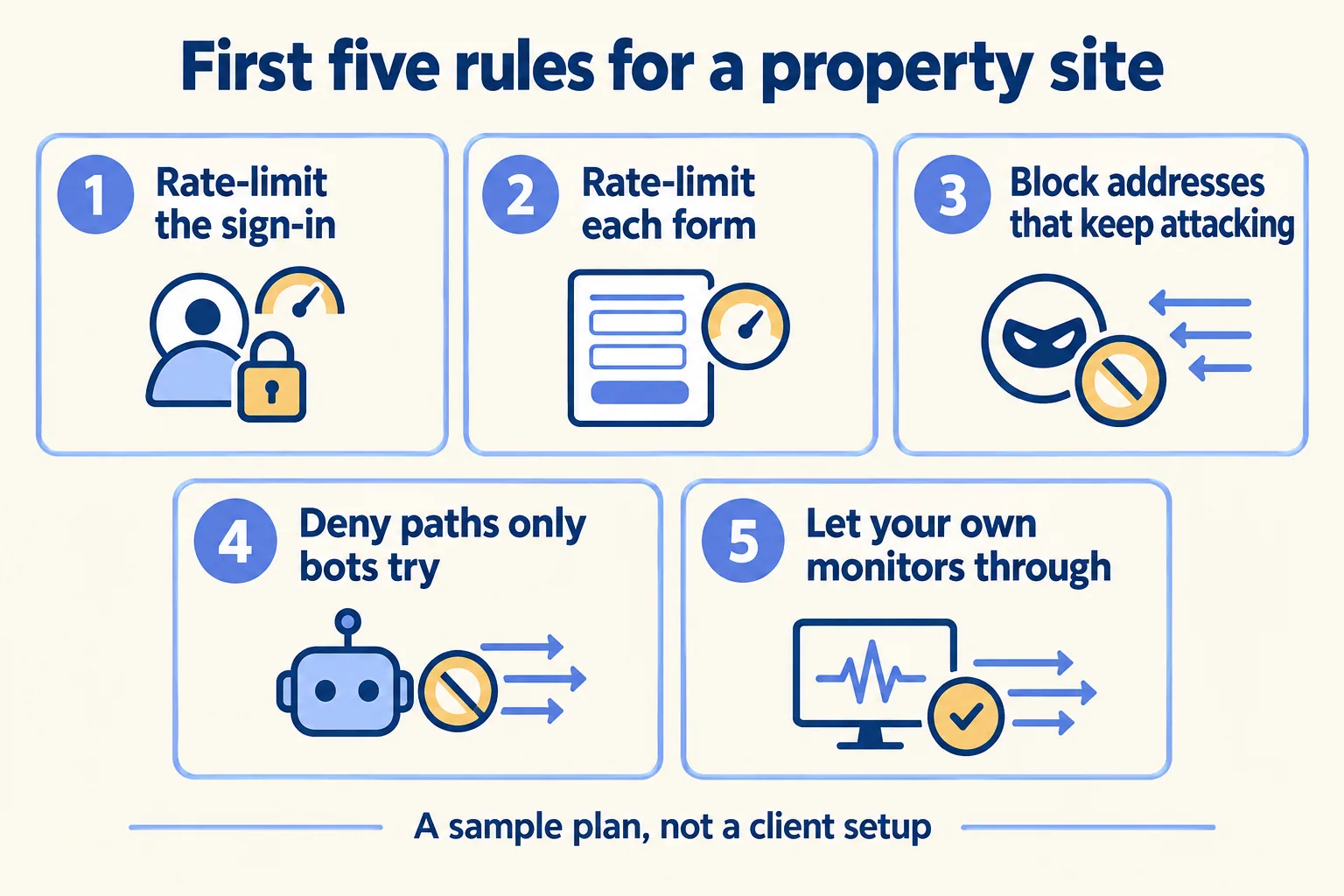
Two things we leave out on day one. A country block is tempting, but a landlord who lives abroad is a normal owner (we wrote about renewing an Ejari from abroad), and a block on their country locks out the people who pay the fees. A Challenge on the whole site adds a check for every tenant; put it on the routes that need it. For the sign-in and form work itself, our property management page shows the rest of the system the site feeds.
What does it cost to run?
Little in platform fees; the cost is in what each request does. These are Vercel's prices as of 16 October 2026.
- Free on every plan: DDoS mitigation, IP blocking and custom rules.
- Rate limiting: Hobby includes 1 million allowed requests a month. Pro starts at USD 0.50 per million allowed requests.
- OWASP managed ruleset (Enterprise): USD 0.80 to USD 1.28 per million inspected requests, priced by region.
- What you do not pay for: traffic the WAF denies, challenges or rate-limits adds no CDN Requests and no Fast Data Transfer. A request that passes a challenge and goes on to your app counts as normal usage.
Put numbers on a flood. One million sign-in attempts that reach your app are one million function invocations, USD 0.60 on Pro, plus the CPU time each one uses (from USD 0.128 per active CPU hour). That is small. The real cost is what each attempt does: a database lookup, a password check, a possible account lockout for a real owner, and, on a form, a fake record someone has to delete. If a route calls a language model, each abusive request is also a token bill, so put a rate limit on that route before any other. Denied or rate-limited at the firewall, the same million adds no CDN Requests and no Fast Data Transfer. Pro itself is USD 20 a month, with USD 20 of usage credit and one deploying seat, and usage after the credit is metered, so set a spend limit in the dashboard either way.
How do you switch a rule on without locking out tenants?
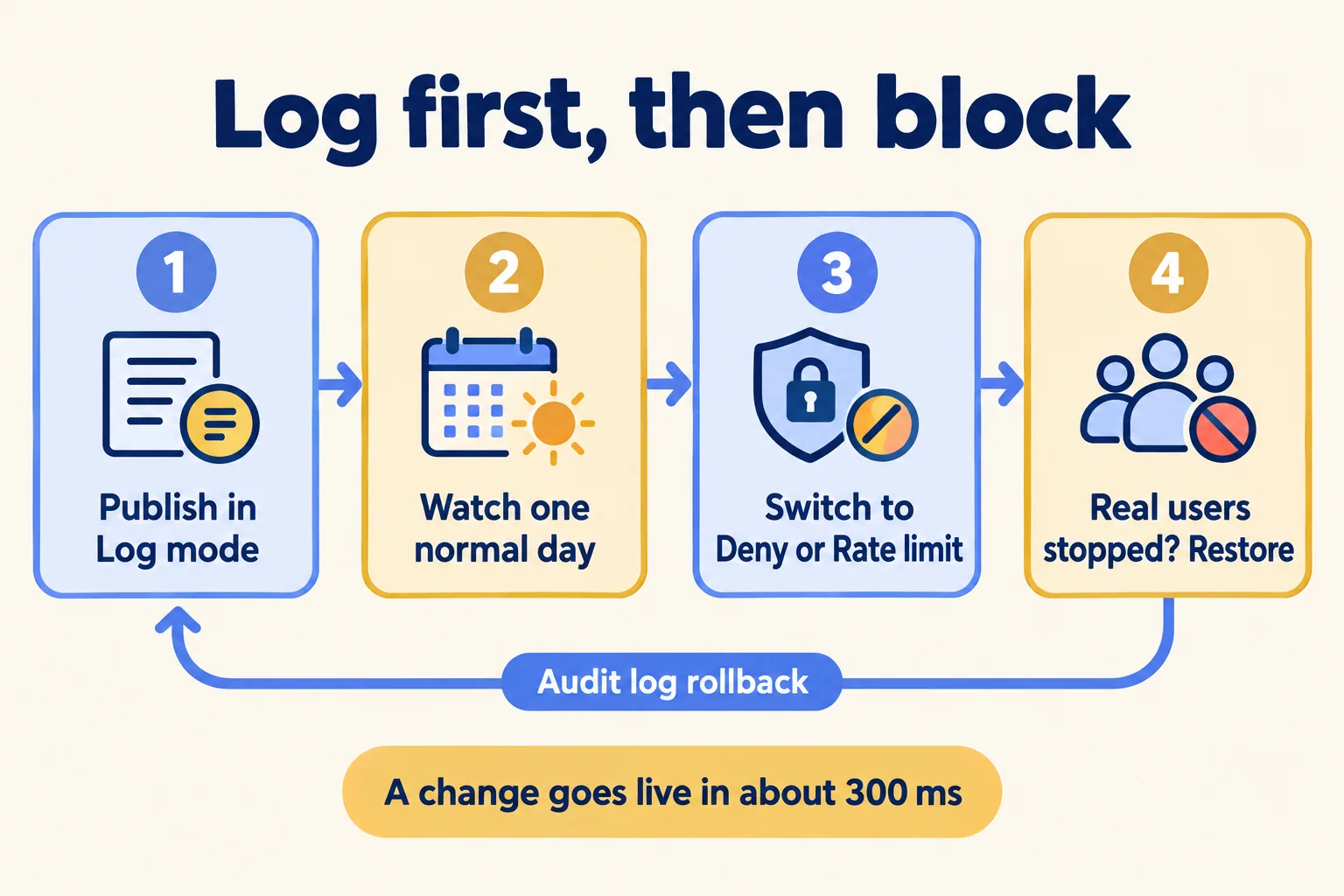
Log it first, for a full business cycle. Vercel lets you publish a rule with the Log action, so you see which requests it would catch before it touches anyone.
- 01Publish the rule with the Log action and note the current config version in the audit log.
- 02Watch it through a normal weekday and, for rent or payment routes, a month-end, when tenants pay and report faults.
- 03If it only catches what you meant, switch it to Deny, Challenge or Rate limit. Vercel says the change reaches every region in about 300 ms.
- 04If real users get stopped, restore the earlier version from the audit log, then fix the rule.
One thing to settle early is Cloudflare. If your agency put it in front of the site, Vercel's docs say its bot protection does not work behind a reverse proxy, so pick one layer for bot checks, not both.
Keep the rules in code once there are more than a few. Vercel lets you manage the firewall through its REST API, SDK or Terraform, and send firewall logs to your security tools through Drains. Then a rule change is reviewed like any other change, and the history lives somewhere other than one person's memory.
What happens on the first call?
If your site is on Hobby, or you have no sign-in, no forms and no abuse in your logs, wait: move to the right plan first, or leave the defaults to do their job.
If not, send us the site address and tell us which page is being hit; we pull the logs with you. We call the method Preview every change: each rule is tried on a preview deployment, a copy of the site only your team can open, and then in Log mode on production, before it blocks anyone. The written assessment lists the rules, the plan they need and what they cost to run. For the rest of what we build on the platform, see everything we build on Vercel. The assessment is free, and the first build week is a fixed AED/SAR 14,900, credited in full if you sign the build within 60 days. Run plans are on What you get. We are not a Vercel partner; Vercel is the product we build on.
