An e-commerce manager and a developer in Riyadh watch a laptop late at night during a big online sale.

Vercel · Security

A script hammers your login page in the middle of the sale. Block that one path at the firewall.

Failed logins pile up, a booking form floods overnight, one script drains your API. Today someone restarts a server and hopes. With the Vercel firewall, we write a rule for that one path, watch what it would block, then switch it on. The change reaches every region in about 300 ms, and blocked requests never reach your app.

Salesforce consulting partner since 2010 · MVP Hall of Fame · 200+ agents in production · UAE, India and US desks

The problem

Where abusive traffic hurts today.

What Web Application Firewall is

Web Application Firewall, in plain words.

Facts from Vercel’s own pages, checked on 16 October 2026. The sources are at the end of this page.

What a rule can do
Log, Challenge, Deny or Rate limit. A rule can run in Log mode first, so you see what it would catch before it blocks anything.
What a rule can match
15+ parameters, including path, location, IP, user agent, headers, cookies and JA3/JA4 fingerprints. Paths can be route patterns like /blog/[slug].
How fast it changes
A new config takes effect globally within 300 ms and can be rolled back to an earlier one instantly.
Order of checks
DDoS mitigation first, then IP blocks, then your custom rules, then managed rulesets.
Limits per plan
Custom rules: 3 on Hobby, 40 on Pro, 1,000 on Enterprise. OWASP managed rulesets are Enterprise-only.
What blocked traffic costs
Denied, challenged and rate-limited requests add no CDN requests or data transfer. Rate limiting on Pro starts at $0.50 per 1M allowed requests, as of 16 October 2026.


How it works

From an attack in the logs to a rule that holds.

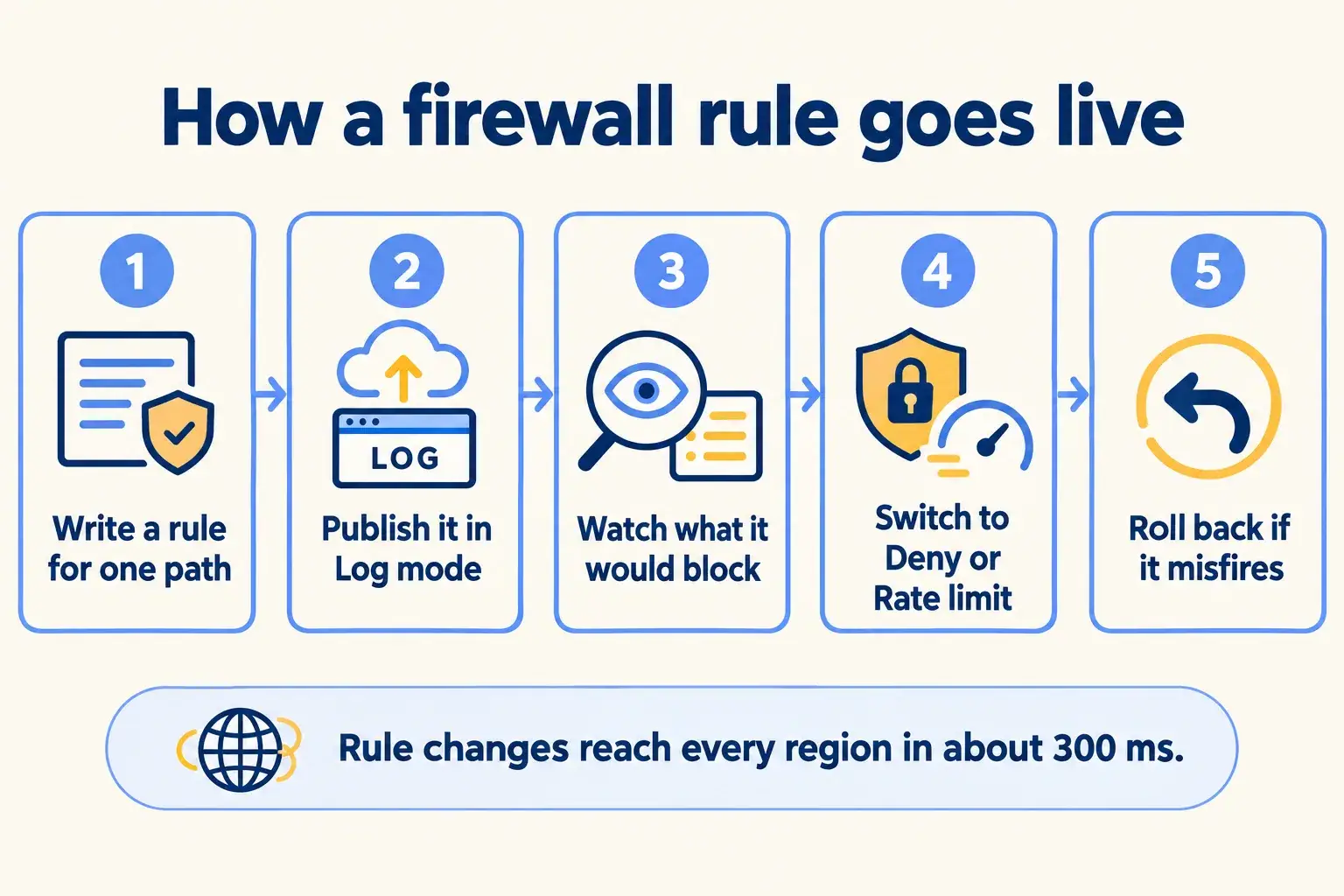
Five steps. Every rule is watched in Log mode before it blocks a real customer.

Five steps: write a rule for one path, publish in Log mode, watch what it would block, switch to Deny, roll back if needed.

Infographic

The same steps are written out below.

Step by step

What happens at each step.

  1. Write

    Write a rule for one path

    In Project, Firewall: the login route, the booking form or the API, with the conditions that match the abuse.

  2. Log

    Publish it in Log mode

    The rule records matches and blocks nothing.

  3. Watch

    Watch what it would block

    Check the matches against real customers before you switch it on.

  4. Enforce

    Switch to Deny, Challenge or Rate limit

    The change reaches every region in about 300 ms.

  5. Undo

    Roll back if it misfires

    Restore an earlier firewall config from the audit log.

How it fits together

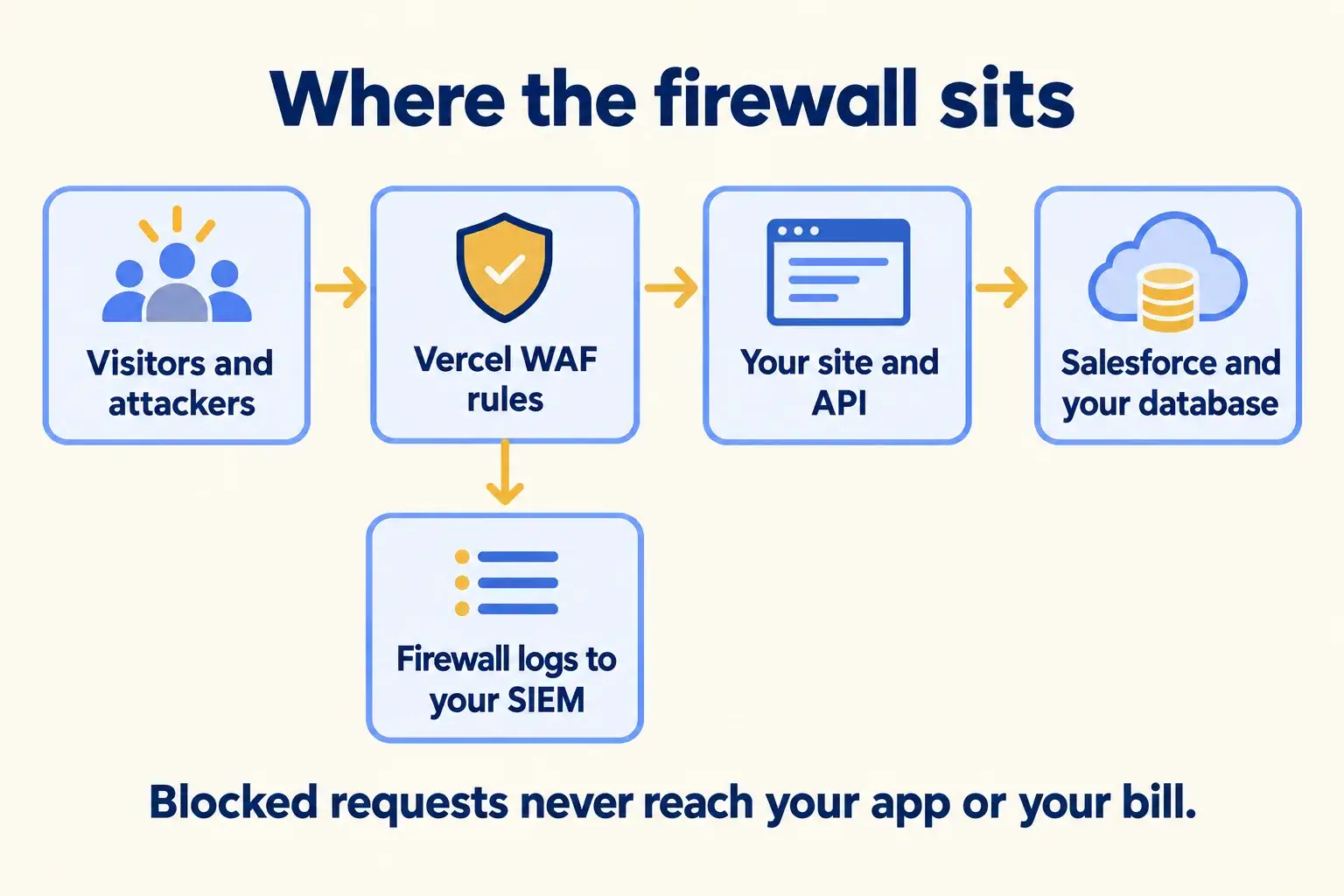
Where the firewall sits between visitors and your systems.

Every request meets the firewall before your site or API. Blocked traffic stops there, so it never reaches Salesforce, your database or your bill. Firewall logs can go to your SIEM through Drains, and the config can live in Terraform.

Visitors meet Vercel WAF rules before your site and API, which talk to Salesforce, with firewall logs sent to a SIEM.

Infographic

Where it sits next to the systems you run today.

Use cases · worked examples

One worked example in each industry.

How Web Application Firewall fits into the work of the industries we serve, one step at a time.

  1. A login attack during a sale is caught by a rate-limit rule in Log mode, then held back while shoppers check out.

    Example 1 · Retail and e-commerce, Riyadh · Infographic

    E-commerce manager at a Riyadh fashion retailer

    Today: On the first night of the sale, someone tried thousands of passwords on our login page. Checkout slowed down and real shoppers gave up.

    After: A rate-limit rule on the login route runs in Log mode for a few minutes, then switches on. Shoppers keep checking out while the guesses are held back.

    Worked example, step by step

    1. 21:10E-commerce manager. Sees failed logins climb and checkout slow down.
    2. 21:15Mindcat. Writes a rate-limit rule on the login route and publishes it in Log mode.
    3. 21:25Mindcat. Checks the matches: a few IP ranges, no real customer accounts.
    4. 21:27Mindcat. Switches the rule to Rate limit. It is live everywhere within a second.
    5. 21:30Shoppers. Checkout is back to normal speed.

    The sale keeps running, and the blocked guesses add nothing to the CDN bill.

    Retail and e-commerce
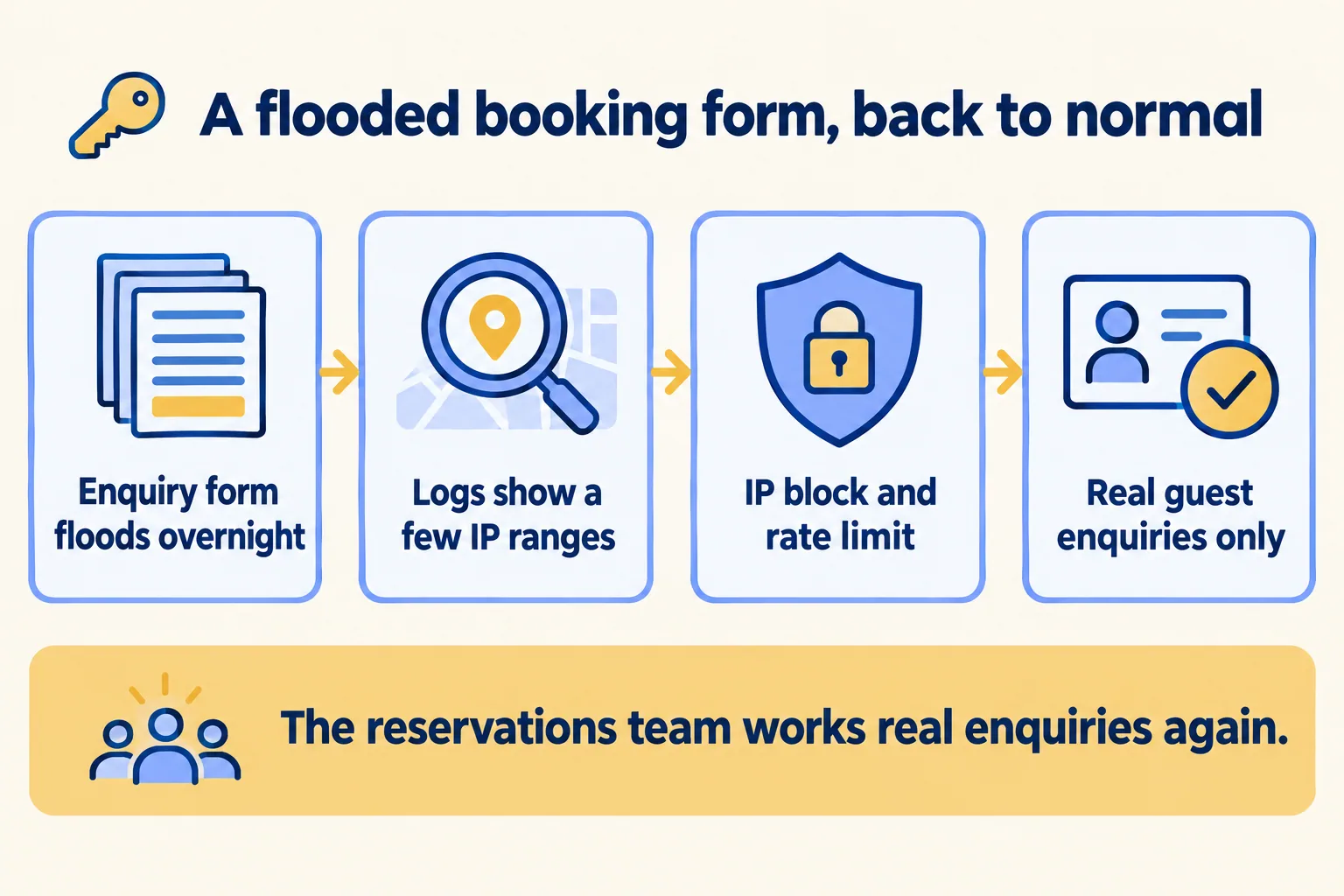
  2. A flooded booking form is traced in the logs, then stopped with an IP block and a rate limit, leaving real enquiries.

    Example 2 · Hotel apartments, Dubai · Infographic

    Reservations manager at a Dubai hotel apartments group

    Today: We woke up to hundreds of junk enquiries from the booking form. The real guest requests were buried, and Salesforce was full of fake leads.

    After: The firewall logs show where the junk came from. An IP block and a rate limit on the enquiry route stop it. Real guest enquiries still reach Salesforce.

    Worked example, step by step

    1. 07:30Reservations manager. Finds the enquiry queue full of junk.
    2. 08:00Mindcat. Reads the firewall traffic. Most of it comes from a few IP ranges.
    3. 08:10Mindcat. Blocks those IPs and adds a rate limit on the enquiry route, in Log mode first.
    4. 08:40Mindcat. Switches both rules on.
    5. 09:00Reservations team. Works only real guest enquiries in Salesforce.

    The team spends the morning on guests, not on deleting junk.

    Hotel apartments
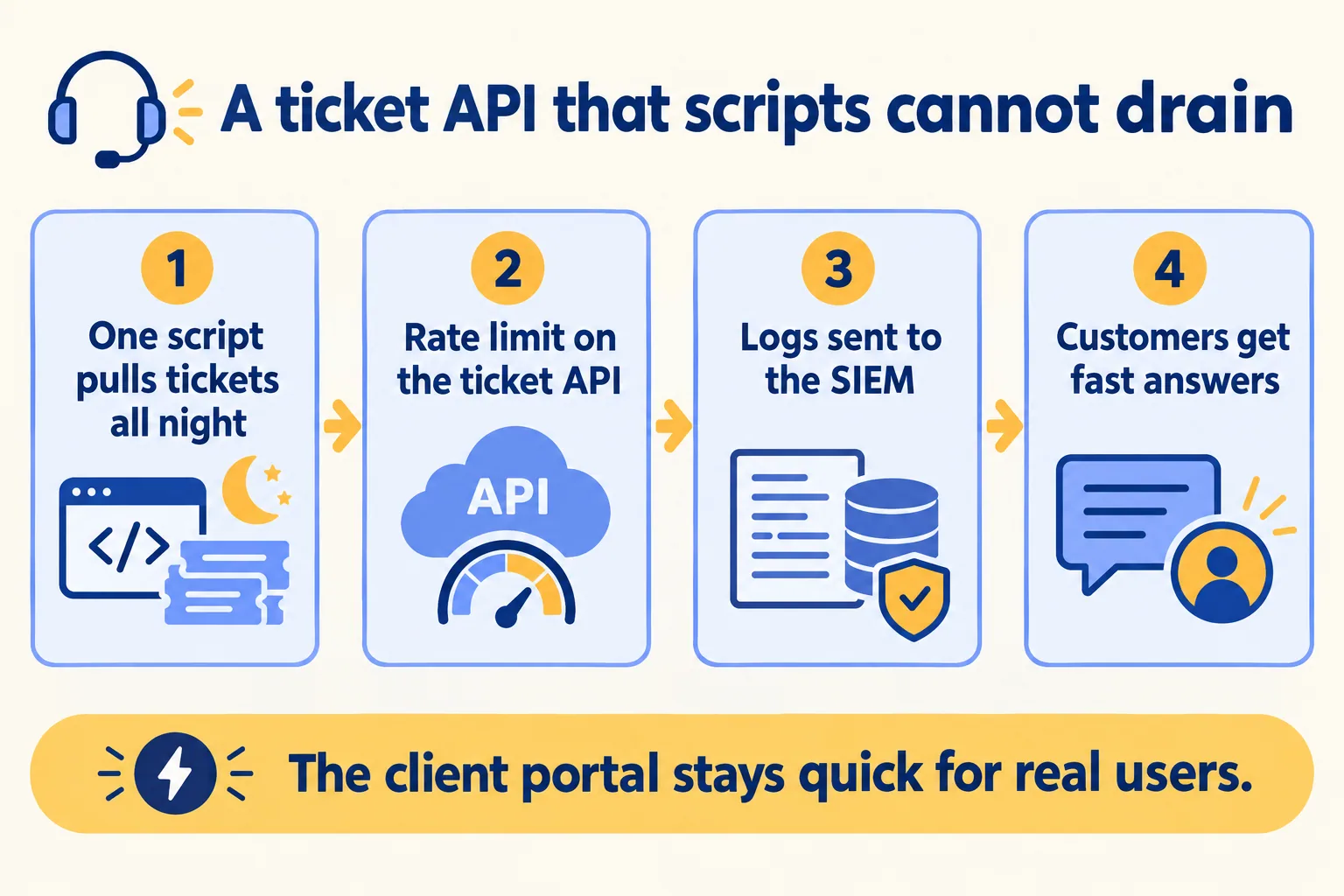
  3. A script draining a ticket API is held back by a rate limit, with firewall logs sent to the SIEM.

    Example 3 · IT service desks, Bengaluru · Infographic

    Service delivery head at a Bengaluru managed IT company

    Today: One client’s script pulls our ticket API all night. Other clients complain the portal is slow every morning.

    After: A rate limit on the ticket API caps each client. Firewall logs go to the company’s SIEM through Drains, so security sees the same picture.

    Worked example, step by step

    1. 09:00Service delivery head. Reports a slow portal for the third morning in a row.
    2. 10:00Mindcat. Finds one client’s script calling the ticket API every second.
    3. 10:30Mindcat. Adds a rate limit on the ticket API route, in Log mode.
    4. 14:00Mindcat. Switches it on and sends firewall logs to the SIEM through Drains.
    5. Next dayClients. The portal is quick in the morning again.

    One script no longer slows every other client, and security sees each block in its own tools.

    IT service desks
Examples of the work, not client stories. Times in each example show the order of events, not a measured result.

Is it for you

When Web Application Firewall fits, and when it doesn’t.

Good fit

Not for you yet

Logins, forms or APIs get abused
You need OWASP managed rules on Pro: they are Enterprise-only
You need to block traffic without a code change
You expect a firewall to block every attack
Your site or app runs on Vercel Pro or Enterprise
The app is hosted somewhere other than Vercel
Security wants firewall logs in its own SIEM
You need more than 40 custom rules on Pro

What Mindcat does

We build it, then we run it.

The assessment is free: a short read of the org and a written note. If you go ahead, the first build week is a fixed AED/SAR 14,900 (about USD 4,050), credited in full when you sign the build within 60 days. After go-live, we keep it patched, watched and changing every month.

FAQ

What teams ask about Web Application Firewall.

Will a rule block real customers?
It can, which is why every rule we write runs in Log mode first. We check the matches against real traffic, then switch it on. If something misfires, the earlier config comes back in one step.
Do we pay for traffic the firewall blocks?
Vercel says denied, challenged and rate-limited traffic adds no CDN requests or data transfer. Rate limiting itself is metered: on Pro it starts at $0.50 per 1M allowed requests, as of 16 October 2026.
Do we get the OWASP rules?
Only on Enterprise. OWASP managed rulesets are an Enterprise feature, priced by inspected requests. On Pro we write custom rules for the paths that matter, up to 40.
Can the firewall be bypassed?
Vercel says a request cannot bypass the firewall once it is enabled. A firewall still only stops what its rules describe, so we review the rules against real traffic after go-live.
Can our security team see the blocks?
Yes. Firewall logs can go to a SIEM through Drains, and the config can be managed by API, SDK or Terraform.

Sources

Where these facts come from.

Start here

Tell us what you want built, and where it runs today.

One or two lines is enough. You hear back within 24 hours from the person who signs the work.

Salesforce consulting partner since 2010 · MVP Hall of Fame · 200+ agents in production · UAE, India and US desks