
If orders, enquiry emails or CRM updates from your website or web app go missing on busy days, and your developer says a slow step timed out, this is for you. It is not for a site whose background work takes a second and loses nothing when it fails (run it in the request), or for a company whose platform team already runs its queues. If your site still runs on an old server, the queue comes after the move; our hosting page sets out what a move involves. A queue takes the slow step out of the visitor's request and keeps trying until it is done. Vercel Queues is one way to do that on Vercel, and it is in Beta.
What problem does a queue solve here?
It moves slow or failure-prone work off the visitor's request. The request saves a message and returns at once; a separate piece of code, the consumer, does the work, and a failure means a retry, not a lost job. Vercel's own list of uses: defer expensive work like emails, PDFs or external API calls; absorb traffic spikes; retry failed work; schedule tasks; drop duplicate publishes; and run separate pipelines from the same messages.
The failure it fixes is quiet. A courier's order webhook calls the label service, the label service is slow at lunchtime, the function times out, and the order never reaches the driver's app. Nobody sees an error page. The order just is not there.
What does Vercel Queues promise, and what does it not?
Read both lists before you design the consumers. The promises are strong, and the gaps are exactly where bugs come from.
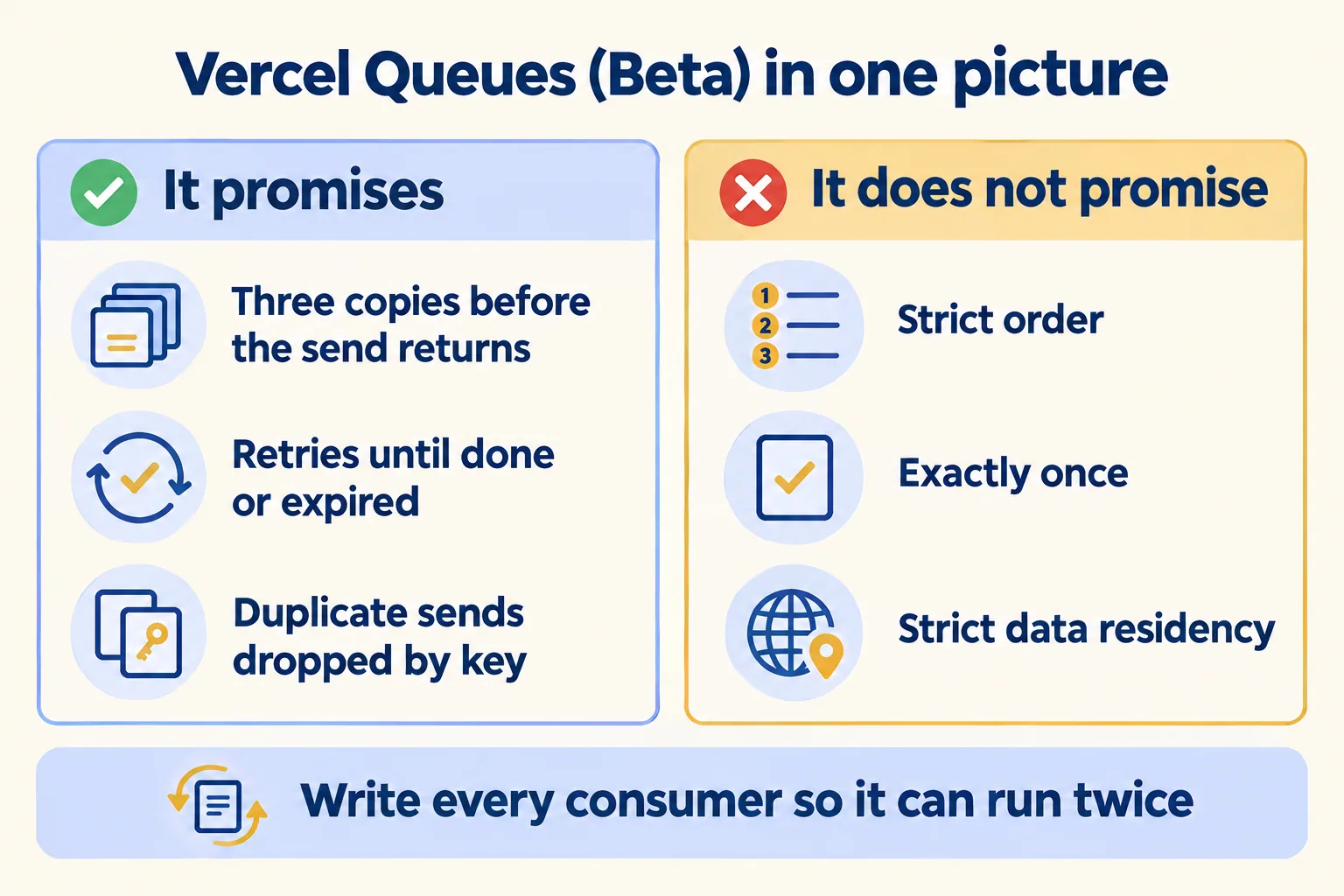
At-least-once is the line that changes your code. In plain terms: now and then the same job arrives twice. Vercel says that in most cases a message is delivered once, but in rare events, such as an availability zone failover, a delivered message may come again. So a consumer that sends a WhatsApp update must check whether it already sent it. Setting a value is safe twice; adding to a count is not.
The limits, as of 16 October 2026: messages are kept from 60 seconds to 7 days (24 hours by default), a delay can be up to 7 days, a receive takes up to 10 messages, and a message can be up to 100 MB. After 32 attempts, retries move to a forced backoff.
Queues or Workflows: which one?
This one is a decision for your developer, so here is our rule to hand over. Vercel calls Queues "the lower-level primitive that powers Vercel Workflows." Our rule: use Queues when one message triggers one or more independent jobs. Use Workflows when a business process has steps that depend on each other, or must wait longer than 7 days.
A label PDF, a WhatsApp update and a CRM update are three separate jobs from one order: that is a queue with three consumer groups. An onboarding that waits for a signed document, then a payment, then a call is a workflow. Vercel's docs suggest Workflows over chaining delayed messages when you need to wait past the 7-day limit.
What does it cost to run?
Queues is billed per operation, and the price depends on the region. As of 16 October 2026, Vercel lists $0.60 per million operations in Washington D.C. (iad1) and $0.6816 per million in Mumbai (bom1). Hobby includes the first million; Hobby is also for non-commercial, personal use only, so a business runs on Pro.
For your developer, the detail behind the price. Five things count as operations: a send, a receive, a delete (the acknowledgement), a visibility change and a notify (a push delivery). Messages are metered in 4 KiB chunks, so a 12 KiB message counts as three. A send with an idempotency key counts double. The function that does the work is billed separately, at normal compute rates.
A sum, with our assumptions stated. With the order ID as the idempotency key, the send counts as 2. Each of three consumers adds at least a notify and a delete, so an order costs at least 8 operations before any retry; we budget 12. At 300,000 orders a month that is 3.6 million operations, about $2.45 (about AED 9) in Mumbai. Check the real count on the usage page in the first week.
Put that next to the rest of the bill. Pro is USD 20 a month (about AED 73) with one deploying seat and USD 20 of usage credit; extra deploying seats are USD 20 and viewer seats are free. The bigger line is the compute each consumer runs, billed at normal rates, and any model calls inside it. The assessment measures that line from your own traffic.
Why can a rolled-back deployment keep running?
Because messages stay pinned to the deployment that published them. This is the detail to read twice, and Vercel's docs state it plainly: promoting or rolling back to another deployment "does not stop deliveries to the old one."
So picture a bad release. It runs in production for ten minutes, publishes messages its consumers cannot handle, and you roll back. The old deployment's consumers "keep being invoked, and keep being retried," for up to the retention period, 24 hours by default. That is a day of failing compute from a release you thought you had undone.
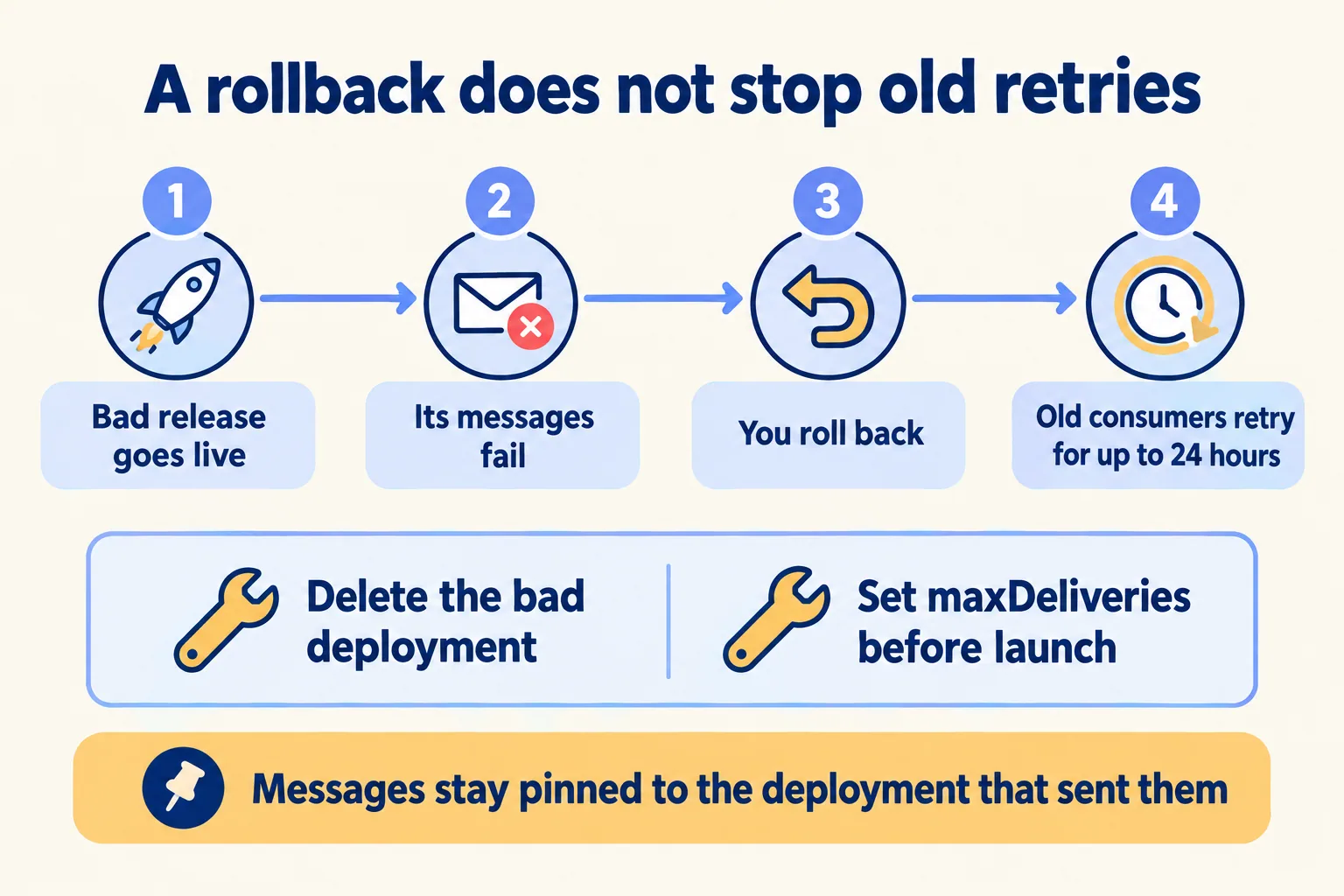
Vercel gives three fixes. Delete the bad deployment, and Vercel stops invoking its functions at once. Set maxDeliveries on the trigger, so a message that keeps failing is dropped after a set number of tries. Or return { acknowledge: true } from the retry callback for messages you know are bad. We set maxDeliveries before the first release, and add a dead-letter step so dropped messages are logged, not lost.
The same pinning helps you in a normal release: a new deployment never reads messages in an old format, so you can change the message shape without a migration.
What changes when a consumer calls a model?
Every retry can bill tokens again. At-least-once delivery is cheap for a consumer that sets a field. For one that calls a model, a repeat delivery is a second model call, and a retry loop is a token bill. So the model step needs its own rules.
- 01Store the model's result keyed by message ID before acting on it. On a repeat delivery, read the stored result instead of calling the model again.
- 02Give each model step its own consumer group, so its compute and its tokens can be metered as one step.
- 03Set a lower maxDeliveries on model steps than on cheap ones, and send what runs out to a person.
- 04Put IDs in the message, not phone numbers or order details. The consumer reads the rest from your own system, so the queue holds less personal data.
On lock-in: Vercel's poll mode lets a consumer read these queues "from any environment", outside Vercel too. Keep the send and receive calls behind one small module, and an exit path stays open while the product is in Beta.
What does this look like for a courier?
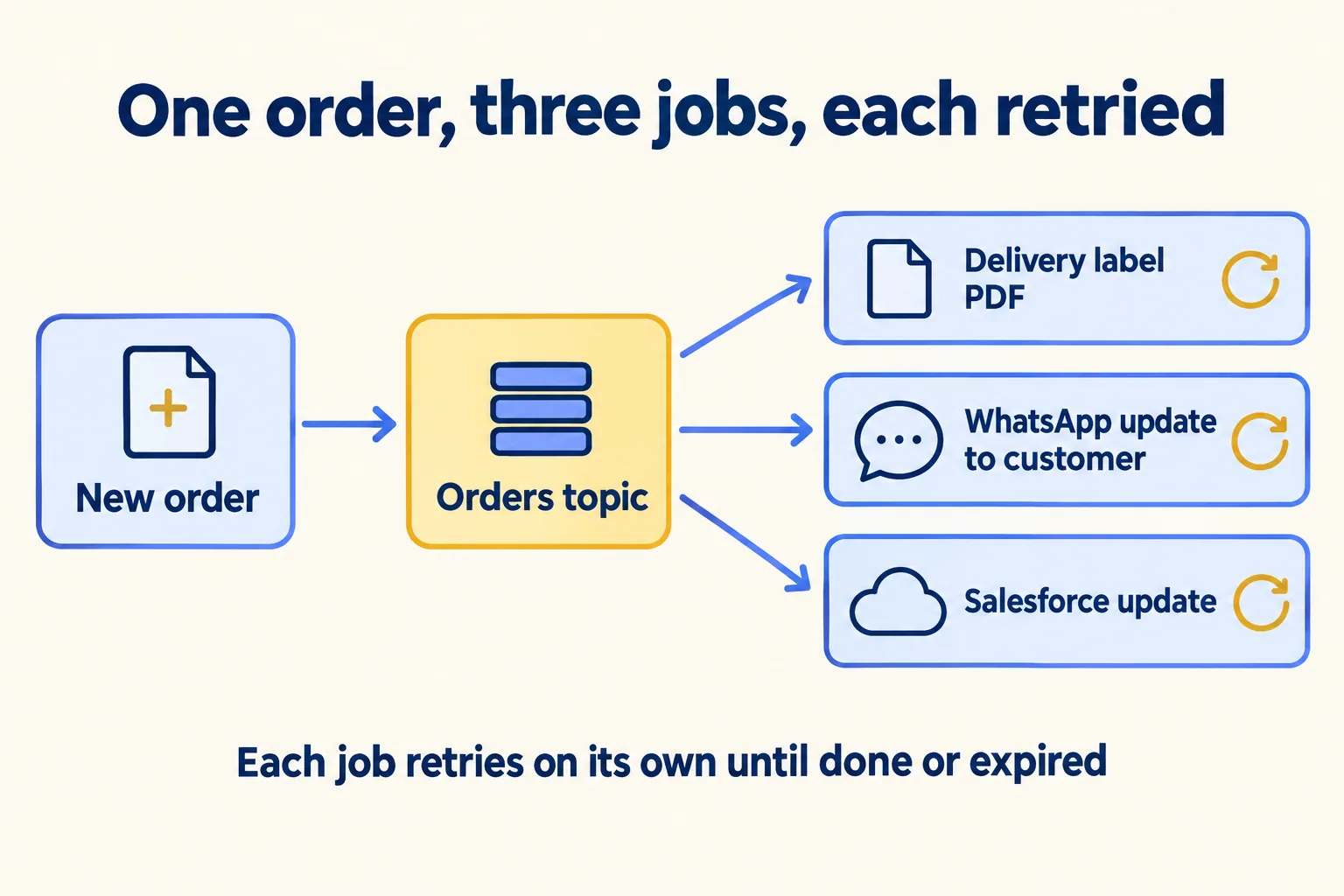
Here is a worked example, not a client. A courier and delivery company in Dubai takes orders from its site and from partner webhooks, with a spike at lunch. Each order needs a delivery label PDF, a WhatsApp update to the customer and an update in Salesforce.
- 01The order route validates the order, sends one message to an orders topic with the order ID as the idempotency key, and replies at once.
- 02Three consumer groups read the same topic: labels, WhatsApp updates and Salesforce updates. Each one retries on its own.
- 03Each consumer checks the order ID before acting, so a repeat delivery does nothing twice.
- 04Each trigger has maxDeliveries set. A message that runs out of tries is written to a failed-jobs table a dispatcher can see.
- 05The queue sits in Mumbai, the nearest of Vercel's 19 regions. There is none in the UAE or Saudi Arabia, so the messages carry order IDs only, and the order details stay in the courier's own system.
When a client's security questionnaire asks about this, the honest answers are: the queue is a Beta service; it runs in the region you picked; messages may sit in a neighbouring region during an outage; and messages hold IDs, not personal data. If a UAE or Saudi client's rules say their data must stay in the country, a queue in Mumbai can carry IDs only, and anything more is a no. Which other answers Vercel's own reports give, and which stay yours, is in our security questionnaire post.
If the courier's real problem is drivers getting jobs from WhatsApp, not lost webhooks, our Dispatch app may be the better answer, with no queue to build.
What do you check before you go live?
Five checks, each one cheaper before launch than after:
- 01Every consumer is safe to run twice for one message.
- 02Nothing depends on strict order, or messages carry a sequence number.
- 03maxDeliveries is set on every trigger, and failed messages land somewhere a person reads.
- 04The team knows a rollback does not stop old consumers, and who deletes a bad deployment.
- 05The region is chosen, and the client has agreed in writing where messages may be stored.
We are not a Vercel partner, and a Beta product goes into a client build only with that label on the plan. See our Vercel overview for what else we run there.
If your background work takes a second and a failure is visible to the person who caused it, you do not need a queue yet; run it in the request.
We call the method Preview every change. Here, that means every change to a consumer runs first on a preview link, a copy of the app only your team can open, with test orders, and reaches production only after someone has watched those orders arrive.
If jobs go missing when traffic spikes, send us the flow and where it runs today. The written assessment is free: it says whether you need a queue at all, what the month would cost, and who watches the failed-jobs list. The first build week is a fixed AED/SAR 14,900, credited in full if you sign the build within 60 days, and our Run plans cover watching that list after launch.
