

If you run a small team and a partner is pitching you Salesforce, read this first. The pitch usually starts from a price per seat. A better start is one week of your team's real work, marked against three things. This is not for you if you are already live on Salesforce, or if nobody on the team would own the setup after go-live.
Why does a $25 price say nothing about month three?
The Salesforce price page lists Starter Suite at $25 per user per month, billed monthly or annually. For ten people that is $250 a month at list. It is a real number, and it is true for the licence.
It says nothing about who changes the setup in month three. A new record type for jobs, a form for approvals, a link to the invoicing tool: someone has to build each one, test it and keep it working. The small-business blog on the Salesforce site says Salesforce "takes minutes to set up and requires no dedicated admin to maintain" (26 October 2026). The same company's Starter versus Pro Suite comparison says Pro Suite "offers greater flexibility for businesses with 10+ employees and complex sales cycles". A team of ten sits on that line. Both sentences come from Salesforce, and they point different ways.
Small-team owners ask the same question in public. "I'm trying to pick a CRM for my small team," one wrote on a community forum in May 2025, "and I'm stuck between HubSpot, Salesforce, and Pipedrive... Salesforce is super powerful but might be overkill for a small team." That forum post asks for opinions. It does not give a test. The test is below.
What does each edition carry, on the Salesforce pages?
Read the chart, not the sales page. The Salesforce Starter Suite and Pro Suite comparison chart, read on 2 November 2026, lists these in the "Enhanced Capabilities" block:
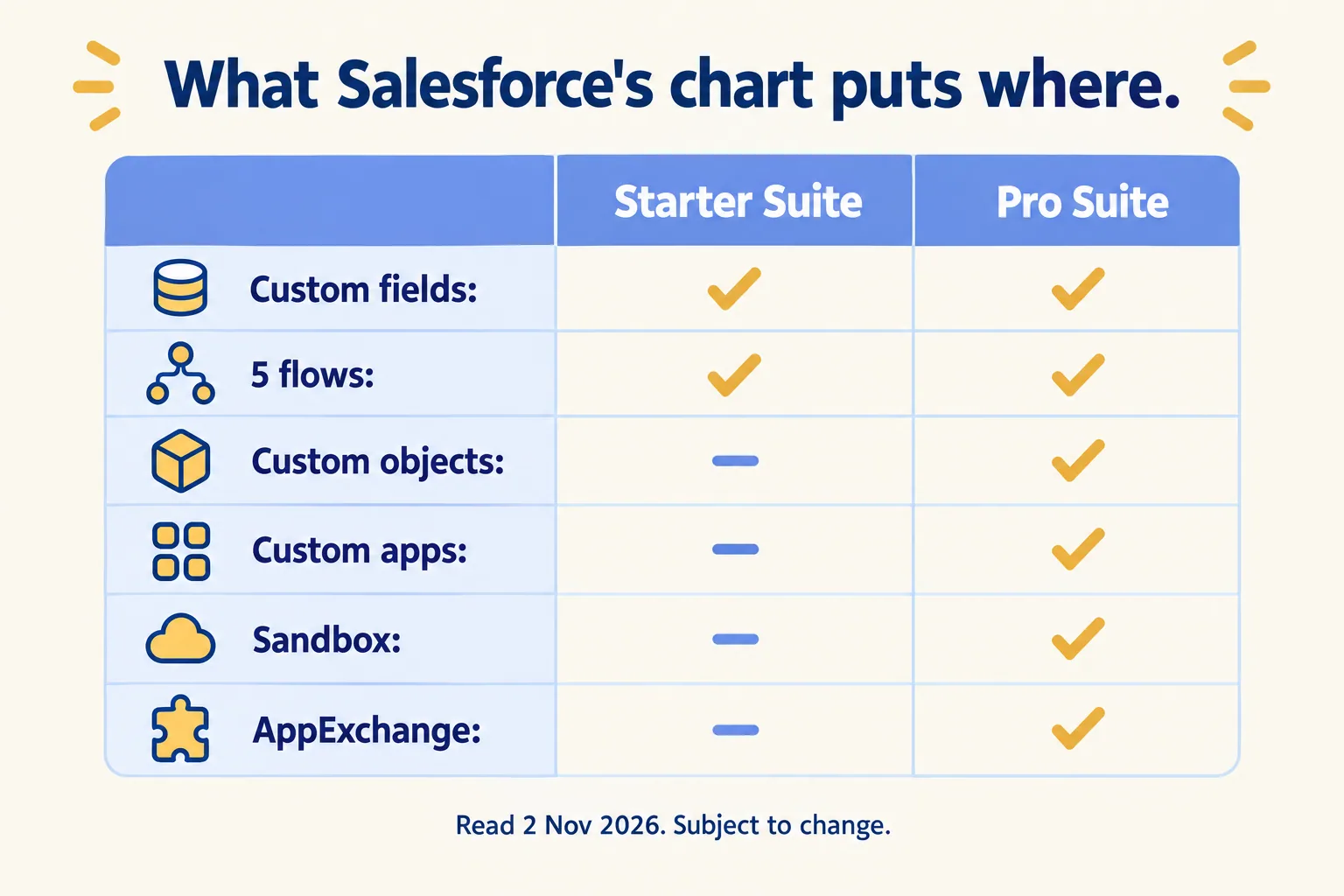
Pro Suite is listed at $100 per user per month, billed annually. Ten users is $1,000 a month at list, $750 more than Starter Suite. Core is listed at $195. Salesforce says the page is "provided for information purposes only and subject to change", so check it on the day you sign.
One more line from the pricing page matters before you pay anything: Salesforce offers a 30-day free trial of Starter Suite for up to 10 users. Use it on your own week, not the sample data.
Which three things does your week need?
Write down one week of the team's real work, by person, step by step. Three terms first: a custom object is a record type of your own, a sandbox is a practice copy of your setup, and AppExchange is the Salesforce catalogue of ready-made add-ons. Then mark every step that needs one of three things a lighter tool tends to lack.
- 01A record of your own shape. A job, a case, a unit, a contract: something that is not a contact or a deal. In Salesforce that is a custom object, which the chart lists under Pro Suite.
- 02A connection to a system that holds money or stock. Invoicing, inventory, the warehouse. Prebuilt apps come through AppExchange, which the chart lists under Pro Suite. A custom link is a build.
- 03A test copy before you change live records. If a wrong edit would reach customers or invoices, you need a sandbox, which the chart lists under Pro Suite.
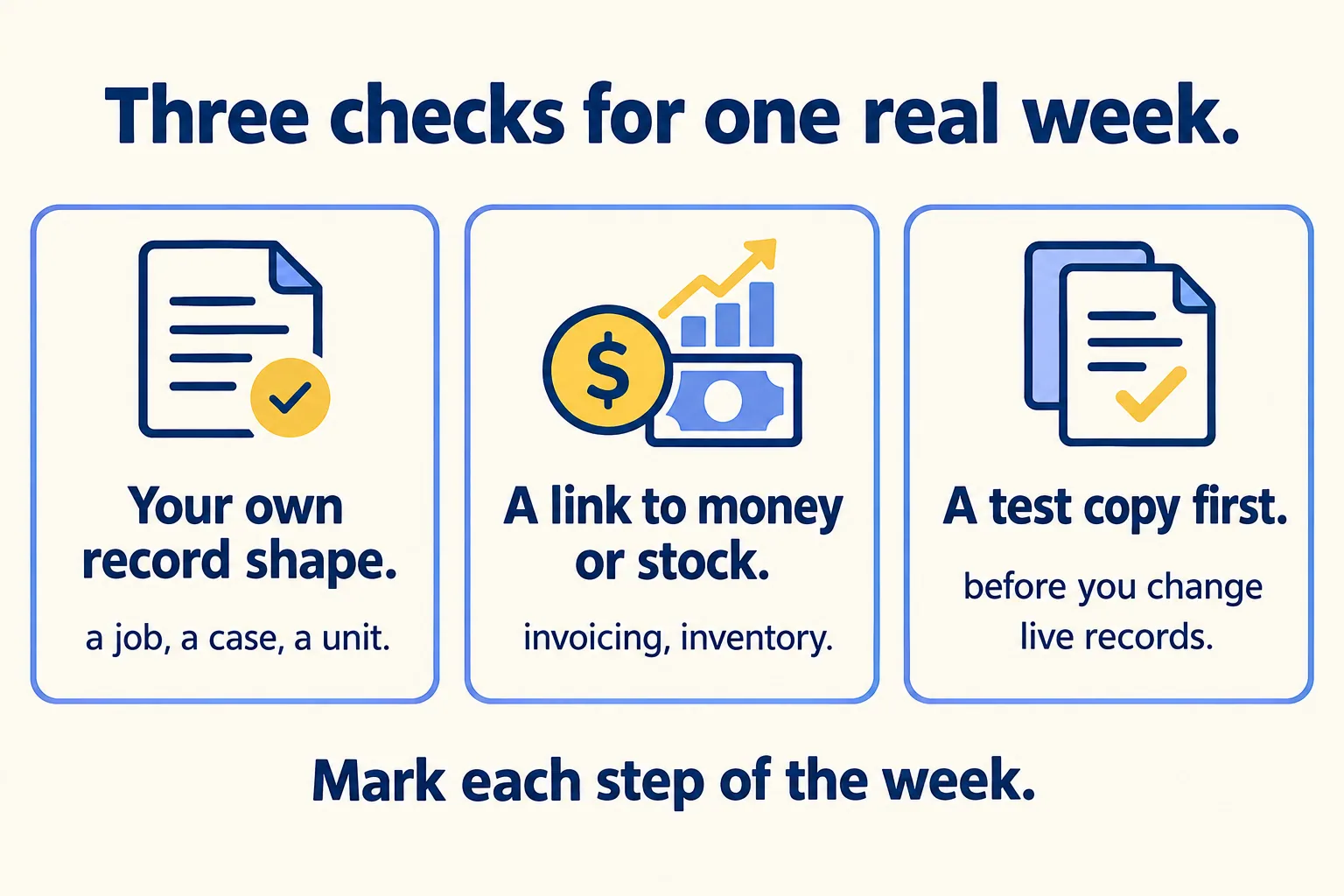
The belief to break is "it starts at $25, so it is cheap". The $25 is the licence. The cost of month three is the person and the hours behind the first custom record, and the chart above is why: the moment a step needs its own record type, you are on the edition that carries it, and the price you were quoted is the other one.
One more question: how many automated steps? The chart answers it only in part. Starter Suite and Pro Suite both show 5 flows. If your week has more than five automated steps, ask Salesforce in writing what the edition you are quoted allows, and do not assume the next edition fixes it.
What do you do with the answer?
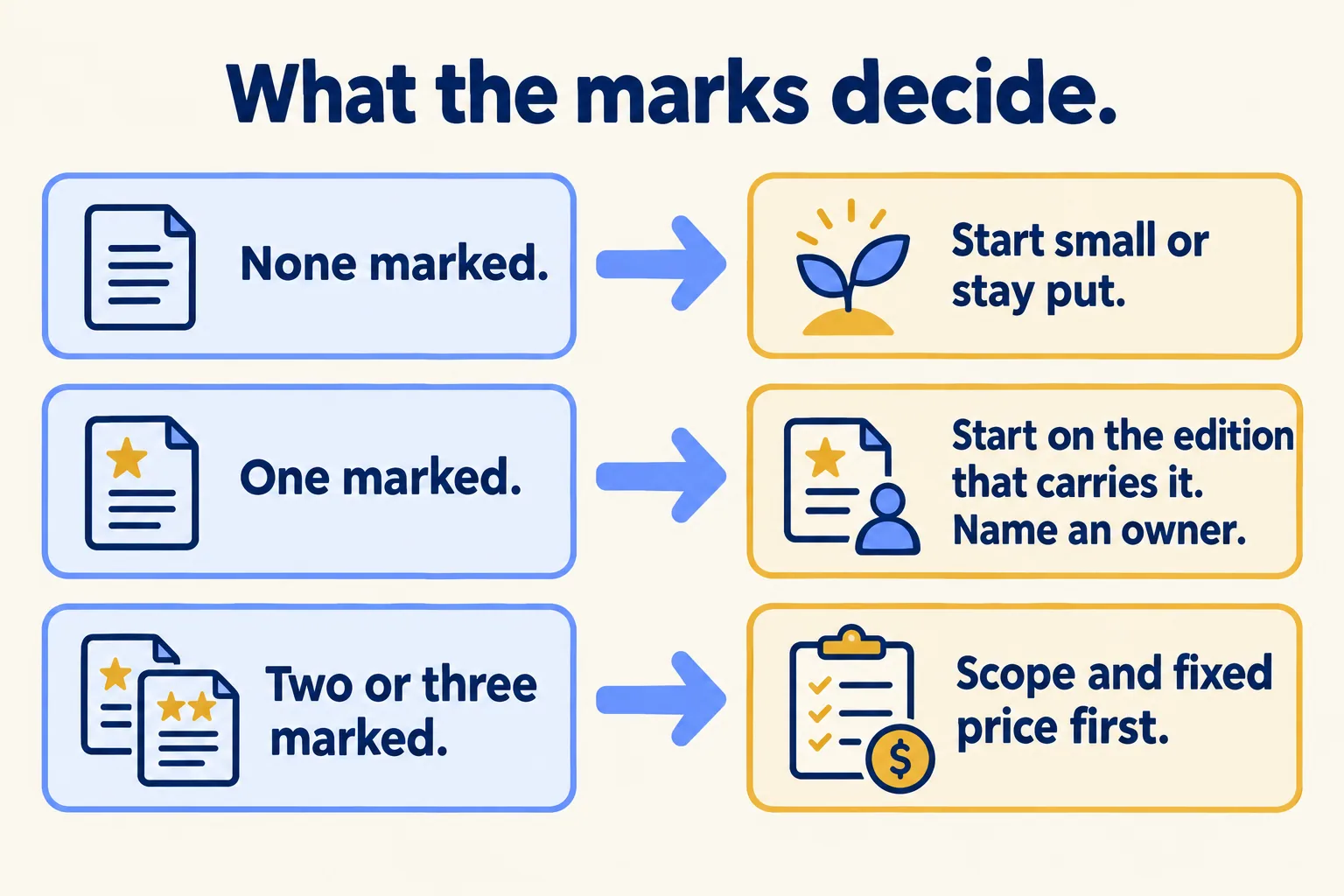
This is our rule, not a Salesforce rule. It decides three cases.
- None marked. Start on the smallest edition, or stay on what you have. Say so to the partner. A spreadsheet and a shared inbox that work are a fine answer.
- One marked. Start on the edition that carries exactly that thing. Name the person who owns it after go-live, even if it is a few hours a month. Price the week of build before the licence.
- Two or three marked. The week is a project, not a trial. Ask for a written scope with a fixed price for the first piece and a named owner, before any licence is signed.
A partner who cannot say which step in your week needs which edition is selling a licence, not a setup. Ask for the step and the edition in the same sentence.
What would we do first?
At Mindcat, we call this Find your week. You send us the process you are buying for, and we reply in writing within 24 hours. The assessment is free: a short read of the org and a written note on what is worth building and what is not. If you go ahead, the first build week is a fixed AED/SAR 14,900 (about USD 4,050), credited in full if you sign the build within 60 days. We quote a fixed price for the named piece after that week, and no number before it. You can see a sample note on an invented org before you send anything. For the build itself, see our Salesforce implementation page.

If you came from a HubSpot setup, read when we tell a 20-person team to stay on HubSpot. If you have two quotes, read how we count the roles in Salesforce versus Zoho.
Not for you if you are already live on Salesforce, or if nobody would own the setup once the partner leaves.
