

If your Salesforce saves feel slow, or Setup shows your Apex close to its size limit, this is for you. Salesforce ApexGuru now hands your org a ranked report of Apex problems. The report is free on most paid editions, and its six lists pull a team in six directions. Read them in the wrong order and the first fixes land on code nobody waits for. This is not for you if your org has little custom Apex, or no named Salesforce owner yet.
What is ApexGuru, and who gets it?
ApexGuru is a Salesforce tool that reads the Apex in your org and lists what to fix. Salesforce Help says it uses AI and machine learning models, and that it detects more than 24 antipatterns across queries, database writes, CPU, memory and strings.
You activate it in a Production org or a Full Copy sandbox on Unlimited, Enterprise, Professional or Signature Edition. It is not available in Developer Edition, the EU Operating Zone or Government Cloud. Once it is on, it scans up to three times a week, and processing usually takes a few hours.
The Salesforce Developers blog said at launch, in February 2024, that it comes at no extra charge for Scale Center customers. Scale Center is free in full sandboxes and production orgs on those editions.
You can open the results in several places:
- Setup, under Scale Insights, then ApexGuru Insights
- Scale Center, on its ApexGuru tab
- Code Analyzer, in VS Code or the command line
- the Salesforce DX MCP server and agent-based editors such as Cursor
The report has six tabs. Each answers a different question, and that is why the order matters.
Which list should you read first?
The one your users feel. Here is the order we use. It is our rule of thumb, not a Salesforce rule.
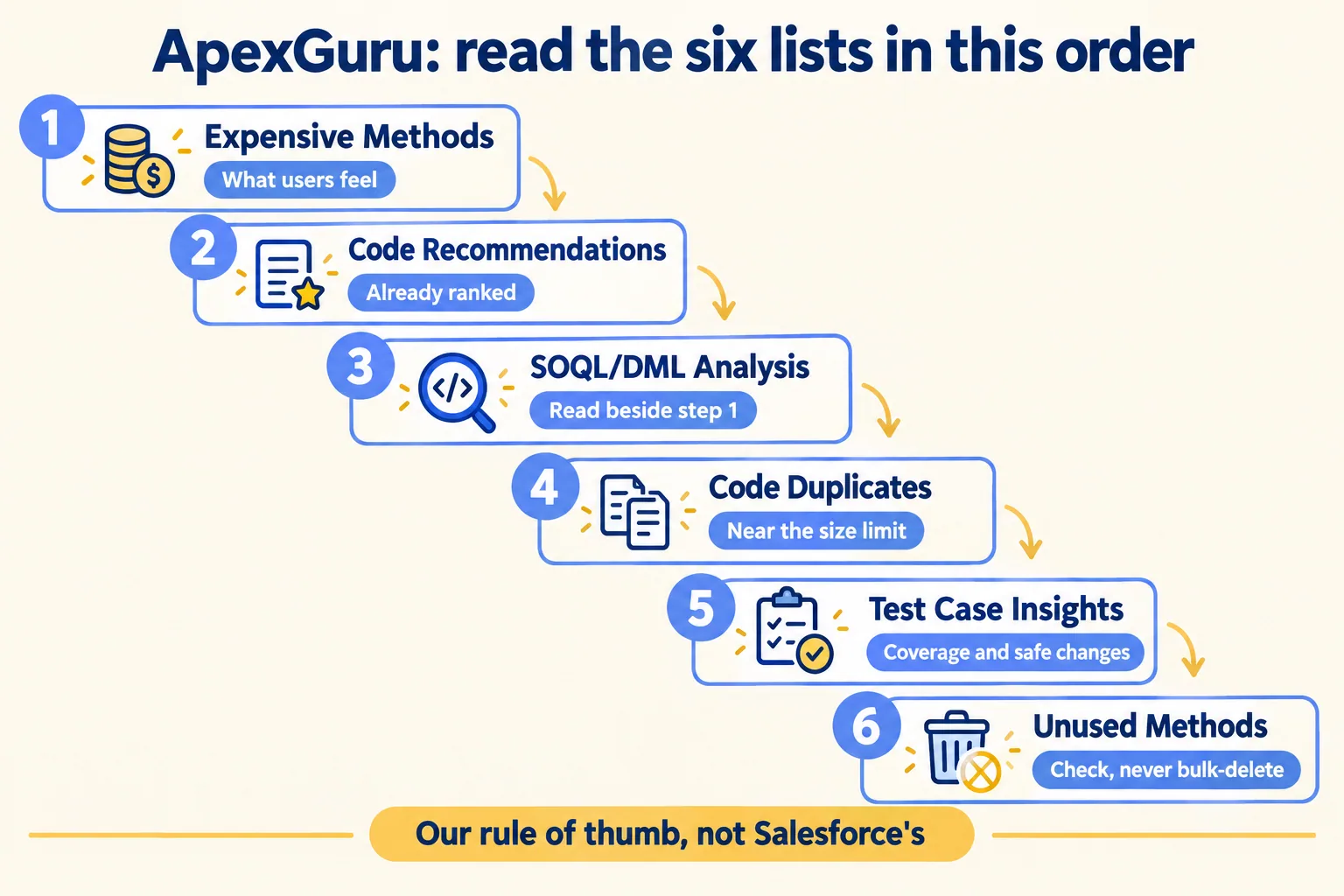
If your team keeps seeing "Apex CPU time limit exceeded", start with step 1. The Salesforce launch post says these CPU figures come from the last 15 days of your org's runtime telemetry, so the list ranks methods that ran, not methods that might. Code Recommendations comes second because it ranks fixes, not methods. Find each slow method there and you have both the cost and the fix.
Before you fix a method from step 1, write one line next to it: which process calls this? Lead conversion, renewals, an order sync. A slow method on a nightly batch nobody waits for can wait. A slow method on every Opportunity save cannot. This is the same test we use for any scan: a list only becomes a plan when each finding has a process and an owner.
Why is Unused Methods not a delete list?
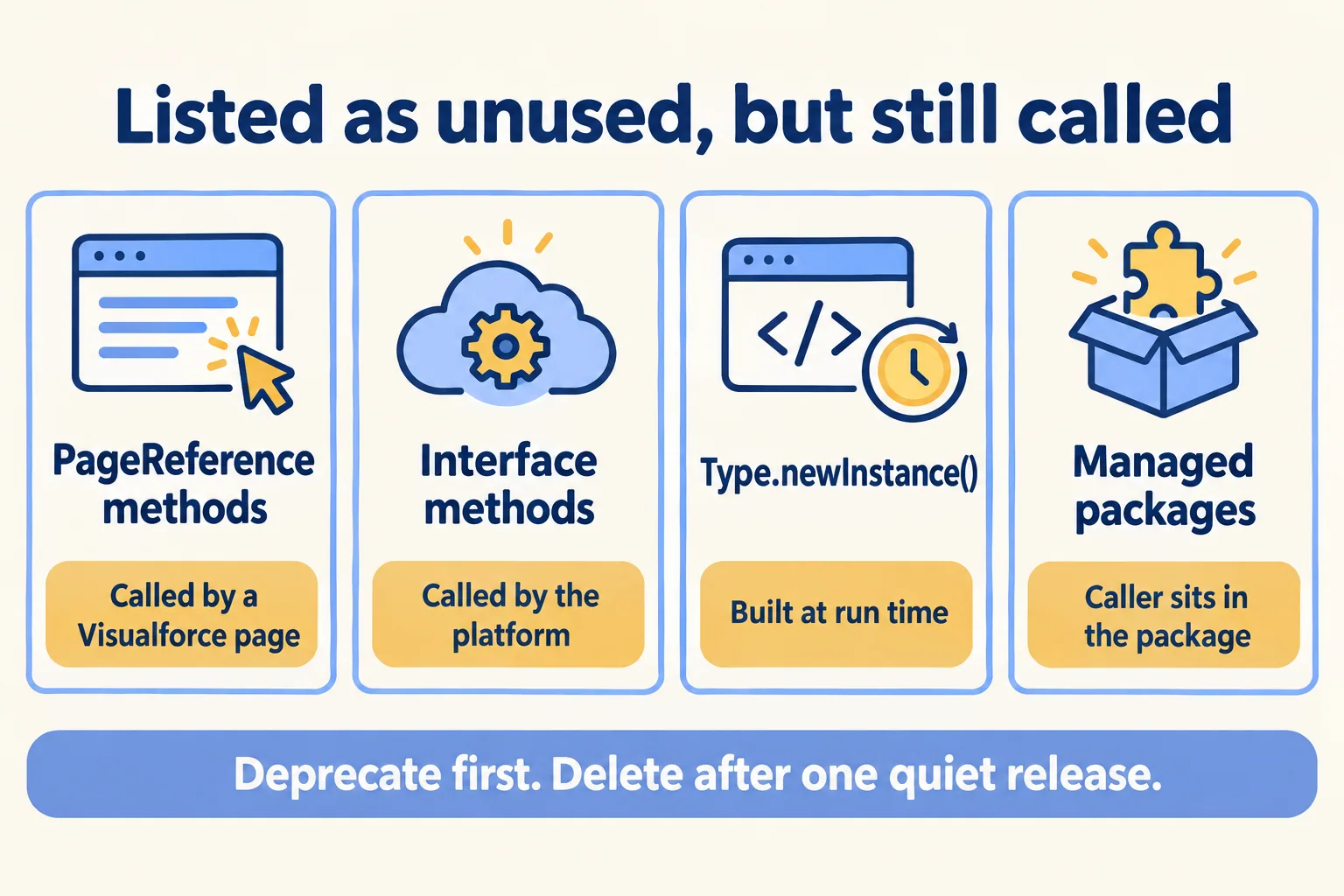
Because ApexGuru cannot see every caller. Salesforce Help says the list comes from static analysis only, not from tracking what runs. It names four cases that show up as unused when they are not.
Some older guides describe this tab as methods that were not run in production over time. The current Help page says static analysis. Trust the Help page, and treat every entry as a question.
- 01Search the org for the method name, including Visualforce pages, Flows and custom metadata.
- 02Check whether the class implements an interface or is built with Type.newInstance().
- 03Mark the method deprecated in a comment, with a date and an owner.
- 04Leave it for one release and watch the debug logs.
- 05Delete it only after nothing has called it.
What if you are near the Apex size limit?
Then Code Duplicates and Test Case Insights move up your list. An org can hold 6,000,000 characters of Apex. Managed packages and test classes do not count. Salesforce Help says that when you reach the limit, deployments and saves are blocked, and it suggests acting at 80 to 85%. You can see your share in Setup, under Apex Classes, as "Percent of Apex Used".
You can ask Salesforce support to raise it. The Help article sets the terms:
- Start at least two weeks before you expect to hit the limit. The review takes one to two weeks.
- You need at least 75% code coverage, and all coverage antipatterns resolved.
- Every Apex class must compile in production. A class that fails to compile gets the request denied.
- An increase goes to the next multiple of 5,000,000 characters, and it is permanent.
- Professional Edition cannot be raised.
Two ApexGuru tabs line up with those terms. Code Duplicates works out the characters you could remove: the size of one copy times the number of extra copies. Three copies of a 5,000-character method is 10,000 characters. It skips test classes and managed package code, the same code the limit skips, so what it finds counts against your limit. Test Case Insights lists the untested and unasserted code that keeps coverage honest.
Salesforce does not say its support team reads ApexGuru reports. We read the two tabs together because the conditions overlap. For the wider tuning work, our Salesforce performance guide covers what sits outside Apex.
Where does your code go during a scan?
Outside your org, for a while. Salesforce Help says ApexGuru processes your Apex through the Einstein Trust Layer, which is hosted in the US, with each org kept logically separate. It keeps the data for 30 days and then purges it. Your code is not used to train models and is not kept by the model.
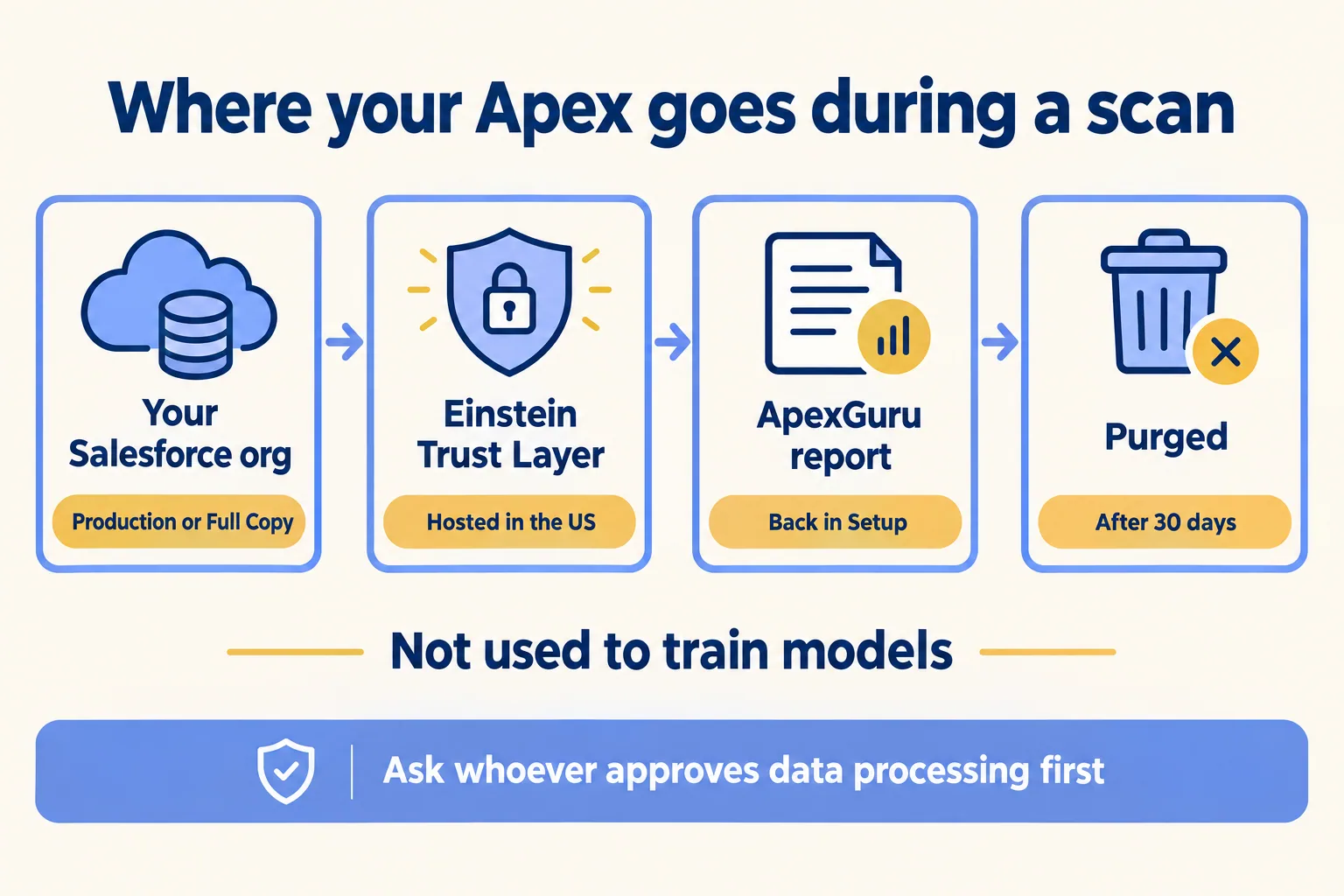
For an org in the UAE or Saudi Arabia with data-location terms in its contracts, it is a question for whoever approves data processing, before anyone clicks activate. Two checks help that conversation:
- Search your Apex for hard-coded personal data, keys or passwords. They should not be in code anyway, and a scan sends the code out.
- Write down which org you activate it in. The Help page says that once a Production or Full Copy org has it, Code Analyzer can also run it from sandboxes and scratch orgs tied to that org.
- Treat the DX MCP server and agent editors as one more way in, not a convenience. Agree who may run a scan from an editor, under which user, before you turn it on.
What would we do first?
At Mindcat, we read the ApexGuru lists against the processes they slow down before we change a line. In a rescue week we get read-only access on day 1. We sort the expensive methods by the process they sit on, check the unused list by hand, and end the week with a written call: finish, cut or rebuild, with the first fix named. You can see a sample read, on an invented org, before you send us anything. Our founder has been a Salesforce MVP since 2014 and is in the MVP Hall of Fame, listed on our credentials page. For the clean-up that follows, our Salesforce optimization work covers it.
Not for you if your org has little custom Apex or no named owner yet. Name an owner first, then run the scan, and the six lists will give you an order you can act on.
