A leasing agent in a Dubai brokerage reads a customer chat on her phone while a colleague follows the team chat.

Vercel · SDKs

Customers write on WhatsApp, your team lives in Slack, and the bots don’t talk. Build the bot once.

Enquiries arrive on WhatsApp. Staff answer in Slack or Teams. Today each app needs its own bot, its own code and its own fixes. With Chat SDK, one bot runs in all of them. It replies in each app’s own format and waits for a person before it changes a booking or a record.

Salesforce consulting partner since 2010 · MVP Hall of Fame · 200+ agents in production · UAE, India and US desks

The problem

Where chat goes wrong today.

What Chat SDK is

Chat SDK, in plain words.

Facts from Vercel’s own pages, checked on 16 October 2026. The sources are at the end of this page.

What it is
A TypeScript SDK for chat bots across Slack, Microsoft Teams, WhatsApp, Telegram, Discord, GitHub, Linear and more. Open source, MIT licence, free for commercial use.
WhatsApp
The official adapter is WhatsApp Business Cloud. Baileys and Zaileys are community adapters on the unofficial WhatsApp Web API. We use only the official one.
Adapters
Three tiers: official (maintained by Vercel), vendor-official and community. Redis and PostgreSQL adapters keep the bot’s state.
AI replies
Built-in AI SDK streaming. When an agent posts, edits or deletes, writes need approval by default.
Human approval
A durable workflow can pause until a person approves the step in chat.
Per platform
Not every feature works on every chat app. Vercel lists support per platform.

How it works

From a message to a reply in the same app.

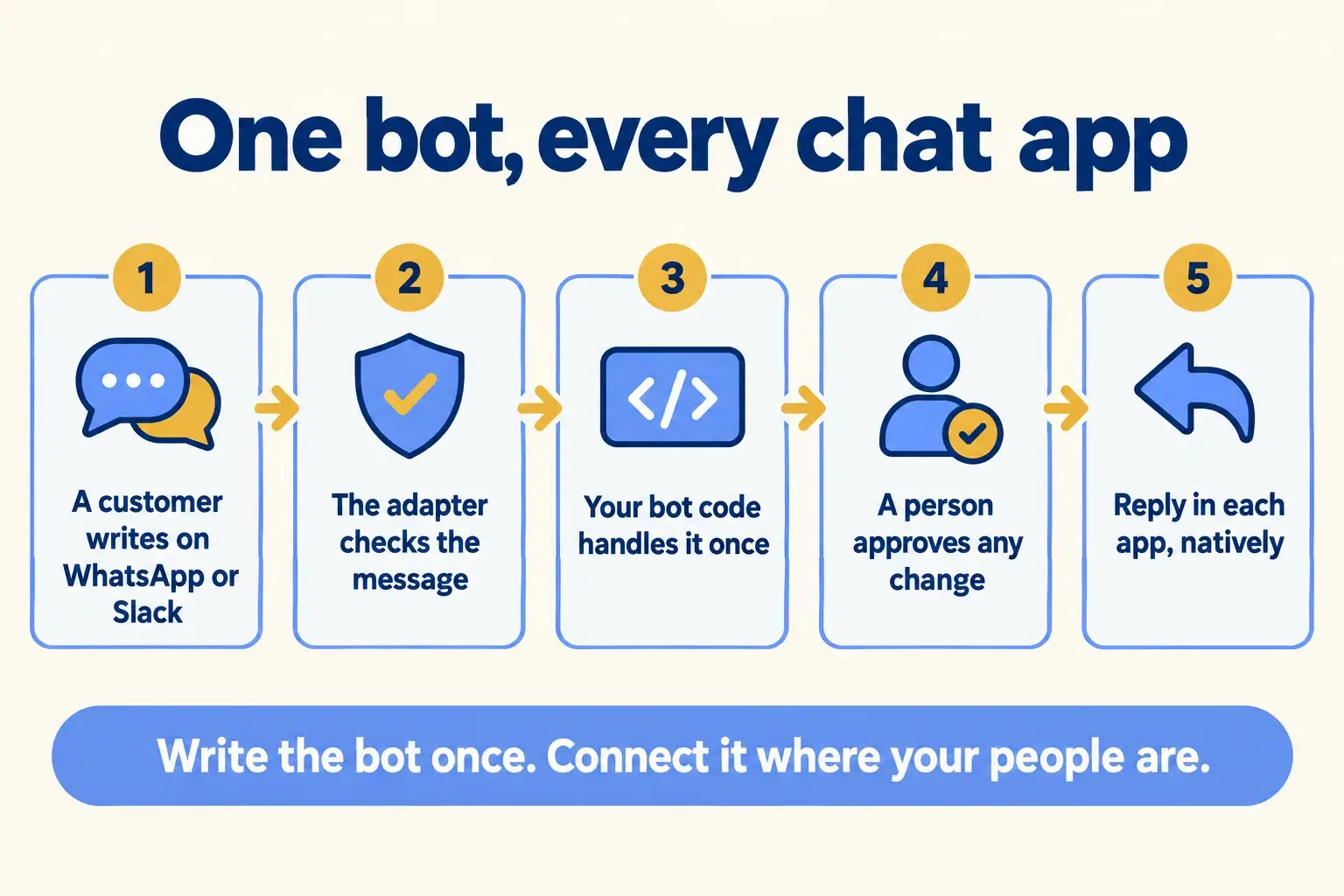
Five steps. The bot’s logic is written once, and anything that changes a record waits for a person.

Five steps: a customer writes, the adapter checks the message, the bot handles it, a person approves changes, the reply goes back.

Infographic

The same steps are written out below.

Step by step

What happens at each step.

  1. Message

    A customer writes on WhatsApp or Slack

    Or Teams, Telegram or the web chat on your site.

  2. Check

    The adapter checks the message

    It verifies the platform’s webhook and turns the message into one shape.

  3. Handle

    Your bot code handles it once

    The same handler runs for every chat app.

  4. Approve

    A person approves any change

    A booking or a record change waits for a yes in your team’s chat.

  5. Reply

    Reply in each app, natively

    Text, cards or a streamed AI answer, in the format each app supports.

How it fits together

Where the bot sits between your customers and your team.

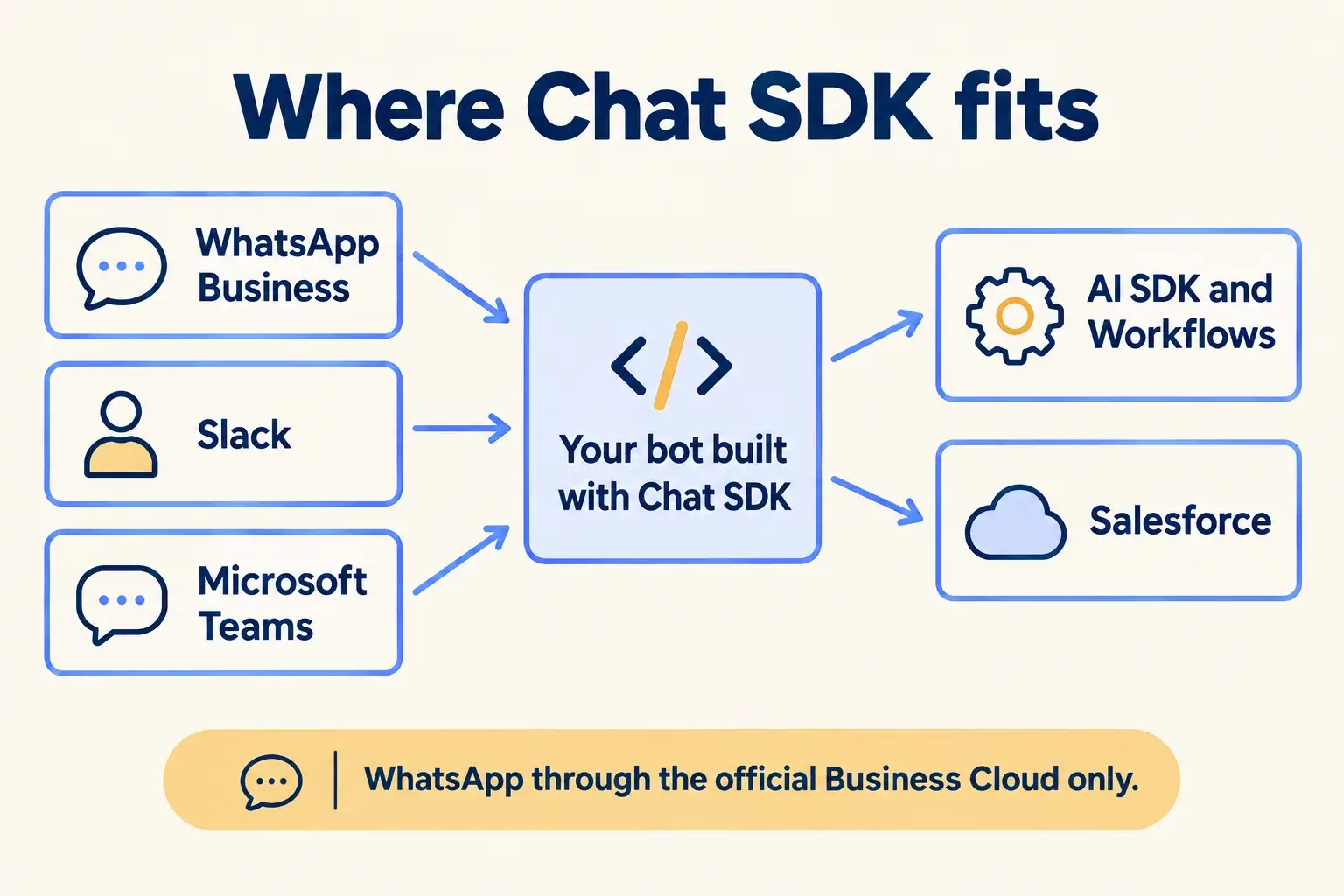
Customers reach you on WhatsApp Business. Your team works in Slack or Teams. One bot built on Chat SDK sits in between, uses AI SDK and Workflows for answers and approvals, and writes to Salesforce.

WhatsApp Business, Slack and Teams connect to one bot built with Chat SDK, which uses AI SDK and Workflows and writes to Salesforce.

Infographic

Where it sits next to the systems you run today.

Use cases · worked examples

One worked example in each industry.

How Chat SDK fits into the work of the industries we serve, one step at a time.

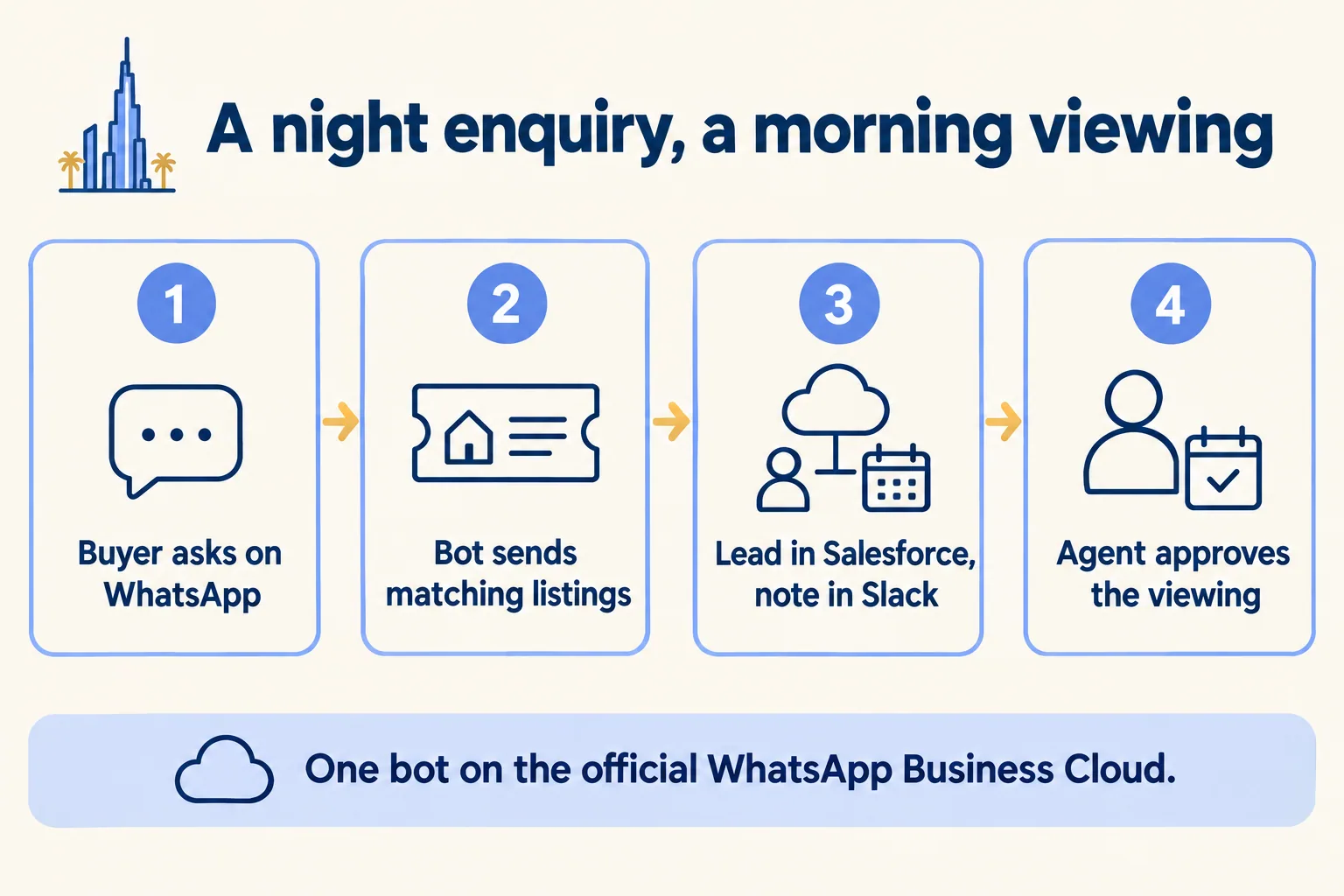
  1. A buyer asks on WhatsApp, the bot sends listings, the lead goes to Salesforce and Slack, and an agent approves the viewing.

    Example 1 · Real estate, Dubai · Infographic

    Leasing manager at a Dubai brokerage

    Today: Enquiries arrive on WhatsApp late at night. Agents answer from their own phones the next day, and half the chats never reach the CRM.

    After: One bot on the official WhatsApp Business Cloud answers listing questions, creates the lead in Salesforce and posts a viewing request in the team’s Slack channel for an agent to approve.

    Worked example, step by step

    1. 22:40Buyer. Asks on WhatsApp about a two-bedroom flat in Dubai Marina.
    2. 22:40Bot. Replies with three matching listings from the brokerage’s site.
    3. 22:42Bot. Creates the lead in Salesforce with the chat attached.
    4. 22:42Bot. Posts the lead to the leasing team’s Slack channel with a proposed viewing slot.
    5. 08:15Agent. Approves the slot from Slack.
    6. 08:15Bot. Confirms the viewing to the buyer on WhatsApp.

    The buyer has a confirmed viewing by 08:15, and the lead was in Salesforce from the first message.

    Real estate brokers
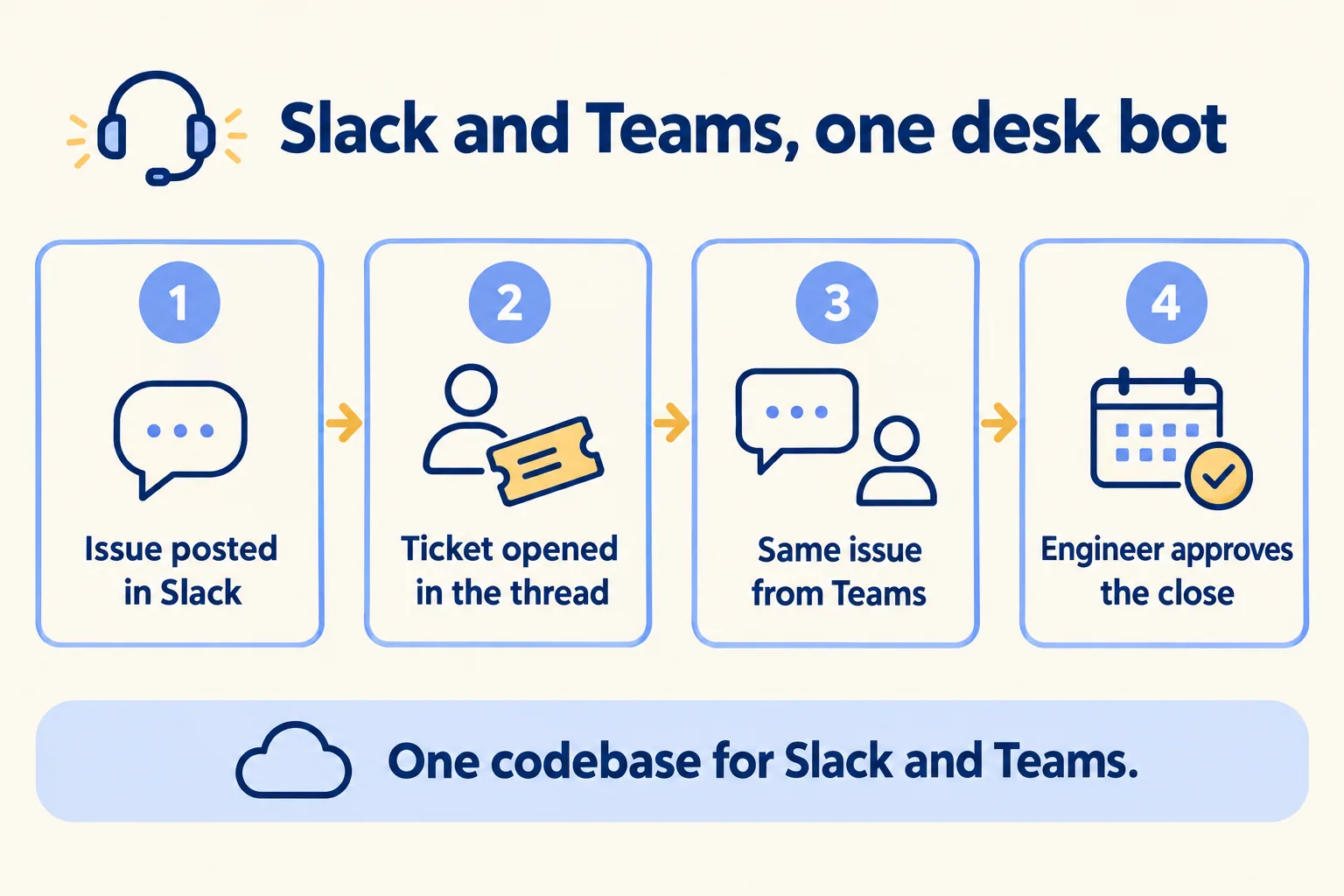
  2. An issue posted in Slack opens a ticket, the same issue from Teams joins it, and an engineer approves the close.

    Example 2 · IT service desk, Bengaluru · Infographic

    Service desk lead at a Bengaluru IT support company

    Today: Some clients report issues in Slack, others in Teams. The company keeps two bots in two codebases, and they drift apart.

    After: One bot runs in both. It opens a ticket in the thread, streams a first fix from the knowledge base, and only closes a ticket when an engineer approves.

    Worked example, step by step

    1. 09:05Client staff. Posts “VPN keeps dropping” in the shared Slack channel.
    2. 09:05Bot. Opens a ticket and replies in the thread with its number.
    3. 09:06Bot. Streams a suggested first fix from the knowledge base, through AI SDK.
    4. 09:20Another client. Reports the same VPN issue in Microsoft Teams. The same bot code handles it.
    5. 09:21Bot. Links the Teams report to the open ticket.
    6. 10:00Engineer. Fixes the VPN gateway and approves closing the ticket from the chat.

    Both clients get answers in their own chat app, from one bot the desk maintains once.

    IT service desks
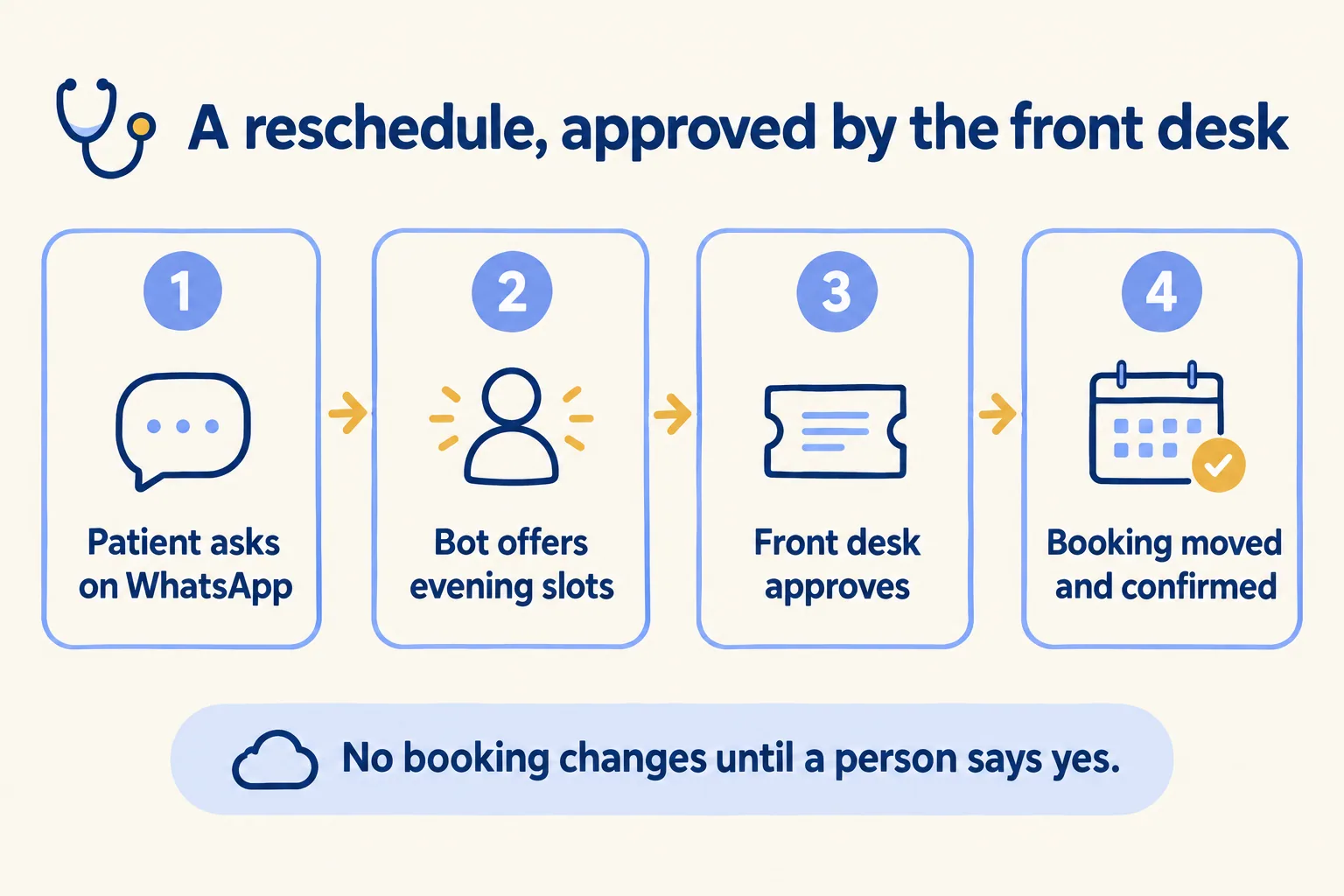
  3. A patient asks on WhatsApp to reschedule, the bot offers slots, the front desk approves, and the booking is moved.

    Example 3 · Clinics, Jeddah · Infographic

    Front desk supervisor at a Jeddah clinic

    Today: Patients ask to reschedule on WhatsApp. Staff copy each request into the booking system by hand, and some get missed before the morning rush.

    After: The bot reads the request and offers open slots. The change waits for the front desk to approve it in their chat, then the bot moves the booking and confirms.

    Worked example, step by step

    1. 07:30Patient. Asks on WhatsApp to move tomorrow’s appointment to the evening.
    2. 07:30Bot. Finds two evening slots and offers them.
    3. 07:32Patient. Picks 18:30.
    4. 07:32Bot. Pauses and asks the front desk to approve the change in their team chat.
    5. 08:05Front desk. Approves.
    6. 08:05Bot. Moves the booking and confirms the new time to the patient on WhatsApp.

    The patient has a new time before 08:10, and no booking moved without a person saying yes.

    Clinics
Examples of the work, not client stories. Times in each example show the order of events, not a measured result.

Is it for you

When Chat SDK fits, and when it doesn’t.

Good fit

Not for you yet

Customers or staff use more than one chat app
You want a WhatsApp Web workaround: we only use the official adapter
You want WhatsApp on the official Business Cloud
You need a ready-made chat widget: Chat SDK is a bot SDK, not a UI kit
A person must approve anything the bot changes
You need one feature on every platform: support differs by app
The bot needs to reach Salesforce or your booking system
Nobody will answer when the bot hands over

What Mindcat does

We build it, then we run it.

The assessment is free: a short read of the org and a written note. If you go ahead, the first build week is a fixed AED/SAR 14,900 (about USD 4,050), credited in full when you sign the build within 60 days. After go-live, we keep it patched, watched and changing every month.

FAQ

What teams ask about Chat SDK.

Is Chat SDK free?
Yes. It is open source under the MIT licence and Vercel says it is free in personal and commercial projects. Hosting and any AI model the bot uses are billed separately.
Which WhatsApp connection do you use?
Only the official WhatsApp Business Cloud adapter. The Baileys and Zaileys adapters are community-built on the unofficial WhatsApp Web API, and we do not use them.
Can the bot change records on its own?
By default, when an agent built with Chat SDK posts, edits or deletes, it needs approval. We keep it that way for anything that changes a booking or a record.
Does every feature work in every app?
No. Cards, modals and streaming differ by platform, and Vercel lists support per app. We check the list for your apps before we design the bot.
Where does the bot run?
Wherever it is deployed. Vercel has no compute region in the UAE or Saudi Arabia; Mumbai is the closest. Where the bot runs and where chat data is kept is confirmed per project before you sign.

Sources

Where these facts come from.

Start here

Tell us what you want built, and where it runs today.

One or two lines is enough. You hear back within 24 hours from the person who signs the work.

Salesforce consulting partner since 2010 · MVP Hall of Fame · 200+ agents in production · UAE, India and US desks