A Dubai broker checks a follow-up on his phone while a colleague shows two clients floor plans by the window.

Vercel · Agent stack · New

The follow-up was due on Thursday and nobody sent it. Build jobs that wait for days and still finish.

A lead needs a reply in two days. A work order needs a technician’s photo, then the client’s sign-off. Today that lives in a cron job, a queue and somebody’s memory. With Workflows, you write the whole sequence as one function. Each step’s result is saved, the run sleeps for minutes or months without using compute, and it resumes after a crash or a deploy.

Salesforce consulting partner since 2010 · MVP Hall of Fame · 200+ agents in production · UAE, India and US desks

The problem

Where long jobs get lost today.

What Workflows and Workflow SDK is

Workflows and Workflow SDK, in plain words.

Facts from Vercel’s own pages, checked on 16 October 2026. The sources are at the end of this page.

What it is
Durable functions. You mark a function with "use workflow", and its steps retry on failure, wait for outside events and resume across crashes and deploys.
Status
Built on the open-source Workflow SDK. Vercel marks Workflows New, and we found no general availability announcement, so we confirm status with Vercel per project.
How long it waits
Vercel’s docs list no limit on run length or sleep. A run can pause for minutes or months without using compute.
Deploys
Running workflows stay on the code they started with, while new runs use the latest version.
What you see
Every step, input, output, sleep and error is recorded in the Vercel dashboard.
Where it runs
JavaScript, TypeScript and Python, in every Vercel Function region, with each run pinned to one region, Mumbai included. You can also self-host it on Postgres.

How it works

From one start call to a job that finishes days later.

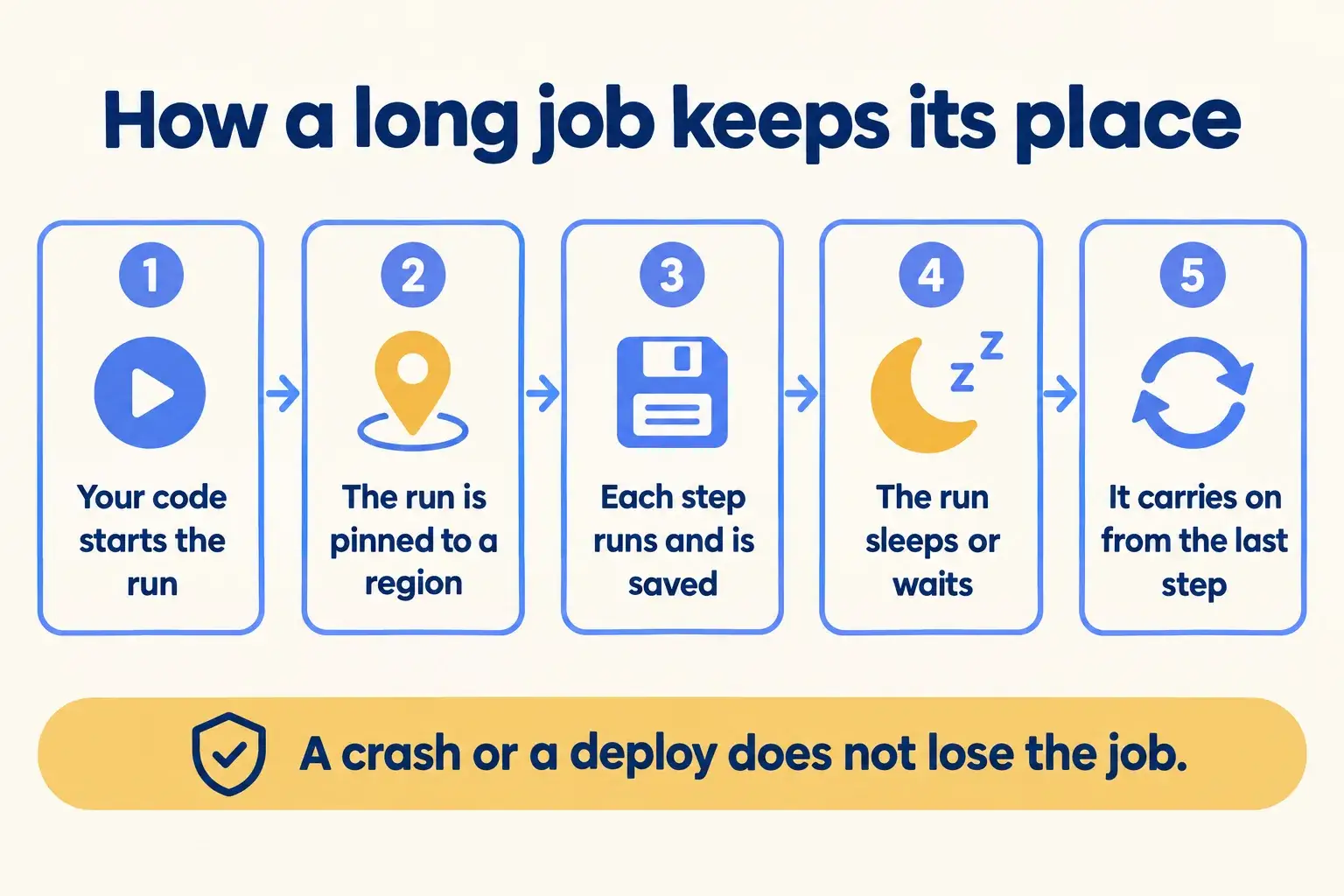
Five steps. Each step is saved as it finishes, so after a crash or a deploy the run picks up from the last saved step.

Five steps: your code starts the run, it is pinned to a region, each step is saved, it waits, then it resumes.

Infographic

The same steps are written out below.

Step by step

What happens at each step.

  1. Start

    Your code starts the run

    From a route, with the lead, the work order or the patient as input.

  2. Pin

    The run is pinned to a region

    The calling function’s region by default, or one you name.

  3. Step

    Each step runs and is saved

    It runs in a Function, and its result goes into the run’s event log.

  4. Wait

    The run sleeps or waits

    For a set time, or for an outside event such as a reply or an approval. It uses no compute while it waits.

  5. Resume

    It carries on from the last step

    After the wait, a crash or a deploy, it replays the log and continues.

How it fits together

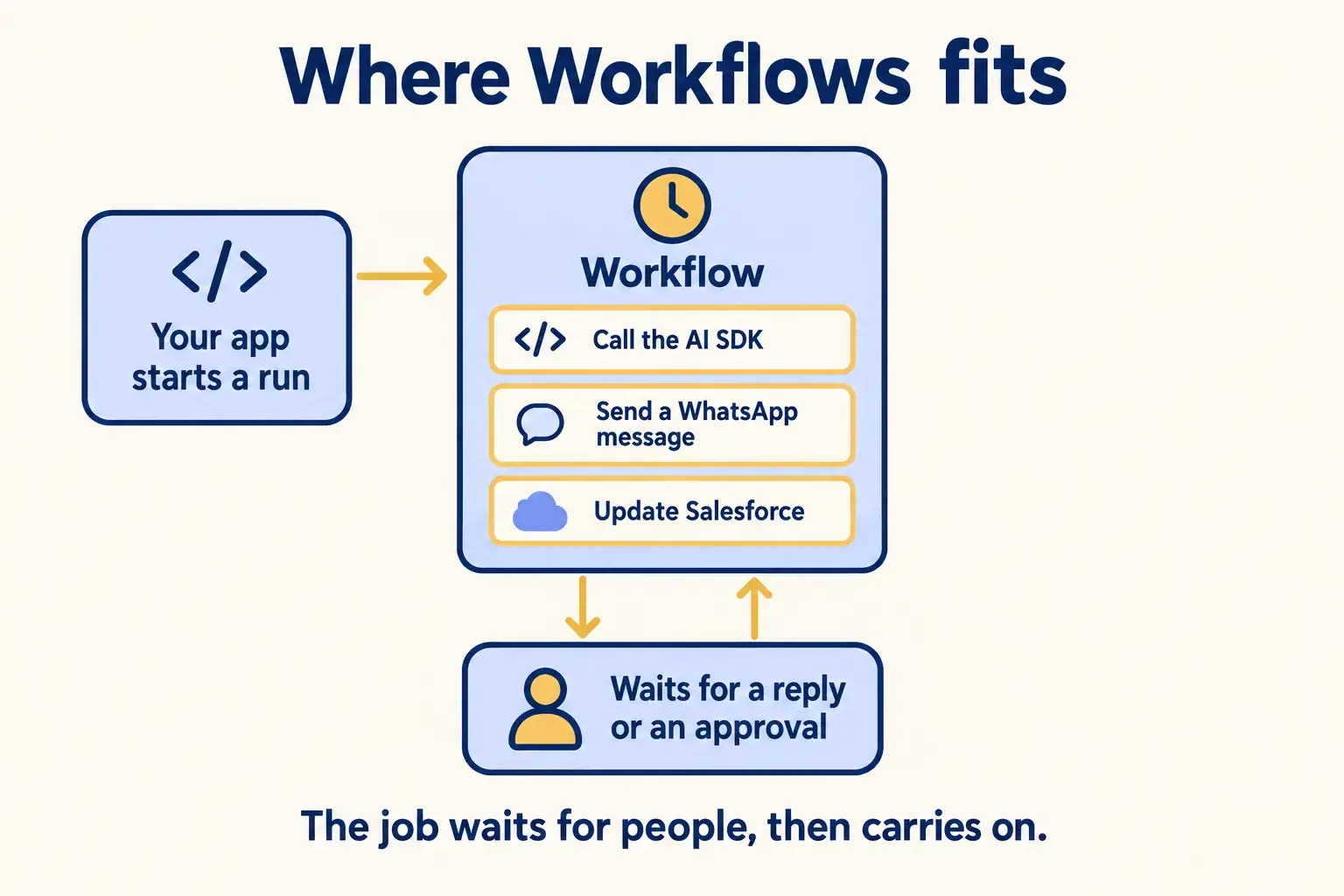
Where Workflows sits between your agent, your people and Salesforce.

Your app or agent starts a run. Steps call the AI SDK, send WhatsApp messages and update Salesforce. The run waits for a customer reply or a manager’s approval, then carries on. Chat SDK can ask for that approval inside Slack or Teams.

An app starts a workflow whose steps call the AI SDK, WhatsApp and Salesforce, and which waits for a person’s approval.

Infographic

Where it sits next to the systems you run today.

Use cases · worked examples

One worked example in each industry.

How Workflows and Workflow SDK fits into the work of the industries we serve, one step at a time.

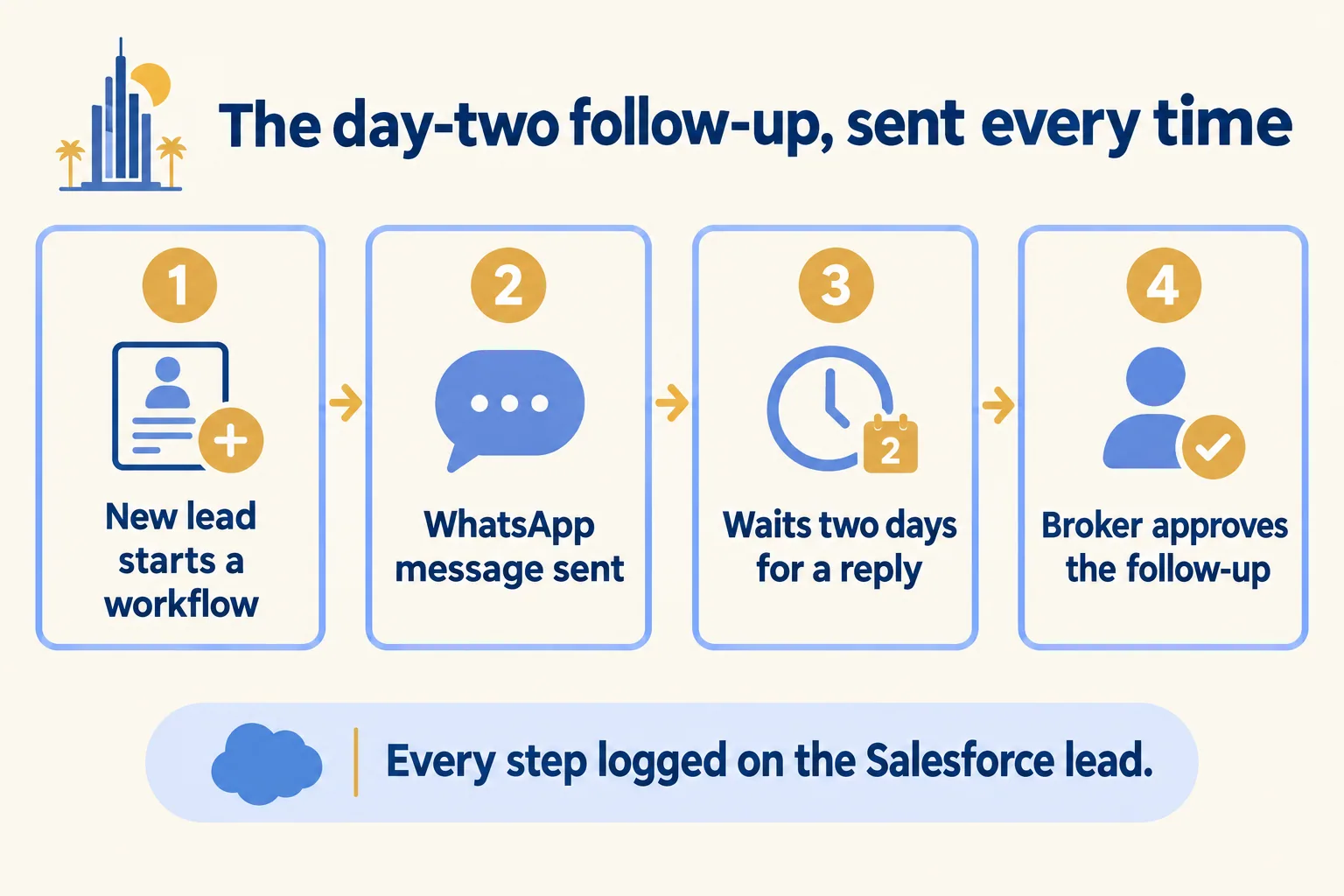
  1. A new lead starts a workflow that sends a WhatsApp message, waits two days, then asks the broker to approve a follow-up.

    Example 1 · Real estate, Dubai · Infographic

    Sales manager at a Dubai secondary-market brokerage

    Today: A portal lead comes in, the broker calls once, and then it sits. Nobody remembers to follow up on day two, so the lead goes cold.

    After: Each new lead starts a workflow. It sends a WhatsApp message, waits two days for a reply, then drafts a follow-up with new listings for the broker to approve. Every step is logged on the lead in Salesforce.

    Worked example, step by step

    1. Mon 10:00Website. A buyer asks about two-bedroom flats in JVC. The lead is created in Salesforce and a workflow starts.
    2. Mon 10:01Workflow. Sends a WhatsApp message from the brokerage with three matching listings.
    3. Mon 10:01Workflow. Sleeps for two days, waiting for a reply, with no compute in use.
    4. Tue 23:00Developer. Deploys a change to the site. The running workflow stays on its original code.
    5. Wed 10:01Workflow. No reply yet. Drafts a follow-up with two new listings and asks the broker to approve it.
    6. Wed 10:30Broker. Approves. The message goes out, and the Salesforce lead shows each step.

    The day-two follow-up goes out on time, and a broker still approves what the buyer receives.

    Real estate brokers
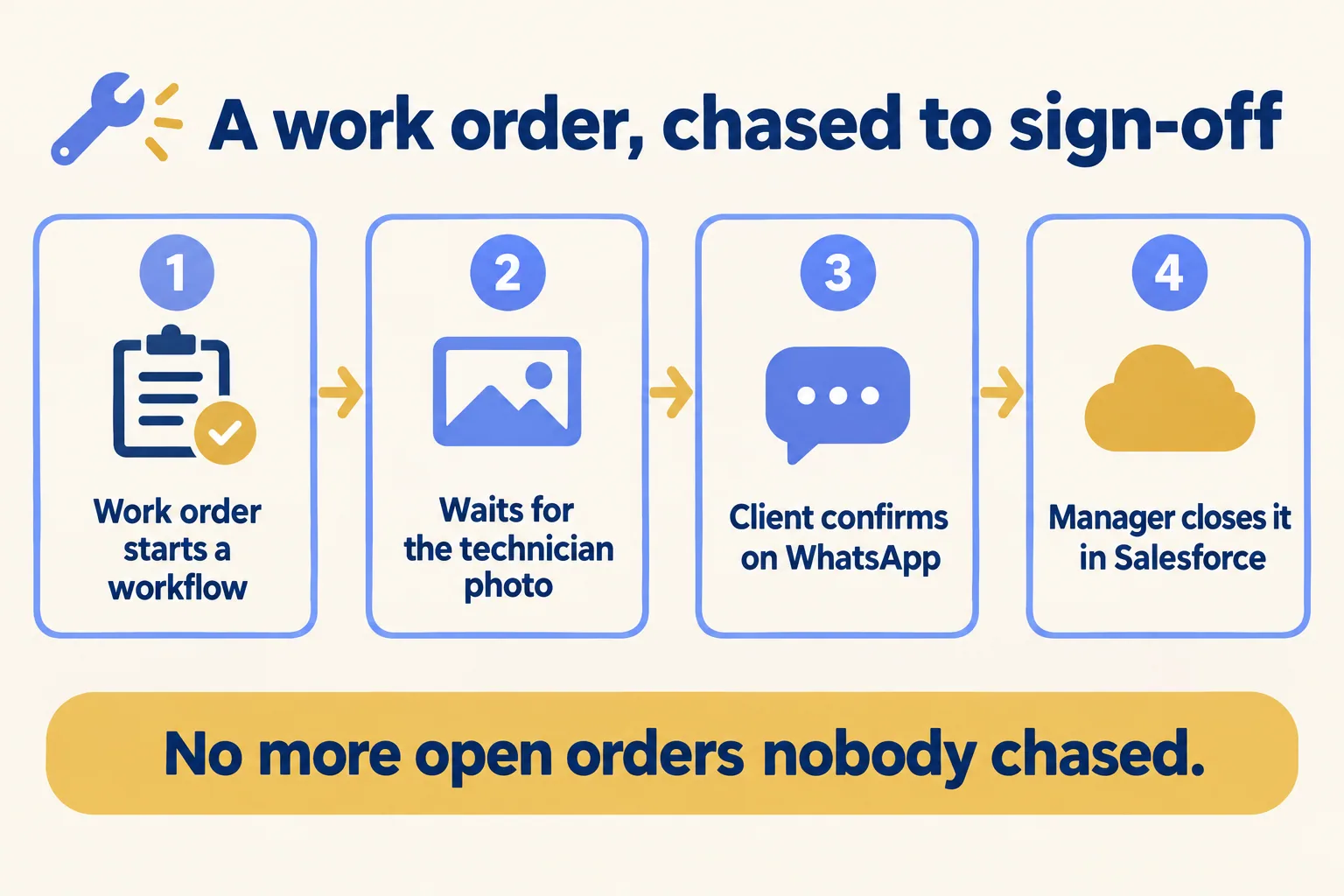
  2. A work order workflow waits for the technician’s photo, gets the client’s confirmation on WhatsApp, then the manager closes it.

    Example 2 · Facilities management, Abu Dhabi · Infographic

    Operations manager at an Abu Dhabi facilities management company

    Today: A work order needs the technician’s photo, then the client’s sign-off. Too many sit open for weeks because nobody chased the sign-off.

    After: Each work order runs as a workflow. It waits for the photo, asks the client to confirm on WhatsApp, sends one reminder after a day, and hands the closure to the operations manager.

    Worked example, step by step

    1. Sun 09:00Client. Reports a broken chiller in the lobby. A work order is created in Salesforce and a workflow starts.
    2. Sun 09:01Workflow. Assigns the technician and waits for the completion photo.
    3. Sun 15:40Technician. Uploads the photo from the site. The workflow wakes and carries on.
    4. Sun 15:41Workflow. Sends the client the photo on WhatsApp and asks them to confirm.
    5. Mon 15:41Workflow. No answer after a day, so it sends one reminder.
    6. Mon 17:00Operations manager. Sees the client’s yes and the photo, and closes the work order in Salesforce.

    Work orders close on the client’s confirmation, and the team stops chasing sign-offs by hand.

    Facilities management
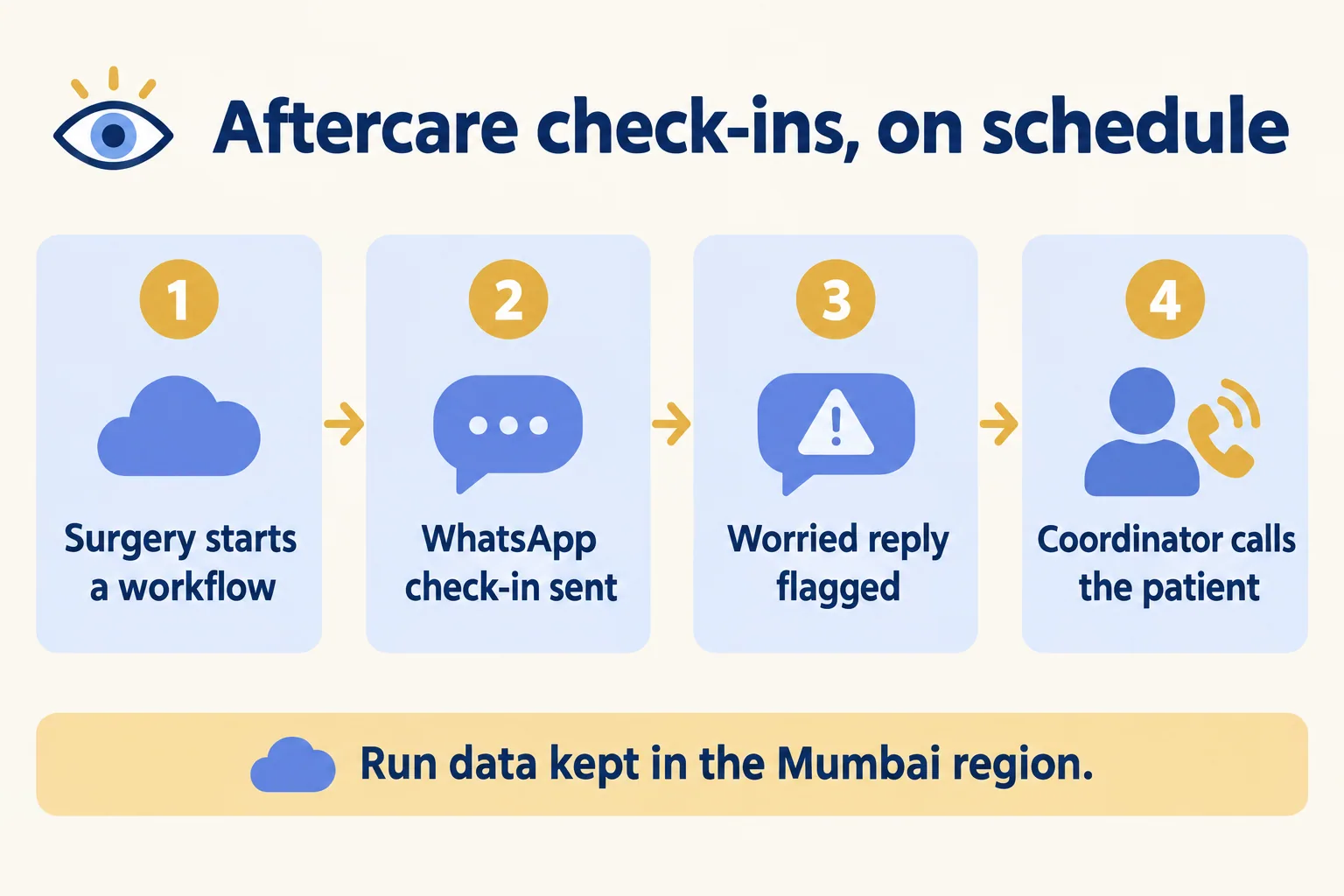
  3. A surgery starts a workflow that sends WhatsApp check-ins, flags a worried reply, and the coordinator calls the patient.

    Example 3 · Clinics, Kochi · Infographic

    Patient care coordinator at a Kochi eye clinic

    Today: After cataract surgery we check on each patient at day one, day seven and day thirty. We run it from a spreadsheet and miss people.

    After: Each surgery starts a workflow, pinned to the Mumbai region. It sends WhatsApp check-ins on schedule and waits for answers. A reply that sounds worrying goes to the coordinator, who decides the next step.

    Worked example, step by step

    1. Day 0Surgical team. Marks the surgery done in Salesforce. A workflow starts, pinned to Mumbai (bom1).
    2. Day 1Workflow. Sends a WhatsApp check-in in Malayalam or English and waits for the reply.
    3. Day 1Patient. Replies that the eye looks a little red.
    4. Day 1Workflow. Flags the reply for the coordinator and waits for her decision.
    5. Day 1Coordinator. Calls the patient, books a review and logs it in Salesforce. The workflow carries on.
    6. Day 7Workflow. Wakes after a six-day sleep and sends the next check-in.

    Each patient gets every check-in on time, and a worrying reply reaches the coordinator the same day.

    Clinics
Examples of the work, not client stories. Times in each example show the order of events, not a measured result.

Is it for you

When Workflows and Workflow SDK fits, and when it doesn’t.

Good fit

Not for you yet

A job waits hours, days or weeks for a reply or an approval
The job finishes in one request: a normal function is enough
A failed step must retry without starting over
Your contract needs a general availability commitment today
You deploy often and cannot lose jobs that are running
Run state must stay in the UAE or Saudi Arabia
Your team writes TypeScript, JavaScript or Python
One step must compute for hours: steps follow Function limits

What Mindcat does

We build it, then we run it.

The assessment is free: a short read of the org and a written note. If you go ahead, the first build week is a fixed AED/SAR 14,900 (about USD 4,050), credited in full when you sign the build within 60 days. After go-live, we keep it patched, watched and changing every month.

FAQ

What teams ask about Workflows and Workflow SDK.

Is Workflows generally available?
Vercel marks it New and shows no beta label on the product page. The Workflow SDK entered public beta in October 2025, and we found no general availability post since. We check its status with Vercel before we commit a client job to it.
What is the difference between Workflows and the Workflow SDK?
The Workflow SDK is the open-source library you write the code with. Workflows is Vercel’s managed version: Functions run the steps, Queues dispatch them and Vercel stores the state. The same code can run locally, or self-hosted on Postgres.
Does a run survive a deploy?
Yes. Runs that already started keep their original code, and new runs use the latest version. After a crash, a run replays its log and continues from the last saved step.
Can run data stay in India or the UAE?
Run state stays in the region it is pinned to, and Mumbai (bom1) is one option. That needs workflow 5.0.0-beta.33 or later, because runs from the 4.x line always live in Washington (iad1). There is no Vercel region in the UAE or Saudi Arabia.
What does it cost?
As of 16 October 2026, Hobby includes 50,000 events and 1 GB written a month, for non-commercial use only. Beyond that it is $20 per million events, $0.50 per GB written and $0.50 per GB-month kept. Run data is kept 7 days after a run ends on Pro and 30 days on Enterprise.


Sources

Where these facts come from.

Start here

Tell us what you want built, and where it runs today.

One or two lines is enough. You hear back within 24 hours from the person who signs the work.

Where are you?

Salesforce consulting partner since 2010 · MVP Hall of Fame · 200+ agents in production · UAE, India and US desks