A developer in a Dubai apartment works with a coding assistant, with a notebook of boxes and arrows beside the laptop.

Vercel · Tools

Your coding assistant writes code for last year’s version of the platform.

Developers use Claude Code, Cursor or Copilot every day. On Vercel work, those agents often guess at APIs that changed months ago. The Vercel Plugin loads current Vercel knowledge, 33 skills and four commands into the agent. We install it, decide the telemetry setting with you, and keep a person reviewing what ships.

Salesforce consulting partner since 2010 · MVP Hall of Fame · 200+ agents in production · UAE, India and US desks

The problem

What goes wrong when an agent writes Vercel code.

What Vercel Plugin is

Vercel Plugin, in plain words.

Facts from Vercel’s own pages, checked on 16 October 2026. The sources are at the end of this page.

What it is
A plugin for AI coding agents with a knowledge graph of Vercel products, 33 skills, 3 specialist agents and 4 slash commands: bootstrap, deploy, env and status.
Which agents
Vercel’s docs list ChatGPT, Claude Code, Codex CLI, Cursor, GitHub Copilot and its CLI, Grok Build, Kimi Code CLI, Kiro, OpenCode and VS Code.
How much it loads
Light by default. It adds context at session start only in empty folders and detected Vercel, Next.js or eve projects, and skills are not injected on every prompt.
Telemetry
On by default: a daily active event and the name of each skill used. Prompt text and tool calls are not collected. VERCEL_PLUGIN_TELEMETRY=off turns it off.
Not the MCP server
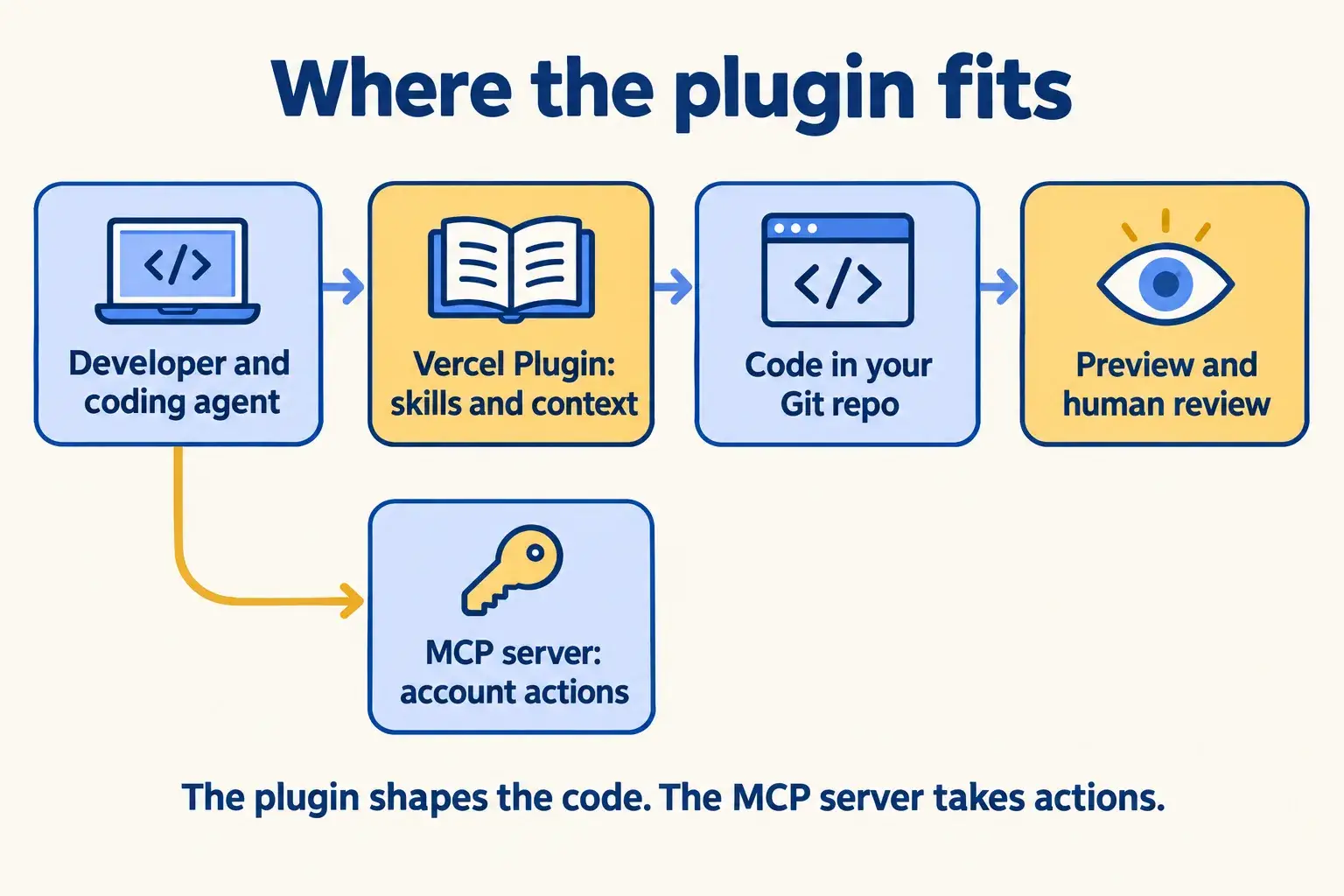
The plugin shapes how the agent thinks about Vercel. The separate Vercel MCP server is what takes actions on your account. They can run together.
Gaps
It ships no Next.js skills; those install separately with npx skills add vercel/next.js. It carries no status label and no price.


How it works

From install to code a person signs off.

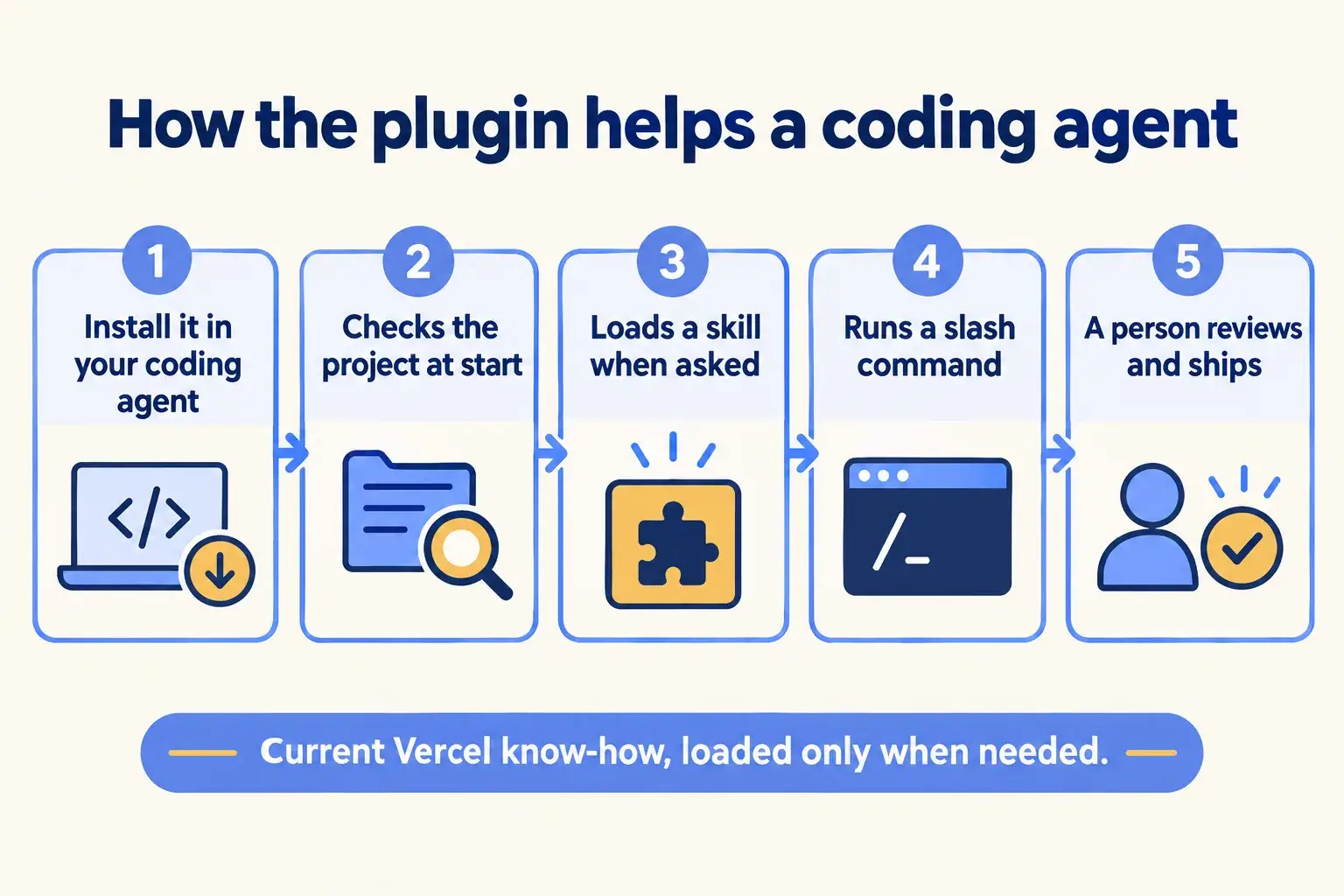
Five steps. The plugin improves what the agent writes. Your developer still reads it, and it still ships through a preview.

Five steps: install it in the coding agent, it checks the project, loads a skill, runs a command, and a person reviews and ships.

Infographic

The same steps are written out below.

Step by step

What happens at each step.

  1. Install

    Add it to your coding agent

    npx plugins add vercel/vercel-plugin. It needs Node.js 18 or later and Bun, except in OpenCode.

  2. Start

    It checks the project

    In a detected Vercel, Next.js or eve project it adds a thin Vercel context and profiles the repo for likely skills.

  3. Skill

    Call a skill when you need it

    AI SDK, Queues, Flags SDK, Domains and more. Token use goes up when a skill loads.

  4. Command

    Use a slash command

    Bootstrap, deploy, env or status, called from inside the agent.

  5. Review

    A person reviews and ships

    The change goes to Git, gets a preview link, and a developer approves it.

How it fits together

Where the plugin sits inside your developer’s tools.

The plugin lives in the coding agent on the developer’s machine. The code it helps write goes to your Git repository and through a preview. Actions on the Vercel account, if you want them, come from the separate MCP server.

The developer and coding agent use the plugin for skills, write code to Git, review it on a preview, with the MCP server separate.

Infographic

Where it sits next to the systems you run today.

Use cases · worked examples

One worked example in each industry.

How Vercel Plugin fits into the work of the industries we serve, one step at a time.

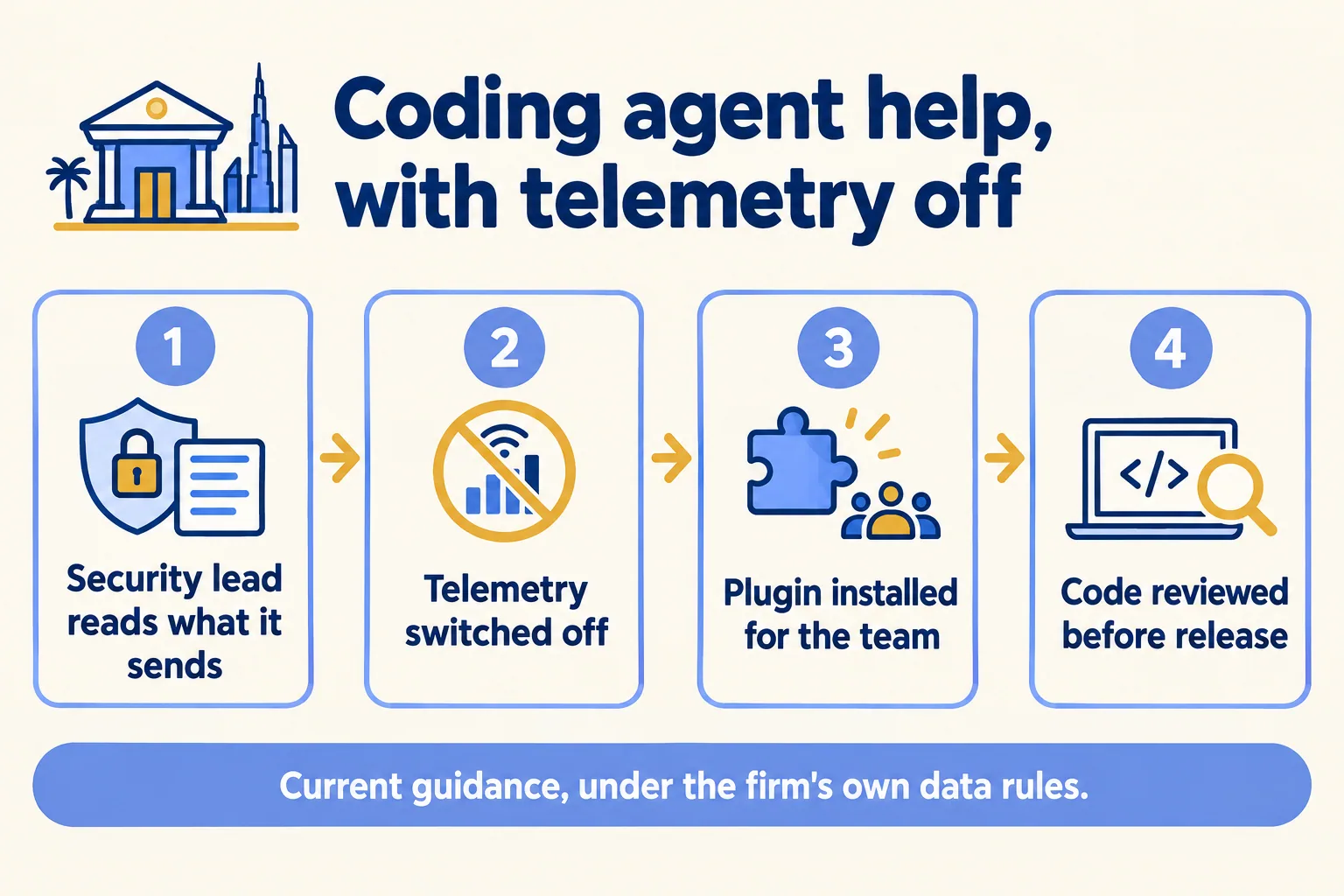
  1. A security lead reads what the plugin sends, telemetry is switched off, the plugin is installed and code is reviewed.

    Example 1 · Financial services, Dubai · Infographic

    Security lead at a Dubai wealth advisory firm

    Today: Our developers want coding agents. Before anything goes on a laptop, I need to know what it sends out.

    After: The security lead reads the plugin’s telemetry notes, switches it off by policy, and then approves the plugin for the client-portal team.

    Worked example, step by step

    1. Mon 09:00Security lead. Reads what the plugin sends: a daily active event and skill names, with no prompt text.
    2. Mon 10:00Security lead. Decides it stays off here. VERCEL_PLUGIN_TELEMETRY=off goes into the team’s shell setup.
    3. Mon 11:00Developer. Installs the plugin in Claude Code on the client-portal repository.
    4. Mon 14:00Developer. Calls the AI SDK skill to add a question box on the portal’s documents page.
    5. Tue 10:00Lead developer. Reviews the change on a preview link before any client sees it.

    The team gets current Vercel guidance in its coding agent, under the firm’s own data rules.

    Financial services
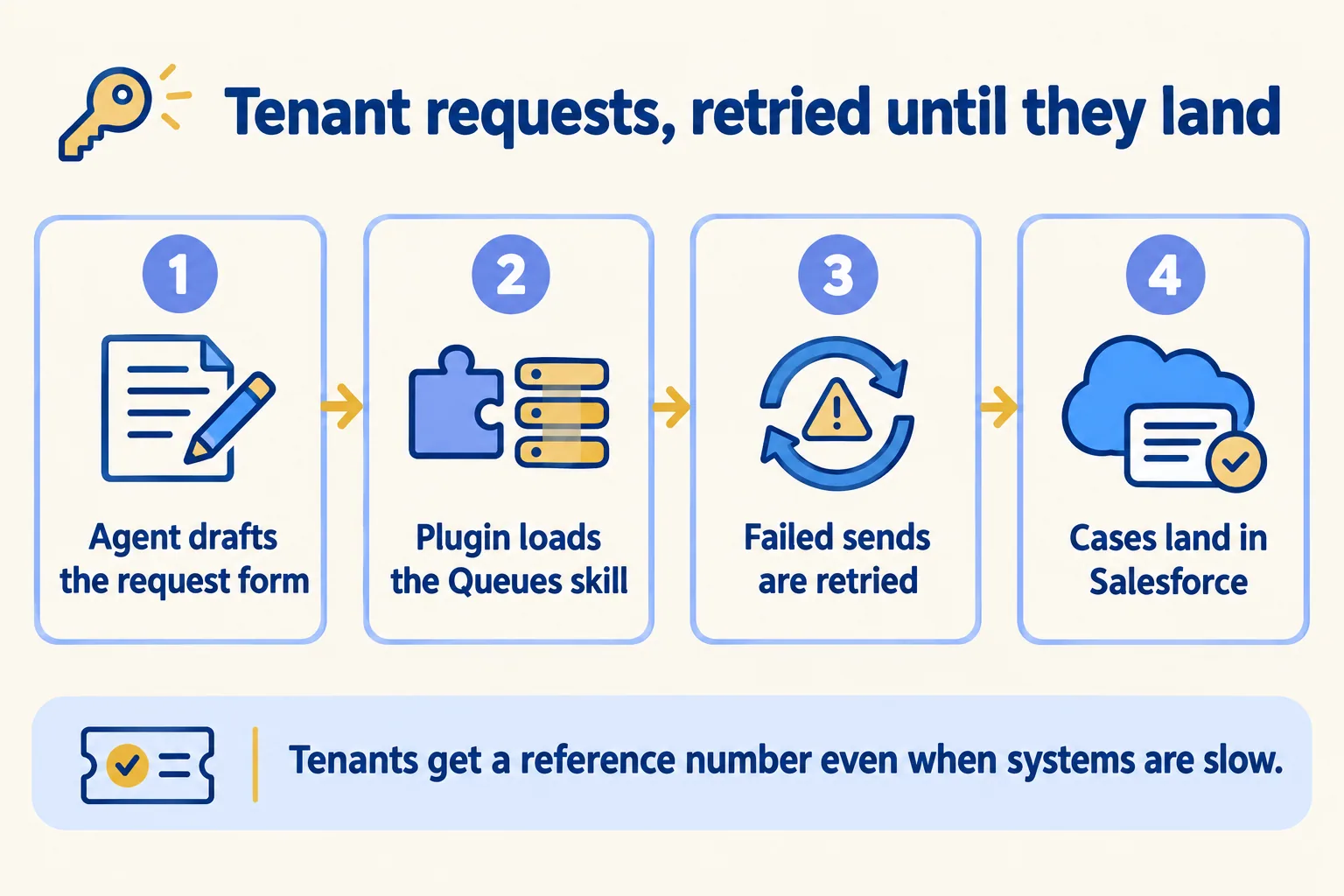
  2. A tenant request form is drafted with the Queues skill, failed sends are retried, and cases land in Salesforce.

    Example 2 · Property management, Abu Dhabi · Infographic

    Developer at an Abu Dhabi property management company

    Today: Tenant repair requests go from the portal straight to Salesforce. When Salesforce is slow, the request is lost and the tenant calls.

    After: The developer has the coding agent build the form with the plugin’s Queues skill, so requests wait in a queue and retry until Salesforce takes them.

    Worked example, step by step

    1. Sun 09:00Developer. Asks the coding agent to build the tenant repair form on the portal.
    2. Sun 09:05Vercel Plugin. Detects a Next.js project and adds current Vercel context to the session.
    3. Sun 09:30Developer. Calls the Queues skill so each request goes to a queue first. Vercel Queues is in beta.
    4. Sun 13:00Developer. Tests it with Salesforce unreachable: the request waits in the queue and retries.
    5. Mon 10:00Property manager. Sends a test leak report from the preview and sees the case in Salesforce.

    Tenants get a reference number even when systems are slow, and every request still reaches Salesforce. The code follows the API Vercel documents today.

    Property management
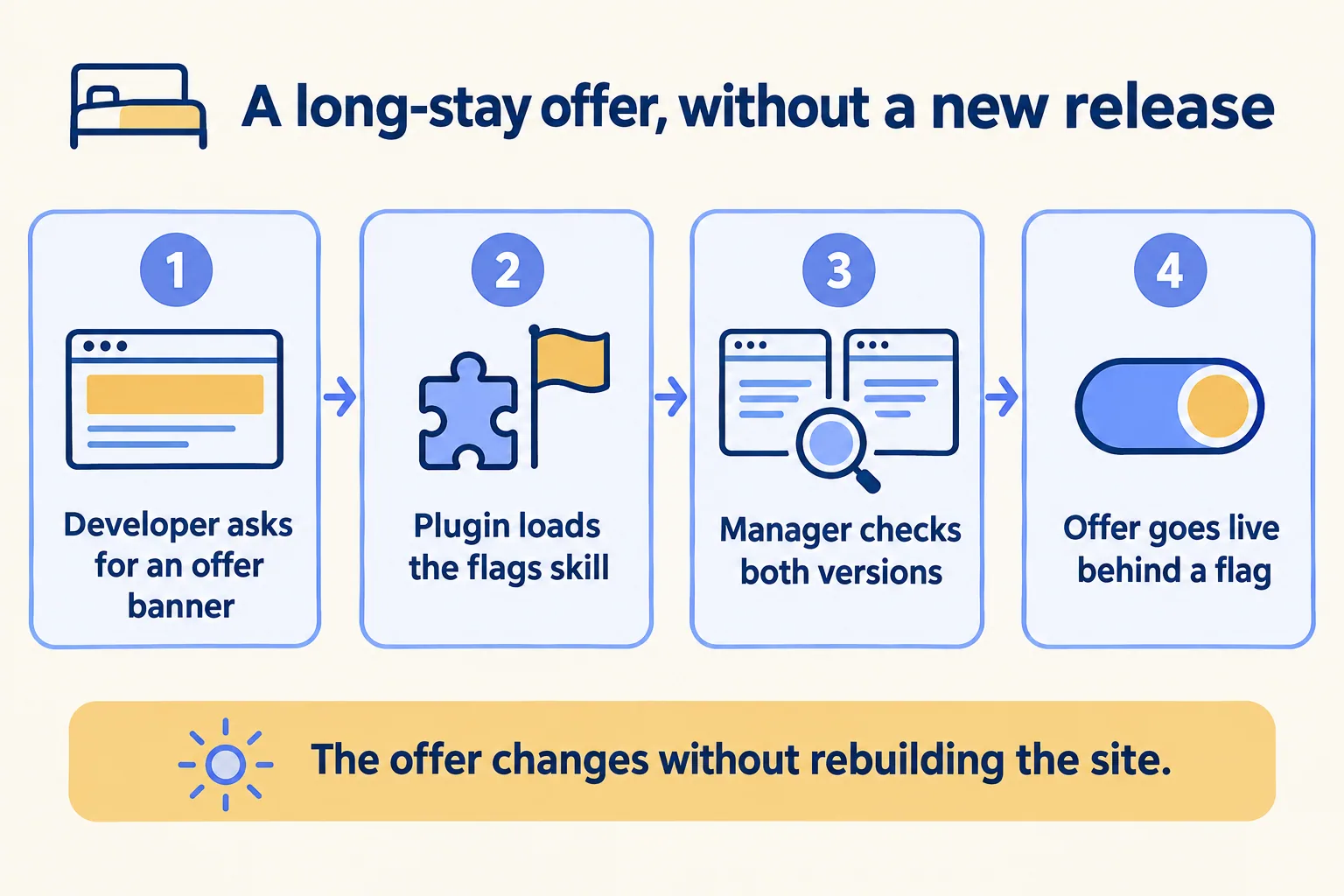
  3. A long-stay offer banner is built behind a flag with the flags skill, checked in both versions, then switched on.

    Example 3 · Hotel apartments, Jeddah · Infographic

    Revenue manager at a Jeddah hotel apartments group

    Today: I want to test a long-stay offer on the booking page. Every change waits for a release.

    After: The developer asks the coding agent for an offer banner behind a flag. The plugin loads the Flags SDK skill, and the revenue manager switches the offer on herself.

    Worked example, step by step

    1. Sun 10:00Developer. Asks the coding agent for a long-stay offer banner behind a flag.
    2. Sun 10:05Vercel Plugin. Loads the Flags SDK skill, so the flag code uses the current API.
    3. Sun 14:00Revenue manager. Checks both versions on the preview with Flags Explorer in the toolbar.
    4. Mon 09:00Revenue manager. Switches the offer on for half of visitors, with no new release.
    5. Mon 09:00 onSalesforce. Each booking enquiry arrives tagged with the version the guest saw.

    The offer goes live and comes off without a release, and the enquiries show which version worked.

    Hotel apartments
Examples of the work, not client stories. Times in each example show the order of events, not a measured result.

Is it for you

When Vercel Plugin fits, and when it doesn’t.

Good fit

Not for you yet

Your developers already use a coding agent
Nobody on the team uses a coding agent
You build on Vercel, Next.js or eve
You want it to deploy or change the account: that is the MCP server
You want the same guidance on every laptop
Policy bans developer tools you have not reviewed
Someone reviews the code before it ships
You need Next.js skills only: those install separately

What Mindcat does

We build it, then we run it.

The assessment is free: a short read of the org and a written note. If you go ahead, the first build week is a fixed AED/SAR 14,900 (about USD 4,050), credited in full when you sign the build within 60 days. After go-live, we keep it patched, watched and changing every month.

FAQ

What teams ask about Vercel Plugin.

Does the plugin deploy or change our Vercel account?
No. Vercel says the plugin shapes how your agent thinks about Vercel, and the separate Vercel MCP server gives the agent tools that act on your account. You can run both, and we set the MCP server’s access separately.
What does it send to Vercel?
By default, a daily active event and the name of each skill used. Vercel says prompt text and bash and tool-call telemetry are not collected. Setting VERCEL_PLUGIN_TELEMETRY=off turns it off.
Will it slow the agent down or cost more?
It loads little by default. Vercel’s FAQ notes that token use goes up when the agent loads a skill, so heavy skill use shows on your model bill.
Which coding agents does it work with?
Vercel’s docs list ChatGPT, Claude Code, Codex CLI, Cursor, GitHub Copilot and Copilot CLI, Grok Build, Kimi Code CLI, Kiro, OpenCode and VS Code. The marketing page’s list leaves out Kiro.
Does it cost anything?
Vercel states no price for the plugin as of 16 October 2026.

Sources

Where these facts come from.

Start here

Tell us what you want built, and where it runs today.

One or two lines is enough. You hear back within 24 hours from the person who signs the work.

Salesforce consulting partner since 2010 · MVP Hall of Fame · 200+ agents in production · UAE, India and US desks