

If your website runs on Vercel and its contact form fills your Salesforce lead list overnight with spam names like "asdf", this is for you. It is not for a site that is not on Vercel and is staying where it is (BotID only runs on Vercel), or for a team that sees a handful of junk leads a week: a validation rule in Salesforce is enough there, and rebuilding the form is not worth it. If your site still runs on an old server, read the last section first: the move and the form fix can be one job.
What do bot leads cost you, beyond a messy list?
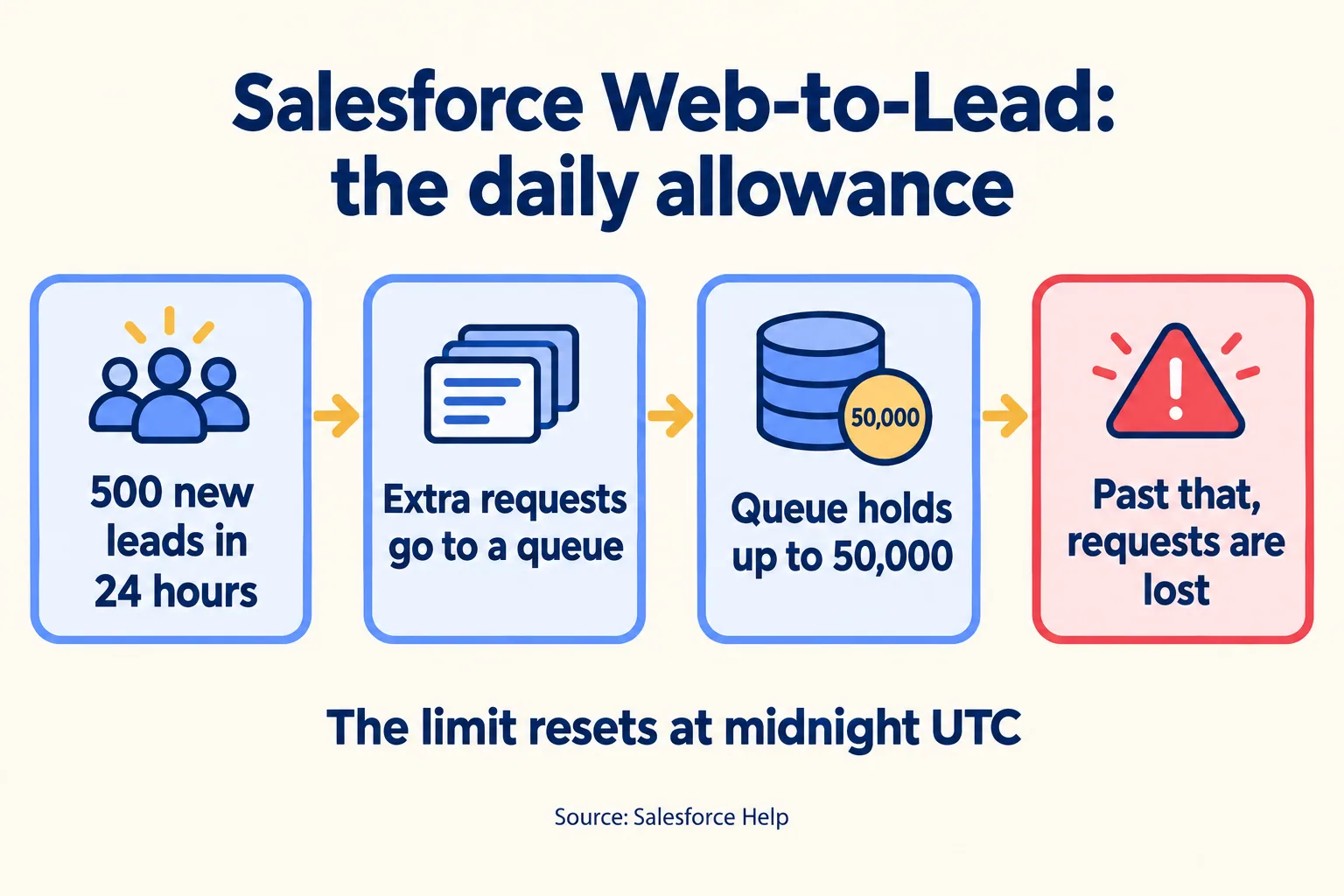
The real cost is the allowance they use. Salesforce creates at most 500 Leads through Web-to-Lead in a 24-hour period. Once you pass that, extra requests wait in a pending queue and are submitted when the limit refreshes at midnight UTC, which means they count against tomorrow's 500 as well.
Midnight UTC is 4am in Dubai and 5:30am in India. So a bot run at 2am in Dubai does not just add rubbish. It can push the real enquiry that arrives at 10am into tomorrow. Salesforce says the queue holds 50,000 Web-to-Case and Web-to-Lead requests combined. Past that, requests are rejected, the administrator gets an email for the first five, and the rest are gone for good. Salesforce support cannot clear the queue for you; it can only raise your daily limit for a while.
Salesforce's own fix list has three parts: a validation rule once you see the pattern, a check or CAPTCHA on the website side, and not leaving the form's code easy to copy. The first lives in your org. The other two live on the website, which is where this post sits.
Why can't BotID see a Web-to-Lead form as it is?
Because the form never touches your server. A standard Web-to-Lead form is plain HTML: its action attribute points at Salesforce, the browser posts the fields there, and Salesforce sends the visitor back to your thank-you page. Vercel BotID works the other way round. The browser solves a hidden challenge, your server code calls checkBotId(), and Vercel checks the answer. Vercel's form docs say it plainly: BotID does not support traditional HTML forms that use the action and method attributes.
Here is our own example. Our landing page forms post straight to Salesforce Web-to-Lead. Each carries a hidden field that people never see and bots often fill, and our code checks that field in the browser before it submits. That stops lazy bots. It does nothing against a script that reads the page source and posts directly to the Salesforce address, because that script never runs our code. Our site runs on Netlify, so BotID is not an option for us; we name the gap rather than pretend the hidden field closes it.
What does the change look like?
In plain terms: the form posts to your own server, the server asks Vercel whether the visitor is a bot, and only a real visitor's enquiry goes on to Salesforce. Vercel's docs show this for Next.js. For your developer, the steps:
- 01Handle the submit in your own code (a Next.js server action or a fetch to your API route), not with the form's action attribute.
- 02Install the botid package and list the form's path in initBotId so the browser runs the challenge for it.
- 03In the server action, call checkBotId(). If isBot is true, stop and return an error.
- 04Only then create the Lead: post the same fields to Web-to-Lead from the server, so the Salesforce org ID leaves the page source.
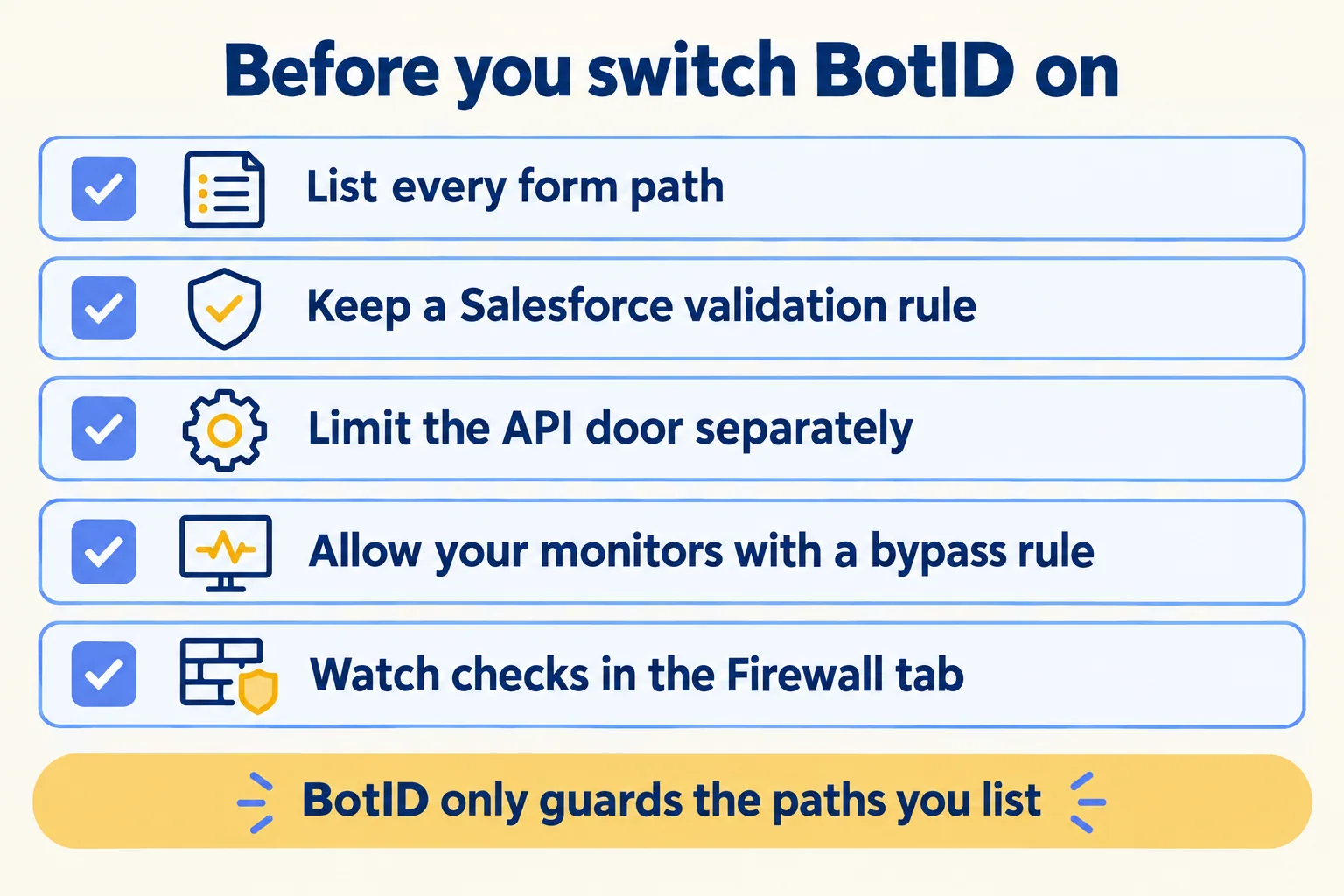
- 05Watch the BotID checks in the Firewall tab of the Vercel project, and keep your Salesforce validation rule.
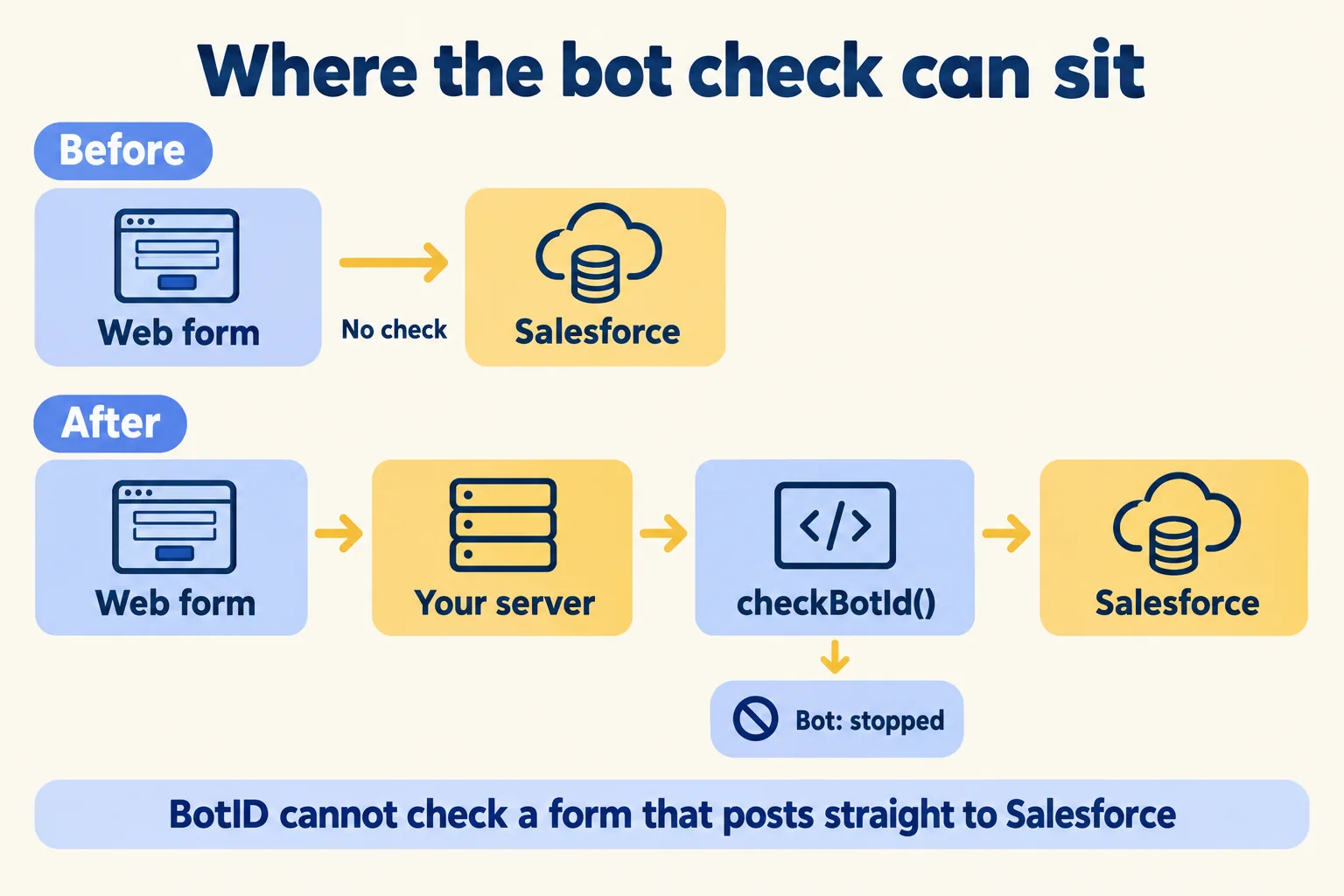
The fourth step carries the second benefit. Today your org ID sits in the HTML for anyone to copy, which is the "easily accessible source code" Salesforce warns about. Once the server makes the post, the browser never sees it. Lead Source, campaign and tracking fields move to the server too, so a bot cannot set them.
The visitor sees no change. BotID is an invisible check, with no puzzle to solve, and the thank-you page works the same way as before.
Basic or Deep Analysis: what does each cost?
Start on Basic and pay for Deep Analysis only on the forms that matter. These are Vercel's prices as of 16 October 2026.
In plain terms, Basic is the free check that the visitor's browser really solved the hidden challenge. Deep Analysis adds a second, paid look at the device and browser signals, for bots that solve it. We found no published catch rate for either level in Vercel's docs, so the number to trust is your own: the Firewall tab counts the checks and the bots stopped from the first day.
Vercel charges only for calls to checkBotId(). Page views and requests that do not call it are free. So the bill follows form submissions, not traffic. A worked example, as sample arithmetic and not a client figure: a Dubai brokerage's landing pages get 3,000 real submissions in a month, and a bot run sends 20,000 more. Every one of those posts calls checkBotId(), bots included, so Deep Analysis that month is about USD 23. Without the check, those 20,000 would have been 40 days of the Web-to-Lead allowance.
The plan is the bigger line. Vercel's Hobby plan is for non-commercial, personal use only, so a business form runs on Pro (USD 20 a month platform fee, with USD 20 of usage credit and one deploying seat, as of 16 October 2026) or Enterprise. If you already run the site on Pro, Basic adds nothing to the bill. Each extra deploying seat, for example one for your agency's developer, is USD 20 a month, and viewer seats are free. Put together for the sample above: Pro USD 20, an agency seat USD 20 and Deep Analysis about USD 23 come to about USD 63 (about AED 231) a month, plus any other usage on the site.
One more line for your client's security questionnaire. Once the form posts to your server, names, phone numbers and emails pass through a Vercel function. Vercel's 19 compute regions include none in the UAE or Saudi Arabia; Mumbai (bom1) is the nearest. Pick the function's region on purpose and write it down as where the form is processed, before the enquiry is stored in your Salesforce org. If a client's rules require that processing to happen in the UAE or Saudi Arabia, this design is a no, and the form has to post from a system hosted there instead. BotID also answers the questionnaire's bot and spam row: which forms are checked, at which level, and since when. Which other answers Vercel's own reports give, and which stay yours, is in our security questionnaire post.
What should you watch after you switch it on?
Five things. They come from Vercel's own docs, Salesforce's spam guidance and what we check on our own forms.
- BotID only guards what you list. Vercel's FAQ says it runs only where you configure protected paths. A second form, a pop-up or a new landing page that you forget to list posts unchecked. If you run one landing page per ad, list them with a wildcard path; Vercel's setup guide supports wildcards.
- The other doors to the same Lead. If you also create Leads through an API route, for a chatbot, a partner or an AI agent, BotID does not cover it. Our own agent endpoint creates the same Lead and is rate-limited by IP; yours needs a limit or a key of its own.
- Good automation. Uptime monitors and partner tools that post to the form can be flagged as bots. Vercel lets you add a WAF bypass rule for them; write that down before switch-on, not after the first complaint.
- Failures you cannot see. Once your server posts the Lead, a Salesforce error no longer shows in the visitor's browser. Log each submission and Salesforce's response, and alert someone when a post fails, so a real enquiry never disappears quietly.
- A real person flagged as a bot. When the check says bot, do not show a blank error. Show your WhatsApp number or email, so a person who is wrongly stopped can still reach you, and check the Firewall tab for how often it happens.
Keep the Salesforce validation rule as the last line. It sees every door, including the ones you forget. The split of work is simple: your web team moves the form; your Salesforce admin owns the validation rule, the Lead Source values and the cleanup.
For the wider picture of what runs on a Vercel site, from hosting to the firewall, see everything we build on Vercel. For how leads should flow once they are real, our real estate brokers page shows how portal and website leads land in one shared WhatsApp inbox, each with an agent.
Why not a CAPTCHA, or the API?
Both are fair choices, and Salesforce's own spam guidance lists a CAPTCHA. The trade is friction: a visible puzzle asks every real buyer to prove themselves, on the form you most want them to finish. BotID is invisible to the visitor, which is why we prefer it when the site already runs on Vercel.
Once the post moves to your server, you can also create the Lead through the Salesforce API instead of Web-to-Lead. Then you need an integration user and you spend your org's API allowance rather than the Web-to-Lead one. Posting to Web-to-Lead from the server keeps the Web-to-Lead setup you already have, such as auto-response rules. Pick one with your admin; both close the door that the page source leaves open today.
For the junk already in your org, Salesforce's article gives the order: find the spam records with a report by creation time, mass-delete them, then write a validation rule from the pattern you found. Do the cleanup before the form change goes live, so the first clean week is easy to see in your Lead reports. If bots have already filled the pending queue, Salesforce support can raise your daily limit for a while to work through it; they cannot clear the queue.
What happens on the first call?
We call the method Preview every change. In practice: the new form runs on a preview link, a copy of your site that only your team can open, and you submit one real test enquiry and one scripted bot run. You see one Lead in Salesforce and one stopped, before anything goes live.
If your site does not run on Vercel and you have no plan to move it, BotID is the wrong tool; keep the validation rule and ask your host what server-side check it offers. If you are thinking of moving off an old server anyway, our hosting page sets out what a move involves, and the form change can ride with it. If the site is on Vercel, send us the form, where it posts today and how many junk Leads you saw last week. The written assessment is free, and if your own web team can make the change, it says so and lists the steps. A form move your own developer can make needs no build week. If you want us to build it along with other work on the site, the first build week is a fixed AED/SAR 14,900, credited in full if you sign the build within 60 days. Run plans are on What you get. We are not a Vercel partner; Vercel is the product we build on, and your Vercel account stays in your company's name.
