A developer and an operations manager in a Kochi office watch customer chats arrive on a phone beside a laptop.

Vercel · Core platform

Most of your backend’s time goes on waiting for a reply. Pay for the CPU it uses.

A WhatsApp bot waits on the model. An eligibility check waits on a credit bureau. A form waits on Salesforce. On a fixed server you pay for the whole box all month, busy or quiet. Fluid Compute runs many requests on one instance and bills active CPU, provisioned memory and invocations. While a request waits, the instance takes the next one.

Salesforce consulting partner since 2010 · MVP Hall of Fame · 200+ agents in production · UAE, India and US desks

The problem

Where the backend costs you today.

What Fluid Compute is

Fluid Compute, in plain words.

Facts from Vercel’s own pages, checked on 16 October 2026. The sources are at the end of this page.

What it is
A way to run Vercel Functions: many requests share one instance, and new instances start only when needed.
On by default
Enabled for new projects since 23 April 2025. Older projects switch it on in Project Settings or in vercel.json.
How it bills
Active CPU, provisioned memory and invocations. Vercel describes CPU that is charged when active, not idle.
Runtimes
Concurrency on Node.js and Python. Bytecode caching and pre-warming reduce cold starts in production.
Work after the reply
waitUntil runs background work after the response is sent. An unhandled error does not crash the other requests on the instance.
Time limits
300 seconds by default. Up to 800 on Pro and Enterprise, 1,800 in beta. Vercel points longer jobs to Workflows.

How it works

From a request to an answer, without paying for the wait.

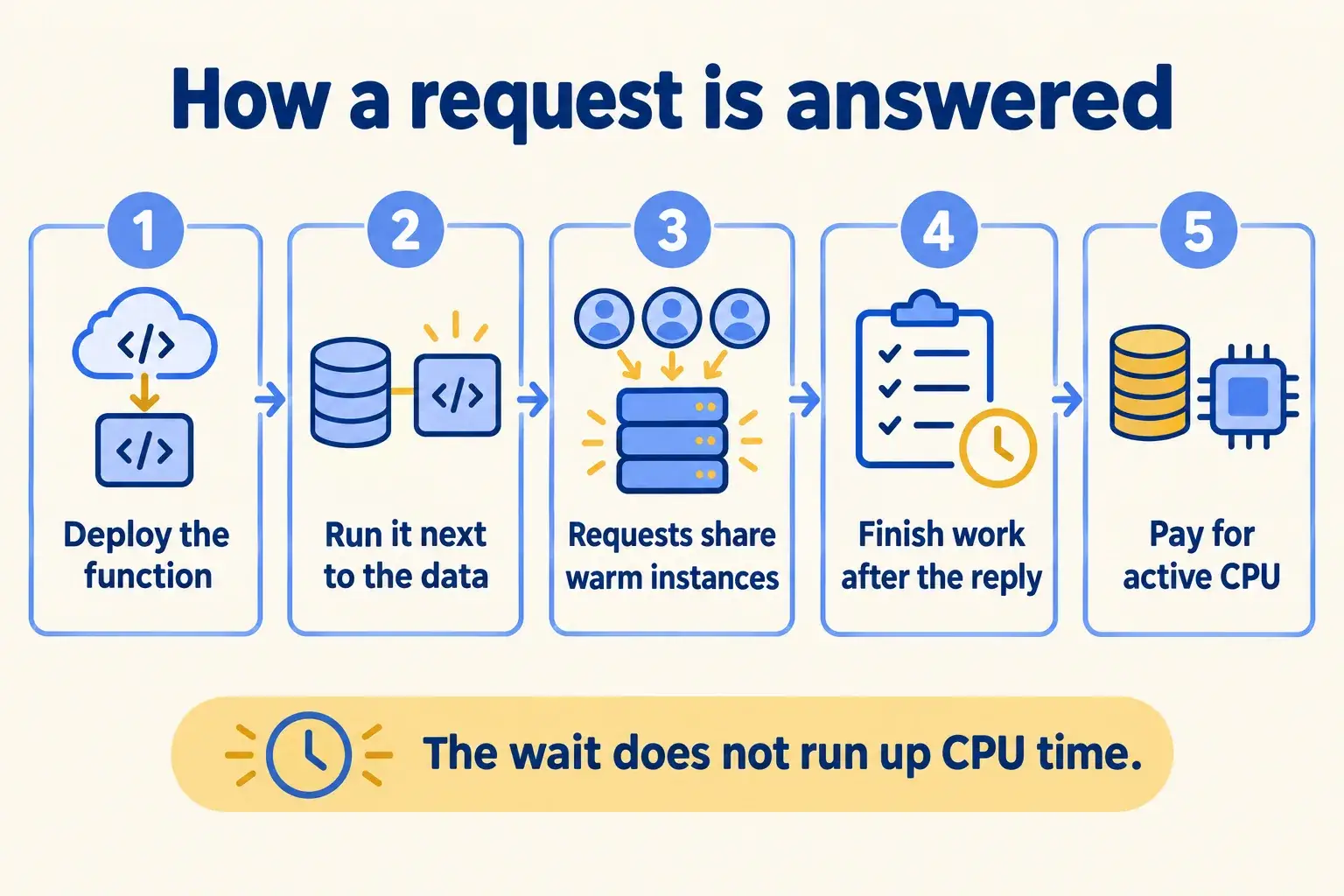
Five steps. The function runs next to your data, shares its instance while it waits, and finishes the slow writes after the customer has a reply.

Five steps: deploy a function, run it next to the data, share warm instances, finish work after the reply, pay for active CPU.

Infographic

The same steps are written out below.

Step by step

What happens at each step.

  1. Deploy

    Deploy the function

    An API route, a server action or a webhook. Fluid is on for new projects.

  2. Region

    Run it next to the data

    Pick the region nearest your database. Mumbai is the closest to the Gulf.

  3. Share

    Requests share warm instances

    While one request waits on a model, the same instance takes the next one.

  4. After

    Finish the work after the reply

    waitUntil writes to Salesforce or a log once the customer has an answer.

  5. Bill

    Pay for active CPU

    Plus provisioned memory and invocations, priced per region.

How it fits together

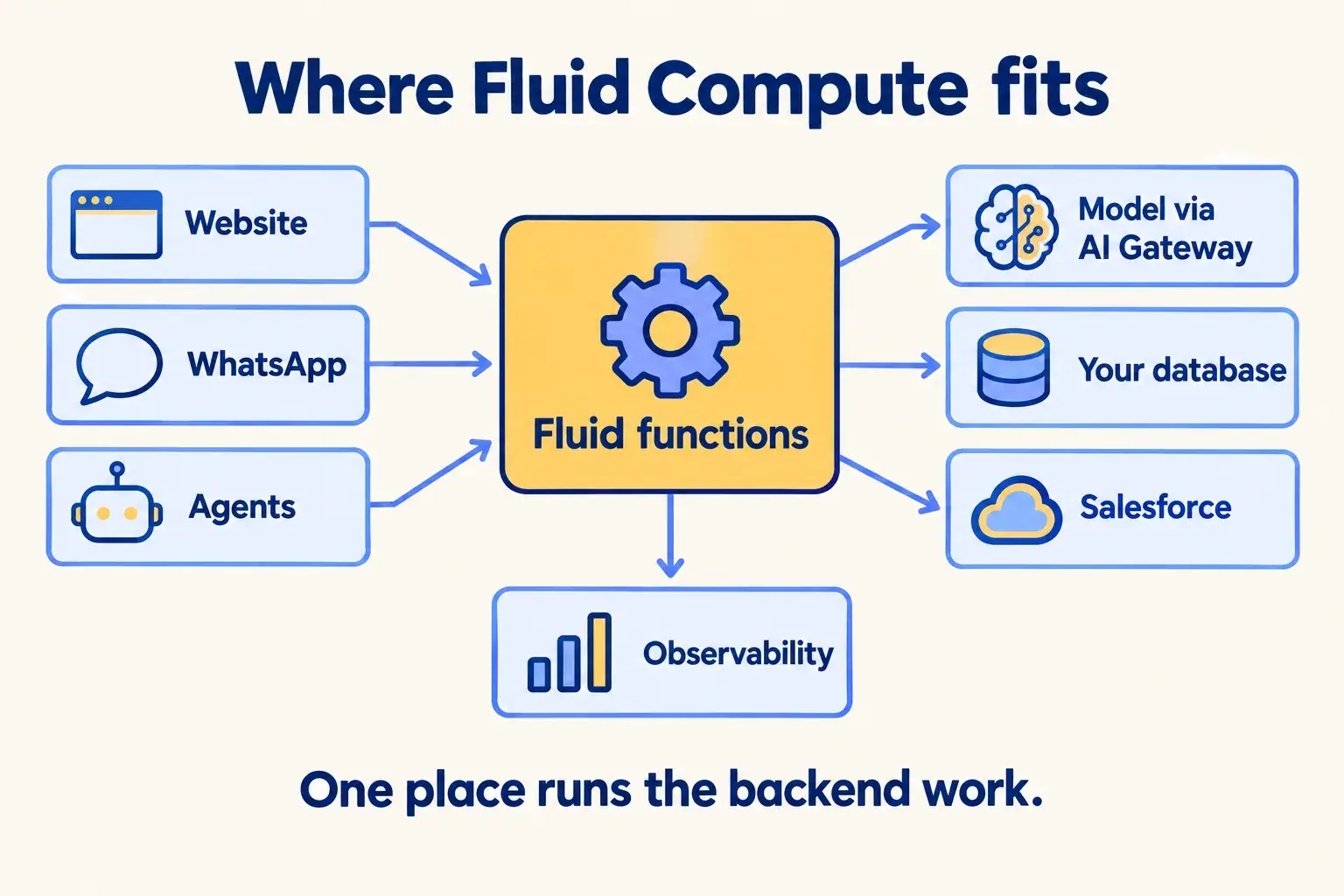
Where Fluid Compute sits between WhatsApp, your site and Salesforce.

Requests arrive from your website, a WhatsApp webhook or an agent. The CDN answers what it can. Fluid functions do the rest: call a model through AI Gateway, read your database, write to Salesforce. Observability shows which call is slow.

Website, WhatsApp and agents send requests to Fluid functions, which call a model, a database and Salesforce, watched by Observability.

Infographic

Where it sits next to the systems you run today.

Use cases · worked examples

One worked example in each industry.

How Fluid Compute fits into the work of the industries we serve, one step at a time.

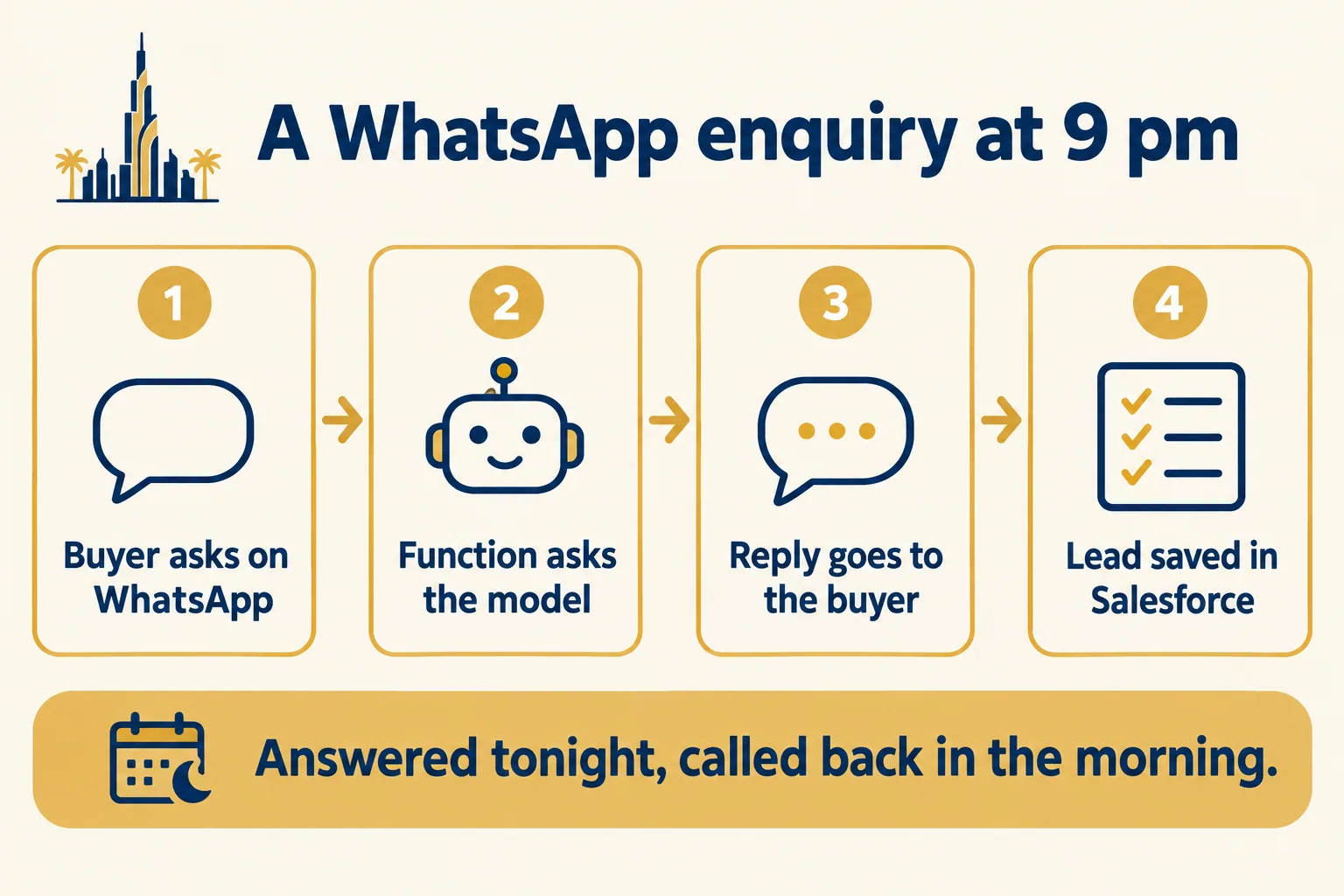
  1. A WhatsApp enquiry flow: the function asks the model, replies to the buyer, then saves the lead in Salesforce.

    Example 1 · Real estate, Dubai · Infographic

    Leasing manager at a Dubai brokerage

    Today: Enquiries come in on WhatsApp at all hours. The bot that answers them runs on a server a freelancer set up, and it goes quiet when a new listing brings a rush.

    After: The WhatsApp webhook runs as a Fluid function. It answers the buyer, then writes the lead to Salesforce with waitUntil, after the reply has gone.

    Worked example, step by step

    1. 21:02Buyer. Asks on WhatsApp about a two-bedroom in Dubai Marina.
    2. 21:02WhatsApp. Sends the message to the webhook, a Vercel Function.
    3. 21:02Function. Asks the model for a reply with the listing details, and waits.
    4. 21:02Fluid Compute. Takes other buyers’ messages on the same instance while the model answers.
    5. 21:03Function. Sends the reply to the buyer on WhatsApp.
    6. 21:03Function. After the reply, creates the lead in Salesforce with the chat attached.
    7. 09:00Leasing manager. Calls the buyer with the chat open in Salesforce.

    Evening enquiries get an answer in the chat and a lead in Salesforce by morning.

    Real estate brokers
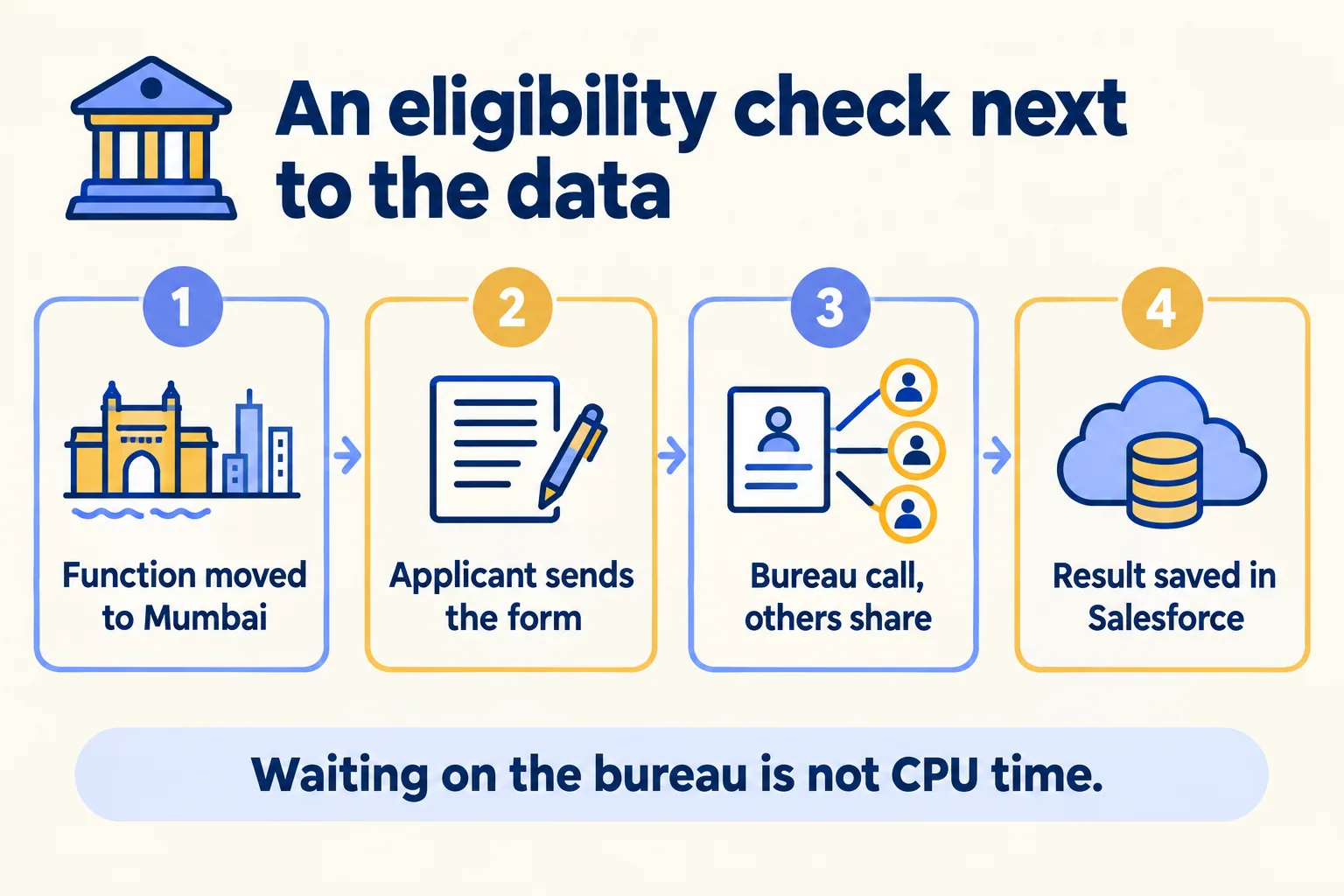
  2. A lending flow: function moved to Mumbai, applicant submits, bureau call waits, result saved to Salesforce.

    Example 2 · Financial services, Mumbai · Infographic

    Product head at a Mumbai lending company

    Today: The eligibility check calls a credit bureau and a bank statement service, and each takes several seconds. The first version ran in Washington, D.C., the default region, while the database sits in Mumbai.

    After: The function moves to the Mumbai region next to the database. While it waits on the bureau, the instance serves other applicants, and the bill counts active CPU.

    Worked example, step by step

    1. Day 1Developer. Sets the function region to bom1 Mumbai, next to the database.
    2. Day 1Developer. Sets a max duration for the statement check that fits inside the plan limit.
    3. 10:15Applicant. Submits the eligibility form on the website.
    4. 10:15Function. Calls the credit bureau and waits. Other applicants share the instance meanwhile.
    5. 10:16Function. Returns the result and saves the application in Salesforce.
    6. Month endProduct head. Reads the bill: active CPU hours at the Mumbai rate, per function.

    The check runs next to the data, and time spent waiting on the bureau stops showing up as CPU.

    Financial services
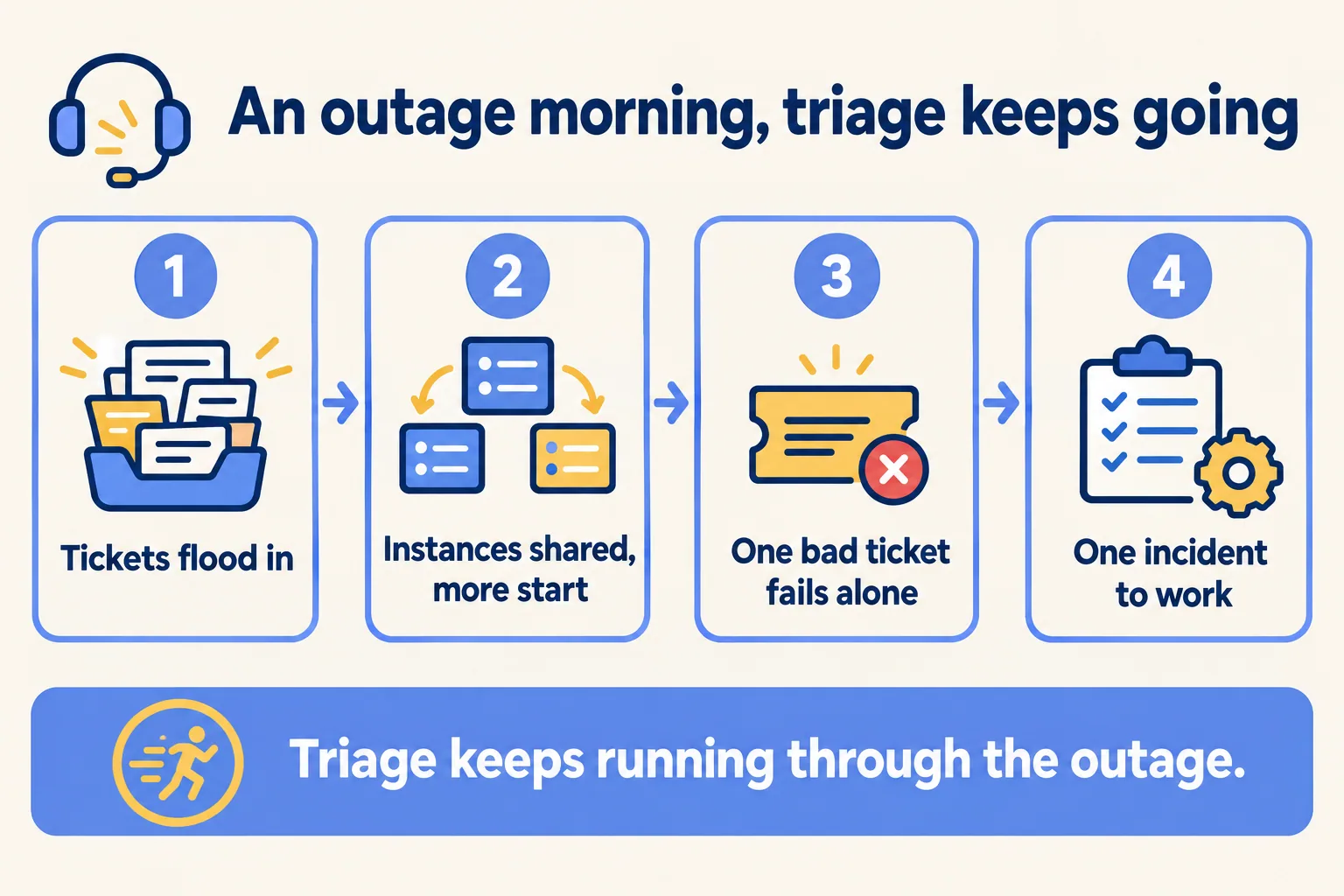
  3. An outage flow: tickets flood in, triage shares instances, one bad ticket fails alone, the lead sees one incident.

    Example 3 · IT service desks, Austin · Infographic

    Service desk lead at an Austin managed IT provider

    Today: When a client’s email goes down, hundreds of tickets arrive in minutes. The triage service falls over, and one bad ticket takes the rest down with it.

    After: Triage runs on Fluid. Tickets share warm instances, new ones start as the queue grows, and an unhandled error in one ticket leaves the others running.

    Worked example, step by step

    1. 08:50Client. Email outage starts. Users file tickets from the portal.
    2. 08:51Function. Classifies each ticket with a model call and links it to one incident.
    3. 08:52Fluid Compute. Runs many tickets on each instance and starts more only as the queue grows.
    4. 08:53Function. Fails on a ticket with a broken attachment. The other tickets carry on.
    5. 08:55Service desk lead. Sees one incident with the tickets linked, not a wall of duplicates.
    6. 09:30Developer. Finds the failed ticket in the logs and fixes the parser.

    A morning outage turns into one incident to work, and triage keeps running through it.

    IT service desks
Examples of the work, not client stories. Times in each example show the order of events, not a measured result.

Is it for you

When Fluid Compute fits, and when it doesn’t.

Good fit

Not for you yet

APIs that wait on models, bureaus or Salesforce
Jobs that run for hours: those belong in Vercel Workflows
Traffic in bursts, quiet at night
Rules that require compute in the UAE or Saudi Arabia: there is no region there
WhatsApp or form webhooks that must answer quickly
A steady heavy load around the clock that you already run cheaply
Code in Node.js or Python
You expect no cold starts at all: Vercel says they are reduced

What Mindcat does

We build it, then we run it.

The assessment is free: a short read of the org and a written note. If you go ahead, the first build week is a fixed AED/SAR 14,900 (about USD 4,050), credited in full when you sign the build within 60 days. After go-live, we keep it patched, watched and changing every month.

FAQ

What teams ask about Fluid Compute.

What does it cost?
As of 16 October 2026, Pro starts at $0.128 per active CPU hour, $0.0106 per GB-hour of memory and $0.60 per million invocations. Rates vary by region: Mumbai is $0.14 per CPU hour. Hobby includes 4 hours of active CPU a month but is for non-commercial use only.
Does it remove cold starts?
Vercel says cold starts are reduced, through bytecode caching on Node.js 20 and later and pre-warming in production. It does not say they are gone, and neither do we.
Will it be cheaper than what we run now?
It depends on how much of each request is spent waiting. Vercel reports a customer quote about cutting costs by over 50%, but that is one customer. We estimate yours from your own traffic before you move.
How long can a function run?
300 seconds by default. On Pro and Enterprise up to 800 seconds, and 1,800 in beta. For longer jobs, Vercel points to Workflows.
Can it run in Dubai?
No. Vercel has 19 compute regions and none is in the Middle East. Mumbai is the closest. If a zone fails, Fluid fails over to another zone in the same region first, then to the next closest region.


Sources

Where these facts come from.

Start here

Tell us what you want built, and where it runs today.

One or two lines is enough. You hear back within 24 hours from the person who signs the work.

Salesforce consulting partner since 2010 · MVP Hall of Fame · 200+ agents in production · UAE, India and US desks