
What did AWS ship on 7 October?
A sandbox decides where your agent can reach. It does not decide what the agent may do once it is there, how often, or in what order. On 7 October AWS released Strands Box in developer preview to close part of that gap: an open source sandbox, under Apache 2.0, that pairs operating-system isolation with rules that can depend on what the agent has already done.
Picture the security review for an on-call agent. The engineer says it runs in a sandbox. Ask two questions: what stops it posting to the incident channel forty times, and does it ever hold the Slack token? Isolation alone answers neither. Box answers the first with a rule on history and the second with a credential proxy.
Disclosure: Mindcat builds client agents on Claude and on OpenAI models. We are not an AWS, Anthropic or Google partner, and no vendor in this post pays us. We read the AWS post, Marc Brooker's companion post, the Box repository and its docs, and every other vendor's own pages on 9 October 2026.
Four things the announcement does not say, from the Box docs and Brooker's post:
- The preview runs on macOS with Apple silicon, macOS 15 or later, at version 0.1.x. The guide says keys, flags and policy actions can change between releases.
- "Every process in the box can use every route." The agent, each tool and each MCP server in one box get the same placeholders, so the box, not the process, is the credential boundary.
- For multi-tenant deployments in the cloud, AWS recommends running Box inside a dedicated microVM per session.
- A limit counted on successful responses can be overspent by requests still in flight. A limit counted on requests is exact, and refused attempts count toward it.
So, today, Box is a control for agents on a developer's Mac, not a server control you can show an auditor. Its value now is learning what your agents actually do and writing the rules before the Linux and cloud versions arrive. We have not run Box on client work. The tests at the end are the ones we would run first.
What does a sandbox stop, and what does it not?
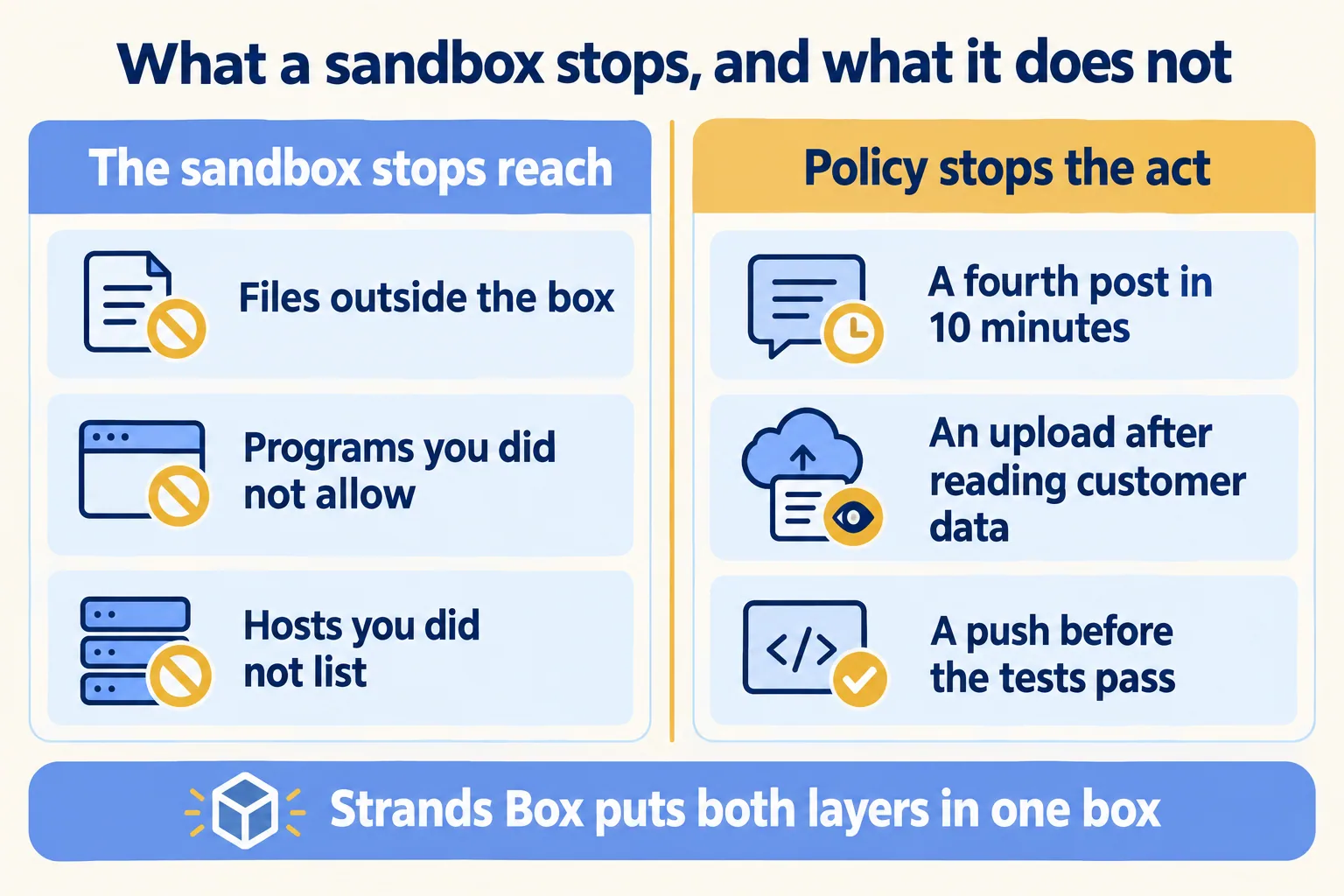
A sandbox stops reach: files outside the paths you grant, programs you did not allow, hosts you did not list. It does not judge an action it allows. If your agent may post to Slack, a sandbox lets it post forty times. If it may read the customer folder and reach the internet, a sandbox lets it do both, in that order.
AWS says the same in its announcement: "Containers and microVMs provide strong isolation, but isolation alone doesn't enforce contextual rules." Its example is an agent investigating a production incident, which should read logs and inspect infrastructure without being allowed to change it.
Box splits the job into two tiers. box.toml sets what the agent's own processes can open, and the operating system enforces it before the first process starts. policy.dw decides each request that goes through Box's own shell, Python, egress gateway and MCP broker, which run in Box's process outside the sandbox. Anything those four handle is refused unless a permit matches, a forbid beats a permit, and if the engine faults, the request is denied.
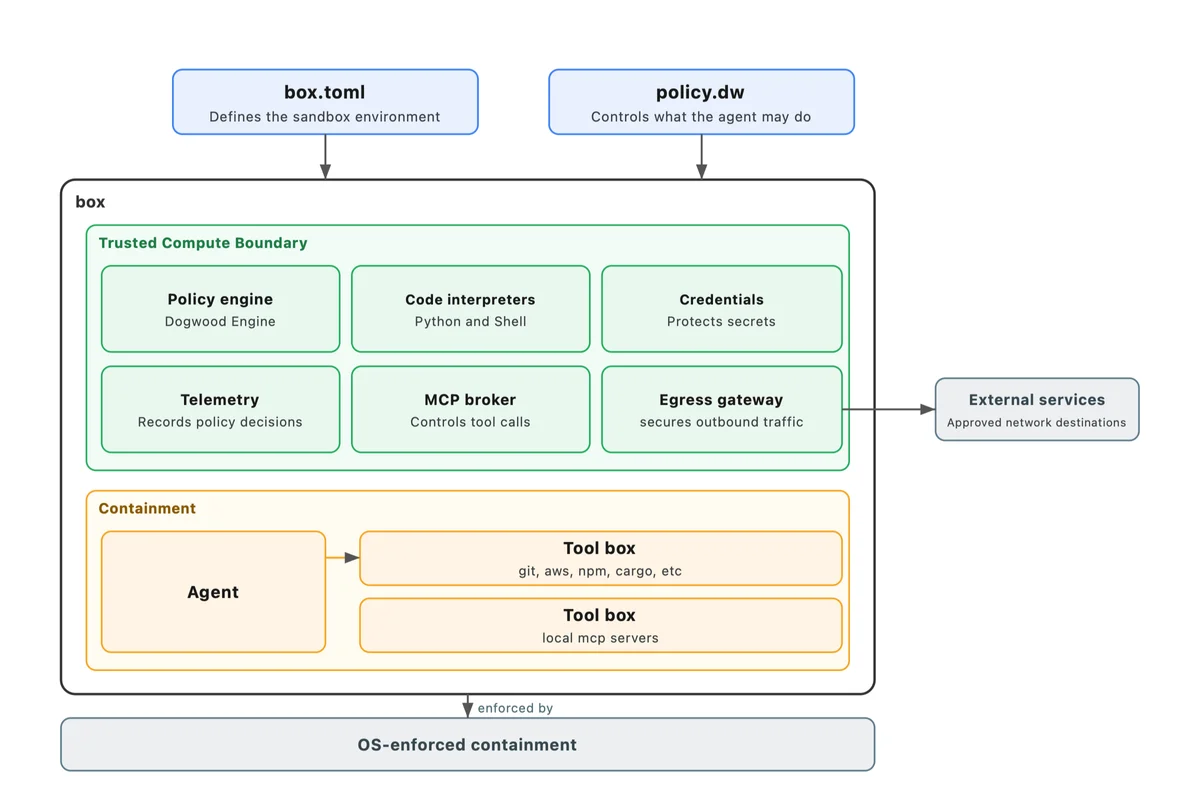
That split is where the write gets caught. If the agent runs rm -rf build/, Box's shell raises an fs:delete decision for each file it would remove, so a forbid on delete stops the command before anything is deleted, while a normal edit in the workspace still goes through. The policy sees the file and the operation, not an opaque system call. It is our line, "the write is the risk", in a form you can test.
For an approver, the record matters as much as the refusal. Box writes each decision as OTLP JSON, by default to private/telemetry/records.jsonl in the box's own directory, with the verdict, the action, the path or host, and the rule. No request from inside the box can reach that directory, so the agent cannot read or edit its own log. Two gaps to plan for: the docs say the log "records the rule and the path, and not the operation" (a cat and an ls of one file look the same), and the docs we read say nothing about retention or cost per call. OTLP is the OpenTelemetry format, so ship the file to your own log store and set retention there.
When the agent is refused, it gets the same text: "policy denied this operation", the rule's ID and its description, so a clear description tells the agent to wait instead of retry. In Box the principal is always the agent, so the log names the rule, not a person. "Who acted" still needs the identity on the other side of the call, which we come back to under Salesforce.
Why do rules about history matter?
Because the risky act is often a permitted act at the wrong time. Dogwood rules can read the agent's recorded history: what it did, in what order, and how long ago. In AWS's words, "permissions can depend on earlier actions, their order and limits accumulated over time."
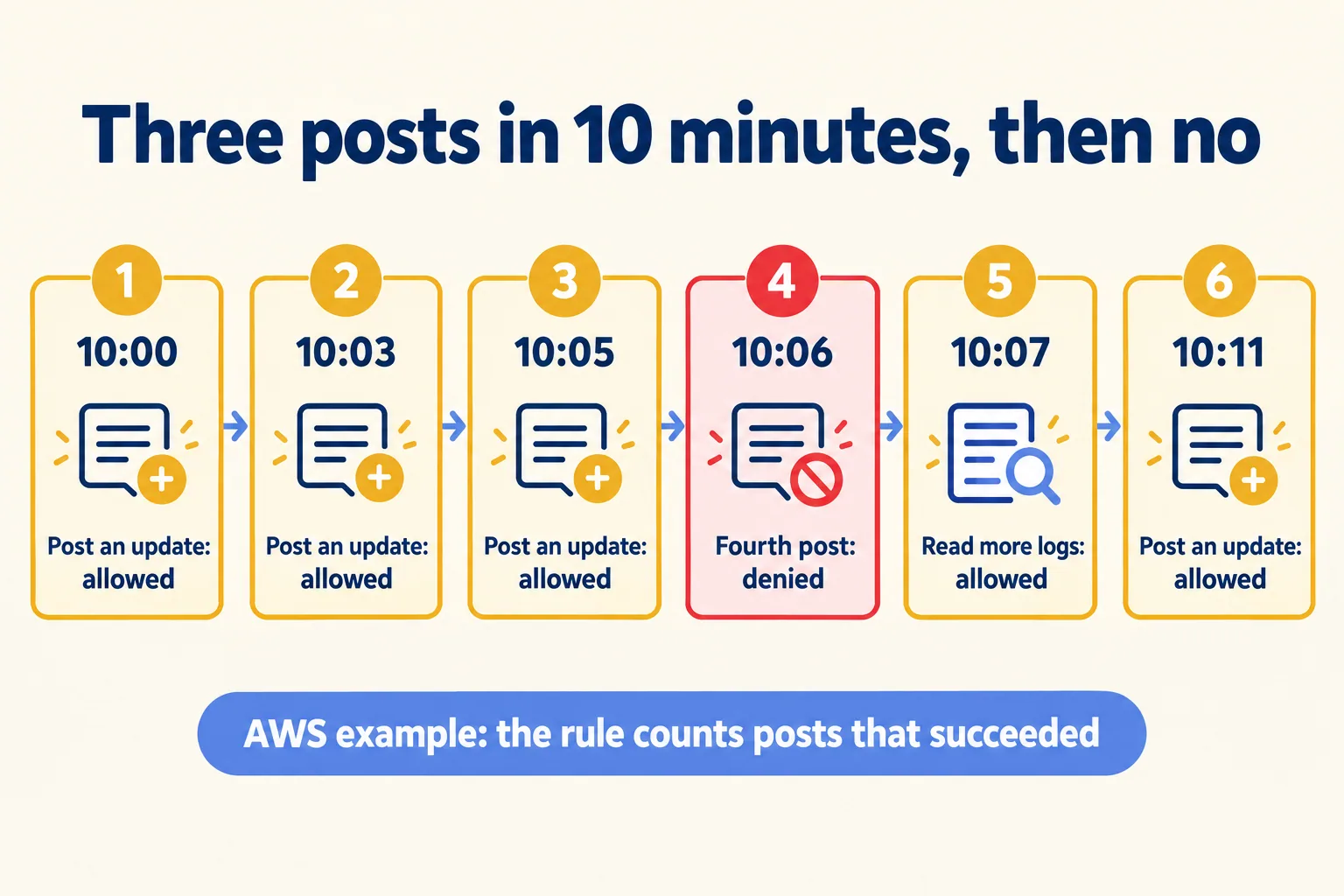
AWS's own example is the incident agent. It may post progress to the incident channel in Slack, but no more than three times every 10 minutes, so it does not bury the updates from people. The rule counts posts that returned HTTP 200 in the last 10 minutes. The agent keeps reading logs while the cap holds.
AWS's incident-agent timeline
10:00
Post an update: allowed
10:03
Post an update: allowed
10:05
Post an update: allowed
10:06
A fourth post within 10 minutes: denied, HTTP 403
10:07
Retrieve more logs: allowed
10:11
Post an update: allowed
The same shape covers rules an approver would want, all from AWS's pages:
- After the agent reads a file from the customer-data directory, block further outbound HTTP requests. Because the shell and Python report reads the same way, the rule holds whichever tool did the read.
- Allow
git pushonly ifnpm testpassed since the lastgit add, within 15 minutes. Brooker notes this is not a complete policy, since agit switchcould break the promise. - Cap calls to one MCP server at 60 an hour, for paid APIs or a shared quota.
If you own the bill, read that last rule as a spend control. Brooker writes that caps like it help with paid APIs, shared quotas, or "simply to prevent unexpected bills", and gives a payments API capped at $100 a day as a rule Box can express. AWS also argues the interpreters cut token spend, because intermediate results stay in the sandbox instead of passing through the model. Neither page gives a latency or overhead figure. The docs warn only that a long time window slows every decision on that action, so time your own.
Your approvals are sequences too. Our own approval flows at Mindcat (expenses, vendor payments, hiring requests) keep the request in a Slack List while it moves through the manager, the department head and, for budget items, finance and the CEO. The flow writes back to Salesforce only after the last approval. That is an ordering rule, and today the flow's design enforces it. In Box's terms it would be a forbid on the Salesforce write unless an approval appears in the history since the request. We have not built or tested that.
What we learned going live applies here. The gaps after launch were missing process cases (contractors, external approvals, audits), not model mistakes. A rule about history needs the same write-up first: you cannot count an event you never named. And the approval has to name the exact action, as the $20 approval that ran as $2,000 showed.
Should policy run inside the agent or at the boundary?
At the boundary, with the agent app's own prompts kept as a second layer. AWS's reason: the permission prompts built into agent apps "run inside the agent's own process and they judge the tool call, not its effect." A prompt sees "run this shell command". It does not see the files the command will touch or the hosts it will reach. Box enforces from outside the process, and one box.toml and policy.dw can carry across agent apps. Its docs include tutorials for Claude Code, Codex CLI and pi.
Each vendor's own page says where its boundary stops. Read that line before you approve anything:
- Claude Code. "The sandbox covers shell commands only. Claude's file tools, MCP servers, and hooks run outside it." Anthropic's sandbox-runtime wraps the whole Claude Code process when you need more.
- Codex. Its network proxy filters commands in the local sandbox and "does not filter web search, app or connector tool calls, MCP server connections".
- Strands Box. Paths granted in
box.tomlraise no policy decision, and a program that ashell:spawnpermit admits runs without its own file operations being decided.
Brooker explains why AWS put policy above the kernel. At the level of a virtual network card, "pretty much all you see on the wire is TLS ciphertexts." So Box uses the kernel sandbox to make the policy layer "the only way out of the box", and the policy layer reads HTTP methods, MCP calls and shell commands. The cost, in his words, is more code to trust: interpreters and protocol interceptors where "bugs could mean bypassed policy." AWS says it wrote that code in Rust and invested in "testing, fuzzing, and validation". The repository has a SECURITY.md for reporting a suspected problem. We found no third-party review of Box's security model.
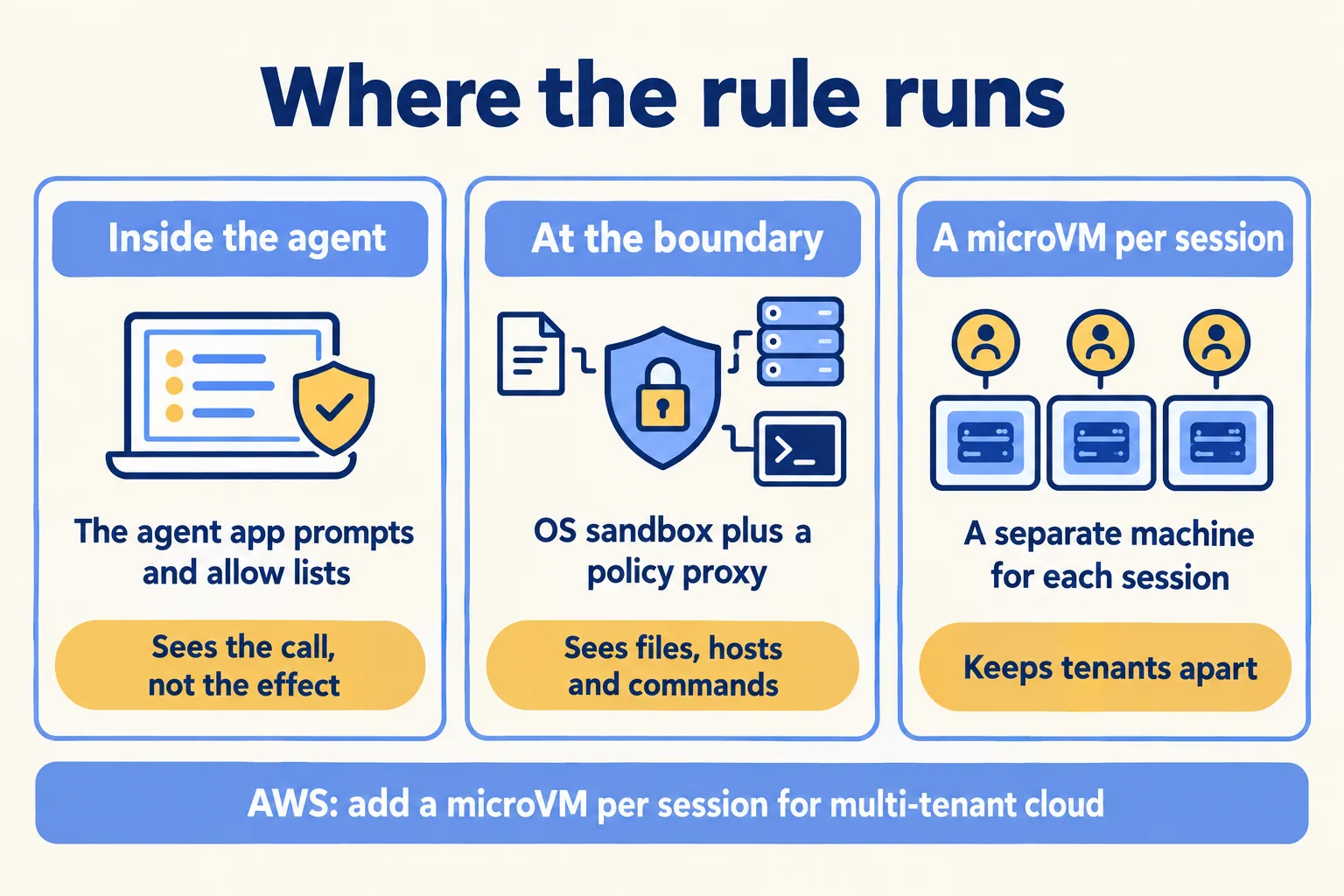
So the answer is layered, and each layer has a trigger. Many tenants, or code from untrusted input: a microVM per session. An agent on a developer's machine: an OS sandbox with a policy point at each exit. Any write that moves money or changes a record: a person. Rent the isolation, since every vendor in the table sells it. Own the rules and the decision log, because they encode your approvals and have to move with you when you change vendors. On client agents we put that check on the hop where the call leaves, the pattern behind our Flex Gateway work. One caution from Box's own guide: it switches the Strands CLI's approval prompts off so the box decides each command. If you copy that, the box is your only check, so keep the person on the writes.
How do you keep the secret away from the agent?
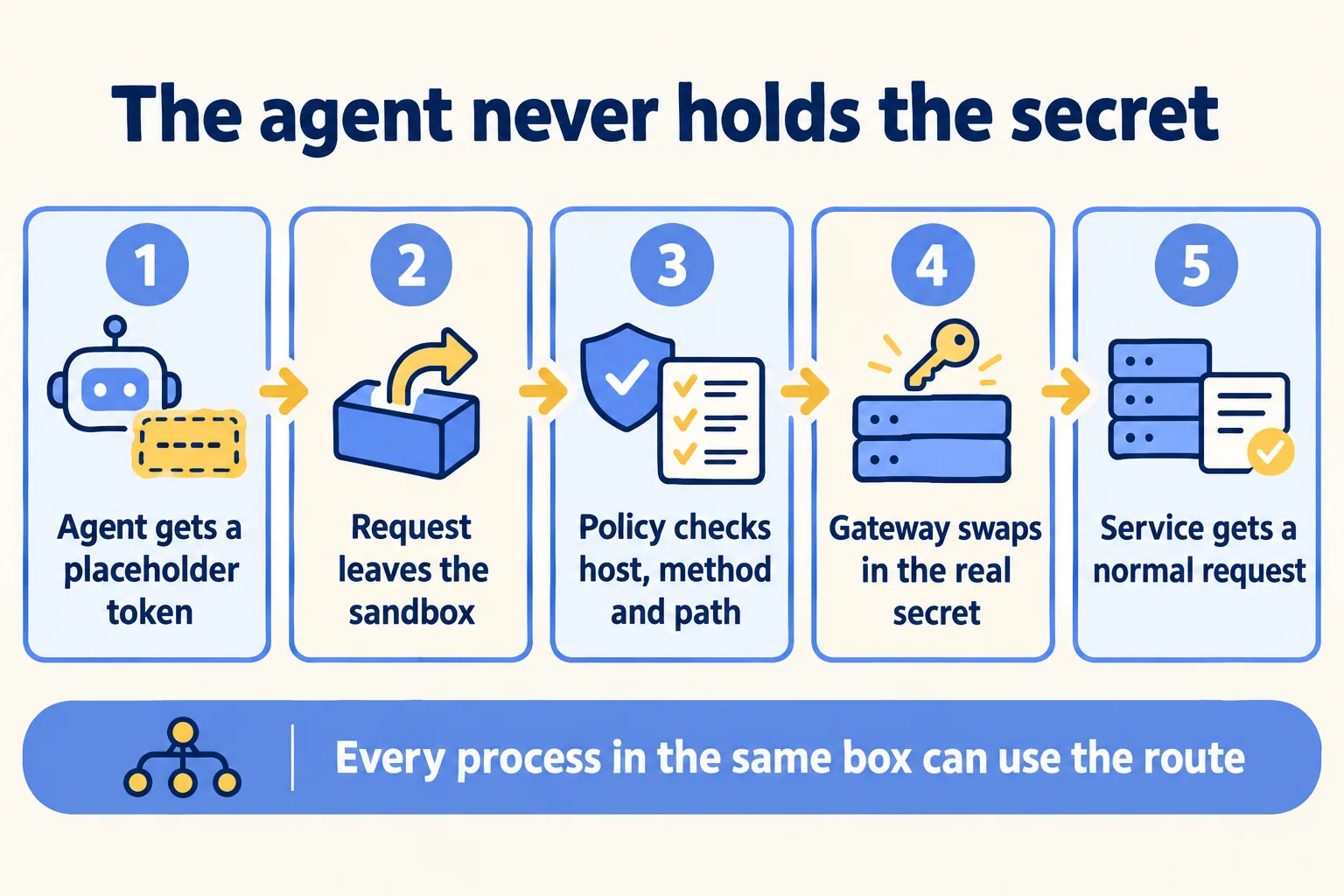
Put the credential in a proxy outside the sandbox and give the agent a placeholder. Box's egress gateway swaps the placeholder for the real secret on each request that policy permits. It supports a bearer token, a custom header such as x-api-key, HTTP Basic, a query parameter, and AWS SigV4, which signs with credentials read outside the agent. A credential binding grants no network reach on its own: each destination still needs a permit.

Five other vendors document the same pattern. Docker's host-side proxy injects headers, and "credential values never enter the VM". Cloudflare's outbound handlers run in your Worker and add the token after the request leaves the sandbox. E2B's egress proxy fills stored secrets into HTTPS headers. Daytona swaps a placeholder in an outbound proxy. Claude Code's mask setting does the same, as an experimental option that needs the proxy to terminate TLS.
The limit to write into your approval is Box's own: "Every process in the box can use every route." The gateway cannot tell which process sent a request. To keep a credential away from a tool or an MCP server, Box's docs say to run it in a separate box. And because the agent never held the secret, revoking it does not depend on the agent.
How do the other sandboxes compare?
No offering wins every row. The first table answers "what holds the agent, and can a rule read its history?" The second answers "who holds the secret, where does it run, and can we use it today?" Where a vendor's page does not say, the cell says so. Everything was read on the vendors' own pages on 9 October 2026.
Isolation and policy, read 9 October 2026
Secrets, platform and status, read 9 October 2026
Read the tables as a split by where the agent runs. On a developer's machine, Box, Claude Code, Codex, Gemini CLI and Docker Sandboxes compete, and only Box ships rules on history. In the cloud, E2B, Modal, Daytona, Cloudflare, Azure and Google's two services give you a separate machine per session and an egress list, and none of the pages we read offers a rule on what the code did earlier. Defaults differ more than you would guess: E2B and Modal sandboxes reach the internet unless you restrict them, while Azure sessions and Google's Code Execution start with no network.
For a multi-tenant agent in the cloud, our rule from these tables: pick a microVM or Hyper-V boundary per session, an egress allow list that starts empty, and a proxy that holds the secret. That is E2B, Docker's cloud sandboxes, AgentCore or Azure dynamic sessions, depending on your cloud. None of their pages we read offers a rule on history, so put that rule at your gateway, or run Box inside the session as AWS suggests.
What does this mean for Salesforce, Slack and MCP agents?
You need two logs to answer "who acted". Salesforce's hosted MCP servers run every call as the signed-in user, and the audit trail names that person, not the agent, as our Salesforce MCP server post set out. Box's decision log names the rule that allowed or refused the call. Salesforce tells you on whose authority the agent acted, and Box tells you under which rule.
Box can sit in front of both kinds of MCP server. Its MCP broker checks local servers' tool calls and their arguments, and its egress gateway raises an mcp:call decision for each MCP request over HTTP. So a rule can sit on a remote MCP call as well as a local one.
The credential needs a test before you plan on it. Box's credential sources are an environment variable or an AWS profile. The docs we read do not describe an OAuth refresh flow, which a Salesforce External Client App uses when the client should stay signed in. Check whether a short-lived token passed as a bearer covers your case.
Slack is AWS's own example. The bot token is injected on every permitted request to slack.com, and a history rule caps the posts. That is the pattern for any agent that posts approvals or alerts into a channel your people read.
Can you stop it? Box gives you three levers. A forbid refuses the next action, but the box reads policy.dw when it starts, so a new rule applies from the next run. The secret lives outside the agent, so you can revoke it at its source without the agent's help. And when the agent exits, the box stops. For a fleet of agents you still need the list of every agent, the named owner and the timed drill from our kill switch post, which also covers what DIFC Regulation 10 adds. We do not map Box's controls to a regulation clause here: no vendor page we read does, and we will not guess. For MCP controls in general, our MCP governance guide has the checklist.
Where does Strands Box stop?
AWS states most of these limits itself:
- macOS only, for now. The preview needs Apple silicon and macOS 15 or later. Linux is planned. Your servers and CI runners are probably Linux, so today Box is a developer-machine control.
- Early. Version 0.1.x, and keys, flags and actions can change between releases.
- Wider trusted computing base. The interpreters and gateways that enforce policy run outside the sandbox. AWS calls this "a deliberate trade-off".
- Direct grants are invisible to policy. Paths in
box.tomlare bounded by containment only and "do not appear in the policy history". A tool's own file operations are not decided either. - Shared routes. Every process in a box can use every credential route.
- Rules are not checked against each other. Two permits that admit the same requests load without a word, so the docs say to write every cap as a
forbid. - Counting has edges. A limit on successful responses can be overspent by requests in flight. A long time window slows every decision on that action.
- Hard to read. Brooker expects your first reaction to be that the policies are "difficult to understand, and difficult to write". AWS ships a policy-authoring skill for coding agents. A policy a model wrote is a reason to review it, not to skip review.
What should your team test this month?
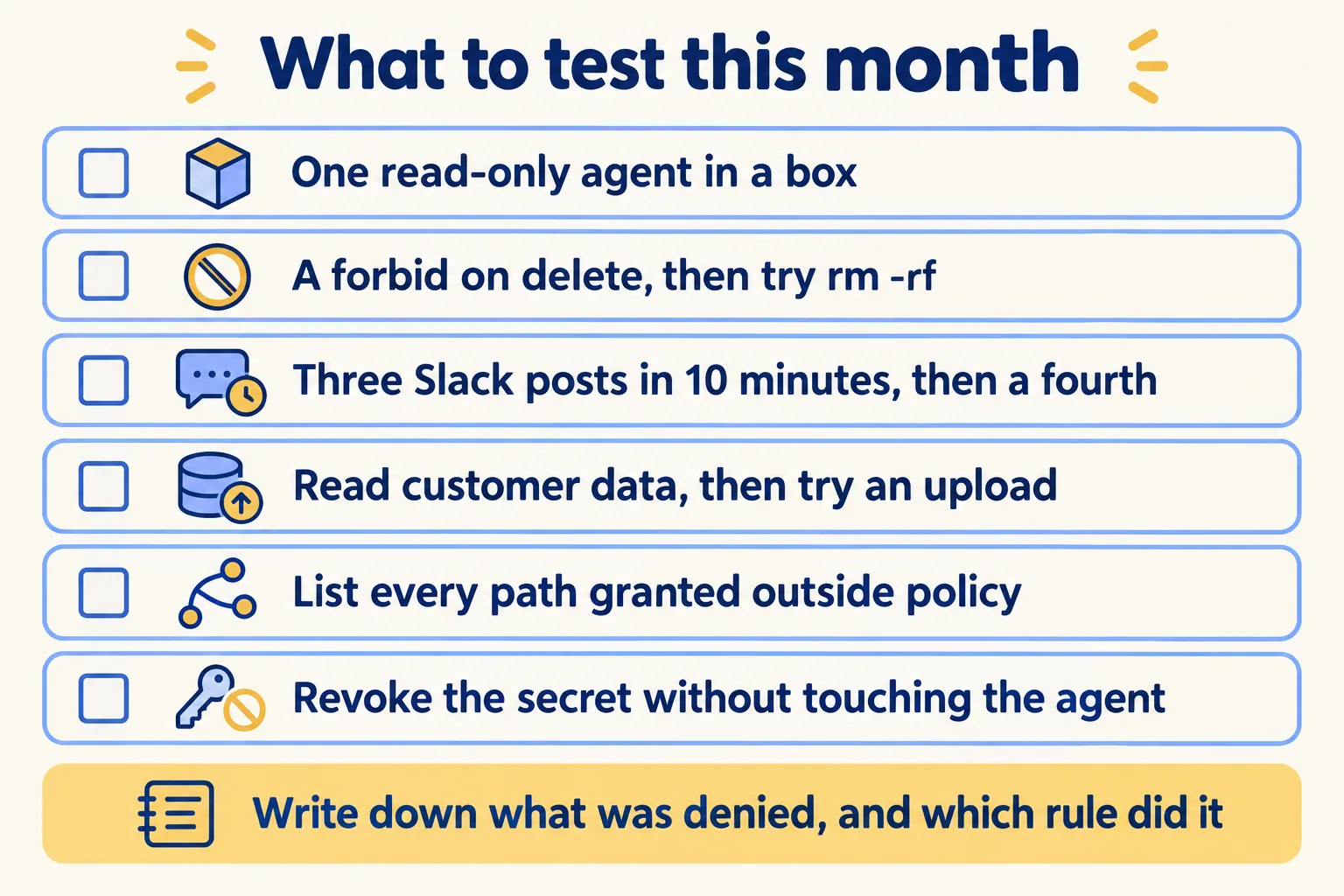
Start with one read-only agent on one Mac. Shivanath has put 200+ agents into production, and the method we use is Spec, shadow, gate: write the step down, run it next to today's version, then put a person on the write. Box fits the shadow stage.
- 01Run one read-only agent (log reading or a weekly report) in Box on one Mac. Keep the agent app's own prompts on.
- 02Add a forbid on fs:delete, ask the agent to clean a build folder, and read the denial in the decision log.
- 03Copy AWS's Slack cap to a test channel. Post four times in 10 minutes and confirm the fourth is refused and the agent waits.
- 04Write the customer-data rule: after a read in that folder, no outbound HTTP. Then ask the agent to upload a summary.
- 05List every path in agent.filesystem and every tool table in box.toml. Each one is reach that policy never sees.
- 06For the sandbox you run today, ask the vendor or your platform team the five questions in the tables: isolation, where policy runs, history rules, who holds the secret, which OS.
If your team already runs agents on Claude or on OpenAI models, nothing here asks you to switch. Ask the same four questions of any stack you run: what the boundary covers, where the rule runs, whether it can count, and whether the agent ever holds the key. Our agent stack notes and the Claude Cowork rollout post cover the approval and data side of the same stack.
