Speaking twice at Dreamforce · Sept 15-17 →

Frameworks and protocols

US · Global

Salesforce MCP server: switch on the read-only one first, then plan the stop

By Shivanath DevinarayananPublished 7 min read
Written forCIO, CISO, or compliance lead who approves agents on real systems“Who acted, and can we stop it?”

The short answer

How do you set up a Salesforce MCP server safely?

At Mindcat, we switch on one Salesforce MCP server first, the read-only one. Every call runs as the signed-in user, but a client's token can reach every server your org has enabled. So the enabled list is your ceiling, the audit log names a person, and the stop procedure comes before go-live.

A dusk waterway lined with stone gates, one lit and open as a boat of sealed letters passes through

Takeaways

  1. 01Enable sobject-reads first. A client's token can reach every MCP server your org has switched on, so that list is your ceiling.
  2. 02Every call runs as the signed-in user and lands in the audit trail under that person's name, not the agent's.
  3. 03Filter API Total Usage logs for SALESFORCE_HOSTED_MCP to find MCP traffic. The files are daily CSVs, so plan for next-day review.
  4. 04Write the stop procedure first: deactivate a server, revoke tokens, or restrict the app to a permission set.

What does a Salesforce MCP server give an agent?

Access to your org through a fixed list of tools, as the person who signed in. Salesforce made its hosted MCP servers generally available on 29 April 2026 for every Enterprise Edition org and above. On 15 September, at Dreamforce, Salesforce announced AIforce, which includes Claudeforce, and Claude's connector page now lists a Salesforce MCP server as a beta. Any client that speaks the Model Context Protocol (MCP), such as Claude, ChatGPT or Cursor, can now connect.

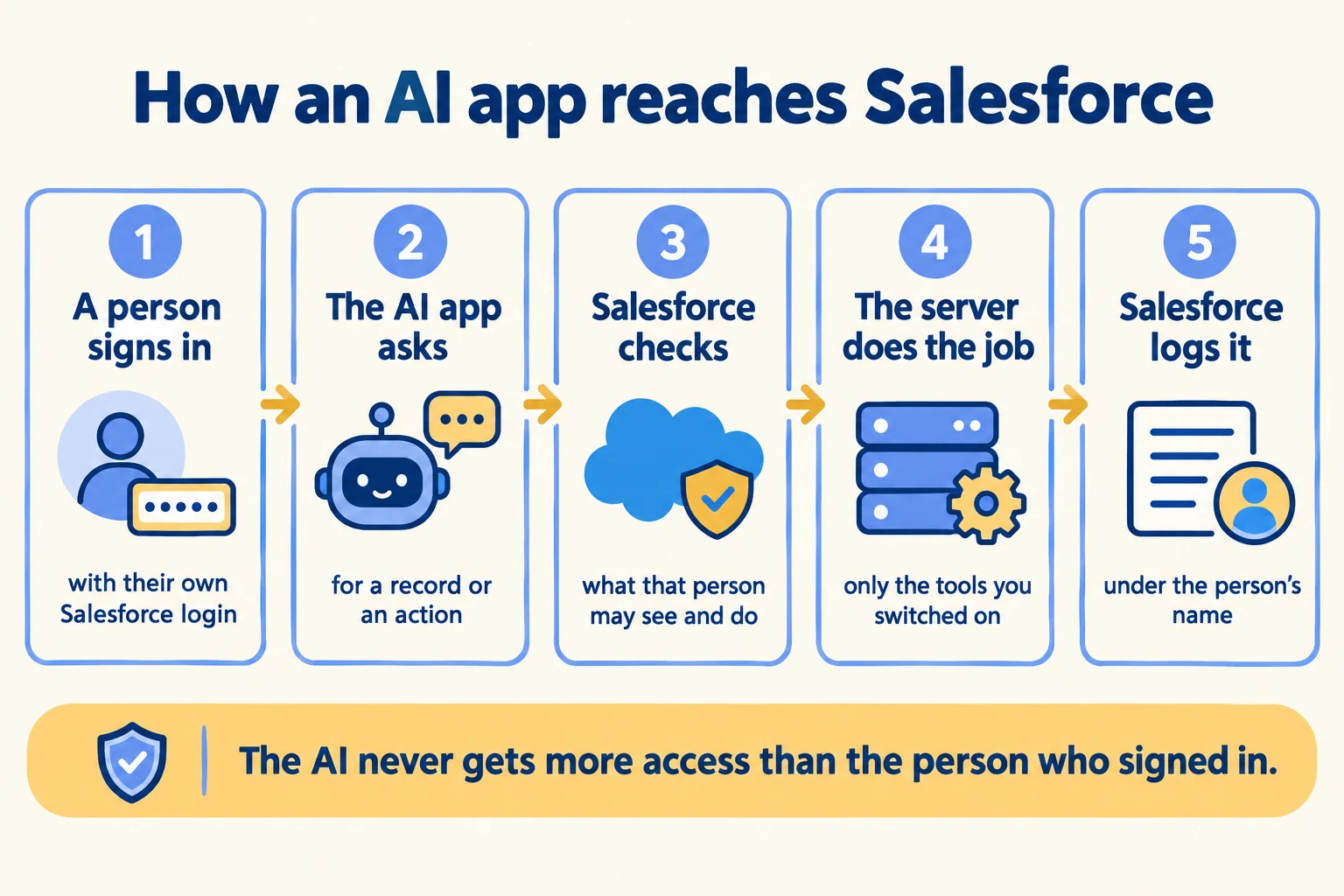
Salesforce says every call runs with the permissions of the user who authorized the connection: object access, field-level security and sharing rules all apply. There are no service accounts and no machine-to-machine flows. Standard servers ship switched off, and their tool lists cannot be edited.

That is a better default than most integrations get. It also moves the decision to a place people skip: which servers you switch on, and for whom.
If your team is still deciding what an agent may touch, our MCP page shows how we list every connector a security team has to inventory.
Five steps: a person signs in, the AI app asks, Salesforce checks permissions, the server acts, Salesforce logs it
The five steps of one MCP call, from sign-in to the log entry.

Which Salesforce MCP server should you switch on first?

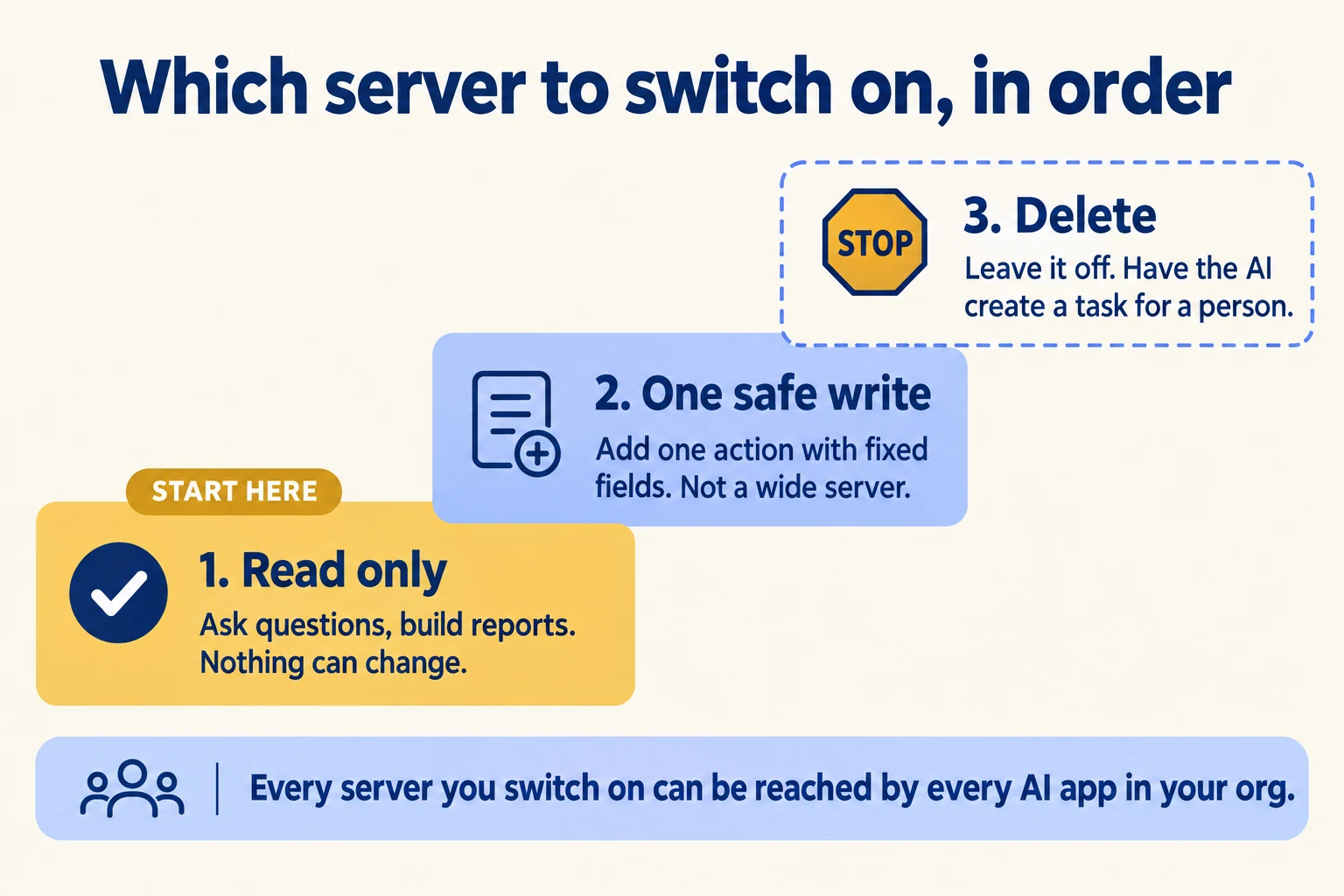
The read-only one. Salesforce ships four standard SObject servers, and the choice among them is the largest permission decision in the whole setup.
ServerWhat it lets a client doSwitch it on when
sobject-readsQuery and read records. No changes.First. It answers questions, builds reports and prepares meetings.
sobject-mutationsCreate and update records. No delete.After shadow runs show which fields a client actually writes.
sobject-deletesDelete records only.Rarely. Have the agent open a task for a person instead.
sobject-allRead, create, update and delete.Not in production. It is the widest ceiling on the list.
Three steps: start with a read-only server, add one safe write later, and leave delete off
The order to switch servers on.

The reason to be strict is a limit in the design. Salesforce's developer blog says you cannot restrict an External Client App to a specific MCP server. You control access to the tools that make up the servers, not to the servers themselves. In an IdeaExchange thread asking for per-server binding, the service's product manager explained why Salesforce did not build it: the user's profile and permission sets already govern the objects behind each server.

So the enabled list is a ceiling for every client token in the org. If you switch on sobject-mutations for one pilot, a token issued to your read-only Claude client can call it too if someone points the client at that server, limited only by the user's own permissions.
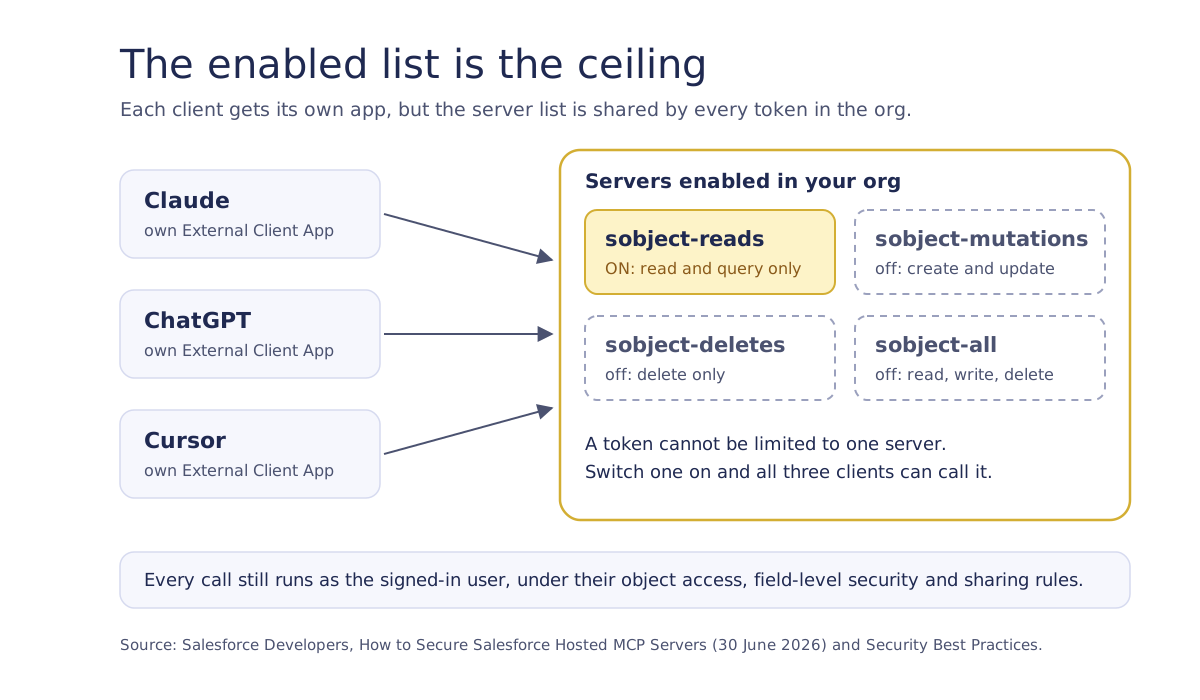
Diagram: Claude, ChatGPT and Cursor each have an app, but all reach the same enabled servers; only sobject-reads is on
Each client has its own app, but a token cannot be limited to one server. Every server you switch on is in reach of every client.
  1. 01Enable sobject-reads and nothing else. Let the pilot group ask questions for two weeks and log what they ask.
  2. 02Read the API log for the objects and fields those questions touched. That is your real read scope.
  3. 03Add writes as one custom tool backed by a Flow with a fixed field set, not a wider server.
  4. 04Leave sobject-deletes and sobject-all off. If something must be deleted, the agent creates a task for a person.

The MCP governance guide covers the general checklist. This sequence is the Salesforce-specific part.

Who acted when an agent writes?

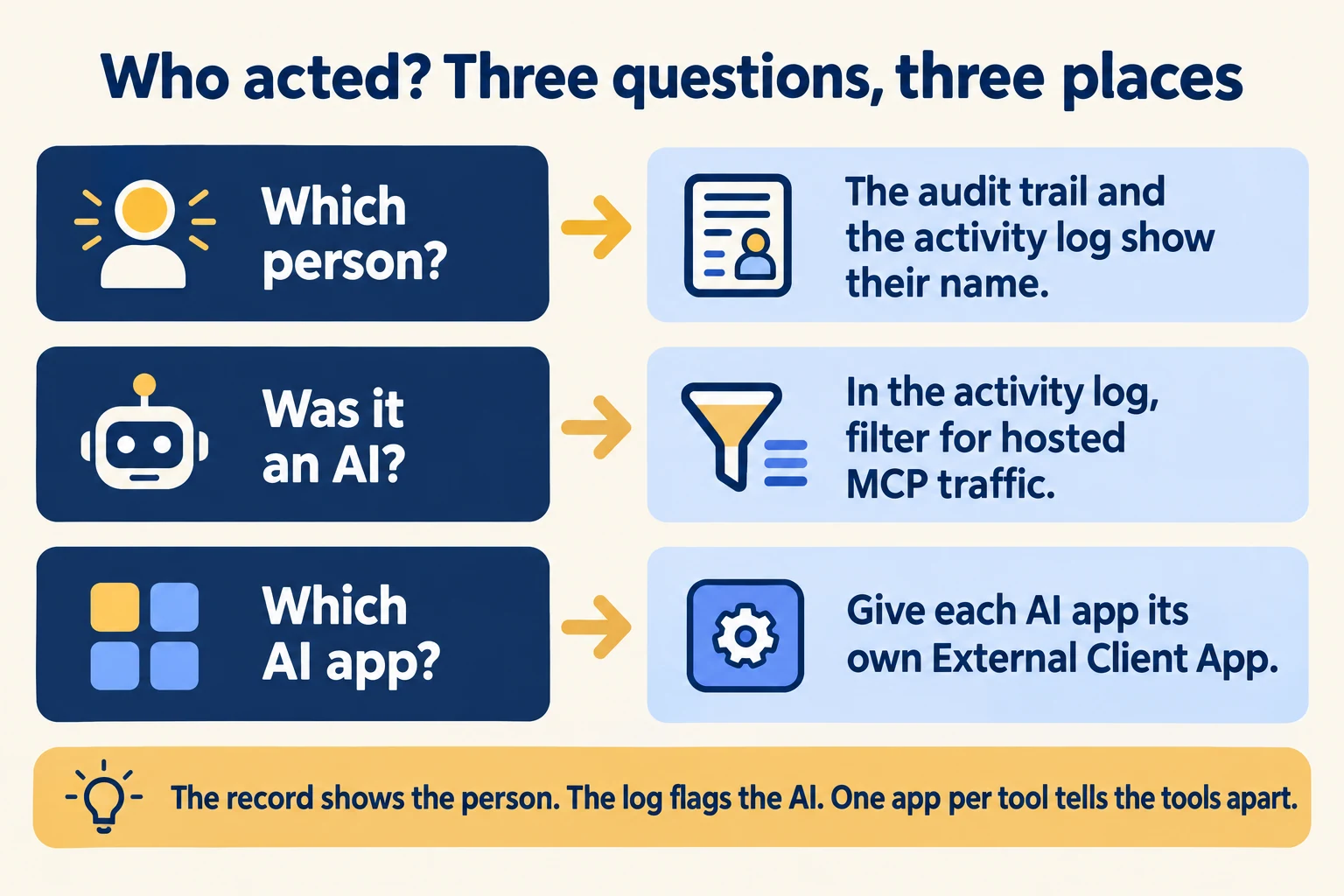
The record says a person did. Salesforce states that all MCP actions are attributed to the named user in audit trails. If an agent updates an opportunity, the user's name is on the change, and nothing on the record separates their click from their agent's write.

The activity log is where you separate them. Salesforce logs hosted MCP traffic through Event Monitoring. In Setup, open the Event Log File Browser, filter the API Total Usage event type, and keep rows where API_CLIENT_CATEGORY is SALESFORCE_HOSTED_MCP. Those rows list the user, the objects, timestamps and status codes.

A clerk at a lamp-lit desk writes in a ledger beside a small brass mechanical arm writing in the same book
The record shows one name for two hands. Only the activity log tells you which one was the agent.

Three versions of who acted

CriterionAnswersWhere to find it
Which personThe record's audit trail and the MCP log rowsAudit trail, API Total Usage
Was it MCP trafficYes or no, per callAPI_CLIENT_CATEGORY = SALESFORCE_HOSTED_MCP
Which clientOnly if each client has its own appOne External Client App per client
What each Salesforce source tells you. The client column depends on one External Client App per client.
Who acted: the audit trail names the person, the activity log flags the AI, one app per tool tells tools apart
Three questions about who acted, and where each answer lives.

Two limits to plan for. The log files arrive as daily CSVs unless you pull them programmatically, so plan for next-day review, not live. And the log records the API call, not the prompt behind it, so the reasoning behind a write lives in the client. Salesforce's docs list user, objects, time, status code and client IP. They do not say the log names the client app, so check a sandbox export before you promise your approver that it does.

Salesforce recommends a dedicated External Client App for each MCP client: one for Claude, one for ChatGPT, one for Cursor. That is the cheapest way to answer "which client did this" and to switch off one client without cutting the others.

How do you stop an agent?

Decide the levers before go-live, and name who pulls each one. Salesforce gives you four, at different speeds and different reach.
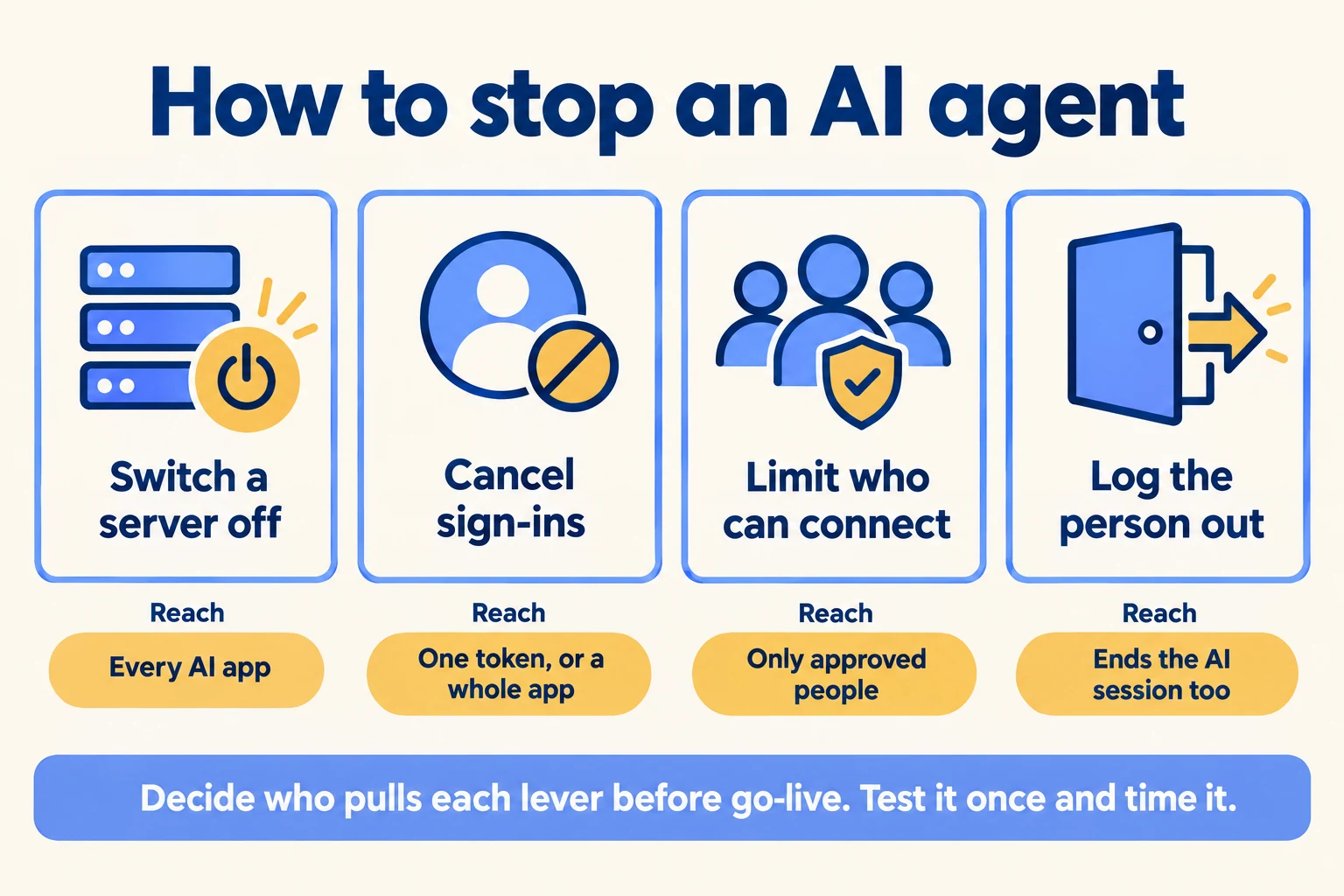
LeverWhereReach
Deactivate a serverSetup, API Catalog, MCP ServersEvery client in the org loses that server
Revoke tokensSetup, OAuth Usage, pick the appIndividual tokens, or every token for the app in bulk
Restrict who can connectExternal Client App policy, a permission setOnly users you pre-authorize can sign in
Single logoutExternal Client App session settingsEnding a Salesforce session ends the client session
Four ways to stop an AI agent: switch a server off, cancel sign-ins, limit who connects, log the person out
Four stop levers and how far each one reaches.

Salesforce also recommends shortening the refresh token lifetime to 30 days or less and turning on refresh token rotation, since the setup guide says refresh tokens stay valid indefinitely by default. The scope matters too. Grant mcp_api and refresh_token, not the broad api scope, which opens the REST, Tooling and Metadata APIs. If an app also holds api, its tokens are no longer limited to MCP.

Run the drill once in a sandbox. Time it. The person on call out of hours has to know where the OAuth Usage page lives, and whether they hold the permission to use it.

What does the setup leave to you?

The approvals, the log review and anything that spans vendors. Salesforce gives you per-user identity, servers that ship switched off and a scoped OAuth grant. It does not decide who signs off on a new client, who reads the logs, or how a write gets caught before it reaches a record.

Who owns what in a hosted MCP rollout

  1. 01Sign-inAuthorization code flow with PKCE. A named user signs in through a browser.Salesforce
  2. 02Scopemcp_api on an External Client App, one app per client.Salesforce
  3. 03PermissionsObject access, field-level security and sharing rules run on every tool call.Salesforce
  4. 04Log reviewSomeone reads the daily API Total Usage rows for MCP traffic and follows up.Your team
  5. 05Write gateA person approves or a Flow fixes the fields before a write reaches a record.Your team
The first three rows are Salesforce controls. The last two are decisions your team has to own. From Salesforce's security guidance.

Salesforce says as much itself. Its launch post notes that enterprises using MCP across several vendors will want an MCP gateway for central access control, and it names MuleSoft AI Gateway. Our Flex Gateway page and the control plane show where that layer sits. Our AI governance service covers how we put a named reviewer on it.
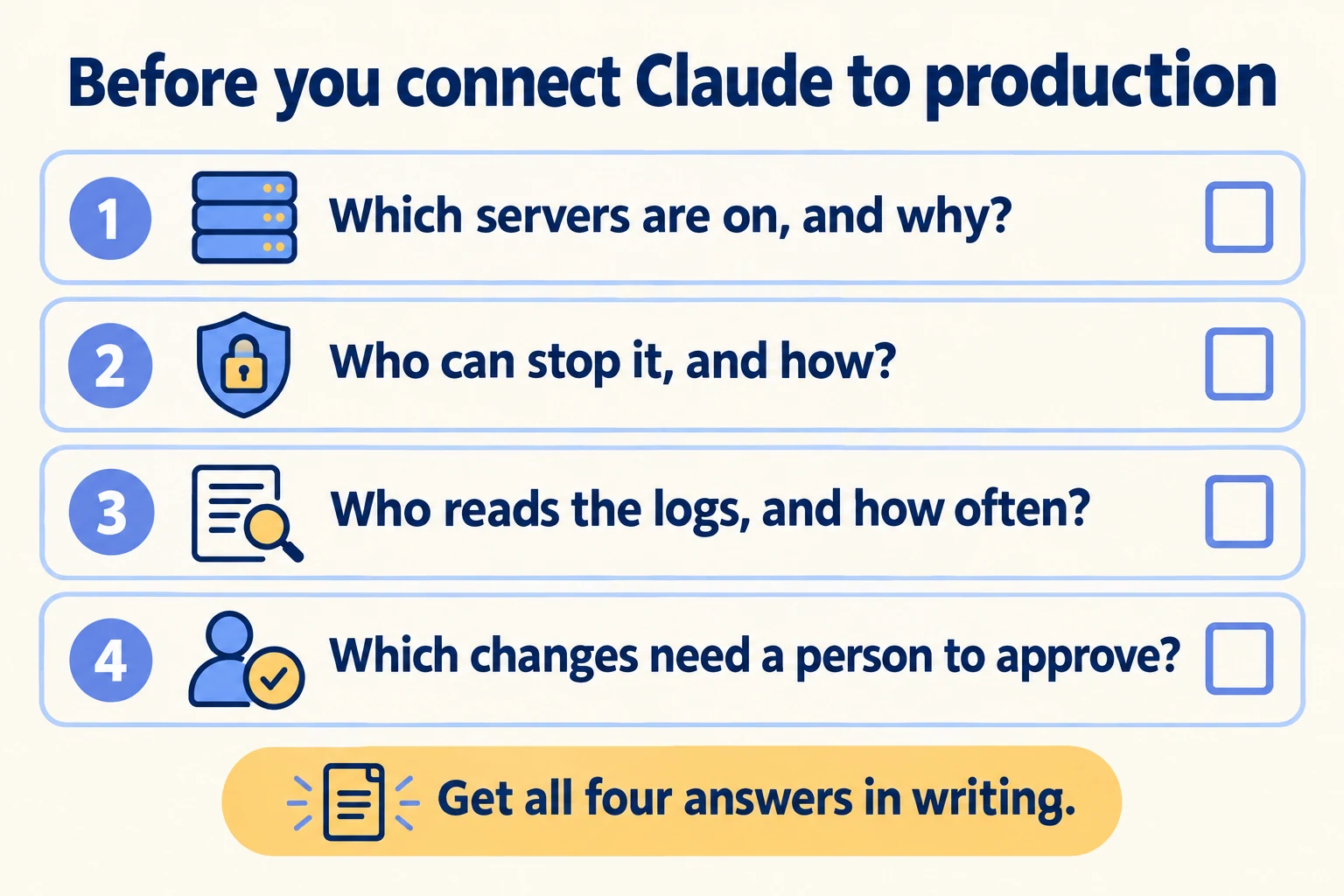
Four questions to answer in writing before connecting Claude to production
The go-live checklist.

Before you connect Claude to production, get four answers in writing: which servers are active and why, who holds the stop levers, who reads the logs and how often, and which writes need a person.

Filed under

Frameworks and protocolssalesforce hosted mcp serverssalesforce mcpsalesforce claudesalesforce mcp claudemcp server security
Useful to someone on your team?

FAQ

Questions teams ask next

Which Salesforce editions get hosted MCP servers?
Enterprise Edition and above. Salesforce announced general availability on 29 April 2026 for every Enterprise Edition org and higher. Standard servers ship disabled, so an administrator has to enable each one in Setup before any MCP client can call it.
Can an agent use a shared integration user with a Salesforce MCP server?
No. Salesforce documents an authorization code flow only, with PKCE required. There are no service accounts and no machine-to-machine flows, so every call traces to a named user who signed in through a browser.
Which OAuth scope does a Salesforce MCP client need?
The External Client App needs the mcp_api scope, plus refresh_token if the client should stay signed in. Salesforce added mcp_api so a client does not need the broad api scope, which opens the REST, Tooling and Metadata APIs.
How do you find MCP activity in Salesforce logs?
Open the Event Log File Browser in Setup and filter the API Total Usage event type. Rows where API_CLIENT_CATEGORY equals SALESFORCE_HOSTED_MCP are MCP traffic. They show the user, the objects touched, the time and the status code.

Sources

  1. 01Salesforce Developers: Hosted MCP Servers, Get StartedAccessed 29 Sep 2026
  2. 02Salesforce Developers: Standard MCP Servers ReferenceAccessed 29 Sep 2026
  3. 03Salesforce Developers: Security Best Practices (Hosted MCP Servers)Accessed 29 Sep 2026
  4. 04Salesforce Developers: Best Practices (Hosted MCP Servers)Accessed 29 Sep 2026
  5. 05Salesforce Developers: Create an External Client AppAccessed 29 Sep 2026
  6. 06Salesforce Developers Blog: How to Secure Salesforce Hosted MCP Servers (30 June 2026)Accessed 29 Sep 2026
  7. 07Salesforce Developers Blog: Hosted MCP Servers Are Now Generally Available (29 April 2026)Accessed 29 Sep 2026
  8. 08Salesforce IdeaExchange: Bind External Client Apps to specific MCP ServersAccessed 29 Sep 2026
  9. 09Claude: Salesforce (Beta) connectorAccessed 29 Sep 2026
  10. 10SiliconANGLE: Salesforce announces AIforce (15 September 2026)Accessed 29 Sep 2026
Shivanath Devinarayanan, founder of Mindcat

Written by

Shivanath Devinarayanan

Founder, Mindcat Consulting · Salesforce MVP Hall of Fame

Runs 200+ agents in production. Reads every brief that comes in and signs the work that goes out.

About Shivanath

First Agent in Production · the written assessment

We work in real estate and right now, the AI pilot never left the sandbox.

Industry
Problem

Brief: Real estate. Leads from portals and WhatsApp. Follow-up has no owner. Stalled AI or Salesforce pilot. Need a finish, cut, or rebuild call. From: /blog/salesforce-mcp-server-controls.